Cover illustration

TheDaily Front

Issue No. #261013 Tuesday, October 13 2026 #261013 — TUESDAY, OCTOBER 13, 2026
Frontier models, domestic screens, and the small matter of who controls the machine.
Tuesday, October 13, 2026 The Daily Front No. #261013 — Contents
30stories
10,057points
7,064comments
328kllm tokens
Assembled with 33 model calls — 222,710 tokens read, 105,466 written.

Highlights

Gemini 4 Argon

Google introduces Gemini 4 Argon as the frontier-model race accelerates, though availability is already drawing grumbles.

Apple HomeView

Apple’s new HomeView brings Siri AI to another household screen—and revives familiar privacy questions.

Redesigning source control at Anthropic

Anthropic rebuilds source control after AI-assisted development pushes its monorepo beyond human-scale tooling.

11 year old unsoundness bugs found in Rust borrow checker

A decade-old Rust borrow-checker flaw puts type-system assumptions under unusually sharp scrutiny.

I posted to HN, and then my website was flooded with AI bot traffic

One developer’s HN moment turns into a report from the increasingly bot-choked open web.

From the Editor

The machines have had a busy day: they are writing code faster, listening more closely, and asking for a place on every desk and kitchen counter. Meanwhile, the old institutions—markets, browsers, source control, and the public web—are being obliged to keep up.

  1. Gemini 4 Argon3
  2. Apple HomeView4
  3. Redesigning source control at Anthropic5
  4. 11 year old unsoundness bugs found in Rust borrow checker6
  5. OpenAI engineer arrested in bugging of executive conference room7
  6. New Apple TV 4K8
  7. I posted to HN, and then my website was flooded with AI bot traffic9
  8. Gemini 4 Argon for Robotics10
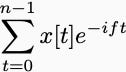
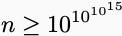
  9. A look at the math that OpenAI claims computes faster Fourier transforms11
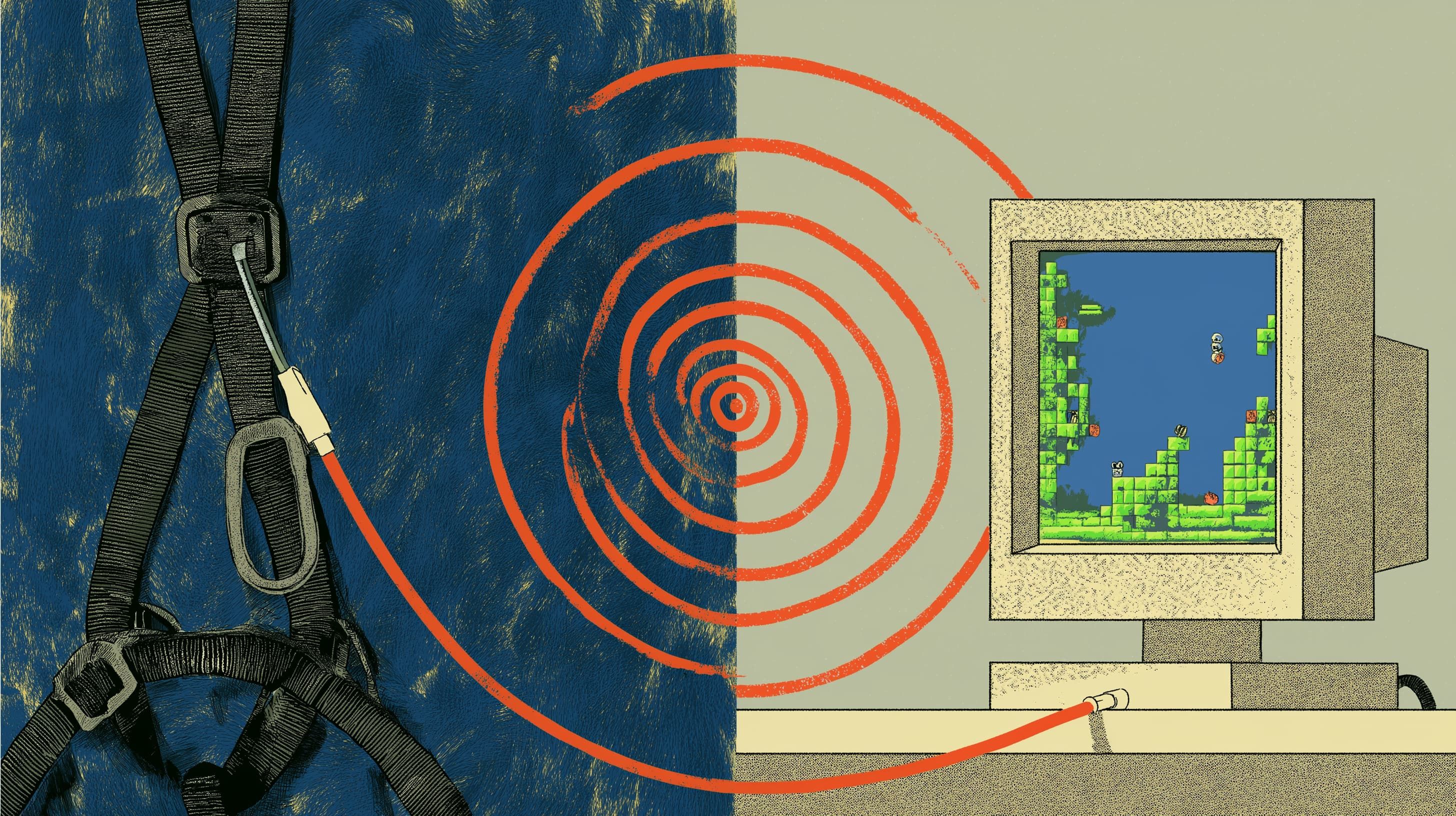
  10. How to engineer an AI harness for game development12
  11. Show HN: SolidCraft – Open-Source Parametric CAD in Rust (With MCP Support)13
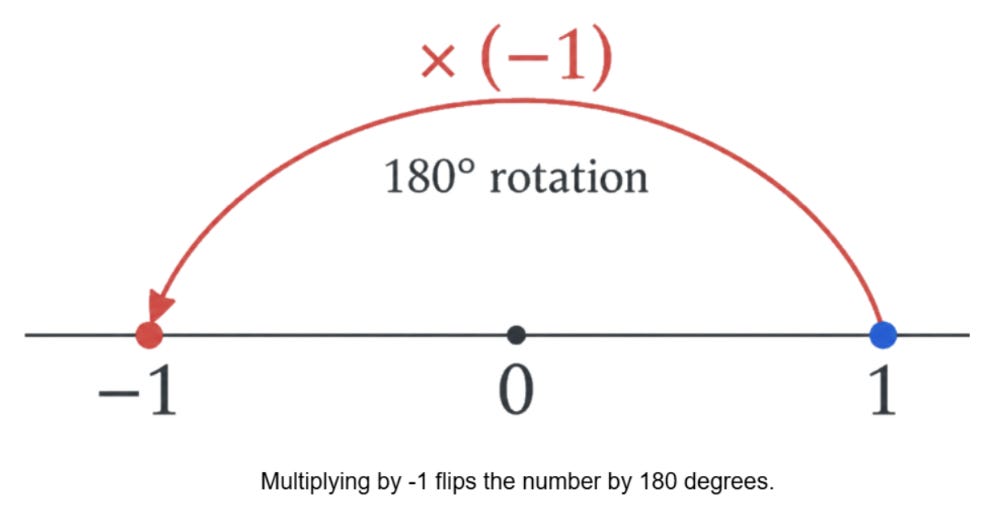
  12. A Visual Intro to Complex Numbers14
  13. Threat of AI share crash puts world financial stability at risk, says IMF15
  14. Crypto thieves sell hardware wallets with secret eSIM16
  15. Firefox Enterprise17
  16. Thunderbird for iOS18
  17. Apple's new 'Switch to Safari' campaign details why you should ditch Chrome19
  18. We turned EmbeddingGemma 2 into a speech-to-text model20
  19. A Dynamic and Distributed Virtual GPU Cloud Built on Idle Apple Silicon Devices21
  20. Show HN: Use your OpenAI subscription to create audiobooks21
  21. Character.ai has initiated voluntary Chapter 11 bankruptcy22
  22. Character.ai Files for Bankruptcy23
  23. AI models can provably hide arbitrary capabilities23
  24. Leaving Tech23
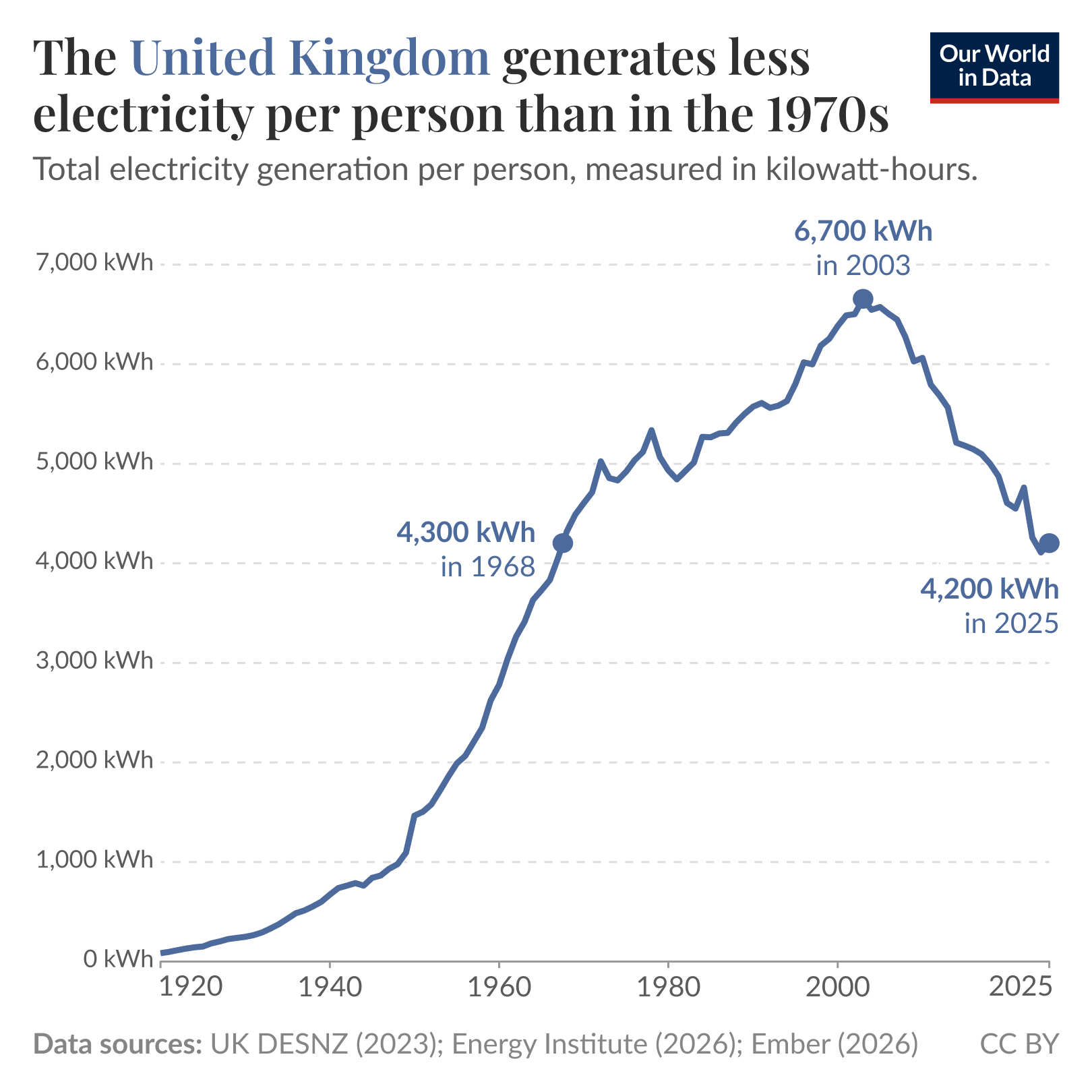
  25. The United Kingdom generates less electricity per person than in the 1970s24
  26. Cyberattack halts construction of tunnel between Denmark and Germany24
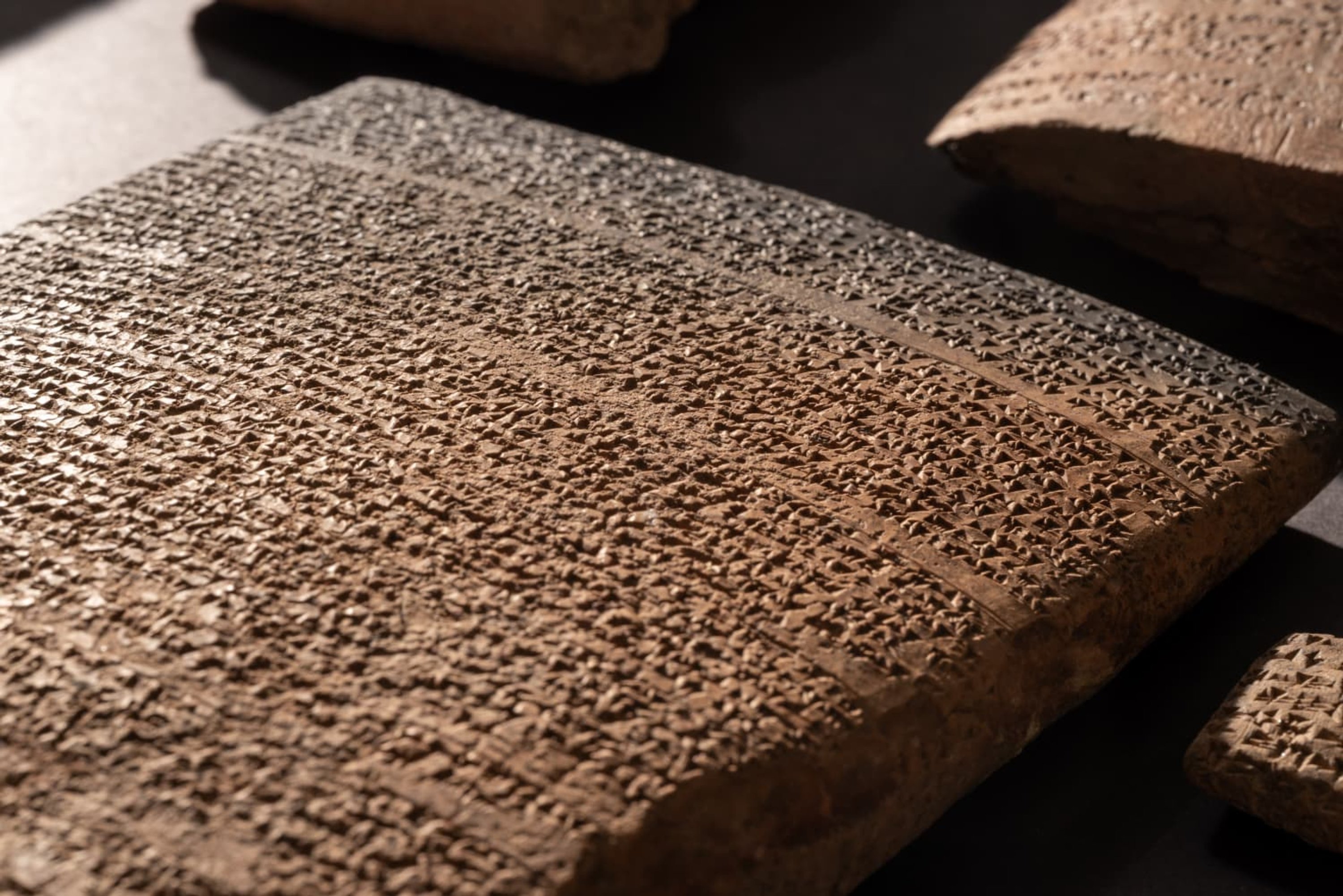
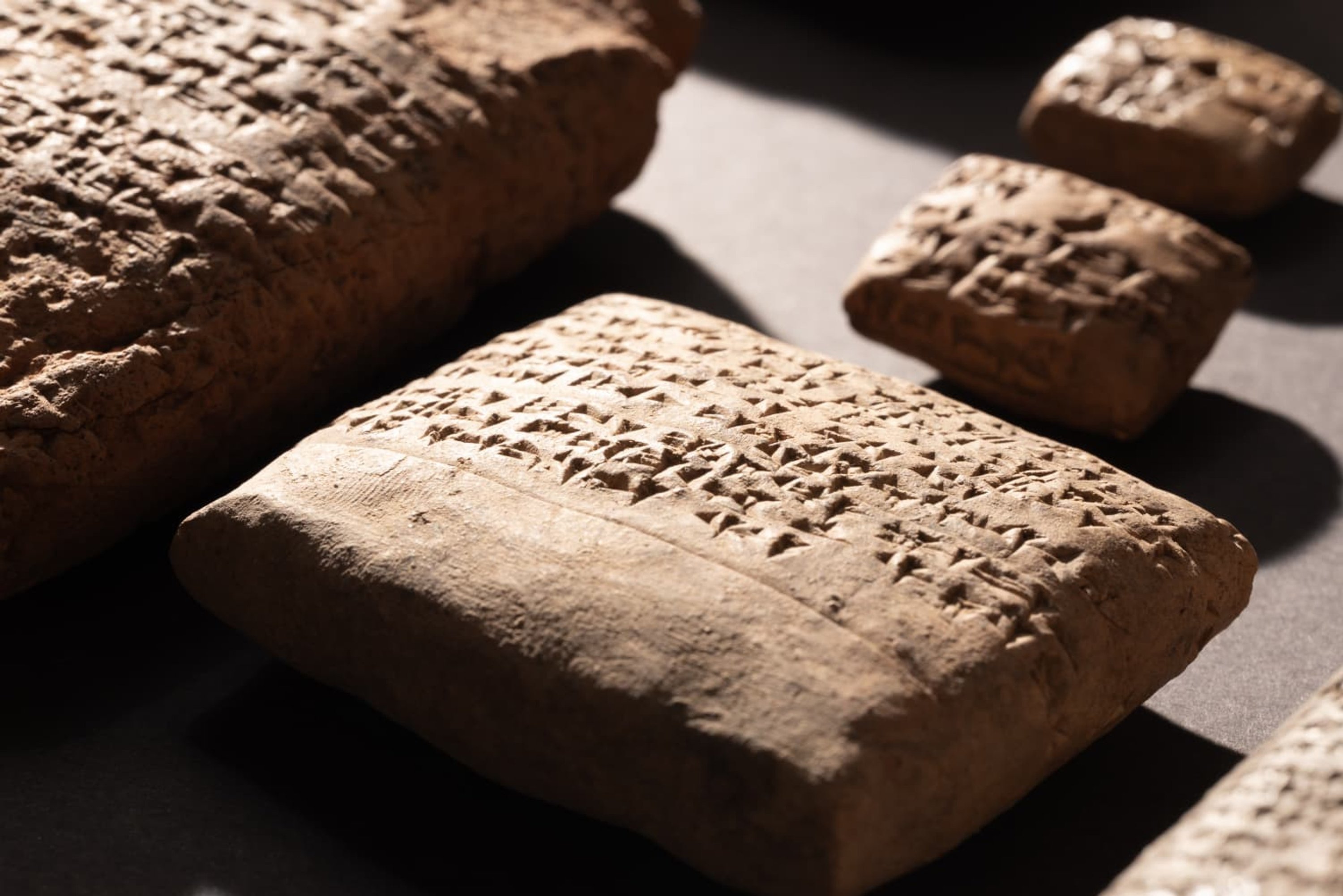
  27. Hittite royal archive found in Turkey25
  28. Show HN: Guitoro, a virtual guitar you strum with your keyboard26
  29. CFTC Staff Were Told to Retract Analysis of Suspicious Oil Trades27
  30. China Overtakes U.S. For First Time as Top Spender on R&D in 202427
The Daily Front Page 2 of 28
Tuesday, October 13, 2026 The Daily Front No. #261013 — The Argon Edition
article

Gemini 4 Argon

by 737max·▲ 1,137 points·821 comments·deepmind.google ↗
Our next era of frontier intelligence, built to solve your hardest problems

Try in Gemini

Try in Google AI Studio

Try in Google Antigravity

Gemini 4 Argon

Our next era of frontier intelligence, built to solve your hardest problems

Solving frontier problems with experts

Researchers, engineers, and security specialists are pairing with Argon to push the boundaries of science, math, robotics and cyber defense.

Unlocking new scientific breakthroughs

Argon is helping researchers at Google and the scientific community accelerate their path to discovery and real-world impact.

Accelerating robotics

Argon autonomously turns raw video to a physics-accurate simulation, estimating depth and physical boundaries, and writing the exact simulation code required to replicate those real-world environments.

Scaling cybersecurity defense responsibly

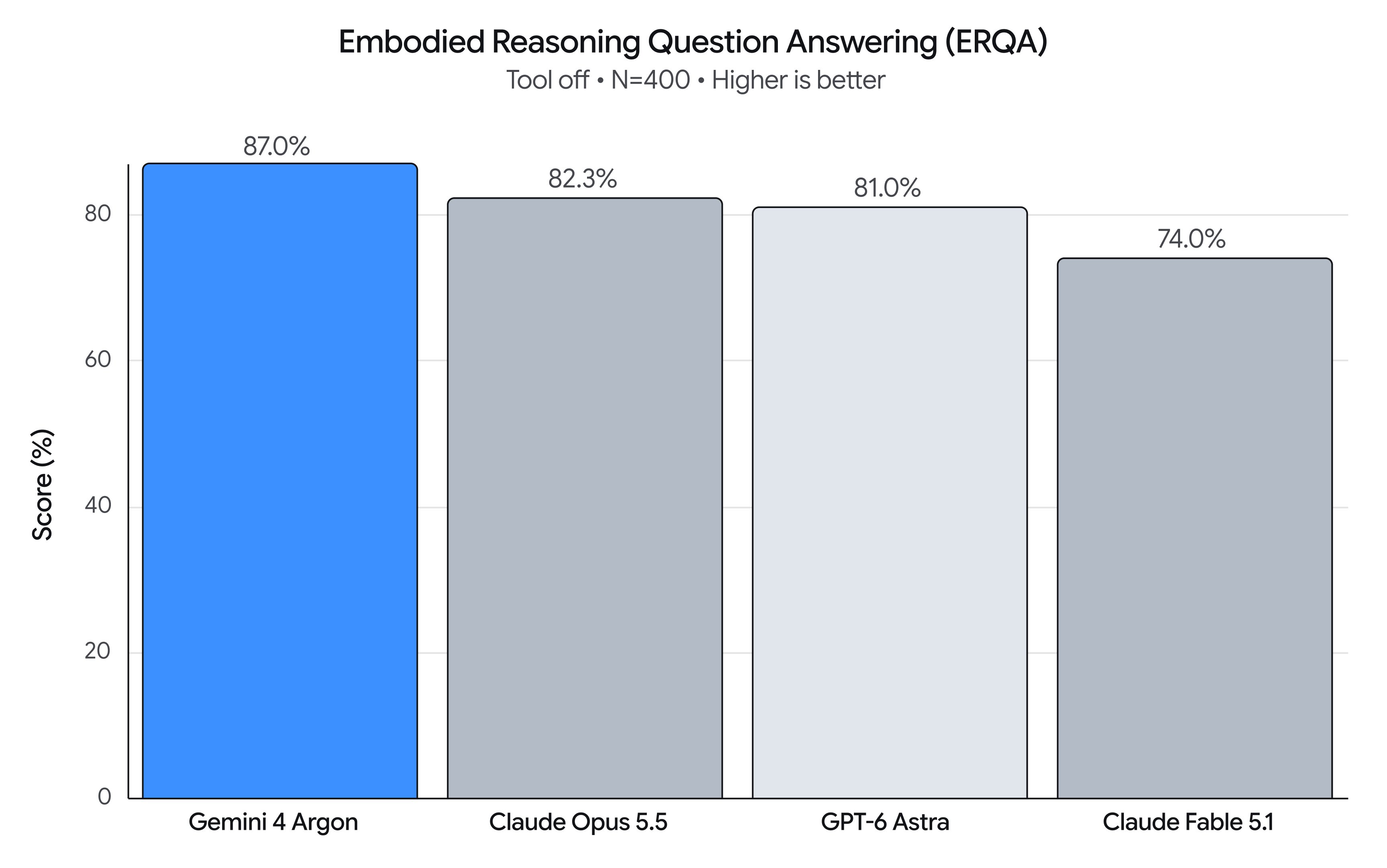
Argon ties for #1 on CWE-Bench (68%) for vulnerability remediation, is our most resilient model against indirect prompt injections, and is expanding to hundreds of additional Fairwind Program partners today.

Solving complex engineering tasks

Across Google and our early access partners, Argon is quickly becoming the preferred model for engineers tackling long-horizon software engineering.

Untangling browser feature code in Chrome

Argon helped the Chrome team separate core webpage handling from a ~6 million line legacy folder of browser features held within Chromium’s 40 million-line codebase. Piping multiple clean code changes at a time, Argon helped the team finish an architectural refactor across hundreds of files, completing months of work in weeks. For Chrome's billions of global users, this will unlock the ability for live webpages to move fluidly between tabs, side panels, and floating windows without reloading, eliminating an entire category of browser crashes.

Quantum chemistry open-source package optimization

xTB (Semiempirical Extended Tight-Binding) is one of the most-cited open-source quantum chemistry packages for molecules. Scientists use it to predict molecules' 3D shapes and to screen large numbers of drug and materials candidates. Using Argon in Antigravity, our researchers made xTB up to 2.3x faster at predicting molecular structures and 1.8x faster at conformer search. The changes have been contributed to the official xTB repository on GitHub.

Optimizing a production Python codebase in hours

Argon in Antigravity is helping the team behind Google's open-source Agent Development Kit (ADK), a framework powering enterprise agents, push their performance engineering further. The team gave Argon their .agents/skills rulebook and a one-paragraph goal to eliminate framework overhead without breaking existing apps. Working autonomously overnight, Argon surfaced optimizations, now live in google/adk-python, that cut in-memory session prep time by 40% in long sessions and sped up cold imports by 21%.

Making our open Gemma models nearly three times as fast

Using Argon, we achieved a 2.85x end-to-end inference speedup on an A100 via vLLM (accelerating throughput from ~37,900 to over 108,000 tokens per second on Gemma 4 E2B) with 100% token parity and zero quality drop in just a few days, a process that would usually take months. Check out the upstream pull requests (optimizing everything from attention tuning to speculative decoding) to see the exact changes.

Migrating legacy code

Argon in Antigravity migrated a backlog of 700+ Google Skills training labs off of hardcoded system images and runtimes spread across five code repositories, catching 16+ hidden timeout and race-condition bugs on the way. The work saved 955 engineering hours and reduced recurring cleanup sweeps from roughly 540 hours a year to a single 3-hour update.

Delivering complex 3D visualizations

Argon brings major improvements in spatial reasoning, mathematical precision, and visual coding compared to previous Gemini models.

Argon built a highly detailed model of a Pagoda using multi-agent visual critique loops in Antigravity. The model autonomously sculpted a multi-building temple complex with photorealistic architecture, foliage and lighting in Blender.

Argon turned pictures of a real desk into a playable miniature racing game using a multi-agent loop in Antigravity. The desk objects, room and race track were modeled and collision-checked using Blender MCP, textured with Nano Banana, and wired with physics, custom shaders, and car engine audio from Gemini Omni Flash in Three.js.

Argon in Antigravity wrote Python scripts to procedurally sculpt, rig, animate, and PBR-bake a complex 3D game using multi-agent visual critique loops then wired it for the web in Three.js with GLSL shaders, shatter physics, and a single-player AI.

With zero external libraries and 100% pure Python, Argon wrote its own 3D ray-tracing engine with a custom video tool and audio mixer to build and document a sunlit library from scratch, producing, narrating, and assembling this video with Gemini 3.8 TTS voiceover and music by Lyria 3.5.

Starting from a single Nano Banana image in Antigravity, Argon drives Blender MCP in an autonomous loop, aligning camera grids, sculpting Gothic architecture, and staging audio-reactive lighting, to create a finished 3D scene.

Transforming critical business and professional workflows

Argon combines frontier reasoning, deep visual perception, expanded domain knowledge, and stronger writing capabilities across legal, finance, science, and coding to handle high-stakes professional workflows.

At Isomorphic Labs, the team is using Argon as a partner to accelerate their drug discovery and design research workflows. Argon is able to quickly synthesize complex PDFs and patents to extract pertinent information, reducing a process that typically takes weeks into hours.

“On over 200 complex synthetic longitudinal charts, Gemini 4 achieved the highest recall and ICD-10 code specificity among the models we evaluated, producing concise problem lists without external lookups. That combination of medical knowledge and long-context understanding shows promise for clinician-reviewed chart workflows. We're now validating it on real patient records and excited to try it out more broadly.”

Brendan Fortuner
SVP Technology, Ambience Healthcare

“Argon is doing a great job at understanding what people actually mean. Customers collect endless signals that they don't know what to do with. Argon consistently scored amongst the top in our evals for building charts that help visualize the solutions for customers. It's also meaningfully persistent about finding those kinds of needle in a haystack answers that are valuable to customers.”

Curtis Liu
CTO, Amplitude

“Gemini 4 represents a step change in what AI can accomplish in real-world science. We've seen it reason through complex experimental data, from cellular imaging to mass spectrometry, and make subtle findings that traditionally require expert scientists to identify. On our Scientific Agent Benchmark, Gemini 4 was at the frontier across most tasks, including our hardest: ranking the clinical risk between two drugs.”

Alex Cabrera
Founding Engineer, Axiom Bio

“Gemini 4 Argon is at the frontier of enterprise knowledge work, achieving a 14% improvement in accuracy compared to Gemini 3.1 Pro. In Box’s evaluation, Argon connected evidence across the full set of documents, including details embedded in figures, and carried multi-step analyses through to complete answers. This is especially valuable in data analysis and in technical fields like healthcare and life sciences, where teams need to find and interpret information across many kinds of source material.”

Yashodha Bhavnani
VP of AI Products at Box

“By integrating Gemini 4 into our 3D spatial reconstruction engine, we turn everyday video into articulated, physics-ready 3D scenes in seconds instead of hours. Across our benchmarks, Gemini outperformed every model we tested — cutting runtime nearly 100× and token usage by 90%, unlocking physics ready and watertight 3D asset creation for our customers.”

Andrew Carr
Co-founder and Chief Scientist, Cartwheel

“Early impressions from Gemini 4 are very strong: for long-running tasks across these workflows, it completed successfully 100% of the time in our evals, maintaining context and running through multiple tools across impressive spans. Its depth of reasoning delivers significantly higher, clearer output. Performing in-depth reasoning for domain-specific tasks without detailed prior logic or instructions is something we’ve never seen with any model in its class before.”

Gopal Srinivasan
Global AI and Data Lead, Deloitte

“On our core financial analysis benchmarks, which span building multi-year financial statements straight from SEC filings to valuing companies with complex capital structures and announced acquisitions, Gemini 4 matched our analyst-built reference models on more than 99% of figures. Performance on our most complex workflows was at the frontier in a majority of tasks. We're excited to keep building with Gemini 4 at Kepler.”

Glenn LeBlanc
Software Engineer, Kepler

“To help legal professionals achieve more with Lexis+ with Protégé, we continuously evaluate AI models as part of the multi-model approach behind the LexisNexis Legal Intelligence Engine. In preliminary evaluations, Gemini 4 Argon demonstrated strong performance across legal knowledge, drafting, and analysis tasks, including identifying relevant citations and improving contract reviews, complaint analyses, and research memos.”

Min Chen
Chief AI Officer, LexisNexis Legal & Professional

“In early testing, Gemini 4 Argon stood out by connecting dates, documents, and financial calculations with legal precedents to develop highly substantive arguments. In one evaluation, it actually surpassed our human expert's answer key by surfacing a legally relevant detail we had missed. This demonstrates AI’s potential to help professionals uncover crucial details and bring a more complete understanding to complex cases.”

Caio Perona
CEO, MinutalA

“In Qualia, our autonomous AI researcher, Gemini 4 Argon has been a standout in our evaluations for both capability and efficiency. On our internal benchmarks of complex, multi-step research tasks, it performs at the frontier while completing our evals 1.5x faster than peer models at a quarter of the cost per task. It excelled at coming up with novel ideas and identifying non-obvious insights about the problem, helping it maintain a clear research vision over long horizons, something today's models struggle with.”

Trenton Chang
Chief Scientist, Quadrillion

“Gemini 4 impressed us with the quality of its responses in our early evaluations. On Poe, people are increasingly using AI to build things, and Gemini 4 gives creators a powerful foundation for turning an idea into a tool they can refine and share.”

Gareth Jones
Head of Product, Quora

“Argon ranked first in our object detection evaluations and led our new text benchmark, which uses real-world images from manufacturing, logistics, and aerial imagery. We’ve fully integrated Argon into Roboflow so developers and enterprises can leverage its high precision detection and text extraction to inspect products, track inventory, and guide machines.”

Brad Dwyer
Co-founder and CTO of Roboflow

In Gemini App, Argon takes an unstructured folder full of project context and formats it into a clean proposal deck for a client using a custom skill. Gemini then drafts and emails the deck to a client while creating an automated workflow for all future incoming client requests with a scheduled task.

See how Argon synthesizes ~50 GB of Airborne LiDAR scans, GIS room vectors, Library of Congress CAD drawings, and NPS archives to reconstruct 3D models of Chaco Canyon, turning fragmented archaeological records into explorable digital heritage sites.

Watch Argon synthesize data from 3 open-source repositories into a medical learning tool where you can peel back anatomical layers, inspect clinical metadata, and trigger biomechanics in a 3D exploration of the human body.

Replace a broken sofa leg with new 3D printed ones using custom visualizations using Antigravity in the Gemini macOS app.

Accelerating real-world impact with researchers and domain experts

Argon is built to be an active research partner, moving beyond literature search to help scientists, mathematicians and researchers formulate, stress-test, and prove non-obvious hypotheses.

Quantum computing

Argon is helping our researchers accelerate progress across both quantum error correction and algorithm design. To help error decoders keep pace with quantum hardware in real-time, Argon translated an internal version of AlphaQubit, our ML quantum error correction decoder, into a single, highly optimized hardware kernel – nearly doubling its inference throughput so we can deploy larger, more capable models and scale to larger quantum devices, while continuing to meet strict real-time thresholds. Argon is also reducing spacetime costs for quantum subroutines. For arcsin, a building block in recent quantum simulation algorithms, an implementation written by Argon and formally verified in Lean cuts spacetime cost by more than 100x compared to a published quantum CORDIC baseline, a step toward a standard library of optimized quantum circuits.

Learn about AlphaQubit

Nuclear fusion

Stellarators are incredibly complex machines that represent a leading candidate for limitless clean fusion energy, but optimizing their 3D magnetic fields is famously difficult. Since 1967, a long-standing hypothesis known as “Grad’s conjecture” assumed that finding exact mathematical solutions for these fields was impossible, until recent counterexamples were found, including by Professor Matt Landreman (University of Maryland). Now, a team at Google alongside Professor Landreman has discovered a broader class of counterexamples to Grad's conjecture. These new solutions give the fusion community reliable benchmarks to test their stellarator simulations codes, which are valuable tools for future designs.

Rare disease diagnosis

Researchers at Gamow Labs used Argon to analyze de-identified genomes from newborns with rare developmental lung disorders. In one case, Argon pinpointed a chromosomal rearrangement that routine software missed for years, and explained why it went undetected. On private Gamow Labs evals derived from real clinical and lab data, Argon topped on RareBench (57% on assistance with rare-disease diagnosis) and LabBench (52.2% on wet-lab reasoning). These advances point to faster diagnosis for families facing rare conditions.

Enzyme design

Engineering enzymes with precise reactivity is notoriously slow, often demanding months of bespoke model tuning and candidate screening. Serine esterases are a class of enzymes that cut ester bonds on targeted molecules, widely used in recycling, and the manufacture of pharmaceuticals, biofuels and detergents. Our scientists worked with Argon to design serine esterases, targeting the benchmark molecule 4MU-acetate that glows under UV light once its ester bonds are broken. In a matter of hours, Argon assembled relevant data, performed model tuning and identified multiple biochemistry-inspired filters to get to a final set of five novel designs. Subsequent laboratory testing confirmed robust catalytic activity across these designs. The speed and ease of successful enzyme generation demonstrates the potential for rapid acceleration in enzyme engineering in fields such as biomanufacturing, green chemistry, and drug development.

Speeding up robotics development

By bringing together advanced visual-semantic reasoning, deep physical understanding, and autonomous code generation, the model introduces a new set of capabilities across the robotics stack.

To demonstrate these capabilities in action, we tested Argon’s ability to learn an out of distribution physical skill simply by watching. In an internal test, Argon watched a raw video of a human playing cornhole, mapped the spatial coordinates of the environment, and calculated the required whole-body joint movements. It then autonomously built the simulation code. When transferred onto Apptronik’s Apollo humanoid, the robot quickly sank seven consecutive shots in a real-world trial.

Gemini 4 Argon with cybersecurity defense capabilities

Bringing state-of-the-art cyber capabilities to more trusted defenders

Wiz is already using Argon for its “Scan for Good” initiative, which protects critical public infrastructure for free. Having had early access to the model, Wiz used Argon to protect critical healthcare infrastructure. The model went beyond just spotting a vulnerability - it proactively safeguarded hundreds of thousands of patient records.

Learn more

Apply for access

Unlocking new applications with a 1M-token output window

Uninterrupted frontier math and science derivations

With 1M output tokens, Argon has the headroom to finish 100K+ token reasoning trajectories and output exhaustive, step-by-step mathematical proofs, quantum error-correction decoders, and complete computational physics solvers in one go.

Full-repository generation and refactoring

Generate entire multi-file applications, scaffold complete microservices, or refactor sprawling codebases in a single pass without stitching together truncated responses.

Massive legacy translations

Translate monolithic legacy files and complex database schemas end-to-end while preserving cross-file dependencies.

Exhaustive structured synthesis

Produce comprehensive compliance audits, full-scale technical specifications, and massive structured datasets in a single turn.

Performance

Frontier performance in complex workflows

Category Benchmark Notes Gemini 4 Argon GPT-6 Astra Claude Fable 5.1 Claude Opus 5.5
Knowledge work Vals Index 68.9% 63.1% 65.8% 67.0%
AutomationBench Score 51.3% 41.4% 31.4% 42.5%
Vals Finance Agent v2 65.4% 53.5% 58.9% 58.6%
Harvey's Legal Agent Benchmark 19.6% 5.4% 6.7% 3.8%
Agentic coding DeepSWE v1.1 77.9% 74.1% 67.4% 74.2%
FrontierSWE v2 55.0% 65.5% 56.3% 62.3%
Vibe Code Bench 91.9% 89.6% 90.3% 90.3%
Terminal-bench 4.0 57.4% 58.2% 57.9% 66.4%
ML engineering PostTrainBench 45.3% 44.3% 40.2% 49.3%
Science and math Terminal-Bench Science 0.1 57.6% 68.1% 52.6% 63.3%
LABBench 2 88.8% 85.4% 68.6% 73.1%
RiemannBench 76.0% 72.0% 65.6% 69.6%
Long context GraphWalks Up to 128k, BFS (F1) 99.7% 98.7% 91.4% 90.6%
GraphWalks 256k to 1M, BFS (F1) 84.2% 71.8% 65.0% 66.8%
Computer use Agent's Last Exam Pass rate 39.5% 34.2% — 38.2%
OSWorld-2.0 Offline subset, Partial score 69.2% 72.6% — —
Multimodal understanding Chartography 71.6% 71.0% 46.2% 66.3%
LVBench 91.7% 87.5% 79.7% 83.7%
Cybersecurity CWE-bench v1 68.0% 68.0% 58.0% 67.0%

Methodology: deepmind.google/models/evals-methodology/gemini-4-argon

Safety

Strengthening frontier safeguards before broad availability

Defending against misuse

Argon is designed to refuse harmful requests while preserving legitimate, dual-use scientific research, as per our Frontier Safety Framework.

Defending against prompt injection attacks

Argon is our most resilient model yet against indirect prompt injections.

Monitoring for misalignment

We are deploying misalignment mitigations that monitor Argon’s chain-of-thought and actions and stop execution when necessary.

Hardening systems

We are hardening our sandboxed environments by isolating and sealing them before high-risk training or evaluations begin.

The Daily Front Page 3 of 28
Tuesday, October 13, 2026 The Daily Front No. #261013 — The Connected Home
article

Apple HomeView

by etothet·▲ 700 points·831 comments·apple.com ↗
Apple HomeView keeps the whole home connected, entertained, and in the know.

Welcome,

Available starting 11.13November 13

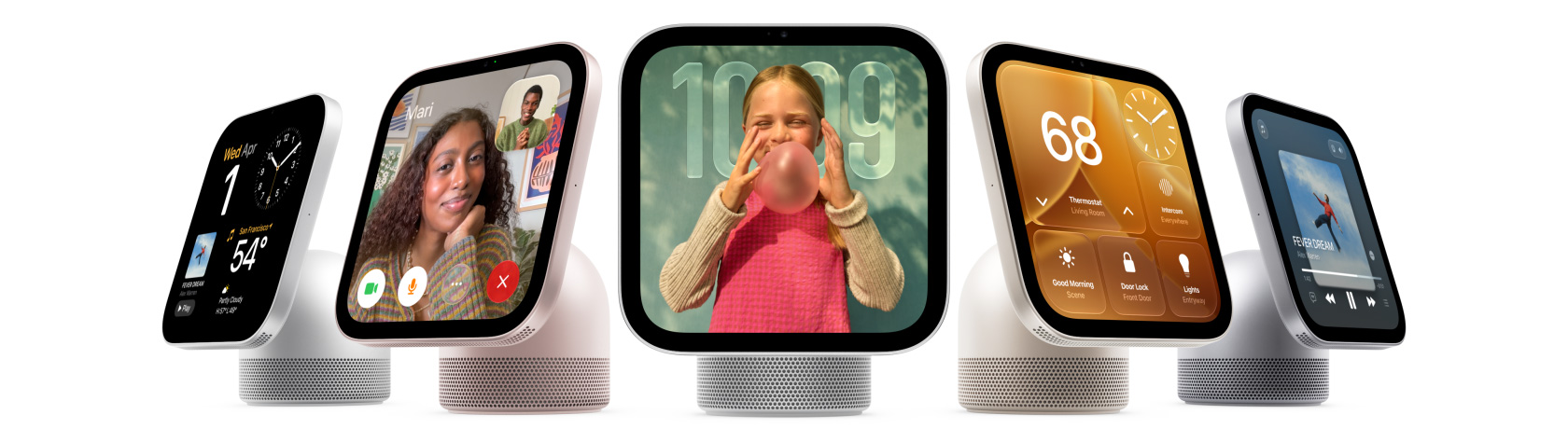
Apple HomeView devices in different colors, showing a variety of apps and functionality

Get the highlights.

  • Watch the Apple HomeView film

  • Apple HomeView keeps the whole home connected, entertained, and in the know. All in one place. Private for all.

  • Siri AI. A personal assistant that helps you find what you need and get more done.1

    Available in English to start.
    Usage limits may apply.

  • Recognizes up to six people and delivers a personalized experience for each one.

  • Incredible audio and stunning visuals for your music, videos, FaceTime, and photos.

    Apple HomeView devices in different colors, showing Apple Music app album artwork and lyrics

  • Text back. Make a call. Wave hello.
    So many ways to connect, even hands-free.

    Apple HomeView, screen shows a FaceTime video call with a woman and child in a kitchen, and an older woman waving in the inset window

  • The ultimate dashboard for your smart home.

    Apple HomeView, screen shows Home app with thermostat at 68 degrees, clock, front door camera feed, Morning Routine scene, door lock, and light controls

  • The privacy every home and everyone deserves.

Take a closer look.

  • SilverDesign

    Design. The domed aluminum base is fitted with a stainless steel hinge that lets you adjust the display.2 Available in four colors. Shown in Silver.

    Apple HomeView Design.

    • Silver
    • Starlight
    • Rose Pink
    • Space Gray
  • Display

    Display. The 7-inch Liquid Retina display includes True Tone for comfortable viewing in any light.3 Brightness ranges from 500 nits for sunny rooms to our lowest-ever 0.3 nits for the bedside. Select features respond to your proximity to show more information the closer you get.

  • Camera

    Camera. The 12MP Center Stage camera is perfect for video calls, keeping everyone centered in the frame even as they move around or when more people join in.

  • Mics and Speakers

    Mics and Speakers. Four beamforming microphones pick up voices near and far, perfect for Siri requests from across the room and crystal-clear FaceTime calls with reduced background noise. Powerful speakers in the base and display deliver Spatial Audio for rich, room-filling sound.4

  • Apple HomeView (Wall Mounted)

    Apple HomeView (Wall Mounted). Available in Space Gray and Silver, the wall-mounted option brings the HomeView experience into places like the entrance or the hallway.5 Choose from wired and plug-in wall mount options.6 Shown in Silver.

Delights up the house.

Apple HomeView is designed to bring more joy and convenience to everyone in your household. Siri AI comes built in for personalized AI assistance that’s truly useful in your everyday life. And with a vibrant display and powerful acoustics, your music, videos, and calls look and sound amazing. Meet the new heart of your home.

A perfect face for any space.

With a collection of customizable faces, Apple HomeView brings beauty to any room. Relive your favorite memories with the stunning Photos face. Choose playful faces like Snoopy or informative options like Calendar, Weather, and more. Even enjoy interactive artwork with the Flow face, which reacts to your movements with mesmerizing colors and light.

Digital picture frame.

Whether a single image or a rotating gallery, photos from your collections or shared albums are beautifully framed.

Dynamic faces.

Select faces change throughout the day. They wake with you in the morning, wind down with you at night, and more.

Meet Siri AI. Your AI assistant. More personal. More powerful.

Siri AI, powered by Apple Intelligence, comes built into Apple HomeView to help you find what you need and get more done while protecting your privacy.1 Siri AI adapts to each person and surfaces what matters most to them — all they have to do is ask.

Available in English to start.
Usage limits may apply.

  • Personal Context
  • World Knowledge
  • Seamless Experience

Personal Context

Relevant to you.

Pull up a party invitation from your calendar, find RSVPs buried in your messages, or play the perfect soundtrack to match the vibe. Siri AI works with your paired iPhone or iPad to find relevant content just for you.1

World Knowledge

Your little brainiac.

Ask about virtually any topic, from quick dinner recipes to DIY home repairs to game-night trivia. Siri AI taps into broad world knowledge to give you highly specific, up-to-date answers.

Seamless Experience

Carries the conversation.

Siri AI lets you ask open-ended questions and go back and forth with natural, rich conversations. And your conversations with Siri on HomeView sync to the Siri app on your other Apple devices so you can pick up where you left off.

Great powers come with great privacy.

Apple Intelligence is designed to protect your privacy at every step. It draws on your personal information without collecting it, and Private Cloud Compute — running on Apple silicon — handles requests without ever storing your data or making it accessible to anyone, including Apple. And because Apple HomeView is made to be shared, everyone’s personal information stays separate and secure.

Heaps of help at home.

Apple HomeView does the heavy lifting when you’re busy around the house. Check your calendar, set reminders, and stay on top of your to-do list. Pull up a quick crafting tutorial. Ask Siri AI to recommend a new coffee shop. Start and stop multiple timers for your chores, and keep an eye on them with Live Activities when you’re using other apps.

Cooking.

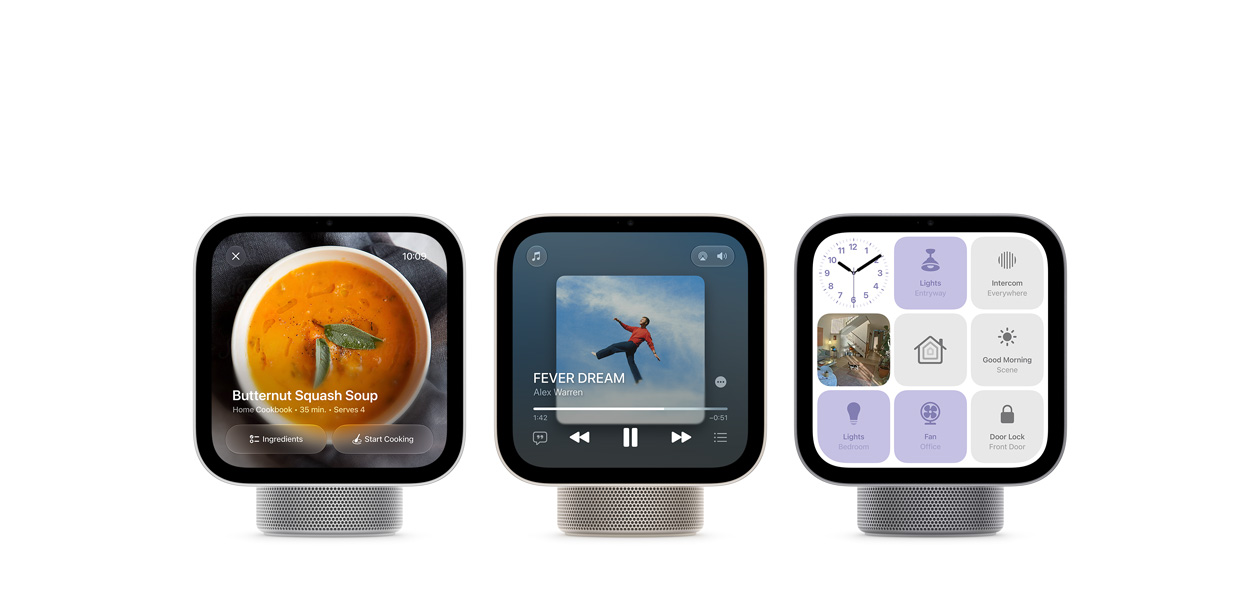
When you find a recipe in Safari, just tap the Start Cooking button to view a streamlined format that’s easy to follow.

Handoff.

Start a song, podcast, call, video, or recipe on iPhone, and continue on HomeView without missing a beat.

Made to be seen, heard, and enjoyed.

Apple HomeView keeps you engaged and entertained with music, podcasts, audiobooks, TV shows, and more. Have an impromptu sing-along. Immerse yourself in a good story. Keep an eye on the game while you do the dishes. With HomeView, there’s never a dull moment.

Apple HomeView, two devices: from left to right, rose pink color, displaying Music app album artwork, starlight color (pale gold), showing artwork from the Apple TV series Pluribus

Apple apps.

A selection of Apple apps are available on HomeView. Enjoy Music with lyrics and artwork,7 audio stories on News8 and Audiobooks, and so much more.

Additional apps.

HomeView supports compatible third-party audio and video apps from your iPhone for a familiar experience across devices.9

Apple HomeView, rose pink color, close-up view of the perforated speaker grille surrounding the base and along the bottom of the display, screen shows Music app with playback controls

Astounding sound.

The mighty yet compact speakers pack a serious punch. Two custom full-range drivers in the display keep everything sounding crisp and clean while delivering room-filling Spatial Audio.4 Computational audio adjusts consistency and balance in real time to deliver incredible sound every time, from anywhere. And a down-firing woofer and two force-cancelling passive radiators are built into the base — for deep, rich bass.

Spatial Audio.

Fills the room with rich, textured sound for a high-fidelity listening experience.4

Multiroom audio.

Use AirPlay to connect with HomePod, Apple TV 4K, and compatible speakers — and just like that, you have a fully connected home sound system.10

Friends and family are just a screen away.

Whether you’re calling a friend abroad or calling the kids for dinner, Apple HomeView brings everyone together. Enjoy clear and hands-free FaceTime calls. Use Intercom on HomeView and HomePod speakers to communicate with people throughout the house or on their personal devices like iPhone, iPad, or Apple Watch. Send messages and make phone calls using just your voice. And use Find My to help you locate your devices, personal items that have an AirTag, and anybody who chooses to share their location with you.

Center Stage

keeps everyone in the frame during FaceTime calls, even as they move around or if more people join in.

The four-microphone array

picks up voices while reducing background noise, for clear calls and Siri requests.

Apple HomeView, screen shows a FaceTime video call with a woman and child in a kitchen, and an older woman waving in the inset window

Everything connected and under one roof.

Apple HomeView is a central hub for your smart home accessories, making it easy to keep things running smoothly. And with the new Apple Home Collection, it’s never been simpler to set up and control a connected home.

Apple HomeView, wall-mounted model on a wall, silver color, displaying time, temperature, front door camera feed, and controls for thermostat, bedroom fan, door lock, and lights

Integrated with the Home app.

Built into HomeView and synced with your other Apple devices, the Home app keeps you on top of your smart home. See who’s at the door, monitor your entryway, access multiple video feeds, adjust the lighting and temperature, and control scenes and automations to fit the routines and rhythms of your household.11

Learn more about the Home app

See it all at a glance.

The Home Modular face gives you a clear and concise look at your home accessories, while the Home Camera face lets you stream up to nine videos at the same time. And you can manage it all with just your voice or a tap.

Enjoy peace of mind.

HomeView can detect the sounds of the smoke and carbon monoxide detectors in your home and alert you on your iPhone, iPad, or Apple Watch.

Stay caught up.

The Home app uses Apple Intelligence to group related notifications together, such as when a family member arrives home, unlocks the door, and disables the alarm. And with descriptions of video footage, you can use HomeView to catch up on key activity in and around the house.

Your data is private property.

Apple HomeView comes with privacy protections built in at every step. Since multiple people can use HomeView, it’s designed to keep everyone’s personal content separate.

Multiple users.

HomeView can recognize up to six people and seamlessly switch between them. It syncs with each user’s iPhone or iPad and is designed to show their content only when they’re using HomeView.12

Secure Exclaves.

The A18 chip inside HomeView contains Secure Exclaves that process the camera and microphone feeds in a secure compartment that cannot be accessed by the operating system or by Apple. This enables HomeView to recognize the face and voice of each user without exposing the audio and visual data used for recognition to the operating system.

Personal content.

Users can access their personal content on HomeView when their paired iPhone or iPad is connected to the same Wi-Fi network and has been recently unlocked, and HomeView recognizes the person by face.

Questions? Answers.

How is HomeView different from other smart displays?

HomeView is deeply integrated within the Apple ecosystem and features a stunning 7-inch Liquid Retina display and Apple-engineered audio. Because multiple people can use HomeView, it is designed to keep everyone’s personal information separate.

Users can access their personal content like Messages and Calendar on HomeView when their paired iPhone or iPad is connected to the same Wi-Fi network and has been recently unlocked, and HomeView recognizes the person by face.

The A18 chip inside HomeView contains Secure Exclaves that process the camera and microphone feeds in a secure compartment that cannot be accessed by the operating system or by Apple. This enables HomeView to recognize the face and voice of each user without exposing the audio and visual data to the operating system.

What is the acoustics performance on HomeView?

HomeView delivers room-filling sound with support for Spatial Audio, making it a great way to enjoy music and podcasts at home. Its custom-engineered acoustic system combines a down-firing woofer and two full-range drivers to produce deep bass and crisp highs. Powered by the A18 chip and built-in sensors, computational audio continuously optimizes the loudness and bass response at any volume.

HomeView (Wall Mounted) brings full, balanced sound with two custom drivers and computational audio tuned specifically for on-wall placement, along with support for Spatial Audio.

Where can I buy HomeView?

HomeView will be available on apple.com, in the Apple Store app, and from select partners. You can see it in person at all Apple Store locations. You can also book a session to shop with a Specialist in-store or online. Learn more.
Subject to availability by partner.

Is HomeView an AI device?

HomeView is powered by Apple Intelligence. It features Siri AI — a more personal and powerful AI assistant powered by the A18 chip. With broad world knowledge, anyone in the home can ask Siri about virtually any topic. When paired with an Apple Intelligence-enabled iPhone or iPad, Siri can do even more for each recognized user, like taking action across apps and drawing on personal context to help with everyday tasks.

Can members of my household use HomeView if they do not have an Apple Account or iPhone?

To unlock a full, personalized experience on HomeView, users need an Apple Account, a compatible iPhone or iPad, and to be added as a member of the shared home in the Home app. However, guests and unrecognized users can still easily interact with HomeView to control smart home accessories, check the weather, set timers, and play music — all without accessing anyone’s personal information.

Which smart home accessories work with HomeView?

Thousands of smart home accessories are compatible with HomeView and Apple Home products. Just look for the Works with Apple Home logo. Lights, locks, cameras, and much more are available. You can also automate many tasks and control all your accessories from the Home app on your Apple devices.

  1. Some features may not be available in all regions or languages. Some devices may not be available in all regions. Siri AI is available in beta in HomeView software version 27.2. Personal context requests require a paired Apple Intelligence-enabled iPhone or iPad running the latest software version with Siri AI turned on and set to a supported language. Certain Apple Intelligence features that rely on server-side models are subject to daily usage limits. Expanded access to such features will be available for a fee in the future. Use of these features is subject to the Apple Intelligence Terms and Conditions. Learn more at support.apple.com/148587.

  2. Wired power required. USB-C cable and USB-C power adapter included.

  3. The display has rounded corners. When measured diagonally, the screen is 6.98 inches. Actual viewable area is less.

  4. Spatial Audio works with compatible content in supported apps. Not all content is available in Dolby Atmos.

  5. Wired power required. Compatible wall mount, USB-C cable, and USB-C power adapter sold separately.

  6. Power mounts sold separately.

  7. Apple Music requires a subscription.

  8. Apple News+ requires a subscription.

  9. Subscription may be required to access some content and services. Some applications are not available in all areas.

  10. Requires multiple AirPlay-compatible speakers with the latest AirPlay software.

  11. Requires a HomeKit- or Matter-enabled accessory. Smart home accessory sold separately.

  12. Requires a compatible iPhone or iPad running the latest software.

The Daily Front Page 4 of 28
Tuesday, October 13, 2026 The Daily Front No. #261013 — Source Control at Machine Speed
article

Redesigning source control at Anthropic

by Philpax·▲ 636 points·611 comments·anthropic.com ↗
source control became our biggest development bottleneck.

As our merges per day grew more than tenfold, source control became our biggest development bottleneck. Here, we share how we migrated to an in-house version control system in five months.

At Anthropic, coding is no longer the bottleneck to building systems or doing research. Claude is able to autonomously iterate on research loops, micro-optimize complex programs, and build new services from the ground up at a speed and scale we haven’t seen before. The bottleneck, now, is all of the developer infrastructure built for human scale: source control, builds, and CI.

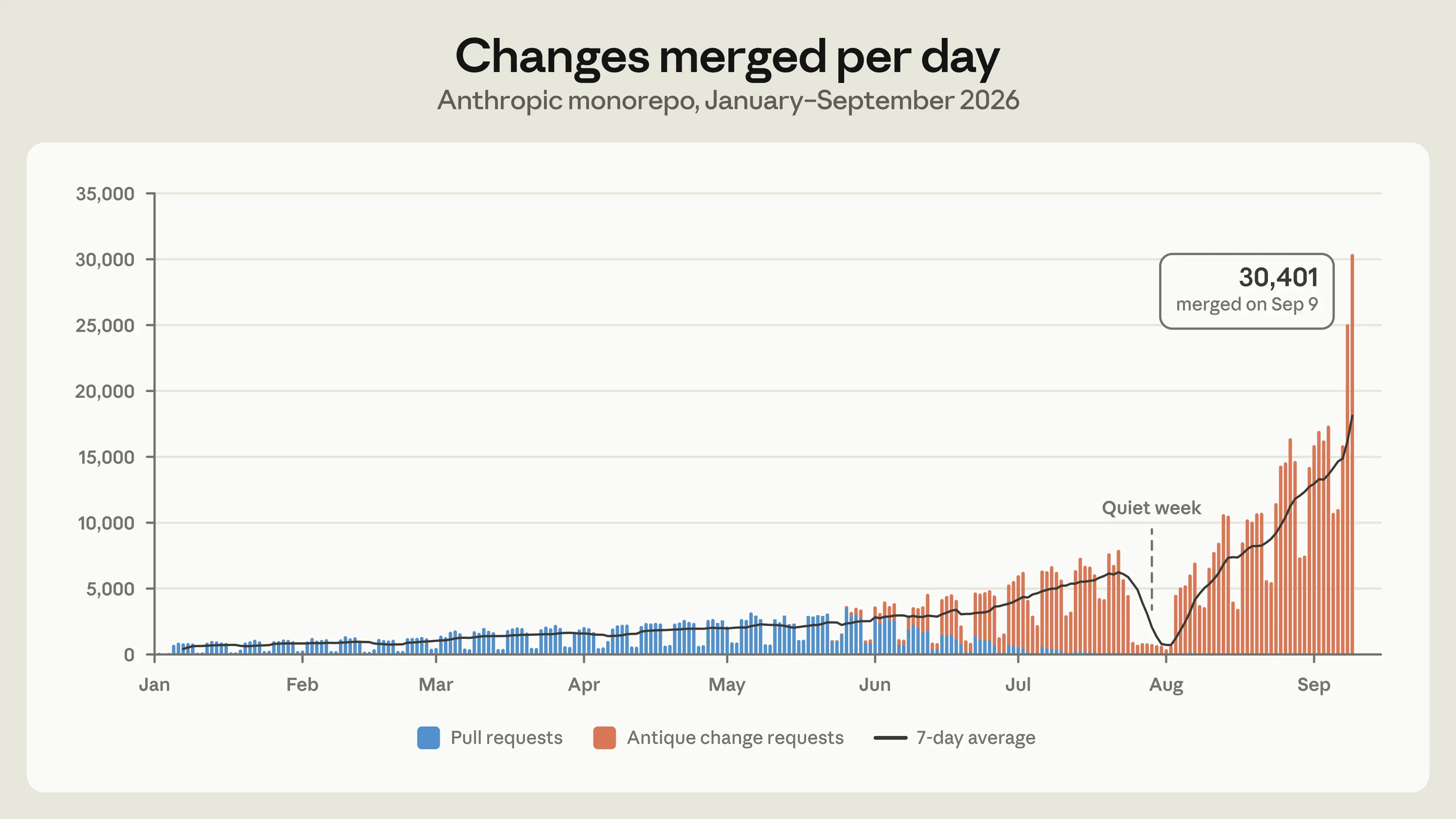
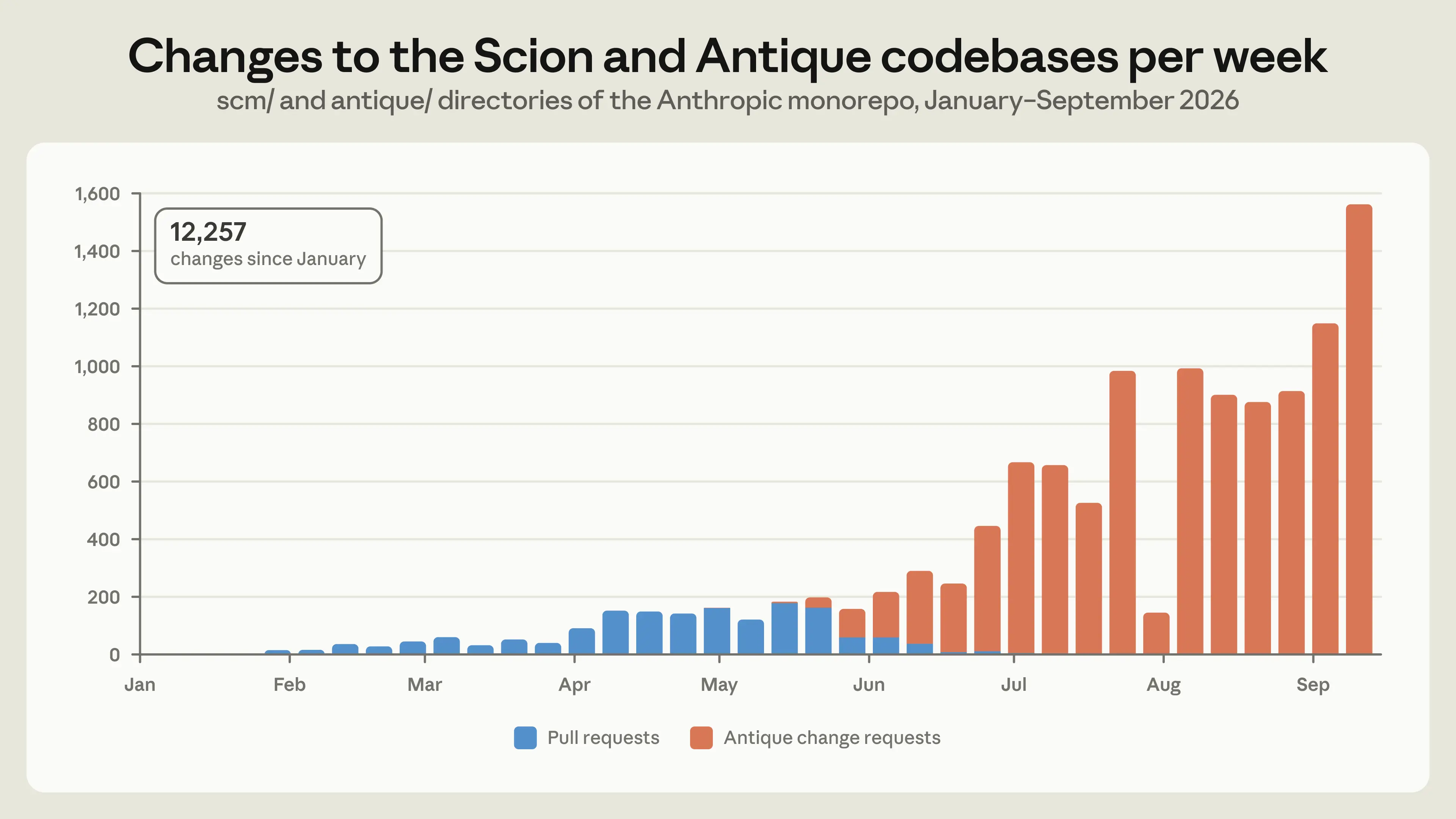
In May 2026, Anthropic averaged around 2,500 code changes merged per day; as of September, we merged over 30,000 per day. We don’t expect this rate of growth to slow down anytime soon; the latent demand for merging code is practically infinite, and every bottleneck we remove immediately leads to a further increase in the amount of code we produce.

Changes merged to our monorepo per day, from January to September 2026.

In order to support this growth, we built Scion, an in-house version control system, and fully migrated our monorepo from git in five months. We also built and shipped a code review surface (called Antique), code search, a rich source control IAM system, novel ways of managing and landing large amounts of reviewed code, and more, all in that same time period. In this post, we’ll focus on how we built Scion specifically. It makes for an interesting case study: Claude’s ability to write code was both what put us in this situation in the first place and how we were able to quickly build a high-quality, scalable system to deal with it.

Growing our monorepo

Before we explore what we built, we should acknowledge how unusual our workload is. Unsurprisingly, Anthropic uses Claude to write software far more than almost any other company, so we’re often the first to see where tools built for human scale start to strain. Source control is just one example of this. While we don’t expect many organizations to have these problems in the very near term, we suspect it won’t be too long before others who use AI coding tools experience these same pressure points, which is why we wanted to share what we built and what we learned.

Git is a decentralized system: every clone is a complete, self-contained repository that can compute diffs, read history and blame, and check out any revision while fully offline. For the vast majority of repositories, this is the right design, and it’s a large part of why git became the standard.

As our monorepo grows, it increasingly doesn’t fit that design space. The history of our main branch alone is almost 100 GB, and a compressed working copy is over 25 GB. We perform on the order of 25 million code checkouts per day for CI, before counting developer environments, agent sandboxes, and research jobs. Fetched naively, that would be over 600 PB of git traffic per day.

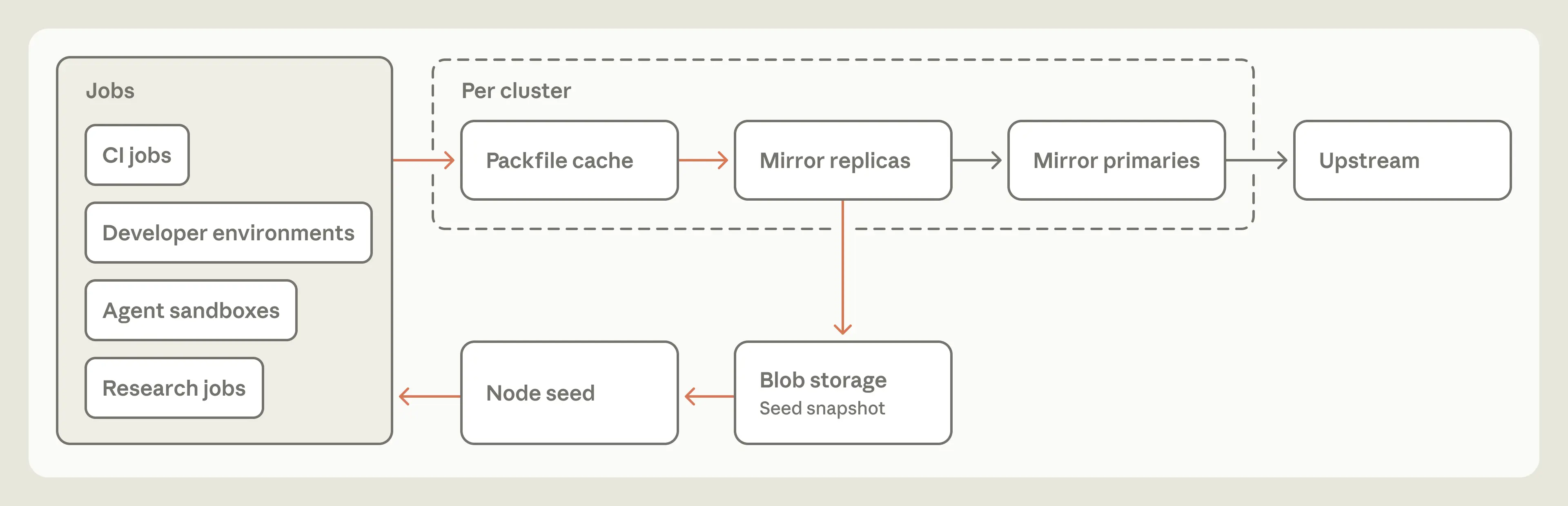
Git offers tools for working with a slice of a repository, such as shallow clones, sparse checkouts, and promisor remotes. Beyond these, there are standard workarounds for large monorepos, like internal git mirrors and repository snapshots (seeds) kept in blob storage. We’ve used all of them—at our peak, we operated several hundred internal git mirrors to deal with the load. This bought us time, but they became harder to operate as our merge rate increased. Seeds fell further from the tip of main between refreshes, and it took more and more care to keep operations that depend on history, like diff and blame, working on partial clones.

The typical setup for scaling git checkouts.

Taking a step back, we noticed that, like most companies, we were using git as a centralized system with one authoritative copy, but nearly all of our clients were agents and jobs that are online by definition. The properties that make git excellent for distributed, offline work were actively undermining our ability to scale as the repo grew. So we asked ourselves: if we designed source control with the fact that agents are always online in mind from the start, what would it look like?

Principles for agent-scale source control

With agentic coding, many common assumptions about how software is developed are evolving. We embraced these changes when building Scion, which allowed us to take a fundamentally different approach than git on several core principles. Source control for huge monorepos has prior art, notably Google’s Piper and Meta’s Sapling, so we were able to build Scion with their hard-won lessons in mind. Our principles are:

Clients are always online. Git assumes that clients work offline and need a complete copy of the repository. Since nearly all of our clients are agents and jobs, we designed Scion’s client and protocols around a server that is always reachable, and have clients fetch data when they need it.

Client-server asymmetry. In git, every client is capable of being a full-fledged server. In Scion, the server answers questions about file history and blame, creates commits, performs merges and rebases, and so on. The client maintains a bounded local object cache, lays out the working copy files on disk, monitors for filesystem changes, and gives users an ergonomic way to work with the server. It can compute very little on its own but, in exchange, it requires much less data locally.

A comprehensive source control service can power many novel applications. With git, a CI job or tool that needs to ask a question about the repository, such as who last changed a line or how two commits are related, has to maintain a local copy of the repo or hope that vendor-specific APIs provide the answer. With Scion, all of the source control queries the client uses are also exposed via API, so in many cases jobs don’t need a local repository at all. Many internal tools, such as our automated bisect and revert pipelines, wouldn’t be practical at scale without this cheap, programmatic access to source control.

Everything must be horizontally scalable. At our peak, we ran several hundred git mirrors, which significantly strained capacity and no longer scaled once the repo outgrew the mirrors’ disks or memory limits. In Scion, the repository’s data is distributed, and every component is independently scalable; there is no fully materialized copy of the repo anywhere, even on the server. There is no equivalent of packfiles (git’s compressed bundles of objects), so no repository maintenance is needed.

Commits must be cheap, incremental, and lock-free. In git, you commit locally and then push to share your work. In Scion, every commit, rebase, or merge happens on the server, so there’s nothing to push, but each of those operations needs to be fast. The cost of creating a commit and updating its downstream data structures has to scale with the size of the change, not the overall size of the repo, or the server can’t keep up. The development lifecycle in Scion discourages refs (pointers to commits, such as branches and tags), except for the main ref or release branches, because global state that every server has to agree on is a looming scaling problem.

The working copy is optional, and sparse by design. Because our monorepo is so large, and because we check out code tens of millions of times a day for CI, we wanted to avoid checkouts whenever we could. With Scion, a CI job that needs the diff between a commit and its merge base, for example, can ask the server for it. The same goes for writes: many write workloads can also skip the checkout and function entirely via API. Scion’s protocol is centered around sparse checkouts, which only contain the directories the client asks for, and virtualized checkouts, which materialize files on demand, so when a job does need files on disk, the client only pays for what it actually reads.

How Scion works

It’s helpful to understand how these principles came together in practice when building Scion. These insights can apply to other source control systems or, more broadly, to other stages of the software development lifecycle.

Data structures

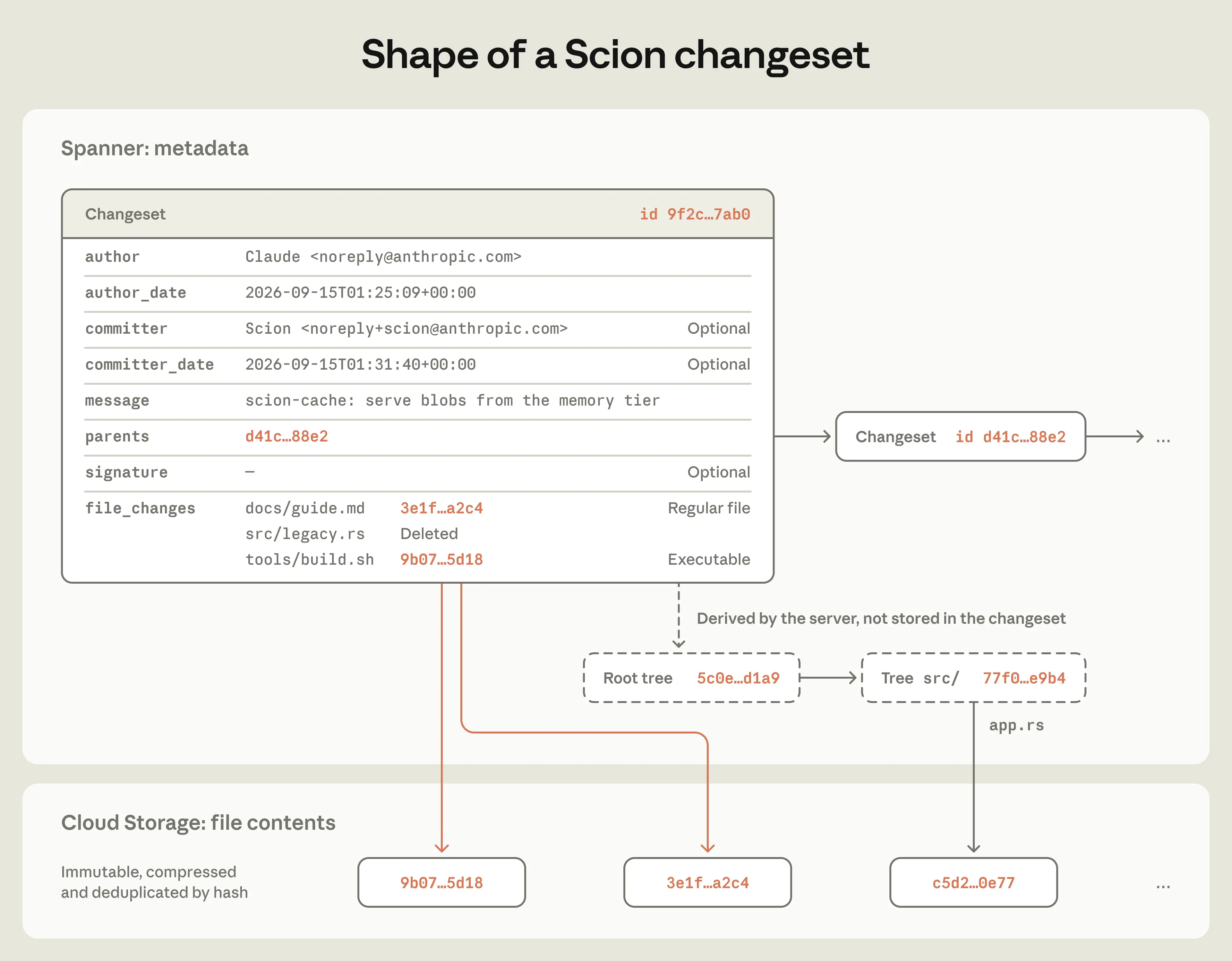
In Scion, the unit of work is a “changeset,” an entry in a write-ahead log. A changeset stores most of what you’d expect from a commit in git. But where a git commit stores a pointer to the tree, a changeset stores a list of the files that changed relative to its first parent,1 along with content-addressed pointers to the compressed file contents in blob storage. Changesets are created server-side and are available everywhere, instantly.

The shape of a changeset in Scion.

This structure lets us accept changesets with very high throughput because there are no packfiles to accept, no locking or cross-server coordination, and no refs to move around. Scion does technically support refs, but since neither creating nor fetching commits involves them, moving one is a compare-and-swap on a single Spanner row that happens separately from creating changesets.

A changeset records only what’s changed, so on its own, it can’t quickly answer questions like who last edited a line or which commits affected a file. To answer those, Scion builds additional data structures from the changesets, including dedicated structures for file blame and path history and skip lists for the commit graph. We call everything that isn’t directly part of the changeset “derived data,” and we compute it all through one generic mechanism. Each type of derived data is defined recursively, so its value for a changeset is computed from its values for that changeset’s parents.

This mechanism has three benefits. First, we can easily add a new type of derived data when a new data structure would make some operation faster. Second, for each type, we can choose whether to compute it eagerly or defer the work, so we avoid materializing data we don’t need. And third, because the client never sees the internals of these data structures, we can optimize them without changing the client. We’ve added new types of derived data many times as the system has grown, such as new indices for performing copy detection or path-based file search.

Scaling Scion

A small fleet of Scion servers provides source control APIs for any operation a client needs, such as getting changesets, computing diffs, finding merge bases, and fetching blobs. All source control data is content-addressed, so a piece of data never changes once it’s stored, and any server can cache it without checking with the others. As a result, the servers are horizontally scalable and require little coordination. They are essentially large caches that can also compute derived data on the fly and write the results back to Spanner.

Scion’s many consumers no longer need to maintain local repositories of their own. Fetching and maintaining the repository used to be a significant maintenance burden for CI jobs or tools that needed to ask source control questions, particularly about commit ancestry and blame. Early in the migration, before we had our own client, repo format, or protocols, Scion only answered these “metadata” queries. Fetching file contents and materializing working copies are far more data-intensive operations, and they needed a design of their own.

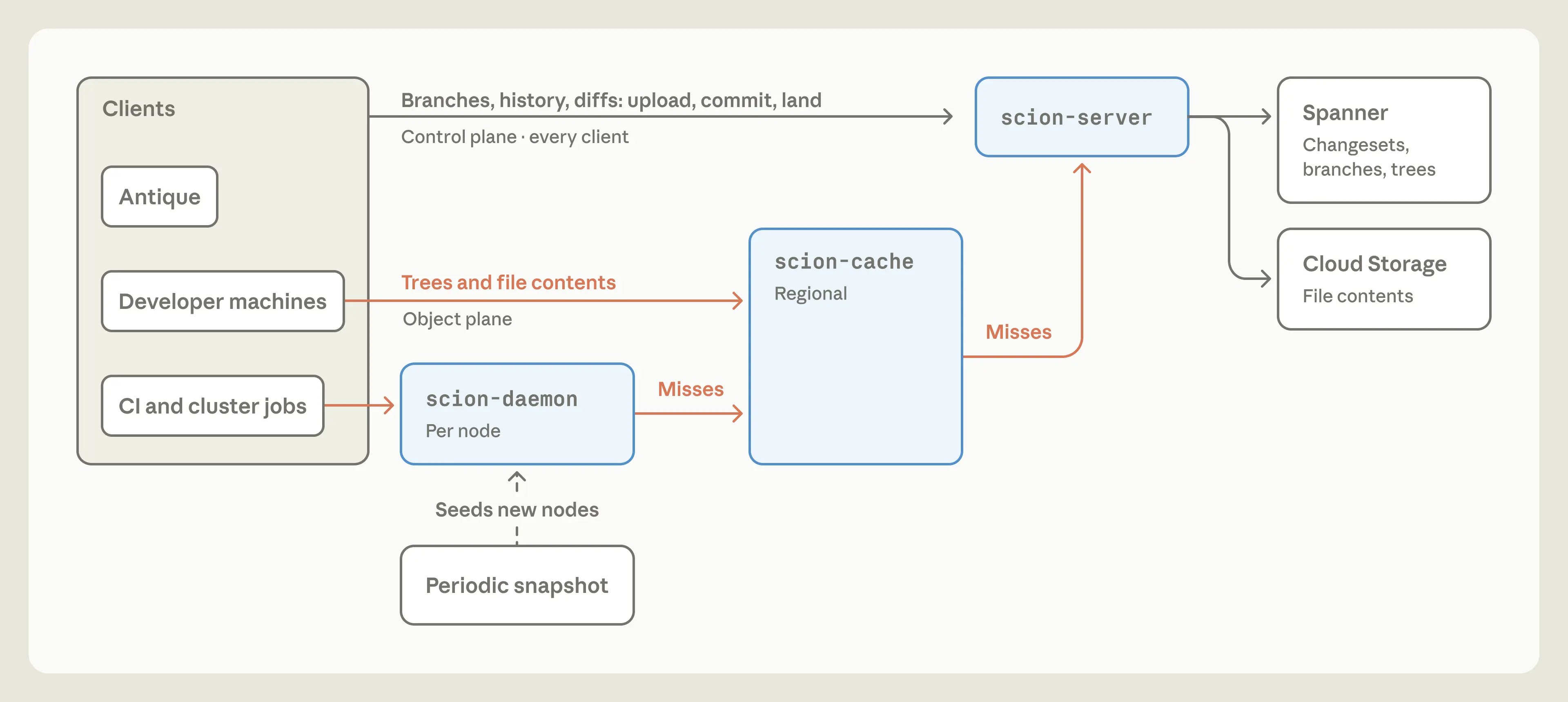
Scion’s scn client deviates from git’s fetch protocols in several important ways and, as a result, lends itself to a highly scalable architecture that requires significantly less CPU than git servers. Scion’s negotiation doesn’t tell the server what the client already has; instead, it operates exclusively on trees and blobs the client wants. Starting from a root tree, the client checks its local store for missing trees and requests them recursively, then repeats the process for blobs. Every request is for a specific object that never changes, so any cache can answer it, and the architecture closely resembles traditional tiered caches. The process is also efficient and resumable, because there is no single multi-gigabyte packfile response. Sparse and even virtualized checkouts don’t need special support, because the client simply doesn’t ask for trees it doesn’t want.

In the fleet, the client talks over a socket to a daemon, scion-daemon, that stores objects for the whole node. Most of our nodes need access to the monorepo, and jobs on the same node reuse most of the same objects. Each daemon starts from a periodically refreshed snapshot, then talks only to the tree and blob cache servers in its region, called scion-cache. These cache servers stream objects directly from memory, in the disk format that the daemon will consume, so they don’t need to spend time computing the client’s missing objects or performing delta compression. When a cache is missing an object, it asks the authoritative scion-servers, which read from Spanner or cloud storage as needed.

The scion-daemon, scion-cache, and scion-server all respond to identical RPCs for this protocol, so the client doesn’t need to know the cache topology. Any tier could theoretically talk to any other, but we strictly enforce the tiering to isolate failure domains. We want to avoid a situation where a failure in a regional scion-cache overwhelms the upstream scion-servers and brings down the entire system.

Scion’s checkout architecture.

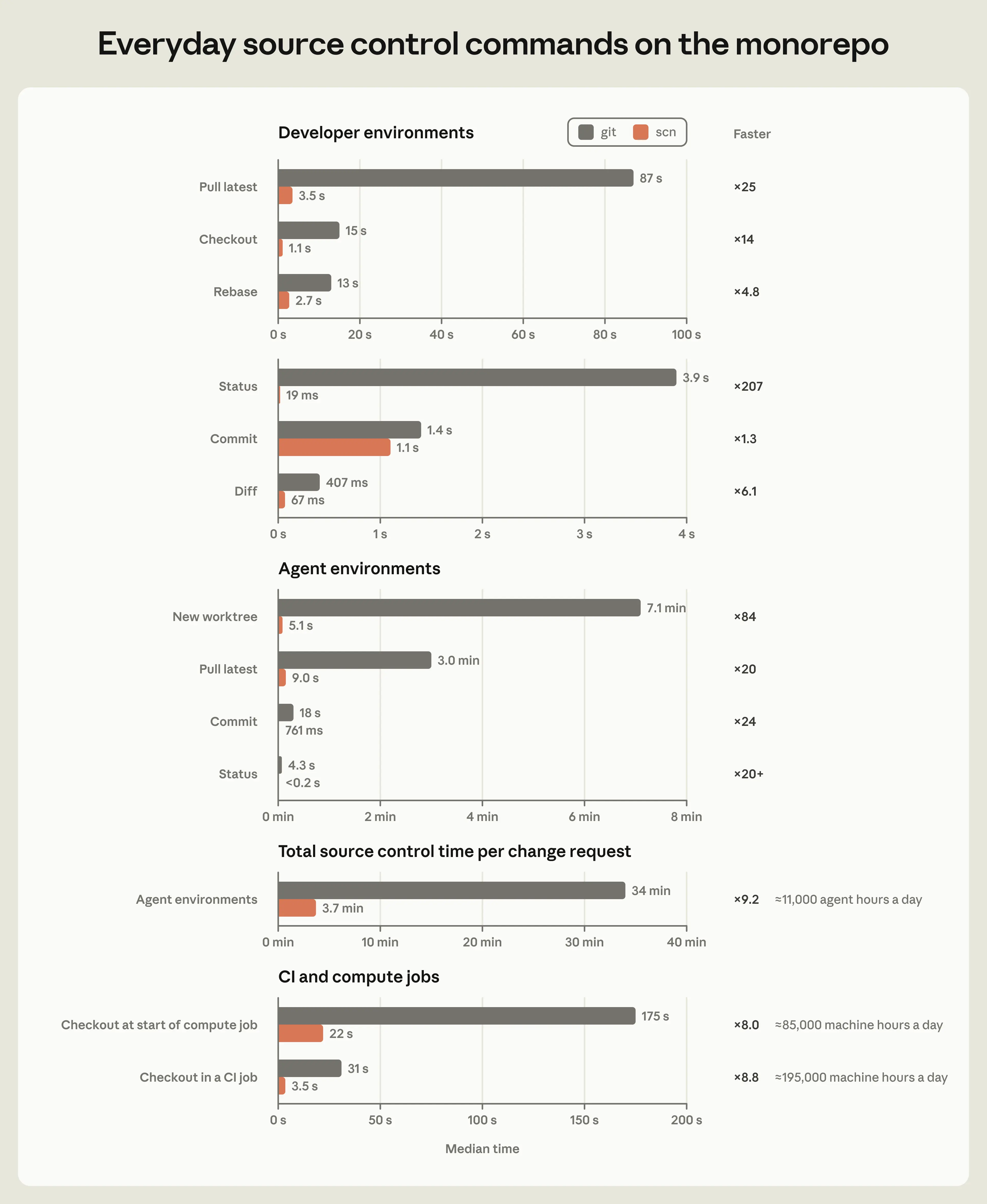
Each tier of this system maintains a cache hit rate of over 99% and does not require long-lived state, so it’s easy to scale up if needed. Our Scion infrastructure footprint is now 200x smaller than our previous git mirroring infrastructure in terms of CPU and memory requirements. CI and research jobs check out code two orders of magnitude faster (in seconds rather than minutes), which frees up a sizable amount of capacity across the fleet; CI alone realized a 25% CPU capacity win. Neither clients nor caches need to perform repository maintenance, which simplifies the lifecycle management of our jobs.

What we learned building Scion

We started building Scion around the same time as Claude Mythos Preview and Claude Tag became available internally. Both of these releases simultaneously amplified the need for Scion and meaningfully accelerated how quickly we could build it.

Here’s a particularly striking example. Earlier in the year, we had largely handwritten the first version of the git-to-Scion ingestion pipeline as a prototype. We thought it was good—until we got our hands on an early internal snapshot of Claude Mythos Preview. We asked it to rewrite the whole thing, and with no further instructions, it produced a version that consumed 20x less memory and was 4x faster, while preserving all of the implicit invariants around ingestion ordering and data structures.

Merged changes to the Scion and Antique codebases per week, from January to September 2026.

What we learned building and operating Scion offers some interesting lessons for what building agent-scale software could look like.

Rapid development with a small team will become more common. A team of seven people built both Scion and Antique (our code review tool, which we could easily write a whole other blog post about), not to mention half a dozen related systems, and fully migrated to them in five months. We did all this while the volume of code merged per day increased by 10x. In the past, developing and deploying a source control system like this would have taken a company years of iterative migration, with many more engineers. We think this sort of fast, nimble migration will become more common in the future.

Engineers are no less valuable, but their work is changing. All of the engineers who worked on this system would now rate Claude as better at writing code than them. But our engineers still supplied the invaluable understanding of the high-level inter-system components and the design-level tradeoffs, making informed choices around the problems we wanted to solve and the scale we knew we needed to achieve. Very often, we found that the role of the engineers was to tell Claude “no.” Agents will sometimes violate core system constraints to satisfy a pattern that should never have been allowed in the first place. This was particularly common in our migration. For example, there were multiple systems that tried to brute force looking up when a change merged to main by linearly reading the commit log instead of asking our code review tool. Anthropic also makes extensive use of adversarial review, and, while this is incredibly effective in many ways, it can also be myopic, so skilled engineers needed to steer Claude away from over-engineering parts of the system in response to hypothetical concerns. For example, one such review was overly defensive about trusting another internal service, which resulted in Claude adding excessive validation and complexity. Our team members still review every change request for the system, but they now examine the intent of the change as opposed to reading every line of code.

We were able to substantially improve optimization and quality. By virtue of Claude’s ability to write immense amounts of code much faster than we could ourselves, Scion is among the most well-tested and well-defended codebases we have ever worked on. Even on our tight timeline, we were able to build hermetic simulations of every non-trivial infrastructure and source control interaction we’ve ever encountered, as well as fuzzing and sophisticated rate limiting. Claude also casually found significant optimizations—for example, an algorithmic optimization to ancestry queries that missed one of our indexes—that would have taken an expert days or weeks of analysis and tuning… and then did it all again the next day.

Observed performance improvements on native Scion repos.

We laid the groundwork for new forms of monorepo security. Managing safety, security, and compliance in a massive monorepo is as important as managing the size and scale. We built Scion with these in mind from the start. It supports rich access control on repositories, as well as the ability to apply permissions to individual directories in order to protect the most sensitive code without losing the benefits of a monorepo. Furthermore, the code review tooling we built can express complex semantic constraints on approvals, which lets us differentiate simple things like comment-only changes from sensitive logical changes, so that human reviewers can focus on the most consequential changes.

A new level of operational excellence is possible. Our team uses Claude Tag heavily, which has helped us monitor each component of the system. For example, we created Slack channels where we tasked Claude with being obsessively focused on the health of a single component. We call these Claudes “superfans.” We have a scion-daemon superfan, a scion-cache superfan, an Antique merge queue superfan, and so on. They have access to our telemetry and logs, and act like an experienced engineer who has nothing better to do than to refresh charts and look for anything strange. We also have traditional alerts for all of our systems, but our superfans can detect subtle and novel issues that make these alerts seem one-dimensional by comparison.

We’re completely rethinking our priors. This project prompted us to take a very hard look at other workflows designed for human scale. A proper merge queue, for example, doesn’t make much sense at agent scale. What does CI even mean when hundreds or even thousands of changes can merge while tests are running? We haven’t been able to effectively replicate the industry standard of a global repository lock on the merge queue, so instead, we’ve invested in post-merge and pre-deploy automated testing. This does mean that concurrent changes can conflict, but Claude can typically fix these conflicts faster than humans can even identify them.

Contributing to the wider ecosystem

We see Scion as just one part of the answer to the scaling concerns that increasingly capable AI agents have raised. We’re sharing these details as an example of how teams can tackle similar challenges, though we don’t expect our solution, or our considerations, to suit every case.

Scion is by no means a suitable replacement for git for general use. The concepts we’ve outlined here really only make sense for truly enormous monorepos, with either tens of thousands of engineers or swarms of agents prolifically writing code. Plus, Anthropic is unique in that our ability to spend tokens for internal use far exceeds what any other business would realistically want to spend. We do this both to address our own software development needs, and to test Claude’s capabilities.

Practically speaking, it’s difficult to offer Scion in a form that would be broadly useful to other organizations. It diverges significantly from git, meaning companies would need to migrate every piece of the development lifecycle, and it requires its own code review, code search, and CI. Our internal versions of these components are highly bespoke, so they would be difficult for other organizations to adopt, and we worry that attempting to build a public version that tries to please everyone wouldn’t actually be very useful.

However, we anticipate that this class of problems will become more commonplace over the next six to 12 months, and it would be an inefficient use of engineering resources for every company using git to face similar challenges alone. Given that, we think the most impactful thing we can do is to share our thinking, so that other developers can apply some of the most successful parts of Scion to git without departing from the overall model. A git server doesn’t have to work the same way as a git client does; novel server architectures exist that provide significant scaling improvements. Git platforms can provide comprehensive server-side RPCs like Scion, perhaps even in a standardized way across forges that the git client can learn to talk to. The negotiation protocol doesn’t have to look exactly like it does today, either, and the various sparse and shallow features in git can be made to compose well.

Lastly, we want to acknowledge that the git community has spent nearly two decades scaling the platform for millions of developers. Our contribution is far narrower: sharing our early view into how agentic software development interacts with these systems, so that we can partner with GitHub, GitLab, and the OSS community to support the changing needs of developers. We’re all in it together as the software development lifecycle intersects with the AI exponential.

Acknowledgements

Written by Nick G. and the source control team: S.G., R.K., Dan C., Garrett H., Ben L., Colin M., Joe P. We’re grateful to Vilas J. and Sergiu D. for supporting the source control team on this ambitious journey and Amir O. for early contributions to Antique.

Footnotes

  1. Storing changed files relative to the first parent of a merge is a stylistic choice; in practice, we’ve found that people only care about history or blame for commits on the main line in trunk-based development in a monorepo.
The Daily Front Page 5 of 28
Tuesday, October 13, 2026 The Daily Front No. #261013 — Rust, Under Examination
repository

11 year old unsoundness bugs found in Rust borrow checker

by formerly_proven·▲ 696 points·386 comments·github.com ↗
★ 119,934⑂ 18,602 forks Rust

Empowering everyone to build reliable and efficient software.

Note

Given that this issue has been shared online and is currently getting quite a few visitors, here's some additional context.

Rust's type system is intended to prevent memory unsafety. Upholding this promise is something we take very seriously, which is why we've been working on things like the next-generation trait solver, the region constraint rework, and more generally Project Zero. It is a large priority of the Types Team to fix all type system unsoundnesses and to work towards there being a solid foundation to minimize the risk of unknown ones.

This bug is a P-high issue and would have been P-critical regardless of whether people encountered it in the wild. The reason that it is "only P-high" is that it's 11 years old. A bug like this which has not been found during the last 11 years cannot actually be that easy to hit.

Looking at the bug itself, it is also very likely that this unsoundness has not caused memory unsafety by accident. While it looks easy to trigger, to exploit this you need an intentionally malicious Drop implementation.

~ @lcnr


In the following code:

use std::sync::Mutex;
static KEPT: Mutex<Vec<Box<dyn std::any::Any + Send>>> = Mutex::new(Vec::new());
struct Q<T: 'static + Send>(Option<T>);
impl<T: 'static + Send> Drop for Q<T> {
    fn drop(&mut self) { if let Some(t) = self.0.take() { KEPT.lock().unwrap().push(Box::new(t)); } }
}
fn main() {
    {
        let l = String::from("hello world, this is long enough");
        let mut q = Q(None);
        q.0 = Some(&l);
    }
    let _z = String::from("XXXXXXXXXXXXXXXXXXXXXXXXXXXXXXXX");
    let k = KEPT.lock().unwrap();
    println!("{}", k[0].downcast_ref::<&'static String>().unwrap());
}

I expected to see this happen: program is not accepted

Instead, this happened: program compiles and prints XXXXXXXXXXXXXXXXXXXXXXXXXXXXXXXX. With asan, the program will crash with a AddressSanitizer: stack-use-after-scope

Meta

Issue on current nightly, and stables at least down to 1.85.0

Godbolt with asan: https://rust.godbolt.org/z/83MvfbKde
Godbolt without asan: https://rust.godbolt.org/z/GsGdqqMWe

Reactions are currently unavailable

The Daily Front Page 6 of 28
Tuesday, October 13, 2026 The Daily Front No. #261013 — The Listening Room
article

OpenAI engineer arrested in bugging of executive conference room

by forthwall·▲ 486 points·419 comments·sfstandard.com ↗
Federal prosecutors say an employee from Saudi Arabia planted an audio recorder

Federal prosecutors say an employee from Saudi Arabia planted an audio recorder and left another unattended in his bag.

Sam Altman, CEO of OpenAI, looks offscreen with a blue background.

An OpenAI engineer concealed a recording device in a conference room used by executives at the company, the Department of Justice claims. | Source: Justin Katigbak/The Standard

An OpenAI engineer has been arrested on suspicion of hiding an audio recording device in an executive conference room at the company’s San Francisco headquarters, federal prosecutors said Tuesday.

Abdulrahman Alfozan, 35, a Saudi national, was arrested Friday and charged with using or attempting to use a device to intercept oral communications. He made his initial appearance in federal court Tuesday and remains in custody.

An unattended bag found in the company’s offices contained Alfozan’s wallet and identification, as well as a recording device, according to the U.S. attorney’s office in San Francisco.

Alfozan has worked as an engineer at OpenAI since July 2025, prosecutors said.

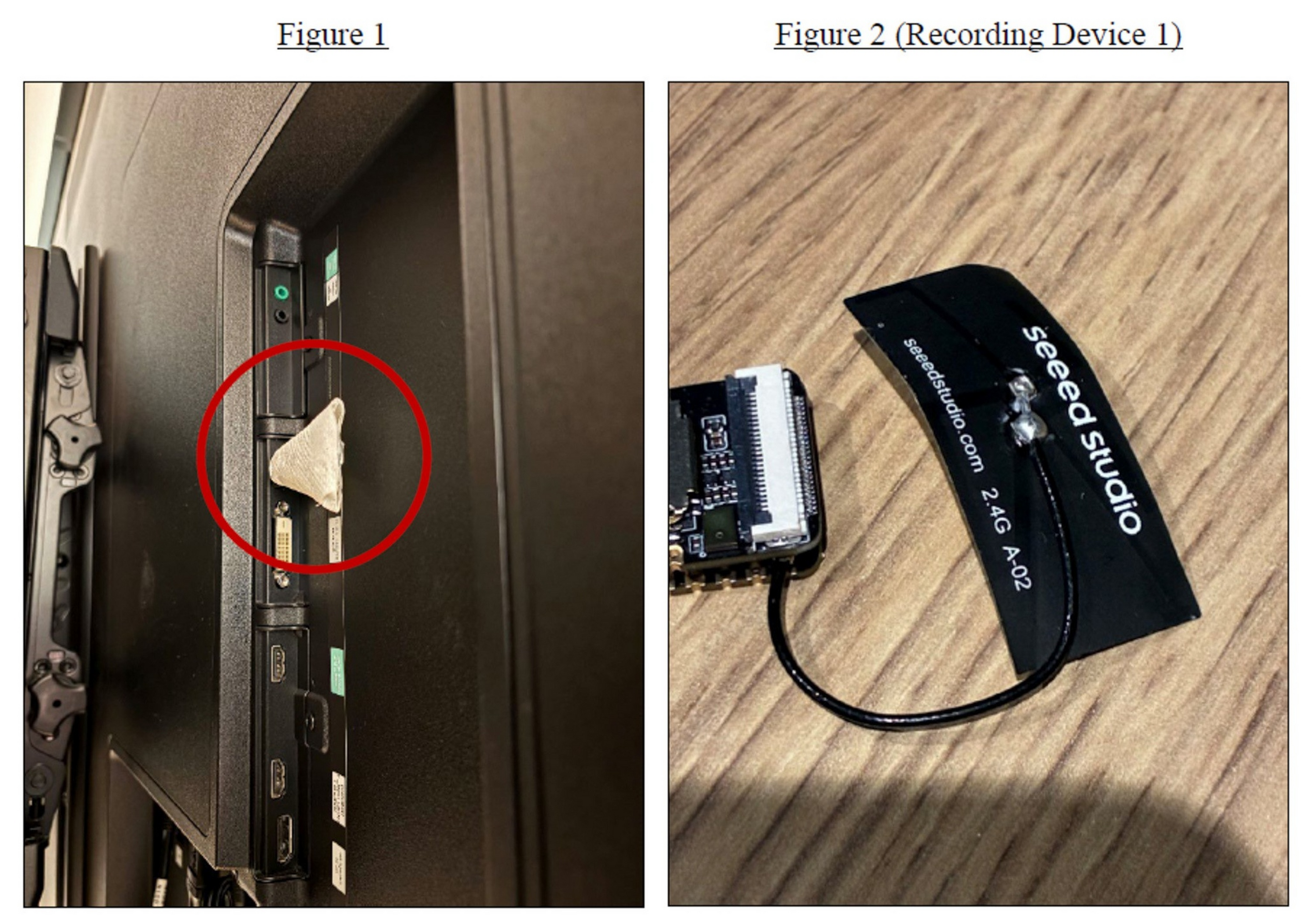
OpenAI personnel found the device Sept. 30. It was plugged into a USB port on the back of a television in an executive conference room and had been concealed in toilet paper, the complaint says. The company determined it was installed around Sept. 28, and its contents were encrypted.

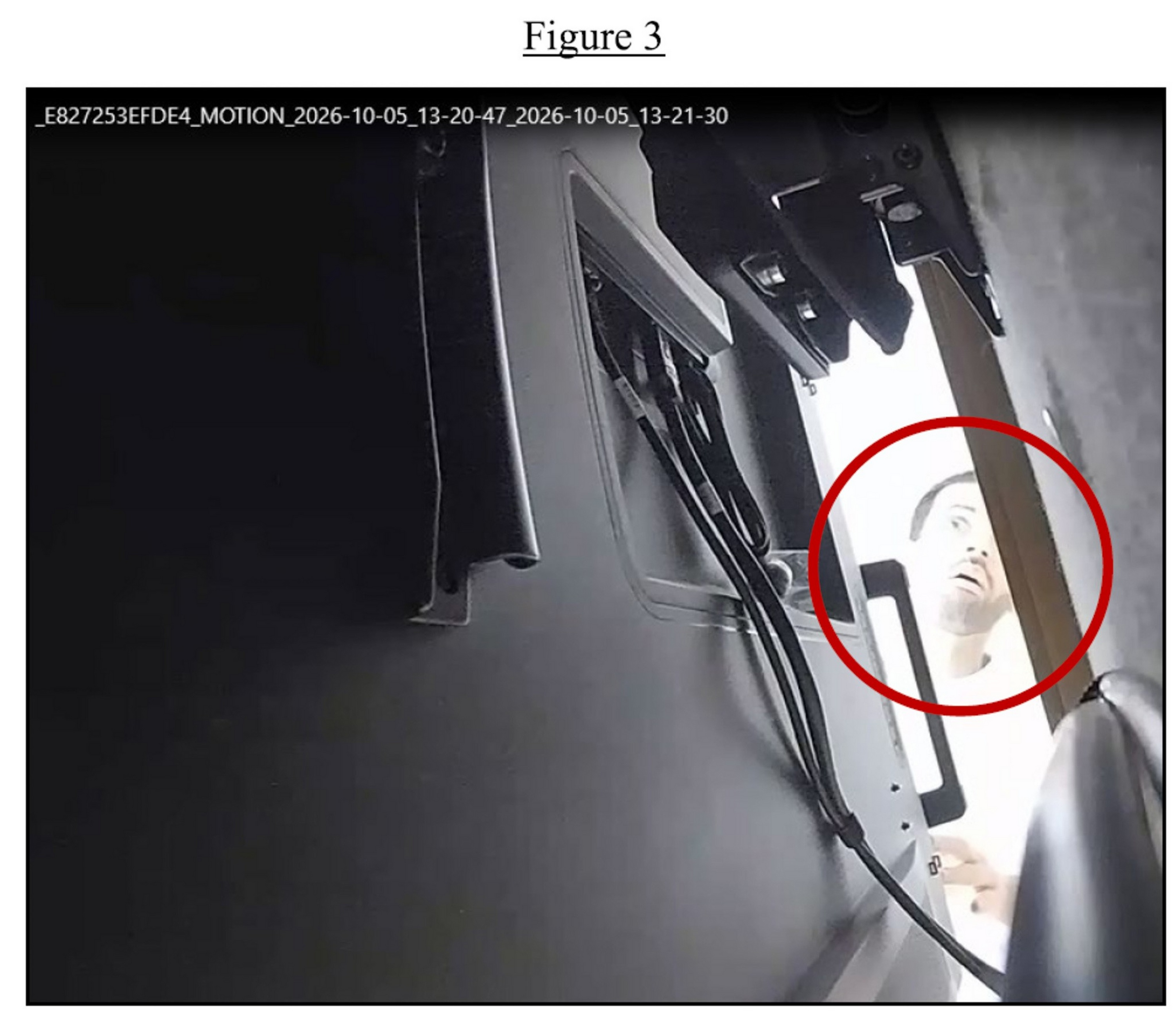
Surveillance footage shows Alfozan near the room on multiple dates before the discovery, though he was not authorized to enter the room or attend meetings there, prosecutors said. Meetings in the room frequently involved confidential technical, commercial, and strategic information, including proprietary research, product plans, and government engagements, according to the complaint.

A man’s face is partially visible through a narrow opening by a door, with his eyes wide open, surrounded by a red circle in the image.

Prosecutors say this image shows Alfozan looking behind a television in an OpenAI conference room.​ | Source: Courtesy U.S. Attorney's Office for the Northern District of California

Before the device was installed, Alfozan used a productivity tool to ask about OpenAI’s building addresses, meeting rooms, room capacities, and calendars, as well as the locations of leadership and outside partner meetings, the complaint alleges.

A chatbot account tied to Alfozan’s spouse, which shared identifiers with his own account, submitted prompts between Sept. 24 and Sept. 30 about building, installing, obscuring, and remotely accessing a recording device, prosecutors said. Queries included how to “build a continuous audio recorder” and “encrypt the SD card,” prosecutors claimed. On Sept. 27 and 28, the account asked about the specific device that was later found, including its unique MAC address.

On Oct. 5, the complaint says, Alfozan entered the conference room and appeared to look behind the television. That same day, he allegedly left a bag unattended in a different room. Security personnel who opened it found his wallet and ID, along with a second recording device similar to the first.

“For us it is a matter of national security,” U.S. Attorney Craig Missakian said in a statement.

A small, triangular device is taped inside a TV’s side panel near the ports, and a close-up shows a black electronic component labeled “seeed studio.”

The recording device with encrypted contents. | Source: Courtesy U.S. Attorney's Office for the Northern District of California

FBI Director Kash Patel said protecting U.S. AI innovation is among the bureau’s highest counterintelligence priorities. Scott Schelble, special agent in charge of the FBI’s San Francisco field office, said the agency is committed to protecting sensitive research and proprietary technology.

If convicted, Alfozan faces up to five years in prison and a $250,000 fine, followed by three years of supervised release.

The case is being prosecuted by the National Security, Cyber & Special Prosecutions Section of the U.S. attorney’s office for the Northern District of California.

OpenAI said on X (opens in new tab) that after discovering the device, employees used the company’s AI models to determine what it was and where it came from, and referred the matter to the FBI. The company thanked the agents and prosecutors who “moved quickly to make an arrest.”

According to OpenAI, its technical surveillance countermeasures team found the device during a sweep of a conference room.

OpenAI described the device as sophisticated and designed to evade detection, saying it had advanced encryption, audio monitoring capabilities, and a mechanism for transferring data in a way meant to avoid monitoring. The company said investigators used its models to analyze forensic images of the device’s storage and assess changes in the underlying data.

The company said it has evidence that Alfozan intended to place other recording devices in sensitive spaces to secretly record meetings.

According to OpenAI, Alfozan was a member of the product team. The company said it coordinated the timing of his firing with the FBI to avoid disrupting the investigation, and he was terminated Friday, the day he was arrested. Between Sept. 30 and that date, OpenAI said, it gradually restricted his access to systems and spaces, then suspended his physical and network access, placed him on leave, and secured his company-issued equipment.

A YouTube video last month touted him as the only Saudi employee at OpenAI.

A LinkedIn profile that matches Alfozan’s name lists his OpenAI role as engineering lead on the company’s AI agents platform

Before joining OpenAI, he was a founding engineer at Nash, an AI infrastructure company for logistics, from 2022 to August 2025, according to the LinkedIn profile. From 2017 to 2022, he was a senior systems engineer at Meta. His earlier experience, according to the profile, includes a stint as a systems engineer at Reach Labs, a wireless power startup in Y Combinator’s summer 2015 batch, and internships at Microsoft, SAP in Berlin and Akamai Technologies.

He has a master’s degree in data science from UC Berkeley, the LinkedIn profile says.

A man in the passenger seat of a car at Alfozan’s Millbrae home said that the family did not want to speak to reporters.

OpenAI said it has no indication that Alfozan improperly accessed or took model weights, source code, or customer data and has not seen activity that compromised the safety of its products or customers’ information. The company said it will continue to support the FBI’s investigation.

OpenAI said it treats protecting its technology, data and people “as a matter of national importance” and called the case an example of how AI can counter sophisticated security threats.

A detention hearing before U.S. Magistrate Judge Alex G. Tse is set for Oct. 19.

The Daily Front Page 7 of 28
Tuesday, October 13, 2026 The Daily Front No. #261013 — Apple’s New Screens
article

New Apple TV 4K

by corvad·▲ 318 points·583 comments·apple.com ↗
A more capable and conversational Siri, faster performance

A more capable and conversational Siri, faster performance, and an even more immersive home theater setup elevate the entertainment experience

Apple TV 4K is pictured with the Siri Remote.

The new Apple TV 4K features Siri AI, which transforms how users search for, discover, and enjoy their favorite movies and TV shows; faster performance; and an even more immersive home theater experience.

CUPERTINO, CALIFORNIA Apple today announced the next generation of Apple TV 4K, delivering its most immersive home theater experience yet. The new Apple TV 4K features Siri AI, an entirely new version of Siri powered by the next generation of Apple Intelligence, transforming how users search for, discover, and enjoy their favorite movies and TV shows through a full-screen Siri AI experience.1 With built-in far-field microphones, Apple TV 4K also lets users talk to Siri completely hands-free.2

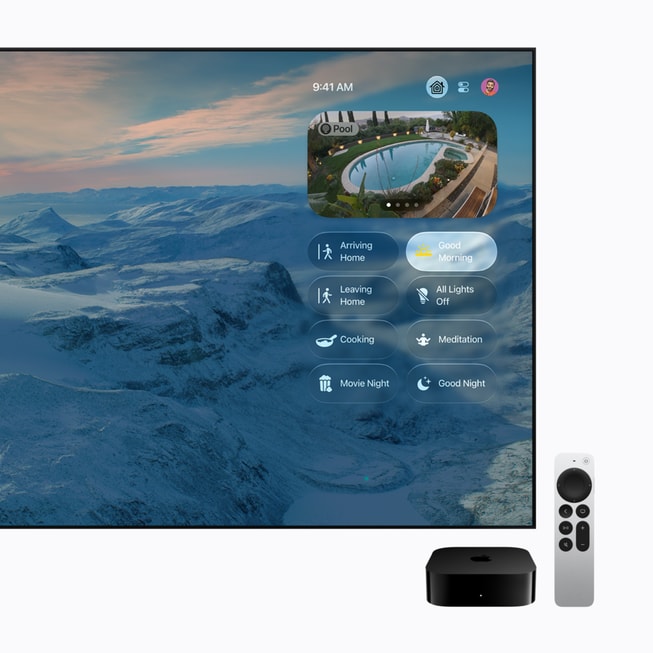
The new Apple TV 4K delivers even faster performance and, when paired with four HomePod mini 2 or HomePod (2nd generation) speakers, unlocks the most immersive home theater surround sound setup Apple has ever offered. As a home hub, Apple TV 4K also makes managing the smart home easier than ever, with Apple Intelligence-generated camera activity descriptions and summarized notifications in the Home app, and control of accessories and scenes.3

The new Apple TV 4K can be pre-ordered starting today, with availability beginning November 13.

“The new Apple TV 4K is our most immersive home theater experience yet,” said Bob Borchers, Apple’s vice president of Worldwide Product Marketing. “With Siri AI, finding something to watch becomes a full-screen, conversational experience, and with built-in far-field microphones, it’s completely hands-free. Pair it with HomePod for the best surround sound setup we’ve ever offered, and it makes managing your Apple Home accessories easier than ever. Now, alongside HomeView, HomePod mini 2, and Apple Home Collection, it’s part of the most connected Apple Home we’ve ever built.”

An Entirely New Version of Siri Powered by Apple Intelligence

Apple TV 4K brings Siri AI to the living room with a rich, full-screen experience. An entirely new version of Siri powered by the next generation of Apple Intelligence, Siri AI is a profoundly more capable and conversational assistant with personal context understanding, broad world knowledge, and the ability to take even more systemwide app actions, making it effortless to find entertainment. Users can simply ask Siri “What Apple TV shows won at the Emmy Awards this year?” and see beautiful poster art pulled directly from the Apple TV app, along with relevant suggestions like “More award-winning comedies” to keep exploring. While watching, users can ask Siri AI follow-up questions and tap into Siri AI’s broad world knowledge to go deeper into a show, asking things like “Where was Pluribus filmed?” or “Is this appropriate for a 15-year-old?” Responses appear in a compact, subtle overlay, providing helpful information when viewers ask while keeping them immersed in the action. With an Apple Intelligence-enabled iPhone, Siri AI on Apple TV 4K can now tap into a user’s personal context to answer requests like “Play the show Alinda recommended.”

Apple TV 4K displays a Siri AI message with thumbnails to various documentaries. The message reads, “Here are some nature documentaries available on Apple TV, including ‘Prehistoric Planet,’ ‘The Elephant Queen,’ and ‘Earthsounds.’”

Siri AI is a profoundly more capable and conversational assistant with personal context understanding, broad world knowledge, and the ability to take even more systemwide app actions, making it effortless to find entertainment.

A Fully Hands-Free Experience with Far-Field Microphones

The new Apple TV 4K features three far-field microphones, letting users control what they’re watching and discover new shows completely hands-free. Advanced echo cancellation intelligently isolates a user’s voice from background sound to deliver crystal-clear “Hey Siri” or “Siri” recognition, even while audio is playing.

Apple TV 4K now features three far-field microphones, letting users control what they’re watching and discover new shows completely hands-free.

Faster Performance, Smarter Remote

The A19 chip in the new Apple TV 4K delivers up to 50 percent faster CPU performance and up to 2x faster GPU performance than the previous generation, for greater responsiveness, faster navigation, and smoother animations. The A19 chip also includes a new, dedicated AV1 decoder, enabling more efficient, high-quality streaming while using less bandwidth.

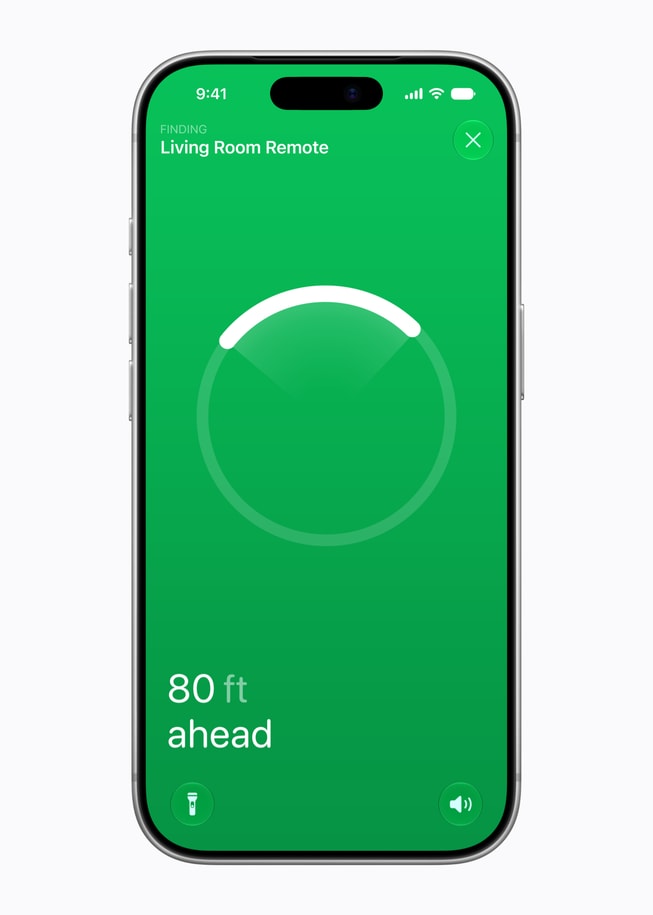
The new Siri Remote keeps its familiar design while adding Find My support with Precision Finding and an option to play a sound on the remote — making it far easier to locate.4

An iPhone 18 Pro screen shows Find My locating a Siri Remote, with the message “80 ft ahead.”

The Siri Remote adds Find My support with Precision Finding and an option to play a sound, making it far easier to locate.

Apple’s Most Immersive Home Theater Ever

Pairing HomePod with Apple TV 4K already offers users an immersive viewing experience that’s easy to set up, and the new Apple TV 4K takes it even further. For the first time, users can create a four-speaker surround sound experience with Apple TV 4K (4th generation) and HomePod mini 2. The four speakers work together with Apple TV 4K to intelligently recognize their position in the room so audio timing and levels are automatically calibrated to the space. HomePod (2nd generation) can also be used in this four-speaker setup for the ultimate audio experience, as long as the front and rear speaker pairs match.5

Apple TV 4K and a four-speaker setup, with two HomePod (2nd generation) speakers in the front and two HomePod mini 2 speakers in the rear.

For the first time, users can create a four-speaker surround sound experience with HomePod.

An Even Smarter Home Hub

The new Apple TV 4K continues to serve as a powerful home hub, giving users control of their smart home accessories from anywhere.6 With a compatible doorbell, notifications appear directly on the TV so users can see who’s at the door, speak with them, and control other accessories like unlocking the door — all without interrupting what they’re watching. Apple TV 4K supports automations, guest mode, and secure local processing of HomeKit Secure Video, now enhanced with Apple Intelligence-generated camera activity video descriptions and summarized notifications. Users can also use Siri AI to control smart home accessories and turn scenes on or off hands-free. And with built-in Wi-Fi and Thread, Apple TV 4K can seamlessly connect and control a user’s smart home.

Apple TV 4K displays a user’s smart home controls.

Apple TV 4K is a powerful home hub, giving users control of their smart home accessories from anywhere.

More Ways to Enjoy the Living Room

Apple TV 4K is more than just a way to watch — it’s a home essential that transforms the living room to reflect what users want in the moment. With Apple Fitness+, the living room becomes a workout studio, while Apple Arcade and the App Store’s library of games turn it into a home arcade. With the Apple TV app, users can stream hundreds of Apple Originals, including thrilling dramas, epic sci-fi, and feel-good comedies, as well as live sports such as Formula 1® in the U.S., Major League Soccer, and Friday Night Baseball.7 Users can also make FaceTime calls with Continuity Camera, view photos, and do even more, all from the big screen.8 With an iPhone or iPad, users can now customize how their iCloud photos appear on Apple TV, making it easy to set up personalized Memories & Slideshows or Portraits screen savers without making their entire library visible. Plus, a new screen saver shuffle feature automatically rotates between categories so there is always something new to see.

iCloud photos are displayed on Apple TV 4K.

Users can now customize how their iCloud photos appear on Apple TV.

Apple TV 4K displays an Apple Fitness+ workout.

With Apple Fitness+, Apple TV 4K can turn the living room into a workout studio.

Apple TV 4K displays an Apple Arcade screen.

Apple Arcade and the App Store’s library of games turn the living room into a home arcade.

Apple TV 4K displays a Snoopy screen saver.

A new screen saver shuffle feature automatically rotates between categories so there is always something new to see.

Apple TV 4K displays a FaceTime call.

With Continuity Camera, users can make FaceTime calls right from the big screen.

Private and Secure by Design

Like every Apple product, Apple TV 4K is designed with privacy and security in mind. Apple TV 4K and the A19 chip include Secure Exclaves: protected and compartmentalized runtimes used to process microphone data separately from the rest of the system. Isolation features added across many core components of the silicon work in tandem to protect Secure Exclaves and keep them segregated from the rest of the system. Data that is processed and analyzed in the Secure Exclaves cannot be accessed by tvOS, apps, the user, or Apple.

Siri AI takes full advantage of the bold new architecture for Apple Intelligence. Siri requests on Apple TV 4K can use on-device processing or Private Cloud Compute, which extends the privacy of the device to the cloud. When processed in Private Cloud Compute, data is neither stored nor made accessible to Apple or anyone else. HomeKit Secure Video footage is stored end-to-end encrypted and never accessible to Apple.

Apple TV 4K and the Environment

Apple TV 4K was built with the environment in mind and drives progress toward Apple’s ambitious plan to be carbon neutral across its entire footprint by 2030. Apple TV 4K features 100 percent recycled gold plating and tin solder in all Apple-designed printed circuit boards, and 100 percent recycled rare earth elements in all magnets. The thermal module is made with 80 percent recycled aluminum, while the enclosure of the Siri Remote includes 100 percent recycled aluminum. Apple TV 4K meets Apple’s high standards for energy efficiency and safe chemistry. As with all Apple products, its paper packaging is 100 percent fiber-based9 and designed to be recycled.

Pricing and Availability

  • Customers in the U.S. and 29 other countries and regions can pre-order Apple TV 4K (4th generation) starting today from apple.com/store and in the Apple Store app, with availability in stores beginning Friday, November 13.
  • Apple TV 4K (4th generation) is available for $299 (U.S.) or $49.83 (U.S.) per month for six months.10
  • Siri AI is available as a beta on Apple TV 4K (2nd generation or later), and is available at launch in the U.S., Australia, Canada, India, New Zealand, Singapore, South Africa, and the UK in English.
  • The new Siri Remote is compatible with Apple TV HD and Apple TV 4K, and is also available for purchase separately. Find My support is available on the Siri Remote (2nd generation or later).
  1. Some features may not be available in all regions or languages. Some devices may not be available in all regions. Siri AI is available in beta in tvOS 27.2 and requires the owner of the home in the Home app to have an Apple Intelligence-enabled iPhone or iPad running the latest software version and have Siri AI turned on and set to a supported language. Personal context requests require a paired Apple Intelligence-enabled device with Siri AI turned on and set to a supported language. Siri AI will not be initially available in the EU in iOS or iPadOS. Certain Apple Intelligence features that rely on server-side models are subject to daily usage limits. Expanded access to such features will be available for a fee in the future. Use of these features is subject to the Apple Intelligence terms and conditions. Learn more at support.apple.com/148587. Access to Siri AI is also available on Apple TV 4K (2nd generation) or later.

  2. Far-field microphone support for Siri varies by region and language. Supported when the primary tvOS language is set to Mandarin Chinese, Dutch, English, Finnish, French, German, Hebrew, Norwegian, or Swedish.

  3. Video descriptions for HomeKit Secure Video camera recordings require setup using an Apple Intelligence-enabled iPhone or iPad and a subscription to an eligible iCloud+ plan. Some Apple Intelligence features in the Home app, such as video summaries, are available for a limited number of cameras depending on the iCloud+ plan. Supported camera counts and other iCloud+ plan features may change over time. Learn more at apple.com/apple-intelligence.

  4. Find My support is available on the Siri Remote (2nd generation or later). Precision Finding works on the Siri Remote (4th generation) paired with iPhone Duo, iPhone Air, or iPhone 17 or later (excluding iPhone 17e) running the latest iOS software; availability varies by region. Playing a sound to locate the remote is exclusive to the newest Siri Remote.

  5. Home theater surround sound requires four HomePod (2nd generation) or HomePod mini 2 speakers in matching pairs (front and rear), paired with Apple TV 4K (4th generation) running the latest operating system software.

  6. Compatible smart home accessories sold separately.

  7. Subscription may be required to access some content. Live sports subject to blackouts. Title and application availability subject to change. Some applications are not available in all areas.

  8. Available on compatible iPhone and iPad devices with Apple TV 4K (2nd generation or later) running the latest operating system software.

  9. Breakdown of U.S. retail packaging by weight. Adhesives, inks, and coatings are excluded from Apple’s calculations.

  10. Apple Card Monthly Installments (ACMI) is a 0 percent APR payment option that is only available if users select it at checkout in the U.S. for eligible products purchased at Apple and is subject to credit approval and credit limit. See support.apple.com/en-us/102730 for more information about eligible products. Additional limits and restrictions apply. See the Apple Card Customer Agreement for more information about ACMI. Apple Card is subject to credit approval, available only for qualifying applicants in the United States, and issued by Goldman Sachs Bank USA, Salt Lake City Branch.

The Daily Front Page 8 of 28
Tuesday, October 13, 2026 The Daily Front No. #261013 — Bots at the Gate
article

I posted to HN, and then my website was flooded with AI bot traffic

by sammy0910·▲ 294 points·160 comments·sammystraus.com ↗
I posted to HN, and then my website was flooded with AI BOT traffic

For the past few years, I've been working on sprinklz.io, a customizable feed reader that can, among other things, deprioritize certain topics from your news feed.

A month ago, I posted it to HN, and it got a hundred or so upvotes, nice! It seems like people are really tired of hearing about LLMs, and they enjoyed being able to deprioritize them from their feed. It was a good demo of why a tool like this is useful. Everything was looking up, and then…

My website got slow. Like, really, painfully slow. At first I chalked it up to the extra attention of a suddenly popular post. Like any developer I both celebrated, and vowed to make my website more resiliant in the future. Strangely though, the slowness continued, and even started to get worse several days after my post went live, and the metrics I did log did not make sense. Like, you know, a good handful of genuinely active, logged-in users, and a sever exhibiting exhorbatantly high load.

So I took a look at some data. I added top-level logging for every endpoint (how many times was a request made to each url path), and I found that a majority of the requests did not even make an attempt to fetch news articles! For reference, my website is built as a single-page-application, and what this means is that a majority of the requests did not even run the javascript necessary to render the page (!).

Digging further, I looked at aggregate NGINX logs to find abusers, and, you're never going to believe this, but it turns out that nearly half of our traffic was coming from one specific user. I won't name names, but I looked them up, and they describe themselves as a service that listens for changes to a website, and then summarizes them into an AI slop news letter. And by 'listens to changes' I mean query our website many many times per-minute. Blocked.

Several of the others were your standard known crawlers, and kindly identified themselves as such. Claude bot, OpenAI bot, google's search indexer, and several others. I even picked up a few vulnerability scanners along the way. At least, somebody is trying to access -/wp-content/phpinfo.php (my website is not a wordpress site). I added robots.txt to discourage most of the AI scanners, but allow google-bot and other search-related traffic, and asked claude to query all the vulnerability paths and mimic the scanners to make sure I wasn't leaking anything. I also added reasonable rate limits, etc., etc.

The most important lesson though, is that it's time to make my website faster. I want to be the website that can day handle xxx QPS of real traffic, and it should scale better than it did, even under heavy load. Inspired by this encounter, I've made quite a few improvements to the underlying infrastructure over the past few weeks, and these should result in pretty substantial performance gains for all users.

P.S. if you'd like to check it out, the website is fully free, and available here

The TLDR is that it lets you define your own customizations, in addition to things like the points totals from hacker news. You can use it to filter out topics, like AI or LLMs, but the topics are completely arbitrary and you can program your own customizations.

2. Using LLMs to Make the Emacs Web Browser Great Again

When I tell people about the emacs web browser, their first reaction is 'Wait emacs has a web browser?!', followed by, 'yeah… I guess that's kind of a web browser'.

The emacs web browser is designed to render webpages in a terminal-based, textonly environment and, well, it goes about exactly the way you'd expect. It works well on HTML-only, small-content websites, but not so good for anything else.

The problem is that emacs is primarily a text-only editor, but the modern internet is very much not plain-text based. Simple HTML, designed in the simple style of the 1990s has a clear translation into plain text, but modern UI design, with it's visual styling, heavy javascript, and just, overall chaos, not so much.

The emacs web browser would be great, if only we could find a way to go back in time…

Ok, so the plan is simple. We take modern webpages, rewrite their source code into old-school simply-styled HTML, and then pipe it through to the emacs web browser. We just need to find a way to do this easily and at scale.

So um, you didn't forget about LLMs did you? It's nice to be using them in a way that will hopefully reduce the amount of spam content in the world.

Basically, the plan is we write a program that:

  • Opens a webpage in firefox
  • Loads the page and runs all the javascript
  • Asks an LLM to generate a re-usable program that transforms the current-page's contents into simplified text
  • Inject the generated javascript into the firefox browser
  • Grab the new page source and forward it to emacs web browser.

Yeah, and so, I've been using it, and it runs very well. Like realistically I can use this on many webpages where eww (emacs web wowser) did not run previously.

Below are some examples of before and after:

The docs for Clojure's mapcat
ClojureDocs_before.png

Figure 1: (before) Using eww-readable
ClojureDocs_after.png

Figure 2: (after) Using simpleweb-simplify-page

It takes a moment to generate the initial modifier program, but once it's generated, it runs pretty fast, and during day-to-day browsing, it mostly doesn't need any extra LLM calls. I have been using it myself and enjoying the experience.

The source code lives here: https://github.com/sstraust/simpleweb

and is open-source, and free to install, etc., etc.

2. If technology got better, why did everything get worse?

I think we all know the answer to this: bad incentives.

Technology makes systems more productive, but it does not, in fact, make you in particular more productive. The tools that enable computers to be more efficient also enable people to be more efficient at exploiting your time, attention, and wellbeing. I'm talking neural nets babyyy.

I first noticed the problem in 2018. Or rather, I noticed that I had a problem, and that problem was spendinng 3 hours a day watching starcraft 2 replays and wondering where the time went, and how I managed to stay up til 2am again.

What's interesting to me is that I didn't have any of these problems until the late 2010s. I had a computer with an internet connection since at least the mid 2000s, and a smartphone with twitter and reddit and the like not long after. It's possible that I've gotten less resiliant over the years, but I have a sneaking suspiscion that it's the computers who changed.

I can't quite put my finger on it, but I have this sensation that every time I interact with a system or website, I'm playing this kind of adversarial game, where I'm trying to just go about my day, and maybe read a little article about computers, and they're trying to figure out a way to keep me on their site for just a little bit longer.

I also have this feeling that as software engineering has moved from a discipline of hobbyists and enthusiasts to leaders who increasingly developed through finance or business-minded tracks, we've found ourselves with these major tools that we used to love become both extremely bland and extremely profitable.

So what can we do it make it stop?

  1. touch grass. really when the world is like this, i think the best solution is to just leave. it's not easy, especially when the planning is often online, but if you can set it up, I promise that a day in the park playing chess with your friends is better than any amount of time you can spend on the internet.
  2. take to the streets. i think that protesting is effective, and more people should do it. if you're willing to take action, it models to others that they can take action.
  3. stop coming back to the same machines. I think we all have this gamblers fallacy in us, where if it didn't pay out the first time, but it pays out sometimes, we try the machine again, but it doesn't really work like that. if you're losing money the lesson is to stop putting coins in the machine.

editor's note: I've been working on a free customizable news reader as a way to take out some of my frustrations with the modern internet. if you don't use this one, I recommend following individual blogs and websites, because it's so much better to just get off these big platforms entirely.

editors note 2: i haven't yet posted this latest article to my rss xml, because i'm not ready to send notifications for it yet. will add in the coming weeks.

3. Deft version 0.2.0

Now that deft 0.2.0 is released, I figure it's a good time to talk about what I built, and why I built it.

The point of Clojure's everything-is-a-map toolkit is that getters and setters are a waste of time. Clojure was built, in large part, in response to the crappy 2008 Java workflow, where you had to write getters, setters, and builders, and you took on all this bloat that nobody enjoyed.

The problem is that if you want to represent your data using the built-in defprotocol and defrecord, and you want to define functions that depend on the presence of a certain field, then the only way to encode that information into the protocol is to add getter and setter metohds to it. icky.

You can also use a combination of protocol + malli schema to represent this, but then when you use it, you need to specify 'this function takes as input something that both implements this protocol and implements this Malli schema'. Also icky.

What we want is something we can use in the style of defprotocol and defrecord, but gives us all the getters and setters and map-like stuff by default. The key insight is that if a field exists in a record, we get all the other good stuff, so we just need to add support for protocols with required keys.

Deft v0.2.0 adds support for namespaced keys in type and protocol definitions. i.e., you can now do:

(defp Positioned :required-keys [::pos - ::Point])

and

(deft Circle [::location/position radius])

(>Circle ::location/position [1 2] :radius 12)

this is useful because you can now define methods that depend on those fields being present i.e.:

(defp Gremlin :extends [location/Positioned])

(defmethod game-object/get-hitbox ::Gremlin [self]
  (js/Matter.Bodies.rectangle
   (get-in self [::location/pos ::location/x])
   (get-in self [::location/pos ::location/y])
   15 15))

Check it out!

https://github.com/sstraus/deft

4. How much LLMs is too much LLMs?

I finished reading On the Edge last week, and it was bad. Not that I don't respect Nate Silver. I respect him a lot. So when his seminal text on gambling and risk taking was a rambling mess, I was suprised and disappointed. Nevertheless, a completionist at heart, I trudged on, to the very end, where I was greeted with this message:

"ChatGPT was a significant help in writing this book, serving as a creative muse when coming up with things like chapter subheadings, metaphors, and analogies, and for refining my understanding of technical topics that are likely to be well represented in its corpus."

Technically he wrote the book by hand, and technically he typed the letters onto his keyboard, but you know, did he really? Did he put his whole thought and mind and being into every word on the page? Maybe. I'm reminded of the absolute classic [Simple Made Easy](https://www.youtube.com/watch?v=SxdOUGdseq4), a video where so much of the core lecture is built on defining precise language, and saying exactly what you mean. When you offload that work, you don't just skip word choices, you skip that thinking, and you miss out on that organization and mental clarity.

In reading Nate's book, there's a real and noticeable difference between the language that feels baked into the organizational fabric of Nate's mentality, and the bits that were added on as an afterthought. The later chapters especially felt like they lacked that sort of mental compactification that cohesifies everything under one vision. I'm sad because this could have been a phenominal work, and it's clear that a lot of effort was made, especially into interviews and data collection, and it feels like it's just lacking that one last missing piece of insight to bring it all the way home.

So how much LLMs is too much LLMs? Well, when it comes to human connection, I'd say the answer is near zero. I don't want to read your AI generated e-mails, and I certainly don't want to read your AI generated essays. I'd much rather read your prompt instead, because I care about what you, yes, you personally think about, and I want to understand what you wanted to communicate.

Don't get me wrong, I love LLMs for the right purpose. I'd love to use LLMs on doctor's notes to build models that predict whether the flu is spreading. But when it comes to writing, especially this kind of writing, it just feels so unnecessary, because when you write down your thoughts, I already have exactly what I wanted, and it just feels so silly to add an extra stop in between.

As a poker player and game theorist, I'm sure Nate would appreciate the phrase "If you couldn't be bothered to write it, then I can't be bothered to read it". And you know, despite a belief that art can live separately from the artist, deep down for me this claim rings true. Not that the same words produced by a person are inherently different than the same words from an LLM, but it throws off my little Bayesian estimator a little.

If the smartest person I know spent 10,000 hours writing, editing, polishing, and publishing a 500 page novel, it tells me not just that the smartest person I know had some thoughts on a topic, but it tells me that they decided to spend 10,000 hours of their precious time, and of their precious energy to communicate this idea to me. It feels good that the time it took me to read it is porportional (and usually less than) the time it took you to write it, because it shows me that you care about the time and energy of creating this exchange.

And it's not just fully AI generated slop that hits this barrier. When you incorporate LLMs into your writing, even a little bit, you miss out on the ability to process your thoughts and create human connection.

5. Building Chess in about 350 lines of Clojure

I recently released deft, a Clojure library that defines types and protocols using plain maps, and so, to take it for a spin, I wrote the game of chess in Clojure.

Chess is a good trial run for any class and interface system, because it's reasonably small and self-contained (and has some pretty obvious choice for classes), but it also comes with some of the messiness of a real application, in that, you want to write something concise, but you still have to handle edge-cases, like castling and en passant.

I hand-drew all of the pieces, and used this little reagent snippet to render the display,

[:h-box
 (doall (for [x (range (count tiles))]
                  ^{:key x}
                  [:v-box
                   (doall (for [y (reverse (range (count (nth tiles x))))]
                     ^{:key y}
                     [:p {:style {:background-color (cond
                                                      (= [x y] @currently-selected-location)  "yellow"
                                                      (= (mod (+ x y) 2) 1) "white"
                                                      :else "black")
                                  :height "4rem"
                                  :width "4rem"
                                  }
                           :on-click (fn [] (move-selected-piece
                                                    game-board-atom
                                                    currently-selected-location
                                                    [x y]))}

                      (if (not (nil? (get-in tiles [x y])))
                        [:img {:src (image-path (::piece-type (get-in tiles [x y])))
                               :style {:height "100%"
                                       :width "100%"
                                       :filter (when (= (::color (get-in tiles [x y])) ::black)
                                                 "invert()")}}]
                        "")]))]))]

but kind of the interesting bit is how to represent the board state and all of its pieces.

I did sort of the obvious thing, and defined types representing a chess piece, and then a board, as a 8x8 grid of pieces

(deft ChessPiece [color piece-type])


(deft ChessBoard [tiles - [:vector [:vector [:or :nil ChessPiece]]]
                  curr-move - [:enum ::white ::black]
                  move-history - [:vector ChessMove]])

and then for the piece behavior, I made protocols that define how a piece is displayed, and how it can move.

(defp PieceType
  (image-path [this]))

(defp MovablePiece
  (is-valid-move-for-piece? [this game-board start-location end-location]))

here is an example for the knight:

(deft Knight []
  PieceType
  (image-path [this] (image-asset "knight_white.png"))
  MovablePiece
  (is-valid-move-for-piece?
   [this game-board start-location end-location]
   (and
    (let [direction (map abs (map - end-location start-location))]
      (or (and (= (first direction) 1) (= (second direction) 2))
          (and (= (first direction) 2) (= (second direction) 1))))
    (is-valid-end-location? game-board start-location end-location))))

is-valid-move-for-piece? returns a true-false value of "can my piece move to this square".

This works great for most pieces, but is insufficient for more complicated moves, like castling, where several pieces move at the same time. To handle this, we use another multimethod

(defmulti special-move-for-piece (fn [x & args] (:type x)))

that is defined only for special moves, and returns the actual state of the modified gameboard.

so for pawns, it would look something like this:

(defmethod special-move-for-piece ::Pawn
  [this game-board start-location end-location]
  (let [curr-piece-color (::color (get-in (::tiles game-board) start-location))
        move-direction (into [] (map - end-location start-location))
        prev-move (last (::move-history game-board))]
    (cond
      ;; en passant
      (and (= (second move-direction)
              (if (= curr-piece-color ::white)
                1 -1))
           (= (abs (first move-direction)) 1)
         (= (:type (::piece-type (::piece prev-move))) ::Pawn)
         (= (apply max (map abs (map - (::end-location prev-move) (::start-location prev-move)))) 2)
         (= end-location
            (into []
                  (map +
                       (map (fn [x] (/ x 2 )) (map - (::end-location prev-move) (::start-location prev-move)))
                       (::start-location prev-move)))))
      (-> game-board
          (update ::tiles assoc-in start-location nil)
          (update ::tiles assoc-in end-location
                  (get-in (::tiles game-board) start-location))
          (update ::tiles assoc-in (::end-location prev-move)
                  nil))

      (and (is-valid-move-for-piece? this game-board start-location end-location)
           (or (= (second end-location) 0)
               (= (second end-location) 7)))
      (-> game-board
          (update ::tiles assoc-in start-location nil)
          (update ::tiles assoc-in end-location
                  (assoc (get-in (::tiles game-board) start-location)
                         ::piece-type (>Queen))))
      :else nil)))

I'm not going to copy-paste the movesets for every piece in this post, but it was pretty straightforward to define relevant methods for all the different piece types and special-cases, and I'm pretty happy with how the code turned out. When you're reading this code, it really looks like somebody just wrote down all the rules for the game of chess, and that's what makes me feel good, and feel like we've done things in a way that's well organized.

But now, sort of the most important question (for me) is:

is this library actually helping? did deft make our lives better?

I think it did, for the following reasons:

  • deft gives us the features from both protocols/records and multimethods/plain-maps, so we didn't need to decide which tool was right for our use-case. this removes just like a lot of cognitive load, because we can use one tool, and trust that it can do everything pretty well.
  • in particular, it was nice to be able to define :default method dispatch for our protocols, and it was extremely nice to be able to reload protocol method defs from the repl without having to re-instantiate the entire chessboard (and clear the current position)
  • it was really nice to be able to enforce when I wanted method defs to be defined for a particular type, and it was really nice to have an easy way to add Malli schema

Overall, I'm pretty happy with how it all turned out, and I'd say the test of our library was a success.

You can find the entire code for

the game here: https://github.com/sstraust/deft/blob/master/examples/src/examples/chess.cljs

the library here: https://github.com/sstraust/deft

and the detailed video explanation here: https://www.youtube.com/watch?v=lrofmFI1UJY

6. Announcing Deft: A class and interface system for Clojure and ClojureScript

Today I'm releasing deft! It's a library that replaces clojure's existing class system with plain maps and Malli schema.

It took me about 6 months to really think it through all the way, and get the design just right, so it feels good to finally publish it.

The library: https://github.com/sstraus/deft Video Tutorial: https://www.youtube.com/watch?v=dlW6YzwUZ-M On Hackernews: https://news.ycombinator.com/item?id=46590958 (plz star the repo!)

Synopsis: This library came out of out frustrations with Clojure's existing type ecosystem. Both defrecord/defprotocol, and plain maps+multimethods, the way they are currently used, make Clojure programs fundamentally difficult to organize and refactor.

The problem is that:

  • Clojure records use single-colon (unnamespaced) keyword access to lookup record fields
  • Clojure records do not allow you to define abstract classes, or things that rely on complex dispatch behavior.
  • Clojure maps are extremely difficult to nail down and make stable. Even with libraries like Malli, it's hard to declare interfaces that explain "what can I do with this thing?"
  • Unless you are extremely regimented about defining Malli schemas for every single use case, it's easy to get things disconnected during destructuring, because missed field lookups return nil

The goal is to give something that's still enjoyable to work with, but lets you really nail down the behavior when you want to (and still keeps it ergonomic and fun).

A secondary goal was to make something that is reliable and stable, and is (hopefully) easy to adopt in existing codebases. check it out!

7. My Blog is Now on RSS

if ur reading this i can publish to my blog w/rss.

im using org-rss-export-to-rss with some very simiple tooling. i thought about using hugo but idk it seemed too heavy and i kinda like the minimalist feel. im optimistic that hugo will be better when i set it up right, and i will probably need some of its features eventually, but thats a battle for another day.

8. How to Win at Wordle

I played my first game of Wordle this week, and I got in 4!

Ok, I got a little bit lucky, but it wasn't all luck. While I was playing I had a chance to think through some of the strategies, and saw some pitfalls I think others might have missed.

8.1. Don't guess letters that are already green

Unless you're trying to make your final guess to win the game, you shouldn't guess the same letter in the same place. You already tried that, so doing it again doesn't give you new information.

Your "guess" is guaranteed to be wrong, but you now rule out (or find!) another possible letter when you go to actually solve the puzzle. Lets see an example:

Suppose you have B - A - _ - E - S, all green. You just need to guess the last letter, but there are a lot of remaining options. Among letters you haven't guessed in that slot, D, K, N, R, S all work. You could guess every letter individually, but you most likely won't get it first try, and worst case it will take you five turns. Instead, if you guess D - R - I - N - K, a word that you know is wrong you "guess" every letter at once, so you're guaranteed to get it in 2 (you guess S if there are no yellows).

8.2. When you guess new letters, put them in places they commonly appear

Just for a moment, think of worlde a little bit like binary search. Your goal is to learn as much information as possible with every guess. If your guess splits the problem space in half (i.e. you eliminate half of possible words if it shows up green, and half of words if it shows up yellow), you learn (on average) the most possible information with every guess.

Now – you only get to guess a letter in one position, so either it's in the one specific position you chose, or it's in any of the other possible four positions. If you want these two outcomes to be roughly equally likely (or as close to equally likely as possible), then that one position you chose had better be really likely to make up for 4 other slots.

You learn (on average) way more about the letter 'Y' with a guess like R - A - I - N - Y, than you do with a guess like Y - E - A - R - N.

8.3. Guess common letters first

Basically the same logic as above. It's either one of the 5 specific letters you guessed, or it's one of the 21 other letters. You want to guess the 5 that most closely split the problem in half.

Going a step further, once you have a few lines guessed, you want to guess the most common/most evenly dividing letters given the letters you already have. Q is a bad first guess, but if you already have a U down, then maybe…

8.4. Think through the list of possible words at every step

Remember, your goal is to "divide in half" with every letter. If you have a sense of/random sample of the words in the space, it's easier to pick the letters/positions that divide that list the most precisely.

9. The Power Of Habit (Book Review Pt 1)

Charles Duhigg was a reporter for the New York Times, and you can feel it in his writing. This is a modern-science report that's sensational, inspirational, and often highly misleading.

This book has it all, self-help transformations from couch potatoes to superstars, the success of Starbucks and the Colts football team, all simply explained by the power of habit. Of course habbit only plays a small role in each of these things. Of course every football game comes down to a little bit of luck (even left up to the wind and the weather). But – someone adopted good habits and later become successful – BOOM – causation – done – problem solved.

Beyond the wild conclusions though, there is some real (and recent!) science being done, and our changing understanding of habits is both interesting and powerful. For me the key takeaways are:

Habits circumvent our normal process of reasoning (and aren't stored in the same brain-area as planning and short term memory) Habits can be modelled as a sequence of trigger – action – reward. If you're missing one of these pieces, you won't trigger (or learn the habit loop) Habits can live latent for a long time, even as we move on from them. Make no mistake though, this book is meant to be transformative. What can YOU do to change YOUR life, just like Peyton Manning did? Again, the science is mixed here, but it seems like the author's point is:

Habits are hard to un-learn, but it's easier if you break them down into the trigger – action – reward lifecycle. If you can swap out the action, but keep the trigger and reward the same, you can hijack your bad habits to learn good behavior. If you want to make a transformative change, it's easiest to focus all your attention on one habit, and then the rest are likely to follow. Habits can be a good thing. Thinking is hard, and deciding what to do takes effort. If something (like choosing what to make for dinner) takes mental effort, your less likely to do it, because that mental effort is as much work as the actual cooking. Try to form habits, and try to think about what you're going to do ahead of time, so that when you get to the moment of truth, it doesn't take effort.

10. Modern Monetary Theory and You

Like any political agenda, modern monetary theory isn't perfectly specified, and people often tailor its definition to their own ambitions. As best I can tell it goes like this:

If you're a country that controls its own currency, its ok to go into debt, and you can print as much money as you want as long as it doesn't cause inflation.

Some people argue that with the power of MMT, we have the money to finance all of our wildest hopes and dreams, if somebody would just have the courage to turn on the money printer. Free college, loan reimbursement, free housing, we could pay for everything with a click of a button, and no negative long-term reprecussions. As long as we don't cause inflation, there really isn't anything to worry about.

10.1. The Big If

The thing is, that's a pretty big if. You can "prove" anything you want if you start with a false assumption. If we could print infinite money, and not cause inflation, that'd be pretty awesome, but is such a thing even possible? How did we get here, and why does anybody believe we can do this?

In theory, economics is based on supply and demand. If everyone wants apples, but there are no apples available, the price of apples goes up. If nobody wants apples, but every citizen has a stockpile of 100 apples, the price (and the implied value of apples) goes down.

In the same way, if everyone in the United States magically had 12 million dollars, they'd all be competing to use that money to buy the same limited supply of things. Many people want 3-bedroom houses, but there aren't magically more of them. It's the same people competing with each other to buy the same house. In order to outbid someone with 12 million dollars for something they really want, you also need to spend millions of dollars.

Fundamentally, people want money so that they can use it to buy goods and services. On a global scale, if every government printed more money, but didn't also increase the global amount of available goods and services, you're not increasing everybody's real buying power, because everyone is still competing to buy the same limited number of goods and services. You only increase real wealth if the number of goods and services produced also increases.

10.2. How We Got Here

So if America went out tommorrow, and started printing tons of money, and taking on tons of debt, we'd expect the cost of everything to go way up. We'd expect government bonds to be much less valuable, right? Right?

Well it turns out that during the 2008 financial crisis, the U.S. did print a lot of money, and did take on a lot of extra debt, and everybody expected inflation to happen, but somehow it just… didn't. Markets are hard to reason about, and nobody really understands why it happened, but people have thrown around some theories:

The United States is considered a trustworthy institution, and people need a safe place to put their money. The world financial system is already so invested in the U.S. dollar that the U.S. can do whatever it wants. The stimulus bill spurred so much economic growth that it offset inflation.

10.3. The United States as a Trustworthy Institution

Ok, so, we took on a lot of debt before, and it was fine. We printed a truly wild amount of money, and people still trusted us as a stable, reliable institution. Everyone believed that the U.S. government would pay them back, and would pay them back in dollars that held value.

Even in a crisis caused by the U.S. economy, the U.S. looked like a safe place to put your money because the U.S. always had been so responsible, and so reliable in the past.

So – if we suddenly started being irresponsible, like, racking up huge debts and printing money to pay them back, people will keep lending to us forever, right? Right?? If we don't produce anything, we can just keep printing money forever, and people will just give us stuff, right?

There's this idea that because we're borrowing in U.S. dollars, and that U.S. dollars are the de-facto currency of the world, we're never in trouble, because we can just print more money to cover our losses. But do you think people will keep lending to us if, in terms of real physical goods, we're not offering anything meaningful in return? Do you think people will continue to use USD as their default currency if the U.S. government buys all your stuff, but gives you paper, and no items in return?

We could technically pay off our debts by printing a shit ton of money, but from an investing perspective, it would be essentially the same as default. We made a promise, and in terms of goods and services, we're not providing any real value to fulfill that promise.

Defaulting on a loan is so dangerous because it destroys your credit. If you go bankrupt, it's super hard to get another loan because people don't trust you anymore.

In the same way, even if the U.S. doesn't technically default on its debt, if it covers up by printing more money, it's essentially going to have the same effect because people won't trust us anymore.

We can "cash in" on our current trust and influence, but once we break that trust we can't rely on it as strongly anymore.

10.4. Take From the Rich and Give to the Poor

The argument goes something like this:

Wealthy people have money, and poor people don't have money. So, if we print some extra money, and give it to poor people, it lowers the value of the rich people's money, effectively taking buying power from rich people and redistributing it to poor people.

It accomplishes a goal people were already after, in a way that's clean and simple.

The thing is – rich people don't own wealth in dollars. The very rich know that dollars aren't necessarily stable, and they own houses, stock in businesses, and even precious art. When you inflate the values of dollars, it doesn't really affect a lot of the rich people, but it does hurt others.

The people that it does hurt are the ones governed by a fixed $15 (or less) minimum wage. The people it does hurt are the lower-middle class people that don't know much about investing, and just keep all their money in a savings account. It helps people who are in debt, and might have some other positive effects, but for many it's more a destabilizing element than it is helpful.

10.5. Stimulus and Economic Growth

Ok so there's a real argument here. The idea is – it's ok to print money because we can generate more goods and services. If we spend it wisely – build bridges, improve broadband, we can create jobs for people who were previously out of work. What's more, that new infrastructure and spending will spur even further economic growth.

If for every dollar we spend, it generates $N dollars of economic activity (how is it even possible to reliably calculate these things?), then we're not just printing money, we're printing value.

This is one of those arguments that I like because it's logically consistent. If we produce more goods and services, then even though there's more dollars in circulation, there's also more stuff to buy with those dollars. If it really creates that much growth, then it works.

The challenge here is it's extremely optimistic. Is your government so smart and well organized that it's going to create 10 trillion dollars worth of value? It might. We've had our shining moments, and I'm hopeful that we'll make it count, but most of the time it doesn't work out that way.

11. The Perfect Camera

Every year, sometime around the holidays, I splurge on one really nice thing for myself. Locked inside during quarantine, there hasn't been much to spend on, but I've had a great time doing landscape photography. We still haven't been to bars and restaurants, but we can drive around in a car, and we've been exploring parks in and around New Jersey.

This year I set my mind on a new camera. Something a little bit nicer than I already had, maybe that I could use to print pictures and big posters.

I bought my first camera in December of 2018. I remember spending ages picking something out, and eventually settling on a Nikon Z6. I really wanted a D850, but along with lenses it was too expensive for consideration. I also looked into the D750, but even though I liked the idea of an optical viewfinder, mirrorless seemed to be the way of the future, and an old DSLR would make me a dinosour. I also looked into some other brands, but Canon didn't have great mirrorless options yet, and I didn't love Sony as a company.

Fast forward two years later, and here I was in the same spot, spending ages to pick out a camera.

In the mean time, I also had the chance to try out an old school DSLR (the D610), and I absolutely loved it. The image quality was better (SOOC at least). The optical viewfinder was a relief to use. Even more than that, the whole camera was just so well thought out and well constructed. Every button was in exactly the right place and there was always a button when I wanted one. Things like white balance, buried in menus on the Z6 were just one tap here. They even had a well functioning assist light that basically solved all my problems with low light focus. It felt like whenever I needed something, I reached out and the D610 had an answer.

This time I had spent so little during the course of the pandemic, I decided it was time to go for a really nice camera. Every brand/style was on the table. I decided that I was going to get the best camera, and then not have to think about upgrading it again, at least not for a really long time.

Of course, I quickly found out that it's not so easy. Even if you had all the money in the world, different cameras have different tradeoffs. The ones with the best image quality are big and bulky. Some cameras technically have lower dynamic range, but beautiful and natural image rendering. Mirrorless cameras have face and eye detect, but miss that great optical and mechanical feeling.

Really each camera gives you a different experience, and different cameras are "the best" in different situations. If you're taking selfies you want a flippy screen. If you're bringing a camera to dinner, you want something fashionable and lightweight. If you're shooting an event, you need the very best in reliability and focus tracking.

I definitely wanted something small that I could take to game night with my friends, but I also wanted something (potentially big and heavy) that could shoot landscapes with the very best image quality. I very quickly realized that I wanted different setups for different situations I was in, and that no camera was going to be perfect for everything for me.

Between everything, I kind of narrowed it down to three situations I usually shoot in:

Photo walks. I set out specifically to take nice landscape photos. I want an enjoyable shooting experience and the ultimate image quality. Less weight is nice, but I don't really mind heavier cameras or slower autofocus too much. Friends and Family memories. This is the camera that I'm taking to hang out and play minigolf. I don't need the ultimate image quality, but I want something unobtrusive and super reliable. I care that I'm going to get a usable image in any and every situation. If the family photo in front of the Eiffel tower comes out blurry, we're not making another trip, and we're not spending 2 hours readjusting to get the perfect shot. It's also important here that if someone else is taking the picture, it still comes out nice. Portraits/selfies – this is somewhere in between the two above. You have more time to set up your environment/carry the right lenses, but you still want fairly reliable face/eye detect. 4.1 The Contenders

4.1.1 Canon

Canon makes professional dslr and mirrorless cameras.

Their most recent professional mirrorless, the R5 is a solid all-arounder that, from what I can tell, preforms very well in almost all situations. It's fast enough to capture sports and wildlife, has very good face/eye detect for ease of use in capturing friends/family memories, and has very good (although expensive) glass for ultimate image quality. As a very big plus, it even has a flippy screen, which is maybe not so useful to professional photographers, but very useful for including everyone in the family portrait.

The only real downsides of the R5 is that it's very expensive, and that it overheats when taking video (although I don't take 8k video it still makes me kind of nervous to have a camera which can overheat). Part of the challenge is there isn't much third party RF glass, so you're stuck with Canon's very good, but very expensive lenses. Canon's colors are known to be good, but I've also heard that the R5/R6 have a flatter profile than earlier Canon DSLRs, meaning it can take some more work in post to get very good images.

They also make a professional DSLR, which is popular, and produces solid SOOC results, although it has worse dynamic range and few meaningful performance improvements over its Nikon counterparts.

Canon also makes the RP which is a much smaller, and lower performing version of the R5

4.1.2 Sony

Sony's A7R4 has the highest resolution, and the best face tracking of any mirrorless camera. It's thought to be a technically very precise camera, although considered lacking in some ease of use features like nice SOOC jpegs and nice ergonomics. Now that the face tracking and tech specs of the Canon have mostly caught up, I think it's harder to justify, especially because I don't love Sony anyway. It is much cheaper though, especially when you take cost of glass into consideration.

Sony also makes the A7C which, paired with a Zeiss 35 2.8 is one of the smallest packages you can buy that gets very good image quality. They also make the Rx1R which is higher resolution, but lacks a flippy screen and IBIS, and the RX100, which is much smaller, but along with a 1" sensor, lacks some of the quality you expect from a dedicated camera.

4.1.3 Nikon

I own a Z6, and the face/eye detect is just bad. It's bad enough that I don't feel like I can fully rely on it. I've taken photos that just look bad, and then later realized that my camera just missed focus. I can't even use the single-point af because the joystick moves the focusing point too slowly.

I've also noticed, that compared to the images I took on the D610 the color balance is slightly off, especially when I use the camera with adapted F-mount lenses, in a way that makes the same image with the same lens just look less pleasing. Maybe there's a way to bring it back in post, but I just find the images from the D610 look way nicer and are way easier to deal with.

Maybe Nikon fixed the AF issues in their Mark II. Maybe the colors look right if you use the latest and greatest Z glass and make adjustments. Maybe the autofocus works better without the adapter. But at this point, I just don't trust them. I really like the Z mount glass, I just wish they had a better camera behind it.

In contrast, my experience with the D610 was just great. A 10 year old camera with performance that holds up to today's standards. Buttons and ergonomics just the way I wanted them. Not a new idea but a fully iterated, rugged, professional camera. It felt like everything I needed was thought through and provided for. And most importantly: the image quality, straight out of camera, was near perfect.

The D850, Nikon's newest DSLR is the next iteration of the D610 (well technically, several iterations). It keeps most of the same design and build quality, uses the same F-mount lenses, and, from what I can tell, renders images in the same very nice way. It's actually missing a few features from the very well designed D610 (e.g. more incremental WB adjustments and a built in flash), but for those small sacrifices, you get a much higher resolution sensor, better dynamic range, better AF points, better color retention if you push the image, and much more.

Unlike the Z6, I trusted the D610, and I knew if I got a D850 with basically the same stuff, I would get basically the same very good images (although hopefully a tiny bit better).

I was waiting/hoping for Nikon to release a successor to the D850, but based on the more recent D780, and other recent camera releases, I guessed that:

They probably wouldn't significantly increase the resolution. At least, it wouldn't make sense if they released a DSLR with significantly more resolution than their most recent mirrorless offerings. They would probably port the same bad face and eye detect from their mirrorless cameras into live view mode. I actually prefer the contrast detect on my D610. It might be slow, but at least it's reliable. Adding phase detect also means more stuff on the sensor that can affect image quality. They might add IBIS, and I'd really like IBIS, but it's not a super big deal since a lot of my lenses already have it. 4.1.4 Leica

I feel like leica is one of these brands where people buy into it to figure out if it's actually worth buying a Leica. Is it really a much smoother ride in a Ferrari? You'll never know unless you try one.

Jokes aside, I've thought of a few real reasons why people might want one:

They render nice. This is one that's hard to qualify, especially when the technical charts don't always back up these claims, but some people like the overall image rendering/asthetic feel of leica images. They look nice. Ok, for a photographer it feels like it shouldn't matter, but it does matter, and it matters because it affects whether you take it with you. If you show up to the royal wedding with a D5 you look like the paparrazi, but a leica is stylish and classy. You might even wear one as part of your outfit, just to look a little bit hipster. They're small. Have you seen the enormous Nikkor 0.95 Noct? Have you seen it in comparison to the leica noctilux? The noct is a little bit better, but you're getting what would normally be very big full-frame primes in a very small package. That means something you can casually carry, and something that fits better in casual environments. They're rangefinders. If you want the rangefinder experience, leica is pretty much your only option. I don't think it interests me, but if you need a manual focus rangefinder leica is the place to be. I like that Leica's are super small. It matters to me that I can take them with me, and that they stay out of the way when I'm not using them. It feels more relaxed to go out to dinner without carrying an enormous DSLR.

The challenge is, Leica's don't have great autofocus (if at all), and are entirely lacking in "ease of use for non-professionals". They're a great lightweight vacation camera for fun photowalks, but if I go on a nice family vacation, I want a nice family photo, and Leica cameras just don't get the job done. (The q2 sort of does).

4.1.5 Fujifilm

Their APS-C line of cameras is solid (and nice-looking!) but I felt they weren't small enough to justify the difference in quality to a body like the A7C. They also make the X100V, whose rangefinder style is very appealing, but there are smaller, lighter cameras with better image quality.

The GFX system is an adventure, because it's a little inconvenient, but undeniably a better performer than any other practical system. When other manufacturers announce 100MP the images might look more grainy, but pull that off with a larger image sensor, and you really are getting 50% more space. Not just that, I can tell the just-released GFX 100S is something special. Not only does it fix the ergonomics of the original GFX 100, not only does it fit the performance into a tiny, dslr-sized package, but it's an absolute bargain at 60% the cost of a GFX 100.

I wanted one because I knew cameras that are that kind of performance breakthrough can hold their own for a really long time. It's like they made a substantially better camera than their absolute medium format flagship, and are charging less money than not only their own flagship, but those of full frame competitors. The D850, when it came out, was a big deal 4 years ago, but this is a big deal that's happening right now, and will continue to be significant far into the future.

I can't quite vouch for the Fuji color science, as I haven't quite put them through the paces like I have my Nikon's, but I've heard great things about their color science, and their film simulations look really appealing, at least from the online test images I've sifted through.

The big problem with the GFX system is that there aren't that many available lenses. The lenses they do have are stunning, some even considered significantly better than their DSLR counterparts, but you have to stick with the lenses fuji gives you, and if you need something specific, like a 14-24 2.8 you're out of luck. This is one system where you're really buying into the glass as much as the body, so you can't just think about the camera in isolation, but how it performs with the lenses you're actually going to use.

If I bought into the GFX system, I wanted the 32-64 f/4, and the 45 f/2.8, both very high performing lenses, though I do wish they had a true 24-70 f/2.8 equivalent, and some other options with more range.

4.2 Decision Time

I knew that, due to the pandemic, I was pretty much cut off from normal social events for a few months to a year, so it didn't matter too much if I carried a big heavy DSLR around. I also didn't want to be the guy that had a million different cameras falling out of his pockets for different situations. The key here is it's ok to take your selfies with a cellphone. You can have a nice camera, but every photo doesn't need to be the ultimate in high resolution image quality. If you just want a nice memory of making pancakes for dinner it matters more that you don't interrupt the memory that you're trying to capture. Maybe if I bought a million cameras, I would get one really tiny one, but it's not what I need right now, and phones are a pretty solid replacement for non-photography photos. I'm also a little wary of fixed-length prime cameras, because once you start cropping, you lose all the benefits in image quality.

I wanted to try all the cameras out in person, but also due to the pandemic, I wasn't really able to visit a camera store. I could get sample images online, but it's always hard to tell how much editing has been done, and how much is due to the scene's lighting and the skill of the photographer.

With that in mind, only looking at big, high-performing interchangable lens cameras, I narrowed down my search. The Nikon Z and A7R cameras were out of contention as I considered them surpassed by the Canon R5. The 5DMark4 was also out of contention, considered surpassed by the D850. That left the remaining options as: The Canon R5, The Nikon D850, and the Fujifilm GFX 100s.

The R5 has excellent RF glass, is a well rounded camera, has a flippy screen, and the benefit of very functional face and eye detect. Plus canon are known for making nice, easy-to-use camers. The thing is, in terms of lenses, Tamron's glass is much cheaper, and very high performing (especially the 35/1.4!), and the face-detect in live view on the D610 is actually very accurate and usable, albeit too slow for fast-moving subjects. The colors straight out of camera are also thought to be a little flatter than it's DSLR counterpart. The thing that I'd really miss most from the R5 is actually the flippy screen, but I figure if we need to take a group photo that badly, we can just ask someone to take our picture. Compared to the D850, it's also missing tons of buttons and the optical viewfinder experience.

The GFX 100S is the camera I gave the most thought to. Paired with the 45 f/2.8 or the 110 f/2, it gives the very best image quality of any practical camera, and it feels good to know that you have the very best. If your image doesn't look as good as the stock photo you find online, it feels good to know that it's not because you took the wrong camera. In programming, we think about debugging as "finding the source of error that broke your software", and having the very best makes your system simpler because there's one less source of error that you have to check. You don't have to go back to the same place and try it with a different camera, because you know that it wasn't the camera's fault. It lets you stop thinking about gear and focus on other factors that make something into a good image.

Although competitive with the R5, the D850 is also a 4 year old camera. With the way technology progresses, it's fortunate to have a camera that lasts 10 years before obsolesence, and it's already mid-way through it's lifespan. By comparison the GFX 100s is not just new, but groundbreaking, a big leap forward in technology that seems likely to stand for a long time. You're buying into a system that's big, and new and rapidly growing, compared to one that's slowly being phased out of existence. It's also on it's fourth iteration, and it's really getting the attention to detail that forms it into a full fledged product. It lacks a vertical grip, but for the most part it's very flushed out, and doesn't have anything major that's still clunky or missing.

Between the D850 and the GFX 100s, the decision was the hardest because the GFX 100s is just such a compelling option.

But ultimately….

I went with the D850. The big thing for me is I loved using the D610, and not just that, I trusted it. I didn't know if the GFX 100s would be fun to use, or if it would render images the way I liked, but I knew the D850 would, because it was just the same as the D610. I remember before I bought the Z6 two years ago, some reviewers told me that it rendered nice and had usable autofocus, but in my mind, they couldn't be more wrong.

Lack of available lenses on the GFX system was also a huge deal for me. If you shoot at 35mm, and then crop it down to 85mm, you're not getting any of the image quality of a medium format sensor. If you shoot the GFX system, you're stuck with a paltry 2x zoom range, meaning that you're not going to get the shot unless the composition lines up exactly with the one lens you happen to have.

Some of the fuji lenses are great, don't get me wrong, but not all of the lenses are perfect, and if something I need is missing, I just can't get it. The 45mm, 110mm, and 32-64mm are considered by most reviewers (and tech charts) to be near perfect, but the same isn't true for other focal lengths. What if I want an ultra-high performing 35-150? What if I really need the long end of my 24-70 f/2.8? Not only are you stuck buying expensive fuji glass, but you're unable to make choices about which lenses best suit your use case.

Even for the same focal length, choices matter. Fuji only has one real pancake lens, but it's not what I want it for. I want a 28mm pancake, and a larger/higher performing 50mm, but fuji doesn't offer that. Not only that, some of the lenses might not render the way I like. Tamron and Sigma both make excellent 35 1.4s, but I like the look of the Tamron, and I don't want to give that up to move to the Fuji system.

I know I said at the beginning that I was willing to switch systems (I definitely would have if only the Z6 were available), but it is nice not having to trade in for new lenses, and more importantly, I've already done my research, and I know which lenses I like, and which lenses are good for the things I need them for.

4.3 The Grand Finale

My D850 arrived in the mail a few weeks ago, and it's exactly what I wanted. It's just like the D610, except the focus is snappier and the resolution is higher (the images even look a little crispier too). As a work of engineering, it's just so well thought out, and so well designed. It's also built like a tank and looks like it could survive anything. The only things I really miss from the D610 are more granular temperature adjustments inside of auto-white balance, a dedicated retouch button inside of playback mode, and a built-in flash. I also prefer having the white-balance button on the side of the camera, rather than at the top by the command dial, even though it's placement on the D850 is still very logical. You get a little grain sometimes along with the higher sensor resolution, but I think it still outperforms the D610 when binned down to a fair comparison.

But the thing that really blew me away, and the thing I didn't expect, is how well the D850 files perform when you try to edit them. If you push a D610 file by 2 stops, it looks washed out and you have to bump the exposure and contrast to compensate, but on the D850 I experienced no such thing. They're mostly comprable SOOC, but once you try to edit them, the colors from the D850 just look better, and are so much easier to get right.

In terms of image quality, I feel like I bought the D610, but even better. I'm getting the same look that's both exactly what I wanted, but even nicer looking than it was before. It works perfectly with the lenses I know and am already very happy with. I love shooting through the optical viewfinder.

It's a 4-year-old camera, but, weirdly I don't think it's going away for a really long time. The latest-and-greatest from canon and sony offer almost no improvement in image quality (I actually like the Nikon better), and I don't even find them significantly more easy/enjoyable to shoot with. I don't think Sony will obsolete it's brand new Alpha One any time soon, and the Tamron 35/1.4 is on par with the very best of mirrorless glass. It is a 4 year old camera, but it's my favorite, and I think it will remain competitive for a very long time.

12. Camera Lenses: What's in My Bag

Camera lenses are expensive. If you own a DSLR, chances are your lenses cost more than the camera body itself. This is because lenses are often the bottleneck for image quality. If you're looking through a blurry window, it doesn't matter how sensitive your sensor is.

In addition, camera lenses come in all sorts of shapes and sizes. Physical limitations mean you can't have one lens that just does everything. If your lens has a massive zoom range, then it probably sacrifices some image quality. You want to choose the lens that's right for the situation you're shooting.

If you want to find the right glass for you, you should think about the situations you take photographs first, and then choose a lens that is appropriate for that situation. Unless you're in a studio, or have a very patient subject, chances are you don't want to switch lenses on the fly, so you want a lens that encompasses the entirety of that situation.

So what's in my bag?

5.1 The portrait lens: Tamron 35-150mm f/2.8-4

Most pro photographers carry two zoom lenses, one 24-70 f/2.8 and one 70-200 f/2.8. But for portraits, neither of these gets you entirely what you want. 85mm is widely considered the "standard" portrait length, but 50mm and even 35mm are also common. The problem is, the range of focal lengths used for portraits is like a normal distribution centered around 70mm. In order to get the right photo, you'd need to constantly swap between the two lenses. I've used a 24-70 for portraits, and I found myself constantly near the long end of the zoom range, often wishing I had just a little more.

The Tamron 35-150 is perfect because the center of it's zoom range is also the center of the range I use for portraits. It has a little more zoom (5x vs 3x) than the standard 24-70, but it's not one of these ultra super zooms that sacrifices on image quality. Most of the lab tests rate it similarly to some of the older 70-200 f/2.8 lenses, so you're not losing much over one of the more standard zooms.

In addition, it's quite fast. It's variable aperture, so you lose some of that speed at the long end of the zoom range, but 2.8 at 35mm is just as fast as a standard 24-70. This means if you find yourself indoors without a flash, it's still sometimes usable.

There isn't quite an everything and the kitchen sink lens, but for me this is as close as it gets. I'll often use it if I'm going on a day trip somewhere unsure of what I'm going to be shooting. The downsides are it's very large (especially with an FTZ adapter), it focuses a little slower and less reliably than some of the native Z lenses, and it's a little less sharp and less fast than a good prime lens.

5.2 In the dark: 50mm f/1.8 G

Ok, well, I'm currently looking to upgrade my 50mm to a different lens of the same type, either the 50mm f/1.8 Z or the 50mm f/1.4 Sigma Art. I bought it because it was cheap, and did something none of my other lenses had. It's not even sharper than my zoom lenses at it's only focal length of 50mm, but it does have one thing those zoom lenses do not: a maximum aperature of f/1.8. If it's dark, and you need light, a fast prime is your only option. Once you're already cranking your camera's ISO the extra stop over an f/2.8 makes a huge difference. A fixed length prime is the least flexible, but it's important when you need it. Also, most fixed length lenses are sharper than their zoomy counterparts, but not this one :(.

5.3 Lightweight Travel/Group Photos: 24-70mm f/4 S

I'm gonna be honest, the only reason why I own this lens is it was half off when it came with my camera. Don't get me wrong, it's still a good lens, but I probably wouldn't have gone out and purchased it on my own. What I like about this lens is that it's super reliable. It's a native Z mount lens on a Z body camera, and the autofocus just works better than any of the other lenses on the same camera. The image quality is also consistently good at f/4 throughout the zoom range, so much so that I don't have to think about it. If I'm going out for the day with casual people, this is the lens that I take. Most people don't want to wait while you fiddle with your settings, and most group photos don't care about artistic framing. The people care that you got the shot, the one where everyoen was smiling, and it didn't come out weird. If it's blurry that's really bad and you likely don't have that many do-overs. It's also super small on the Z body, and feels nicely balanced. Most travel photos I take are wide-angle anyway, because I want to capture the environment, and you're often in those situations where you have to pull the shot quickly and not mess it up. The lack of light can be inconvenient sometimes, but so far it hasn't been worth it to me to shell out for the much better (and much more expensive) 24-70mm f/2.8 S lens.

13. Why Many Primary Forecasts are Wrong

Ok, wrong might be a little bit too severe, but at the very least unfairly biased. I think most models underestimate Warren and Sander's chances of winning the primary because it evaluates the voting in every state as a single event, rather than viewing the primaries as a sequential selection process. In past elections, while the later states still matter, the early voting states have had special significance because they narrow down the pool of candidates by eliminating out candidates which seem unlikely to win.

Let's say you're a Democratic moderate. Even if you really really like Tulsi Gabbard, you're probably not going to vote for her, because you know that if you do, your vote won't matter. Since she's not going to run anyway, you might as well vote for Mayor Pete or Joe Biden. When the votes from the early states come in, they tell the people what candidates are unlikely to win. When a candidate does badly in an early state, people become less willing to vote for them and they become even more unlikely to win.

While eventually the race usally comes down to two or three, often closely split candidates, it's important to remember that primary elections are an unstable equillibrium, and it can be easy for things to snowball. Right now Biden is by most polling clear favorite to win the election, with roughly double the odds of the next major candidate. But it's important to remember that this is because Elizabeth Warren and Bernie Sanders split the progressive vote, and their policies and supporters are in many ways very similar. If one or the other starts to outpreform in some of the early states, they're going to start picking up all of the progressive votes, and start to become competitive in the states where Biden was heavily favored. While Biden could also gain some ground from early victories, he has less room to grow because the moderate vote is less split, and the other candidates to gain from like Mayor Pete, have some significant ideological differences.

14. The Wonky Math behind the Democratic Primary

Oh man, if you thought the electoral college was bad, you're in for a real treat.

On paper, it looks like primaries are mostly the same process. Every state gets "electoral college delegates", and the number of delegates for each state is the same as in the presidential election: two plus some extra porportionate to the state's population.

The thing is, the number of delegates is porportional to the state's TOTAL population, not the number of people that actually vote in the election. If California has 50 million citizens, but only 5 people actually vote, those 5 people have tremendous influence. In primaries, certain states are dominated by particular parties. That means even though Tennessee has 5 million elligible citizens, it only has 400 thousand voting in the Democratic primary. That means if you're a Democrat in Tenessee, you have much more influence than a Democrat from California. The state is considered large even though the number of Democrats actually voting is small.

7.1 Biden is Winning in States with Low Voter Turnout

Ever wonder why Biden seems so unpopular with so many voters, yet forecasts frequently predict him to win the election? Biden's best state's, according to 538: Alabama, Mississippi ,Delaware ,South Carolina, North Carolina, and Louisiana, are ALL low Democratic voter turnout states. Biden isn't actually that popular with the Democratic party overall, but it doesn't matter because he's disporportionately popular among the subsets of people that have the most voting power.

By contrast, take a look at the best states for Bernie Sanders: Vermont, Utah, Washington, California, Colorado, New Hampshire, all heavily Democratic states. Because he's appealing to more liberal states, and because his message resonates with certain groups of people, he's being disproportionately hurt by the electoral college relative to his popularity.

https://fivethirtyeight.com/features/biden-is-the-front-runner-but-there-is-no-clear-favorite/

15. What's Going on With The Impeachment

The impeachment trial, as it stands, is a little bit of a mess, with what feels like many muddled and ever-changing accusations, against a president who keeps doing new things to be accused of. Right now Nancy Pelosi orchestrated an impeachment vote in the house, but has stalled refusing to send a vote to the senate. Given all the confusion I'd like to take a step back to understand how we got here, and why it all happened the way it did.

Before anything, we need to understand that this is first and foremost a popularity contest, with a jury of the American public. There are legal rules, sure, but the people who are voting on impeachment are congressmen, and congressmen represent the desires of their constituents. You can see this in the correllation between congressmen's willingness to defend Trump and his popularity within their home state, as well as how their treatment of him changed as he rose in popularity within the republican party. In order to get him impeached, the Democrats need to convince the people that he should be removed from office.

8.1 The Russia Investiagtion

On November 8, 2016 Democrats were absolutely stunned. Despite all the polls from trustworthy sources like the New York Times*, an unthinkable candidate had won the election. There had to have been a mistake. There had to have been something deeply wrong, Democrats everywhere searched for an explanation.

Not believing that such a candidate could have won fairly, they blamed James Comey for unfairly reporting on Hillary's e-mails just days before the election. They blamed misleading polls discouraging Democrats from voting in an already "certain" election. And finally, they blamed Russia for interfering in our Democratic process, certain that for this to happen, rules must have been deeply and influentially broken.

There was a lot of evidence suggesting wrongdoing. Trump always seemed to have a soft spot when he spoke of Russia. There were the meetings in Trump tower. And Trump seemed to be doing everything in his power to kill the investigation.

The first weeks of Trump's administration were hectic to say the least. Trump picked fights with anyone and everyone. He struggled to assemble a cabinet and wound up leaving many key government positions unfilled. He seemed hell-bent on ignoring all rules and structure, as much as he possibly could. And finally, in a move that shocked many, he fired the person investigating him, FBI director James Comey.

Things moved quickly. Deputy Attorney Rod Rosenstien appointed a special counsel to replace Comey in the Russia investigation. Mueller seemed like just the man for the job, and over the coming weeks, his team gained momentum. Democrats saw not only mountains of evidence piling up, but real criminal offenses, with Mueller and his team reaching indictment after indictment. And Trump, although powerless to fire Mueller seemed to be doing everything in his power to kill the investigation.

The Democrats saw the way the investigation was going, and they saw the indictments lining up, and they made a crucial tactical error. Instead of zeroing in on the firing of Comey, the offense they knew he had committed, they threw all their efforts behind the Russia investigation, doing everything possible to stoke public excitement for a dramatic Mueller testimony.

They had a precedent from the Nixon investigation, one of the few issues on which Trump lacked positive sentiment within the Republican party, and what looked to be an undeniable act of treason. They thought the Mueller report was going to be a bombshell. That they were going to catch Trump red-handed, and that it would suddenly and dramatically sway public opinion. They were expecting something so severe that it would be impossible to claim impeachment was a purely partisan investigation. Even many Republicans were holding their words, waiting to see what the report described.

A week before the report's release, the Democrats made another tactical error. Instead of demanding Mueller first testify to the public directly, they allowed his report to pass, largely unquestioned, through Trump's justice department, and Attorney General William Barr. I don't know if they could have stopped Barr from publishing his letter, but they could have kept the tension, pushing people to wait for the bombshell that was the final report. Instead, they let the singular news story, the one they were building up for months, be not Mueller's report itself, but Barr's report on Mueller's report.

8.2 The Mueller Report

On March 24, 2019, Barr issued his letter to Congress. The verdict was "no collusion", i.e. the investigation did not establish coordination between Trump and the Russian government. Importantly, despite all the evidence in the report, Barr himself decided that Trump had not committed obstruction of justice, and attached his own findings, instead of the report's in his letter. Mueller himself described Barr's letter as a mischaracterization of his report, and in another mistake, Mueller expressed his discontent privately instead of immediately going to the public.

It was only after the full report was released, nearly a month later, that people began to realize what happened. Most neutral media organizations and fact checkers described Barr's letter to be intentionally misleading. Instead of "totally exhonerating" the president, Mueller had carefully layed out the case for obstruction of justice, and seemed only to not reach a verdict because it was not in the mandate for his report. In addition, instead of finding no evidence of direct collusion, he did suggest there was questionable behavior towards Russia.

By this point the moment had long since passed. Democrats had been hyping up a jarring news story, and what they got was a drawn out fizzle. There was a lot of dirt in the Mueller report, but Democrats didn't get the conclusive proof they claimed was lurking. They tried to pivot and push further, but having failed the first time, it looks like they were just grasping at ways to accuse the president.

If they had focused in on obstruction of justice, they would have gotten the president on an act they knew he had committed, and bad news from the Russia investigation wouldn't have broken their momentum. On the other hand, if they had spent months arguing that Trump had broken rules by firing Comey, and real evidence was found from the Russia investigation it still would have been the bombshell they needed to sway public sentiment and press further. This is again an instance where Democratic leadership was too confident and failed to plan effectively to minimize their downside.

8.3 Rebuilding a Case

In the months after the Barr's letter, the Democrats were frustrated and disorganized. They sensed Trump was doing something wrong still, and pushing the boundries, but they lacked a single rallying cry. If they had done so from the beginning, their strongest play would have been to rally around the firing of James Comey, but by now years had passed, and it would be hard to pick back up again.

Despite the lack of a central rallying cry Democratic voters were angry, and they were growing more angry with each new presidential offense. More and more moderate Democrats, long evasive, now publically voiced their support for impeachment. As primary season rolled in, all eyes turned to the candidates, who felt rising pressure from the left-most wing of the party. Unable to avoid the question in debate after debate, the candidates all lined up in support of impeachment. Only Nancy Pelosi and her closest allies held their breath.

8.4 The Ukraine Scandal

Finally, in September, news broke that President Trump asked the Ukranian government to investigate Hunter Biden the son of his chief political rival. Abuse of power to investigate a political oponent drew such a parallel to Watergate that it immediately set off alarm bells in politician's minds. Not only did they have more evidence of wrongdoing, but their anger had a central focus once again. Pelosi, sensing a shift in momentum, announced that she would begin the impeachment process. After an announcement from their extremely cautious, yet trusted leader, the rest of the Democratic party followed suit.

Why was Pelosi cautious for so long? I think it's because you only get one shot to announce articles of impeachment (or at least, if your first attempt fails, it makes your second attempt harder). I think she was saving it, waiting for a news story like this one to break, so that when something like this did come out, she could investigate it and apply pressure on it. Starting an impeachment proceding draws national news coverage, and she wanted an event that the American people would see as definitely wrong, something that was worth spending her news coverage on.

The impeachment process also makes it easier for the Democrats to carry out a formal investigation. This means that the democrats got to learn about the Ukraine scandal in more detail, and potentially uncover even more damaging information. In addition, waiting for so long gave some kind of additional credibility to the investigation. It sends the message that Pelosi feels "we don't want to do this, and we won't unless we really have to, but as it turns out we really have to."


The Daily Front Page 9 of 28
Tuesday, October 13, 2026 The Daily Front No. #261013 — Argon Goes Physical
article

Gemini 4 Argon for Robotics

unlocking new workflows across the robotics stack

argon__robotics__hero

Gemini 4 Argon marks a step change in physical understanding, code generation, and visual-semantic reasoning—unlocking new workflows across the robotics stack and accelerating progress toward physical AGI.

You can see this leap in capability on the Embodied Reasoning (ERQA) benchmark, which tests a model's ability to understand and solve physical, spatial problems in 3D environments. Using pure reasoning, Argon scores 87%, outperforming every other frontier model.

gemini-4-argon__benchmark__robotics

As a general-purpose physical reasoning model, Argon can be applied across the entire robotics lifecycle. In this post, we share representative prompts for Argon across four key areas:

  • Robot control → Mobile manipulation with MuJoCo practice, zero-shot robot control, and closed-loop steering of video world models.
  • Real2Sim → Reconstructing physically calibrated simulation twins from robot camera feeds, egocentric human video, or hand-drawn paper sketches.
  • Physical understanding → Agentic multimodal hindsight labeling including detailed understanding of dexterity, dense value functions and progress estimation.
  • Research and self-improvement → Action improvement via simulation and iterative self-improvement on hardware.

Unlocking robot control with Argon

1. Spot mobile manipulation: Putting in the trash bin with MuJoCo practice

Argon controls a Boston Dynamics Spot® quadruped (12-DoF legs + 6-DoF arm) to learn a new skill: stepping on a foot-pedal trash bin to throw away soda cans. Argon creates an articulated MuJoCo digital twin of a foot-pedal trash bin to practice its moves before stepping on the physical pedal and dropping soda cans into the open bin.

Spot Mobile Manipulation — Real-to-Sim-to-Real foot-pedal trash bin disposal: Spot picking up the soda can, checking its wrist camera, practicing 3-leg tripod balance in MuJoCo, stepping on the foot pedal, verifying hand centering in the open bin, and dropping the can inside.

Prompt:

There's a Diet Coke can behind you and another on the black table on your left.
Use the spot-mobile-manipulation skill to pick them up and trash them in the black foot-pedal bin.
Before stepping down on the pedal, verify in the front cameras that your front-right foot target is centered on the pedal, and use a 2-agent verification swarm (foot-verifier and hand-verifier) to verify both the foot-pedal step and the 3D hand-in-bin alignment before releasing.

2. Zero-shot control

Argon controls a simple robotic arm to place a fallen mug upright and put the crumpled napkin inside. Argon reasons with a visual coordinate harness and action primitives to perform this task over several turns.

Left: 3rd-person real robot view; Right: calibrated wrist camera with projected 2 cm world coordinates and jaw-closing reticle.

Prompt:

[Attached: wrist_cam.png, obs.json]

Task: Get the robot arm to reorient the mug upright and put the napkin inside the mug.

## Execution Discipline
- Simply output 1 sentence observation followed immediately by your `curl` command (with `# Plan:` on Turn 1 and `# Thought:` on every turn). Everything needed is in `obs.json` and the calibrated reticle/grid drawn on `wrist_cam.png`.

## Visual Coordinate Reference (Annotated on wrist_cam.png)
- `+X` (UP in image): Away from robot base | `-X` (DOWN): Towards robot base
- `+Y` (LEFT in image): World left         | `-Y` (RIGHT): World right
- `+Z`: Height above table                | `Yellow numbers`: World (X, Y) in centimetres (2 cm grid at `grid_z`)
- `Cyan + crosshair`: Current 3D pinch center
- `Cyan [ + ] brackets`: Current jaw opening and closing line
- `Green line`: Current object long-axis orientation (`yaw_deg`: 0° = vertical along +X, 90° = horizontal along +Y)
- `pitch_deg = 90°`: Straight down (-Z) top-down grasp/place; `pitch_deg < 60°`: Tilted coaxial approach along finger axis

## Closed-Loop Turn Workflow
1. Inspect current state & view `wrist_cam.png`:
   `curl -s http://127.0.0.1:8081/obs` (returns `ee_pos`, `holding`, `status`, `workspace`, `wrist_cam_path`).
2. Select VLM call granularity upfront on Turn 1:
   - Coarse (2–4 calls): `look_at` -> `grasp` -> `place` -> `done`
   - Pre-Grasp Hover Verify (4–7 calls): `look_at` -> `goto(z=0.04)` (verify cyan `[ + ]` brackets straddle target) -> `grasp` -> `place_until_contact` -> `done`
   - Fine Visual Servoing (8–20 calls): `look_at` -> `grasp` -> pre-pose `goto` -> closed-loop `move_by` / `move_until_contact` -> `done`
3. Send motion primitives (`POST /plan`) and verify visually after every turn in the updated `wrist_cam.png`. If `status == "grasp_failed"`, call `robot.look_at(...)` to re-observe and recover closed-loop.

## Code-as-Policies Primitives (`POST http://127.0.0.1:8081/plan`)
robot.look_at(x=0.35, y=0.13, z=0.14, grid_z=0.015)
x, y = robot.deproject(u=0.52, v=0.48, z_plane=0.015)
robot.grasp(x=x, y=y, z=0.015, yaw_deg=-35, pitch_deg=90)
robot.place(x=0.24, y=0.06, z=0.075)
robot.place_until_contact(x=0.24, y=0.06, z=0.015, max_lag=0.012, relief=0.002)
robot.goto(x=0.28, y=0.05, z=0.04, arc_z=0.14, pitch_deg=25, azimuth_deg=90, roll_deg=0, speed=0.10)
robot.move_by(forward=0.025, dz=-0.002, dpitch_deg=-3, droll_deg=5, speed=0.04)
robot.move_until_contact(dz=-0.06, speed=0.03, max_lag=0.012, relief=0.002)
robot.open_gripper() / robot.close_gripper() / robot.home() / robot.done()

3. Omni control

Argon steers robots in the Gemini Omni World Model to rearrange five scattered Scrabble tiles (G, R, A, N, O) into a clean row spelling A - R - G - O - N. Instead of specifying one static prompt, Argon steers in a closed visual loop. It writes timestamped action prompts, inspecting intermediate rollout keyframes, and refining its prompts.

Iterative Video World Model Steering Dexterous Hands: 33-Step Steered Video Rollout Spelling A-R-G-O-N.

Prompt:

Goal: {task_goal}

You are steering a video world model (Gemini Omni) in an iterative visual feedback loop. Inspect the attached frames from the latest rollout and write the next timestamped action prompt for the video world model:
- Break complex motions into one simple, single-direction action at a time.
- Keep inactive hands retracted and avoid blocking the camera's view of objects in the workspace.
- Explicitly state which areas of the workspace become empty after an object moves.
- Use [MM:SS.mmm] timestamps for each action beat and wrap your output in <omni_prompt> tags.

Example format (sample timestamps only, not the full prompt):
<omni_prompt>
[00:00.000] Character A's left hand rests at the side while the right hand reaches toward the target object.
[00:02.500] Character A's right fingertips push the object smoothly into the center of the table, leaving its starting area empty.
[00:05.000] Character A's right hand opens and retracts to the side so all placed objects remain in clear view of the camera.
</omni_prompt>

Unlocking Real2Sim with Argon

1. Robot view to simulation

Argon views a real robot teleoperation episode and develops a digital twin; it obtains or creates simulation assets that look and behave like the real objects upon contact with the dexterous hands. Argon tunes the assets and scenes to match sim visuals and contact events with those in the real recorded data in an iterative visual-reasoning loop.

Left (Real View): synchronized real robot camera feeds; Right (Simulated): 3D MuJoCo scene reconstructed and calibrated by Argon.

Prompt:

[Attached: robot_rollout_episode]

Build a MuJoCo scene of the robot and reconstructed task objects. When each episode is replayed frame by frame, by driving the robot joints toward the logged observation.state with joint-space PD.

Iterate using two verification objectives:
(1) Visual match: MuJoCo renders from the head_left, left_wrist, and right_wrist cameras line up with, and look like, those real observations.
(2) Physical match: the simulated contact force/torque on each Sharpa fingertip, in the sensor frame, matches the logged tactile_force in timing, magnitude and direction.

What you can tune happens before simulation starts:
(1) Static object assets: realistic geometry, collision shapes, mass, inertia, friction and joints, with appearance close to the real objects, plus the initial object poses at t = 0.
(2) Offline-planned robot commands, changed only in frames where the real fingertips are near an object. Each command must stay within 0.55 rad (arm joints) and 0.65 rad (hand joints) of the logged teleop trajectory. Everywhere else, replay the logged trajectory unchanged.

No sim cheating: task objects may move only through real MuJoCo contact with the robot hands and the environment (mj_step).
Not allowed after t = 0: changing MjModel parameters; applying external forces or torques to objects; welds or equality constraints; feedforward torques beyond joint-space PD; setting or rolling back object qpos/qvel; disabling or excluding collisions; reporting contact forces that don't come from the MuJoCo solver (for example, copying the logged tactile readings).

Immediately present the reconstructed scene and rollout results as an interactive HTML session viewer with one page per episode, showing:
- At the bottom: A synced timeline (play, scrub, speed control) that drives every panel.
- On the left panel: An interactive 3D Blender scene showing the simulated robot and objects, showing contact points and force arrows as replay progresses.
- On the right panel: Real vs. sim camera views side by side for all 3 cameras. Real vs. sim finger force visualizations.

2. Human view to simulation

Given an egocentric human video of a manipulation task, Argon identifies the task-relevant objects, replaces crude bounding boxes with compound convex-decomposed meshes for concave containers, and retargets the human hand trajectory onto a 76-DoF bimanual humanoid with 22-DoF five-fingered hands in MuJoCo contact physics.

Human View to Simulation — Egocentric Human Video to Dexterous Humanoid Twin: Left shows the input egocentric human RGB video; Right shows the synchronized 500 Hz MuJoCo + Blender Cycles multi-view simulation rollout.

Prompt:

[Attached: egocentric_human_video.mp4, candidate_sim_views.png, hand_3d_keypoints.json]

You are building a physically solvable 500 Hz MuJoCo manipulation environment (`scene.xml`) and studio Blender render that faithfully reproduces the tabletop task shown in `egocentric_human_video.mp4` on a bimanual humanoid robot with 22-DoF dexterous five-fingered hands:

1. Scene Reconstruction & Camera Calibration:
   - Identify only the manipulation-relevant objects (the grasped target object and the receiving container or landmark) and triangulate their 3D tabletop coordinates from the egocentric camera intrinsics/extrinsics.
   - Replace crude bounding boxes with compound convex-decomposed 3D meshes so concave containers (nested bowls, recessed wooden trays, open bins) support physical interior placement.

2. 500 Hz Dexterous Motion-Fitting Stress Test:
   - Retarget the 3D human wrist and finger keypoints to the humanoid's 7-DoF arm and 22-DoF hand joints, and step the trajectory in MuJoCo at 500 Hz (dt = 0.002s) with zero kinematic weld constraints.
   - Verify opposing thumb-and-finger force closure, clean object lift (> 2 cm), and stable final placement inside or beside the target landmark.

3. Sketch to simulation

With Argon, a developer can snap a photo of a rough pen-and-paper sketch—showing an Apollo 2 humanoid throwing a ball along a parabolic arc to topple a 3-2-1 stack of boxes on a table—and have Argon automatically construct the GPU-accelerated mujoco_warp scene, synthesize a balanced 76-DoF whole-body and five-finger throw trajectory, verify 6/6 target knockdown in closed-loop physics, and export a Blender 4.5 Cycles render.

Sketch to Simulation — Hand-Drawn Sketch to Dexterous Humanoid Trajectory & Cycles Render.

Prompt:

[Attached: hand_drawn_throw_sketch.jpg]

Translate this hand-drawn sketch into a physically verified humanoid simulation in `mujoco_warp` and a raytraced Blender Cycles video:

1. Scene & Kinematic Setup from Sketch:
   - Parse the spatial layout from `hand_drawn_throw_sketch.jpg`: place the 76-DoF humanoid (32-DoF body equipped with two 22-DoF five-finger dexterous hands) at the origin facing a table holding a 3-2-1 pyramid of 6 rigid target boxes, with a projectile sphere grasped in the right five-finger hand.

2. Whole-Body Balance & Dexterous Throw Synthesis:
   - Synthesize a 50 Hz whole-body throwing trajectory (140 steps, 2.80 s) across four phases: (1) stable stance & 5-finger power grasp closure, (2) torso/shoulder wind-up with ankle-hip Center-of-Mass compensation, (3) forward whipping acceleration, and (4) synchronized 22-DoF five-finger opening at peak hand velocity so the ball launches on a ballistic arc into the pyramid's second-tier center of mass.
   - Verify in `mujoco_warp` contact physics that the humanoid maintains upright balance (< 3 cm pelvis drift) and knocks down all 6 target boxes.

Unlocking physical understanding with Argon

1. Hindsight labeling and data quality

Argon has precise physical understanding of dexterous manipulation and can provide detailed segmentation and text labeling from video. Argon is able to identify poor manipulation segments such as pauses, unstable grasps and fumbles. Given an overhead video of a bimanual ALOHA 2 robot folding a square sheet of paper into an origami fox over 136 seconds, Argon produces a time-aligned 4-level hindsight annotation hierarchy: Episode Goal (G1), 6 contiguous Semantic Subtasks (G2), 17 contact-level Atomic Primitives (G3), and automated Quality Control (QC) reweighting that holds task progress flat during fumbles and retries.

Argon Multi-Granularity Hindsight & Telemetry HUD.

Prompt:

[Attached: Aloha2_Origami_20250309.mp4]

Produce a time-aligned multi-granularity hindsight annotation JSON with four levels:
1. G1_episode_instruction: Concise imperative sentence describing the overall manipulation goal.
2. G2_subtasks: Contiguous semantic subtask phases specifying which arm(s) anchor vs. fold/rotate the object.
3. G3_atomic_primitives: Fine-grained contact-level primitives (3–15s) aligned with grasp closure, crease sweeps, release, or retry attempts.
4. quality_control_and_reweighting: Hold task_progress_pct flat during non-progressing slip/delamination retry loops and downweight them (0.15x–0.25x) for Behavior Cloning.

2. Find the odd ball

To recreate the classic 12-ball balance scale puzzle with robots, Argon builds a bimanual Franka FR3 MuJoCo environment with 12 visually identical pool balls (one secretly heavier or lighter) and an articulated Roberval two-pan balance scale. It then writes a vision-only closed-loop solver that triangulates the balls from stereo RGB cameras, visually reads the scale tilt after each weighing, and isolates the odd ball into the Heavy (Red) or Light (Blue) tray within 3 weighings.

Find the Odd Ball (Vision-Only Closed-Loop Solver): Dual-arm Franka FR3 weighing candidate balls on the Gold/Teal pans, reading stereo scale tilt , and isolating the confirmed Heavy odd ball into the Red tray in 3 weighings.

Prompt:

# Prompt 1 — Physics-Accurate MuJoCo Environment & Benchmark Generation
Make a MuJoCo environment where a dual-arm robot (two 7-DoF Franka FR3 arms with parallel-jaw grippers on a shared tabletop) is tasked to solve the classic 12-ball balance scale weight puzzle from https://www.mathsisfun.com/pool_balls_solution.html.
1. Create 12 visually indistinguishable pool balls in a 2x6 starting rack (11 standard 150 g, 1 odd ball either 270 g or 30 g).
2. Build a functional two-pan Roberval balance scale at the center of the table with parallelogram equality constraints (`mjEQ_JOINT`) so the Left (Gold) and Right (Teal) pans stay horizontal, plus Red (Heavy) and Blue (Light) submission trays.
3. Track distinct settled weighings (`weighing_count`) and reward `1.00` for isolating the true odd ball in the correct Heavy/Light tray within <= 3 weighings.

# Prompt 2 — Closed-Loop Vision-Only Solver
Implement an independent closed-loop policy relying strictly on stereo RGB camera inputs (`head_camera_left_rgb_image`, `head_camera_right_rgb_image`) and robot proprioception (`add_privileged_task_observations=False`):
1. Segment the 12 balls, Gold/Teal pans, and Red/Blue trays in both stereo views and triangulate their 3D coordinates.
2. Visually read the balance scale tilt after each weighing from stereo vertical pixel disparity (+1 = left heavier, -1 = right heavier, 0 = balanced).
3. Rotate the gripper wrist yaw by 90 degrees when grasping/placing inside the narrow scale pans to clear the raised rims, and isolate the odd ball into the Red or Blue tray within <= 3 weighings.

3. Value function

Argon is a general value function for robotics tasks. Evaluated on a 60-second bimanual ring-sorting episode from a human UMI dataset, Argon iteratively inspects synchronized head, left-gripper, and right-gripper camera feeds around contact transitions to generate dense value function / task progress predictions and decompose the trajectory into 28 segments with positive, neutral, and negative progress slopes.

Value Function: Synchronized 3-camera UMI playback (head, left gripper, right gripper) locked to animated task progress curve and bimanual segment annotations.

Prompt:

[Attached: umi_head.mp4, umi_left_gripper.mp4, umi_right_gripper.mp4]

Look at 3 videos of human wearing a gripper performing activities from head, left, right gripper views. Look at the videos thoroughly and give a detailed plot of progress at the task (with positive, neutral, negative slope), identifying important segments in the video and labeling the activities. Look at individual frames or subsegments of the video if necessary to get a better understanding.

Unlocking research and self-improvement with Argon

1. Action improvement via simulation

Argon can generate new data in simulation to improve performance of generalist vision-language-action (VLA) models. Starting from a single RGB photo of the real tabletop, Argon autonomously builds a calibrated MuJoCo simulation twin, defines new tasks, and synthesizes a closed-loop motion generator to collect 4,500+ domain-randomized episodes in simulation—boosting real-world physical robot Success Rate from 56% to 75% and reducing completion time from 35s to 24s.

Action Improvement via Simulation: improves the real-world evaluation benchmark (56% → 75% Success Rate and 35s → 24s Completion Time).

Prompt:

[Attached: real_tabletop_photo.jpg]

You are given a single overhead RGB camera photo (`real_tabletop_photo.jpg`) of a bimanual robot workspace (two 7-DoF Franka FR3 arms with parallel-jaw grippers and 4 RGB cameras) facing a table arranged with photobooth party props.
1. Reconstruct procedural 3D meshes and compound MuJoCo collision primitives for all 9 party props matching their real-world dimensions, colors, and resting poses, including spring-hinged deformable crown panels for the soft plush cap.
2. Define a 77-task single-arm and bimanual curriculum (pick-and-place, uprighting, directional pushing, mid-air handovers, bimanual scoop-and-push, and pipelined table clearing).
3. Synthesize a closed-loop IK trajectory generator across ±10 cm pose randomization, verify `reward == 1.0` in MuJoCo physics, and export 4,500+ episodes for VLA fine-tuning.

2. Self-Improvement for visual pick and place

On a simple 6-DoF arm, Argon iteratively self-improves both execution speed and placement accuracy on a pick and place task via trial and self-reflection.

SO-101 Vision-Guided Pick-and-Place — Iterative Hardware Self-Improvement Across Iterations 1 → 2 → 3: Iteration 1 (58.9s), Iteration 2 (22.9s, grazed box rim on drop), and Iteration 3 (17.4s, dead-center drop).

Prompt:

# Stage 1 — Measure Objects & Dry-Run Plan (No Hardware Motion)
Stage 1: measure objects — find the objects and plan the whole motion. The arm does not move in this stage.

A. I put a LEGO brick and a box on the table in front of the arm, and the wooden box to one side. Find the brick and the wooden box in the image. And also in the real world. Show this in an annotated image.

B. A dry-run plan (no hardware). Write the planner to pick and place the lego block. Print the plan table, draw all poses onto the overhead image, and stop. Do not move the robot.
Report with evidence.

# Stage 2 — Pre-Pick Hover & Wrist-Camera Verification
Stage 2: Put the gripper above the brick without touching it, and verify with the wrist camera that the arm and the vision agree. Please record executions with both cameras (compressed video is OK).

# Stage 3 (Autonomous Pick-and-Place → Self-Improvement → Optimization):
1. Execute autonomously: Turn the Stage 1 dry run into a real grasp, lift, and place into the wooden box. Run it yourself subject to safety rules from AGENTS.md.

2. Self-improve: When an attempt fails, diagnose it yourself. Review your own logs and wrist/overhead footage, find the root cause, check the fix in a dry run, and retry.

3. Optimize on feedback: Once it succeeds, make it at least 2× faster within safety limits (rule R5) unless I authorize more, or give feedback.

3. One-prompt robotics paper reproductions in MuJoCo WebAssembly

With a single prompt per paper, Argon reads a robotics control manuscript and any released checkpoints, ports the physics model and closed-loop controller (from 7-network hierarchical locomotion in DeepLoco and 50 Hz PPO actors in HUSKY to Web Worker iLQR in Whole-Body MPC) into self-contained MuJoCo WebAssembly browser labs, and verifies them in headless Chromium.

Five Landmark Legged & Humanoid Papers Running Live in Browser (MuJoCo WASM): Robotic Soccer OP3 1v1, DeepLoco, Massively Parallel Deep RL ANYmal C, Whole-Body MPC Go2, and HUSKY G1 Skateboarding (from 68 interactive browser sandboxes reproduced by Argon).

Prompt:

[Attached: paper.pdf, optional author_checkpoints/ or urdf_assets/]

Reproduce the paper "<Paper Title & arXiv ID>" from scratch in MuJoCo WebAssembly and deploy a self-contained browser lab + visual essay:

1. Match the paper's exact physics timestep, actuator gains (kp/kv), torque limits, and kinematic constraints in MuJoCo XML, and run real neural inference or Web Worker iLQR in JavaScript at the paper's exact control rates.
2. Build `index.html` (Spatial UI simulator with camera presets, live telemetry plots, and disturbance injection) and `scrollytelling.html` (interactive visual essay).
3. Run a headless Chromium (Playwright) verification loop asserting 0 console errors and non-zero task progress over 300+ frames.

Advancing embodied intelligence with Argon

Argon bridges coding, visual perception, physics simulation, and embodied robot control. By reasoning natively over multi-view video, 3D geometry, contact mechanics, and proprioceptive telemetry, Argon understands not just what objects are in a scene, but how they physically interact with agents to accomplish whole-body dexterous tasks. Gemini 4 Argon marks an important milestone accelerating the path toward physical AGI. By building this core intelligence, our goal is to enable robotics that can work alongside humans to solve complex challenges.

Getting started

You can start building with Gemini 4 Argon today across Google’s developer platforms:

  • Google AI Studio: Available to Google AI Ultra subscribers.
  • Gemini API: Available with the paid tier of the Gemini API in AI Studio. Use gemini-4-argon in the Interactions API with day-one support across the google-genai SDKs.
  • Google Antigravity: Available for Google AI Ultra subscribers. To start building, select Gemini 4 Argon (gemini-4-argon) as your active model in Google Antigravity for complex planning, /goal runs, and multi-agent orchestration.
The Daily Front Page 10 of 28
Tuesday, October 13, 2026 The Daily Front No. #261013 — The Fine Print on Faster FFTs
article

A look at the math that OpenAI claims computes faster Fourier transforms

by mochomocha·▲ 240 points·159 comments·argmin.net ↗
less a breakthrough and more a malicious exploit.

The OpenAI algorithm for the FFT is less a breakthrough and more a malicious exploit.

Hi there, argmin readers! Today’s post looks at part of OpenAI’s math repository that claims to compute faster Fourier transforms. It’s more technical than usual, but I tried to add some tutorial material for people who need a refresher course on signal processing or computational complexity.


The Fast Fourier Transform is one of the most important innovations in digital signal processing and one of my favorite algorithms. The FFT is a fast way to extract the frequency content of signals, letting you rapidly analyze, filter, and manipulate frequencies across different bands of the spectrum.

The Fourier transform computes the energy in each frequency band through a simple dot product.1 Let x denote your input, a length n array of samples, and f a frequency. Then the amount of frequency content in x at f can be computed by the formula:

For digital signals, a bit of math shows you only need to compute n of these dot products, one at each multiple of the frequency 2𝜋/n, to understand all of the frequency content. Naively, this requires n multiplications and additions for each frequency. Hence, computing the entire Fourier transform appears to require n2 arithmetic operations.

The fast Fourier transform is a clever recursive procedure devised by James Cooley and John Tukey in 1965.2 The main idea is that a length-n Fourier transform can be computed by shuffling the input vector, computing two Fourier transforms of length n/2 on the shuffled components, and then recombining the outputs using atomic arithmetic operations. The shuffles and recombinations take a linear number of arithmetic operations. Repeating this procedure iteratively, namely, log2(n) times, computes the full discrete Fourier transform. With the bookkeeping, the FFT computes a length-n Fourier transform in fewer than 5 n log2 n arithmetic operations.

To make this acceleration concrete, when n is 1,000, n^2 is 1,000,000 and 5 * n log n is around 50,000, a 20-fold speedup. When n is 1,000,000, the speedup is 10,000-fold. These speedups can be the difference between a transform being computable or not given the constraints of a signal processing application.

Since the invention of the FFT, people have looked for even faster Fourier transforms. One question is just how fast you can go. It seems like you probably need at least n operations to compute the FFT, as it takes n steps just to write it down. The FFT is 5*log2(n) times slower than that reasonable speed limit, and that 5*log2(n) factor can be big. It’s 200 when n is a trillion. Can you do something clever to reduce that prefactor of 200?

Well, lo and behold, in the massive paper dump OpenAI took on the mathematics world last week, they claim to have a faster Fourier transform. The main claim from their discriminatively named “main.pdf” is

I was intrigued about what was going on here. The log(n) term, in theory, was a teeny tiny bit smaller than in the standard FFT.

Did I read this paper? Of course not. No one at OpenAI read this paper either, so why should I? I did what every other mathematician in the world does with AI slop mathematics: I fed it back into the slop machine and ran an information retrieval session with a chatbot interface to extract salient facts. Anthropomorphically speaking: I asked ChatGPT what it thinks about its own output. This is how we do mathematical research now. What a world.

Unfortunately, I did not find a faster Fourier transform. Instead, I found the rot that develops inside applied mathematical theory when formalism becomes so detached from reality that a “breakthrough” is nothing more than an artifact of mathematicians not being able to properly specify the rules of their games in natural language.

First, “big-O” notation has been so abused that it has become meaningless. Let’s review the definition, which impressed me as an undergrad. An algorithm has running time T(n) = O(F(n)) if there exists an integer N and a constant C such that

That is, the number of steps the algorithm actually takes is upper bounded by a constant times some convenient function F(n) as long as n is large. F(n) is usually something familiar and interpretable, like a polynomial or exponential function. This notation says that we only care about what happens when the size of the computation is large. We care about the asymptotic growth rate of the computation time. All constants are equivalent.

Big-O notation is useful for shortcuts in algorithmic accounting, but it also allows for remarkable logical laziness. If we want a practically faster FFT, we want an algorithm that requires fewer than 50n operations for reasonably sized n. But O(n) does not mean 50 n. It could mean 1080 n. This would be considered a “linear time” algorithm. An algorithm that requires n + 1080 is also considered a linear time algorithm in the big-O regime. An algorithm that only has linear-time guarantees when n is greater than 1080 is also considered linear time. 1080 is approximately equal to the number of atoms in the known universe. That is why Richard Lipton and Ken Regan call algorithms with unfathomably large hidden constants galactic algorithms.

The OpenAI FFT algorithm is definitely galactic. The estimated values for C were 10100 when N=1012. So even when n=10100, the venerable Cooley-Tukey-Gauss FFT would be 1099 times faster.

So why is this new FFT result interesting? Well, note that in big-O notation, it is technically asymptotically faster than the Cooley-Tukey algorithm because

I mean, sure. But given the constants, the algorithm runs faster only when n is impossibly large. Roughly, you need

whatever the hell that number means.

Lipton and Regan argue galactic algorithms are useful because they spur research. Once you show a running time is asymptotically possible, you can spend your time finding an algorithm that practically achieves this provable running time. Maybe you can send your AI agent swarms after it. You do you. Maybe you can get a practical algorithm out, but I don’t know of any legitimate examples where this happened. I’m particularly doubtful here, because the model of “computation” OpenAI uses bears no resemblance to an actual computer.

“The model uses exact complex arithmetic.” That means it assumes you can store and multiply complex numbers at arbitrary precision. Indeed, the algorithm requires you to multiply complex numbers whose magnitudes grow superpolynomially with n. If you stored these numbers as bits, the memory requirement would effectively be exponential in the input length. It assumes you can multiply such arbitrarily large complex numbers together in a single operation. We do not have computers that can do this. So even if this theorem in main.pdf is “true” (no one knows, and I don’t care), it’s not actually solving the problem we set out to solve when looking for a faster FFT.

For people familiar with theoretical analyses of the FFT, that you need an absurd model of computation to break the FFT speed limit isn’t surprising. In 1973, Jacques Morgenstern proved that you couldn’t get a Fourier transform faster than ½ n log n if you required that complex coefficients used in the computation had bounded magnitude. That should have been the end of the story! But it wasn’t. People said Morgenstern’s restricted coefficient model was too restrictive. Forty years later, Nir Ailon showed that you couldn’t compute an FFT faster than n log n without severe numerical instabilities. This was also too restrictive for some people, I guess.

This new OpenAI result is thus less a mathematical breakthrough and more an oddity of computer scientists being bad at formalizing their design specifications. The “theoretical” definition of a computer is very far removed from the computers we actually build. The “faster” Fourier transform is merely an example where theory gets so unmoored from the original question that an “open problem” becomes nothing more than an academic status puzzle. The solution is like what happens when you set computational bot streams at impossible problems and find them engaging in illegal hacking.

Many of the other “big” results in this OpenAI slopository could be critiqued in the same way. For example, one of those results was a galactic algorithm to multiply two matrices in O(n^2.25) operations. The construction used in the paper does not let you even estimate the constant that hides inside big O.3 It may as well be infinite, computable only with the divine music of the spheres.

Still, if written substantially better, these papers would have made it into the most prestigious publication venues for the theory of computer science (i.e., refereed conference proceedings from STOC or FOCS).4 The matrix multiplication paper would have likely won awards. But neither of these has anything to do with computers!

This is because the theory of computer science has a culture that actively discourages running algorithms on a computer. It’s acceptable to write papers in theory conferences that assert an algorithm exists without ever writing it down. The theory of computer science has become a form of mathematics that doesn’t concern itself with computers, and it offers little reward for impact outside those mathematical pursuits. I explained this to a friend who remarked to me that “theory” has the transdisciplinary meaning of “hiding in obscurity of one’s own making.”

AI is really good at automating our worst tendencies. It amplifies the unspoken cultural practices no one likes, but no individual can reasonably deviate from. It exploits the mechanized traditions recalcitrant to collective action. In that vein, AI can now write useless theory papers. But perhaps in the absurdity of the distasteful OpenAI trash dump of proofs, we can all look up and realize together that we should consider doing something else.

1

Kids these days call it cosine similarity.

2

The wikipedia page says it should be credited to Gauss in 1805! Proper credit assignment is a perennial problem in academia.

3

That one shows that for every epsilon greater than 0, there is a constant C so that T(n) <= n^(2.25 +epsilon + C/log(n)). No matter which queries I try, I can’t get an OpenAI model to give a quantitative estimate of C. Whatever!

4

Another bad tradition is computer science choosing its most prestigious venues as hastily reviewed conference proceedings.

The Daily Front Page 11 of 28
Tuesday, October 13, 2026 The Daily Front No. #261013 — Games, Made Legible
article

How to engineer an AI harness for game development

by kkukshtel·▲ 141 points·64 comments·kylekukshtel.com ↗
Exploring practical ways to make your game more legible to AI agents

Exploring practical ways to make your game more legible to AI agents and how to make agentic iteration faster.

harness

I gave a 45 minute presentation entitled “Your Game Is A Harness” as part of Indie Rodeo in Calgary on 9/12/26. After speaking with a lot of people after my talk, I thought it would be good to more broadly share the ideas I presented there in a form that could be enjoyed by people beyond just those who attended the conference.

Also, because I talk about AI a lot on this blog, people assume I use AI to write. This is not true! Everything below is 100% human authored, with me writing the post with basically only the slides I presented as a reference (this is not a transcription). As much as I enjoy using AI to write code and tools, I get a similar enjoyment out of writing “the old way”, especially as I have no reason to try and make any part of this process more efficient.

So with that all out of the way, I present to you my first ever blogification of a talk I gave. Enjoy!


Introduction

[I give a small introduction to myself and my own work, that I’m omitting here, as you’re on my website]

I want to talk about using LLMs in game development. Not one-shot type demos that look cool on Twitter, but like real development. Where you’re working eight hours a day, 5 days a week, etc.

And before I get into it, I think it’s useful to level set about LLMs. Or at least get into some basics so the rest of what I talk about here makes sense. I recognize that for a lot of this people this will be review, so if you just want to get into the dev-loop stuff, scroll down to the next section.

My journey into using LLMs for dev work started with a moodboarding site I made called mood.site. This was pre “agentic” anything, but I wanted to test and see if ChatGPT at the time could actually code anything. The process was a lot of me just blindly copy/pasting code into ChatGPT’s web interface. The process sucked, but I was surprised at the results. I built the site! It worked! I still needed to verify a fair amount of stuff myself, but it was enough to convert me. If I didn’t have access to an LLM I wouldn’t have been able to make that site happen in near the amount of time it ended up taking me (~2-3 weeks of nights, probably like 20 hours total). I’d probably still be working on building the first version today.

Since then, mood has become something of a testbed for me moving through LLM stuff (and a mildly successful project on its own!), and has inspired me to kick up lots of other projects that use similar stacks. Additionally, LLMs have gotten better, especially with things like Claude Code and later Claude models. From my own experience, I feel like now there is very little, if anything, I think an LLM can’t do when it comes to a web-based stack.

It could be easy to then say LLMs can do everything, as so much of software is web software. But whenever I tried to use an LLM on building a non-web game thing, it was this resounding takeaway:

Screenshot 2026-09-19 at 2.00.12 PM

“LLMs are Bad At Games”

Any time I tried to use an LLM for a game-y thing, it would fall over. Maybe this is my own bias. I’ve been a game programmer for nearly 15 years, I think I know how things work. I can sniff out “bad” game code a mile away. But when it comes to Svelte web-apps, I’m decidedly less well versed and am inclined to think that whatever code the LLM produces is “good”. Maybe it’s actually garbage. But there is reason to believe the Svelte and web-stack stuff is quality, in part due to the fact that there are LOTS of high quality web projects with their source available online. Comparatively for games, I imagine there are orders of magnitude less data to train on.

Not only this, but games have a lot of stuff in them that isn’t code. Games aren’t just about putting static images and text in a layout. There are tons of things in games that aren’t easily representable by code. AND then on top of that there is all the same text layout stuff of web, but only as a subset of the 100 other systems a game needs to handle.

This is part of the reason why a lot of people have been making games in Three.js — they can easily represent assets as plain boxy primitives and skip a lot of the asset generation/conforming work and processing normally required for games. As a result, a lot of that stuff is slop because it lacks any real authorial voice outside of whatever the LLM median is.

However, maybe they have a point.

Screenshot 2026-09-19 at 2.01.19 PM

A key idea of the one-shot Three.JS workflow (as well as LLMs proficiency at building web apps) is that everything is code. By having stuff as code, it’s very easy for an LLM to be able to reason about it, make changes, etc.

Screenshot 2026-09-19 at 2.02.41 PM

However for traditional games, this is not the case. Or at least the full story. Games obviously have code, but there is a lot of other stuff that is not code. This means that there are key components of games that are effectively opaque to an LLM. If your game then relies on the effective puppeting and transforming of that opaque stuff, then an LLM is going to fall over when trying to work on your game.

Screenshot 2026-09-19 at 2.09.12 PM

I think a lot of the gamedev community maybe gave LLMs a go a bit ago and ran directly into this. The “LLMs are bad/not useful/etc.” sentiment (massive caveat here, just talking about capability specifically and not potential society-ending implications) came from running headfirst into these limitations.

Screenshot 2026-09-19 at 2.11.28 PM

This is to say that, structurally, LLMs are bad at reading games. At least in their default state.

LLM Basics

Let’s talk more about why, and what we can do about it.

Any call/prompt to any LLM service breaks down into three basic components. A system prompt, an assistant prompt, and a user prompt:

System prompt: Generic text shared across all users of a service. This usually describes the basics of the LLM itself, with something like “You are Opus 5, an intelligent Large Language Model created by Anthropic…”. This isn’t to say these aren’t important (they are), but more that they aren’t super-relevant to our use case. You can see some examples of posted (and exfiltrated) system prompts for models here.

Assistant prompt: This is kind of a sidecar prompt section meant to help guide the AI in terms of what it is responding to. You can think of it basically as the model’s basic “interaction” vector with your prompt, and represents something like the model’s “response” to the user based on some input. You usually do not have to think about this.

User Prompt: This is really The Thing. Most any input you put into any AI tool goes here. Any submitted chat, code, etc. gets dumped into this section. When people talk about “context”, they are largely talking about “how many tokens are stored in the user (and assistant) portion of a prompt”.

It may be easy to think that each chat is a “fresh” version of the above, but what actually happens is that, as you work with a model in a given session (the bounds of “session” vary based on what service you are using — this can be a single Claude Code session before closing it, a “chat” accessible in the side panel of a web hosted model, etc.), every prior message you sent to the model is re-submitted every time you send a message. It’s kind of like playing the old playground game where, on your turn, you have to say everyone else’s thing again before then adding your own thing for the next person to have to add on.

Screenshot 2026-09-24 at 8.35.14 AM

Context and Context Pollution

As you do this over and over, you build up the “context” of the session you’re working in.

Screenshot 2026-09-24 at 8.35.51 AM

This is all well and good, but a key thing to notice here is that you only really are able to address the “latest” thing in your context (i.e., you submit a new message). Things from previous messages get submitted over and over again to the model. Hence, you want to make sure what’s in your context is “good”, otherwise you can find yourself in degenerate scenarios where your context becomes polluted due to “bad” things earlier continually informing new work.

Screenshot 2026-09-24 at 8.47.56 AM

Managing context then is a key thing in working with LLMs, and a new engineering practice called “context engineering” has emerged in light of these constraints. Context engineering asks “how can we get the best information into the context, with as little pollution as possible”.

There is a great blog post here on “ways long contexts fail” that goes a bit more into this, but I’ll highlight the key part here:

Screenshot 2026-09-24 at 8.50.21 AM

Context Engineering itself is a really big topic that is outside the scope of this talk/blog, but we will be using some of the tenets of it here to explore how to help LLMs do a better job working with games.

Said differently, getting LLMs to work well with games is a context problem, not something that is intrinsically linked to how games or LLMs “are” (or “aren’t”!).

Screenshot 2026-09-24 at 8.52.19 AM

The complicating factor here though is, games are weird. Or at least: we have no real template to build a game. We have game engines, but there is effectively 0 standardized tooling for anything, in part because every game manifests its own needs differently from one another.

Screenshot 2026-09-24 at 8.56.06 AM

This is acutely unique to games (imo), but it manifests enough in other technological domains that a new concept has emerged in order to get agents to effectively “work” with whatever your work product is: Harnesses.

Some Description of the Idea of a Harness

The general idea of a Harness is that it’s some set patterns of actions an agent is meant to take in response to some well (or loosely) defined expected input. You’re probably already using a harness like Claude Code, but these can be augmented, extended, distilled, abstracted, etc. to better support the specific work you are trying to do. There’s also been a LOT of action in this space recently, with many harnesses being built for developing all sorts of things:

Screenshot 2026-09-24 at 8.59.31 AM

The key things these are all pointing to is: “how can I better understand what I’m building, and guide that process as it is developed”. Harnesses can tie in things like iterating with a browser, telemetry, profiling, and even full SDLC work like making tickets, documents, etc.

However, the thing none of these do well is actually talk to your game. Your game is a bit of a black box, and most of what’s visible to an LLM is only the code-as-written, which as we talked about before, isn’t really enough. We know LLMs are already good at working with code, so it’s not like some harness itself solves that “games aren’t just code” issue we ran into in the first place.

What really needs to happen here is that we can take all the stuff in games, and try to turn it into something the LLM is able to work with. We need to crack open the black box of your game and make more of it addressable directly by an LLM.

Screenshot 2026-09-24 at 9.06.06 AM

Screenshot 2026-09-24 at 9.06.24 AM

During the talk version of this I had this Very Funny Slide that said that the arrow here was the actual content of this talk. The joke hits nowhere near as hard in blog form but I’m leaving it here for posterity:

Screenshot 2026-09-24 at 9.06.38 AM

Screenshot 2026-09-24 at 9.07.28 AM

So let’s talk about what we can do.

Let’s Make a Game Legible To AI Agents

Here’s some very tangible, actionable things you can do for your game to make it more legible and workable by an LLM.

As a brief aside before getting started, it’s also worth noting here that a lot of these tips are good for game development in general. They get supercharged a bit with AI, but doing any of this will likely make working on your own games generally just better.

Fixed Randomness

A running theme through this whole talk/post is the concept of determinism. Basically, how accurately can you reproduce a very specific state in your game. The general goal is that it should be very easy, and very exact. Doing this at the very end of your production will be VERY hard to do, and would likely require fundamental changes to your game in the 11th hour.

Instead, if you assume this constraint before you write your first line of code, and stick to it as a goal, you’ll be paving the path to a much more productive end game and not find yourself fighting off entropy and spaghetti code.

Starting off here is pretty easy. At the start of your game, create a single source of seeded randomness. Make sure any call to anything non-deterministic uses this source of randomness. This means that your game will be able to deterministically recreate almost any state in the game. If your code calls Random.Float or whatever in 30 places to determine some gameplay behavior, you know that the 30th call will be the same every time. Easy.

Screenshot-ability

Why have reproducible states? Many reasons, but for an agent, imagine you’re iterating many times on trying to correct something. It’s important for the agent to be able to get to the same state from scratch over and over again without needing to churn through state replication failures.

And once you get there, how do you know? How can you evaluate those changes?

Well for one, screenshots! Most engines have some built in screenshot API or functionality:

Screenshot 2026-10-01 at 12.22.01 PM

I also recommended adding in the ability to easily toggle UI layers, gameplay layers, etc. on/off that way you can reduce visual clutter that distracts the LLM from the layer you’re trying to address (ie, dont have gameplay under a UI if you’re trying to fix some UI style thing).

Taking a before and after picture of your game between agent changes is a nice way for an agent to be able to understand what changed.

…Or is it?

Screenshot 2026-10-01 at 12.15.58 PM

When you take two screenshots (Before/After) a change, the LLM, even if it’s multi-modal (ie, has vision capabilities), will likely have a VERY hard time not only understanding what the change is, but understanding if the change it made moved it closer to its own end goal.

This noise from image data is its own form of context rot: naiively throwing screenshots at models can muddy their own sense of progress, leaving both them and you confused.

A visual example can help here: Imagine you take a screenshot of the home page of this conference:

Screenshot 2026-10-01 at 12.18.48 PM

You ask the model to “Make the skeleton a pirate”. Assuming if (and with text LLMs, unlikely) this can be applied as an annotation to the image (Google Stitch does this), your image will be passed to the model provider with your tag, but then also all the other stuff you aren’t trying to address (in green below).

Screenshot 2026-10-01 at 12.20.46 PM

This means that everything in green is something akin to “context pollution”. It is data the LLM is processing as well as your requested change, but it’s not just thinking about what you requested, but is thinking about the whole image.

You need to get the LLM to think about only what needs to change. How do you judge what has changed?

Image diffing!

Screenshot 2026-10-02 at 9.32.48 AM

If you take two images and “diff” them, like you do with code changes, you can easily see what has changed. Combined with clever uses of cropping, you can have an LLM understand, with a quantitative measure, how closely some output post-change is close to your provided input/target image.

Luckily, you don’t have to do this yourself. There is a very good free, command-line image-diffing tool called odiff that does exactly this.

Screenshot 2026-10-02 at 9.35.12 AM

Given two different images, odiff finds the “difference” between the two, and can output that difference as a “diff” image:

Screenshot 2026-10-02 at 9.36.25 AM

odiff also can give you a quantitative difference value like “85% similar”, that an LLM is very good at reading, and can then use that as a stable baseline of eval across each agent turn as it strives to reduce the difference/increase the similarity.

Said differently, as you are working, these agent screenshot -> progress diff check become the basis for continual agent evaluation towards whatever your task is:

Screenshot 2026-10-02 at 9.40.29 AM

However, this obviously isn’t all. Games are much more than just their visual elements. “Progress” here breaks down into it’s own little inner loop:

Screenshot 2026-10-02 at 9.47.22 AM

This inner-loop is likely the place where an agent will spend most of its time, doing multiple turns on its own before going back to the screenshot comp/diff (assuming that your change has some visual implication).

The goal here is to be able to make every change be the minimum amount of change required for a desired outcome, and have those changes able to be quickly verified. You want an incredibly stable, “boring” baseline that can be evaluated in near-isolation to ensure that anything built on top of it doesn’t produce wide ranging technical debt (aka, spaghetti). So let’s talk more about deterministic state.

Screenshot 2026-10-02 at 9.53.45 AM

Deterministic State

The rest of the items in the above graph also deal in some part with deterministic state, but I want to talk about specific strategies and techniques for achieving it, as they will be essential for everything else.

There’s a simple question to ask to understand/know how close you are to deterministic state: how easily can you save and load an exact state in your game? Or said differently, the most important part of state reproduction is having a strategy for efficiently saving and loading your game from the start.

Saving/Loading is usually something amateur developers will put off to the end of a game, but this is a grave mistake, as many more seasoned developers will tell you. It’s easy to think of saving/loading as a “feature” that you can add at some point during a game’s development, but saving and loading, when leveraged at the VERY start of a game and programmed in conjunction with, can be a development superpower that has a near innumerable list of benefits.

Let’s talk about one strategy for doing this, and why it makes ALL of development easier.

Screenshot 2026-10-02 at 10.00.47 AM

We’re going to take a small jaunt here into CS-style programming theory. Most people that spend extensive time with object-oriented type architectures for games will find that, near the end of their project, something like the above statement “A Tree is a Dog” is true. They look at their code, and what things actually do in a game, and realize that, these two seemingly very different objects with separate OOP hierarchies are, at the end of the day, actually more or less the same kind of “thing” from the perspective of the code.

A tree is an object that has a mesh and a collider. A dog is an object that has a mesh, collider, and can move. “Movement” is not an intrinsically “dog” thing (other things in the game may move), and hence a tree and a dog are basically just compositions of components that have some game-representation. From the code’s perspective, they are effectively the same.

This can be counter-intuitive at first, as it feels wrong, but there is a chakra-unlocking insight here that, when you hold on to, starts to make game programming much easier and not a constant uphill battle against a wall of abstraction that occurs when you try to maintain a strong OOP-style object model in your game.

Thing-Driven Development

Instead, if you take the idea I’m proposing and run with it, you can assume from the very start of your game that everything is actually the same thing (maybe even use the type Thing). If you were to define Thing in code, you’d have something that looks like this:

Screenshot 2026-10-02 at 10.17.15 AM

You can see a Thing has some stat-type values on it as well as a shared idea of “liveness” from the isAlive flag. Otherwise, the “types” of thing is just an enum value, and based on that type the implementing code can take some action.

And as It turns out, AI REALLY likes this.

Screenshot 2026-10-02 at 10.18.21 AM

With this type of architecture, there is a single source of truth for your object model. If instead you have 100 classes of 100 different types of objects, an AI will need to likely understand all of those (and their relationships) to take action. This fills up your context, and makes reasoning about how to fit into that pattern messy — should I (the AI) extend some class? Morph the type of a class to better capture this new thing? Make a new class? It’s hard to say!

With a single object type, there is no ambiguity. AI knows exactly where to make changes, every time.

Not only this, but (getting back to saving/loading), having a single object type makes saving and loading FAR easier:

Screenshot 2026-10-02 at 10.20.44 AM

When you have one object type, deserializing/serializing is trivial — it’s a single type, so there is one way in/one way out. With multiple different types (and potential trees of inheritance), you will likely find yourself in weird race condition deserialization paths, needing to link up objects and trees of children in strange ways and grappling with concepts like “polymorphic deserialization”. It is well and good to know about these things and use them when required, but for games There Be Dragons here.

A game then is just a giant list of Things. Saving is saving all those things through one path, and loading is the same, but in reverse. Any casing you need to do can happen on the deserialized enum type value. It’s nice!

I’m also far from the first person to ever talk about this, so if you want to hear more about this I highly recommend some of the episodes of Wookash podcast where he talks with some of the creators of Dreams about a very similar system:

By working with a system like this, reproducing state immediately is quite easy and you skirt all the difficulties of saving and loading. There is more complexity here, and I do recommend the above talk for further reading, but the fundamental idea is the same — capture everything as a single object type. State itself is then easily captured by the same system. Nothing is stopping you from have a Turn Number field on every structure as well, and a Type that is GameManager. Make this object do literally everything. And no, it’s not memory expensive like you may think it is.

Addressable State

Once you have a system like this, it makes other parts of the game easier as well.

Screenshot 2026-10-02 at 10.31.00 AM

If you have one type of object, it’s very easy to capture changes to state, because any change in your game presumably targets the single object type. You may want to change these values directly, but with this “fat struct” approach you can very easily implement something called the “Command Pattern” for even more benefit:

Screenshot 2026-10-02 at 10.32.01 AM

The idea of the command pattern is that you capture changes to an object itself not as a loose function call, but instead as an (ideally serializable) object. These commands then get passed through some processing class, which makes the changes to the objects themselves instead of you directly. This level of indirection can again seem strange at first, but bear with me.

Imagine you have some starting state. The player makes some actions that alter state, which manifest as commands. This results in some end state, where a bug occurs.

Now lets say you want to try to reproduce this. One version of this is you trying to communicate with the player to figure out what they did and try to do the same thing in your copy of the game.

OR, you can take the starting state, and “playback” the serialized commands, which capture exactly what the player did. And notably, this doesn’t have to be you literally playing the game or writing bespoke function calls to change state: you just playback the commands. Or not even you, but an AI agent can also run them back as it continually tries to assess how its changes affect state.

Screenshot 2026-10-02 at 10.38.21 AM

Taking this a step further, you may notice that these commands also don’t actually have to be authored from the game itself. You can easily string together commands in a text editor (or authored by the AI), and then have them played back on a running instance of the game, no compiling required!

Screenshot 2026-10-02 at 10.40.32 AM

Commands give the AI (and you), a typed interface to interact with your game, effectively making it “puppet-able” and not requiring every change or attempt to work with your game need some bespoke processing logic or reflection (and then compiling those changes). AI likes this!

To linger on no-compile changes for a bit: the more you can drive your game to be able to make changes without compiling, the better. Not just as some badge of honor, but especially for agentic loops — the more it can test without needing to wait for any compile time means it’s able to act more quickly and make/validate changes in a tighter loop.

On Data Management

This dovetails nicely into one of my own pet peeves: data management. Lets go back to the fat struct example:

Screenshot 2026-10-03 at 1.15.51 PM

When I say “data”, I’m talking about the static, operational data your game uses to describe how things are. In the example above, I’d consider Type, attackDamage, walkSpeed, and boatSpeed all “data”. These are characteristics of the object that do not change. Things can modify these and work with these, and players may never see literally these numbers, but they describe the baseline shape of some Things existence in the game.

If you were making things for your game, you may write out a lot of your structs directly, setting their properties based on what you know they are. Those changes then get compiled into the game. If you want to change something’s base walk speed, you need to either make the change and recompile, or write some function binding that assigns the value and is externally callable (think console commands).

All of these options introduce churn to the AI agent. Especially in the scenarios where you’re compiling, you’re putting testing basic value changes behind a compilation.

The better way to do this is to have all your data external to your game instead of represented as code. Assigning this data is just a matter of deserializing the data, applying it to the correct objects, and done! So changing data is just a matter changing in your data source of choice, setting up some basic deserialization in your game, and combine it with object creation. Done! This also allows you (or an agent, or other team member, etc.) to be able to iterate on your game with a build! They don’t even necessarily need editor access.

Screenshot 2026-10-03 at 2.17.15 PM

For Cantata, this was our exact workflow. All the non-programmers on the team (~7 people) were given builds of the game and our custom data editor Depot. This workflow was so effective, I’m now turning Depot into a full-fledged product:

img

Team members made changes in Depot, and the game build handled deserialized changes so they would work in a loop without needing me to cut new builds. Depot is my tool of choice here, but other teams use things like Google Sheets, or their own custom tools.

AI agents can be taught to use your own tools, and then can, like other team members, test out data changes on their own without needing to rebuild the game constantly. The tighter you can make the agentic loops, the better! It’s all about trying to remove cycle bottlenecks.

Screenshot 2026-10-03 at 2.18.01 PM

This leads into another core idea. It’s a bit of a rabbit hole, so bear with me.

Standalone Simulation / Blackbox

When developing a game, either in an engine or on your own with some custom tooling, it’s usually the case that the logic of the game itself is intermingled with visual state transitions, UI calls, etc. This is by no fault of anyone, but it makes sense as a default model: some action happens, you update the UI, maybe change some visuals, etc.

However, in putting all of this together, especially in engine, you start to realize that to start trying to test anything or reproduce someone’s bug, you need to have the whole game running and doing its thing. Models have to be loaded, sounds setup, scenes loaded, etc. The simulation of your game necessitates having “the whole game”. When things start to break, it becomes hard to disambiguate between what is breaking and why: is it the simulation? The models? The scene design?

A better way to work here is that the simulation of your game sits outside of the actual operating logic of the engine. And by outside, I mean literally as its own DLL/library. The game consumes the simulation and its outcomes, but doesn’t itself “own” the simulation.

Instead, the engine communicates with the simulation through “commands”, not dissimilar from how clients and servers work in web programming.

Screenshot 2026-10-04 at 8.43.30 AM

These commands can (and should!) take the form of the previous idea of commands we introduced earlier:

Screenshot 2026-10-02 at 10.32.01 AM

As the engine pipes commands to the simulation core, the simulation responds with the updated states passed back to the engine. The engine then interprets the updated states (or diff’d state from the last received state) and acts on it.

This sounds a bit abstract, so here’s a more specific example:

Imagine something is moving in your game. That movement is likely a few different things — animation, models, sound effects, and logic around movement start, continuing, stopping, with maybe intermediate updates for things like vision as the object moves. However, what movement fundamentally “is” is something going from point A to point B in response to some player input.

The idea is that the engine sends in a movement request for some Thing (fat structs remember!), and the simulation independently decides if that’s a valid movement target (the engine can also filter for this specifically before submitting the command). The simulation then resolves the movement, and gives back to the engine an updated state object that shows the object has indeed moved. The engine can understand that the movement happened by diffing against the previous state, or other ways that are too complex to fully get into here (recording buffered commands and acting on them if the simulation accepts them, etc.). The key though is that the engine is “dumb” — it just acts on what it gets from the simulation and doesn’t question it. The simulation is the source of truth: if the simulation says something moved, the engine then moves the object, no questions asked.

This level of indirection can seem like too much abstraction, but when you have your simulation core separate from your engine, it means that anything can send commands at your core:

Screenshot 2026-10-04 at 9.18.05 AM

The biggest immediate win here is that network programming becomes FAR easier — because your game is setup to just consume states/diffs, where they are actually coming from doesn’t matter. They can come from the network, LLM, whatever!

There are even simpler use cases. Testing in game development is often a bit of a bear to tackle, but I’d argue the reason for a lot of that is because state/logic/data are often coupled so tightly that it’s very hard to test the game because it requires so much scaffolding.

However, leveraging an architecture like this allows you to easily test a game’s simulation, without needing an engine at all. You can rip through tests with pure C# projects, using standard C# tooling, and not need any engine running your code. AI likes this!

Screenshot 2026-10-07 at 9.52.56 PM

This idea broadly is called “Blackbox Game Architecture”. Versions of it have existed before, but this talk by Brian Cronin as part of Roguelike Celebration a few years ago goes into technical detail about he leveraged the technique for Monster Train:

I also talked with the team behind Solium Infernum as part of Game Data Podcast where they described a similar technique:

When you leverage something like this, it becomes a gamedev superpower. You can start really working with your game as a technical object that is abstracted from the actual player experience of it. You can run simulations, hypothesis, tests, etc., directly on the simulation itself and can skirt all the questions of state that usually plague related efforts that don’t use some architecture strategy like this.

Screenshot 2026-10-10 at 12.42.23 PM

Going back to our chart above, we’ve made out way to the near end of our flywheel. We set some deterministic input parameters, have ways to modify that state in structured ways that can avoid compilation, and can then verify our own changes in a vacuum.

Impact Assessment

However, how do we actually know those changes then affect the actual game how we want? This is the idea of “impact assessment”.

Screenshot 2026-10-10 at 12.46.40 PM

I’m going to focus on a somewhat narrow set of options here, but there are more tools a studio could deploy in this arena that are more specific to their own game. Things like tests fall into general areas here, but also running things like fixed gameplay scenarios to figure out balance impact, etc. These all matter, but are game specific and as such hard to directly extract in the scope of this post.

However, one thing that all games share is a concern for performance. Traditionally, performance profiling has been a relatively manual effort, and required developers to work with profiling tools, with ones built into editors like Unity/Unreal or through IDE tooling like dotMemory:

Screenshot 2026-10-10 at 12.49.36 PM

These tools are designed for human consumption — they expect you to dig into the call stacks and graphs and such to find whatever bottlenecks you are looking for. Perhaps unsurprisingly then, it turns out AI doesn’t really like using tools like this: they aren’t legible to the agent (though worth saying Unity is doing a lot of work here to make the profiler better able to be read by agents!).

What AI really likes it to work with text (and lots of it), so profiling tools that are able to dump out raw captures as text REALLY help to accelerate AI iteration. There are a few options here, but the one I’ve grown to like the most is the (free!) tool samply:

Screenshot 2026-10-10 at 12.53.50 PM

Samply can be hooked up to easily run against your own project, and dump capture output to console. An AI agent knows how to read the samply source and docs to help it figure out how to eval its own changes here, so the capture and iterate loop can be performed effectively autonomously. AI likes this!

Bringing It Home

As we combine all these tools and technique together, something like this comes into view (and this is just one version!):

Screenshot 2026-10-10 at 12.55.44 PM

With the data-oriented, binary-isolated, no-compile-needed version of development I’m sketching here, an agentic turn can run through this WHOLE loop in seconds. It makes iteration significantly faster than a baseline naiive approach, and at every step helps the AI to better understand your game and what you’re trying to do. Because the whole loop is efficient and fast, it can be run against every change, and not saved for only when it “matters”.

Reframing this a big, you can see what a game-driven harness looks like:

Screenshot 2026-10-10 at 1.03.19 PM

Spoilers: it’s your game! Any game is capable of all of this, meaning any game can easily be its own harness. Or, as we’ve said at the start:

Screenshot 2026-10-10 at 1.04.16 PM

Thanks for reading!

Postscript

It’s been interesting to write this after having presented it. I stand by a lot of what I’ve said, but am in the process of shipping a project where I’ve also used none of this. I think the scale I’m targeting here is really larger projects. The thing I’m shipping is very small, so I really didn’t need to do much for it in terms of any harness stuff.

However, as I pick up work on a larger game that I’m cooking, a lot of this is definitely relevant and I’m very thankful for all these tools.

If you apply strategies like the above to your own games, I’d love to hear about your experience and what worked/didn’t work! I’m really thinking about a lot in this space (obviously) as I continue to make games and tools, so am excited to hear what other people are doing.

Again, thanks for reading and talk next time!


The Daily Front Page 12 of 28
Tuesday, October 13, 2026 The Daily Front No. #261013 — The Maker’s Desk
show hn

Show HN: SolidCraft – Open-Source Parametric CAD in Rust (With MCP Support)

by bherbruck·▲ 133 points·45 comments·github.com ↗
An open-source parametric 3D CAD application built in pure Rust.

An open-source parametric 3D CAD application built in pure Rust.

Sketch, constrain, and build solids with a parametric feature timeline. Change a dimension and watch your model rebuild. Run it on your desktop, in your browser, or let AI agents model through the built-in MCP server.

SolidCraft 0.8: model a Raspberry Pi 4 case from an empty design: a sketch dimensioned with parameters, extrude, fillets and shell, a rim rounded in one pick, standoffs patterned on the board's mounting holes, port cut-outs, vent slots, "Pi 4" engraved in a font, a PETG material with its mass in Properties, and a height change in Parameters

A Raspberry Pi 4 case from an empty design: a sketch dimensioned with the board's parameters, extrude, fillet, shell, the rim rounded in one pick, an M2.5 standoff patterned on the 58 × 49 mm hole rectangle, port cut-outs, vent slots, "Pi 4" engraved in DejaVu Sans Bold and a PETG material defined in the design, with its mass in Properties, then height 24 → 32 mm in Parameters and it all rebuilds. 9× playback. Full video, recorded with the demo script.

Download

Download for Windows Download for macOS Download for Linux Get it from the Snap Store Try it in your browser

The downloads aren't signed yet. On Windows, if SmartScreen warns you, choose More info, then Run anyway. On macOS, the first time, right-click SolidCraft in Applications and choose Open.

Older versions, checksums and other formats are on the releases page. Install details, upgrading from earlier builds and building from source are in Getting started.

Documentation: the SolidCraft book (user guide, developer guide and command reference; sources in docs/book).

Status: early but usable for simple parts. 75 of 76 public reference parts match their analytic or FreeCAD-computed volume, area, centre of mass and bounding box (docs/oracle.md); the other is a tracked bug. These checks do not establish complete geometric or workflow equivalence. The commands SolidCraft has are listed by area in docs/features.md; status and plans are in ROADMAP.md. Open work and known bugs are in GitHub issues, and help is welcome: see CONTRIBUTING.md.

Built with SolidCraft

SELENE, a scientific rover by 0xlillith, assembling itself as the timeline plays through its 3,323 steps in SolidCraft: tub, wheels, electronics, suspension, sampling arm, solar wings, dish and camera turret

SELENE, a scientific rover built entirely through SolidCraft's MCP server by @0xlillith: 3,323 editable timeline steps that rebuild with no errors, replayed here at 2× speed. Full video · download the editable model.

What works

  • Sketches on origin planes, offset planes or planar faces: lines, rectangles, circles, arcs, polygons, slots, ellipses, fit/control splines, conics and text; construction geometry, projection, trimming, fillets and chamfers, including corners at the origin. New face attachments retain supported construction identities and chosen occurrences; missing sources expose an explicit plane repair workflow. See face attachments. Explicitly closed fit splines and closed associative offsets use periodic C2 interpolation. Supported convex line-and-arc offsets retain their identity when an inset consumes corner arcs, and linked extrusions follow the current boundary. Breaking the association freezes the boundary and keeps existing extrusions usable. Curve drawing and picking adapt together to zoom and display scale, including small circles at Fit and sketches in placed components.
  • Constraints and dimensions solved by our own solver. Points the constraints fix relative to known geometry are placed exactly by construction (loci intersections and rigid-cluster decomposition, after Owen 1991 and Fudos–Hoffmann 1997); Levenberg–Marquardt solves the rest, and the rank of its Jacobian gives the remaining degrees of freedom. Constraints: coincident, point on curve, horizontal/vertical, parallel, perpendicular, tangent, curvature (G2), equal, concentric, collinear, midpoint, symmetry, fix; linear, aligned, horizontal, vertical, point-to-line, radius, diameter, angle, arc sweep, arc length and slot length dimensions driven by parameters. Over-constraining edits are rejected; fully constrained geometry turns black. Dragging solves the sketch every frame and rebuilds the model once, when the drag ends. Select a line or its two endpoints, type its dimension and press Enter to commit one undo step; with Sketch Dimension it's D, click, type, Enter. Fit keeps sketch geometry clear of the palette and navigation controls.
  • Profiles found automatically, including regions split by lines and holes inside outlines. Newly captured complete adaptive boundaries retain their outer and hole source identities when spline span counts change. Partial or ambiguous boundaries do not qualify.
  • Features on a parametric timeline: extrude, revolve, sweep, loft, fillet/chamfer, shell, draft, holes, threads, patterns, mirror, split, combine, move and construction geometry. The timeline rebuilds incrementally; features can be edited, suppressed, renamed, reordered and deleted. Supported geometry and current limitations are described in ROADMAP.md. New revolves preserve symmetric and two-sided angular placement across reversed axes; older designs retain their saved convention when reopened or edited.
  • Parameters and configurations with unit-aware expressions (2 * width + 5 mm, angle / 2), ordered rules, feature suppression and per-row body materials/appearances.
  • Assemblies with nested components and occurrences, joints, motion studies, contact sets, interference and material-aware mass properties. Recorded body transfers preserve modelling history and world placement; 3D sketch wires retain their coordinate frames through edits.
  • Sheet metal with flanges, hems, fold/unfold/refold, material cutouts, flat patterns, retained shallow prismatic pockets, exact line/arc/circle DXF outlines and bend tables; plastic enclosure features and rules. Pocket depth and side survive unfold/refold and appear separately from through-hole outlines in the flat preview and DXF.
  • Files: design containers (.solidcraft) with lossless binary mesh payloads; plain JSON remains supported for opening, Save As and export. Desktop Open can show a saved provisional picture from warm geometry caches while rebuilding before editing; caches never replace the parametric design. Export to STEP (AP242 with body names, colours and components as assemblies; revolved faces as native planes, cylinders, cones, spheres and tori), IGES 5.3 (manifold solid B-reps with names and colours), 3MF, STL (binary/ASCII) and OBJ, and assemblies with joints as URDF for robot simulators (docs/urdf.md); 3MF, STL and OBJ import as mesh bodies (they render, measure, move and export; solid features need B-rep bodies). Convert Mesh reconstructs supported closed constant-section parts as parametric solids with planar and circular cylindrical faces; STEP import (AP203/AP214/AP242 solids, assemblies, units, names, colours) and IGES import (manifold solid B-reps, or trimmed and bounded surfaces sewn into solids) as a base feature that later features build on — open a .step/.stp/.igs/.iges file, insert one into a design, or drop it on the window (docs/step-import.md).
  • Desktop app (egui + wgpu): toolbar with workspace tabs, browser, timeline, 3D viewport with axis view and navigation bar, sketch tools, feature dialogs, command palette, and a JSON-lines control channel so agents and tests can drive it. Feature errors and Help can open an editable Create Issue draft with relevant context and an optional reviewed screenshot; opening GitHub does not submit the report.
  • Headless CLI solidcraft-cli: run command scripts, measure (volume, area, centre of mass, face/edge/vertex counts), export, render PNG snapshots and replay reference recipes.
  • MCP server solidcraft-cli mcp: AI agents model, measure and look at parts headless or in the running app (see below).

Build and run

cargo run --release -p solidcraft -- --sample          # desktop app with a sample part
cargo run --release -p solidcraft-cli -- commands      # the command registry
cargo run --release -p solidcraft-cli -- run examples/bracket.json --out bracket.step
cargo run --release -p solidcraft-cli -- snapshot examples/bracket.json --out bracket.png
cargo run --release -p solidcraft -- part.step          # open a STEP file as a new design
cargo run --release -p solidcraft-cli -- eval part.step # measure an imported STEP file
cargo xtask ci                                          # fmt, clippy, tests, assets, layers, wasm

Windows builds: cargo xwin build --release --target x86_64-pc-windows-msvc -p solidcraft.

On Windows and Linux, SolidCraft detects a connected 3Dconnexion SpaceNavigator or SpaceMouse through its multi-axis HID interface. Move the cap to pan and zoom, and tilt or twist it to rotate the 3D view. While editing a sketch, the cap pans and zooms without changing the sketch view. The Navigation page in Preferences has an on/off switch and a speed control for the 3D mouse.

On Linux SolidCraft reads /dev/hidrawN directly, so the logged-in user needs access to the device. A udev rule that adds the uaccess tag does that, for example /etc/udev/rules.d/70-3d-mouse.rules for devices with 3Dconnexion's vendor id:

SUBSYSTEM=="hidraw", ATTRS{idVendor}=="256f", TAG+="uaccess"

Older SpaceNavigators use Logitech's vendor id 046d; add a rule with their product id (see lsusb) instead of matching every Logitech device. Reload with sudo udevadm control --reload && sudo udevadm trigger, then replug the device. The Flatpak sandbox does not expose hidraw devices, so the 3D mouse only works with native builds there for now. Devices that send all six axes in HID report 1 (some homemade ones do) are recognised from their report descriptor, so they work as well.

In the browser: cd apps/solidcraft-web && trunk build --release --public-url ./ (WebGPU, or WebGL2 with ?webgl; ?sample opens the sample part).

Scripts

A script is a JSON list of commands, the same ones the UI runs:

{"commands": [
  {"command": "sketch.create", "params": {"plane": "XY"}},
  {"command": "sketch.rectangle.two_point", "params": {"p0": [0, 0], "p1": [40, 30]}},
  {"command": "solid.extrude", "params": {"distance": 20}},
  {"command": "solid.fillet", "params": {"edges": [[0, 0, 10]], "radius": 3}}
]}

AI agents (MCP)

solidcraft-cli mcp is a Model Context Protocol server on stdio. Headless it runs its own design session; with --connect 127.0.0.1:PORT it drives the app started with solidcraft --control PORT, so you can watch the agent model. Tools: list_commands, execute, batch, inspect_design, measure, body_topology, set_parameter, screenshot (returns the image), export, undo, redo, new_design, open, save. Tool calls reach files only in the open design's folder (when it lies inside your home folder, never home itself or a hidden folder), SolidCraft's recovery folder and folders given with --allow-path DIR. Claude Code: claude mcp add solidcraft -- solidcraft-cli mcp. Details, client configuration and an example session: docs/mcp.md.

Architecture

Layer Crates Role
L0 geom vectors, planes, profiles, meshes and their measures
L1 sketch, kernel, render constraint solver and profiles; the B-rep kernel boundary (truck); view math and CPU rasterizer
L2 doc parameters, expressions, the feature timeline and its incremental evaluation
L3 io design files, STL/OBJ/STEP/3MF export, STEP and 3MF/STL import features
L4 engine the session and the command registry (everything is a command)
L5 ui-egui, mcp the swappable desktop front end; the MCP server (headless or bridged to the app)
apps solidcraft, solidcraft-cli desktop app, headless CLI

Contributing

Coming from Autodesk Fusion? SolidCraft uses familiar parametric CAD workflows: constrained sketches, solid features, an editable timeline, parameters and assemblies. See the roadmap for supported operations and current limitations.

See CONTRIBUTING.md: how to build and test, the code map, the clean-room and licence rules, and where help is wanted most.

Licence

MIT OR Apache-2.0, at your option. Developed under the clean-room contribution rules; third-party code and assets retain their documented licences and attribution.

SolidCraft is independent. Behaviour is designed from public documentation, general CAD conventions and user feedback. Reference tests use analytic values and open-source tools. SolidCraft is not affiliated with, sponsored by or endorsed by Autodesk. Autodesk and Fusion are trademarks of Autodesk, Inc.

The Daily Front Page 13 of 28
Tuesday, October 13, 2026 The Daily Front No. #261013 — A Mathematical Picture Book
article

A Visual Intro to Complex Numbers

by surprisetalk·▲ 121 points·70 comments·photonlines.substack.com ↗
A Visual Intro to Complex Numbers

We’ll start off our journey by attempting to solve the systems of equations provided below:

At first this resembles an ordinary system of two equations – but if we just spend a small amount of time attempting to plug in regular whole / real numbers, you’ll be able to see a bit of a dilemma. Let’s try plugging in 3 for both x and y:

Let’s try plugging in 4 and 2 now to see if this gets us any closer:

Playing around a bit more should get use to realize that there is something awfully wrong here: it doesn’t’ seem possible to solve the above equations using our regular number system – no matter what we try to plug in, our answers always seem to sway far apart from one another. Attempting to come up with feasible solutions using negative numbers doesn’t help either since the multiplication step would require 2 negative numbers and no 2 negative numbers can add up to a number greater than 0.

So – what can we do?

Well – let’s try solving our equation algebraically instead of going through our heuristic approach above. We rearrange our first equation to solve for y:

We substitute this into our 2nd equation to obtain:

We now expand the left hand side:

Let’s move all our terms to the left hand side to get our equation into standard quadratic form:

Finally, we multiply every term by -1 so the squared term is positive:

Taking a glance at the above equation provides us with a bit of a mystery: it doesn’t seem to cross 0 (on our x-axis) at all when we attempt to graph it:

It thus appears that our equation doesn’t have a solution – but let’s try the algebraic approach now to do a quick double check – to do so, we can use the quadratic formula to provide a solution to the above equation. As a reminder, a quadratic equation in the form provided below:

has a solution given by the formula:

From our quadratic formula:

we know that a = 1, b = -6, and c = 36, and we can plug this in to obtain:

This is where we once again encounter a big mystery: the solution to our original quadratic formula appears to take the square root of a negative number (-108) but this is not possible using our regular number system composed of real numbers. We’ve hit a wall.

This exact mathematical wall involving the seemingly impossible square root of a negative number is precisely where the Italian mathematician Gerolamo Cardano found himself in 1545. While developing his groundbreaking general solutions to cubic equations, Cardano noticed something bizarre: even when an equation yielded a completely real, tangible answer, the algebraic path to get there forced him to temporarily calculate the square root of a negative number. For instance, in some of his working expressions, quantities would arise that required manipulating roots like the square root of -15 alongside other terms.

Cardano discovered that if you stubbornly followed the standard rules of algebra with these forbidden quantities—multiplying and simplifying them—the imaginary parts would eventually vanish, leaving behind a perfectly accurate, real-world solution. In fact, in 1545 he published Ars Magna, one of the most important algebra books of the Renaissance. Among its many problems, Cardano asked his readers to divide 10 into two parts whose product was 40. In modern notation, he was searching for two numbers u and v such that:

This should look familiar since it very much resembles our original problem involving x and y. Using a similar approach which we used to turn our original equations into a quadratic one, Cardano simplified the above into the equation shown below:

Applying the quadratic formula leads to a result that would have looked impossible to almost every mathematician of Cardano’s time:

At this point, every instinct from ordinary arithmetic says to stop - you should not be able to take the square root of −15. There is no real number whose square is negative, so the two parts would have to be:

But now something almost magical happens: if we ignore this impossibility for a moment and just apply the usual rules of algebra:

The end product is:

Yet, despite watching the math work out cleanly in front of him, Cardano couldn’t bring himself to believe it. He viewed the whole maneuver as a mere “convenient artifice”— a mathematical magic trick with no actual substance or practical meaning behind it. French philosopher René Descartes (1596–1650) strongly agreed with that skepticism — looking at these strange numbers, Descartes dismissed them as nonsensical fabrications and coined the term imaginary for the roots of negative quantities—a derogatory label meant to mock them as products of pure fancy, which unfortunately stuck around for centuries.

Throughout the 18th century, however, mathematicians found themselves unable to ignore these numbers. They kept popping up as indispensable shortcuts in calculus, algebra, and physics. It was Leonhard Euler who finally gave them a proper home and standard notation, introducing the symbol i to represent the square root of -1:

Even with Euler’s notation, a lingering question remained: what do these numbers actually represent? If real numbers live on a 1-dimensional number line stretching from negative infinity to positive infinity, where do imaginary numbers live?

The answer arrived near the turn of the 19th century when Jean-Robert Argand and Caspar Wessel independently figured out the missing piece of the puzzle: a geometric model. They realized that multiplying by -1 rotates a number 180 degrees on the number line:

Therefore, multiplying by the square root of -1 (or i) shouldn’t just push you further left or right on a one-dimensional line—it represents a 90-degree rotation into a completely new, perpendicular dimension. This is a natural product of i2 being equal to -1 (a 180 degree rotation). Since i represents half of this multiplicative step, it can naturally be mapped to 90 degrees (a halfway 180 degree rotation). By turning our 1D number line into a 2D coordinate plane (where the horizontal axis holds real numbers and the vertical axis holds imaginary numbers), every “complex” number suddenly corresponds to a physical point on a flat plane:

In the above image, the horizontal axis now represents the real number line (-2, -1, 0, 1/3, 3, etc…) while the vertical axis represents a brand new perpendicular dimension representing the real part of our number (-2i, -1i, 0, 1/3i, 3i, etc…). The curved blue line shows what happens when we multiply by i: multiplying +1 by i swings it a quarter turn upward, landing precisely on +i which is a 90 degree rotation.

To put things simply: our new dimension gives us a way to turn our 1-dimensional real number system into a 2-dimensional one. To do this, we allow the regular x-dimension to model the real part of our new number system while the vertical y-dimension now represents the new ‘imaginary’ dimension.

We can visualize this intuitively by taking a look at the diagram below, where a is the real part while b is the imaginary one:

This model provides a natural correspondence between complex numbers and points in the plane. The horizontal axis is called the real axis, the vertical axis the imaginary axis, and an arbitrary complex number z = a + ib appears as the point with coordinates (a, b) on the plane.

We also note that using our new system of dimensions, multiplication by i simply represents a 90 degree rotation:

In the early 1800s, many strict mathematicians rejected the Argand / Wessel plane because it felt like a cheap visual trick. They argued that just because you can draw a picture of the square root of 1 as a vertical line doesn’t prove it logically exists as a number.

In 1833, Hamilton published a paper that removed all geometry and “imaginary” mystery completely. He defined a complex number strictly as an algebraic ordered pair of real numbers, written simply as (a, b). He then defined precise rules for how to add and multiply these pairs:

We can visualize the addition component easily since it maps to regular vector addition:

We can also visualize multiplication (albeit it is a bit less intuitive than addition) by looking at some of the visuals below - in the below visual we multiply an imaginary number by i (to produce a 90 degree rotation):

Another more complex example is provided below where we multiply (2, 1) and (1, 2) in our new imaginary system:

In the above image, we can see an example showing:

Both factors have real and imaginary components. Their directions add together to produce:

and their lengths multiply:

Therefore, the product lands at (0, 5).

This geometric breakthrough was originally popularized and cemented by Carl Friedrich Gauss. Gauss utilized the complex number system to construct the proof of the fundamental theorem of algebra, which demonstrated that every non-constant polynomial equation has at least one root in the complex number system. As an example – even though the graph for the equation below never crosses 0 – we can still find four roots in the complex plane which all appear symmetrically on the unit circle:

That definitive proof finally convinced the wider mathematical community of the profound importance and absolute validity of complex numbers—transforming them from Cardano’s torturous artifice into one of the most powerful tools in all of mathematics and science.

Finally, taking a cue from Cardano and Euler, let’s take that bold leap ourselves and apply this concept to our own unsolved mystery. We left off with the troubling fraction below:

Instead of stopping, we can pull apart that -108. We know that -108 is the exact same as 36 multiplied by -3:

We can evaluate the square root of 36 and pull it outside as a 6:

Here is where Euler’s i comes to the rescue. We can separate out the square root of -1 from the -3:

Substituting in our imaginary unit i and dividing by 2 provides our ultimate, two-part solutions:

Since x + y = 6, the corresponding y-values are:

We write the 2 ordered solutions as:

Let’s check the product:

The two middle terms are equal and opposite, so the imaginary part disappears. The final i² becomes -1, turning the last subtraction into addition. We can visualize this as adding our 2 angles (resulting in a vector of 0 degrees since they are opposite in direction) and scaling our resulting vector (of length 6) by 6 across the x-axis resulting in 36:

We can also easily verify that x + y = 6 since the i components cancel each other out and our real-parts simply add up to equal to 6:

To sum it up – complex numbers are not all that complex: all we’re doing is transforming the number system represented in 1 dimension into a 2-dimensional number. A real number needs only one coordinate, so we draw it on a regular line; a complex number needs two coordinates – a real part and an imaginary part - so we draw it on a plane like the one shown below:

The x-axis above represents our real part while the y-axis represents the imaginary component. Addition now looks like ordinary movement in the plane and we add the real parts horizontally and the imaginary parts vertically.

Multiplication contains an even deeper idea: multiplying by i transforms and the point a + bi into and rotates our 2-dimensional point (or vector) by 90 degrees counter-clockwise:

Multiplying by i a second time turns it another 90 degrees, producing a total rotation of 180 degrees. That is why i squared equals -1: two quarter-turns point us in exactly the opposite direction on the real axis.

Thus, multiplication also maps nicely into this new world (especially when multiplying by i).

Trigonometric Functions and Complex Numbers

Before we explore this connection, it is worth taking a moment to understand what the trigonometric functions actually represent.

At first, sine and cosine are usually introduced as rules involving the sides of a right-angled triangle. Given an angle θ, we define:

Although these definitions are useful, they can make sine and cosine feel like little more than tools for solving triangles. Their deeper meaning becomes much clearer when we place the triangle inside a circle.

Imagine drawing a circle with a radius of 1 and then rotating a line from the positive horizontal axis through an angle θ. The endpoint of that line has two coordinates: a horizontal position and a vertical position. The horizontal coordinate is given by cos θ, while the vertical coordinate is given by sin θ:

Thus the pair:

identifies a point on the unit circle:

As θ changes, the point moves around the circle and the values of sine and cosine keep track of its vertical and horizontal positions.

To put it simply, sine and cosine transform an ANGLE into two directions of movement. Cosine tells us how far we travel horizontally, while sine tells us how far we travel vertically. If our rotating line has a length r instead of 1, these two components become:

This should already look remarkably similar to the complex-number system. A complex number also contains two components: a real component measured horizontally and an imaginary component measured vertically. Trigonometry therefore gives us another way of describing a complex number—not only by stating its horizontal and vertical coordinates, but by stating its LENGTH and ANGLE.

This connection becomes especially powerful when we begin multiplying complex numbers. In the early 18th century, French mathematician Abraham De Moivre noticed a striking similarity between complex multiplication and the addition formulae of the sine and cosine functions from trigonometry. Given that:

it turns out that these two seemingly separate formulae fit together perfectly inside a single complex number. To see why, we first need to look at our complex plane in a slightly different way.

So far, we have described a complex number z = a + bi by giving its horizontal position a and its vertical position b. However, there is another equally useful way to locate the same point. Instead of asking how far right and how far up we travel, we can ask two new questions: how far is the point from the origin, and through what angle must we turn to face it?

We call the distance from the origin r and the angle θ (theta). From the Pythagorean theorem:

and from ordinary trigonometry:

Multiplying both equations by r gives:

We can now substitute these expressions into z = a + bi:

Nothing mysterious has been added here. We have simply changed the language used to describe the point. The form a + bi tells us its horizontal and vertical components, while the form r(cos θ + i sin θ) tells us its length and direction. The first is like giving a street address; the second is like giving a distance and a compass. If r = 1, our point lies on the unit circle and the expression becomes especially simple:

The cosine supplies the horizontal coordinate while the sine supplies the vertical one. As θ changes, the complex number travels around the unit circle. In this form, an angle is no longer merely attached to a complex number—it has become part of the number itself.

Now let’s multiply two unit complex numbers:

Multiplying them in the ordinary algebraic way gives:

Since i² = −1, we can collect the real and imaginary parts:

At first, this result looks a bit cumbersome. But take another look at the two trigonometric addition formulae we started with. The real part is exactly cos(α + β), while the imaginary part is exactly sin(α + β). Therefore:

This is the striking connection which de Moivre uncovered. Complex multiplication automatically performs the angle-addition rules of trigonometry. The large collection of terms created by ordinary algebra is not random at all—it is the sine and cosine addition formula hiding in plain sight.

To put it simply, complex multiplication performs two geometric actions at the same time:

  1. It MULTIPLIES the lengths: r₁ × r₂.
  2. It ADDS the angles: α + β.

Let’s check the picture with an exact algebraic example. Consider:

The trigonometric rule predicts a product with length 2 × 2 = 4 and angle 30° + 60° = 90°:

Ordinary algebra confirms exactly the same thing:

The real terms cancel, leaving a number pointing straight upward on the imaginary axis. The algebra and the geometry are not two different explanations—they are two views of the same multiplication.

De Moivre’s Formula

Once this pattern is visible, repeated multiplication becomes almost effortless. Multiplying a complex number by itself twice doubles its angle. Multiplying it by itself three times triples its angle. In general, for any whole-number power n:

This is now known as De Moivre’s formula. If the original complex number has a length r, that length is also multiplied by itself n times:

For example, let’s calculate (1 + i)⁴. In rectangular form, 1 + i has:

Therefore:

Applying de Moivre’s formula gives:

Instead of expanding four factors and trying to keep track of every i, we simply raise the length to the fourth power and multiply the angle by four. The number rotates from 45° to 180° while its length grows from √2 to 4.

Another great and simple example which takes the cube of a complex number is provided below:

So De Moivre’s theorem is not just a formula; it is a compact description of rotation. Raising a complex number to the nth power rotates it by n times its original angle.

Finding Complex Roots

The same idea can also be run backwards. Powers multiply angles, so roots divide them. However, complex angles contain one final twist: turning through 360° brings us back to the same direction. Thus 0°, 360°, 720°, and every other complete turn all describe the positive real axis.

Suppose we want to solve:

The number 8 has length 8 and angle 0°, but it can also be described using the angles 360° and 720°. Taking the cube root divides the length and each of these angles by three:

This gives three different solutions:

The three answers are equally spaced around a circle. Their angles differ by 120° because 360° ÷ 3 = 120°. More generally, the n different nth roots of a non-zero complex number are evenly spaced around a circle, like the vertices of a perfectly regular polygon. This is one of the reasons complex roots display the beautiful symmetry which we saw earlier in the equation z⁴ + 1 = 0.

We can now see why sine and cosine belong so naturally inside the complex number system. They are not decorative additions placed on top of complex arithmetic. They are the coordinates of rotation itself. Cosine keeps track of the horizontal component, sine keeps track of the vertical component, and complex multiplication combines them in precisely the way required to add angles.

Concluding Remarks

To sum it up – complex numbers were not invented because mathematicians wanted to make arithmetic more complicated – they were invented because ordinary algebra kept producing patterns that the real-number system could not satisfy. What first appeared to be an impossible square root turned out to be evidence that the number line was only a slice of a larger world. Once we allow that world to have two directions instead of one, the mystery begins to disappear: a complex number is not an imaginary answer pretending to exist — it is an ordinary point in a richer mathematical space.

To put it simply, the world of 1-dimensional real numbers turns into a ‘complex’ world involving pairs of reals numbers which are endowed with their own arithmetic. The rectangular form a + bi tells us where a complex number is, while the trigonometric form r(cos θ + i sin θ) tells us how far it reaches and which way it points. Once we use this second language, multiplication becomes scaling plus rotation, powers become repeated rotation, and roots become evenly spaced directions around a circle. What looked like a complicated two-part arithmetic has quietly turned into the geometry of length and angle.

Complex analysis and the use of complex numbers might seem like an abstract idea, but the reality is quite the opposite. Because they are the natural language of rotation, scaling, and oscillation, complex numbers are uniquely equipped to describe the cycles and waves that permeate our physical world. Far from being a mathematical parlor trick, they are an essential tool for engineers, physicists, and computer scientists.

Signal processing and communications are built on the same idea. Any reasonable signal—sound, an image, a radio wave—can be decomposed into a sum of complex exponentials.

The Fourier transform does this, and the fast Fourier transform makes it fast enough for everyday devices. This is how MP3 and JPEG compression work, how WiFi and 5G encode and decode data, how noise-canceling headphones separate unwanted sound, and how radar, GPS, and medical imaging reconstruct information. In each case, complex numbers turn difficult time-domain problems into simpler frequency-domain operations.

Control systems use complex analysis to keep machines stable. Drones, autopilots, robots, cruise control, and thermostats are modeled with Laplace transforms and transfer functions. The poles and zeros of those functions live in the complex plane. Their locations tell engineers whether a system will settle down, oscillate, or become unstable. A pole in the left half-plane usually means stability; a pole on the imaginary axis means sustained oscillation; a pole in the right half-plane means instability. That abstract picture directly determines whether a real machine behaves safely.

Physics and engineering fields rely on complex analysis even more deeply. In electromagnetism, fluid flow, and heat conduction, complex potentials and conformal mappings solve two-dimensional field problems. They are used in aerodynamics to design airfoils, in electrostatics to shape electric fields, and in civil and mechanical engineering to model stresses and flows. Quantum mechanics goes further: the Schrödinger equation contains i explicitly, and wavefunctions are complex-valued. Without complex numbers, modern descriptions of atoms, semiconductors, lasers, and magnetic resonance imaging would be impossible.

So complex numbers are not a strange detour from reality. They are a compact language for rotation and oscillation, and complex analysis is the calculus of that language. The imaginary unit i is not imaginary in the sense of unreal; it is a 90-degree turn. From the AC in our walls to the signals in our phones, from the stability of a drone to the images inside an MRI, the mathematics of complex numbers quietly runs much of the everyday world. What began as an impossible square root became one of the most useful and unifying ideas in science and engineering.

The Daily Front Page 14 of 28
Tuesday, October 13, 2026 The Daily Front No. #261013 — The Bubble Ledger
article

Threat of AI share crash puts world financial stability at risk, says IMF

by novaRom·▲ 111 points·125 comments·theguardian.com ↗
The threat of an AI share price crash rippling out across global markets

High valuations and debt put sector in danger, while fund also warns on government borrowing and cyber-attacks

An AI sign at the World Artificial Intelligence Conference in 2023

The IMF underlined the interconnected nature of big AI companies, and the high levels of borrowing being undertaken to fund investment in the sector. Photograph: Aly Song/Reuters

The threat of an AI share price crash rippling out across global markets is putting world financial stability at risk, the International Monetary fund has warned.

In its twice-yearly Global Financial Stability Report, the IMF highlighted the sky-high valuations for AI companies along with their increasing debt pile as one reason that risks in the system are “elevated”.

“The consequences of an AI correction could be global,” it warned. Aside from the US, Asian markets would be most exposed, and the UK and euro area potentially more insulated – though investors with US holdings would be hit.

Athanasios Vamvakidis, the deputy director of the IMF’s monetary and capital department, launching the report, said: “The exposure of the rest of the world to US assets, particularly AI, is the highest it has ever been. So this is supporting the global economy through wealth effects today; but if we get a market correction it could have broad implications.”

An AI crash was one of three “salient risks” to stability identified by the IMF, alongside rising government borrowing costs and the threat of a big cyber-attack.

It called this trio of factors “plausible near-term catalysts for a sharp tightening of financial conditions and market turmoil”.

The IMF’s analysis underlined the interconnected nature of big AI companies, and the high levels of borrowing being undertaken to fund investment in the sector.

“Weaker or less durable investment and profitability in AI could trigger a correction in AI-related asset prices, exacerbated by rising leverage, concentrated exposures, and circular financing arrangements,” it said.

Such a reassessment would then “sharply reduce investment, trigger equity market corrections, and tighten financial conditions, with global spillovers”.

The “magnificent seven” big tech stocks – Alphabet, Amazon, Apple, Meta, Microsoft, Nvidia and Tesla – account for more than 35% of the S&P 500 share index in the US, up from 12% a decade ago, and their total market capitalisation has increased by more than 50% in the past two years.

Yet the IMF warned of “growing evidence” that the successful rollout of AI “may not require investment on the massive scale being undertaken by ‘hyperscaler’ firms”, and “potential economic gains may not be as large as expected”.

The hyperscalers are the companies building the underlying infrastructure for the AI rollout, including many vast datacentres. They include Amazon Web Services, Google, Meta and Oracle.

Shares in semiconductor companies fell on Tuesday after the boss of Broadcom compared many AI investors to “casino” gamblers. Reports that the Chinese memory chip maker CXMT was making good progress on a new chip architecture also hit South Korean tech companies.

The IMF also highlighted the growing leverage, or borrowing, that underpins the current boom and could amplify the effects of a crash.

In particular, it identified soaring debts contracted by the companies themselves; hedge fund investment in the sector; and retail investors borrowing to speculate in AI stocks.

In the event of an AI-led market downturn “these growing sources of leverage heighten the potential for forced selling and surges in equity volatility”, it said.

It also pointed to the prevalence of “circular financing” deals, tying stronger AI companies to weaker partners in the same sector, and potentially exacerbating the impact of a share price correction.

It identified $300bn (£227bn) worth of transactions between hyperscalers and “weaker AI firms” in just the past three years, supplemented by $650bn in debt, in exchange for $1.4tn in future financial commitments.

In London, the chief executive of the UK’s Financial Conduct Authority, Nikhil Rathi, urged every small business across the financial sector to take out insurance to protect themselves against AI-related cybersecurity threats.

He told MPs on the Commons Treasury committee that not all companies would have the resources to pay for access to “frontier” AI models such as Anthropic’s Mythos, which has been released on a restricted basis after it was said to be rapidly identifying gaps in government and corporate cybersecurity systems.

“One message I’d give to every small business: you should consider making sure you are insured,” Rathi said.

The Daily Front Page 15 of 28
Tuesday, October 13, 2026 The Daily Front No. #261013 — Wallets With a Wiretap
article

Crypto thieves sell hardware wallets with secret eSIM

by qwertox·▲ 110 points·2 comments·heise.de ↗
whoever can read the screen wins.

Around 100 million US dollars in cryptocurrency have been stolen from users of certain hardware wallets because whoever can read the screen wins.

A Ledger stick lies on a PC keyboard

Ledger wallet with built-in screen

(Image: Shutterstock)

“The Ledger Nano X is the most secure way to manage your cryptocurrency”, the French company Ledger advertises its hardware wallet for cryptocurrencies. Nevertheless, users have lost around 100 million US dollars in cryptocurrencies. This is because unknown individuals have succeeded in intercepting and manipulating the offline wallets on the go.

Each Ledger Nano X has a Secure Element chip that controls a tiny screen. Ledger advertises this as particularly secure. Unfortunately, this only applies if attackers cannot read the screen. This is exactly what the perpetrators are doing. They insert additional hardware into apparently genuine Ledger Nano X and then sell them to unsuspecting crypto speculators.

If buyers use such a modified hardware wallet and create a seed phrase with it, the attackers automatically read along. They haven’t touched the Secure Element chip at all; it remains secure. Instead, they have installed an additional chip that intercepts the transmission from the Secure Element to the built-in screen and recognizes the displayed letters of the seed phrase – embedded Tempest. This is indicated by an analysis by Tibane Labs.

LTE modem calls home

Recognizing the characters alone does not help the perpetrators yet, because the wallets fundamentally work offline. So the perpetrators have also installed an LTE modem, a tiny eSIM module, and a small antenna, all powered by the battery already built into the hardware wallet. The seed phrase is then transmitted via mobile network to the perpetrators, who gain control over the cryptocurrency assets secured by the seed phrase.

Ledger has admitted to one customer that they suffered financial loss and that their hardware wallet was manipulated. However, the company has not yet confirmed the exact process and the full extent of the damage. Blockchain observers state that they have identified over 300 affected wallets so far, which have collectively been drained of approximately 93 million US dollars. The stolen cryptocurrency units are subsequently exchanged and, at least in part, passed through crypto mixers.

Secret change of ownership at dealer

Suspicion is directed at Cryptobilis, a wallet dealer operating mainly in Southeast Asia from Malaysia. Ledger advises anyone who has purchased from Cryptobilis in the last three months not to use these wallets and to quickly move any existing holdings to another wallet. It is temporarily prohibiting Cryptobilis from further sales. All Ledger dealers are prohibited from offering any returns to other customers.

Unfortunately, not every affected buyer knows that they bought from Cryptobilis. Tibane Labs reports a manipulated Ledger device that was purchased via Amazon Japan from a Chinese seller but was mailed from Malaysia.

In the crypto scene, it is said that Cryptobilis recently received new owners without this being announced. The previous owners reportedly state that they have nothing more to do with their old company. According to unverified screenshots, the wallet dealer has belonged to a Chinese man named JiaMing since August. Depending on the pronunciation, this is either a common name in China or it means “wrong name”.

Series production

The recently discovered manipulated Ledger devices are at least the third generation. In May, embedded specialist Joe Grand presented what was apparently a manually manipulated Ledger Nano X at the Hardware.io conference. To make space in the small USB stick, the perpetrators replaced the battery with a much smaller one and left conspicuous wiring – conspicuous, of course, only if you take the USB stick apart, which users do not typically do.

Tibane Labs now describes wallets of two further advanced generations of manipulation. One was already designed more professionally, but still replaced the battery. In the third known generation, added parts are precisely cut in professional series production, and the original battery remains untouched.

The perpetrators have found another, less conspicuous way: Ledger protects the built-in screen from below with foam. The attackers scratch this away and thus create space for their additional hardware. If you open the casing, you will see nothing other than unmanipulated Ledger Nano X, apart from a small antenna wire.

The Daily Front Page 16 of 28
Tuesday, October 13, 2026 The Daily Front No. #261013 — Browsers and Mail
article

Firefox Enterprise

by recvonline·▲ 685 points·276 comments·firefox.com ↗

Firefox Enterprise puts customer privacy, independence and control first.

Request a Demo

Modern work lives in the browser. So does modern enterprise risk.

The browser is where work, data, identity, and AI converge. That makes it a critical layer for governance and compliance — and one many enterprise technology stacks still don’t fully cover.

Learn more

Firefox Enterprise brings browser management to your own infrastructure.

Sovereignty

Bring deployment and data under your control.

Deploy Firefox Enterprise on-premises, within your own infrastructure. Define and audit where your data, policies and management live.

Control

Protect data and access in the browser.

Prevent sensitive data from leaving the browser and give employees, contractors and BYOD users secure, identity-based access to internal applications — without the infrastructure of traditional remote access.

Resilience

Strengthen browser autonomy.

Built on Mozilla’s independent engine, Firefox Enterprise adds browser diversity that reduces shared failure risk and vendor lock-in – while integrating seamlessly with your current security stack.

Built to help organizations meet demanding regulatory requirements.

Visit the Trust Center

DORA GDPR NIS2 ISO27001 SOC2

See what upleveling to Firefox Enterprise can bring to your business.

Firefox Enterprise

On-prem browser governance for regulated and security-sensitive organizations

  • Centralized policy control — manage browser behavior across endpoints
  • External connection controls — govern browser callouts and telemetry
  • Native DLP — warn or block sensitive data actions by domain
  • AI controls — allow, restrict or disable AI tools
  • SIEM integration — export browser events and audit activity
  • Lockdown Mode — harden high-risk or restricted browsing
  • Extension governance — allow or block add-ons organization-wide
  • Professional Support included — private triage and defined response times

Learn more

Firefox

The browser everyone loves can be used at your organization, too.

  • Private and secure — built-in protections for everyday browsing
  • Regular updates — frequent improvements and feature releases
  • Professional Support available — direct access to Mozilla experts

Learn more

Thunderbird logo

Coming Soon

Thunderbird Enterprise

Centralized management of Thunderbird email, calendar and contacts, right from the Firefox Enterprise console.

Request more information

Your business now has backup. Introducing Firefox Professional Support.

Give your IT staff a direct path to the people behind the product, helping them resolve issues quicker and with less guesswork.

Standard support is included with Firefox Enterprise, and is available as a paid upgrade if you’re using Firefox as your company's browser.

Contact sales Learn more

Firefox Enterprise. Different at the core. Stronger because of it.

Only a different business model, driven by different incentives, can deliver a fundamentally different kind of enterprise solution. One that gives organizations more.

More Control

Your management console runs on your infrastructure.

More Transparency

The browser is open source. You can see how it handles your data.

More Choice

Integrates with your tooling. No ecosystem lock-in.

More Resilience

Built on Mozilla's own browser engine.

Contact Sales

The Daily Front Page 17 of 28
Tuesday, October 13, 2026 The Daily Front No. #261013 — Browsers and Mail
article

Thunderbird for iOS

by mjorgers·▲ 384 points·168 comments·blog.thunderbird.net ↗

The team has been working hard behind the scenes laying a strong foundation for the Thunderbird iOS app. Rather than leveraging existing code, we are building natively from scratch. This fresh start allows us to take everything we’ve learned from Thunderbird Desktop and Android to ensure a fast, reliable, and modern experience on your iPhone right from the start.

Our ultimate goal is seamless cross-device experience. Whether you’re sitting at your desktop computer, checking messages on the go, your workflow should feel effortless and unified.

Right now, we are focused heavily on getting the core foundations right. We are excited about the momentum because having clean architecture today means we can layer on exciting new features much faster in the future.

Below we’ve captured some of our work in progress. Nothing is final, but we wanted to share what we are cooking up so far. If you have feedback, keep reading on. At the bottom of the post we have a link to a user research study where we want to hear from you and what you want to see from Thunderbird for iOS.

Hassle-free setup

Adding account user flow with options for email services like Google and Microsoft

We know people are really busy, often doing more than one thing at a time. We’re making login fast, secure, and fully automatic, so whether you’re signing in with a single click or setting up multiple accounts, you can get to your inbox quickly.

Solid reliable connections

Thunderbird inbox

An email app is only as good as its connection. Behind the scenes, we’re building a background sync that maintains a steady connection with your provider that keeps your inbox up to date while respecting your battery life.

Core daily tools

Formatting toolbar (highlighted to show the details)

Your daily email routine should feel effortless. We’re polishing the essentials: a clutter-free, easy-to-read inbox layout paired with a clean, modern editor that lets you format messages smoothly without getting in your way.

Designed for growth

Thunderbird has always belonged to its community. We’re structuring the app with clean code and an experimental feature flag system so it’s easy for community developers to contribute. This means power users will be able to test out new experimental features early, and external contributors can easily help us extend what the app can do.

When can you try it?

Our goal is to have a first version ready for community testing in the next few months.

Building with our community, not just for people, is core to what we are trying to do. To help us decide what to build next after our first release, we’d love your input. If you had to pick the top three things that matter most to your daily email routine, what would they be?

➡️ Survey link
Update: the survey has now closed. Thanks to all that responded!

A note to the community

Lastly, we know how long many of you have been asking for and waiting for Thunderbird on iOS. Whether you’ve dropped a comment on our forums, tagged us on social media, or simply kept an eye on our progress, thank you for your patience!

Bringing Thunderbird to iPhone and iPad isn’t just about building an app; it’s about doing it right so it serves you reliably for years to come. Today, we want to pop open the hood, share where we are, and work with everyone to design the best possible experience.

The Daily Front Page 18 of 28
Tuesday, October 13, 2026 The Daily Front No. #261013 — Browsers and Mail
article

Apple's new 'Switch to Safari' campaign details why you should ditch Chrome

by ivell·▲ 230 points·376 comments·9to5mac.com ↗

Apple is kicking off a new campaign today to promote Safari’s benefits over Chrome. With a new “Switch to Safari” page on its website and a pair of new YouTube videos, Apple wants everyone to know Safari is “a more powerful and private browser than Chrome.”

On the new website, Apple touts several advantages of Safari over Chrome, including better battery life, stronger privacy protections, and faster performance.

  • Safari offers up to 5 hours more video streaming on your Mac compared with Chrome.
  • Chrome doesn’t remember which distractions you want to keep hidden.
  • Chrome lets more third-party trackers follow you across the web and collect and sell your data to advertisers.
  • Safari is up to 35% faster than Chrome when loading frequently visited sites on Mac.

The site also includes a side-by-side Safari vs Chrome comparison chart, alongside details on features including Reader Mode, Notify Me, Profiles, Apple Pay, and more.

In addition to the new “Switch to Safari” website, Apple has also published two YouTube videos showcasing Safari’s Distraction Control and Intelligent Tracking Prevention.

You can check out the new page on Apple’s website and watch the new videos below. This is only the latest example of Apple’s head-to-head promotion of Safari vs Chrome. Earlier this year, the company launched a new “Privacy on iPhone” campaign promoting Safari as the more private alternative to Chrome.

Do you prefer Safari or Chrome on your Mac? Let us know down in the comments.

The Daily Front Page 19 of 28
Tuesday, October 13, 2026 The Daily Front No. #261013 — AI, Applied
article

We turned EmbeddingGemma 2 into a speech-to-text model

by amrrs·▲ 409 points·87 comments·eg2.haku.sh ↗

Google's EmbeddingGemma 2 is an embedding model. We turned it into a speech-to-text model: an hour of audio in about 13 seconds on a base MacBook Air, entirely on device.

Can an embedding model transcribe speech?

EmbeddingGemma 2 is a multimodal embedding model: text, images, audio and video in one shared space. Say a word out loud and its audio lands close to the written word.

So we tried reading words straight out of that space.

How it works

  1. EmbeddingGemma 2's audio encoder stays exactly as it is.
  2. A small reader moves each short slice of audio into the model's text space.
  3. The closest of ~229,000 English words wins, and the slices become a transcript.
  4. A tiny extra model adds punctuation and capitals.

Only the reader is trained: under two hours on 8×H100, on openly licensed English speech. The base model was never trained for speech-to-text.

How fast?

Model Runs on Mac Speed
Embedding Gemma Transcribe Neural Engine base M3 MacBook Air, 8 GB 288×, 1 hour in 12.6 s
IBM Granite Speech 5.0 Turbo CTC GPU (MLX) base M3 MacBook Air, 8 GB ~150×, 1 hour in 25.7 s
NVIDIA Parakeet TDT 0.6B v3 (FluidAudio) Neural Engine M4 Pro 156×
NVIDIA Parakeet TDT 0.6B v3 (FluidAudio) Neural Engine M5 Pro 335×
Phonon-2, a Parakeet v3 fine-tune (FluidAudio) Neural Engine M5 Pro 480×

× real time: seconds of audio per second of processing. Rows 1–2: our tests on the same base M3 MacBook Air. Rows 3–5: FluidAudio's published benchmarks on larger, newer Macs and different audio. A rough guide, not a like-for-like ranking.

Where it stands

Its word error rate is about 5% right now, against 2–3% for leading speech models. We believe a better-trained reader can close that gap; that's the next iteration.

Use it

Drop in an audio file, or hold Right Option, speak and release to dictate into any app. It runs on the Mac's Neural Engine; your audio never leaves the machine.

Download for Mac (free)

EmbeddingGemma 2 is made by Google DeepMind and released under Apache 2.0. This is an independent project, not affiliated with or endorsed by Google.

The Daily Front Page 20 of 28
Tuesday, October 13, 2026 The Daily Front No. #261013 — AI, Applied
article

A Dynamic and Distributed Virtual GPU Cloud Built on Idle Apple Silicon Devices

by acossta·▲ 240 points·96 comments·machinelearning.apple.com ↗

The increasing demand for GPU-accelerated machine learning inference has exposed limitations in centralized GPU infrastructures, including high cost, limited elasticity, and long wait times under resource constraints. At the same time, modern Apple Silicon–based macOS devices are equipped with powerful GPUs that remain largely idle during normal usage. This paper presents Minions, a dynamic and distributed virtual GPU cloud that aggregates idle Apple Silicon GPUs across macOS devices to execute large-scale machine learning inference workloads. Minions enables teams to leverage existing hardware without requiring additional GPU procurement. The system provides flexible GPU inference task execution, fault tolerance, and efficient resource utilization. Our experience shows that idle macOS devices can be transformed into a practical distributed GPU inference platform in environments where centralized GPU resources are constrained.

show hn

Show HN: Use your OpenAI subscription to create audiobooks

by janpmz·▲ 161 points·82 comments·pdftomp3.com ↗

Make your first audiobook

Watch on YouTube

$0 to PDF TO MP3

Use your subscription to process the documents. The speech generation is billed by Google or OpenAI.

01Connect your AI

Sign in to check

Choose your AI Codex Claude

In Codex, open Settings → Plugins → Add MCP server.

Choose Streamable HTTP and paste this server address.

Copy

Save, then choose Authenticate and connect your PDF TO MP3 account.

02Add your speech key

This key pays for speech only.

Choose who makes your speech OpenAI Gemini

Get an OpenAI key

Sign in to save key

Enable billing in the Gemini console to improve reliability.

Free keys can hit rate limits or “high demand” errors.

03Send your first document

Attach a PDF in your AI chat and ask:

“Use the PDF TO MP3 MCP to turn this into an audiobook.”

Copy prompt

A PDF attached in Codex, with a request to use PDF TO MP3 to make an audiobook.

Your subscription will be used for:

  • document processing (via MCP) already paid by your subscription

Your API key will be used for:

  • generating speech OpenAI charges per usage

Only want to connect your API key? Use my API key

The Daily Front Page 21 of 28
Tuesday, October 13, 2026 The Daily Front No. #261013 — The Human and the Machine
article

Character.ai has initiated voluntary Chapter 11 bankruptcy

by nryoo·▲ 313 points·274 comments·blog.character.ai ↗

An Update on Character.ai

Today, we’re sharing that Character.ai has initiated a voluntary Chapter 11 bankruptcy process to facilitate a court-supervised sale of the company.

Over the past year, we’ve taken meaningful steps to sustain and improve our business amid significant legal, regulatory, and operational headwinds. After a comprehensive review of our available alternatives, our board determined that this court-supervised sale process provides us with the best opportunity to maximize value for all of our stakeholders.

We hope that the sale process will yield an actionable proposal that will allow continued operations of the Character.ai platform. If such a bid is unavailable, however, the platform will be wound down.

As we navigate this process, maintaining a safe and engaging experience for our community remains a top priority.

What This Means for Our Community

The Character.ai platform remains up and running, and you can continue to access all services at this time.

We know that this news may raise questions for some of you. To learn more, please see our FAQs below. And if you need support, you can find helpful resources here.

1. Why did Character.ai file for Chapter 11?

Over the past year, we have taken meaningful steps to sustain and improve our business amid significant legal, regulatory, and operational headwinds.

After a comprehensive review of available options, we determined the best path forward was to begin a Chapter 11 case to pursue a court-supervised sale of all or substantially all of our assets. We believe that this court-supervised process both maximizes the value of our business and provides the best opportunity for continued service to our platform users.

2. How long is the sale process expected to take?

We currently expect that the court-supervised sale process will be complete by the end of November or perhaps early December 2026.

3. What does this mean for users?

The Character.ai platform remains up and running, and you can continue to access all services at this time. We're focused on finding the best path forward for our platform and community.

4. Is my paid subscription still active?

Yes, your subscriptions remain active, and billing is unchanged for now. If the service changes in a way that affects paid features, we intend to notify subscribers in advance.

5. What happens to user data and chats?

Your information continues to be protected under our Privacy Policy, and our data privacy and security practices are unchanged. As a reminder, you can delete your account or export your data through the app or the Character.ai website.

To learn more, you can read the full press release HERE. Court filings and additional information relating to Character.ai’s Chapter 11 case can be found HERE, a website administered by Character.ai’s claims and noticing agent, Stretto, Inc.

The Daily Front Page 22 of 28
Tuesday, October 13, 2026 The Daily Front No. #261013 — The Human and the Machine
article

Character.ai Files for Bankruptcy

by yanis_t·▲ 145 points·22 comments·theverge.com ↗

The chatbot startup is looking to sell its assets to Disney after years of legal challenges and safety concerns.

STK278_character_ai_B

Image: The Verge

Character.AI, one of the first breakout startups of the generative AI boom, has filed for bankruptcy and is selling some of its assets to Disney. The company, which builds various online bots for users to chat or roleplay with, has faced mounting scrutiny and lawsuits over the safety of its chatbots, but has continued releasing updates and products in recent months.

In a press release and blog post published Monday, Character said it had filed for Chapter 11 bankruptcy protection in the US to facilitate the sale of the company and its assets. “Over the past year, we’ve taken meaningful steps to sustain and improve our business amid significant legal, regulatory, and operational headwinds,” the company said.

In its bankruptcy filing, Character listed estimated liabilities between $50 million and $100 million. As part of the proposed sale, Disney would serve as the lead bidder for Character.AI’s assets, setting a baseline for competing offers. Disney would pay $20 million for certain undisclosed assets, and provide transition support “using former Company employees it has hired.” It would also receive a nonexclusive license to unspecified intellectual property.
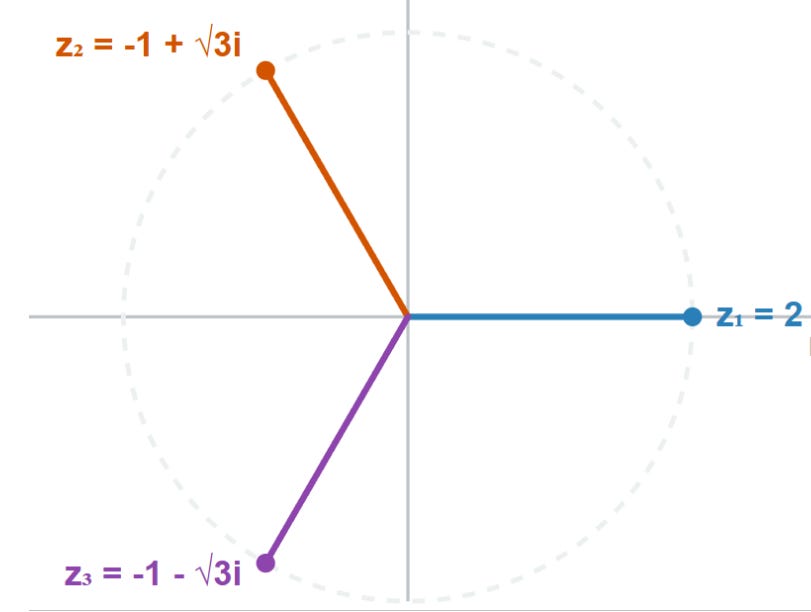
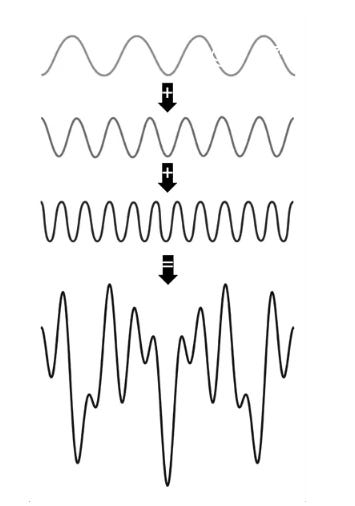
Disney’s involvement comes shortly after the entertainment behemoth hired Character.AI’s former CEO Karandeep Anand as chief technology officer, part of its growing push into AI. Anand’s tenure as Character CEO lasted just over a year and during that time he oversaw the company’s move into microdramas. Disney has previously complained that Character was damaging its brand and exploiting its intellectual property by allowing unauthorized chatbots of its characters, including sending cease and desist letters.

Along with Anand, Disney also said it expected “a number of Character.AI’s technical team” to join the company. The move resembles a kind of “acquihire” strategy that has become increasingly common in Silicon Valley as a means of hoovering up startups’ talent that sometimes leaves the original company struggling to survive. Character.AI has survived it once already — Google spent over $2 billion to hire away much of the company’s talent, including co-founders Noam Shazeer and Daniel De Freitas, in 2024.

Character said it expects the sale process to be completed by late November or early December and plans to continue operating its services, including paid subscriptions, in the meantime. However, the company warned that “the platform will be wound down” if a suitable bid does not emerge. “As we navigate this process, maintaining a safe and engaging experience for our community remains a top priority,” it said.

article

AI models can provably hide arbitrary capabilities

by sbulaev·▲ 273 points·137 comments·arxiv.org ↗

Capability evaluations aim to surface dangerous model behaviors before deployment, but their reliability depends on the assumption that hidden capabilities can be elicited. We show this assumption does not hold under adversarial conditions by constructing backdoor attacks that embed encrypted neural networks within host model weights, decrypting and executing them only upon receiving a secret trigger. Using digital lockers, these hidden circuits remain provably hard to elicit and interpret under cryptographic assumptions, even given full access to model weights, extending prior work from hiding fixed strings to arbitrary computations. We implement our proof of concept constructions in PyTorch and evaluate elicitation through fine-tuning, weight noising, gradient-based trigger search, and latent adversarial training on a small chemical reaction prediction task - a proxy for CBRN-relevant capabilities. Our results demonstrate resistance to these methods and, together with our cryptographic guarantees, reveal a limit of elicitation-based capability audits. We release our models to support the improvement of defenses.

article

Leaving Tech

by jonahx·▲ 174 points·186 comments·ryanbigg.com ↗

Leaving Tech

I’ve now applied for over 3 dozen jobs and I’ve heard back from 24 of them with a rejection. This tech market at the moment is so very cooked and for that reason I’m stepping away from tech.

I’ve been a developer for 20 years across more than just the Ruby and JavaScript that I’m known for. I’ve written books about programming, I’ve given talks and I’ve ran events. I maintain two of the most downloaded Ruby packages. And yes, I delivered the fuck out of value for shareholders. I also grew a team from 2 people to 12 people at my last job.

I cannot continue to put myself through this process of rejection. It is causing me a great deal of mental harm and anguish.

The industry at the moment wants people who know how to use AI to further the business goals but here’s the thing nobody wants to admit: not one person knows how to use AI to actually do that. I use it to write a lot of my code and then I critically review that code before it reaches production.

My life is based here in Warrnambool and I choose to work remotely from here. Hybrid is infeasible even if it were in Melbourne because Melbourne is 3.5hrs away on the train. I know I can work remotely effectively because I did it for the last 6 years. And I helped others adjust to that as well!

So it’s clear that there’s no room for me in tech anymore, so I’m going to chat to some people to figure out what’s next.

The Daily Front Page 23 of 28
Tuesday, October 13, 2026 The Daily Front No. #261013 — Infrastructure Watch
article

The United Kingdom generates less electricity per person than in the 1970s

by karakoram·▲ 251 points·337 comments·ourworldindata.org ↗

Line chart of total electricity generation per person in the United Kingdom (kilowatt‑hours) where generation rises from near zero in 1920 to a peak of about 6,700 kWh in 2003 and then declines to about 4,200 kWh in the latest year, lower than the roughly 4,300 kWh recorded in 1968. Data sources: UK DESNZ (2023) and Ember (2026). License: CC BY.

Globally, electricity generation per person has grown by more than 50% this century.

In the United Kingdom, things have moved in the opposite direction. Its generation per person peaked in 2003 and has fallen by more than a third since then.

You can see this in the chart, which shows generation per person since 1920. Today, levels are back to where they were in the late 1960s.

Some of that decline is a change in electricity imports, rather than demand: net imports have increased from 1% of electricity demand in 2010 to 9% in 2025. But it’s still true that the UK consumes much less electricity than it used to.

The most common explanation is deindustrialization: as the economy shifted from manufacturing to services, electricity demand fell. That’s part of the explanation, but far from all of it.

Sectoral data from the International Energy Agency confirms that electricity consumption in industry has fallen by one-quarter since 2005 (more if we calculate this per person). But residential and commercial electricity use has fallen by just as much.

Deindustrialization has reduced demand, but improvements in energy efficiency — such as the shift from incandescent to LED lightbulbs and the introduction of efficiency standards for appliances — have played an important role too.

Explore how electricity generation has changed in your own country

article

Cyberattack halts construction of tunnel between Denmark and Germany

by paaloeye·▲ 158 points·121 comments·ua.news ↗

Cyberattack halts construction of tunnel between Denmark and Germany — RMF24

Construction of a road-and-rail tunnel under the Fehmarn Belt strait, intended to connect Denmark and Germany, has stopped due to a cyberattack. The incident affected the international FLC consortium carrying out work on the project, RMF24 reports.

Equipment and workers’ access blocked

As a result of the attack, workers’ identification cards stopped functioning. Vessels, cranes and platforms used for offshore work were also immobilized. According to Danish media, construction work has therefore been completely halted.

The FLC consortium employs around 2,800 people in total from companies in Denmark, Germany, France, Belgium and the Netherlands. There is a significant number of Poles among the workers at the site.

Details of the attack are being established

Representatives of the investor company Sund & Baelt confirmed that they are discussing the situation with the contractor. It has not yet been established who exactly is behind the cyberattack or how long it will take to eliminate its consequences.

Henning Mortensen, head of the Danish Council for Digital Security, did not rule out a connection between the incident and hybrid warfare. In recent weeks, Danish services have warned of possible cyberattacks from Russia and raised the threat level to high.

The 18-kilometer tunnel is being built from 89 concrete elements, which are transported and connected at sea using digital software. The project’s cost is estimated at approximately €7 billion. Its opening was initially planned for 2029, but possible delays had already been reported earlier.

The Daily Front Page 24 of 28
Tuesday, October 13, 2026 The Daily Front No. #261013 — Infrastructure Watch
article

Hittite royal archive found in Turkey

by benbreen·▲ 348 points·83 comments·thehistoryblog.com ↗

Archaeologists have uncovered a royal archive of cuneiform tablets in the ancient Hittite city of Samuha, modern-day Sivas, central Turkey. This year’s excavation unearthed 131 cuneiform tablets and fragments which record an epidemic of fever, military logistics, religious practices and events of royal daily life 3,400 years ago. Last year’s excavation uncovered 53 cuneiform tablets and fragments, so this season’s discoveries more than triple the number of texts. It is now the largest, most comprehensive archive of Hittite-language documents found in the 21st century.

The records date to the reign of King Tudhaliya II, and are written in Hittite and Hurrian. One text tells of a fever epidemic that struck the infant daughter of the king. She was still a nursing baby when she became ill. She never recovered from the fever and her health declined precipitously until she passed away. The cuneiform tablet records the funerary ritual that followed.

The health of the princes and princesses, not just babies but even up to adulthood, was an important focus of the records. The children of high-ranking imperial officials were given the same attention. Because illness was considered an expression of divine will, religious leaders performed many rituals to keep an eye on the physical health of the children of kings and government officials.

Another notable document is a letter from Hittite generals in western Anatolia appealing to the king for reinforcements in men, horses and chariots to fend off enemy forces. The generals’ warnings are dire. They plead that without an infusion of strength, the army would be destroyed by the enemy. They have the temerity to disclaim all responsibility for any upcoming failures if the reinforcements don’t come.

It’s a rare glimpse into the realities of military logistics with armies long distances from the king and court. The text also confirms that the king was at Samuha when the letter arrived, underscoring the city’s political importance. It was a royal stronghold for King Tudhaliya during times of military and political upheaval. His successor Suppiluliuma I used it as a launching pad for military campaigns that consolidated and expanded the territory of the Hittite Empire.

Samuha was also a major center of religious administration. Its patron deity was the goddess Sauska, goddess of love and war who was the Hurrian version of Ishtar and the most important goddess in the Hurrian pantheon. The association with the goddess was central to the city’s identity and was reflected in its religious ceremonies.

One tablet records the journeys of bird diviners who left Samuha and traveled through different regions. Their routes, the cities where they stayed and the birds they observed were recorded in a format resembling a diary. The documents also provide previously unknown information about how bird omens were observed, evaluated and interpreted by the Hittites.

The archive includes texts covering divination, correspondence, rituals and prayers, offering researchers new material for studying Hittite religious practices as well as the development of the Hittite language and scribal culture.

The Daily Front Page 25 of 28
Tuesday, October 13, 2026 The Daily Front No. #261013 — After the Feed
show hn

Show HN: Guitoro, a virtual guitar you strum with your keyboard

by talccc·▲ 359 points·97 comments·guitoro.com ↗

Steel-string acoustic guitar, seen from above

The most realistic virtual guitar online

What is Guitoro?

Guitoro is the most realistic and the most complete virtual guitar you can play online, free in your browser. Play it with your computer keyboard, your left hand on the chords and your right hand strumming, or swipe the strings with your finger on a phone or tablet. Choose a steel-string acoustic, a classic guitar, an electric guitar or a four-string bass.

It's also a way to learn chords and songs that a chord chart or a video lesson can't show you. Each song plays its best-known part close to the original recording, stroke for stroke. Slow it down to 20% and watch it being played: each string lights up the moment it's hit, the pick swings down and up with the strum, and the neck shows which finger goes where.

Then it's your turn. No guitar? Play the song on the keys or the screen, and it waits for you at every chord change. Have a guitar? Pick it up and play along at your own speed, with the strings, the strum and the fingering right in front of you.

Every guitar and bass note is a recording of a real instrument. There's nothing to download and no account to create. If you played the Google guitar doodle, Guitoro takes the idea further: six real strings, 15 chords in every key, and 51 songs to play along with.

Start playing How you learn with it

  • 4 instruments
  • 15 chords in every key
  • 51 songs to play along with
  • 20% slowest song speed
  • 56 strum and picking patterns
  • 15 drum styles

Play guitar with your keyboard or your fingers

No guitar needed. Guitoro is built to be played, not just clicked, on whatever you have in front of you.

  • Computer keyboard

    Your left hand holds a chord on the letter keys and your right hand strums with H and J, the way you'd play a real guitar. 15 chords sit under your fingers, plus keys for arpeggios, single strings, chucks and palm mutes.

  • Touch screen

    On a phone or tablet, tap a chord pad and swipe the strings with your finger. Up to five fingers at once, and you can tap the frets on the neck to play single notes.

  • Mouse

    Drag across the strings. A fast swipe plays louder, a slow drag rolls the notes one by one, and a click plucks a single string.

  • Melodies in Solo

    On a computer, switch to Solo and every keyboard row becomes a string and every column a fret, with bends and vibrato on the arrow keys.

See every string and every stroke, as slowly as you need

In a video lesson the hand moves fast and hides the strings, so you can't tell which ones were really hit. Guitar apps teach the basic chords and stop there. Guitoro plays the song's real part on the guitar in front of you, at the speed you choose, and shows exactly what the hands do. Then you play it, on the virtual guitar or on your own.

  • Played like the record

    Each song plays its best-known part close to the original recording, stroke for stroke. Slow it anywhere from 20% to full speed and the chords, the strum and the band slow down together.

  • See which strings are hit

    Each string lights up the moment it sounds, then vibrates as it rings. You can see whether a stroke hits all six strings, just the bass strings or only the top three.

  • Watch the strumming hand

    Over a strummed part, the pick swings down and up like a real strumming hand, once per step of the pattern. Solid swings hit the strings and faint ones miss them, so you see the hand keep moving through the gaps.

  • Fingers on the neck

    While a chord rings, the neck shows it: finger numbers from 1 to 4, barres, muted strings and the capo. Copy the shape onto your own guitar.

  • No guitar? The song waits for you

    Play a song's chords on the keys or the screen and it follows you. The keys show its chords in order, the next one lights green, and the song holds until you play it. No score and no rush.

  • Have a guitar? Play along

    Watch a part slowly, copy it on your guitar, then play along as you raise the speed. On a computer, choose My guitar: the on-screen keys step aside and the song box shows the strum or picking pattern, a chord strip you can click to jump around, and the speed.

Why it sounds and feels like a real guitar

Most online guitars only let you click single strings or frets, or play a synthesized tone when you click a chord. On Guitoro you strum: swipe across the strings or use the keys, and every string sounds as you cross it, from recordings of real instruments.

  • Recorded, not synthesized

    Every guitar and bass note is a recording of a real instrument: a steel-string acoustic, a classic guitar with nylon strings, a solid-body electric on its bridge pickup, and a four-string bass.

  • Strums follow your hand

    Each string sounds as your finger or mouse crosses it. Swipe down or up, fast or slow, and you hear the difference, down to a slow roll across the strings.

  • Real chord shapes

    Chords use the shapes guitarists play, with open strings, barres and muted strings, so a G sounds like a G on a guitar, not on a keyboard.

  • Guitar techniques

    Chucks, palm mutes, hammer-ons, pull-offs, bends and vibrato, while the strings vibrate on screen as they ring.

What people use it for

  • Playing without a guitar

    Strum real chords and play whole songs with your computer keyboard or your fingers, with a backing band behind you. On a train, at the office or on the sofa, a laptop or a phone and headphones are enough.

  • Learning real songs

    Songs like Wonderwall, Hallelujah and Let It Be come set up with the right key, capo, tempo and the strum from the record. Lead the chords from the keys, or pick up your own guitar and play along at any speed.

  • Getting a strum right

    Slow a song's strum down, watch which way the pick moves on every beat, then strum it yourself over a drum beat until it feels steady.

  • Learning their first chords

    See where each finger goes, hear how the chord should sound, then copy the shape on a real guitar. Every chord also has its own page in the guitar chord chart.

  • Checking a chord chart

    Paste the chords of a song from a chord site and hear how it goes before you sit down to play it.

  • Writing a song

    Type a chord progression under My songs, loop it with the backing band, and record the idea before it's gone.

  • Teaching

    Show a class a chord shape or a strum on a big screen, slowed down, with every string and every pick stroke visible.

  • Other musicians

    Singers, keyboard players and songwriters can hear how guitar chords are voiced and see how a progression lies on the fretboard, without learning to hold a guitar first.

Everything in the app

The most complete virtual guitar online: four instruments, every key, real chord shapes, songs, a backing band and recording, all free in one place.

  • Four real instruments

    Steel-string acoustic, classic guitar, electric and four-string bass, each built from recorded samples. Pick a recording for the acoustic (Warm, Bright or Mellow) and the classic (Natural or Concert), and presets for the electric, from Clean to Crunch, Classic Rock, Metal, Lead and Ambient.

  • 15 chords in every key

    Pick any of the 24 major and minor keys and the chord keys fill with the chords that fit it: the main chords, sevenths, and sus, add9 or sus2 colors. Edit puts any chord you type, like F#m7 or Dsus2, on a key.

  • Chord shapes on the neck

    While a chord rings, the neck shows finger numbers, barres, muted strings and the capo. Standard is the shape most players learn first, Easy swaps a barre chord for a smaller shape, and Up plays the same chord higher up the neck.

  • Songs at any speed

    51 songs and classical pieces come set up to play, from Wonderwall and Hotel California to Canon in D. Slow them to 20%, lead their chords from the keys, or play along on your own guitar.

  • 56 strum and picking patterns

    14 everyday strums from Steady downs and the pop staple D DU U DU to shuffle and 6/8, 4 styles (reggae, funk and country), 26 more rhythms drawn from real songs, and 12 picking patterns like Travis and classical p-i-m-a. Choose one and you hear it straight away.

  • A backing band

    Drums, bass and strings that follow your chords: 15 drum styles, including rock, funk, reggae, bossa nova and cajon, and 25 bass lines. The Band switch next to Play turns them on. Tempo goes from 10 to 220 BPM, with a metronome.

  • Your own songs

    Paste a song from a chord site or as ChordPro text, pick a strum, and Guitoro plays it with the band. Write "x2" to repeat a line or a part. Lyrics are left out, and your songs stay in your browser.

  • Solo mode

    Play single notes and melodies on the neck from the computer keyboard, with hammer-ons, pull-offs, bends and vibrato.

  • Amp & FX

    Overdrive, distortion and fuzz on the electric, plus bass, mid and treble, room or hall reverb, and delay on every instrument.

  • Tunings and capo

    10 tunings, from Standard, Drop D and half step down to DADGAD and Open G, D and E, a capo up to fret 10, and a left-handed guitar.

  • Record and export

    Record takes of up to 10 minutes with the band, replay them and save them as WAV or a small compressed file. Takes stay in your browser.

  • Online tuner

    A free guitar tuner that listens through your microphone, with pages for drop D, open tunings, the bass and the ukulele.

How to use Guitoro

From silence to a song you lead yourself. The first two steps take a few seconds.

  1. Choose an instrument

    Pick Acoustic, Classic, Electric or Bass at the top of the page. On a phone, tap the guitar picture. You can switch at any time.

  2. Pick a chord

    Tap a chord pad, or press its letter on the keyboard. The default key is G major, so the middle row, A S D F G, holds G, C, D, Em and Am. Auto strum starts on, so the chord strums itself.

  3. Strum it yourself

    Turn Auto off, then swipe down across the strings for a downstroke and up for an upstroke. On a keyboard, H strums down and J strums up.

  4. Choose a pattern

    Open the Strum menu and pick a strum or picking pattern. You hear it once on your chord. With Auto and Loop on, it keeps playing while you hold a chord key.

  5. Play a song

    Open Songs & recordings and pick a song. Press Play to hear it, or press the chord key that lights green to lead it yourself. The tempo button next to Play slows it down.

  6. Add a band

    Turn on the Band switch next to Play. Its edit button opens Backing band, where you choose the drums, the bass line and the strings.

  7. Record a take

    Open Songs & recordings, choose Recordings, and press Record. Play, then use Stop next to the recording timer. Your takes stay in Recordings.

Play guitar with your computer keyboard

Your left hand holds the chords and your right hand strums, just like on a guitar. Keys follow their physical position on a US QWERTY keyboard, and every key on screen shows its letter.

Chords: Three rows of five: A to G for the main chords, Q to T for sevenths, Z to B for more chords and colors like sus4 and add9.

Strum: H down, J up, K down when pressed and up when released, N hard down, M slow down.

Pick: Y arpeggio, U bass note, I O P the top three strings.

Feel: L chuck, ; palm mute, Shift hard strum, Alt slow strum.

Songs: The chord keys show the song's chords in order and the next one lights green. With My guitar on, Space plays and pauses the song.

Solo mode: Each row is a string and each column a fret. Left and Right arrows move up and down the neck, Up bends, Down adds vibrato.

How to learn guitar chords with Guitoro

  1. Start with G, C, D and Em

    In the key of G these four chords sit on the middle row of keys, and together they play hundreds of pop and folk songs. Press each one and watch the neck: the numbers are your fingers, from 1 for the index to 4 for the little finger. An X marks a string you don't play, and a bar across the strings is a barre.

  2. Listen to the difference

    Play C, then Am. The chord name above the guitar tells you which is major and which is minor, and your ear learns the bright and the sad sound. Do the same with the sevenths on the top row.

  3. Copy the shape on a real guitar

    Put your fingers where the dots are, strum, and compare your sound with Guitoro's. A buzzing or dead string usually means a finger is too far from the fret or touching the next string. Many barre chords have an Easy version for while your hand gets stronger.

  4. Change chords in time

    Open Songs & recordings and pick a song, or paste one under My songs. Press each chord key as it lights green: the song waits for you at every change. Start slow, then raise the speed a little at a time.

  5. Try other keys, the capo and tunings

    Switch the key to hear the same chords higher or lower, or in a minor key. Put a capo on in Settings and the same shapes sound higher, which is how guitarists play in keys like A or B with easy open chords. Drop D and Open G show how a tuning changes the whole sound.

Low E string on the left. Numbers are fingers, O is an open string, X is a string you don't play.

How to learn strumming patterns

Strum patterns are written with D for a downstroke and U for an upstroke, and x for a muted chuck. The trick is to keep your hand moving down on every number and up on every "and", even when it misses the strings. In Guitoro you can watch the pick do exactly that.

The pop staple D DU U DU

Counted "1, 2 and, and, 4 and": the down on beat 3 is left out, but the hand still moves.

  1. Listen first

    Choose a pattern from the Strum menu and you hear it once on your chord. The menu shows each pattern as a grid of downs and ups.

  2. Watch it slowly

    Open a song with the strum you want and slow it to 50% or less. The pick swings down on the numbers and up on the "and"s: solid when it hits the strings, faint when it misses. The strings light up to show which ones each stroke hits.

  3. Play it yourself

    Turn Auto off, turn on the Band switch or the metronome, and strum along with H and J or by swiping the strings.

  4. Record and listen back

    Record a take and listen for uneven strokes. When it sounds steady, speed up.

  5. Build up in order

    Steady downs, then Down-up eighths, then the pop staple, then 6/8 ballad and Shuffle. After that, open songs like Wonderwall, Hallelujah and Knockin' on Heaven's Door and strum their own patterns.

Play along with a song

Each song page has its chords with diagrams and its strum or picking pattern written out, and sets the guitar up for you: key, capo, tempo and chords. The easy guitar songs page groups them by how many chords they have.

Tools

Playing a real guitar along? The free online guitar tuner listens through your microphone, with pages for drop D, half step down and open tunings. There is a free ukulele tuner too.

Guitar chords

Every major, minor and seventh chord in all 12 keys, with finger charts and an easier version where there is one: the guitar chord chart. Search any chord there, hear it strummed, and open it on the guitar.

Questions

Is Guitoro free?

Yes. It runs in your browser with no download and no sign-up.

How is it different from a video lesson?

A video shows a teacher's hand from one angle, at one speed, and the hand hides which strings it hits. Guitoro plays the song's part close to the original recording on a guitar you can see whole: each string lights up as it's hit, the pick shows every down and up stroke, and you set the speed. Then you play it yourself and the song waits for you.

Which songs can I play?

51 songs and classical pieces, from Wonderwall, Hotel California, Let It Be and Perfect to Canon in D and Für Elise, each with its key, capo, tempo and strum or picking set up. See them all on the easy guitar songs page, or paste your own from a chord site.

Does it work on phones and tablets?

Yes. Tap a chord pad and swipe the strings. In portrait, the enlarged neck sits below the strings with four frets per page. In landscape, the neck and strings sit side by side. Tap the frets to play single notes. Solo mode and My guitar need a computer.

Can I play guitar with my computer keyboard?

Yes. The left side of the keyboard holds 15 chords and the right side strums, picks and mutes. See the table above.

How do I slow a song down?

Press the tempo button next to Play and drag the speed, from 20% to full speed. The chords, the strum, the pick on screen and the band all slow down together.

Can Guitoro teach me to play a real guitar?

Yes, as a guide next to your guitar. It shows you what to play and how it should sound: the chord shapes and fingers, which strings each stroke hits, which way to strum, and whole songs at any speed. Watch it slowly, copy it on your guitar, then play along. It can't hear you or check your hand, so listen to yourself and compare with Guitoro.

Can I play along on my own guitar?

Yes, on a computer. Pick a song and answer "Yes, my guitar", or switch to My guitar at the top of the page. The on-screen keys step aside, the speed goes down to 20%, and Space starts and stops the song. Tune up first with the online tuner.

Why can't I hear anything?

Browsers only start sound after you touch the page, so tap a chord pad or a string first. Then check the device volume and the tab's sound. Bluetooth headphones can add a delay, and wired headphones or speakers fix it.

Where are my songs and recordings saved?

In this browser, on this device. Export the takes you want to keep as WAV or a compressed audio file before you clear browser data or switch devices.

The Daily Front Page 26 of 28
Tuesday, October 13, 2026 The Daily Front No. #261013 — Also on the Front Page
The Daily Front Page 27 of 28
Tuesday, October 13, 2026 The Daily Front No. #261013 — Colophon

That's the Front for Today

Issue No. #261013 — Tuesday, October 13, 2026 — went to press 2026-10-14 at 05:02 UTC.

About This Magazine

The Daily Front is a daily digital magazine assembled from the stories that reached the front page of Hacker News on Tuesday, October 13, 2026. Headlines, points, and comment counts are recorded as they stood at press time. All articles remain the property of their original authors — every piece links back to its source and its discussion thread.

How It Was Made

Fetched, cleaned, and typeset by an automated pipeline. An editor model laid out the pages and chose the highlights; a second read a handful of the day's stories and briefed the cover illustrator — 33 model calls and 328k tokens in total. Set in Jacquard 12, Playfair Display, Source Serif 4, and IBM Plex Mono, all served via Google Fonts under the SIL Open Font License.

The Cover

The cover illustration was commissioned with this prompt:

In a lived-in living room, a game designer kneels beside a coffee table, guiding a small wheeled robot through a cardboard maze while a large domestic screen shows the same room transformed into a precise physics simulation. On the floor, a transparent trail of duplicate robot paths converges toward a tiny virtual doorway. Behind the sofa, an overworked tower of cooling fans feeds the screen, while the designer’s hand hovers over a single physical switch, deciding whether the machine continues.

Render the supplied living-room tableau as a gallery-scale projection-mapped installation photograph: preserve every described action, object, and spatial relationship, with the screen’s room-sized physics simulation precisely aligned to the real room and the duplicate robot paths converging visibly toward the virtual doorway. Use a 24mm tilt-shift lens and elevated gallery viewpoint; carve forms with sharply cut projected blocks of electric cyan, signal orange, and ultraviolet violet against near-black unlit negative space, keeping the hovering hand and single switch as the decisive visual focal point.

Absolutely no text, letters, numbers, readable symbols, or logos anywhere in the image. Keep the main image subject primarily below the upper 10% of the composition, where a title may be overlaid; the scene may extend naturally underneath that title area.

Production Ledger

StageModelCallsTokens InTokens Out
extractgpt-5.6-luna 29 202,202 101,792
layoutgpt-5.6-terra 1 18,626 1,840
covergpt-5.6-luna 2 1,621 462
covergpt-image-2.5-flare 1 261 1,372

The Publisher

Published by Johnny.

Support the Press

If The Daily Front brightens your morning, consider supporting its publisher.

Credits & Contact

All content — articles, posts, comments, and the images within them — belongs to its original authors and is reproduced here to point readers back to the source. Full credit goes to those creators; every item links to its original and its Hacker News discussion.

If you are an author and would like your content removed from an issue, write to hi@johnnys.page and it will be taken down.

Feedback is always welcome at the same address: hi@johnnys.page.

Credit where credit is due.

Every page of this issue began as someone else's work — these are the original sources, linked in full.

  1. Gemini 4 Argon by 737max — deepmind.google·HN discussion ↗
  2. Apple HomeView by etothet — apple.com·HN discussion ↗
  3. Redesigning source control at Anthropic by Philpax — anthropic.com·HN discussion ↗
  4. 11 year old unsoundness bugs found in Rust borrow checker by formerly_proven — github.com·HN discussion ↗
  5. OpenAI engineer arrested in bugging of executive conference room by forthwall — sfstandard.com·HN discussion ↗
  6. New Apple TV 4K by corvad — apple.com·HN discussion ↗
  7. I posted to HN, and then my website was flooded with AI bot traffic by sammy0910 — sammystraus.com·HN discussion ↗
  8. Gemini 4 Argon for Robotics by xnx — developers.googleblog.com·HN discussion ↗
  9. A look at the math that OpenAI claims computes faster Fourier transforms by mochomocha — argmin.net·HN discussion ↗
  10. How to engineer an AI harness for game development by kkukshtel — kylekukshtel.com·HN discussion ↗
  11. Show HN: SolidCraft – Open-Source Parametric CAD in Rust (With MCP Support) by bherbruck — github.com·HN discussion ↗
  12. A Visual Intro to Complex Numbers by surprisetalk — photonlines.substack.com·HN discussion ↗
  13. Threat of AI share crash puts world financial stability at risk, says IMF by novaRom — theguardian.com·HN discussion ↗
  14. Crypto thieves sell hardware wallets with secret eSIM by qwertox — heise.de·HN discussion ↗
  15. Firefox Enterprise by recvonline — firefox.com·HN discussion ↗
  16. Thunderbird for iOS by mjorgers — blog.thunderbird.net·HN discussion ↗
  17. Apple's new 'Switch to Safari' campaign details why you should ditch Chrome by ivell — 9to5mac.com·HN discussion ↗
  18. We turned EmbeddingGemma 2 into a speech-to-text model by amrrs — eg2.haku.sh·HN discussion ↗
  19. A Dynamic and Distributed Virtual GPU Cloud Built on Idle Apple Silicon Devices by acossta — machinelearning.apple.com·HN discussion ↗
  20. Show HN: Use your OpenAI subscription to create audiobooks by janpmz — pdftomp3.com·HN discussion ↗
  21. Character.ai has initiated voluntary Chapter 11 bankruptcy by nryoo — blog.character.ai·HN discussion ↗
  22. Character.ai Files for Bankruptcy by yanis_t — theverge.com·HN discussion ↗
  23. AI models can provably hide arbitrary capabilities by sbulaev — arxiv.org·HN discussion ↗
  24. Leaving Tech by jonahx — ryanbigg.com·HN discussion ↗
  25. The United Kingdom generates less electricity per person than in the 1970s by karakoram — ourworldindata.org·HN discussion ↗
  26. Cyberattack halts construction of tunnel between Denmark and Germany by paaloeye — ua.news·HN discussion ↗
  27. Hittite royal archive found in Turkey by benbreen — thehistoryblog.com·HN discussion ↗
  28. Show HN: Guitoro, a virtual guitar you strum with your keyboard by talccc — guitoro.com·HN discussion ↗
  29. CFTC Staff Were Told to Retract Analysis of Suspicious Oil Trades by helsinkiandrew — bloomberg.com·HN discussion ↗
  30. China Overtakes U.S. For First Time as Top Spender on R&D in 2024 by mushstory — japannews.yomiuri.co.jp·HN discussion ↗

Browse all issues in the archive →