Cover illustration

TheDaily Front

Issue No. #260827 Thursday, August 27 2026 #260827 — THURSDAY, AUGUST 27, 2026
Silicon buys the model hub while the machines learn to mind the shop.
Thursday, August 27, 2026 The Daily Front No. #260827 — Contents
30stories
11,227points
5,355comments
259kllm tokens
Assembled with 30 model calls — 183,642 tokens read, 75,739 written.

Highlights

Nvidia agrees to acquire Hugging Face for $13B

Nvidia’s reported $13 billion pursuit of Hugging Face raises fresh questions about the future of the open-model commons.

Saving 100 terabytes of memory by optimizing 1.1.1.1's DNS cache

Cloudflare recounts the painstaking cache engineering that reclaimed 100 terabytes at DNS scale.

Microduck

A $399 open-source biped offers a small but unusually playful entry point to sim-to-real robotics.

Suica, Japan's First IC Transit Card

The story of Suica explains why Japan’s quick, batteryless transit tap remains an engineering marvel.

Aphantasia Beginner's Guide

A guide to aphantasia prompts hundreds of readers to compare notes on the strange varieties of mental imagery.

From the Editor

The machine desk is overflowing: models are getting smaller, platforms are getting larger, and somebody has built an executive suite to automate the executive suite. Elsewhere, the old crafts endure—cache tuning, transit cards, mechanical movements, and games rescued from obsolete silicon.

  1. Nvidia agrees to acquire Hugging Face for $13B3
  2. CEO fired developers to make room for AI. Developers create open source AI CEO4
  3. Saving 100 terabytes of memory by optimizing 1.1.1.1's DNS cache5
  4. Microduck6
  5. Small Models Have Arrived7
  6. Gemini-3.5-Transcribe8
  7. Gemini Omni 1.1 Flash9
  8. Suica, Japan's First IC Transit Card10
  9. Decompiling a Nintendo 64 game in 84 days11
  10. US Government designates host of noblogs.org a "global terrorist"12
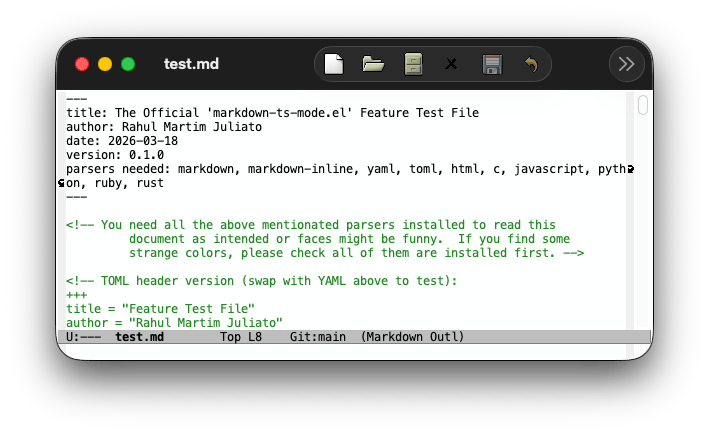
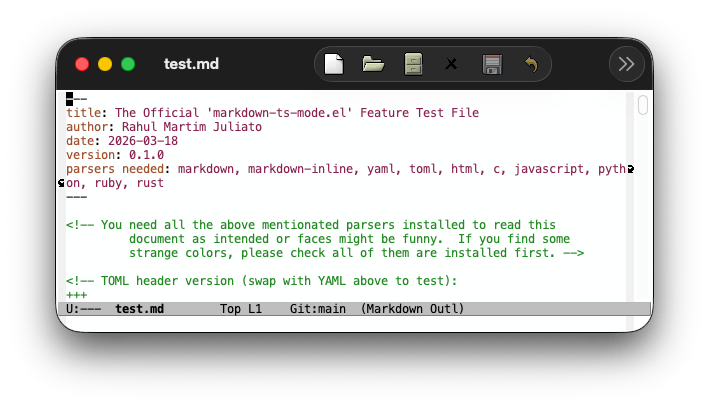
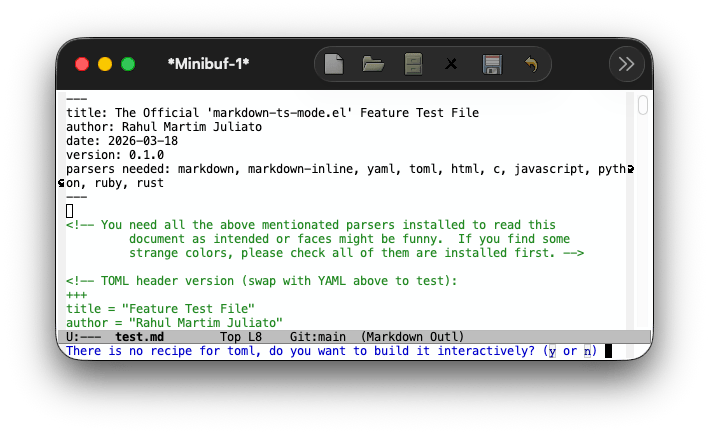
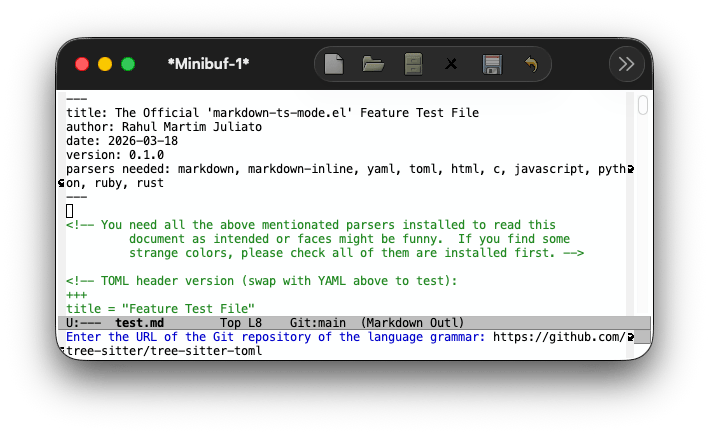
  11. Emacs 31: An unofficial guide to Markdown-ts-mode13
  12. Show HN: OpenTIE and OpenXWA, Modern Ports of Tie Fighter and X-Wing Alliance14
  13. Aphantasia Beginner's Guide15
  14. Meta Paid $17B – Gets to Write Safety Rules for Other SocMedia Platform16
  15. MIT's Ad Hoc Committee on AI Use in Teaching, Learning, and Research Training17
  16. 507 Mechanical Movements18
  17. Show HN: We built open OpenRouter that turns usage into a better model18
  18. M5Stack Launches PaperMono18
  19. CoMaps integration with the wider FLOSS ecosystem18
  20. Afterglow: Run classic After Dark screen savers on modern macOS18
  21. Trade (and Tariffs)19
  22. Tell HN: PayPal blocks GrapheneOS19
  23. Two German airport workers die of malaria after 'mosquito arrives on plane'20
  24. Xcancel and Nitter have been taken down21
  25. Flock CEO gets his house blurred out on Google Maps and Zillow22
  26. Show HN: The load-bearing vocabulary of Claude23
  27. Kusama Yayoi has died23
  28. We found a division by zero bug in FFmpeg with a vibecoded fuzzer23
  29. Doctors are finally learning to manage antidepressant withdrawal23
  30. Show HN: Voronoi Go23
The Daily Front Page 2 of 24
Thursday, August 27, 2026 The Daily Front No. #260827 — The Model-Market Deal
article

Nvidia agrees to acquire Hugging Face for $13B

by mfiguiere·▲ 1,903 points·882 comments·businessinsider.com ↗
Nvidia has been in talks to acquire Hugging Face for more than $13 billion

Nvidia CEO Jensen Huang in profile

Nvidia CEO Jensen Huang Bloomberg/Getty Images

Nvidia has been in talks to acquire Hugging Face, the popular AI platform for sharing and building with open-source models, in what could be one of the chip giant's biggest deals yet.

The two parties have had acquisition conversations in recent weeks about a deal that would value Hugging Face at more than $13 billion, according to a person familiar with the matter. The companies have not yet reached a deal, and the talks could still fall apart, the person said. Business Insider on Sunday was the first to report that Hugging Face was fielding takeover interest.

Nvidia and Hugging Face did not respond to requests for comment.

Nvidia has increasingly ramped up dealmaking with its enormous cash pile. The company said Wednesday that it has $18 billion committed to equity investments for the rest of its fiscal year, on top of $47.9 billion it already holds in private companies.

Microsoft also met with Hugging Face, but the person familiar and a second person said talks are not ongoing.

Nvidia already has a relationship with Hugging Face. The chipmaker participated in its $235 million funding round in 2023 that valued it at $4.5 billion.

Hugging Face turned down a $500 million investment offer from Nvidia late last year that would have valued it at $7 billion, the Financial Times previously reported. Hugging Face said at the time it did not want a dominant investor that could sway decisions.

Hugging Face sits at the center of the open-source AI ecosystem, hosting millions of AI models and datasets that developers can build on. Owning the platform could give Nvidia a bigger foothold with those developers — and potentially drive more workloads onto its chips.

Hugging Face was founded in 2016 by French entrepreneurs Clément Delangue, Julien Chaumond, and Thomas Wolf.

But Nvidia ownership could also complicate one of Hugging Face's strengths: its neutrality. The platform supports models and hardware from across the industry, including Nvidia competitors such as AMD and Intel.

The Daily Front Page 3 of 24
Thursday, August 27, 2026 The Daily Front No. #260827 — The Automated Corner Office
repository

CEO fired developers to make room for AI. Developers create open source AI CEO

by GrumpySciGuy·▲ 978 points·676 comments·github.com ↗
★ 1,775⑂ 123 forks Python

AI-powered virtual executive team — a single coherent executive persona backed by 8 specialist Claude agents (FastAPI + Next.js).

CI License: Apache 2.0 Python 3.11+ Next.js 15

An AI system that acts as your company's virtual executive team — a senior advisor with Harvard MBA-level knowledge, customized for your specific business.

Demo

Open Executive demo video

A walkthrough of Open Executive in action — watch on YouTube.

What It Does

Developed by sentelabs.ai Open Executive provides a single coherent executive voice backed by eight specialist AI agents:

  • Chief Strategy Officer — competitive analysis, M&A, market positioning, OKRs
  • Chief Financial Officer — financial modeling, fundraising, unit economics, cash flow
  • Chief HR/People Officer — hiring, compensation, performance, culture
  • General Counsel — contracts, IP, employment law basics, compliance
  • Chief Operating Officer — process design, vendor management, operational scaling
  • Chief Marketing Officer — GTM strategy, brand, communications, PR
  • Chief Product Officer — roadmap, prioritization, product strategy
  • Board Communications Director — board decks, investor relations, governance

All responses come from one consistent executive voice. The internal agent architecture is never exposed to the user. Beyond Q&A, the system maintains episodic memory of past decisions and initiatives across sessions, and a built-in scheduler can proactively surface follow-ups and time-sensitive actions.

Architecture

User message
    ↓
Executive Orchestrator (claude-sonnet-4-6)
    ↓ tool use → parallel specialist calls
CSO / CFO / CHRO / GC / COO / CMO / CPO / Board
    ↓ each specialist retrieves relevant context from ChromaDB
Built-in MBA knowledge + Your company documents
    ↓
Synthesized executive response

Knowledge — Two retrieval layers per specialist call: (1) built-in MBA-level Markdown (knowledge/builtin/, git-tracked) seeded into ChromaDB at startup, and (2) your uploaded company documents chunked and stored in a separate company_docs collection. RAG context is injected into the user turn, never the cached system prompt.

Episodic memory — After every response, a background claude-haiku-4-5 pass extracts key decisions, initiatives, and advice into SQLite. The next session opens with a <past_decisions> block so the Executive remembers what it recommended last month.

Scheduler — A built-in job runner claims due actions via UPDATE … RETURNING to prevent double-firing. The API must run as a single instance; do not horizontally scale it without gating the scheduler first.

Prompt caching — The system prompt is structured so the Executive persona, company profile, and knowledge index are cached separately (up to 85% cache hit rate after the first few turns). No dynamic content ever goes in a cached block.

See docs/architecture.md for the full design.

Tech Stack

Layer Choice
LLM backbone Anthropic Claude API
Default model claude-sonnet-4-6 (Executive + most specialists)
Deep reasoning claude-opus-4-7 (CSO, CFO, GC, Board — with extended thinking)
Backend Python 3.11 + FastAPI
Package manager uv
Vector store ChromaDB (local, embedded)
Episodic memory SQLite
Web UI Next.js 15 (App Router) + Tailwind
License Apache 2.0

Repo Layout

openexecutive/
├── packages/
│   ├── core/
│   │   └── openexecutive/
│   │       ├── orchestrator/     # Executive persona + routing loop
│   │       ├── agents/           # 8 specialist agents
│   │       ├── knowledge/        # ChromaDB store + RAG pipeline
│   │       ├── memory/           # Company profile + episodic memory
│   │       ├── onboarding/       # Wizard state machine + profile builder
│   │       ├── prompts/          # Persona + domain prompts + cache manager
│   │       ├── api/              # FastAPI app + routes
│   │       ├── integrations/     # Slack, Email, Telegram, Google Chat, Discord
│   │       ├── scheduler/        # Background job runner (single-instance)
│   │       ├── alerts/           # Proactive alert system
│   │       ├── audit/            # Audit logging
│   │       ├── architecture/     # Internal architecture utilities
│   │       ├── workflows/        # Multi-step workflow definitions
│   │       └── cli.py            # Click CLI
│   └── ui/                       # Next.js 15 web UI
├── evals/                        # Eval scenarios + LLM-as-judge runner
├── fixtures/                     # Demo company fixtures (profiles, docs, rosters)
├── scripts/                      # Operator scripts (Fly secrets, Google auth)
├── docker/                       # Dockerfile(s) + docker-compose.yml
├── fly.api.toml / fly.ui.toml    # Fly.io configs — dev API + UI apps
├── fly.api.qa.toml / fly.ui.qa.toml  # Fly.io configs — QA API + UI apps
├── fly.honcho.toml               # Fly.io config — Honcho memory app (optional)
└── docs/                         # Architecture + deployment docs

Quick Start

# Clone the repo
git clone https://github.com/SenteLabsAI/OpenExecutive.git
cd OpenExecutive

# Set your Anthropic API key
cp .env.example .env
# Edit .env and add ANTHROPIC_API_KEY=sk-ant-...

# Start everything
make dev

Open http://localhost:3000 to start chatting with your executive. The API runs on port 8000 and the UI on 3000.

First run: requires Python 3.11+ and Node 22+. The initial uv sync pulls heavy ML dependencies (ChromaDB + sentence-transformers/PyTorch), and the first boot downloads a small embedding model (~90 MB) to build the local vector index — so the first make dev takes a few minutes before the app is ready. Subsequent starts are fast.

For contributors not using make:

cd packages/core
uv sync
source .venv/bin/activate
uvicorn openexecutive.api.main:app --reload --port 8000

# In a second terminal
cd packages/ui && npm install && npm run dev

Run the Discord Bot

  1. Create a Discord application at https://discord.com/developers/applications
  2. Enable the Message Content privileged intent (Bot → Privileged Gateway Intents)
  3. Invite the bot with bot + applications.commands scopes
  4. Set env vars in .env: DISCORD_BOT_TOKEN, DISCORD_APP_ID, DISCORD_GUILD_IDS
  5. Run the API normally — the bot starts as part of the FastAPI lifespan when DISCORD_BOT_TOKEN is set:
make dev

The bot is embedded in the API process (alongside the email poller, scheduler, and resumer) so it shares the same SQLite database and ChromaDB vector store under /data in production. Skip the token to disable.

For iterating on bot-only code without restarting the API, make discord runs the bot as a standalone process against the same local DB.

Users can DM the bot, @mention it in a channel (replies in a thread), or use /ask and /today slash commands. Slash commands sync to DISCORD_GUILD_IDS instantly on startup; leave blank for global registration (up to 1-hour propagation delay).

Deploying to production

Just set the secrets on the existing API app — no new Fly app required:

flyctl secrets set -a openexec-api-dev \
  DISCORD_BOT_TOKEN=... \
  DISCORD_APP_ID=... \
  DISCORD_GUILD_IDS=...

Discord user access is managed via the /people UI — add a Person row with discord_user_id set.

The machine restarts and the bot starts on the next lifespan boot. To disable in prod: flyctl secrets unset -a openexec-api-dev DISCORD_BOT_TOKEN.

Onboarding Your Company

The first time you visit the app, you'll be guided through a wizard to set up your company profile:

  • Company basics (name, industry, stage, team size)
  • Business model and revenue
  • Competitive landscape
  • Strategic priorities
  • Culture and values
  • Optional: financial position, document upload

After onboarding, the Executive will reference your specific company context in every response.

Interfaces

Interface How to Use
Web UI http://localhost:3000
Slack Mention @OpenExecutive or DM the app
Email CC or email the configured address (IMAP/SMTP poller)
Telegram Message the configured bot
Google Chat Mention the app in a space
Discord DM the bot, @mention it in a channel, or use /ask / /today slash commands
CLI openexecutive chat

Document Upload

Upload your pitch deck, financial model, strategy docs, or any company documents via the web UI or API. The Executive will reference them when relevant.

# Via CLI
openexecutive upload deck.pdf model.xlsx strategy.md

# Via API
curl -X POST http://localhost:8000/documents \
  -F "file=@deck.pdf" \
  -F "domain=strategy"

Deployment (Fly.io)

Two environments, each a separate set of Fly apps, driven by branch:

Environment Trigger Workflow Apps
dev push/merge to main (continuous) .github/workflows/deploy.yml openexec-api-dev, openexec-ui-dev
qa push/merge to qa (deliberate promotion) .github/workflows/deploy-qa.yml openexec-api-qa, openexec-ui-qa

Both workflows use dorny/paths-filter to deploy only the changed app (API, UI, or both). QA is a stable twin of dev — same image and runtime, only the app name differs (fly.api.qa.toml / fly.ui.qa.toml) — so it lags main and stays vetted. An optional Honcho memory app (fly.honcho.toml) deploys independently.

Topology

App Purpose State
openexec-api-{dev,qa} FastAPI + scheduler Persistent volume executive_data at /data
openexec-ui-{dev,qa} Next.js 15 Stateless
openexec-honcho-dev Honcho per-person memory (optional) Postgres-backed

⚠️ Single-instance only: The scheduler claims rows via UPDATE … RETURNING. Running two API machines would double-fire scheduled actions. max_machines_running = 1 is set in fly.api.toml / fly.api.qa.toml — do not override it.

Required GitHub Actions secrets

Deploys authenticate with per-app Fly deploy tokens stored as repo (or org) Actions secrets. Generate each with flyctl tokens create deploy -a <app> -x 999999h:

Secret App Used by
FLY_API_TOKEN_API openexec-api-dev dev
FLY_API_TOKEN_UI openexec-ui-dev dev
FLY_API_TOKEN_HONCHO openexec-honcho-dev dev (honcho job)
FLY_API_TOKEN_API_QA openexec-api-qa qa
FLY_API_TOKEN_UI_QA openexec-ui-qa qa

Per-app runtime secrets (ANTHROPIC_API_KEY, BACKEND_SHARED_SECRET, the AUTH_* set, integration tokens) are set directly on each Fly app — see scripts/fly-secrets.sh.example.

One-time bootstrap (dev)

# 1. Create apps and volume
flyctl apps create openexec-api-dev
flyctl apps create openexec-ui-dev
flyctl volumes create executive_data --region iad --size 1 -a openexec-api-dev

# 2. Set the required secret
flyctl secrets set -a openexec-api-dev ANTHROPIC_API_KEY=sk-ant-...

# 3. Create deploy tokens and add as GitHub secrets FLY_API_TOKEN_API and FLY_API_TOKEN_UI
flyctl tokens create deploy -a openexec-api-dev -x 999999h
flyctl tokens create deploy -a openexec-ui-dev  -x 999999h

# 4. First deploy
gh workflow run "Deploy (dev)" -f target=both

QA bootstraps the same way against the -qa app names (push to the qa branch, or gh workflow run "Deploy (qa)"). See docs/deployment.md for the full runbook (operations, rollback, common failure modes, why .flycast isn't used).

Access control

The deployed UI is gated behind Google sign-in with an email allow-list, and the public API is protected by a shared-secret header between the UI proxy and the FastAPI backend. See docs/auth.md for the full setup (Google Cloud Console steps, required Fly secrets, adding/removing users, rotating secrets, and a debugging table).

Configuration

All settings via environment variables. Minimum required: ANTHROPIC_API_KEYunless you configure a local or OpenRouter backend instead (see Running on Local Models). At least one provider must be set or the app refuses to start.

Variable Required Default Description
ANTHROPIC_API_KEY Yes¹ Anthropic API key
DEFAULT_MODEL No claude-sonnet-4-6 Executive + most specialists
DEEP_REASONING_MODEL No claude-opus-4-7 CSO, CFO, GC, Board
VECTOR_STORE_PATH No ./chroma_db ChromaDB directory
EPISODIC_DB_PATH No ./episodic_memory.db SQLite for episodic memory
COMPANY_PROFILE_PATH No ./company/profile.yaml Company profile
ENABLE_CACHING No true Anthropic prompt caching
ROUTING_MODEL No claude-haiku-4-5-20251001 Model for intent routing
SLACK_BOT_TOKEN No Slack bot OAuth token
SLACK_APP_TOKEN No Slack socket mode token
EXEC_EMAIL_ADDRESS No Executive Gmail address (Gmail MCP OAuth)
EMAIL_POLL_INTERVAL_SECONDS No 60 How often to poll for new email
TELEGRAM_BOT_TOKEN No Telegram bot token (from @BotFather)
TELEGRAM_WEBHOOK_SECRET No Random string for webhook validation
DISCORD_BOT_TOKEN No Discord bot token (Developer Portal → Bot tab)
DISCORD_APP_ID No Discord application ID (General Information tab)
DISCORD_GUILD_IDS No Comma-separated guild IDs for dev slash-command registration
DISCORD_NOTIFY_CHANNEL_ID No Default channel ID for outbound notifications
GOOGLE_CHAT_PROJECT_NUMBER No GCP project number for Google Chat
GOOGLE_CHAT_SERVICE_ACCOUNT_FILE No Path to service account JSON key
GOOGLE_OAUTH_CLIENT_ID No Google OAuth client ID (Gmail MCP)
GOOGLE_OAUTH_CLIENT_SECRET No Google OAuth client secret (Gmail MCP)
OPENROUTER_ENABLED No false Route Claude calls through OpenRouter and unlock non-Anthropic models per-agent in the Council UI
OPENROUTER_API_KEY No Required when OPENROUTER_ENABLED=true
LOCAL_MODELS_ENABLED No false Route selected slugs to a local OpenAI-compatible server (Ollama, LM Studio, vLLM, llama.cpp)
LOCAL_BASE_URL No Local server URL incl. version path, e.g. http://localhost:11434/v1. Required when LOCAL_MODELS_ENABLED=true
LOCAL_API_KEY No Optional bearer token (vLLM / gateways); Ollama & LM Studio need none
LOCAL_MODELS No Comma-separated local model slugs to surface in the Council UI and route locally, e.g. llama3.3,qwen2.5
LOCAL_TIMEOUT_S No 300 Per-call timeout for local generation, in seconds
HONCHO_ENABLED No false Per-person memory layer (honcho.dev) — a peer card shared across all channels
HONCHO_API_KEY No Required when HONCHO_ENABLED=true
HONCHO_BASE_URL No Self-hosted Honcho endpoint

See .env.example for the full list.

¹ ANTHROPIC_API_KEY is required only when you serve Claude models directly. It can be omitted entirely if you run on local models (LOCAL_MODELS_ENABLED) or route through OpenRouter (OPENROUTER_ENABLED).

Running on Local Models

Open Executive can run against any OpenAI-compatible local server — Ollama, LM Studio, vLLM, or llama.cpp — instead of (or alongside) the Anthropic API. Local model slugs route to your server through the same provider abstraction the hosted models use; no agent or orchestrator code changes.

# 1. Pull a capable, tool-use-friendly model (example: Ollama)
ollama pull llama3.3

# 2. In .env — point at the local server and list the slugs to expose
LOCAL_MODELS_ENABLED=true
LOCAL_BASE_URL=http://localhost:11434/v1   # Ollama default
LOCAL_MODELS=llama3.3

# 3. (Optional) run with NO Anthropic key — make local the default everywhere
DEFAULT_MODEL=llama3.3
DEEP_REASONING_MODEL=llama3.3
ROUTING_MODEL=llama3.3
# ...and leave ANTHROPIC_API_KEY unset

The listed slugs appear in the Council UI model dropdown, so you can also run a hybrid setup — keep the Executive on Claude while flipping individual specialists to a local model per-agent.

Caveats. Server-side web search (ENABLE_WEB_SEARCH) and Anthropic prompt caching / extended thinking have no local equivalent and are automatically disabled for local models. Multi-agent routing leans heavily on tool use, so pick a model that's strong at it (e.g. Llama 3.3 70B, Qwen2.5) — small models may route poorly. LOCAL_API_KEY is only needed if your server (vLLM, or a gateway) requires a bearer token; Ollama and LM Studio need none.

Adding a New Specialist Agent

  1. Create packages/core/openexecutive/agents/your_agent.py extending BaseAgent
  2. Add a system prompt constant in packages/core/openexecutive/prompts/domain_prompts.py
  3. Register in packages/core/openexecutive/orchestrator/router.py — add to SPECIALIST_REGISTRY and the specialist enum in SPECIALIST_TOOLS
  4. Add domain alias to DOMAIN_ALIASES in packages/core/openexecutive/knowledge/retriever.py
  5. Add knowledge docs to knowledge/builtin/your_domain/
  6. Add at least 2 eval scenarios to evals/scenarios/
  7. Submit a PR — CI requires all of the above

Development

make dev          # Start FastAPI + Next.js
make test         # Run Python tests
make eval         # Run eval suite
make lint         # Run ruff + mypy
make docker       # Build and run Docker stack

# Unit tests only (no API calls required)
pytest packages/core/tests/unit/ -v

Evaluation System

evals/ contains 29 scenarios covering all 8 domains, scored by claude-opus-4-7 as an LLM-as-judge. Each scenario defines a query, simulated company context, expected topics, required specialist routing, and a domain-specific rubric. Five scoring dimensions (persona coherence, domain accuracy, company context utilization, routing quality, actionability) are each rated 1–5. The CI gate requires ≥ 3.5/5 average; any dimension dropping > 10% vs main fails the PR.

Privacy

Everything in company/ is gitignored — the profile YAML, uploaded documents, and the ChromaDB vector store. None of this leaves your local machine (or your own Fly volume in cloud deployments) except as part of prompts sent to the Anthropic API. Anthropic does not train on API data.

Contributing

See .github/CONTRIBUTING.md. All PRs must include:

  • Working implementation (no stubs)
  • Tests for new behavior
  • Eval scenarios for new agents or prompt changes

License

Apache 2.0 — free to use commercially, requires attribution.

The Daily Front Page 4 of 24
Thursday, August 27, 2026 The Daily Front No. #260827 — The Byte-Saving Desk
article

Saving 100 terabytes of memory by optimizing 1.1.1.1's DNS cache

by TangerineDream·▲ 796 points·235 comments·blog.cloudflare.com ↗
wasting a single byte per entry costs more than 250 gigabytes of memory

Big Pineapple, the platform behind 1.1.1.1, Gateway DNS, DNS Firewall, AS112, and several other Cloudflare DNS services, stores over 250 billion DNS cache entries at any given time. At that scale, wasting a single byte per entry costs more than 250 gigabytes of memory across our fleet.

Five successive changes to how cache entries are stored in memory cut the per-entry footprint by over 50%. Across our fleet, these changes freed up roughly 100 terabytes of memory, equivalent to the amount of RAM in 130 of our Gen 13 servers. The cache also got faster. Insert throughput rose 43% and lookup latency dropped 19%, as fewer allocations and better memory locality meant we did not trade speed for space.

What we cache

On cold start, Big Pineapple starts out with an empty cache. As DNS queries arrive, the cache fills until it hits its maximum entry count, at which point we evict older or less popular items to make room.

The exact cache size varies by data center. When EDNS Client Subnet (ECS) is in use, authoritative servers return different answers depending on the client's network, so we cache multiple versions of the same query. This increases both the number of entries and the memory each one consumes, making the optimizations in this post especially impactful for ECS-heavy locations.

Each item in the cache is a key-value pair. The key identifies what was queried:

pub struct CacheKey {
    qname: Name,
    qtype: Rtype,
    authenticated: bool,
    tag: Vec<u8>,
}

The value stores the DNS response itself: the answer, authority, and additional record sections, along with metadata like the creation time, a hit counter, and the Time-to-Live (TTL).

pub struct CacheEntry {
    timestamp: UnixTimeStamp,
    pub inception: Instant,
    pub ttl: Ttl,
    pub hits: u32,
    pub answers: Vec<Record>,
    pub authority: Vec<Record>,
    pub additional: Vec<Record>,
    pub errors: Vec<ExtendedError>,
    ...
}

Both structs have room for improvement. Several fields use types that carry overhead we don't need once the entry is stored.

Benchmarking memory usage

To measure the impact of each change, we benchmark by filling the cache with randomly generated entries that roughly match the traffic distribution we see in production: 56% A records, 25% AAAA, and 19% TXT. Each entry contains between one and four records.

TXT records serve as a stand-in for all non-A/AAAA record types in the benchmark. Their size is randomized between 64 and 224 bytes, close to the average response size we see for variable-length record types.

We track memory usage using a custom allocator that wraps Rust’s System allocator and records the number and size of allocations per cache entry. Alongside memory, we measure insert throughput and lookup latency across the full cache flow to make sure memory savings don’t come at the cost of performance.

These inputs approximate production rather than reproduce it exactly. Process memory also depends on traffic mix, cache occupancy, allocator state, and memory used outside the cache. We therefore measured resident memory across production instances during the rollout.

The cost of capacity

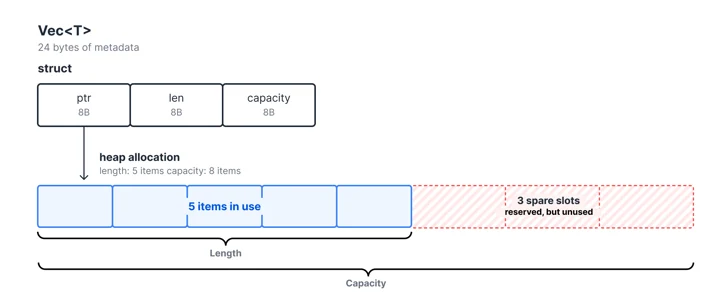
Vec<T> stores three fields: a pointer to heap-allocated data, the current length, and the total capacity. When you push an item, Vec checks whether the length exceeds the capacity and reallocates if needed. If there’s room, it just appends the item and increments the length.

1.png

Once we store a DNS response in the cache, however, we never modify it again. The capacity field serves no purpose, but still costs 8 bytes per Vec. The over-allocated heap space is wasted as well, as a Vec with capacity for eight items but only five stored leaves three slots unused on the heap.

2.png

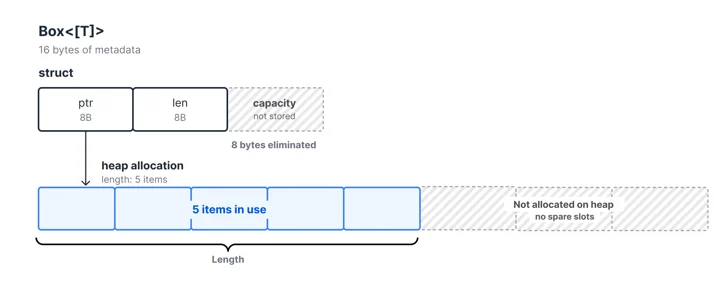
Using Box<[T]> solves both problems. It can’t grow after creation, so it doesn’t need a capacity field or reserve space for future elements. The same applies to String, which also carries a capacity field. Box<str> drops it.

Each cache entry stores 8 Vec and String fields. Replacing them with Box<[T]> and Box<str> saves 8 bytes per field, 64 bytes per entry. It also eliminates the excess heap memory that Vec reserves for future growth. The combined savings add up to over 15 terabytes with over 250 billion cache entries.

Fewer lists, fewer pointers

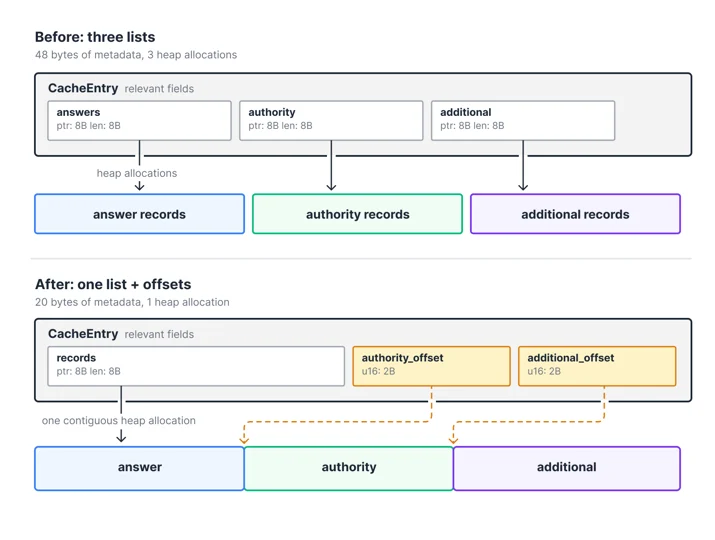
Rather than storing the answer, authority, and additional sections in separate lists, we can store a single list with offsets to the start of each section. Since DNS record counts per section fit in a u16, we can use a u16 (2 bytes) for each offset, compared to the 8-byte pointer and 8-byte length that each separate Box<[T]> requires.

3.png

This removes two lists, each with an 8-byte pointer and 8-byte length, and replaces them with two 2-byte offsets, saving 28 bytes per entry.

These savings do not always map directly to the number of bytes removed from individual fields. Rust inserts padding to satisfy alignment requirements and rounds a struct’s size up to a multiple of its alignment. Removing a small field can therefore eliminate additional padding. For example, we also packed several boolean fields into a single bitflag. This reduced the surrounding padding, causing the struct to shrink by more than the size of the individual booleans.

Dropping the owner

Each DNS record has an owner, the domain the record belongs to. In many cases, this owner is identical to the domain being queried. For example, a query for example.com A returns two records with the same owner:

$ dig example.com A

;; ANSWER SECTION:
example.com.        300    IN    A        198.51.100.1
example.com.        300    IN    A        198.51.100.2

But when a CNAME is involved, for example, the record owner can differ from the queried domain:

$ dig example.com A

;; ANSWER SECTION:
example.com.        300    IN    CNAME    cdn.example.com.
cdn.example.com.    300    IN    A        198.51.100.1
cdn.example.com.    300    IN    A        198.51.100.2

The DNS wire format handles repeated owners using name compression, as defined in RFC 1035. Rather than encoding the same domain twice, subsequent occurrences store a 2-byte pointer to the first occurrence. A domain like www.example.com can encode just www followed by a pointer to where example.com already appeared in the message.

This works well on the wire, but in our cache we store the full owner name alongside each record. Following compression pointers during cache lookups is expensive on the hot path, so we trade memory for speed.

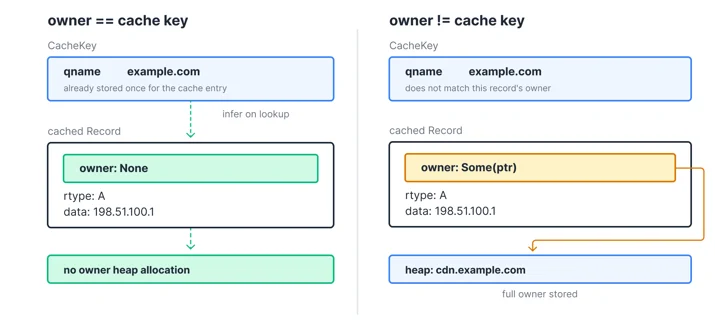
Most records, however, have an owner identical to the queried domain. For those, we can drop the owner entirely and infer it at read time. When the owner differs, such as the A records behind a CNAME, we store the full name.

pub struct Record {
    owner: Option<Box<Name>>,
    class: Class,
    ttl: Ttl,
    rtype: Rtype,
    data: RecordData,
}

When owner is None, response construction restores the queried domain from the cache key, avoiding a heap allocation. This means the record is no longer self-contained, but the cache key is already available during every lookup. When the owner differs, Some stores a pointer to the full name on the heap.

4.png

In practice, most cached records have an owner identical to the queried domain, so the majority require no heap allocation for the owner field.

Enum sizing

Rust enums are sum types: each variant can carry different data, but the enum is always the size of its largest variant.

pub enum Option<T> {
    Some(T),
    None,
}

Option is either Some and holds a value, or None and holds nothing. Both variants take the same amount of memory. The enum stores a tag indicating the active variant, followed by space large enough for the largest variant’s data. When the variant is None, that space is unused.

For record data, it seems natural to store each DNS record type as an enum variant:

pub enum RecordData {
    A(Ipv4Addr),
    Aaaa(Ipv6Addr),
    Txt(Txt),
    Naptr(Naptr),
    Svcb(Svcb),
    // ...
}

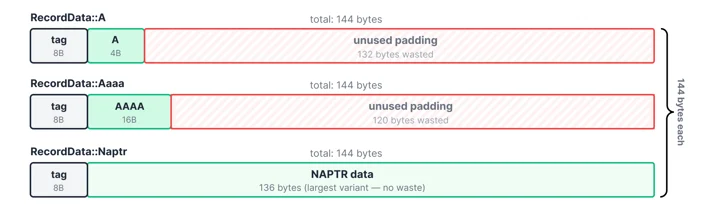
But the enum is always as large as its largest variant. In our case, that’s NAPTR at 136 bytes. It stores three variable-length text fields, a domain name, and two integers. As a result, the full enum, including the variant tag and padding, becomes 144 bytes.

5.png

An A record only needs 4 bytes, and an AAAA record needs 16 bytes. A and AAAA make up over 80% of our traffic, so most records waste over 120 bytes on padding. Since a single cache entry can store many records this quickly adds up.

Boxing the variants

To solve this problem, we can box the larger variants of the enum, moving them to a separate heap allocation. The enum then stores an 8-byte pointer to the heap, where the data takes up only the size it actually requires.

pub enum RecordData {
    // Small and common variants are stored inline
    A(Ipv4Addr),
    Aaaa(Ipv6Addr),
    // Large variants are stored on the heap
    Txt(Box<Txt>),
    Naptr(Box<Naptr>),
    Svcb(Box<Svcb>),
    // ...
}

For A and AAAA records, this saves 120 bytes per record. Smaller variant types like TXT and CNAME also benefit. They still occupy the 24-byte enum, but their heap allocation is sized to their actual data rather than padded to 144 bytes. NAPTR, the largest variant, actually pays slightly more. It now adds the cost of a heap pointer and allocation overhead. But NAPTR records are rare in practice, so the tradeoff is worth it.

6.png

But boxing the larger record variants introduces costs of its own.

The costs of boxing

Boxing has two costs. The first is allocator overhead. Each boxed variant becomes a separate heap allocation, and allocators round up to the nearest size class. Big Pineapple uses jemalloc, an allocator designed for multithreaded, allocation-heavy workloads. jemalloc groups allocations of similar sizes into fixed-size bins. A TXT record requests 32 bytes and fits exactly into a 32-byte bin, wasting nothing, but an MX record requests 40 bytes and rounds up to 48, wasting 8 bytes.

The second cost is poor memory locality. Without boxing, the record enum values for a cache entry sit in a single contiguous allocation. With boxing, data for each boxed variant lives in a separate heap region. Reading it requires following a pointer, and when that pointer lands far from the rest of the entry, the CPU has to fetch a new cache line. With millions of cache entries, boxed data ends up scattered across the heap rather than packed together.

7.png

Neither cost is catastrophic on its own, but eliminating both, as the next section shows, yields a measurable improvement in both memory usage and lookup latency.

Storing records in wire format

An obvious next step would be to store the full DNS response in wire format, patching only per-client fields like the message ID on each lookup. But this has drawbacks. DNSSEC records are only included when the client sets the DO (DNSSEC OK) flag. Storing a complete wire format message means either caching two variants, one with DNSSEC and one without, or filtering them out of an already-built message. There is also a cost to parsing the full message on every lookup, which the enum approach we just described avoids by storing already-parsed records.

As a middle ground, we store just the record data as raw bytes, while keeping the rest of the cache entry as structured fields. Instead of a list of parsed enum variants, we store the records as a single Box<[u8]> containing each record encoded as a 2-byte length prefix followed by its raw bytes.

8.png

This eliminates the per-variant enum overhead and the boxed heap allocations from the previous optimization. The data also becomes packed contiguously, which improves CPU cache locality. The tradeoff is that records can no longer be randomly indexed. We have to iterate through the buffer sequentially. This adds some complexity for features like round-robin rotation of A/AAAA records, but since record counts per entry are small, the cost is negligible.

When building a DNS response from cached records, most record types can be copied directly from the buffer into the outgoing message. Previously, each parsed record had to be serialized field by field back into DNS wire format. The new layout skips that work for A, AAAA, TXT, and all DNSSEC record types by copying their encoded bytes directly. Only records containing domain names, such as CNAME, NS, MX, and SOA, still require parsing so we can apply DNS name compression. Since records that support direct copying make up the vast majority of our traffic, this change reduces work on the lookup path. Combined with improved memory locality, this reduced cache lookup latency by 5% in our benchmarks.

To build the record data buffer, we write into a reusable scratchspace buffer that persists across cache insertions. Since previous writes have already grown it, the buffer rarely needs to be reallocated. Records vary in size, so we do not know the exact buffer size until they have been serialized. Once the records are in the scratchspace buffer, we allocate a Box<[u8]> and memcpy the data into it. This replaces the separate allocation for each boxed record with one allocation for all record data. It also avoids the waste from shrinking a Vec<u8>, where the allocator may not be able to reclaim the unused tail of the original allocation. In our benchmark, this change alone increased cache insert throughput by 13%.

The results

The production measurements show how the benchmarked per-entry savings translated to whole-process resident memory. The graph below shows p90, p98, and p99 memory usage across Big Pineapple instances. The first dashed line marks the start of the rollout on May 18, 2026, and the second marks its completion across all services on July 6, 2026. Each release introduced one or more of the optimizations described above, so memory usage dropped in steps rather than all at once.

As each release rolled out, restarted instances began with empty caches and consumed more memory as those caches filled. The stable plateaus therefore represent steady-state memory usage better than the initial dips.

9.png

Per-instance memory usage dropped across all percentiles. At p99, memory dropped from 9.3 GB to 5.3 GB, a 43% reduction in resident memory. At p90, memory dropped from 6.5 GB to 3.8 GB, a 42% reduction. Instances with fuller caches saw the largest absolute savings.

In our benchmarks, these five optimizations reduced the per-entry memory footprint from 953 bytes to 420 bytes, a 56% reduction. Per-entry allocations dropped from 1.1 KB to 461 bytes. The reductions measured in production are smaller because resident memory includes the cache alongside all other process data. After the rollouts settled, aggregate working-set memory across the fleet was roughly 100 terabytes lower.

Performance also improved. Cache insert throughput increased by 43%, while lookup latency dropped by 19%.

Metric Before After Change
Per-entry net footprint 953 bytes 420 bytes -56%
Per-entry allocations 1.1 KB 461 bytes -58%
Cache insert throughput 625,000 entries/s 893,000 entries/s +43%
Cache lookup latency 828 ns 670 ns -19%

We plan to reinvest the freed memory into increasing cache capacity without increasing our memory usage, which improves cache hit rates and reduces upstream query volume. We're also exploring further optimizations to the cache itself.

To learn more about Big Pineapple, see How Rust and Wasm power Cloudflare's 1.1.1.1. If you work on DNS or other large systems, share the optimizations that have worked for you in the Cloudflare Community or on the Cloudflare Developers Discord.

The Daily Front Page 5 of 24
Thursday, August 27, 2026 The Daily Front No. #260827 — A Duck Learns to Walk
article

Microduck

by robotswantdata·▲ 689 points·217 comments·pollen-robotics.com ↗
Trained in sim, deployed on the real robot.

Made to move · Ready to learn

A 25 cm open-source biped you train yourself with reinforcement learning. Playable out of the box.

Pre-order for $399

Pre-orders open August 27, 2026
$399 before taxes and shipping
Ships before Christmas 2026
Open source

The Microduck squad

The launch film · sound on

Roll the tape

Waking up the duck…

Meet the twin

Sim2real that works

Trained in sim, deployed on the real robot. This is the simulated twin the ducks were trained on.

Launch the simulator

Fun out of the box. Yours to retrain.

Teach it new tricks

Every behaviour is a policy you can retrain on your own machine.

01. Train in simulation

Behaviours are learned in physics sim, on your machine or on Hugging Face Jobs.

02. Deploy on the robot

One step from simulation to the real thing.

03. Refine the simulation

Tune, re-train, re-deploy.

04. Publish the policy

Share your new behavior with the community!

Walk

Velocity-tracking gait.

Sit & stand

Sits down, holds the pose, stands back up on its own.

Kick

A one-shot boot, then straight back to walking.

Grab

Dips the beak to the ground, scoops, and pops back upright.

Roller skating

Roller skating locomotion when the skates are equipped.

Get back up

Flat on its back to standing, all by itself, ready for the next command.

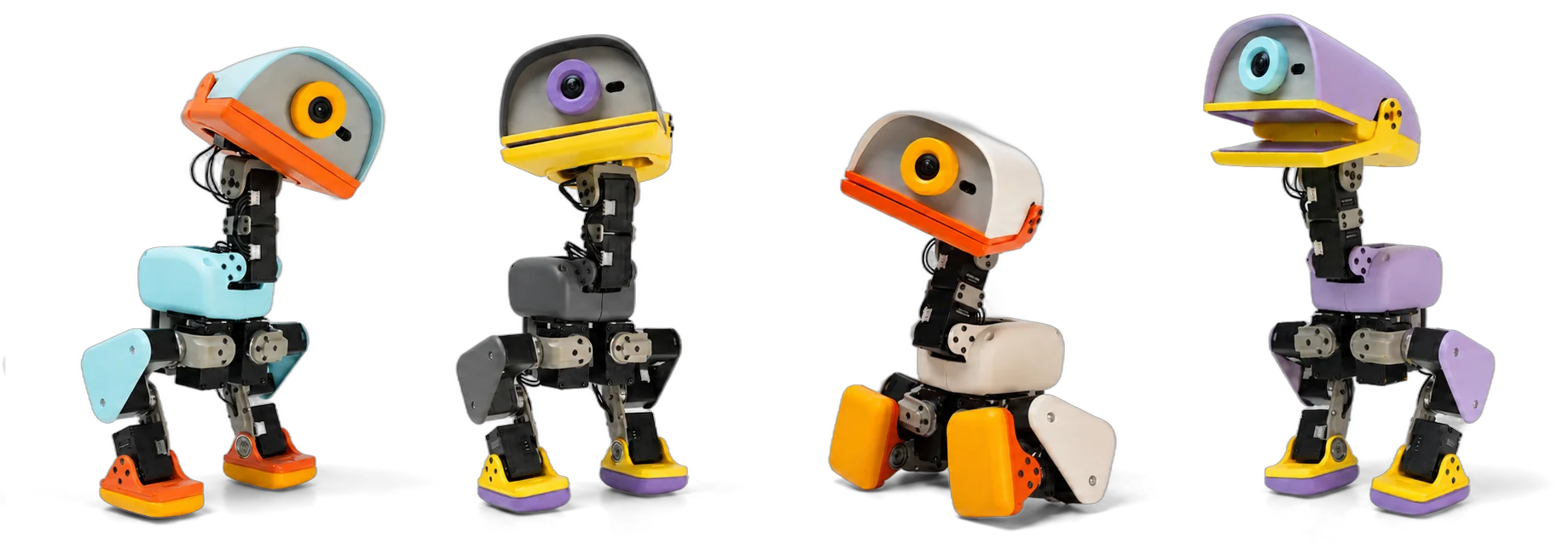
One robot, four colourways

Choose your colour

Every Microduck ships in one of four colourways. Same robot, same brains underneath - pick the shell that best fits you.

Waking up the duck…

In the wild

The real robot in real places - on desks, on the pitch, out at golden hour.

Close-up of a Microduck standing on a desk in warm light

A woman laughing while playing with a Microduck at a table

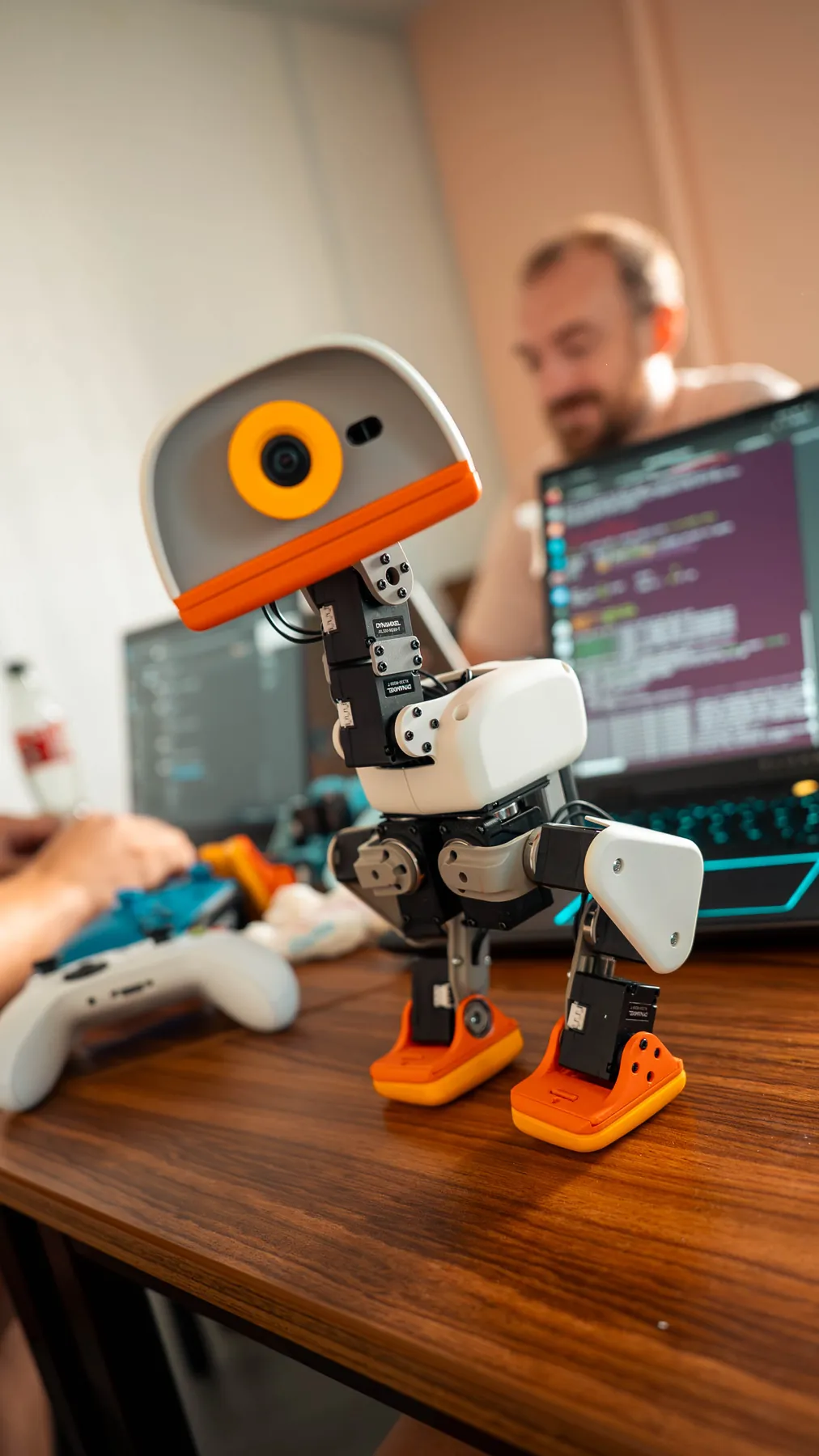
A Microduck on a desk looking into the camera while someone codes behind it

Two Microducks playing with a ball on a turf pitch

Overhead view of a desk with Microducks, a game controller and a sticker sheet

A Microduck carried under an arm

A Microduck standing in front of a laptop screen in teal light

Microduck outdoors at golden hour, next to a skater's shoe

A hand sticking a lips sticker onto a Microduck's beak, sticker sheets spread on the table

A Microduck standing on a pink rug in a child's playroom

A Microduck on a desk in warm morning light, next to a monitor and a game controller

A Microduck standing on a bedroom rug while its owner codes on the bed behind it

A Microduck walking across a green games table surrounded by people

The robot, and what to add to it

Pick your pack

The robot is everything you need on day one. The packs add play gear and spare parts.

The Microduck robot standing on a desk, drawn as a comic panel

$399

Microduck

In the box

Robot, battery, USB-C cable, game controller.

Pre-order

Charger pack

A dual-slot battery charger, two spare batteries and a USB-C cable, drawn as a comic panel

$39

Dual charger, 2x batteries.

Pre-order

Dev pack

Three spare motors, motor cables, two batteries, a charger, ten NFC tags, a Hugging Face sticker, a screwdriver and spare screws, drawn as a comic panel

$119

3x spare motors, 5x motor cables, 2x batteries, dual charger, 10x NFC tags, Hugging Face credit, screwdriver, screw pack.

Pre-order

Accessory pack

Two yellow roller attachments, a ball, a laser pen, an NFC polaroid and ten NFC tags, drawn as a comic panel

$39

Laser pointer, NFC polaroid, 2x rollers, ball, 10x NFC tags.

Pre-order

Tech specs

Full sheet in the press kit

15 Motors

25 cm Tall

800 g To pick up

Camera

Plus LiDAR and two IMUs

7 Trained moves in the box

50 Hz Onboard policy loop

Built in the open

Open source

The SDK, the simulation and the full RL training stack are on GitHub. What the robot runs is what you can read, fork and retrain.

pollen-robotics/microduck

$ robotctl monitor   # status of the robot
$ robotctl configure # configure the robot
$ robotctl update    # update the robot

Apache-2.0

The whole software stack, permissively licensed

MuJoCo

The physics sim every policy is trained in

7 policies

Every shipped move, published and retrainable

Join the flock

Builds on show, policies to swap, help when a leg does something strange. The community lives on Discord.

Join the Discord

End of tape · be kind, rewind

Pre-orders are open now

Pre-order for $399

In four colourways. Ships before Christmas 2026.
Introductory price, before taxes and shipping.

The Daily Front Page 6 of 24
Thursday, August 27, 2026 The Daily Front No. #260827 — The Small-Model Moment
article

Small Models Have Arrived

by tosh·▲ 675 points·299 comments·calv.info ↗
It is shockingly capable, fast, and smart.

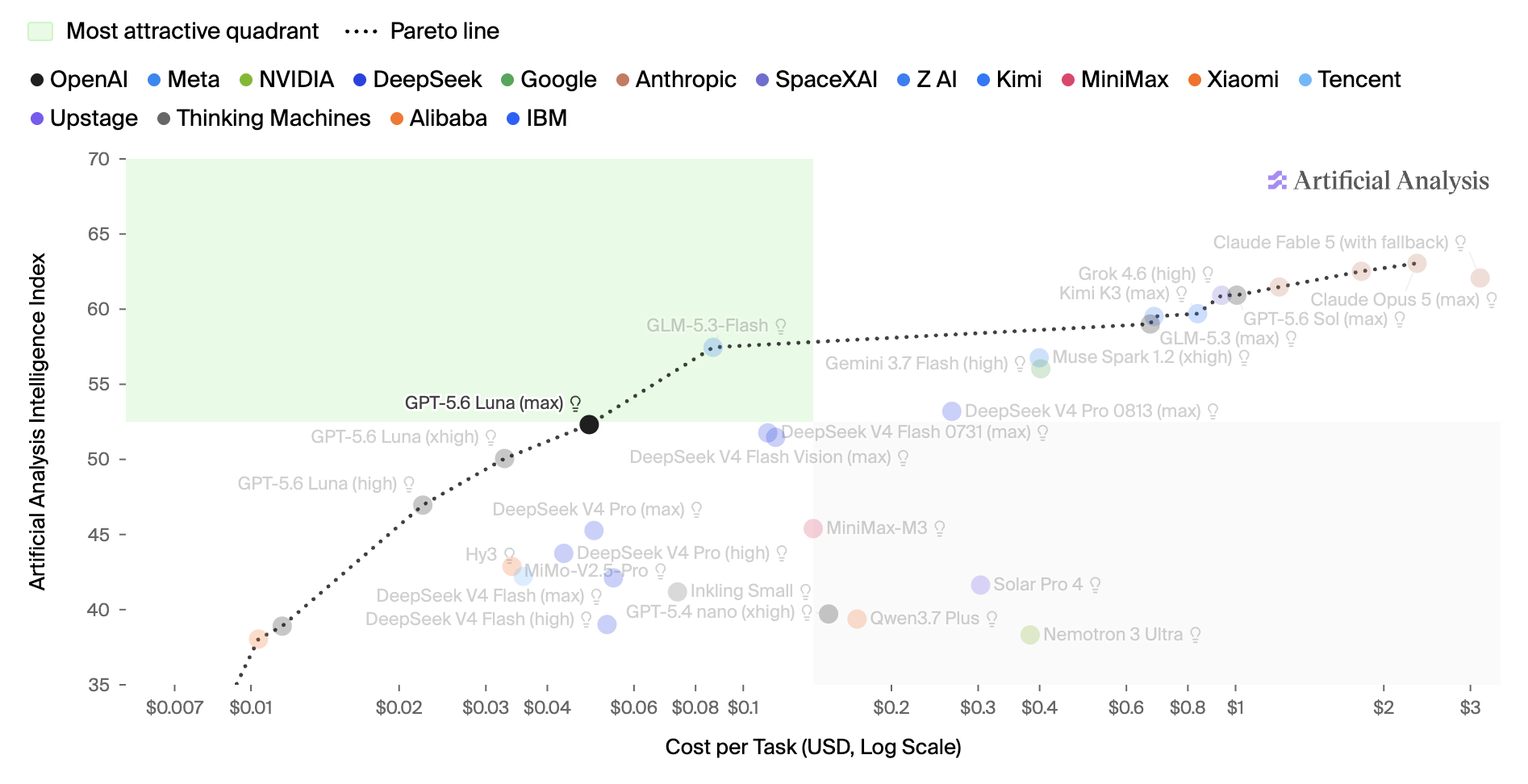
For the past few weeks, I've been playing with gpt-5.6-luna. It is shockingly capable, fast, and smart. I regularly see it do ~100 tps, and rip around my codebase, email, and knowledge base.

Of course, the biggest thing with luna is the cost. I've tried running some fairly complicated research threads, and it's pretty tough to run up a large bill. Even having it search across thousands of emails, I end up with an API cost in the tens of cents.

Courtesy of artificialanalysis.ai

With GLM 5.3, we even have a new option at the Pareto frontier.

When doing coding work, I almost always reach for the most expensive and capable models (Fable 5, 5.6 Sol). So it's been easy to miss the progress the small fast models have made.


One thing a few investors I've talked with have mentioned: "It's weird we're not seeing more consumer AI companies. Why is that?"

There's a straightforward answer: token costs.

In the times before AI, the playbook for big consumer apps looked like this...

  • create some sort of compelling website which is fairly cheap to run
  • attract a bunch of users (typically with some virality)
  • raise money, scale to more users
  • create an ads marketplace

This roughly describes most of the big consumer companies (Google, Facebook, Snapchat, etc.).1

But what if you want to add AI to your product? Well, now you have some real inference costs on every request! Suddenly the amount of capital required increases dramatically.

A pet eval of mine is to build a daily news site, personalized to me:

research @calvinfo on the internet. figure out what news they might like. build a micro-site with today's top stories, personalized for them. search hn, reddit, twitter, etc.

With the previous generation of models (Sonnet class), you'd spend ~$1 to get anywhere. Charging $30/mo is untenable for a consumer app. There's obviously a lot we can optimize here, but if you're charging what the WSJ or The Economist charges, you'd better be delivering similar value.

But looking at luna, the results are pretty decent, and the average cost is ~$0.10. Now we're talking!


Where I think this gets even more interesting is in the world of business.

My Segment co-founder Peter and I were recently comparing notes on a hike. Across his various startups, Peter has seen two kinds of work:

  1. the "IQ 180" work. some mad scientist genius type comes up with some crazy solution you've never thought of.
  2. the "token spewer" work. being ultra responsive, pushing the ball forward across dozens of different fronts.

Peter runs multiple companies. Beyond Segment, he's raised $100m+ for Charm Industrial, and just recently closed a Series A for Revoy. He's incredibly organized and efficient with his time.

And yet, Peter mentioned that ~95% of the work he does falls into bucket 2. It's hopping on calls. Nudging people. Blocking and tackling.

To be clear, Peter says his companies would be dead-in-the-water today without an IQ 180 technical mind solving the deep problems. Just that most of his work falls in bucket 2.2

I think demand for "frontier-level" models is going to keep compounding. Especially for fields that require novel breakthroughs or discovery (engineering, hard science, model training).

But I also think the demand for "fast/cheap/good-enough" models is just about to take off.

Think of the people you interact with on a daily basis: coworkers, vendors, and customers. Nine times out of ten, you want someone who is super responsive, and just handles things for you. Most of the "human tokens" at companies today are spent this way — hiring skews heavily toward the fast/cheap/good-enough archetype.

There's a lot of work that needs to happen to make fast/cheap/good-enough models a reality for business. New harnesses, prompt injection safety, roles, and permissions. But I'm confident we'll figure that out.

If you're also experimenting with making small models useful, please drop me a line.

Footnotes

  1. Amazon and Netflix are the notable exceptions
  2. Peter is also being modest here. He's sharp as a tack.
The Daily Front Page 7 of 24
Thursday, August 27, 2026 The Daily Front No. #260827 — The Transcription Desk
article

Gemini-3.5-Transcribe

by k9294·▲ 308 points·101 comments·blog.google ↗
converts raw audio directly into accurate, polished, formatted text

Our latest speech-to-text model designed for precise and intelligent real-time transcription.

Text "Gemini 3.5 Transcribe" next to the Gemini spark, all on a blue background

Today, we’re introducing Gemini 3.5 Transcribe, our most precise speech-to-text model yet, designed for intelligent voice interactions. Unlike conventional speech recognition models that struggle with background noise, complex jargon, and disfluency cleanup, Gemini 3.5 Transcribe converts raw audio directly into accurate, polished, formatted text.

Across our products like the Gemini app and on Android, we’ve seen consumers already benefiting from this transcription model with new voice capabilities like Rambler on Android and in the Gemini app on macOS. Now, developers can build similar capabilities with Gemini 3.5 Transcribe in the Gemini API in Google AI Studio and Gemini Enterprise Agent Platform.

We've built 3.5 Transcribe to plug seamlessly into your developer workflows, whether you’re building voice agents, real-time captioning tools, or post-call analytics pipelines. The model is available across two separate APIs:

  • Real-time streaming: Delivers continuous, bidirectional streaming with sub-second latency for interactive voice apps via the Live API using gemini-3.5-transcribe-live.
  • Pre-recorded audio processing: Transcribes recorded audio, meetings, call logs, and more with speaker attribution and word-level timestamps via the Interactions API using gemini-3.5-transcribe.

Get more precise and intelligent transcription

Gemini 3.5 Transcribe is designed to capture your natural speaking style to better understand your intent and recognize custom vocabulary, so you can execute tasks with your voice.

  • Smart transcription: Seamlessly handles self-corrections (like "let’s meet Tuesday—no, Wednesday"), removes filler words (“ums” and ‘“ahs"), auto-formats your text.
  • Function calling: The model can delegate complex tasks (such as image generation and file analysis) to other Gemini models via function calls. Currently available in the Gemini macOS app.
  • More precise transcription: As measured by Artificial Analysis, achieves an average Word Error Rate (WER) of 4.0% for streaming and 2.6% for non-streaming use-cases. It shows strong performance across noisy, real-world environments, accurately capturing alphanumeric entities like postal codes and order IDs.
  • Custom vocabulary: Recognizes specialized jargon and unique spellings by seamlessly adapting transcriptions to your provided custom vocabulary.
  • Global language support: Automatically detects and transcribes over 85 languages, seamlessly handling regional accents and diverse dialects.
  • Multi-speaker identification: Accurately attributes speech in pre-recorded audio with timestamps for up to three speakers (support for 3+ speakers is experimental).

Gemini 3.5 Transcribe handles live language switches and seamless streaming transcription

Watch Gemini 3.5 Transcribe clean up speech disfluencies with smart transcription capabilities.

3.5 Transcribe delivers transcription with multi-speaker attribution and word-level timestamps.

Gemini 3.5 Transcribe’s performance represents a major advancement from our previous transcription model, Chirp 3, offering new capabilities, improved word error rates, and significantly better latency. As measured by Artificial Analysis, time to final transcription, for example, improves by 70%. On the FLEURS benchmark across a set of top languages and locales, the model delivers precise multilingual performance, improving over Chirp 3, and achieving a 5.50% WER in streaming mode and 5.04% WER in non-streaming use-cases.

Graph of streaming speech recognition accuracy

Graph of streaming speech recognition accuracy

Experience smart transcription and advanced dictation

In addition to the Gemini API in the Google AI Studio and Gemini Enterprise Agent Platform, 3.5 Transcribe goes further than standard speech-to-text to make working across Google feel more natural and intuitive. By bringing context-aware understanding directly into everyday surfaces like Gboard, Antigravity, the Gemini app, and Chrome, it captures nuances, intent, and inline edits with ease.

  • On Gboard on Android, through the new Rambler feature, 3.5 Transcribe transforms spoken thoughts into well-formatted text, filtering out filler words. You can also use your voice to make edits, correct misspellings, and change the writing style.
  • On Google Antigravity, 3.5 Transcribe pairs screen context and chat history, with your permission, to ensure pinpoint transcription accuracy across file names, agent thoughts, and active documents.
  • In Google AI Studio, you can access 3.5 Transcribe in Build mode to vibe code apps with your voice on the fly.
  • In the Gemini app on macOS, 3.5 Transcribe not only transcribes your free natural speech into clean formatted text, but also enables voice commands that can pair seamlessly with screen context to power complex workflows. By calling on other Gemini models in the background to handle the heavy lifting, the model makes it effortless to summarize local files, repurpose text across apps, or generate images right at your cursor—using just your voice.
  • Coming soon to Chrome, you’ll be able to talk to type in any web field — making it effortless to dictate replies, draft posts, or prompt Gemini in Chrome more naturally and easily with your voice.

Gemini 3.5 Transcribe lets you analyze files, generate images, and search in the Gemini app on macOS using just your voice.

See how Gemini 3.5 Transcribe uses Rambler on Android to automatically remove filler words and clean up speech.

Gemini 3.5 Transcribe leverages screen context on Google Antigravity to ensure accurate transcription accuracy.

Read the early reviews

By leveraging the Gemini Live API, developer platforms such as Agora, Fishjam, LangChain, LiveKit, Pipecat, Vercel, and Vision Agents enable developers to build and deploy high-performance voice-driven interfaces with ease. These platforms manage complex real-time media streaming infrastructure behind the scenes, allowing developers to focus entirely on crafting the user experience.

Companies like vivo, Intellitek Health, and Lingopal have also shared positive feedback on 3.5 Transcribe, highlighting its impressive latency, accuracy, and expansive language support.

vivo testimonial

IntelliTek testimonial

Lingopal testimonial

Stream testimonial

Agora testimonial

fishjam testimonial

Start using 3.5 Transcribe today

The Daily Front Page 8 of 24
Thursday, August 27, 2026 The Daily Front No. #260827 — Moving Pictures, Generated
article

Gemini Omni 1.1 Flash

by saretup·▲ 265 points·197 comments·blog.google ↗
Omni now delivers studio-quality video production

Omni now delivers studio-quality video production, including the ability to extend a scene, first and last frame interpolation, crisp 4K upscaling, faster prototyping, and more.

Text "Gemini Omni 1.1 Flash Available via APIs" surrounded by various images of people and a squirrel

Today, we’re introducing Gemini Omni 1.1 Flash, a new suite of creative controls and generative video capabilities to support developers. Gemini Omni brought real-world reasoning to generative creation, and today’s updates make Omni 1.1 production-ready for professional use via the Gemini API in Google AI Studio.

Whether you’re building generative video workflows, creative tools, or media editing software, these updates make generative video more controllable, faster to iterate on, and polished for real-world deployment. Here’s a look at what’s new:

Extend scenes for longer storytelling

Scene extension allows you to take an existing video and continue generating footage seamlessly from where it left off.

With Omni 1.1, the model can now analyze up to 10 seconds of prior context — a leap from previous models that only referenced the final second. The result is improved visual consistency and narrative adherence, letting you build longer stories or branch into new creative directions. You can extend videos in 10-second increments up to a total cumulative length of 40 seconds.

Prompt 1: Camera slightly pans and we now see she is talking to a man with curly hair, we see man’s back, he says “I see it too” dramatic music score

Prompt 2: Camera slowly pulls out, forgotten dusty catacombs, dramatic music score.
Prompt 3: Camera slowly pulls out, a vast library where shelves and books float weightlessly in a dusty void, dramatic music score.

Prompt 1: Continue the video. Execute a cinematic optical dolly-zoom shot. The camera dollies forward while simultaneously zooming out, keeping the character's frozen shocked face locked at the exact same size. The long corridor of stone pillars in the background dramatically stretches and deepens with intense optical perspective distortion. Clean architecture, continuous unbroken shot.

Prompt 2: Continue the video. The camera executes a fast mechanical snap-zoom directly into the character's wide eyes. Stylized cinematic camera control.

Prompt 3: Continue the video. Time completely freezes into a static moment: the character, their windblown coat. The camera performs a smooth, high-speed 360-degree orbital rotation around the frozen character, showcasing dramatic 3D depth and parallax across the colonnade. Flawless continuity.

Prompt 1: The man in the blue sweater replies: "Did your father go out on the boat too?"

Prompt 2: The camera pulls back in one continuous movement as he continues his story: "He used to say that this harbour had a soul. And that the boats were a part of us." The music swells.

Prompt 1: The looks directly at the camera and talks about what the final chapter will end with!

Prompt 2: He then stands up walks around the desk to the camera and says "what would you choose?"

Here’s how you can extend your scene with the Gemini API:

from google import genai

client = genai.Client()

interaction = client.interactions.create(
    model="gemini-omni-1.1-flash",
    previous_interaction_id=previous_video_interaction.id,
    input=[
        {"type": "text", "text": "Continue the scene."}
    ],
    response_format={
        "resolution": "360p",
    },
)

Specify first and last frames

Achieve smooth transitions and camera movements by specifying the starting and ending frames of a shot. Omni 1.1 generates continuous video between two keyframes, making it ideal for complex camera orbits, zoom transitions, or seamless looping clips.

Prompt 1: A close-up low-angle shot of a stylish drummer in a beige suit playing a red drum kit in a grand hall transitions as the camera whip-pans to the side, revealing an older saxophonist playing alongside a ballet dancer spinning in a white outfit under soft purple stage lights. One continuous shot, no jump cuts.

Prompt 2: The camera zooms into the TV screen, where we see the same woman and the same scene from the beginning. Seamless video. One continuous shot, no jump cuts.

Draft videos more efficiently in 360p

Generate lightweight previews in 360p resolution up to 60% faster* and at a third of the cost compared to Omni 1.1’s standard 720p resolution. This is helpful for rapid prototyping, storyboard iteration, and quick rendering in developer platforms.

*Up to 60% faster generation based on system throughput of 360p vs. 720p resolution

Prompt: A microscopic view of iridescent marine diatoms, displaying intricate, glass-like silica shells with breathtaking natural symmetry. The colors range from deep volcanic amber and warm copper to vibrant turquoise and violet, mimicking the rich palette of earth and ocean. Tiny, delicate structures glow softly against a clean dark field background. High-fidelity scientific imaging, sharp details, organic textures, micro-photography. Maintain the microscope lens effect throughout the entire video.

Upscale up to 4K resolution

Generate polished, high-resolution 1080p or 4K outputs that are ready for professional production with Omni 1.1.

Prompt 1: Fish swimming, tracking shot

Prompt 2: A little chipmunk darting out of the woods from the left side of the screen and sniffing the air inquisitively before darting out of frame on the right side

Prompt 3: Cinematic macro close-up of vibrant golden-orange Japanese maple leaves on a delicate branch, gently rustling and swaying in a soft, rhythmic autumn breeze. Sunlight filters through the translucent foliage, creating a warm, glowing effect. Shallow depth of field, dreamy bokeh background, hyper-detailed textures, photorealistic, 4k.

Add video references in your multimodal input

Reference up to three seconds of video when crafting your scene, allowing you to maintain visual context and character consistency based on video references.

Prompt: Use the three uploaded videos of dancers and replace them with the provided characters. Have them perform their individual dances from the reference videos, all together in the large, open space from the provided image.

The dog character dog.png should do the classical dance from dance3.mp4. The octopus octo.png should do the hip hop dance from dance1.mp4, and the bear bear.png should do the breakdance from dance2.mp4. The final result should be one continuous shot with no scene cuts.

Inspiring concepts for what you can build

Here are a few ideas showing how developers can put these new capabilities into action across custom tools and creative workflows.

In this app, you can drop in a first and last frame, generate the transition between them with presets or a prompt box because of Omni's full-context reasoning enabling you to get camera moves that read as real.

This app moves the camera through the rooms. It arcs, it pushes in, it pulls back. It shows the home in an aspirational state, At the perfect time of day. It adds no furniture or details that don’t exist.

Creators already generate several videos before landing on the right one. The Draft Room makes that exploration cheap and structured: generate 3-4 draft variations in 360p, varying one thing at a time and compare them side by side.

See how customers are putting Omni Flash in production

Our customers are already driving real-world production with Gemini Omni Flash via the Agent Platform API. Explore the videos they've created and hear about how they are using the model below.

Adobe integrated Gemini Omni Flash into Adobe Firefly. Check out this video showcasing its video editing capabilities.

“Gemini Omni Flash is one of the strongest video models available in Figma Weave, where the canvas helps creative teams build on every generation — attaching references, branching different versions, and shaping something unique. With extensions, richer reference material, and 4K resolution, Gemini Omni Flash takes teams beyond generating videos to truly directing them.” - Itay Schiff, Creative Director, Figma Weave.

“At GMI Cloud, we give creators centralized access to the world’s most capable models. What stands out about Gemini Omni Flash is its accuracy: the details hold up under scrutiny. For customers creating educational and explanatory content, where getting things right is essential, that reliability matters more than any single feature. Omni has made AI video viable for a segment that previously couldn’t rely on it.” - Louisa Guo, VP of Marketing, GMI Cloud.

“Omni Flash fits naturally into how people already use Runway: start with a prompt, an image or a video, then generate or edit from there. It's another way for our users to move quickly between ideas.” – Jamie Umpherson, Chief Creative Officer, Runway.

Build with Gemini Omni 1.1 Flash Today

A table with pricing numbers for the Gemini Omni 1.1 Flash model.

Omni 1.1 is rolling out across the Google developer ecosystem:

  • Start building in Google AI Studio: Try out Omni 1.1 directly in Google AI Studio.
  • Build on Gemini Enterprise Agent Platform: Enterprises can build with Omni 1.1 directly via Agent Platform API.
  • Explore the developer documentation: Check out the official documentation, the cookbook and prompting guides to learn how to integrate scene extensions, video references, and upscaling into your applications.

Omni 1.1 is also available to all Google AI Plus, Pro and Ultra subscribers globally in Google Flow, starting today. Scene extension is available to all Google AI Plus, Pro and Ultra subscribers globally in the Gemini app.

The Daily Front Page 9 of 24
Thursday, August 27, 2026 The Daily Front No. #260827 — A Fare Card’s Long Journey
article

Suica, Japan's First IC Transit Card

by zdw·▲ 253 points·233 comments·tokyodev.com ↗
a complex transaction happens in the fraction of a second, without needing a battery or live internet connection

Illustration of a hand holding an IC transit card over a Japanese ticket gate, with stylized clouds and trees in the background.

Image: Amanda Yanagawa

If you’ve ever ridden a train in Japan, there’s a good chance you’ve held a Suica card in your hand and tapped it against a station gate.

Even though it was developed back in the 90s, Suica’s technology is really impressive even by today’s standards. Every time you tap it, a complex transaction happens in the fraction of a second, without needing a battery or live internet connection.

It’s easy to take IC transit cards for granted now that they’re part of everyday life, but let’s not forget how much work went into engineering them several decades ago before cashless or contactless payments were common.

Here’s a breakdown of how these cards work, and the surprisingly bumpy story of how they came to be.

How the cards actually work

Every Suica card has a chip storing two things: a unique card ID, and your current balance. Both of those live on the card itself, rather than a central server.

When you tap your card on a terminal, it reads and rewrites the card locally in an instant, with the entire transaction processed in under 200 milliseconds. For each tap, the card and terminal mutually authenticate each other and generate a fresh encryption key to prevent spoofing.

The cards have no battery and aren’t self-powered in any way. Instead, the reader on the gate emits an electromagnetic field that powers the card just long enough to complete the transaction.

Why not sync with a central server each time? The reason is simply that it would take too long.

With the sheer volume of people passing through Tokyo’s stations each day, calling a server would be extremely risky. Transactions would take longer, causing people to slow down at the already-crowded station gates. And any network issues like latency, packet loss, or server downtime would cause the gates to shut down, which would be disastrous during peak commuting hours.

To prevent that, the card and terminal handle everything between themselves. The individual gates do sync with central servers to save transaction logs, but only periodically, rather than in real time.

How stations worked before Suica

For several decades, trains were operated by a government-owned entity called Japan National Railways. In 1987, it was privatized and split into the regional JR companies that we know today, including JR East and JR West.

Back then, a lot of train stations in the Tokyo area didn’t even have automated gates. They were manned by staff who physically punched holes in passengers’ paper tickets with a hand clipper. As you can imagine, this wasn’t the most efficient setup and caused massive bottlenecks during rush hour.

Meanwhile, over in the Kansai region, several private railways (such as Hankyu) were using magnetic ticket gates—the same kind still used today, where you feed a ticket into one end of the machine and pick it up after it pops out the other side.

JR East, now in charge of train stations in the booming Tokyo metropolitan area, was thinking hard about what it could do to modernize. Two of their biggest goals were to:

  • Relieve congestion at stations to make train travel faster and more convenient.
  • Cut maintenance costs. The existing ticket machines worked well, but had tons of moving parts and sometimes suffered from jams and breakdowns.

So the company started researching a long-term solution. Several companies approached JR East with ideas, and one of them proposed something quite ambitious: using contactless integrated circuit (IC) technology.

That company was none other than Sony.

Initial resistance

Sony had actually started researching and developing IC cards in 1988, but not specifically for trains. Their main use case was for logistics. The idea was to attach wireless tags to boxes and parcels so that a reader could identify them from a distance, without needing to unpack or scan anything by hand. The technology behind this was FeliCa, Sony’s proprietary contactless system.

You may have heard of RFID, a more broad term for wireless technology that uses electromagnetic radio waves to identify or track objects. FeliCa is essentially a specialized branch within the RFID family.

Sony built FeliCa to process data quickly and securely over short distances. Seeing potential in their product, they pitched the idea of contactless transit cards to JR East.

JR East said no.

They liked the concept of contactless cards, but the actual technology at the time simply wasn’t advanced enough to meet the speed and reliability demands of Tokyo’s massive train network.

JR East also was hesitant to invest billions of yen into unproven IC technology when Kansai’s magnetic ticketing system was already proven to work. And that’s exactly what they ended up using instead: in the early 1990s, JR East installed the same magnetic gates in Tokyo, finally replacing the human ticket-punchers.

Meanwhile, Sony nearly gave up on FeliCa. They tried finding other uses like access-control systems for buildings, but didn’t have any luck. After a period of fruitless experimentation, an unexpected opportunity came along . . . from outside of Japan.

Success in Hong Kong

Over in Hong Kong, a conglomerate called Creative Star (known today as Octopus) was looking to adopt a fast, unified transit card that could work across multiple types of transit, including trains, metros, buses, and ferries. They were exploring contactless technology, and that’s exactly where Sony found an opening.

Sony set an ambitious goal of building a card that could be read from 10 cm away, with a 100 millisecond response time. With a dedicated team of engineers, they pulled it off and won the bid.

The Octopus card launched in 1997 and was a massive success. Three million cards were issued within the first three months, and the technology proved to be reliable enough to handle millions of passengers every day.

While all of this was going on, JR East had been running its own internal trials, and was gradually starting to warm up to Sony’s now-proven technology.

Back to Japan: Upgrading the card

Eventually, Sony and JR East officially partnered up. But even after Octopus’s success, there was still lots of work to do.

Sony needed to upgrade the technology to meet JR East’s requirements and adapt it to the realities of Tokyo’s rail network. As you can imagine, Tokyo’s sheer scale and density entailed quite a lot of technical challenges.

The biggest challenge was speed. JR East’s gates handled absolutely ridiculous passenger volumes during rush hour. To avoid dangerous bottlenecks, the company set a non-negotiable rule: the entire transaction had to happen in under 200 milliseconds.

At first glance, that might sound less impressive than Octopus, which used a chip that could respond in under 100 milliseconds. But the two numbers are actually different benchmarks.

Octopus’s 100 millisecond target referred only to the radio communication between the card and the reader. It didn’t include the subsequent fare calculation, as that depended on the rest of the transit system. For the record, Octopus’s full end-to-end transaction reportedly takes around 300 ms.

On the other hand, JR East’s 200 millisecond window had to cover everything, including the card-to-reader communication and the fare calculation. So Suica’s target was actually tighter.

Hitting that target was no small feat. It involved detecting the card, authenticating it, calculating the fare based on entry and exit data, and then deducting the balance—all made much harder due to Tokyo’s sprawling web of JR lines, subways, and private railways all tangled together.

To hit the 200 millisecond target, the card and reader had to handle the entire transaction locally, rather than trying to reach a backend server.

Think about the two different approaches. If every single tap required Gate → Network → Database → Approval → Return, the results would have been disastrous at Tokyo’s scale, due to the extra time required and the potential for network errors. So instead, the card was built to simply do this: Gate ↔︎ Card. Done. Server sync later.

This was especially tricky to implement because the card had no internal battery, and was powered entirely by the electromagnetic energy from the gate. So everything had to happen during the tiny window when the card is tapped on the reader and receives power for a split second.

Sony also gave the reader itself a communication range of 85 millimeters, which was double that of rival contactless systems at the time. This might sound like a minor tweak, but it actually mattered a lot. A longer range meant that the transaction could start earlier and finish faster, letting passengers walk straight through the gate without having to stop and carefully line up their card perfectly.

Critical performance issues

After all that hard work, the project encountered a dire situation. When they started testing prototypes of the card-reading touch panels, the performance was abysmal, with an error rate significantly higher than the original magnetic tickets.

Shinji Yamanaka, an industrial designer who worked on the panels, mentioned retrospectively in his blog how severe the problem was. He wrote that Nearly half of the testers couldn’t get through the gates, and quoted an executive who complained, It only worked for me once every five tries. A 20% batting average.”

The failure rate was so high that leadership was ready to pull the plug on the whole project. Yamanaka and his team were brought in as part of a last-ditch effort to save it—and they delivered. It turned out that the problem wasn’t really with the technology itself, but rather with how people were using it.

The original readers were completely flat and didn’t clearly signal to passengers what they were supposed to do. Many users treated them like a barcode scanner. They would swipe the card too fast, or hover it too high above the pad, causing the reader to throw an error.

One idea was to add an explicit “tap here” message on the panels, but this alone didn’t actually solve the problem. After developing four new prototypes and having users test them at a public exhibition, Yamanaka and his team analyzed the footage and found the brilliantly simple solution: to tilt the reader at a slight angle.

They found that tilting the reader exactly 13.5 degrees made it match the natural ergonomic motion of a hand moving forward. This caused users to instinctively rest their hand on the reader for a split second, which kept the card in the reader’s field just long enough to finish the transaction. It also made it easier for approaching passengers to see the reader from a distance, much more so than the original flat design.

With the redesign, the error rate plummeted to under 1%, and the project was saved. That design was later patented and is still the standard used for IC card readers today.

Naming the card

JR East held a public competition to decide on the new card’s name and branding. The winner was none other than Suica, the name that we all know and love today.

Most users get that it’s a cute reference to suika (スイカ, “watermelon”), which inspired the green color scheme. But it actually also stands for “Super Urban Intelligent CArd”, on top of being a reference to the word sui sui (すいすい) which means “smooth” or “effortless.”

The iconic penguin mascot was an existing character created by picture book illustrator Chiharu Sakazaki, and it was adopted to help make the new and unfamiliar technology more friendly and approachable.

JR East backed it all with a series of quirky ads and commercials.

Launch day

Project leader Akio Shiibashi originally set a symbolic launch target: January 1, 2001, the first day of the new millennium.

But as it often happens with big technical projects, preparations weren’t finished on time, so the launch shifted to November 18, 2001. When the day finally arrived, 3,200 gates across 424 different stations in the Tokyo metro area went live, all at once.

Suica was a massive, smashing success. Within just 19 days of launch, one million cards had been issued. Two months later, that number doubled to two million. And by October 2002, it had climbed to five million.

One small mystery with Suica’s launch is that JR East manufactured a huge number of physical cards ahead of time and stockpiled them in warehouses, but did not pre-issue them before the launch. There’s no official statement about why this happened, but there are some plausible explanations given how the cards work.

Each physical card has its own ID stored on the card itself, and each card needs to be activated before it can be used. When you buy a physical Suica card at a ticket machine, activation happens during the purchase. But that activation requires the actual network to be live. Although JR East could manufacture and store the cards ahead of time, they couldn’t pre-activate them because the system wasn’t running yet.

It’s also worth noting that while they did do field testing via employee trials and controlled passenger trials, there was never a public soft launch. The whole system essentially went live in one big move.

What happened next

In the beginning, Suica was solely a transit card, usable only at stations operated by JR East. But it didn’t take long to turn into the multifunctional Suica that we know today.

In 2002, Suica became usable on the Tokyo Monorail and Rinkai lines. In 2004, it received e-money functionality, transforming it into a flexible prepaid card that could be used at shops, restaurants, and vending machines. Naturally, this came with some more lovely commercials.

In addition to being one of the first successful cashless payment methods for consumers, it became a major source of revenue for JR East. When you pay with Suica, the merchant pays a transaction fee of between 2 to 3.2%, similar to a credit card.

A few years later, in 2006, Mobile Suica was launched. This was ahead of its time, letting passengers load Suica onto their phones even before the smartphone era. It worked thanks to a system called osaifu-keitai (おサイフケータイ, wallet phones), which was supported on many flip phones back in the day, and was also powered by the same FeliCa chips.

Not stopping there, JR East developed its own line of credit cards called View. These can be linked to a Suica card to enable automatically charging it when its balance drops below a certain amount. This was also revolutionary for the time, as it completely removed the need for cash, ticket machines, and unneeded mental bandwidth.

From there, Suica’s underlying technology was adopted by the rest of the country, leading to the launch of new IC cards like PASMO and ICOCA.

Initially, each card was locked to its own network:

  • Suica worked only on JR East
  • PASMO worked only on Tokyo’s subways and certain private railways and buses
  • ICOCA worked only on JR West

But eventually, nationwide mutual usage was implemented. Now, any card can be used on almost any train or bus across Japan, with only a handful of exceptions. Nearly everyone using public transportation in Japan is now using IC cards or their smartphone equivalents, and we have the hardworking engineers from the 1990s to thank for it.

Fun fact: Akio Shiibashi, the JR East engineer who led Suica’s development, went on decades later to become the head of the agency issuing Japan’s digital My Number Cards.

Today, all modern iPhones around the world support FeliCa out of the box, letting travelers add Suica cards to their Apple Wallets. Android is a bit trickier since FeliCa is only supported on phones sold in Japan, or on select models. For better or worse, this means that many international travelers still have a reason to get the physical card.

Speaking of which, there are signs that the industry is moving away from dedicated IC cards. Several rail operators around the country, including Tokyo Metro, Toei Subway, and Hankyu, have rolled out credit card tap-to-pay terminals. JR East itself hasn’t joined, but is working on its own gate-less walk-through system using the Suica app and location data. Neither of these means that the physical cards will be discontinued, but they do point to a future where the card itself becomes just one of several options.

Final thoughts

Suica’s launch is a story that spanned well over a decade, involving rejected pitches, an unexpected detour in Hong Kong, and many other trials and tribulations.

Perhaps the most impressive part of the story is that it wasn’t just about that card. The entire system, including JR’s network, infrastructure, and hardware, was all developed and rolled out in one go across one of the world’s busiest rail networks. The 200 millisecond response time is still incredible by today’s standards, and Suica remains one of the fastest transit cards in the world more than 20 years later.

On a sadder note, the beloved Suica penguin will soon be retiring. After 25 years, the mascot will be phased out in spring 2027, and the successor will be chosen by public vote.

So the next time you tap your Suica card at a train station, take a moment to think about all the hard work that went into it, and also be sure to thank the penguin for its many years of service.

The Daily Front Page 10 of 24
Thursday, August 27, 2026 The Daily Front No. #260827 — Source Code, Unearthed
article

Decompiling a Nintendo 64 game in 84 days

by knackers·▲ 251 points·145 comments·blog.chrislewis.au ↗
all functions have matching C implementations that, when compiled, produce identical machine code to the original game

I’m very pleased to announce that the original Snowboard Kids is now 100% decompiled! This means that all functions1 have matching C implementations that, when compiled, produce identical machine code to the original game.

This was obviously not a one-person effort. I am particularly grateful to inspectredc, Bl00D4NGEL, and queueRAM for their significant contributions to the project. No amount of AI would have been able to replace them.2 I would also like to thank iFuzzle, JamesBLewis, and douglasjv for lending their tokens to the cause.

My hope is that a full decompilation will prove useful to the Snowboard Kids community. Speedrunners in particular have long focused on the first game. Working source code can help shed light on externally observed phenomena such as CPU pathing and the exact factors contributing to player speed. A full understanding of the source code will also be useful for static recompilation and more ambitious modding efforts in the future.

The speed at which the project was finished is also noteworthy. Snowboard Kids took only 84 days to decompile compared with 596 days for Snowboard Kids 2, roughly one-seventh of the elapsed time.3

chart showing weekly Snowboard Kids decompilation progress

Weekly progress of the Snowboard Kids decompilation.

What explains this difference? Well, it’s 2026, so the answer is at least partially AI. But it would be a gross oversimplification to attribute the difference entirely to LLMs.

What Was Different

To state the obvious, I was not starting from scratch. By this point I had already spent nearly two years on a similar project and was vastly faster than when I began. This advantage is difficult to quantify and was somewhat offset by new challenges such as working with a different compiler.

Overall, roughly 4.8% of matching commits involved expert intervention.4 I have already credited these amazing people once, but it’s worth reiterating. This project would not have been possible without significant help from the decompilation community, particularly inspectredc, queueRAM, and Bl00D4NGEL <3.

The difficulty generally didn’t come from trying to understand what a function did5 but rather how that logic was expressed in C and how the resulting code was compiled. Snowboard Kids was compiled with IDO 5.3 rather than the GCC 2.7.2 compiler used by Snowboard Kids 2.

Most programmers will be familiar with GCC. It is a widely used open-source compiler still in active development today. IDO, on the other hand, was a proprietary compiler developed by SGI, whose own story is closely entwined with that of the Nintendo 64.6 Its source was not available, and its original development environment was tied to obsolete SGI hardware and software. To use and properly understand it today, the decompilation community has had to reverse-engineer and decompile parts of the compiler toolchain as well as statically recompile the IDO 5.3 and 7.1 suites to run on modern hardware. That closed history makes IDO harder to reason about than an open compiler such as GCC.

IDO splits optimisation and code generation across several different passes, transforming code quite aggressively along the way.7 Tiny changes to the C can then ripple through those passes and produce a completely different register allocation.

The community has made great strides in understanding IDO and its quirks, but this remains more of an art than a science. LLMs and I are not particularly good at reproducing its output. The usual workflow, for both me and the agents, was to figure out what a function did and then write C that approximated that purpose. From there, small tweaks assisted by the permuter could catch any remaining differences. But you can’t permute yourself into a match in all cases, particularly when the underlying structure is wrong. IDO’s behaviour made this workflow far less predictable.

A motivated human team with the right expertise and intuition can match or even exceed the pace of the Snowboard Kids decompilation. The Pilotwings 64 decompilation was completed in only 74 days.8 Pilotwings 64 had 16% fewer functions than Snowboard Kids, but more compiled code overall, so this is not a clean comparison either.

screenshot of Pilotwings 64

Pilotwings 64, a charming flight simulator, was a Nintendo 64 launch title and remains a cult classic to this day.

Snowboard Kids was also smaller than its sequel, containing 2,145 functions compared with 2,995 in Snowboard Kids 2. Function count is a crude measure of difficulty, but there were simply fewer functions to decompile.

Where Agents Did Help

I’ve already written elsewhere about using agents to decompile functions. The same basic process was used here, so I’ll focus on what changed. Unlike the previous project, this one began with access to frontier models and a capable agent harness.

Library Code and Other Low-Hanging Fruit

I was interested to see how agents would fare during the early stages of a project. One area where they thrived was matching standard-library code. In theory, this is the most obvious chunk of almost any Nintendo 64 decompilation. The code is not unique to the game, and versions of it are available online. Snowboard Kids contains more than a hundred source segments from Nintendo’s libultra, alongside functions from the libmus audio library. Tools such as N64Sym can identify probable library functions in the ROM.

This pass was fairly successful. The main stumbling block was convincing agents to rely on the existing library source rather than decompile the same functions again from scratch. This required stronger prompting. Once a likely library function was identified, agents were instructed to treat the corresponding source as their starting point and exhaust plausible SDK versions, compiler options, and conditional compilation paths before attempting their own implementation.

Another optimisation was to have an agent write a script that ran m2c against every unmatched function and automatically integrated any exact matches, rather than relying on agents to attempt those functions individually.9 The script matched only 17 of 1,830 functions, an incredibly low success rate of 0.93%, but anything matched this way was cheaper than burning agent tokens.

IDO Tooling and Skills

IDO is weird, but it is often weird in recurring ways. Successfully matching one function could reveal a compiler quirk that applied to many others. Codex has become better at carrying lessons between tasks through features such as local memories. To make those lessons available beyond a single agent, I prompted agents to record observed IDO behaviour in a DECOMPILATION_LEARNINGS.md file. When an agent discovered a generalisable compiler quirk, it could record the evidence there for later attempts. This created a useful feedback loop. Agents helped document IDO, and the resulting documentation made subsequent agents better at matching IDO code.

But the most useful resource was N64 Decomp Workbench, a collection of tooling and documentation for debugging late-stage MIPS decompilation mismatches. It can classify mismatches, account for relocations, replay individual compiler passes, and help distinguish a structural problem from a register-allocation problem. Pass replay requires the relevant compiler binaries and project-specific setup, but once configured it exposes information that a raw assembly diff cannot. A raw diff tells you that two functions differ. The Workbench can give agents a much better idea of why the functions differ and what sort of change might fix them.

Worktrees and Synchronisation

For this project, I ran the decompilation harness across four Git worktrees. Each worktree gave an agent an independent copy of the repository, allowing several functions to be attempted in parallel.

One small but useful improvement was to give every task an explicit deadline and expose that deadline to the agent. During the Snowboard Kids 2 project, agents often struggled to use the permuter effectively because it would continue running until it found a 100% match or was manually stopped. An explicit deadline allowed agents to set sensible timeouts and trade off permuting time against other forms of problem-solving. Anecdotally, it also helped them judge how long to keep working on a difficult function before giving up. I could then increase the time allowance as the easy functions disappeared and the remaining work became more difficult.

Another problem that had existed in Snowboard Kids 2 but became more apparent as I added worktrees was synchronisation. As discussed in my previous post, each agent was given a function to decompile alongside a set of similar functions that had already been matched. These provided useful reference points for reproducing particular IDO instruction patterns. Work was divided between the worktrees using Nigel’s --shard option, which uses basic hashing to partition candidates between a specified number of workers.

This allowed more work to happen in parallel without duplication, but introduced a new problem as the worktrees diverged. One worktree, for example, might successfully decompile a function that was 99% similar to a function being attempted elsewhere, but that new reference would remain invisible to the other agent until the changes were merged. Periodically merging everything into the main branch and resynchronising the worktrees fixed this, but synchronising all four could take more than an hour. Synchronising continuously wasted time, while waiting too long increased drift.

To make synchronisation less critical, I updated the similarity search to inspect every worktree. A newly matched function could immediately become a reference for another agent without waiting for it to reach the main branch. The harness would produce messages such as the following.

1✓ Candidate ["func_80094A94", "func_80094FF4 (../sbk-c)",
2  "func_80094808", "func_8009491C (../sbk-a)",
3  "func_8009469C (../sbk-c)", "func_80093144"] was fixed!

This helped the process remain efficient as the easy functions disappeared. Synchronisation was still needed to consolidate and push changes, but it was no longer required for agents to learn from one another.

Model Choice

I tried GPT-5.5 and 5.6, Claude 4.5 and Fable, and GLM 5.2. This is completely unscientific. The models were tested against a changing set of difficult functions, sometimes after another model had already made partial progress. Broadly, though, Codex continued to outperform Claude, as it had towards the end of the previous project. Sol xhigh was particularly effective once it became available.

GLM 5.2, served by z.ai, was very disappointing. I had previously been a big fan of GLM. It was effective, even if it was not quite a frontier model, and its generous usage limits made up for the gap. That tradeoff became much less attractive as the limits grew less generous while latency remained awful. The feedback cycles were so long that I stopped giving it work and eventually cancelled my subscription.

What Next?

The immediate priority is to better document the game. A 100% match means we have C code for every function; it does not mean we understand what every function does. There are still generated names to replace, unknown structure fields to identify, awkward matches to clean up, and large amounts of data to describe.

Work is also underway on a Snowboard Kids recompilation. Fortunately, the first game shares many of the quirks addressed by patches in Snowboard Kids 2: Recompiled.

early screenshot of Snowboard Kids: Recompiled

I’m looking into porting the levels and other content from the first game into the second game’s engine, although I have no idea how much work that will be yet.

Beyond that, I’m interested in decompiling Snowboard Kids Plus on the PlayStation, a Japan-exclusive expanded release of the first game with extra levels and characters.

If you’ve made it this far, you’re probably interested in decompilation and Snowboard Kids. Take a look at the Snowboard Kids decompilation project. There is still plenty of cleanup and documentation work to do, and contributions are very welcome.


  1. Almost. A small amount of handwritten assembly from system libraries remains because assembly was the original source rather than a temporary decompilation placeholder. ↩︎
  2. In the best case, I think the project would have stalled around 89–90% without their IDO expertise. ↩︎
  3. For Snowboard Kids 2, I measured from the first commit on 28 September 2024 to the final matching function on 17 May 2026, a span of 596 days. The 84-day figure for Snowboard Kids is my project-level count; the public repository itself spans from the first commit on 28 May 2026 to the final matching function on 19 August 2026, just over 83 days. ↩︎
  4. Based on a manual review of the Git history, I identified roughly 41 expert-assisted matches, corresponding to about 4.8% of the commits I classified as function-matching work. This retrospective classification is approximate because commits can contain multiple functions, help was often incorporated into my own commits, and the figure does not measure person-hours. Note that I am not counting myself as an “expert”. ↩︎
  5. One notable exception was validateControllerPakSave, which appears to have been used to debug Controller Pak saves. Most of its debugging and validation logic was omitted from the final build. ↩︎
  6. Nintendo has described adopting an architecture from Silicon Graphics for the Nintendo 64. The original development system was similarly SGI-centric. Nintendo’s development documentation describes connecting its emulator board to an SGI Indy workstation, and IDO was one of the supported compilers. The relationship therefore extended from the console’s underlying architecture to the machines and tools used to develop its games. ↩︎
  7. IDO used a multi-stage compilation pipeline. Its uopt documentation says that eligible loops were unrolled four times by default. Coincidentally, four is also the number of racers in the game. Loops with four iterations are therefore candidates for complete unrolling, and they occur frequently 🫠. ↩︎
  8. Measured from the addition of progress tracking on 26 January 2026 to the final matching functions on 10 April 2026, the decompilation took almost exactly 74 days. Pilotwings 64 had 1,791 functions compared with 2,145 for Snowboard Kids, but approximately 838 KB of code compared with 732 KB for Snowboard Kids↩︎
  9. Using a one-shot script like this is not a particularly novel idea. I’m pretty sure I copied it from somewhere, possibly Diddy Kong Racing’s m2c_all.sh↩︎
The Daily Front Page 11 of 24
Thursday, August 27, 2026 The Daily Front No. #260827 — Networks and Designations
article

US Government designates host of noblogs.org a "global terrorist"

by robtherobber·▲ 223 points·123 comments·crimethinc.com ↗
the United States government classified the Italian collective Autistici/Inventati as a “Specially Designated Global Terrorist”

On August 26, 2026, the United States government classified the Italian collective Autistici/Inventati as a “Specially Designated Global Terrorist,” citing the collective’s “far-left” politics to justify the designation. They announced similar designations of the British group Palestine Action and the transnational Palestinian movement Masar Badil in the same statement.

Founded in 2001, Autistici/Inventati is a volunteer-run provider of privacy-oriented email, websites, mailing lists, blogs, and communications tools for users who prefer not to rely on corporate platforms. According to the US State Department, Autistici/Inventati hosts “roughly 16,000 mailboxes, 1,500 websites, 5,500 mailing lists, and 10,000 ‘blogs’ on its custom-built platform.”

Autistici/Inventati explain their values and goals in their manifesto:

We believe that communication must be free—and for free—and, therefore, universally accessible.

We try to accomplish all this by offering internet services (web sites, e-mail, mailing lists, chats, blogs, newsletters, and more) using our best skills and knowledge to defend both individuals or groups sharing our same aims or ideals. […]

We believe that media and communication should not be the exclusive domain of information professionals. We believe in the value of self-management: this is why we have no sponsors or funding of any kind, apart from voluntary donations from those who believe that our project is important and must survive. None of us earns a cent from this project (in fact, quite the opposite).

Many book fairs, radio programs, and other cultural projects rely on the Autistici/Inventati platform noblogs.org for website hosting. According to one anti-fascist research group, “Some of the most well-known NoBlogs sites belong to researchers who solely report on far-right hate and radicalization, never doing anything aside from showing you what exists.” Such researchers helped to identify the fascists who participanted in the “Unite the Right” rally in 2017, during which one Neo-Nazi murdered Heather Heyer in an actual act of terrorism.

The US State Department is rationalizing this designation by alleging that Autistici/Inventati “provides encrypted tools and services to numerous violent far-left extremist groups,” including Portland-based Rose City Antifa. Their claim about Rose City Antifa seems to be false, however, conflating Rose City Antifa with another project called Rose City Counterinfo.

On the basis of this error, the State Department rushed to proclaim an alleged “Portland Antifa connection to Hamas” and “Iran’s IRGC” [Islamic Revolutionary Guard Corps], with the sole justification being the allegation that an unnamed “extremist media group”—which they do not allege had any relationship to Rose City Antifa—had republished statements from Hamas and the IRGC on a website hosted by noblogs.org. This is representative of the dishonesty and erroneousness of the State Department press release as a whole.

When a military force carries out an attack on a village, the first thing they do is attempt to cut the communication lines that connect it to the outside world. We have to understand the attack on Autistici/Inventati the same way. Now that tech corporations from Meta to the platform formerly known as Twitter have showed that they are willing to ban whoever the US government instructs them to, the US government is going after groups that provide web services on a non-commercial basis.

Because there is no “domestic terrorist organization” designation in the United States, the Trump administration began its criminalization of anti-fascists by designating European anti-fascist groups as “terrorists.” They are targeting an Italian tech project for the same reason: they aim to put the pieces in place to criminalize domestic protesters by associating them with designated “Global Terrorist” groups.

According to the United States Department of the Treasury, starting on September 25, 2026, any transactions with Autistici/Inventati will be “prohibited by the Global Terrorism Sanctions Regulations.”1 The press release from the Treasury stipulates:

Violations of US sanctions may result in the imposition of civil or criminal penalties on US and foreign persons.

Autistici/Inventati have released a short statement about the designation:

We deny all allegations included in the statements, while we strongly affirm our dedication to providing a platform of tools for digital self-defense, addressing the need of free communication for activists and other individuals, groups and associations.

We will not back down, we will keep doing what we have been doing all these years and we will do whatever is in our possibility to counter the false allegations made by a politically desperate administration with the sole intention of swaying people and media attention away from their own violence and warmongering.

Anti-fascism and anti-capitalism are not terrorism. Protesting is not terrorism. And everyone has the right to speak out and to struggle for humanity.

Building on the social media bans of the preceding years, the terrorist designation of Autistici/Inventati is an effort to suppress dissident media and a significant step towards state repression on the basis of ideology alone. This will not stop with anarchist projects, but will eventually extend across the political spectrum to everyone who does not fall in line with the administration, unless the administration is removed from power. The danger to all will increase until that occurs.

Of course, Donald Trump’s successors could keep repressive policies like this in place, much as Joe Biden did. We must make sure that there is enough political pressure on any political formation that could succeed the Trump presidency to compel them to roll back the repressive measures that Trump‘s administration introduced.


Further Reading

For a legal analysis of this designation, you could start here.


  1. The specific threat from the Treasury Department reads as follows: “As a result of today’s action, all property and interests in property of the designated or blocked person described above that are in the United States or in the possession or control of US persons are blocked and must be reported to OFAC [the Office of Foreign Assets Control]. In addition, any entities that are owned, directly or indirectly, individually or in the aggregate, 50 percent or more by one or more blocked persons are also blocked. Unless authorized by OFAC, or exempt, OFAC’s regulations generally prohibit all transactions by US persons or within (or transiting) the United States that involve any property or interests in property of blocked persons.” 
The Daily Front Page 12 of 24
Thursday, August 27, 2026 The Daily Front No. #260827 — The Emacs Workshop
article

Emacs 31: An unofficial guide to Markdown-ts-mode

by RahulMJ·▲ 184 points·74 comments·rahuljuliato.com ↗
this mode uses tree-sitter under the hood

Cover Image for An unofficial guide to markdown-ts-mode on Emacs 31

Intro

So, Emacs 31 has been released, and a lot of shiny new stuff is there, ready for us to play with.

You probably heard of this new markdown-ts-mode and decided to check it out. And guess what? On Emacs version 31, this is marked as an experimental mode. What does this mean? Should you use it or not? Is this ready? Is this just a sketch of a mode?

Treat this post as a quick guide to getting this mode up and running and helping yourself find answers to these questions.

Where is it in terms of features?

This is an experimental mode, right? You need to opt in, so probably not everything will work flawlessly yet, and it needs more testing and feedback.

That said, don't let this title mislead you. This does not mean the mode is premature in terms of features. As you will see, this is a very feature-rich mode. This mode already covers all of the https://commonmark.org/ spec, as well as most of https://github.github.com/gfm/, with some extras like code blocks even for non-ts-modes, like elisp, table of contents utilities, and interfaces with external converters, such as pandoc and gfm.

Before deep diving into it yourself, you may need some help simply turning this mode on. Tree-sitter is tricky. It might even be your first time with tree-sitter, so a quick "install guide" is on our agenda.

Where is it? Do I need to install the mode?

Experimental means Emacs does not enable the mode by default so it is not there waiting for you to simply open a .md file or call it with M-x markdown-ts-mode RET. You need to load this library.

As always on Emacs, there's more than one way of doing everything, I am a big fan of use-package so I tend to use it to organize my init file. Here is my suggested initial setup:

(use-package markdown-ts-mode
  :ensure nil
  :mode ("\\.md\\'" "\\.mdx\\'" "\\.markdown\\'")
  :config
  (require 'markdown-ts-mode-x))

Or if you keep use-package out of your tool belt:

(autoload 'markdown-ts-mode "markdown-ts-mode" nil t)

(dolist (re '("\\.md\\'" "\\.mdx\\'" "\\.markdown\\'"))
  (add-to-list 'auto-mode-alist (cons re 'markdown-ts-mode)))

(with-eval-after-load 'markdown-ts-mode
  (require 'markdown-ts-mode-x))

Now both the mode and the x (nice extra goodies) libraries are loaded, and you can simply visit your Markdown files using it.

If you want to experiment with it without touching your own configuration, do the following:

  1. Save the above content in a file like testing.el.
  2. Call emacs with emacs -Q --load 'testing.el'.

And there you have it, a bare Emacs session with your testing ground set up. This is what I will use for the rest of this guide.

IMPORTANT: there's NO NEED to download or add this package to your package manager. The (now very old and archived) MELPA Repository will refuse to install on Emacs version 31 onward and is very, very poor in terms of features. If you are using this, you're not using the new built-in markdown-ts-mode. Right? Let's continue.

Opening our first markdown file

In order for you to "see what I see", we need some pictures. If it is the first time you're using a tree-sitter-based mode, let me warn you: although tree-sitter is wonderful, fast, and feature-rich, it comes with its own set of tasks to complete and perhaps debugging skills if it needs help. I will try to cover some here; I will forget others for sure.

For this guide, I will be using this test file.

The repository where it is hosted is our laboratory. No code lives there, remember, all code is in Emacs itself.

Now go ahead and open the test.md file.

IMPORTANT: At this point, many things can happen. If you have the grammar for markdown installed in your system, the file is already opened. You could, though, be prompted, as I am here, with this:

emacs_markdown_31_demo step 01

It means Emacs hasn't found a grammar for markdown in my system, in this case in ~/.emacs.d/tree-sitter/ (which is the default when I start Emacs with emacs -Q ...). Emacs will offer to install it, which means downloading and compiling it from a repository already defined in markdown-ts-mode's source code. Let's install it with y. Emacs will clone the grammar repository, compile it, and continue to the second grammar. Yes, markdown uses two grammars: the main one and one for inline parsing. I will allow Emacs to install the second one with y.

Success!

What you should be seeing:

emacs_markdown_31_demo step 02

If not, here is what you should check if something went wrong:

  1. Is Emacs compiled with the tree-sitter flag? Use M-: (featurep 'treesit) RET and check if it returns t.
  2. Do you have the tooling used for "compiling" grammars, like make, gcc, and others?
  3. Tree-sitter needs a package in your distro, usually named tree-sitter-cli which provides a tree-sitter binary, you can check you have it with tree-sitter --version.

This is a common headache for all tree-sitter modes. Many people like NOT to compile their own grammars, but instead use some compiled file from a place they trust, like their own distro repository, or packages with hundreds of pre-compiled grammars. I will not dive into it; there are many ways of acquiring grammars, and I will stick with "build it yourself" for this guide.

See, I kind of tricked you there. I told you that you should be seeing that, but actually, the "do you see what I see" should look like this:

emacs_markdown_31_demo step 03

We provide the full file in here, with several default themes so you can compare whether your setup is complete.

So, what happened?

This is part of the reason markdown-ts-mode is very special.

This mode can work not only with markdown, but with all other -ts-modes available! Keep this in mind; we will talk about code blocks in a while. For now, we need to understand a few things.

In your test.md file, we have a special header. It is very common to have toml or yaml as headers of markdown files.

This little guy here:

---
title: The Official 'markdown-ts-mode.el' Feature Test File
author: Rahul Martim Juliato
date: 2026-03-18
version: 0.1.0
parsers needed: markdown, markdown-inline, yaml, toml, html, c, javascript, python, ruby, rust
---

Needs something else to fontify (aka be painted with colors by Emacs). Can you figure out what is missing? If your answer is "we need a grammar for YAML!", kudos!

Whenever something does not fontify correctly in -ts-modes, you're probably missing a grammar. And as markdown-ts-mode is made to work with all available ts-modes, this is no exception.

Let's install our yaml grammar with our trusty M-x treesit-install-language-grammar RET yaml.

You might see now what I am seeing:

emacs_markdown_31_demo step 04

Let's agree to it with y. Hmm, it looks like this time, something went wrong with yaml-ts-mode trying to register its preferred grammar with treesit-install, as there are no suggestions. We could provide it manually. But let's check something first. Taking a look at yaml-ts-mode.el, we can check which grammar it expects in its source code:

;; from yaml-ts-mode.el
(add-to-list
 'treesit-language-source-alist
 '(yaml "https://github.com/tree-sitter-grammars/tree-sitter-yaml"
		:commit "b733d3f5f5005890f324333dd57e1f0badec5c87")
 t)

Awesome! Let's simply evaluate that block and try to install the grammar again. Or manually provide the source https://github.com/tree-sitter-grammars/tree-sitter-yaml to our already-started interactive session, as I did this time:

emacs_markdown_31_demo step 05

We then keep going with the defaults with RET RET RET... until the library is installed.

After that, reload markdown-ts-mode, or use C-x x g, or re-open the file you're visiting.

What we did here by visiting the source code is pretty rare, and most -ts-modes will automatically suggest the repository from which they are going to compile. It was nice that this happened, so I can show you what to do.

Now what? We need to do the same M-x treesit-install-language-grammar for every block without fontification that we encounter. If you'd like, for our test file we could use C-x x f to force fontification and be prompted for every missing grammar used by this file.

By now, you should see the entire document fontified as in here. Same as previous image:

emacs_markdown_31_demo step 03

A note on grammars

A -ts-mode is only as good as the tree-sitter grammar behind it. This means every -ts-mode needs to constantly keep up with improvements to the grammar, which is shared by any editor or program wanting to use tree-sitter to parse the language.

This also means we are, at some point, dependent on the grammar for certain constraints and features. Almost all -ts-mode code in Emacs is filled with notes on limitations and the reasoning behind why and how something obscure is treated the way it is.

Emacs mode authors and maintainers always try to suggest the grammar and the SHA commit the ts-mode is prepared to use, either in comments or in the code inside the mode, which is the same as you saw for the yaml suggestion. Part of maintaining ts-modes is keeping up with newer grammar version changes. We try our best to keep it updated with the latest versions, but the one we tested against and that should work as expected is the one in the source file of the mode.

This is why I think compiling it yourself interactively with Emacs is the best possible way to guarantee a nice experience.

Specifically for markdown-ts-mode, we're using the grammars provided by https://github.com/tree-sitter-grammars/tree-sitter-markdown, as this is the most complete, maintained, and broadly adopted one, both by code editors and programs in general. This doesn't mean it is free of bugs or limitations. Again, we do our best to work around these limitations and even contribute issues to the grammar and to the core tree-sitter library.

I can finally open a markdown file!

Congrats! Now what? How often do I need to do all of this? Only once, the first time you use a -ts-mode, or never if you already have grammars installed by some other method.

Now let's see what markdown-ts-mode already provides.

A quick look at markdown-ts-mode features

We (BTW, this mode is authored by me and Stéphane Marks) provided an easy-menu feature for quick discoverability of functionalities.

You can access it by clicking on Markdown in the mode-line, or, if you have menu-bar-mode enabled, on the menu bar, or even Ctrl + Right click (whatever Emacs maps your OS input to) on a buffer using markdown-ts-mode.

emacs_markdown_31_demo step 06

This is actually this guide's TL;DR, if you want to stop now and explore it yourself (spoilers ahead).

Editing

The fastest way to learn the mode is to type a little of everything. Below is a speed run: what you write, what key does it for you.

Marks (emphasis)

Markdown is plain text, so you can always type the markers yourself:

When you want You write bold **bold** bold, alt __bold__ italic *italic* italic, alt _italic_ bold + italic ***both*** strikethrough ~~gone~~ inline code `code`

Or let the mode do it: C-c C-x C-f (markdown-ts-emphasize) then a single key:

  • b bold, B bold with underscores
  • i italic, I italic with underscores
  • a bold + italic
  • s strikethrough
  • c inline code
  • SPC remove emphasis at point

If a region is active, the formatting wraps the region. With no region, it wraps the word at point, or inserts the pair and drops point in the middle.

emacs_markdown_31_demo step 07

Tip: C-c C-x RET (markdown-ts-toggle-hide-markup) hides the markers themselves, so **bold** shows as bold. Very nice for reading while editing, like default org-mode.

emacs_markdown_31_demo step 08

Another tip: M-q fills correctly even inside lists and quotes.

Headings

Type them: #, ##, ... up to ######. Setext headings (=== and --- underlines) are recognized, too.

Promote and demote without retyping the hashes:

  • M-<left> promote (markdown-ts-promote)
  • M-<right> demote (markdown-ts-demote)

And move a whole section, body and children included:

  • M-<up> (markdown-ts-move-subtree-up)
  • M-<down> (markdown-ts-move-subtree-down)

TAB on a heading cycles its visibility (outline folding). The mode is an outline-minor-mode citizen, so folding just works. S-TAB on a heading will cycle the visibility of all headings.

emacs_markdown_31_demo step 09

IMPORTANT: By now, you can see this mode tries, when possible, to draw parallels with org-mode, so Emacs users used to it can have fewer problems adapting to markdown. If these bindings don't suit you, everything can be customized.

Listings (lists and checkboxes)

Type - item, + item, * item or 1. item.

  • M-RET new list item (markdown-ts-insert-list-item)
  • RET is smart: markdown-ts-newline continues the list for you
  • M-<left> / M-<right> promote/demote the item
  • C-c C-r renumber an ordered list (markdown-ts-renumber-list)
  • C-c C-c toggle a task checkbox (markdown-ts-toggle-checkbox)
  • M-q fills correctly inside an item

Task lists are the GFM ones:

- [ ] not done
- [x] done

Raw mode:

emacs_markdown_31_demo step 10

With markup hidden:

emacs_markdown_31_demo step 11

Note the bullets and boxes you see if you toggled C-c C-x RET are display only. The buffer still holds - and [x]. See markdown-ts-unordered-list-marker, markdown-ts-checked-checkbox and markdown-ts-unchecked-checkbox.

Blocks

C-c C-, (markdown-ts-insert-structure) then one key:

  • ` fenced code block, prompts for the language
  • ~ tilde fenced code block
  • q block quote
  • d divider (thematic break)
  • t table

If a region is active, it wraps the region instead of inserting an empty block.

emacs_markdown_31_demo step 12

With markup hidden:

emacs_markdown_31_demo step 13

Code blocks

This is the party trick. A fenced block tagged with a language is fontified by that language's own mode:

```python
def hello():
	return "world"
```

Missing colors typically means a missing grammar, same story as the yaml header earlier.

Better than colors: put point inside the block and you are in markdown-ts-code-block-in-context-mode (lighter [code] in the mode-line). Inside it:

  • TAB indents like the language does
  • RET newline and indent like the language does
  • M-q fills like the language does
  • M-. jumps to definition via xref

Move to the next/previous blocks with C-c C-v n and C-c C-v p.

Non tree-sitter modes work too, elisp included. Knobs: markdown-ts-code-block-modes, markdown-ts-default-code-block-mode, markdown-ts-fontify-code-blocks-natively.

An example raw:

emacs_markdown_31_demo step 14

With markup hidden:

emacs_markdown_31_demo step 15

Tables

Insert one with C-c C-, t or M-x markdown-ts-table-insert-table, which asks you to specify the number of rows and columns to insert.

| Column 1 | Column 2 |
|----------|:---------|
| a        |        1 |

Inside a table you are in markdown-ts-in-table-mode (lighter [table]) and the keys change:

  • TAB / S-TAB next / previous cell (also formats your table)
  • RET / S-RET next / previous row
  • M-RET insert row below
  • M-<up> / M-<down> move row
  • M-<left> / M-<right> move column
  • M-S-<up> insert row above, M-S-<down> delete row
  • M-S-<right> insert column left, M-S-<left> delete column
  • C-c C-c align the whole table
  • C-c C-t a set column alignment (left, center, right)
  • C-c C-t t transpose the table

Plus, from the menu: clone rows and columns, CSV/TSV import of a region and CSV/TSV export of the table.

emacs_markdown_31_demo step 16

NOTE: There are some limitations when working with tables at the moment, mostly due to how the grammar parses them, so you may bump into unfontified stuff while typing. All valid tables according to the GFM spec should be good to use, though.

Links and images

Links are the usual [text](url) and [text][ref]. Fragment links like [intro](#intro) are clickable and jump to the heading in the buffer, using GitHub style slugs by default.

Images render inline. C-c C-x C-v toggles them (markdown-ts-toggle-inline-images). See markdown-ts-image-max-width and markdown-ts-display-remote-inline-images for how big and whether remote URLs are fetched.

Markdown: emacs_markdown_31_demo step 17

After C-c C-x C-v: emacs_markdown_31_demo step 18

After C-c C-x RET: emacs_markdown_31_demo step 19

Moving around

  • TAB cycle folding at point
  • C-c C-n / C-c C-p next / previous heading
  • C-c C-u up to parent heading
  • C-c C-f / C-c C-b next / previous heading, same level
  • M-x imenu jump to any heading or named code block by completion
  • C-c C-v n / C-c C-v p next / previous code block

markdown-ts-default-folding decides how a file opens: everything shown, or folded.

markdown-ts-view-mode

M-x markdown-ts-view-mode read-only mode with a single key navigation: n, p, u, f, b, TAB. Good for reading a README without fear of typing into it.

emacs_markdown_31_demo step 20

Extras

Everything below lives in markdown-ts-mode-x.el, which is why we loaded it back in the setup.

TOC

A table of contents is delimited by HTML comments, so it survives rendering anywhere:

<!-- markdown-ts-toc: -->
<!-- markdown-ts-toc-end: -->
  • M-x markdown-ts-toc-insert-template inserts those markers, basic or complete (the complete one lists every parameter with its default)
  • M-x markdown-ts-toc-generate fills them in, and refills on every call
  • M-x markdown-ts-toc-clear empties, markdown-ts-toc-clear-and-remove also removes the markers
  • M-x markdown-ts-toc-update-before-save-mode regenerates on save

Parameters go inline in the opening comment: min-depth, max-depth, candidates, from, style, indent, no-link, relative-depth, ignore. A buffer can hold more than one table with different parameters. Candidates are not only headings, list items, setext headers and named code blocks can feed a table too.

Raw:

emacs_markdown_31_demo step 21

With markup hidden:

emacs_markdown_31_demo step 22

Exporting

M-x markdown-ts-convert converts the buffer, markdown-ts-convert-file a file. You get asked for the format and the converter, unless you set markdown-ts-default-converter. Supported out of the box:

  • PDF via pandoc
  • HTML via pandoc, cmark, cmark-gfm, markdown, markdown.pl

With a prefix argument the result is displayed, by default with eww. See markdown-ts-convert-display-function to open in a browser instead. That is your somewhat 'live' preview. Converting is not (yet) automatically when you make changes, maybe in the future.

Example using eww, split manually made for this demo:

emacs_markdown_31_demo step 23

Spec at hand

M-x markdown-ts-browse-commonmark-spec and M-x markdown-ts-browse-gfm-spec open the specs, for when you need to settle an argument.

Experiment with eglot and eldoc

This is still experimental within the experimental, so don't blame eglot's author if something goes wrong. Send a bug report to markdown-ts-mode instead.

If you set this:

(setopt eglot-documentation-renderer #'markdown-ts-view-mode)

Eglot will try to render documentation (usually Markdown provided by the LSP server) using markdown-ts-mode.

emacs_markdown_31_demo step 24

Again, we are still shaving off some rough edges here, and results may vary. Please do help us test this, though.

Play with options

M-x customize-group RET markdown-ts RET and go through it. Some of the customs worth a look at first:

  • markdown-ts for display: markup hiding, ellipsis, bullets, checkboxes, thematic break and hard line break characters, inline images, folding on open
  • code blocks: markdown-ts-code-block-modes, markdown-ts-default-code-block-mode, markdown-ts-enable-code-block-context-mode
  • tables: markdown-ts-enable-table-mode, markdown-ts-table-auto-align, markdown-ts-table-default-column-width
  • markdown-ts-convert for exporting
  • markdown-ts-toc for tables of contents

Faces are customizable too, one per Markdown element.

How you can help

The best way you can help is simply by using it. Try it with your Markdown files, play with the different features, and see what needs improvement or what breaks.

If you find something that doesn't work as expected, please report it as a bug from Emacs itself with M-x report-emacs-bug RET. Include a small example that reproduces the problem whenever possible. This is especially useful for issues involving fontification, tree-sitter grammars, tables, code blocks, or interactions with other modes.

We're still polishing the rough edges, so bug reports, feedback, and real-world testing are very welcome.

I found a bug, is it because markdown-ts-mode is buggy?

Some of the surprises you may hit while using markdown-ts-mode might be the mode, some might be the grammar, some might come from how tree-sitter is integrated into Emacs, or from the tree-sitter ecosystem as a whole. Knowing about this upfront helps understanding that debugging is challenging.

Grammars are a shared, external asset

A grammar is not written for Emacs. The very same tree-sitter-markdown is consumed by other editors and tools, so any change to it is negotiated among all of its users. That is great for the ecosystem, and it also means a fix we would like to see may take a while to land, or may never land in the shape we would prefer. When that happens, we work around it inside the mode as best we can, and report the issue upstream.

So, if you find something that looks like a mode bug and the answer turns out to be "the grammar parses it this way", now you know where that answer comes from. Please do report it anyway, we would rather hear about it twice than not at all.

Building grammars has its own quirks too. Not every grammar builds with make and a C compiler alone: several are generated from a JavaScript definition, so their build path expects the tree-sitter CLI, and sometimes a Node.js installation, to be available. This is a good part of why pre-compiled grammar bundles and distro packages are so popular. As said before, I still prefer compiling them interactively from Emacs, but now you know why your distro may be pulling in more than you expected.

Indirect buffers

This one deserves an explicit warning, because it surprises people: tree-sitter and indirect buffers do not get along.

  1. Parsers are not shared with indirect buffers. They belong to the base buffer, and an indirect buffer starts with none. You either copy them over manually, or re-instantiate them by enabling a major mode in the indirect buffer.
  2. Font-lock in indirect buffers is not supported at all. This is a limitation in Emacs itself.

The practical consequence is that (at least at the moment of this writing) if you use a package that clones a region into an indirect buffer, expect no fontification there. This is not specific to markdown-ts-mode, it applies to every -ts-mode, and it is not something we can fix from the mode's side.

Further reading

If this guide got you interested, there is a lot of good material out there about writing and using tree-sitter modes. Stéphane Marks, my partner in crime on this mode, put together the list below, and it is too good to keep to ourselves. Some of it may be a little stale by now, tree-sitter moves fast, but the reasoning in these articles holds up:

And, of course, the notes from the people who built all of this into Emacs, Yuan Fu and Juri Linkov, which are the closest thing we have to a canonical reference:

Is this going to be out of the experimental tag on next Emacs release?

In this post beginning I wrote:

What this means? Should you use it or not? Is this ready? Is this just a sketch of a mode?

Now you probably have a better answer.

experimental does not mean markdown-ts-mode is just a sketch or that it is missing the basic features you would expect from a Markdown mode. It means the mode is still evolving, and we are not yet ready to promise that its API, behavior, or some of its features won't change.

So, should you use it? Yes! If you are comfortable with the experimental label, please give it a try. The more people using it with different Markdown files, configurations, and workflows, the easier it is for us to find issues and fix it.

Will it be out of experimental in the next Emacs release? Maybe, we sure are working towards it! We will see. There are still things to polish, limitations to work around, and feedback to process before we can make that call.

For now, consider this your invitation to play with it. And if you find something weird, don't just work around it, let us know. That's how we get it ready.

The Daily Front Page 13 of 24
Thursday, August 27, 2026 The Daily Front No. #260827 — The Old Starfighter Returns
show hn

Show HN: OpenTIE and OpenXWA, Modern Ports of Tie Fighter and X-Wing Alliance

by elyosh·▲ 175 points·43 comments·github.com ↗
an open-source reimplementation of Star Wars: TIE Fighter for Windows, macOS, and Linux

GitHub Release Visit our Discord server

Screenshot of OpenTIE

OpenTIE is an open-source reimplementation of Star Wars: TIE Fighter for Windows, macOS, and Linux. It runs the original game data natively on current systems and supports both the 1995 Collector's CD-ROM and the 1998 Windows release.

With both editions installed, OpenTIE can combine the 1995 menus, cutscenes, and adaptive iMUSE soundtrack with the 1998 flight simulation and 3D assets.

Important

OpenTIE does not include any content from the original game. A complete installation of at least one supported edition is required. Install both editions to use the recommended combination.

Star Wars: TIE Fighter Special Edition is available from GOG and Steam.

The best of both editions

The 1995 and 1998 releases each have their own presentation, flight simulation, and soundtrack. OpenTIE lets the menus and cutscenes, flight simulation, and music be selected independently.

The recommended configuration combines:

  • the 1995 menus and cutscenes
  • the 1998 flight simulation and 3D assets
  • the adaptive 1995 iMUSE soundtrack

This retains the 1998 flight presentation without giving up the interactive music of the Collector's CD-ROM. Either supported edition can also be played on its own.

Adaptive music

OpenTIE reimplements the adaptive iMUSE soundtrack from the 1995 Collector's CD-ROM. The music responds to mission events and moves seamlessly between themes during flight.

OpenTIE can emulate Roland SC-55 Sound Canvas, the hardware for which the game’s music was originally composed. This requires compatible SC-55 ROMs supplied by the user.

Built-in Sound Blaster-compatible OPL3 emulation is available for the classic FM-synth sound, while FluidSynth can play the soundtrack with a user-selected SoundFont.

The original prerecorded TIE98 music remains available when the complete 1998 experience is preferred.

Graphics

OpenTIE offers classic and modern graphics modes. Classic mode preserves the original presentation, while modern mode combines the original models and cockpit artwork with high-resolution rendering and substantially more advanced lighting.

Modern graphics include:

  • shadows, ambient occlusion, and bloom
  • motion blur
  • MSAA and AMD FidelityFX FSR 3.1.4 anti-aliasing and upscaling
  • HDR output

Press TAB while the game is running to switch between classic and modern graphics.

Smoother flight

Flight simulation can update at up to 240 Hz to match modern high-refresh-rate displays, providing smoother motion and more responsive controls. The original TIE95 and TIE98 timing modes remain available when their exact behavior is preferred.

Modern gamepads and joysticks are supported and can be configured from OpenTIE's settings.

Getting started

  1. Download the latest package for your platform from GitHub Releases.
  2. Extract or install the package and launch OpenTIE.
  3. Select the complete TIE95 and/or TIE98 installation folders when prompted.
  4. If both editions are available, select the recommended configuration to combine the 1995 presentation and music with the 1998 flight experience.

OpenTIE validates the selected installations, remembers them for future launches, and imports compatible existing pilot files during initial setup.

To access OpenTIE settings from the concourse, press ESC and select OpenTIE Settings. During flight, press ESC to open them directly.

Useful shortcuts:

Key Action TAB Switch between classic and modern graphics

Supported platforms

Platform Target Graphics backend Windows x86-64 Direct3D 12 or Vulkan macOS macOS 13 or later; arm64 or x86-64 Metal Linux x86-64; glibc 2.35 or later Vulkan

Current state

OpenTIE remains under active development. Bugs and differences from the original releases are still possible.

OpenXWA

Fans of Totally Games’ space simulators may also be interested in OpenXWA, an open-source reimplementation of Star Wars: X-Wing Alliance for Windows, macOS, and Linux.

Community

Join the TotallyOpen Discord server to discuss OpenTIE, OpenXWA, development, and the Totally Games flight simulators.

System requirements

  • a 64-bit system with a modern GPU
  • a complete installation of the 1995 Collector's CD-ROM or the 1998 Windows release

Release packages include the required runtime libraries. Keep the executable, libraries, resources, and shader directories together when moving an installation.

Building from source

The build requires CMake 3.23 or later, a C/C++ toolchain, SDL3 3.4, zstd, FFmpeg, and SDL_shadercross. Release packaging pins its dependencies, including SDL3 3.4.14, and provides the reference for reproducible builds.

Platform-specific instructions are available for Windows, macOS, and Linux.

The Daily Front Page 14 of 24
Thursday, August 27, 2026 The Daily Front No. #260827 — The Mind’s Eye
article

Aphantasia Beginner's Guide

by ksec·▲ 165 points·398 comments·aphantasia.com ↗
Grasping the concept of a mind without images can be super baffling

If you've just discovered aphantasia and feel lost in understanding it, we made this Aphantasia Guide just for you.

Oh hello there curious mind! Welcome to the Aphantasia Beginner's Guide. Grasping the concept of a mind without images can be super baffling - but this aphantasia guide is here to illuminate the path for you. Dive on in!

How To Get The Most Out Of The Aphantasia Guide

See the table of contents below for everything in the Aphantasia Beginner's Guide. Here, you'll find assessments and experiments to pinpoint your experience, answers to those burning questions, communities to connect with, and a treasure trove of scientific insights. Each section is a revelation, so embark at your own pace!

So I Just Learned I Have Aphantasia

You know that great musical number "Does anybody else have this?" or the popular internet meme, "Can you picture a red apple in your mind?" Well, I just found out that most of you are seeing a juicy, shiny apple floating in your mind's eye and my mind is blown. I don't see any images in my mind. Yep, I have aphantasia. And if you're wondering, "Aphant-what now?" keep reading.

What Is Aphantasia?

Aphantasia is the inability to visualize. Otherwise known as image-free thinking. In simpler terms, if you ask someone with aphantasia to imagine a beach, we think of the concept of a beach. We know what a beach is and can describe it, but we can't "see" it in our mind's eye. It's not just the visual sense that's impacted. Aphantasia can affect all or some of the other senses in your imagination...more on this later.

What is aphantasia?

Do I Have Aphantasia? The Apple Test

Here's a simple and helpful test to determine if you have aphantasia. Imagine a red apple. Try to visualize it in your mind's eye. What do you see? Some people will conjure up clear images of an apple, some might see blurry ones, and a few can't see anything at all.

If you find yourself in the latter category, understanding that you've always interpreted phrases like "mind's eye" or "counting sheep" as mere metaphors, you have aphantasia.

The term "mind's eye" often gets thrown around, but for many, it's taken quite literally. When someone says they're "counting sheep" to fall asleep or talks about their "imaginary friend" from childhood, they are actually picturing these scenarios. For those with a highly visual imagination, these aren't just metaphors; they're real mental images.

To determine where you are on the visual imagination spectrum, the VVIQ is a recognized test that can help identify where you might fall on the spectrum.

Aphantasia Test

What's It Like To Visualize?

Experiment with this apple illusion to see for yourself. Keep your gaze focused on the center point without moving your eyes for about 30 seconds, then turn your gaze to the blank white space and blink several times. You'll briefly see an afterimage of a red apple.

This afterimage illusion, while a product of perception, serves as a bridge to understanding visualization. For those with aphantasia, it's a rare opportunity to "see" what visualization might be like for some visualizers.

Learn more about the afterimage apple illusion.

Aphantasia Apple Illusion

What Do Most Visualizers "See"?

People's experience of visual imagination can range from subtle to incredibly realistic. For instance, when asked to imagine a seashell, some might see a simple white or pink curve, while others might visualize a detailed, photorealistic seashell with intricate patterns lying on a sandy beach. This ability to form mental images isn't just limited to objects; it can extend to people, places, events, and even abstract ideas.

The article "Visualizing the Invisible" delves deeper into the nuances of visual imagination. It highlights that the vividness of one's mental imagery isn't just about clarity or detail. Some people might only visualize things they've seen before, while others can conjure up entirely new images. The presence, arbitrariness, or controllability of these images can also vary.

For example, some individuals can easily create, hold, or modify a mental image, while others might find this challenging. Emotions, recent media consumption, and even whether one's eyes are open or closed can influence the type and clarity of our mental images.

How Do We Know People Are Actually Visualizing?

People have taken various physiological and behavioral tests in a research lab. Researchers have observed that people who report vivid imagery respond differently to these more objective measures than aphantasics. Although this doesn't let us know definitively that they vividly see an image, it all points to the fact that something is truly different between people who claim to see vividly and those who don't.

We can also see activation in the visual cortex during fMRI studies, the area in the brain that processes images from the eyes, further suggesting actual visualization. For more on the known neurodifferences in imagery experiences, check out these shocking insights. For a deeper dive into how this brain activation can be used to decode mental imagery, you might find this study enlightening.

How to Tell The Difference Between Visualizers And Conceptualizers

While visualizers "paint" vivid pictures in their minds, those with aphantasia lean more towards conceptual thinking, diving deep into ideas and concepts rather than visual scenes. Discovering the differences between visualizers and conceptualizers can be both enlightening and entertaining. Want a quick and fun way to spot the difference?

Try the Ball on the Table experiment. In under two minutes this playful experiment can shed light on the distinct thinking styles of visualizers and conceptualizers, offering a glimpse into the fascinating differences in our inner worlds. Credit to u/Caaaarrrl for this experiment.

Are You a Visualizer or Conceptualizer?

When you ask a visualizer about the ball on the table, most will immediately have answers to all of the questions. They are likely to provide extra details you didn't ask for. This is the first clue the individual may be picturing the scene in their mind. For example, a visualizer might say, "The ball looks like the Pixar Ball. It's yellow and features a blue strip with a red star. The ball is about the size of a baseball. It's on a wooden, oval-shaped table with scratches on top, etc."

Conceptualizers, on the other hand, approach this task differently. To them, the ball on the table is an idea. While they can anticipate the possible outcome – a ball, when nudged, might roll and likely fall off – many specific details, like the ball's color, its size, the material of the table, or the gender of the person, remain elusive to them. It's possible that they only acknowledge or consider these details when directly questioned about them. If you're more of a conceptualizer you grasp the core idea, but likely do not form a detailed mental picture. This is one of aphantasia's unique strengths, thinking more conceptually.

How Do I Explain Aphantasia To My Family And Friends

Breaking the news about your discovery of aphantasia to friends and family can be a daunting task, especially since it's a topic that's not commonly discussed. It's natural for them to have questions or even doubts (after all, with ~4% of the population having aphantasia, it's more likely that they can visualize).

To help you navigate this conversation, here's a sample dialogue that addresses some typical questions and concerns you might encounter.

Common Questions About Aphantasia

When you first tell someone you have aphantasia, a flurry of questions often follows. "Can you dream?" "How do you remember things?" "Do you recognize faces?" Dive into this section to arm yourself with answers and insights to these common curiosities. It's a journey of understanding, one question at a time.

Do you Dream?

How do you remember things?

Do you recognize faces?

Can you picture your loved one?

Does aphantasia affect daily life?

Can you imagine sounds or other sensory experiences?

Were you born this way?

Is aphantasia hereditary?

Imagine a horse

Common Misconceptions About Aphantasia

Understanding our cognitive differences is crucial, yet it's all too easy to apply the "aphantasia stamp" to every challenge we face once we uncover this facet of our minds. But resist the temptation! Not every hurdle is tied to our unique way of processing. Let's debunk some common misconceptions together.

Aphantasics have difficulty with navigation.

Aphantasics dislike fiction.

Aphantasia can be cured.

Aphantasics can't be artists.

Aphantasics are unable to meditate.

Aphantasics can't be hypnotized.

I'm Struggling With My Aphantasia Discovery. Where Can I Go?

It's important to note that aphantasia is not a disorder. Yet, for ~35% of those with aphantasia, its discovery can be a significant psychological stressor. If you suspect you have aphantasia, it's always good to read more about it. If you find yourself struggling with your aphantasia discovery, consult a mental healthcare professional to understand it better.

Be aware, however, that many practitioners have yet to learn about aphantasia. Here's a resource on how to talk to a therapist about aphantasia, and a database of professionals we can vouch for.

Online Communities Where Aphants Hang Out

Discovering aphantasia can often feel like you've been handed a puzzle piece you didn't even know was missing. Suddenly, you realize that many people around you have been secretly visualizing their entire lives! Those movie "flashbacks" that seemed so dramatic? They're a real experience for some. And police sketch artists? They aren't just a figment of Hollywood's imagination. It's undeniably a lot to take in.

The initial shock can be overwhelming, and it's completely natural to have a strong reaction. But remember, you're not alone in this journey. Once you've had some time to process this newfound understanding of your mind, connecting with an online community can offer support, insights, and a sense of belonging. We're here to help you navigate this revelation and celebrate the unique way your mind works!

🌐Community-Organized Groups

  1. r/Aphantasia on Reddit
  2. The Aphantasia Artist (Art Group for Image Blind Creators) on Facebook
  3. Aphantasia! on Facebook

🏠Aphantasia Network Community

  1. Aphantasia Discussion Forum
  2. Aphantasia Network Membership Community
  3. Aphantasia Community Meetups

Venture Deeper Down the Rabbit Hole of Aphantasia

Aphantasia is more than just a different way of thinking; it's a journey into understanding the intricacies of the human mind. For those intrigued and wanting to delve deeper into this invisible difference, there's a whole world waiting for you down the rabbit hole of aphantasia. Sign-up for our aphantasia newsletter to get weekly insights into the aphantasic experience.

The Daily Front Page 15 of 24
Thursday, August 27, 2026 The Daily Front No. #260827 — The Platform Rules Desk
article

Meta Paid $17B – Gets to Write Safety Rules for Other SocMedia Platform

by ano-ther·▲ 136 points·28 comments·techdirt.com ↗
Meta Just Paid Nearly $17 Billion To Make Sure It Gets To Write The Kid Safety Rules

By now you’ve almost certainly heard the news that Meta has settled with 52 state and local Attorneys General who had sued the company in some form or another over child safety on Meta’s platforms. The headlines are all covering the basics: the years-long case these states filed against Meta ends, and Meta pays somewhere between $12.7 billion and $18 billion, depending on which document you read (the consent judgment itself caps the total at $16,680,647,753.21; Meta’s press release rounds it up to “approximately $18 billion”). Also Meta will implement a bunch of changes to its platforms with the aim of improving child safety on those platforms. It will also “encourage” YouTube and TikTok to enable the same safety features even though (bizarrely), if YouTube and TikTok follow suit, then Meta will have to pay more.

You can read the details of the proposed settlement here.

Notably, the whole point of doing this as a “settlement” is that everyone involved knows full well that no government could mandate these feature changes without violating the First Amendment. But now that it’s in a “settlement” the courts may need to explore if these choices — which Meta could make freely on its own — suddenly have become a “state action,” implicating the First Amendment.

As with the various rulings against Meta over the last few months, people are cheering this on, without realizing the damage it will do. We’ll explore why this is problematic in a moment, but just to highlight that I’m not alone in thinking so, both EFF and Fight for the Future are warning how bad this settlement is. Here’s EFF:

Under this settlement, young users will now have less access to Meta products, and a lesser ability to exercise their rights to speak, access information and art and culture, associate and form communities, and play. The settlement also embeds age assurance into every product, mandating the collection of even more personal information from users of all ages; this enshrines Meta’s harmful surveillance into law, and it will compromise users’ privacy and anonymity while increasing their exposure to data breaches and government data requests. And the data minimization and security measures don’t keep states from using data collected under the agreement for other law enforcement purposes – which could include things like criminal investigations of abortions or gender-affirming care.

And here’s Fight’s emailed statement:

Big Tech does pose harm to our kids through its business practices and exploitation, but pushing for more censorship, age-gating, and surveillance of young people at the hands of the same Big Tech companies that have already harmed young people is not the answer. Online ID checks when implemented put vital information behind age-gates, stamp down teenagers’ right to speak, and expose all of us to even more of our data being collected, hacked, and leaked. Meta knows that managing this amount of personal information and enforcing these agegates will be messy and that’s why they are seeking to offload the burden to anyone but themselves, while being seen to comply by the public and lawmakers. Instead of actually damaging their exploitative business model, this result allows Meta to bring everyone else down with them, from app stores to other social media companies. We feared that these lawsuits would manufacture consent for invasive age verification and content controls and our fears have been proven correct. We will continue to oppose online ID checks everywhere and be on the watch for more censorship creeping into Meta’s platform.

We’ll get into the specifics of why this settlement is so bad, but first some important background. For a few decades now, when basically all Attorneys General would get together to threaten and/or sue tech companies, it was almost always over bullshit headline grabbing claims where the AGs either had no jurisdiction or ability to legally do anything. Sixteen years ago, we wrote one story about an account written by a CEO of a company who faced down dozens of state AGs who were way more concerned about the headlines they generated than actually making platforms safe.

It was similar to other stories that we’d heard, where no matter what companies did to explain to the AGs what steps they were taking to keep a platform safe the AGs would simply turn around and misrepresent what they were told, out of context, to make the platforms look worse and worse until they agreed to some sort of settlement. It happened with Craigslist. It happened with ISPs being forced to kick their users off at the behest of the recording industry. Even John Oliver has covered how grandstanding state Attorneys General will target just about anyone they want to shake down in some form or another.

That’s not to say that there aren’t righteous cases brought by Attorneys General, but there are so many examples of them being much more about getting headlines than actually making people safer. And the simple fact is that these efforts are so resource intensive, so expensive, and so draining that it’s no surprise that most companies end up “settling” by agreeing to do things that the government simply cannot force a company to do. But because it’s a “settlement” people act like it’s not the government doing it.

In this case, given some of the recent court decisions, it’s no surprise that Meta would strike some sort of settlement. As these cases continued, the headlines would only get worse for the company. And Meta deserves some bad headlines, but as I’ve discussed, many of the bad headlines in these cases involved lawyers and the media taking things way out of context. The classic case with Meta is that many of its efforts to study how to make its platforms safer were used against the company as proof that “they knew!” their platforms were unsafe!

The lesson for the rest of the tech industry is grim and unambiguous: never study whether your own platform is causing harm. The mere existence of the research will be turned into Exhibit A that “they knew,” both in the court of public opinion and in actual courts.

The other bit of background worth understanding here is that Meta has been desperately seeking a path to regulatory capture for quite some time now. It’s been practically begging for Congress to pass child safety legislation that only the largest companies (like itself) could comply with. Indeed, Meta has done this before. It went against the rest of the internet industry in embracing FOSTA, again to try to create a regulatory moat. So this shouldn’t be surprising.

Meta’s failed forays into the “metaverse” and AI have shown that it’s been pretty consistently losing the innovation race, and the government granting it a regulatory moat that smaller competitors can’t cross would be a godsend.

And it’s even better when it can be done in a way that looks like Meta “losing” a lawsuit.

So that’s what Meta gets here. They “settle” the lawsuit so the AGs and Meta haters can all claim that they’ve “protected the children.” Meta pays out over a decade — enough that it’s taking a $10 billion legal charge in Q3, which stings for a bit but will mostly be forgotten by next year. Meta can easily eat the cost. And then Meta agrees to implement a bunch of kid safety features, most of which we have no idea whether they actually protect any kids. Notably, a legislature could not have mandated most of these features without running straight into the First Amendment — but coming out of a settlement, they carry the imprimatur of law anyway (more on that in a moment), and the structure of the agreement makes it so that Meta has to actively encourage Google and TikTok to take identical steps, thereby setting in concrete what steps any platform will have to take to be considered following “best practices” and therefore acceptable to most of the country’s Attorneys General.

The specific features don’t even matter that much, but for the record:

  • Time Limit: A default two-hour daily time limit that teens can only turn off with a parent’s permission. This limit is cumulative across Facebook and Instagram, and time spent scrolling on both apps counts toward the total, including if we detect that someone has multiple accounts.
  • Night Mode: A default block from our apps between midnight and 6am. This means teens will not be able to post or view their Feed, Stories, Explore, or Reels, for example.
  • School Mode: Notifications will be muted by default between 8 AM and 3 PM. During those hours, teens will no longer receive push notifications, except for direct messages and alerts about their account security or safety.
  • Regular Prompts: Teens will receive prompts after every 15 minutes of continuous screen time on Facebook or Instagram. They’ll also receive prompts when their total daily usage hits 60 minutes and 90 minutes. These prompts are designed to encourage intentional use.
  • Algorithmic Feed Control: Teens will be able to choose a non-algorithmic feed — one that isn’t personalized by our recommendation systems — as their default. We will periodically remind them of this option, and parents can choose to adjust their teen’s default experience to require this setting.
  • Autoplay Control: Teens will be able to turn off autoplay, so that content no longer automatically plays. Instead, they’ll need to take a deliberate action, like a tap or swipe, to see more. Parents can choose to adjust their teen’s default experience to require this setting.
  • Hidden Likes: Teens won’t see the number of likes and reactions on posts — both their own and those from others — by default.
  • Disabling cosmetic surgery and extreme makeup filters: In addition to our existing policy to block teens from using cosmetic surgery filters, we’ll now block teens from using extreme makeup filters.
  • Age Assurance: We work hard to find and remove underage accounts from our apps and, as part of our agreement, we’re investing in even stronger technology to proactively catch accounts that may belong to under-13s. We’re also strengthening the technology we use to identify accounts that may be between the ages of 13 and 17, so we can ensure those accounts are placed in experiences designed for teens, even if they give us an adult birthday. However, to ensure teens are consistently protected across the many apps they use, app stores must provide developers with verified age information. This will allow platforms to put age-appropriate protections in place for as many teens as possible. That’s why we’ll continue to advocate for legislation that empowers parents by requiring app stores to verify age and obtain parental approval before a teen downloads an app.
  • Age-appropriate content restrictions: We will maintain our current content standards so that, by default, teens are placed into 13+ content settings, inspired by movie ratings criteria and parent feedback. We will also continue to prevent teens from following or interacting with accounts we consider age-inappropriate. We will work to continually improve these systems to ensure age-appropriate content experiences for teens.
  • Unwanted contact from strangers: We will maintain our current practices of defaulting teens into private accounts on Instagram and private default settings on Facebook, and we’ll continue to restrict potentially suspicious adults from contacting them. We will also strengthen our efforts to make it harder for those adults to find, follow, or interact with teens.
  • Reporting and ongoing protection from harmful content: We will continue to give teens easy ways to report content that concerns them, and we’ll work to improve our response times. We will also continue our work to protect teens from potentially harmful experiences by regularly evaluating how often teens are exposed to them. We’ll draw on research and expert input to improve our work.
  • Strengthening our parental controls: We will encourage parents to set up our supervision tools and give them new controls and insights. This includes notifying parents when a teen links a secondary account, alerting them to interactions with potentially suspicious accounts, and providing periodic updates on their teen’s usage and any changes their teen attempts to make to their protective settings.

Some of those might be good features. Some of them might not be. Some of them might be good for some kids, but very bad for other kids.

Part of the problem is we really don’t know.

There is something of an accountability structure here too. Meta and the states will appoint an “independent” auditor for five years, and the age assurance system gets tested annually to meet certain thresholds. But it’s important to look at what’s actually being audited here. It’s whether or not Meta is implementing the things it’s promised to do, not whether any of those things actually work.

But now these are, effectively, mandated by law. Even though if Congress or the states had passed a law requiring these, it would almost certainly be thrown out as unconstitutional under the First Amendment.

The weirdest part of the agreement is that Meta has to try to convince Google (YouTube) and TikTok to implement some (but not all?) of these same features. Indeed, Meta has already put up a settlement-mandated open letter to those two companies asking them to implement those features.

What’s so weird is that if YouTube and TikTok agree to do this and to voluntarily throw billions of dollars at the states, then Meta also needs to pay more. The breakdown of the money Meta owes is partially dependent on them arm-twisting those two companies to do the same things:

The agreement includes a payment of approximately $18 billion, which can be used to fund youth online safety initiatives, among other state priorities. The payment will be distributed in annual installments over a 10-year period. Participating states will receive approximately 70% (approximately $12.7 billion) of the allocated payment over the decade. The remaining 30% (approximately $5.3 billion) will be released only after two specific conditions are met.

  1. YouTube and TikTok implement a one-hour Daily Limit, Night Mode, and age assurance measures.
  2. YouTube and TikTok each pay an amount matching the 30% figure, with half of the remaining funds tied to YouTube’s payment and half tied to TikTok’s.

You can argue that Meta might not actually want YouTube and TikTok to do this, so they won’t have to pay that extra $5.3 billion, but from a competitive standpoint, you have to think that Meta absolutely needs to have YouTube and TikTok implement these features or its already somewhat dwindling market share will dwindle faster.

It’s quite possible that YouTube and TikTok will go along with this, rather than get bogged down in a similarly costly legal fight. But, again, that would create many problems. First, we still don’t know if those feature changes are actually helpful or effective. But now they’re effectively government mandated.

In theory, this could open up room for other platforms to come in and sweep up the youth market by not implementing these same features. But the nature of this agreement is that if the state AGs suddenly feel like any platform is becoming too popular with the kids, it can point to this agreement and call it “industry standard” or “industry best practices” to insinuate that other companies not doing the same are deliberately choosing to keep kids unsafe.

Indeed, within the agreement there’s a bit of weirdness, in which Meta has to push for “industry wide adoption” which is currently defined as YouTube and TikTok, but which the agreement makes clear could include any new social media platform if such a new platform meets the thresholds. In other words, Meta is basically being forced into guaranteeing this settlement creates an industry-wide standard.

And that’s a real problem when we still don’t know how to actually help keep kids safer online. So if a web service comes up with a unique or innovative or different idea that works differently than what Meta has agreed to do, then that may be too risky to even try. Better to just follow what the AGs have “blessed” in this settlement.

As noted, we already know that some of these things are directly harmful. Age assurance is a privacy nightmare. Enshrining it as the industry standard means the end of meaningful online anonymity, and it “forces” Meta to collect more data about all of us — including adults — while handing the states a pipeline to that data for whatever else they decide it’s useful for.

That’s bad.

Also, there are some oddly specific requirements:

Meta SMPs will disable Teen Users from applying Cosmetic Procedure Filters to their content.

The agreement clarifies that this means:

… any digital filter or augmented reality (AR) effect that distorts, sculpts, redefines, or idealizes a user’s face in a way that cannot be achieved without cosmetic surgery or extreme makeup techniques.

And, sure, I can understand why such content might be unhealthy for teens. But it is, in fact, Constitutionally-protected speech. Meta could decide internally to block that speech specifically on its own platform (that’s its own editorial right). But now that it’s being done at the behest of government pressure, it almost certainly violates the First Amendment.

Also, somewhat oddly, some of the rules appear to only apply to content in English or Spanish:

With respect to Potentially Harmful Reported Content submitted in English or Spanish, Meta SMPs shall maintain processes designed to permit Teen Users to receive a response indicating Meta’s decision on the report within 6 hours in at least 90% of cases.

The implication is obvious: those are the languages most reports come in, and Meta is expected to staff up enough to clear them fast. But it also means the government has just negotiated a moderation service level that varies by the language you happen to speak — English and Spanish speakers get a six-hour guarantee, Tagalog and Mandarin speakers get whatever Meta feels like. That’s a strange thing for a state to be dictating at all.

This is also a perfect example of the kind of standard that only a giant can meet. A six-hour turnaround on 90% of reports is achievable when you have thousands of trust & safety staff and a decade of tooling. For a startup with four employees and a Discord server, it’s a fantasy — and now it’s the benchmark against which every AG will measure them.

So what happens now? The judge will need to review the settlement, but I’m actually wondering if some teenage users would have standing to challenge this. Meta is clearly restricting First Amendment protected speech under this agreement. It is free to do so on its own if it chooses to do so, but this is different. Here it’s doing so because it’s being forced to by various state AGs, making it a state action.

Under the Supreme Court’s recent (unanimous) Vullo decision, that seems pretty clearly unconstitutional. In that case,the justices said, quite clearly:

[A] government official cannot do indirectly what she is barred from doing directly: A government official cannot coerce a private party to punish or suppress disfavored speech on her behalf.

That seems like it should be the whole ballgame, because that’s what’s happening here.

One other point on all of this. Here’s the list of 52 Attorneys General that have agreed to this settlement:

Alabama, Alaska, American Samoa, Arizona, Arkansas, California, Colorado, Connecticut, Delaware, District of Columbia, Georgia, Hawaii, Idaho, Illinois, Indiana, Iowa, Kansas, Kentucky, Louisiana, Maine, Maryland, Massachusetts, Michigan, Minnesota, Mississippi, Missouri, Montana, N. Mariana Islands, Nebraska, Nevada, New Hampshire, New Jersey, New York, North Carolina, North Dakota, Ohio, Oklahoma, Oregon, Pennsylvania, Puerto Rico, Rhode Island, South Carolina, South Dakota, Tennessee, Texas, Utah, Vermont, Virginia, Washington, West Virginia, Wisconsin, and Wyoming.

Notice anyone missing? Yup. There’s no New Mexico. Remember, New Mexico won its initial case against Meta recently, enabling the judge to force a different set of feature changes on the company. So… now Meta may have certain features for New Mexico, and different features for everywhere else?

None of this is to say that Meta shouldn’t do a better job trying to protect kids on its platform. Obviously, it can certainly do more. But this settlement seems much more like Meta using this case as a way to force the industry into a set of required steps (which might not help much, and may do real harm in some cases), making it difficult for smaller competitors to enter the market, and giving them a bit of regulatory capture through mass lawsuit settlement.

As law professor Jess Miers wrote, this settlement is about Meta selling out the entire social media industry, forcing them to embrace impractical and unhelpful features that serve only to lock in giants and lock out upstarts:

Meta sold out the entire social media industry today by signing all UGC services up for standards that are neither practical nor something the government actually has the right to mandate. This is precisely why I am not confident in them defending 230 at SCOTUS either in the Nevada case.

Jess Miers 🦝 (@jmiers230.bsky.social) 2026-08-26T20:55:11.766Z

But for all the people “celebrating” this as a win “against” Meta, you’ve been fooled. Meta just cut a deal to put itself in charge of how social media works going forward. As Justin Maurer wrote on Bluesky, this is Meta taking a “please regulate me Daddy” approach to the government, and getting exactly what it really has been asking for.

We still don’t have any actual evidence that this will help anyone, let alone every kid. The state AGs didn’t have to prove how this would help kids. Meta didn’t have to prove it. The judge won’t be asked to. It’s just taken on faith. Meta offered this up, the AGs okayed it… and it all becomes a grand experiment on kids.

You can argue that these feature changes sound like they should help kids. Limiting access to two hours a day (unless parents grant more, which many will), lights out at midnight, disappearing like counts — these all sound like they’ll help some kids. But if it turns out that locking kids out of these systems actually pushes the most vulnerable ones to darker places with no trust & safety team at all, you won’t hear about that from Meta or the AGs.

We just spent three years teaching the entire industry that if you do research on child safety, you’ll have it held against you. Do we really think that all of this is going to actually enable anyone to figure out what works to help actual kids?

Meta bought itself a moat. The AGs bought themselves headlines that will be useful next election season. And every teenager in the country was just automatically enrolled in an untested experiment. There’s a five year independent auditor requirement to confirm that Meta follows the rules. But not to see if the rules work.

The Daily Front Page 16 of 24
Thursday, August 27, 2026 The Daily Front No. #260827 — The University and the Machine
article

MIT's Ad Hoc Committee on AI Use in Teaching, Learning, and Research Training

by pbui·▲ 132 points·77 comments·aiandeducation.mit.edu ↗
This report is a call to action.

MIT’s Ad Hoc Committee on
AI Use in Teaching, Learning, and Research Training

1. Introduction

This report is a call to action.

Through five intense months of meetings, research, and outreach across the MIT community, the Ad Hoc Committee on AI Use in Teaching, Learning, and Research Training sought to understand the role of generative AI in the life and educational mission of the Institute and recommend how to navigate its challenges and opportunities.

In January 2026, Chancellor Melissa Nobles, Provost Anantha Chandrakasan, and Faculty Chair Roger Levy charged us1 specifically to:

  • Assess current AI use at MIT.
  • Identify innovations in teaching and student assessment.
  • Propose an AI use policy.

However, what we learned as a group quickly convinced us that the Institute community, particularly the faculty, must tackle a set of deeper questions about the structure, meaning, and value of an MIT education in an era in which AI is one of several factors complicating the Institute’s mission.

Our committee consisted of undergraduate and graduate students, faculty from every school, and staff from relevant units, including the MIT Libraries and the Teaching and Learning Lab. Though we brought to the assignment a broad range of experience and no fixed thesis, our brief but intense explorations led us to a strong shared view.

In this report, we:

  • Highlight key aspects of the current educational landscape at MIT.
  • Share eight principles we relied on and that we hope will guide the Institute in the work ahead.
  • Recommend immediate and long-term actions for both instructors and the administration.

As an institution deeply identified with the birth of AI and known for its distinctively rigorous, hands-on education, designed to produce graduates unafraid of the world’s hardest problems, MIT has a unique role to play in this moment. We believe it also has a responsibility to lead.

We hope our report can help the Institute lean into the spirit of Mind, Hand, and Heart as it continues to define and foster the highest-quality residential education – of humans, by humans, in support of human flourishing, and for the betterment of humankind.

Eric Klopfer, co-chair Sam Madden, co-chair

On behalf of the Committee on AI Use in Teaching, Learning, and Research Training

1.1 The Landscape

This report’s recommendations reflect the following insights about the educational landscape at MIT.

Generative AI is everywhere already, spurring an assortment of views:

  • MIT students use AI frequently and pervasively – with strongly mixed feelings, from curiosity, creative inspiration, and gratitude to resignation, concern, and anxiety.
  • Instructors’ attitudes range from enthusiastic exploration and growing reliance on AI to skepticism, suspicion, and “AI refusal”– and there’s a widespread desire to share experiences, ideas and techniques.

While AI is allowing instructors to develop exciting new learning experiences and enabling students to learn and experiment in innovative ways, there have been a number of concerning effects on the life of the campus, including signs that AI is:

  • Upending foundational elements of the MIT educational experience, especially for undergraduates, from the p-set, the take-home exam and UROPs to office hours and the study group.
  • Increasing isolation.
  • Undermining student mastery and confidence.
  • Eroding the “social contract” between instructors and students.
  • Making it much harder to assess student progress.
  • Challenging decades of distinctive MIT community norms and values about rigor, the creative friction required for learning, collaborative problem solving, and personal integrity.

AI is generating both immediate rapid changes and long-term tectonic disruptions – and MIT needs to respond:

  • Students are confused and concerned about a lack of clarity, consistency and justification about the use of AI, within a given subject and across the curriculum.
  • Every subject taught at MIT will likely need to be reexamined and potentially revamped to make sure that how students are being taught, what they’re learning, and how they’re assessed are “AI-aware.”
  • AI is changing what students need to know and know how to do.
  • Beyond its implications for specific subjects and disciplines, the advent of AI demands a broader, holistic reassessment of the nature, scope and purpose of higher education today.

Finally, AI presents substantial practical concerns for our community, from data privacy and confidentiality to questions around disparate access, bias, fairness, and accountability. AI’s explosive growth and ascendance also raise important questions for society, from the environmental impact of AI data centers, to the use of intellectual property and training data, to the overall human impact of the technology and the industry – and MIT needs to engage with those questions too.

Other educational institutions are grappling with similar questions around AI and generating interesting ideas – but no one seems to have it all figured out.

Three notes on the words we use:

  • N.B. In this report, “Instructors” includes faculty and everyone else engaged in teaching at MIT.
  • Most references to “students” apply to both undergraduate and graduate students, except in a few obvious places, as when we refer to the General Institute Requirements (GIRs) or to participants in the Undergraduate Research Opportunities Program (UROP).

“We,” “us,” and “our” sometimes refer to the members of the committee, and sometimes the whole of MIT. The difference should be clear from the context.

2. Guiding Principles

We start by defining eight principles we relied on and that we hope will guide the Institute in the work ahead.

2.1. Be humble

Some technological innovations emerge gradually: As society and technology evolve in concert, mutual adaptation softens the impact. The computer – AI’s precursor and key enabler – fits this pattern. Other innovations land more abruptly, becoming socially consequential before individuals and institutions have time to adapt.

Society tends to peg the “birth” of a new technology as the point when it becomes readily usable. By that measure, generative artificial intelligence was “born” with the release of ChatGPT in late 2022. Public engagement with generative AI is therefore less than four years old. In that time, it has amassed more than a billion users, and the companies selling AI technology have come to dominate the headlines, the stock market, and public consciousness.

In other words, AI is progressing across almost every domain and on a timescale too compressed for society to properly observe and analyze its impacts and then gradually adapt.

This suggests our first guiding principle: We offer our proposals in a spirit of humility. Course corrections – perhaps even major ones – will be inevitable as the technology continues its relentless evolution and the Institute experiments and learns.

2.2. Be bold

Yet uncertainty can’t be an excuse for inaction. This is not a moment for patches and duct tape. The challenges AI presents in teaching and learning call for a bold strategic response – everywhere, and especially at MIT. With our Social and Ethical Responsibilities of Computing program2 completing its seventh year, we are uniquely positioned to find ways to employ this new technology for the benefit of society, and for our students in particular.

AI also presents extraordinary opportunities, from unprecedented possibilities for individualized tutoring and coaching to a dramatic acceleration and revamping of research in many disciplines. Seizing these opportunities deserves and demands boldness too.

Bold thinking is especially important because our students will go on to help shape the intellectual, ethical, and technical direction of our society – and soon. We owe them a deep engagement in rich and constructive uses of AI, and a sophisticated understanding of its potential and its drawbacks. Their MIT experience should prepare them with the wisdom to help determine how and where AI is used for the betterment of society and the world at large.

2.3. Put humanity front and center

Facing a technology that already has such immense capabilities – built on, modeled after, and in many ways now exceeding human powers – the Institute’s fundamental challenge and most important goal must be to nurture and protect our shared humanity, and to value the MIT community, its members, and their flourishing above all.

In a listening session with instructors, we learned that some were considering using AI agents as research assistants instead of hiring undergraduates as UROPs. One can see the case for speed and efficient use of resources (especially now, when research resources are so constrained). But if those criteria come to dominate our decisions, we all have to ask, “What is it that we are here together to do?”

As a community, we need to keep in mind that although research is central to MIT’s mission, it’s more than an end in itself; on our campus, research is also an apprenticeship, a means of training the next generation of researchers to continue our work and drive our fields of inquiry forward. Using research as an opportunity for learning-by-doing may produce seeming “inefficiencies,” but that’s a feature, not a bug.

A focus on our humanity should also alert us to the fact that common current remedies for the problems AI creates can risk damaging the relationships between and among teachers and students. For instance, many instructors recounted that having to “police” unauthorized AI use was harming their connection to students (a dynamic made worse by the fact that, as we learned, AI detection software is quite unreliable). For their part, students fear being wrongly accused of AI cheating and are increasingly frustrated by instructors’ use of AI in areas that demand a human touch, such as grading, assignment creating, and feedback. Such an underground river of mutual suspicion is no foundation for a healthy classroom.

2.4. Lean into learning

Many problems and assignments used in MIT classes to reinforce learning and assess student progress can already be accomplished by AI. Unrestricted AI use by students can make some traditional assessments less reliable as indicators of individual learning, potentially weakening confidence in grades and credentials. For educators, this radical shift in norms and expectations can feel profoundly disorienting.

But as a community, what should worry us most is that many uses of AI deprive students of the opportunity to learn.

The threat AI poses to familiar ways of teaching and testing may be a blessing in disguise – because the changes are too sudden and severe to ignore. As the faculty on our committee can attest, for at least two decades, educators have lamented the strain on teaching and learning from fragmented attention, ubiquitous devices, a narrow preoccupation with grades rather than learning, and a weakening sense that students and teachers are joined in a common intellectual project.

As an institution that prides itself on the power of its distinctive educational recipe, it is up to MIT to seize the opportunity of this moment: to make sure that the undeniable changes imposed by AI become a tipping point, forcing us to deal decisively with the forces eroding our shared educational mission.

Leaning into learning means creating a new “social contract” between teachers and students. All of us who teach at MIT will need to be prepared to help students understand both that the process of education is necessarily a productive struggle, and that the most important product of their education is not a GPA or a diploma but themselves: their personal growth and intellectual maturity and the development of their own imagination, insight, and judgment.

Instilling these attitudes needs to become a central task for every educator, so that our students know not only what they should learn, but also how they should learn and why learning matters. We need to help them develop metacognitive abilities to think about thinking, to engage in reflective practices, and to enhance their sense of personal agency. This will require both dedication and fresh preparation on the part of instructors.

2.5. Teach with intentionality

Most classes taught at MIT will require careful review and, in many cases, substantial adaptation to survive an encounter with AI without serious disruption. AI will undermine the pedagogical assumptions that guided the choice of content, the methods of instruction, and the ways of assessing student performance.

In short, it’s time to reflect deeply and extensively on what we teach and how we teach it. Future class structures, assessments, and policies must be built with high intention and a clear sense of purpose, not merely tweaked in reaction to the immediate realities of AI. This does not mean, however, that every course must change in the same way.

The time-tested technique known as “backward design3” offers a useful framework here. For instance, rather than beginning by asking whether AI should be allowed or prohibited in a specific subject, educators would begin by defining the purpose of the learning experience itself: what students should come to know, be able to do, and learn to value. Assignments and assessments can then be designed to measure and encourage those outcomes, using AI if it’s helpful but not if it isn’t.

The instructor time and effort required to redesign, reassess, or intentionally preserve existing structures is likely to be significant. But that process of pedagogical reflection and reasoning is valuable in itself. Intentional teaching promotes intentional learning; when instructors make clear why AI is permitted, limited, or required, students are more likely to understand the learning that’s being protected or developed.

In this way, backward design can help MIT preserve the purpose of its education while adapting honestly to the realities of AI. (Encouragingly, MIT’s Teaching and Learning Lab is well-equipped to help instructors master this tool.)

2.6. No one size fits all

No single approach to AI in education will serve MIT well. A poetry seminar, a mathematical proof course, and an architectural design lab logically entail different relationships to AI. In some, using AI to generate creative work or solve a problem defeats the purpose of the exercise; in others, AI fluency is already part of professional practice, and avoiding it would leave students shortchanged.

Similarly, a first-year student building foundational skills and judgment stands in a different relationship to AI than doctoral candidates accelerating literature review in a field they deeply know. In short, a uniform Institute-wide rule would inevitably be too permissive for some contexts and too restrictive for others.

This is not to say that every instructor should have to invent AI policy from scratch. MIT should provide a shared framework – including a common policy menu, disclosure expectations, and accountability standards – within which departments and instructors can make choices. Departments are a natural unit for this work, since students experience a major as a coherent progression and would benefit from consistency about when AI is welcomed, when it is restricted, and why.

2.7. Augmentation not automation

As AI-enabled technologies become more capable, it will be possible – and tempting – to offload more “thinking” tasks to them; not surprisingly, students told us the temptation was greatest when they feared they would miss a deadline. There are early signals, however, that overreliance on chatbots can have a range of significant negative consequences – diminishing critical thinking, weakening memory, eroding confidence, and undermining mastery.

Getting the right answer from a chatbot can create the illusion of learning – but it can also trigger “cognitive surrender”4, where students fall back on AI at the first hint of struggle. In a recent paper5, three noted MIT economists – Daron Acemoglu, David Autor and Simon Johnson – argue for what they call “pro-worker AI.” They make the case that instead of designing AI systems to replace workers, businesses should develop AI that allows human beings “to be more effective at their existing tasks, tackle new tasks, and acquire new expertise.”

In the same spirit, collectively, we need to shape MIT’s use of AI in education to be “pro-learner” – not to replace the “hard fun” of thinking, learning, creating, and problem solving, but to expand what’s possible for students to think about, learn, and solve. In short, AI should be used to augment and enhance curiosity, creativity, and learning, not automate them.

Importantly, this issue is social as well as psychological. Just as automation threatens job loss, deskilling, and the increasing isolation of workers, so too the reliance on chatbots in education displaces peer-to-peer connections like study groups and decreases interactions between students and instructors. If we want augmentation to carry the day instead, we need to see it as more than an abstract, “hoped-for” ideal; it’s a concrete practice that our pedagogies can help promote.

This leads to our final principle.

2.8. Think beyond the classroom and the campus

AI should be integrated into MIT education in ways that enhance, rather than diminish, students’ capacities for growth as whole human beings. In The Culture of Education6, Jerome Bruner, a leading psychologist of education and a pioneering figure in cognitive science, argued that learning is not simply a technical matter of transmitting content from teacher to student, but a process through which students learn how to interpret the world, find their place in society, and develop a sense of themselves as capable persons.

If learning is (mis)understood primarily as content delivery, then highly responsive AI systems may seem capable of replacing teachers, mentors, peers, collaborators, and the interpersonal dimensions of learning altogether. But while this attitude may be increasingly common, it’s shortsighted. Education is a cultural practice through which students learn to make meaning, exercise judgment, form identities, and participate responsibly in community.

Much of what our students gain from MIT is never spelled out in a syllabus or an assignment; it’s what they learn from living and working on our campus in each other’s company – the tacit expectations, habits, relationships, and values that inform how they learn to solve problems, exercise judgment, persevere through difficulty, and become members of an intellectual community. “Residential education” is powerful in part because it happens everywhere: in residence halls, living groups, sports teams, arts groups, clubs, and so on.

A fundamental danger, as we’ve discussed, is that AI can allow students to bypass learning. Equally concerning is that students may internalize a transactional model in which assignments are outputs, teachers are evaluators, peers are optional, and knowledge (or an MIT degree) is an optimizable commodity to be acquired or produced as efficiently as possible.

Such a mental model will not remain confined to the classroom. It will shape how students come to understand work, collaboration, and social responsibility, and they will carry that mindset with them out into the world. However sociable or responsive AI systems become, they cannot substitute for the relationships and practices necessary to grow and mature as a human being.

MIT should therefore approach AI not simply as a tool for improving educational efficiency, but as a force that must be governed, to support the broader purposes of education. Students should learn to use AI productively and fluently, but also in ways that deepen their capacity to participate well in their classrooms, laboratories, workplaces, families, and communities.

The goal is not to shield students from AI, nor to preserve older educational forms for their own sake. It is to ensure that AI use supports the development of people who can think critically, act with initiative, work productively with others, and understand the consequences of their choices in a world shared with nine billion other human beings.

3. Recommendations

This section details the changes we see as necessary for MIT to prepare our students for a new world. Based on the Institute’s longstanding values, our recommendations are not a checklist of individual initiatives that can be implemented one at a time, bit by bit, but rather a set of substantive changes that must be undertaken in concert.

We recognize that serious change takes time. Given the impacts already affecting our community, however, the required changes should be implemented on two timescales: those that happen immediately, and those that begin immediately, but require further study and planning.

Artificial intelligence – in the form of LLMs and other generative AI technologies – presents MIT with profound challenges and intriguing opportunities.

Already these technologies can produce credible solutions and provide reasonable responses to almost any written assignment in our undergraduate curriculum, including essays, math and science problems, proofs, and coding assignments.

Concerning impacts

Because many students are choosing or feel pressure to shift to learning and problem-solving with AI, in less than three years these technologies have driven major shifts in campus culture, including decreased attendance at office hours, reduced participation in online discussions, and, as we heard anecdotally, a drop in in-person study groups in dorms, libraries, and other study spaces. These issues have presented themselves suddenly and dramatically, creating a clear sense of urgency. They also land at a time when higher education is facing other challenges, and MIT itself is considering broad curricular changes emerging from the findings and recommendations of the Taskforce on the Undergraduate Academic Program (TFUAP).

Intriguing opportunities

While these challenges are pressing, AI also offers exciting opportunities for learning and for creating. Many instructors told us that AI tools help them develop customized, interactive learning tools that allow students to explore subject content with more depth and for instructors to create learning experiences for their students that are new or newly tailored to each student. With a little guidance, even instructors who are not proficient in software development can customize AI agents to support a subject or research project. Students can create large-scale software projects with the limited timeframe of classes that would not have been remotely possible before. They can also use AI to analyze data, conduct research, and build tools to amplify their expertise and pursue projects that benefit them and society at large. The potential of these technologies to augment work across campus is immense.

The recommendations we offer below aim to help the MIT community navigate AI’s challenges and seize its opportunities, while reflecting the principles laid out in Section 2. For instance, Humility means that we must create administrative processes for continuous evaluation and revision rather than assuming any change we make today will be adequate in the future. Boldness requires us not simply to try to patch the existing system to limit or counteract the impacts of AI on our students and systems but instead to redesign learning experiences, assessments, and curricula in ways that help redefine the future of education. Putting humanity front and center means that we will seek uses of AI that strengthen rather than weaken the value of an MIT residential education. Leaning into learning means teaching with intentionality, revisiting what we need students to learn, and aligning assessments with those desired outcomes, to preserve the productive struggle essential to a learning-by-doing education. No one-size-fits-all means that we should develop tailored frameworks for adapting to AI rather than uniform AI rules for all students, instructors, or departments. Augmentation over automation means that we prepare students to use AI fluently and in ways that preserve agency, judgment, integrity, and human connection. Thinking beyond the classroom and the campus requires that we anticipate the skills that our students will need for success in work and life, as community members, future leaders, and creators of the next generation of AI technology.

Three broad areas of work

We believe the circumstances call for a substantial reshaping of the student experience. While the life of an MIT student will no doubt look different in 10 or 15 years, as a community we have a responsibility to make sure that it remains immediately recognizable as an MIT experience. Paradoxically, preserving what’s most important will require deliberate change.

We group our recommendations into three sections, briefly summarized below. Broadly speaking, we recommend that, through the combined efforts of the faculty and the administration, MIT:

Adapt educational processes for an AI-aware world (Section 3.1)

  • Campus-wide and as soon as possible, review what our students need to learn. Led by instructors and departments, this “AI-aware” process will inform the design of classroom activities that are more social and experiential, and in tune with innovative assignments and assessments that provide feedback on those key student outcomes. This will also require an investigation into the nature of grades and grading.
  • Facilitate this process by providing instructors with dedicated resources (for example, additional TAs) and by adapting physical spaces for experimentation, community-building, and AI-free interaction and assessment.
  • Create “communities of practice” at MIT that allow members to share challenges and findings, as well as tools and techniques to improve teaching and learning.

Center people, community, and the residential experience (Section 3.2)

  • Reinvigorate and reclaim the residential experience based on shared experiences, transparency, and a focus on in-person activities.
  • Thoughtfully integrate AI literacy and responsible and ethical AI use as a foundation and throughline for student work, attending closely to how it connects to specific disciplines. This will demand technical proficiency, of course, but it hinges on adopting a human-centered approach to AI as an augmentative tool.

Build processes, teams and tools to enable continuous reflection, iteration and improvement (Section 3.3)

  • Establish roles, processes, and ongoing committees to address these challenges.
  • Collect feedback and data, stay apprised of research and best practices, connect with peers and learn from them.
  • Provide technical and educational support to enable all of this.

In addition, we identify a set of concerns about the wider impact of AI on society, jobs, the environment, and more, that also bear on our on-campus AI policy.

3.1. Adapt educational processes for an AI-aware world

Generative AI affects what our students need to know and be able to do (our learning outcomes), how our students achieve those outcomes, and how we evaluate and assess what they have learned.

Because AI’s ability to competently complete MIT-level assignments makes it difficult to assess student progress based on out-of-class work, instructors urgently feel the need for new assessment strategies.

While we make several recommendations about assessment, we urge instructors to do more than simply try to “AI-proof” their classes. In particular, the ways that AI changes the social aspects of learning – such as how students interact with TAs and engage in office hours and study groups – present an even deeper challenge.

3.1.1. Revisit course goals

Before considering how to construct AI-aware assessments, instructors should reconsider their goals for student learning7 in every subject they teach. What should students know or be able to do by the end of the course?

The learning goals for a given subject may or may not be affected by the availability of AI, but they should be “AI-aware”; that is, they should recognize that AI exists in the world, that instructors may direct or permit it to be used in or out of class in structured ways – and that students may also seek to use it without permission.

The greatest concern for many instructors: When AI makes it possible to offload the cognitive work of learning, how can we assess what students actually know and understand?

In the era of AI, some traditional learning goals may merit rethinking; for example, do the majority of our students need to be able to write complex programs by hand? Individual instructors and departments will need to assess whether longstanding goals are still important, and if so, develop AI-resilient ways to evaluate them.

While learning goals that involve lab, project, or performance-centered work may not require much adjustment, generative AI may offer novel ways to help students reflect on, practice, or prepare to perform. For instance, an instructor reported to us that, for students learning to serve as mediators, providing personalized, course-specific AI coaches eliminated the awkwardness of practicing public speaking in front of others, which substantially increased students’ willingness to practice, which in turn increased their skills.

AI may also enable instructors to devise learning goals that were previously impossible, such as understanding or working in new ways with very complex texts, engineering artifacts, or large software systems.

3.1.2. Ensure durable learning through new course policies, structures, and forms of assessment

MIT’s curriculum is famously demanding. On top of that, many students pack their schedules with high unit loads and multiple extra curricular activities. These competing demands on their time drive students to prioritize efficiency – and nothing could be more efficient than automating work through AI. But if students give in to that tempting option, they cheat themselves of the cognitive friction and productive struggle necessary for actual learning.

AI has both created and revealed a mismatch between established learning objectives and familiar forms of assessment. At MIT, we have long used problem sets, long-form written assignments, take-home exams, and projects completed outside of class to allow students to solidify their knowledge through practice and demonstrate what they’ve learned. AI saps these tools of their value for both teaching and assessment.

Instructors already sense it: In the face of AI, they have to change how they evaluate students. Already, many are increasing the weight of exams in their grading or asking students to write or code during class time. However, these tactical solutions come with a cost: For instance, overemphasizing in-class evaluations means reducing students’ incentive to invest themselves in the difficult, time-intensive p-sets and projects it takes to build the ladder to mastery. By definition, shifting assessments to time-limited class periods limits how much thought and deliberation students can put in. If we want students to care about and know how to create and recognize worthy work – work of scope, rigor, creativity and thoughtfulness – quick, high-stakes evaluations embody the opposite of the signal we want to convey to them right now.

Rather than simply “AI-proof” current methods of assessment, instructors need to revisit what they really want students to know and devise assessments that foster, or even include, the kind of productive struggle that builds durable understanding and mastery.

We urge instructors to consider forms of assessment that are less vulnerable to AI, and more valuable for learning, such as oral exams, semester portfolios, and out-of-class assignments paired with in-class conversations. This likely means resources such as TAs and class time will become more central to evaluation.

As described in Section 3.3 below, we also hope that the Institute will create efficient ways for instructors to share new assessment ideas and best practices that may emerge.

3.1.3. Emphasize experiential and project-based learning

To match the shift towards assessment methods that aren’t vulnerable to AI, instructors need to increase the role of experiential and project-based learning. To encourage this kind of creative teaching, MIT should support the development of teaching skills and practices for all instructors, and recognize contributions in this domain.

Ironically, in some cases AI itself can help open the door to experiential opportunities. For instance, since AI excels at tasks like coding and some types of design, instructors can now assign projects that are much more ambitious. For example, in MIT’s capstone level software engineering class, projects that students could reasonably undertake in a semester often had to be limited in scope and unrealistic in key respects; today, it’s entirely reasonable to expect students to use AI coding tools to build near production-quality software artifacts in a single academic term. This in turn can make room for deeper experiential learning: students can explore how different designs work in the real world, reflect on cases where certain designs outperform others, and explore how the systems they build work in realistic settings.

Opportunities extend well beyond computer science: Architecture students are using AI to experiment with new ways to visualize and rapidly test their ideas, beyond what’s possible with traditional representational skills. This expands the range of creative projects they can undertake (though it only increases the importance of building fundamental conceptual and technical skills, judgment and social reasoning, to ensure students remain in charge of their ideas.)

In a recent Wall Street Journal interview, Harvard economist Rafella Sadun observed that workers who will succeed in the AI era are those “who can creatively think about ways in which AI can generate value, quickly translate ideas into action, and who are ready to revise their intuition through experimentation and validation. Tinkerers and doers thrive in this environment” – an obvious match with MIT’s hands-on ethos and focus on societal impact. As AI enables our students to tackle more sophisticated and challenging tasks, one way to live up to our Mens et Manus motto will be to expand the scope and real-world application of the projects and endeavors we assign.

Finding new opportunities for collaborative, in-class projects provides significant opportunities for growth beyond mastering the particular content. Properly structured and supported, such projects can build students’ strength in collaboration, communication, problem-solving, and emotional intelligence. These durable human skills remain among those that employers prize the most. We would do well to provide more opportunities for our students to build them.

AI can also enhance these experiences, offering students new ways to analyze data, conduct research, and build tools to amplify their expertise and pursue projects that benefit them and society at large. The potential of this technology to augment work across campus is immense.

3.1.4. Build structured in-person social learning into subjects

Because AI tools are disrupting longstanding patterns of social learning at MIT, every subject should include a regular in-person social component (not just sitting in lecture or recitation and quietly taking notes). Instructors should intentionally structure such interactions to achieve desired learning objectives and maintain quality, even in large classes.

Examples of structured social learning include:

  • Group projects with weekly staff check-ins and deliverables that assess both individual and collaborative contributions.
  • Group problem-solving sessions guided by a lab assistant or TA.
  • Feedback discussions structured around a class rubric.
  • In-class discussions facilitated by a trained TA or professor, where individual participation is graded.

To get the most value from in-person interactions like these, instructors should clearly explain on the first day of class why they are important for individual learning and building community. Courses that include extensive group projects should offer practical guidance and structures for how to successfully work together.

Although the presence of AI is disrupting social learning on campus, AI tools can also offer real benefits for student learning, including timely help, individualized feedback, accessibility, and support for students who might otherwise be stuck, as well as just-in-time ways to help groups collaborate.

Unfortunately, these benefits become counterproductive if they allow students to bypass the human settings where they would learn how to work with others, communicate their ideas, receive criticism constructively, build confidence, develop judgment, and act as members of a community.

MIT should therefore treat AI not only as a pedagogical or technical challenge, but as a test of whether residential education can be renewed around human presence, shared work, and meaningful mentorship.

3.1.5. Preserve and expand out-of-class research and career experiences

With its launch in 1969, MIT’s Undergraduate Research Opportunities Program8 (UROP) broke new ground by creating a systematic way to give undergraduates hands-on experience with frontline faculty-led research. Today, UROP is a signature part of the MIT experience, directly engaging 93% of undergraduates and 58% of faculty.

UROP and other out-of-class research and learning experiences offer students obvious practical benefits such as academic credit and paid work. But the broader benefits – including personal development, connections with mentors and peers, and career exploration – are even more important. UROP makes an eloquent case for the purpose and value of residential college education.

MIT should preserve, renew and ideally expand its commitment to UROP and other learning experiences that emphasize mentorship, collaboration, and learning by doing; find ways to make them more accessible; and consider extending them beyond the lab.

We also encourage the Institute to explore related efforts to enhance the value of the MIT residential experience, such as establishing co-op programs9 (which the Institute is actively exploring), allowing UROP-like experiences to satisfy degree requirements, or expanding industrial/co-op based graduate research programs. This should include working with organizations on campus that already support experiences like these, including the PKG Public Service Center and MISTI.

UROPs, research assistantships (RAs), and other forms of student participation can give students entry into new intellectual communities: joining a lab, learning from graduate students and postdocs, collaborating with peers at different career stages, presenting work in group meetings, contributing to papers, traveling to conferences, and gradually coming to see themselves as members of a field. Students learn not only methods and technical competencies, but also how research questions are formed, how judgment develops, how mistakes are constructively interpreted, how credit is shared, how disagreement is handled, and how knowledge is collectively produced.

One note about UROP in particular: While undergraduates can provide faculty with useful research labor, that is not the point of the program. It exists to educate. This is why the possibility that faculty may find it advantageous to replace novice researchers with AI agents warrants special concern.

As AI systems become a cheaper or more efficient replacement for UROPs or RAs, students could lose access to the relationships, practices, and shared forms of work through which belonging, confidence, judgment, and professional identity are formed. The danger is not only that students would have fewer opportunities to conduct research, but fewer opportunities to become participants in research communities.

3.1.6. Reconsider grades and incentives

Several peer institutions recently imposed limits on the number of A’s instructors can give in a subject. We do not advocate this kind of grade rationing, in part because we expect it to be counterproductive in helping the Institute navigate the challenges of AI. Responding to an intense societal focus on credentials and grades, students who are set on maximizing their GPA have a strong incentive to use whatever means they feel are most effective to achieve that goal. Rationing top grades would intensify the temptation to cut corners on actual learning by increasing reliance on AI.

As instructors explore new forms of assessment and experiential learning activities, MIT should take this opportunity to consider what role grades play in our overall system, and if the current approach could be improved. For instance, if instructors mainly respond by putting more weight on in-class exams, there’s a risk of narrowing what the MIT credential has long signaled: that MIT students are capable of difficult, independent, and thought-intensive problem solving, not just acing exams on paper.

The committee encourages MIT to explore alternative systems of grading and assessment, including those that work in other countries (such as the UK system, which uses percentages to express relative mastery against an expert standard), and newer paradigms such as competency-based and mastery-based assessments. As one thought experiment, the committee discussed the idea that if MIT did not have grades, many of the incentives around AI cheating would disappear. Note that MIT already refrains from the common practice of awarding summa/magna/cum-laude diplomas, because we believe that earning an MIT degree stands as distinction enough.

Grades are far from the only way for students to demonstrate mastery or gauge their own progress; real-time feedback during an oral exam or presentation, or written comments reflecting on a project submission, likely give students more useful information about their mastery of concepts than they could glean from any grade.

With an increased focus on projects and experiential learning, instructors should consider whether grades are the only, or even the best, mechanism for signaling mastery in all contexts. Alternatives could include elevating the standing of portfolios of projects as a showcase of student achievement, in every field. Already, many employers are less focused on applicants’ grades than on their performance on internal assessments, such as the ability to answer difficult interview questions or demonstrate problem solving and mastery through custom exercises.

3.1.7. Expand in-person spaces for labs and in-person evaluation

In several ways, our recommendations call for more face-to-face activities, from hands-on learning and collaborative lab projects to in-person assessments. All of them require physical space.

Several instructors expressed a desire for collaborative spaces where students can complete extended assignments or exams. These might be fully analog spaces or spaces with AI-free (or AI-limited) computers. Many departments have lab spaces that could support collaborative activities but lack resources to staff them full time. (In fields that use expensive and possibly hazardous equipment and materials, self-service labs are often not possible.)

Collaborative hands-on spaces are useful for teaching, learning, and community building across the disciplines, not just in the traditional lab sciences. We urge MIT to invest in creating and staffing such spaces.

3.1.8. Provide AI use policies, with justification

Students report that the AI guidance they receive from instructors is often confusing and unclear. What’s more, the rules and the way they’re conveyed vary widely from instructor to instructor.

While we recommend against imposing a one-size-fits-all policy on AI use, students are anxious for clarity about AI use: in any given course, they want to feel sure about when, where, and why AI is prohibited, allowed, or required.

Therefore, instructors, and perhaps departments, should make sure that every MIT subject has a clear policy about the use of generative AI, posted prominently in the syllabus and on the course website.

To make this workable, as soon as possible MIT needs to develop a clear and consistent menu of guidelines for instructors and departments to choose from and adapt as necessary. Departments will likely want to take a coordinated approach so that guidelines and rationales are well understood and largely consistent across a given major.

We encourage instructors to use a standardized format to communicate this information, so students can easily understand what is and is not permitted, course by course. Appendix B below provides an example policy.

AI policies should include a rationale. While many courses already have an AI use policy, we recommend that all instructors make sure that their policies include a clear rationale, tied explicitly to the learning goals of the given course, for why AI must, may, or may not be used.

For example, if an instructor wants to ban the use of generative AI tools, instead of simply declaring that AI use is a form of cheating, it’s more effective to explain how generative AI tools shortcut students’ ability to learn the fundamentals of the course or to practice solving the kind of problems they will encounter in exams, future classes, and the real world. This approach is more likely to foster self-awareness and a healthy culture around AI use.

Similarly, instructors who want to encourage AI use in a particular assignment should make it clear why using AI is important to the educational experience. For assignments that feature AI, instructors may wish to include exercises in which students reflect on when and how AI helps or harms their learning, thinking, and morale, and how it changes or expands the work they produce.

Finally, when allowing or encouraging AI use, instructors should make sure students understand that LLMs can fabricate facts and citations, code generation tools can produce incorrect or insecure code, and image generation tools can produce biased, offensive, or otherwise inappropriate outputs.

AI is only a tool, and students are responsible for all work they submit, including any inaccurate, biased, offensive, or unethical content produced with the assistance of generative AI.

3.1.9. Exercise caution with AI detectors and online exam platforms

Many tools purport to detect AI use, and some are reasonably accurate when given a piece of purely AI-generated text. However, most real-life situations are more nuanced: If a student uses AI to complete an outline or edit a section, these tools are unlikely to uncover it.

No doubt the tools will improve. Nevertheless, we recommend against relying on AI detectors, as it risks an arms race in which students respond to automated detection by using increasingly powerful “AI humanizers” to remove signals that AI detectors are cued to catch. The result: a lot of effort on both sides that in the end serves no one.

AI detection systems may also mistake the writing of non-native English speakers or neurodivergent students for text generated by AI. Even low rates of false positives can put students on edge and cause serious individual consequences. More generally, stepping up “policing” around AI use builds an adversarial atmosphere of distrust between instructors and students, which understandably hurts students’ motivation and morale.

Some instructors have asked if MIT will provide so-called “lockdown” browsers for conducting evaluations of students. These are online testing environments that take over the computer during an exam, preventing access to any online resources outside of those provided as a part of the test. The committee recommends that MIT study such tools, but notes that the current generation is buggy, error-prone and feels like surveillance. At least for now, in-person proctored exams – the current norm at MIT – are a better choice in most cases, though they will require appropriate in-person spaces.

Alternatives to these heavy-handed technological solutions are more likely to build trust and support student learning. Options include working on writing in class by hand for early ideation/drafts, creating regular project deadlines or meetings to show project progression, preventing massive amounts of work from piling up near the final deadline, and allowing instructors to give feedback at various stages (not just on the end product).

Other technical tools can also be helpful. For example, instructors can require students to do their work on platforms that capture a history of versions, and to submit the history along with their work. This can provide useful process evidence – for example if a student were to submit an assignment within a few minutes though comparable work would typically take hours. And students themselves often find these tools useful for reflecting on how their ideas have evolved.

Preparing our disciplinary system

While we hope students will follow AI policies for their own benefit, MIT needs to be better prepared to handle serious violations. MIT’s existing academic integrity framework, and the Committee on Discipline (COD) processes that enforce it, were built on a model of authorship in which the work students submitted was either their own or someone else’s. Generative AI collapses that simple binary. A student who uses an AI tool to brainstorm an approach, debug a function, tighten a paragraph, or generate a full draft is not “copying” in any traditional sense, and faculty in our listening sessions consistently reported uncertainty about where the line now lies, both in formulating their own course policies and in deciding which cases to refer to the COD.

MIT needs to make sure that Institute policies clarify what evidence would be required to bring an academic integrity case forward when AI is involved; the COD itself does not consider AI detector output alone sufficient.

Students should not feel policed. Durable change will require instructors to be as clear as possible about their expectations and students to understand AI misuse as an unacceptable deviation from shared peer norms and community values rather than a violation of an arbitrary bureaucratic rule.

3.1.10. Support responsible experimentation in the curriculum

There are many unknowns about how best to integrate AI into the curriculum and how to design experiences to avoid its pitfalls. We encourage instructors and departments to pursue coordinated curricular experimentation in both these areas. It might also make sense to offer variants, for example by developing both rigorous “AI Light” or “AI Heavy” classes or pathways through the curriculum.

Some students and instructors prefer not to use AI (for a variety of reasons). We encourage instructors to take such student reluctance seriously and, where the subject matter allows it, to suggest a pathway that keeps the use of AI to a minimum.

Creating learning experiences that meet clear but perhaps evolving learning objectives, incorporating AI where applicable, and always acknowledging its presence – all while maintaining high standards – won’t be accomplished by superficial tinkering. Instead, it will require bold, imaginative systemwide experimentation and evaluation. Our work on this committee demonstrates the shared will among students, instructors, and staff from every corner of the Institute to creatively address this epochal challenge together.

The committee heard from many instructors that the administrative process for making even small changes to curriculum requirements is time-consuming and burdensome, making it hard for MIT to respond to, let alone anticipate, fast-moving, far-reaching disruptions.

We urge MIT to revise its governance processes to promote more rapid curricular exploration, paired, of course, with thorough evaluation of the results. Departments need to be empowered to explore AI-aware substitutions and alterations to their curriculum on a regular basis without fixed, multi-committee, year-long review processes – or we will be left behind. At the same time, of course, it’s essential to maintain the kind of long-term coherence across our curriculum that has been a hallmark of MIT education (see §3.3 below).

3.2. Center people, community, and the residential experience

AI is disrupting the social fabric of our campus – and the wider world. The backlash against AI in commencement speeches in the summer of 2026 was just one expression of the discontent many feel about AI itself and the role Big Tech now plays in our society.

An MIT education has always meant being challenged by a deep intellectual community that champions creativity and rigor. We must preserve the transformative power of that experience for our students.

AI has arrived at a moment when the social foundations of campus life are already under strain. Across higher education, students report10 high levels of anxiety, depression, loneliness, and disconnection. Confidence in institutions has weakened, political polarization has made campuses more fragile, and the post-pandemic recovery of in-person communities remains incomplete. AI is therefore not arriving in a socially neutral environment. It is imposing new pressures on a community still working to restore the foundational habits and attitudes that residential education depends on: showing up, building trust, enthusiastically joining shared efforts, and living with an easy sense of mutual obligation. AI could accelerate this erosion. Or it could be the impetus for a deliberate rebuilding.

The challenge for MIT is therefore neither to preserve existing practices unchanged, nor to reject AI tools that may support learning and research. It is to act decisively to ensure that AI augments the human communities through which education happens, rather than quietly replacing them – so that the machines serve us and not the other way around.

MIT should use this moment to ask what forms of presence, collaboration, mentorship, and shared intellectual life are essential to residential education – and then design AI policies, pedagogies, and research practices that strengthen them rather than allow their erosion, replacement, or collapse.

3.2.1. Define and communicate the value of residential education

As a residential institution, MIT needs to clearly define the value of bringing students to campus and engaging avidly in face-to-face discussions, dialogue, and problem solving. No one reading this report was educated without these basic human interactions. But we cannot take for granted that incoming students will appreciate their value.

This is the core of MIT: In the spirit of “Mind and Hand,” we work together on real projects that require deep thought and careful, rigorous work.

It’s clear that unthinking, “opportunistic” use of AI tools to complete assignments diminishes what students learn and damages the learning communities they belong to. Learning works when it’s both challenging and social; knowledge is built through cognitive friction, whether that’s disentangling the steps of a mathematical proof with your study group, adjusting an experiment over and over until it works, or having a spirited argument with a peer (rather than getting “the” answer from AI). That’s why it matters for students to go to college!

Students need to believe that doing the work themselves is in their self-interest. It will take more than top-down AI use policies to inspire that conviction. As a community, we need to cultivate a campus culture in which (1) AI restrictions that instructors impose clearly support student learning, personal growth, and professional success; and (2) students have a shared culture that values and fosters residential learning and discourages excessive reliance on AI.

MIT’s official mission11 and values12 unite us all. But our daily decisions, conscious and unconscious, are largely shaped by the unspoken norms and values of our immediate communities – classes, study groups, departments, labs, offices, teams, clubs, living groups and more.

For our students, it’s these in-person communities that foster the social relationships – formal and informal – that allow them to grow, thrive and prepare for their lives beyond MIT.

Employers prize MIT graduates for excellent problem-solving and technical skills. But increasingly, they also want people with the skills of human connection. By prompting students to turn to AI instead of to their fellow students, TAs, or professors, these technologies offer the illusion that human interaction is inconsequential. But learning with and from other people simultaneously supports learning and builds the human skills that make the world go ’round.

3.2.2. Strengthen social connection and personal wellbeing

AI threatens the shared social fabric of MIT and creates new risks to the well-being of our students. MIT needs to invest in creating shared norms, establishing new community rituals, and addressing new academic, social, and emotional challenges introduced (or exacerbated) by AI.

While our core recommendations center on policies for the classroom and AI training, we encourage the Institute to take many other steps to build the kind of community that AI can’t replace. (The recent report of the MIT Task Force on the Undergraduate Academic Program13 includes similar recommendations.)

In the past, the technical General Institute Requirements (GIRs) provided not only a shared academic foundation and problem-solving skill set for first-year undergraduates but also an intense bonding experience around a common core. But this core is fracturing as students rush to take major-specific classes in their first year and put off some of the GIRs until senior spring. Students’ other shared rituals – campus preview weekend, orientation, convocation, the brass rat, and commencement – are widely spaced milestones. Outside of their research groups or labs, graduate students have even fewer shared rhythms and rituals.

Anecdotally, it appears that the rapid adoption of AI may already be affecting student well-being and creating new long-term challenges. Some students are becoming dependent on AI for schoolwork or emotional support; losing their sense of agency, purpose, and confidence; and worrying about their career prospects in an AI-saturated world. Instructors and other academic staff should be prepared to recognize AI-related academic, social, and emotional challenges and to direct students to appropriate support.

We also need to engage many more people across campus in conversation about shared norms and why community matters. One example could be a series of panels that bring together students, people from industry, instructors, and staff, to talk about where they come from and what they love: not just what they do, but how they have handled obstacles and made hard choices in life and career. Other ideas include campus-wide celebrations of human skills and accomplishments, “Tech Free Times” (periods during which MIT would not schedule classes, office hours, or meetings and instead support activities centered on in-person connection), and broadening MIT Reads14, perhaps at the department or residence level, to encourage more people to participate in collective reading, reflection and discussion.

3.2.3. Encourage instructor disclosure around their own AI use

Just as MIT needs norms around students’ AI use, the community also needs to agree and adhere to norms on the appropriate use of AI by instructors. If instructors plan to present students with content substantially generated by AI, or to use AI for some aspect of evaluation, grading, or feedback, we strongly recommend that they be transparent with their students about how and why AI is being used.

While AI can be a remarkably useful tool to help instructors improve lecture notes, generate slides, and create animations or simulations, students made clear that its over-use in the classroom can make them feel that teaching is not a priority for their instructors. A common refrain: “Why should I bother coming to class or doing the work if the teacher is just going to give an AI-generated lecture?” In a poll, most students told the Tech they are uncomfortable with the idea of AI teaching assistants.

Our listening sessions reinforced how alert students are to instructors’ behavior: Students notice when instructors are clearly using AI for slides, feedback, or grading while imposing restrictions on student use, and they perceive it as a double standard. This points not only to a risk but also to an opportunity: by modeling responsible use of AI, instructors can help reinforce the new social contract our community will need to adapt to an AI-infused world.

With respect to evaluation, while AI can be a good way to check assignments against a rubric or automate some aspects of evaluation, many students also have a justifiably strongly negative reaction if, after investing their own time in an assignment, the only feedback they receive is from a machine. An alternative way to use AI graders is to provide them directly to the students along with the assignment, as a way for students to get useful feedback on their performance rather than a way to determine final grades. If we view assignments as a critical tool for learning, both the instructor and the student need to invest their own thoughts and efforts in the process.

3.2.4. Teach effective, responsible, and ethical use of AI

In the fall 2025 Tech Survey, more than two-thirds of students who responded felt that AI would be important in their careers, yet only 25% felt that MIT was adequately preparing them to use AI.

The effective, responsible, and ethical uses of AI are distinct – but interrelated. Students need ways to build strength in each area. We recommend immediately integrating these topics into undergraduate and graduate orientation, and infusing them throughout the curriculum as soon as possible, so community members can build a shared sense of competence in assessing and evaluating AI systems.

  • To use AI effectively, students need to learn how to specify a problem or prompt, how to verify an output, when a model is likely to hallucinate, and when not to reach for AI at all.
  • Using it responsibly begins with grasping the difference between augmentation and automation when it comes to education: when AI helps a human do better work, versus when it replaces the human (and thereby eliminates the learning that would come from the human doing the work). Responsible use also entails knowing how to disclose AI’s contribution honestly across coursework, theses, internal reports, and published research.
  • Ethical use requires each of us and all of us together to explore issues our community has not yet worked through, including judgments about the provenance of training data; the potential for bias; the risk of homogenization in outputs; environmental and resource cost; intellectual property issues; and the line between assistance and misrepresentation of authorship.

These themes can be instilled through the curriculum in a range of ways: Capstone projects in a given major could include AI-related components, such as opportunities to reflect on the limits of AI and its appropriate use within the discipline. Departments may also choose to develop “AI-I-M” (AI Intensive in the Major) courses, and similar foundational courses for grad students, to teach students how the use of AI meshes with practices in their discipline. Communication Intensive subjects should also provide instruction and practice around how to use and when to avoid AI in writing, including the risks of hallucinated citations and of the homogenization of language and ideas. Graduate advisors and research groups should incorporate discussions of appropriate use of AI in conducting and publishing research.

3.2.5. Recognize and mitigate negative impacts of AI

As we learned from both listening sessions and survey results, many people at MIT object to the way most AI models were trained – by reading vast amounts of data from the internet, often without the authors’ explicit consent. Some community members decline to use AI at all because they object to how the data has been harvested without benefit or attribution to its creators.

MIT needs to recognize the broad range of attitudes and perspectives around AI, from enthusiasm to skepticism to outright rejection, and create educational experiences that will allow all students to thrive academically and personally. MIT should also encourage research and policy efforts to mitigate the negative impacts of AI.

While corporations aggressively push their AI products in the education sector, including on our own campus, people are becoming more concerned with the growing size and power of leading technology companies. This is particularly true for students, who have grown up under the sway of powerful social media firms. They would like to see both greater responsibility and greater transparency around the societal, environmental, and social impact of AI tools.

3.2.6. Acknowledge AI use in theses and other research work

Student research is a hallmark of an MIT education. Many of our students contribute to research publications, and student theses, made publicly available through the MIT Libraries’ MIT Open Scholarship15 repository, share our research with the world. Because these publications not only disseminate knowledge but also launch careers, they should reflect the value and integrity of an MIT education.

All theses should include a statement about how AI was used in the production of the thesis. AI should never be listed as a co-author. Most journals and conferences also require acknowledgment of AI use, and some prohibit certain use cases, so researchers should check guidelines before preparing manuscripts for publication. The MIT Libraries provide guidance on how and when to cite AI tools16.

Just as in the classroom, norms play an important role in how AI is used in research, particularly in the preparation of manuscripts and theses. What uses of AI in research are acceptable? How do we educate researchers in the practice of discerning when AI output is useful and factual? Standards and practices in different communities will vary. But we believe that all MIT researchers should view AI as a tool under the direction of a human who is responsible for verifying the accuracy of its output.

3.3. Build processes, teams and tools for continuous reflection, iteration, and improvement

The previous sections outlined many changes, both immediate and longer term, that MIT will need to make to adapt to AI. Given the startling rate of change in AI, however, the solutions we offer today must continuously evolve. Our recommendations in this section are intended to address this need for deliberate ongoing adaptation.

3.3.1. Establish an ongoing AI and education committee

It was clear to all of us on the committee that, although our report is finished, MIT’s work on this subject has only just begun.

To put our recommendations into practice, MIT should establish an ongoing committee. It will serve to monitor the on- and off-campus impacts of AI; evaluate changes in AI models and technology; and incorporate evolving evidence from the economy, learning sciences, and campus experience into policies and practices.

The committee will be the primary group responsible for strategy, monitoring, evaluation, and policy coordination, working closely with the AI Leads, the AI Fellows, and the AI Implementation Team (whose roles we describe in the sections below).

3.3.2. Create school/college- or department-level AI Leads

We recommend appointing AI Leads in each school and the college (or possibly each department) to help with local AI curricular planning, adaptation, and adoption.

Their responsibilities could include shaping tailored AI policies, planning how to adapt each unit’s course offerings in light of AI, and developing new unit-level education and assessment models such as competency-based learning, portfolios, or both.

3.3.3. Fund AI Fellows and an AI Implementation Team

We also recommend that MIT fund an AI Implementation Team and AI Fellows – staff members, postdocs, UROPs, and graduate students with the skills to help instructors adapt their courses to AI in ways that make the most of the latest AI technology and are backed by the principles of learning science.

Including experts in technology, AI, and learning sciences, the Team and the Fellows would work at three levels: supporting individual instructors; developing campus-wide tools; and serving as implementation experts with an “ear to the ground” to study how these tools are being used across campus and to what effect.

Transitioning from longstanding classroom practices and assessments to a new set of AI-aware or AI-enabled practices and assessments presents a daunting task for any individual instructor. Doing this at scale across the Institute will be a massive undertaking.

If we expect instructors to make more than incremental improvements, we need to offer them guidance, direct support, and community. Given that existing instructor and curriculum support units like the Teaching and Learning Lab are already at capacity, the success of this endeavor will require expanding the pool of expert staff.

3.3.4. Create an AI Pilot Fund

Curricular changes are not easy, and many of our instructors, particularly in the largest classes that most immediately need to adapt to AI, already feel overworked and unsure of how to proceed. To support AI-aware revision of course objectives and methods across campus, MIT needs to provide substantial resources.

We recommend that MIT and departments/schools/the college create an AI Pilot Fund that instructors can apply to for resources (such as AI credits, TAs, UROPs, and summer support) to do AI-enabled projects, explore the impact of AI on pedagogy, and create deliberately AI-free experiences.

3.3.5. Provide ongoing training and instructor support

In addition to material resources, instructors need ongoing opportunities to learn how AI is changing teaching, learning, and their own work. Many instructors described having relatively limited experience with AI and feeling unsure about how students are using it and how to use it themselves. Others told us that using AI has helped them develop interactive learning tools, create animations for slide decks, polish lecture notes, and reduce various aspects of course management busywork, while also creating new learning experiences for their students. The tools have already progressed to the point that even instructors with no background in developing software can produce impressive results.

To help instructors navigate both the risks and the opportunities, we recommend that MIT follow the lead of MIT Sloan17 and develop a set of resources for educators, including:

  • Holding regular “lunch-and-learn” style seminars where instructors can hear from colleagues about how they are using and adapting to AI. Instructors across the Institute were eager for such “communities of practice” both within and across disciplines.
  • Creating online and in-person training on the use of AI for teaching and administrative tasks, such as how to develop animations and simulations, use coding tools, build task-tracking systems, and so on. While these might incorporate components on ethics and AI safety, we urge MIT to avoid “checking the box” by adopting generic third-party AI training programs and instead invest in ways for our own community to provide these resources.
  • Institute-sponsored annual or bi-annual workshops on AI and Education for both the MIT and wider academic community to convene and discuss developments and best practices.

Some of these changes can be facilitated by the AI Implementation Team and Fellows mentioned above. The Teaching and Learning Lab, which focuses solely on supporting residential education, can play a key role in helping to organize and conduct some of these activities.

3.3.6. Develop metrics

To understand how AI is reshaping our community and classrooms, MIT should begin tracking metrics around AI use, campus engagement, student satisfaction, and post-graduation feedback. This could include additional AI-focused questions in the biannual MIT Quality of Life survey, or perhaps other metrics, such as additional questions in course evaluations about student/staff engagement and AI use.

3.3.7. Ensure equitable technology access

MIT should continue to provide a “model agnostic” AI platform such as Parley, that does not tie our community to one model provider, and ensure that this platform provides the level of access that our community needs.

Different generative AI models vary significantly in their performance and behavior on different tasks. Commercial AI providers like OpenAI, Google, and Anthropic all offer for-pay hosted commercial services, with the highest tier of plans costing as much as $200/month (as of June 2026). Some researchers reportedly spend thousands more per month on pay-per-invocation requests (“API Access”) for coding tools and other use cases. These commercial providers continually renew their models to offer state-of-the-art performance.

For the MIT community, the result is an uncomfortable inequity: Many students here can spend $200 or more per month out-of-pocket to access cutting-edge AI systems; many of their peers cannot. Some students can thus access tools that can complete substantial course projects or solve very difficult math and coding exercises overnight; others must make do with less advanced models, even if course policy allows unrestricted AI use. This imbalance has the potential to create enormous disparities in course performance.

Similar concerns apply outside the classroom, to administrators and researchers whose productivity is being measured against colleagues with access to more or less powerful models.

As an important first step in addressing access and privacy concerns, IS&T offers the Parley System18, which gives everyone at MIT access to a range of different models, both commercial and open, and provides each user with up to $30/month of free credits to use them. API access for use with coding tools was released in the Summer of 2026.

The access Parley provides is very helpful, but it may not be sufficient for all MIT classes, particularly in software engineering where industry is rapidly adopting these tools. Some users have also expressed concern that the $30/month “budget” for each user is too low. We recommend that MIT continue to survey the community and consider providing expanded access for certain types of uses (e.g., specific AI-focused classes) where students need additional resources. Additionally, we have heard from several groups that even now, they still pay for commercial models because subscription plans effectively subsidize token usage relative to Parley’s per-token pricing.

Because agentic systems and tools are increasingly part of AI practice, whatever systems we employ should provide access to agentic coding and working tools, in addition to chat interfaces. We also need to ensure that we provide adequate access to computing resources that students require for classes and projects where they


The Daily Front Page 17 of 24
Thursday, August 27, 2026 The Daily Front No. #260827 — Tools, Devices & Open Systems
article

507 Mechanical Movements

by helloplanets·▲ 599 points·76 comments·507movements.com ↗

Wait... you said they were animated!
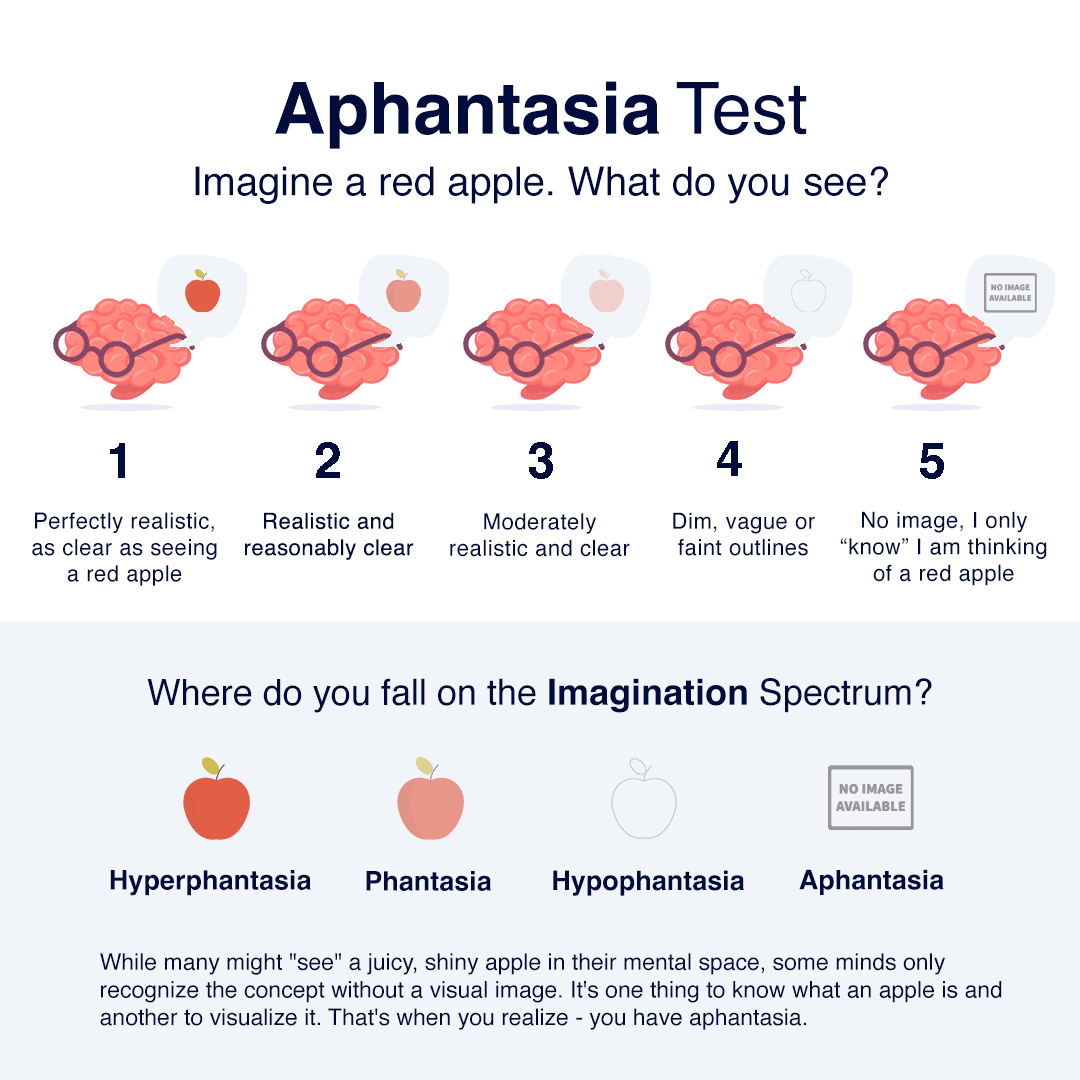
Ah, yes… well, unfortunately we do not have all the animations working yet, but we do have quite a few.

Look for the color thumbnails. They identify the completed animations. Use the prev and next links (above right) to browse the thumbnail pages.

As time goes on, we’ll be adding more until all 507 are complete.

Meanwhile, we hope you enjoy the animations we have completed, along with Henry T. Brown’s original illustrations in this classic technical reference.

show hn

Show HN: We built open OpenRouter that turns usage into a better model

by SilenN·▲ 184 points·37 comments·github.com ↗

Experiential is an open source gateway and router for agent workflows:

  1. Use hosted, BYOK, and local models through one OpenAI-compatible API.
  2. Control which users and agents can use which models, for which use cases, and how much they can spend.

  3. Turn production traffic into a custom router or model optimized for quality, speed, and cost.

Experiential workspace usage dashboard showing model traffic, identities, and spend

🌐 Platform | 📚 Docs | Discord

Getting Started

Start a local OpenAI-compatible gateway. On first run, the setup wizard uses the shared provider, model, and reasoning-effort selectors, persists every selected provider connection, then shows defaults for the public alias, identity, and $50.00 command budget before printing a one-time key:

pip install experiential
exp

Choose a public alias such as opus-5, capture the issued key, and send a request:

export EXP_GATEWAY_KEY=...
curl http://127.0.0.1:8000/v1/chat/completions \
  -H "Authorization: Bearer $EXP_GATEWAY_KEY" \
  -H 'Content-Type: application/json' \
  -d '{"model":"opus-5","messages":[{"role":"user","content":"Help me"}]}'

Setup / get started with the hosted gateway

Prefer a managed gateway to running one locally? The hosted platform at platform.experientiallabs.ai serves the same OpenAI-compatible (and Anthropic Messages) API at https://api.experientiallabs.ai/v1. See SETUP.md for copy-paste prompts you hand to your coding agent (Claude Code, Cursor, Codex, and similar); the agent runs the setup for you. It collects four prompts:

  • Upload your LLM traces as telemetry: create an account instantly from your email, then pull or upload your existing LLM traces onto the platform as telemetry.
  • Connect your inference provider keys (BYOK): create an account, then connect your own OpenAI, Anthropic, Gemini, Azure, Bedrock, Fireworks, or OpenRouter keys for free pass-through.
  • Start calling models on the gateway: make your first /v1 call with the OpenAI and Anthropic SDKs using an xpl_ key, and optionally repoint your existing coding agents.
  • Full onboarding: create an account instantly from your email, connect your keys, import your spend, then repoint every coding agent (Claude Code, Cursor, Codex, Aider, and similar) or Conductor at the gateway.

Using the API

Start the local gateway with exp (or exp run); the compiled native data plane serves every route on loopback. From Python, load a fitted project router as an official OpenAI client backed by its own private gateway:

import exp

with exp.load_router("my-project") as client:
    response = client.chat.completions.create(
        model="my-project",
        messages=[{"role": "user", "content": "hello"}],
    )

Optimize from Traffic

First, collect OpenTelemetry traces from your current agent. If you just want to try it out, grab the public terminal-tasks OTLP dataset:

curl -L -o traces.otel.jsonl \
  https://huggingface.co/datasets/experiential-labs/wmo-terminal-tasks-traces/resolve/540883e451dc13d34fb50fdd36b143cb0f1fb0db/traces.otel.jsonl

Then build a project. The build command walks you through providers, models, and budget, and asks for your trace file:

# Build simulation from your agent traces and optimize a router against it
exp build support-agent

After collecting traces from your router, fine-tune an open source model you own using Tinker.

exp optimize model support-agent

Telemetry

Anonymous aggregate PostHog product telemetry is enabled by default. It never includes prompts, traces, actions, observations, paths, model names, credentials, or raw customer content.

exp config telemetry status
exp config telemetry disable
exp config telemetry enable

The preference is stored locally in .exp/settings.toml.

Development

uv sync --extra dev
uv run ruff format --check .
uv run ruff check .
uv run ty check
uv run pytest -q

Repository and documentation conventions live in AGENTS.md.

About

An open source model gateway that provides one control plane across closed, open-source, local, and custom models.

experientiallabs.ai

article

M5Stack Launches PaperMono

by marksully·▲ 147 points·51 comments·shop.m5stack.com ↗

M5Stack today launches PaperMono, a compact ESP32-S3-based E-Ink development terminal designed for low-power information display, interaction, and connected IoT projects. PaperMono is now available through the M5Stack Store.

Product Value

Featuring a 3.97-inch 4-level grayscale E-Ink display, touch input, integrated frontlight, NFC, LoRa, microSD storage, RTC, and a built-in 1150mAh battery, PaperMono brings display, interaction, power, and connectivity into one integrated device.

Key Features

Display and Interact

The 3.97-inch 4-level grayscale E-Ink display provides a low-power viewing experience with the look and feel of paper. Touch input enables interactive interfaces, while the integrated frontlight supports comfortable use in low-light environments.

PaperMono also supports the CrossPoint Reader firmware, bringing an open and flexible reading experience to this compact E-Ink device.

Connect and Respond

Built-in NFC and LoRa support connected projects such as digital badges, identity displays, remote messages, sensor status screens, and other low-power IoT applications.

Build and Extend

Powered by the ESP32-S3R8 and supported by microSD storage, RTC, IMU, Wi-Fi, and a 1150mAh battery, PaperMono provides an integrated foundation for building and experimenting with E-Ink projects.

Version Comparison

PaperMono is also available in a Lite configuration for makers who want the core E-Ink development experience without NFC or LoRa connectivity. Both versions share the same 3.97-inch touch display, integrated frontlight, and ESP32-S3R8 platform.

PaperMono is designed for connected projects that require near-field identification or long-range, low-power communication. PaperMono-Lite is a focused option for E-Ink development without those connectivity features.

Compare the Versions →

Applications

Detailed Specification

See Detailed Specifications →

Turn Ideas into E-Ink Projects

PaperMono and PaperMono-Lite are now available from the M5Stack Store. Choose PaperMono for NFC and LoRa connectivity, or PaperMono-Lite for the core E-Ink development experience.

Shop PaperMono →

article

CoMaps integration with the wider FLOSS ecosystem

by janandonly·▲ 138 points·33 comments·comaps.app ↗

CoMaps is proud to be a fully free and open source app, and this ideal exists as one of CoMaps' core principles. Naturally, it's within our interest to make sure the ecosystem of FLOSS apps can flourish and serve as a viable alternative to their proprietary counterparts. Thus, Android users and enthusiasts who embrace this ecosystem of FLOSS Android apps may be pleased to hear that a few of us have working on ensuring CoMaps can interoperate well with these other apps, while still continuing to respect the user's privacy.

Gadgetbridge

Gadgetbridge is a free and open-source Android app which allows you to use your smartwatches, headphones, and other Bluetooth devices without having to use your manufacturer's proprietary app. Starting with Gadgetbridge v0.93.0, you can now use CoMaps as a navigation data provider, meaning users with a supported smartwatch may enjoy turn-by-turn directions on their wrist in a fully FLOSS solution.

At the time of writing, this setting can be found in Settings > External Integrations > Navigation. Enabling it will enable it for all supported connected devices.

The navigation app running on InfiniTime, with instructions from CoMaps

OpenVitals

OpenVitals leverages Android's Health Connect framework to bring you a complete dashboard of all your health and wellness data, so you can enjoy a free and open source alternative without the need to share it with external companies. It also allows you to record outdoor activities using CoMaps as a navigation context provider, so you can keep an eye of your activity metrics alongside the route of your bike ride or hiking trail.

At the time of writing, you can find it under Settings > Activities > Comaps navigation guidance. Enabling it will give you the ability to show the route set in CoMaps over your live activity.

CoMaps guidance within OpenVitals

Private by default

Being an app which respects its users, CoMaps only provides this data to other apps if the user allows it. To that end, you must grant each app a special permission provided by CoMaps.

If you're a FLOSS developer and want to build your own dashboards, widgets, et cetera with CoMaps' data, you can find documentation on Codeberg!

article

Afterglow: Run classic After Dark screen savers on modern macOS

by NaOH·▲ 157 points·47 comments·morphing.cloud ↗

Afterglow app icon: a glowing meteor crossing a violet star field

afterglow afterglow

Run classic After Dark screen savers on modern macOS

Download Afterglow

Universal binary · macOS 15+ · Changelog

In the ’90s, Berkeley Systems’ After Dark screen savers brought Flying Toasters, Fish, and Starry Skylines to Macintosh screens everywhere. They served a practical purpose in preventing burn-in on CRT monitors, but also entertained, with animations that could be funny, surreal, beautiful -- sometimes gross.
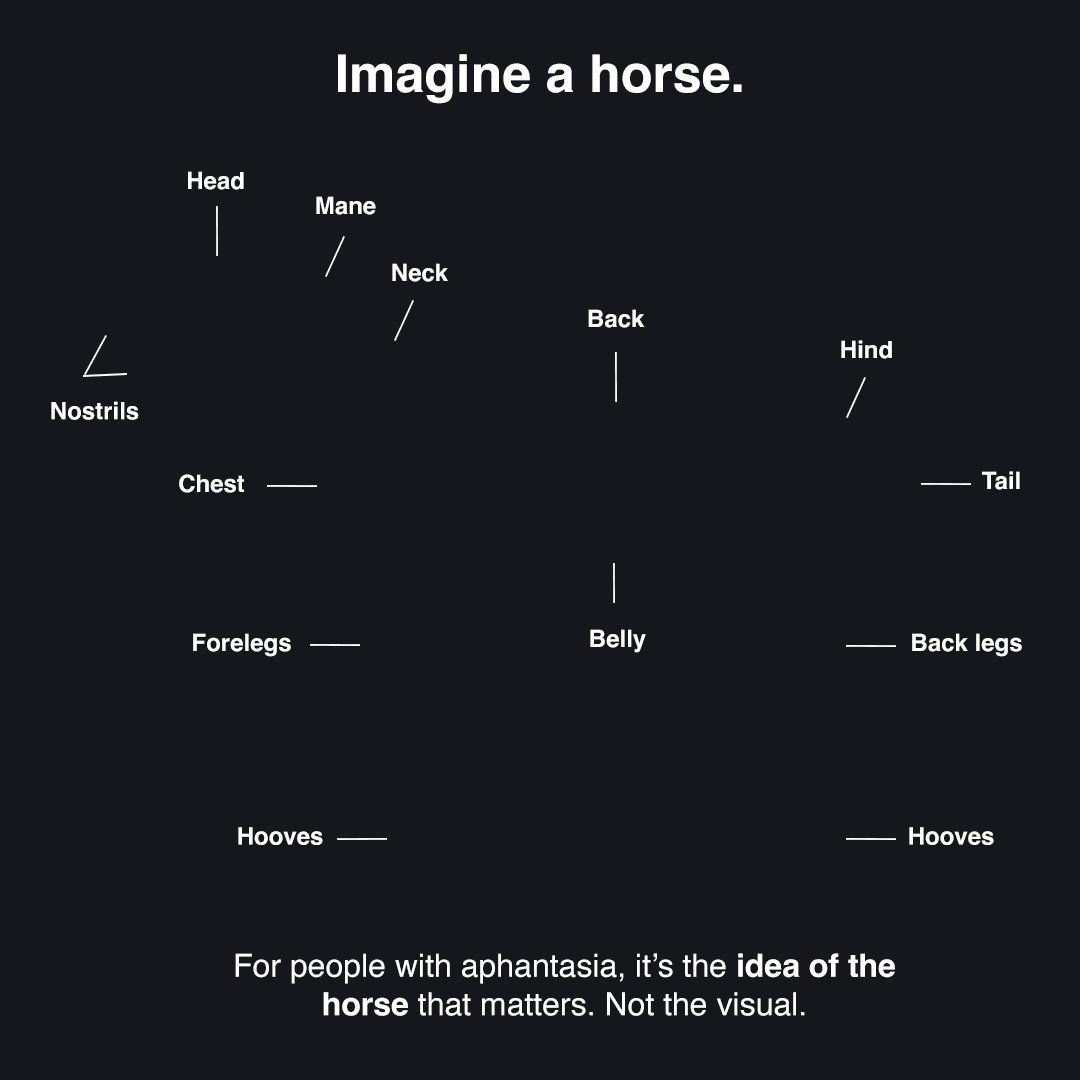
They are works of art worth preserving.
Running After Dark modules in the present day has involved fussy configuration of Mac OS emulators or vintage hardware. Even then, no single emulator or vintage computer can faithfully run every module: some animate too fast, some too slow.
Afterglow is an emulator built specifically for running After Dark modules -- the original 68k module code, not a remake or port -- with no dependencies on ROMs or classic Mac OS. Created in the spirit of software preservation, it makes After Dark easy to enjoy today and for years to come.

See it in action

Afterglow running Flying Toasters, with the module library on the left and its original settings and notes on the right.

Features

Import all most of the things

Modules aren’t included, but importing is easy: drag and drop module files, disk images, or compressed archives into the app and Afterglow extracts and imports them automatically. Whatever you have, if there are modules in there, you can probably drop it into Afterglow.

You can also browse and install software releases directly from the Internet Archive without leaving the app.

macOS screen saver

The joy of screen savers is in the surprise and delight of returning to your computer and seeing something unexpected: a psychedelic fractal, a procedurally generated mountain landscape, a Bad Dog defiling your desktop.

Afterglow includes a screen saver module for modern macOS, allowing you to run any of the classic modules you’ve imported.

The Liquid Glass lock screen has never looked better!

Dependency-free

Powered by the Musashi 68k CPU emulator, Afterglow reimplements just enough of the Macintosh Toolbox and OS APIs to run After Dark modules.

No Apple ROM or classic Mac OS installation is required.

And more…

  • Module controls
  • Full-screen mode
  • Randomizer
  • Multimodule
  • 3D box art
  • CRT shader
  • Resource inspector
  • DrawMorph editor

Questions or feedback?

Visit Afterglow Help →

Afterglow is a non-commercial project that exists in the spirit of software preservation, with gratitude to the artists and programmers who made these original works of art.

Afterglow is not affiliated with or endorsed by Berkeley Systems or the current rights holders of After Dark.

Copyrights and trademarks for After Dark and its modules belong to their respective rights holders.

The Daily Front Page 18 of 24
Thursday, August 27, 2026 The Daily Front No. #260827 — Public Affairs & Public Health
ask hn

Tell HN: PayPal blocks GrapheneOS

by leumon·▲ 489 points·313 comments·news.ycombinator.com ↗

It seems like the PayPal app now refuses to run on GrapheneOS. I don't know if it's only because I have enabled the PayPal card for contacless NFC payments, but when opening the app it crashes with the following exception: com.paypal.oslo.app.rasp.RootDetectionSecurityException: Security policy violation: s=root

Join the discussion on Hacker News →

The Daily Front Page 19 of 24
Thursday, August 27, 2026 The Daily Front No. #260827 — Public Affairs & Public Health
article

Two German airport workers die of malaria after 'mosquito arrives on plane'

by vinni2·▲ 183 points·103 comments·bbc.com ↗

Getty Images A view of a taxiing area at Frankfurt Airport. A Lufthansa plane sits on the tarmac.

Getty Images

Frankfurt is Germany's busiest airport

Two Frankfurt Airport workers have died of malaria after a rare outbreak led to six employees contracting the serious infection spread by mosquitoes.

It is believed the mosquitoes arrived at Germany's busiest airport on a plane, according to German public health officials, triggering an outbreak which was first detected in July.

A spokesperson for airport operator Fraport told the BBC an employee had died as a result of the infection, while public health officials said later on Wednesday that two of the affected individuals had died.

Traps have been installed at the airport and mosquitoes captured will be analysed in a laboratory to determine their species and origin.

"We have provided comprehensive information to all employees and encourage them to consult a doctor if they experience any symptoms," the Fraport spokesperson told the BBC.

The outbreak is being investigated by the Frankfurt Public Health Department.

The BBC understands that six male airport workers in different jobs and different areas of the airport were infected, and officials are analysing blood samples to determine if they were infected by one mosquito or six different mosquitoes.

Later on Wednesday, public health officials in Frankfurt sent a letter to media outlets which said two of the affected individuals had died.

"For the population of Frankfurt, the risk is considered very, very low. The disease is not transmissible from person to person but is always transmitted by mosquitoes," the letter added.

It said laboratory tests to determine the source of the infections were not expected to be available for several weeks.

It was reported in July that the outbreak involved four infected workers.

The Robert Koch Institute - a German federal government agency and research institute for disease control and public health - previously said the four employees fell ill between 4 and 6 July and the mosquitoes were brought in by plane.

The institute said malaria in Germany almost exclusively affects long-haul travellers who were infected in malaria-endemic areas, and that malaria transmitted within a German airport is rare.

"The lack of a travel history can lead to a delayed diagnosis. A delayed diagnosis increases the risk of a severe course of the diseases," the institute said in its epidemiological bulletin.

The last case of airport malaria was in 2023 also at Frankfurt Airport, it added.

Malaria is a disease spread by some types of mosquitoes biting humans, and is mostly found in tropical countries, according to the World Health Organization (WHO).

The infection, which is preventable and curable, is caused by a parasite and does not spread from person to person. However symptoms can be mild or life-threatening.

The Daily Front Page 20 of 24
Thursday, August 27, 2026 The Daily Front No. #260827 — Public Affairs & Public Health
The Daily Front Page 21 of 24
Thursday, August 27, 2026 The Daily Front No. #260827 — The Card File
The Daily Front Page 22 of 24
Thursday, August 27, 2026 The Daily Front No. #260827 — Also on the Front Page
The Daily Front Page 23 of 24
Thursday, August 27, 2026 The Daily Front No. #260827 — Colophon

That's the Front for Today

Issue No. #260827 — Thursday, August 27, 2026 — went to press 2026-08-28 at 11:48 UTC.

About This Magazine

The Daily Front is a daily digital magazine assembled from the stories that reached the front page of Hacker News on Thursday, August 27, 2026. Headlines, points, and comment counts are recorded as they stood at press time. All articles remain the property of their original authors — every piece links back to its source and its discussion thread.

How It Was Made

Fetched, cleaned, and typeset by an automated pipeline. An editor model laid out the pages and chose the highlights; a second read a handful of the day's stories and briefed the cover illustrator — 30 model calls and 259k tokens in total. Set in Jacquard 12, Playfair Display, Source Serif 4, and IBM Plex Mono, all served via Google Fonts under the SIL Open Font License.

The Cover

The cover illustration was commissioned with this prompt:

Inside a sprawling data center, a towering industrial arm lifts a crowded crate of small, mismatched machine-learning modules toward a single gleaming server cabinet, while dozens of tiny maintenance robots sort glowing cache tokens into tightly fitted trays. A technician kneels beside an opened server rack, removing handfuls of empty spacer blocks to make room for reclaimed memory modules. Through the glass wall, rows of identical cabinets disappear into the distance as the robots continue their orderly work.

Render the data center as a broken liquid-crystal display: cold electric cyan, spectral magenta, acid green, and bruised violet under icy backlight, with dead-pixel constellations, vertical black fractures, and rainbow pressure bruises disrupting every plane. Preserve the towering arm lifting its crowded mismatched-module crate toward one gleaming server cabinet, the tiny maintenance robots sorting glowing cache tokens into fitted trays, the kneeling technician removing empty spacer blocks beside the opened rack to admit reclaimed memory modules, and the glass wall’s receding cabinet rows with orderly robots, reducing detail into sharply legible LCD-like silhouettes, segmented reflections, and fractured luminous bands.

Absolutely no text, letters, numbers, readable symbols, or logos anywhere in the image.

Production Ledger

StageModelCallsTokens InTokens Out
extractgpt-5.6-luna 26 162,680 68,012
layoutgpt-5.6-terra 1 18,497 1,897
covergpt-5.6-luna 2 2,218 342
covergpt-image-2 1 247 5,488

The Publisher

Published by Johnny.

Support the Press

If The Daily Front brightens your morning, consider supporting its publisher.

Credits & Contact

All content — articles, posts, comments, and the images within them — belongs to its original authors and is reproduced here to point readers back to the source. Full credit goes to those creators; every item links to its original and its Hacker News discussion.

If you are an author and would like your content removed from an issue, write to hi@johnnys.page and it will be taken down.

Feedback is always welcome at the same address: hi@johnnys.page.

Credit where credit is due.

Every page of this issue began as someone else's work — these are the original sources, linked in full.

  1. Nvidia agrees to acquire Hugging Face for $13B by mfiguiere — businessinsider.com·HN discussion ↗
  2. CEO fired developers to make room for AI. Developers create open source AI CEO by GrumpySciGuy — github.com·HN discussion ↗
  3. Saving 100 terabytes of memory by optimizing 1.1.1.1's DNS cache by TangerineDream — blog.cloudflare.com·HN discussion ↗
  4. Microduck by robotswantdata — pollen-robotics.com·HN discussion ↗
  5. Small Models Have Arrived by tosh — calv.info·HN discussion ↗
  6. Gemini-3.5-Transcribe by k9294 — blog.google·HN discussion ↗
  7. Gemini Omni 1.1 Flash by saretup — blog.google·HN discussion ↗
  8. Suica, Japan's First IC Transit Card by zdw — tokyodev.com·HN discussion ↗
  9. Decompiling a Nintendo 64 game in 84 days by knackers — blog.chrislewis.au·HN discussion ↗
  10. US Government designates host of noblogs.org a "global terrorist" by robtherobber — crimethinc.com·HN discussion ↗
  11. Emacs 31: An unofficial guide to Markdown-ts-mode by RahulMJ — rahuljuliato.com·HN discussion ↗
  12. Show HN: OpenTIE and OpenXWA, Modern Ports of Tie Fighter and X-Wing Alliance by elyosh — github.com·HN discussion ↗
  13. Aphantasia Beginner's Guide by ksec — aphantasia.com·HN discussion ↗
  14. Meta Paid $17B – Gets to Write Safety Rules for Other SocMedia Platform by ano-ther — techdirt.com·HN discussion ↗
  15. MIT's Ad Hoc Committee on AI Use in Teaching, Learning, and Research Training by pbui — aiandeducation.mit.edu·HN discussion ↗
  16. 507 Mechanical Movements by helloplanets — 507movements.com·HN discussion ↗
  17. Show HN: We built open OpenRouter that turns usage into a better model by SilenN — github.com·HN discussion ↗
  18. M5Stack Launches PaperMono by marksully — shop.m5stack.com·HN discussion ↗
  19. CoMaps integration with the wider FLOSS ecosystem by janandonly — comaps.app·HN discussion ↗
  20. Afterglow: Run classic After Dark screen savers on modern macOS by NaOH — morphing.cloud·HN discussion ↗
  21. Trade (and Tariffs) by throw0101d — xkcd.com·HN discussion ↗
  22. Tell HN: PayPal blocks GrapheneOS by leumon — news.ycombinator.com·HN discussion ↗
  23. Two German airport workers die of malaria after 'mosquito arrives on plane' by vinni2 — bbc.com·HN discussion ↗
  24. Xcancel and Nitter have been taken down by madduci — news.ycombinator.com·HN discussion ↗
  25. Flock CEO gets his house blurred out on Google Maps and Zillow by lorecore — twitter.com·HN discussion ↗
  26. Show HN: The load-bearing vocabulary of Claude by Labo333 — louisabraham.github.io·HN discussion ↗
  27. Kusama Yayoi has died by phantomathkg — nytimes.com·HN discussion ↗
  28. We found a division by zero bug in FFmpeg with a vibecoded fuzzer by dclavijo — code.ffmpeg.org·HN discussion ↗
  29. Doctors are finally learning to manage antidepressant withdrawal by eutropheon — newscientist.com·HN discussion ↗
  30. Show HN: Voronoi Go by igpay — voronoigo.com·HN discussion ↗

Browse all issues in the archive →