Cover illustration

TheDaily Front

Issue No. #260825 Tuesday, August 25 2026 #260825 — TUESDAY, AUGUST 25, 2026
Silicon flexes, platforms close ranks, and the old songs still play.
Tuesday, August 25, 2026 The Daily Front No. #260825 — Contents
30stories
11,133points
6,371comments
322kllm tokens
Assembled with 33 model calls — 208,117 tokens read, 113,536 written.

Highlights

Apple introduces M6 and M5 Ultra

Apple’s first 2 nm M6 and enormous M5 Ultra put local AI—and eye-watering memory configurations—at the center of the Mac story.

OpenAI Jalapeño: Better than Nvidia Blackwell

OpenAI’s Jalapeño inference ASIC enters the contest with a provocative claim against Nvidia’s Blackwell generation.

Dolly Parton has died

A remembrance of Dolly Parton, the songwriter and philanthropist whose reach extended far beyond country music.

Nitter and XCancel receive cease and desist notices

Cease-and-desist notices have silenced Nitter and XCancel, sharpening the argument over public access to public posts.

What's new in Emacs 31.1

Emacs 31.1 arrives with a thick bundle of practical improvements, from tree-sitter to its long-awaited grammar installer.

From the Editor

The presses run hot with chips today: Apple has a new fleet, OpenAI has a challenger, and every discussion seems to end at memory bandwidth. Elsewhere, a beloved voice falls silent and the open web finds another gate swung shut. Such is the modern edition—progress in one column, tollbooths in the next.

  1. Apple introduces M6 and M5 Ultra3
  2. New Mac Studio with M5 Max and M5 Ultra4
  3. New Mac mini, featuring M6 and M5 Pro5
  4. OpenAI Jalapeño: Better than Nvidia Blackwell6
  5. Dolly Parton has died7
  6. Nitter and XCancel receive cease and desist notices8
  7. Bomb fishing is wreaking havoc on Indonesia's coral reefs9
  8. My Friend Aaron10
  9. Building a backyard office, the build and cost breakdown11
  10. Peppermint oil reduces blood pressure by 8.48 mmHg in small study12
  11. Training AI to Paint with Code13
  12. How Universities Should Prepare Founders14
  13. Tooltips need a delay, and then they need to skip it15
  14. Octopus intelligence may be related to never-before-seen mutation16
  15. Black hole singularity is a surface not a point17
  16. Firefox 157 will include JPEG XL by default on all platforms18
  17. Don't Wordle19
  18. Visualizing Binary Files20
  19. Run OpenBSD on DigitalOcean for $4/month21
  20. Bookshelf – Self-hosted eBook library that runs on object storage22
  21. Show HN: LatticeDB – Like SQLite but for graph databases23
  22. What's new in Emacs 31.124
  23. Show HN: I wrote a BASIC interpreter that boots on UEFI machines25
  24. Show HN: I made a Raspberry with Qwen my local car AI26
  25. SiFive's First Server Platform27
  26. Was modern art a CIA psy-op? (2020)28
  27. C2PA Cameras Do Not Survive Contact with Reality29
  28. FDA authorizes first wearable device that monitors ketone and blood sugar levels30
  29. Starbase, LA30
  30. Qwen 3.8-Flash-Next releasing tomorrow (125B a6B)30
The Daily Front Page 2 of 31
Tuesday, August 25, 2026 The Daily Front No. #260825 — The New Silicon Order
article

Apple introduces M6 and M5 Ultra

by interpol_p·▲ 1,135 points·1,097 comments·apple.com ↗
M6 delivers a revolutionary leap in everyday performance and power efficiency.

M6, Apple’s first 2 nm chip, features a larger, more powerful 12-core CPU, 12-core GPU, and Dual 16-core Neural Engine, while M5 Ultra is Apple’s first quad-die architecture and its most powerful chip ever

Logos for the Apple M6 chip and Apple M5 Ultra chip side-by-side.

M6 delivers a revolutionary leap in everyday performance and power efficiency. M5 Ultra unleashes unprecedented desktop-class power and massive unified memory bandwidth to conquer the most demanding projects.

CUPERTINO, CALIFORNIA Apple today debuted M6 in the new Mac mini and M5 Ultra in the new Mac Studio, providing an extraordinary leap in performance and AI capabilities. M6, Apple’s first state-of-the-art 2-nanometer chip, advances every compute block, delivering gains across every dimension of performance. The chip features a larger 12-core CPU complex with the world’s fastest CPU core, a larger 12-core GPU with Neural Accelerators, a Dual 16-core Neural Engine, and up to 170GB/s of unified memory bandwidth.1 M5 Ultra, the ultimate powerhouse for pro and AI workloads, uses next-generation UltraFusion technology to form a quad-die architecture for the first time in an M-series system on a chip (SoC). The chip includes an up-to-36-core CPU and up-to-80-core GPU with a massive 1.2TB/s of unified memory bandwidth, 50 percent more than M3 Ultra. With their advanced technologies, these SoCs deliver extraordinary compute with industry-leading power efficiency, empowering users to do even more on a desktop.

“Today, we’re debuting the next giant leap in performance and AI compute for Apple silicon with the incredibly advanced M6 and the most powerful M-series chip yet, M5 Ultra,” said Sri Santhanam, Apple’s vice president of Silicon Engineering Group. “Built using the cutting-edge 2 nm process, M6 combines a new CPU complex, two additional CPU and GPU cores, a Dual 16-core Neural Engine, and more unified memory bandwidth to power through workloads with amazing energy efficiency. And for the ultimate desktop performance and the ability to run massive AI models, M5 Ultra features a massive GPU, now with Neural Accelerators, and more unified memory bandwidth, pushing the boundaries of what a desktop can do.”

M6: Optimized Design and Enhanced Performance

Designed to power the workflows of everyday users, students, developers, AI hobbyists, and enterprises, M6 offers the ideal balance of performance, power efficiency, and on-device AI to effortlessly fly through daily tasks, coding, and creative projects.

M6 is built using cutting-edge 2 nm process technology, packing greater transistor density into a smaller die for a major leap in performance and power efficiency. M6 also introduces a Dual 16-core Neural Engine, providing up to 2x the peak compute over previous generations to make on-device AI workflows run even faster. System frameworks can automatically utilize both engines simultaneously, enabling applications to see faster model execution.

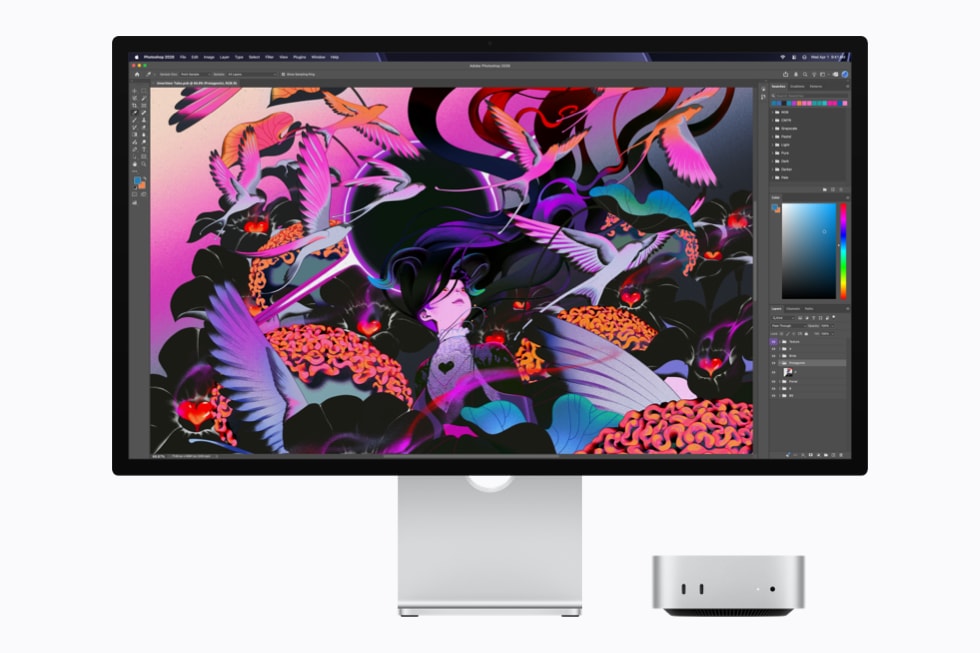
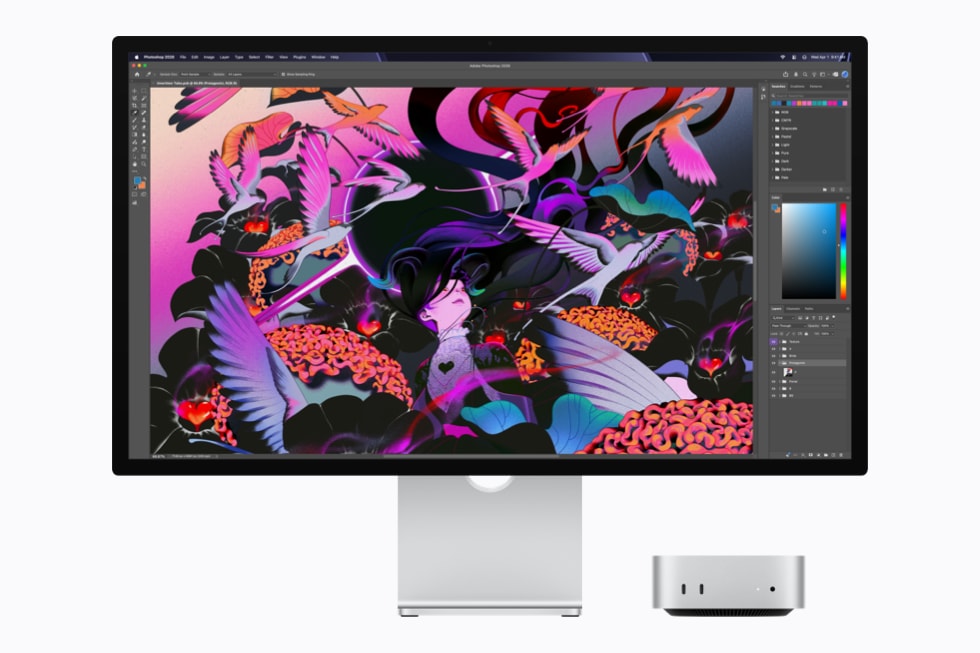
Mac Studio and Studio Display show a colorful, abstract illustration being edited in Adobe Photoshop.

Powered by the all-new 2 nm M6, Mac mini provides an incredibly fast and responsive experience for creative workflows in apps like Adobe Photoshop.

M6 has a brand-new 12-core CPU complex — two more cores than M5 — that consists of 2 super cores, 4 performance cores, and 6 efficiency cores. It delivers the world’s fastest single-threaded performance and up to 1.2x faster multithreaded performance as compared to M5, and up to 2.4x faster than M1.2 The super cores blaze through single-threaded workloads, the performance cores use less power and join the super cores to run demanding multithreaded workloads, and the efficiency cores handle everyday background tasks — all with industry-leading performance per watt. As a result, demanding CPU tasks such as editing images, compiling code, indexing new files, and running agentic AI workloads are faster than ever.

Accelerated GPU and Faster Memory Bandwidth

M6 features a 12-core GPU — two more cores than M5 — with a Neural Accelerator in each core. This design delivers a nearly 30 percent increase in peak GPU compute for AI compared to M5, and more than 8x compared to M1, enabling significantly faster prompt processing when interacting with on-device LLMs.2

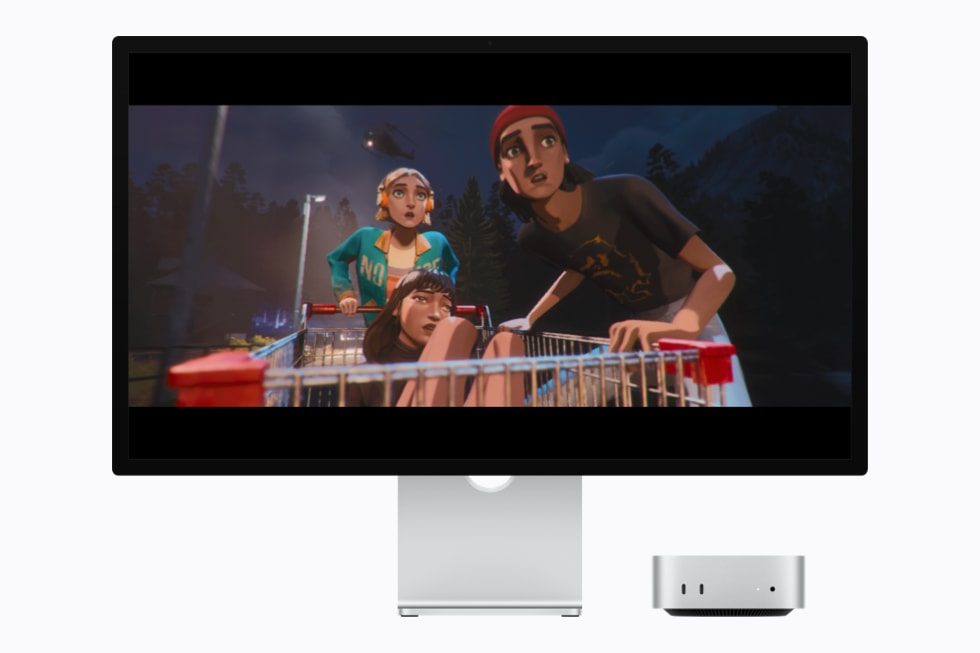
Mac Studio and Studio Display show a cinematic scene from the video game Mixtape.

M6 features a powerful, larger 12-core GPU that provides higher geometry rates and updated Dynamic Caching to deliver stunning visuals and fluid frame rates in demanding games like Mixtape.

In addition, M6 offers Apple’s latest advanced graphics capabilities, including updates to the shader core architecture, Dynamic Caching, and hardware-accelerated ray tracing. These technologies combine to deliver stunning visual realism, faster rendering, and higher frame rates for gaming. M6 also has 50 percent increased geometry rates for complex graphics.

M6 supports up to 32GB of unified memory to multitask across demanding apps and run LLMs on device for secure and private agentic tasks. It also provides up to 170GB/s of unified memory bandwidth — a 10 percent increase over M5 and a 2.5x increase over M1.

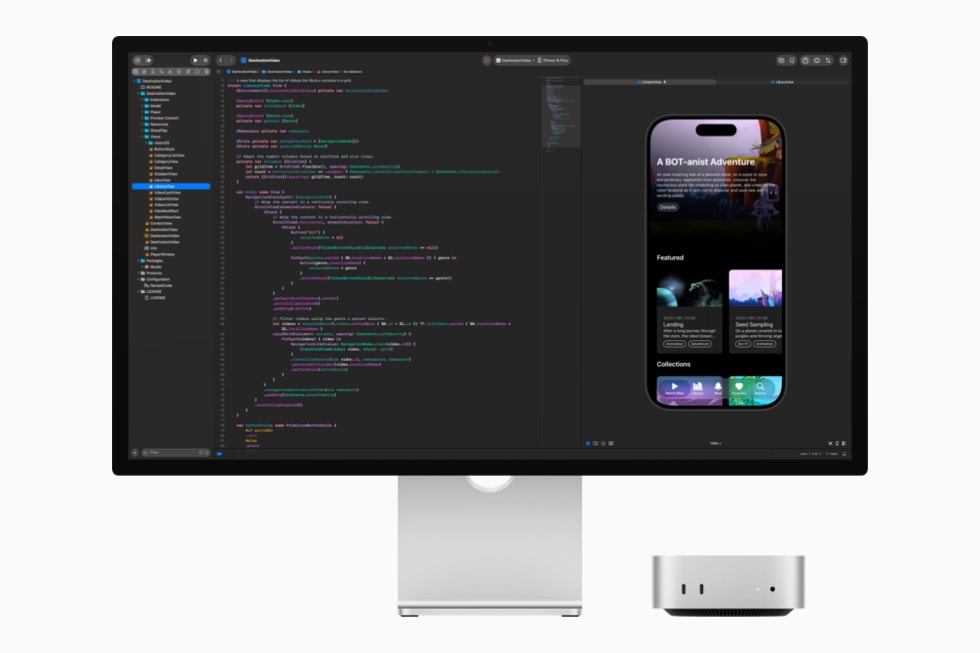
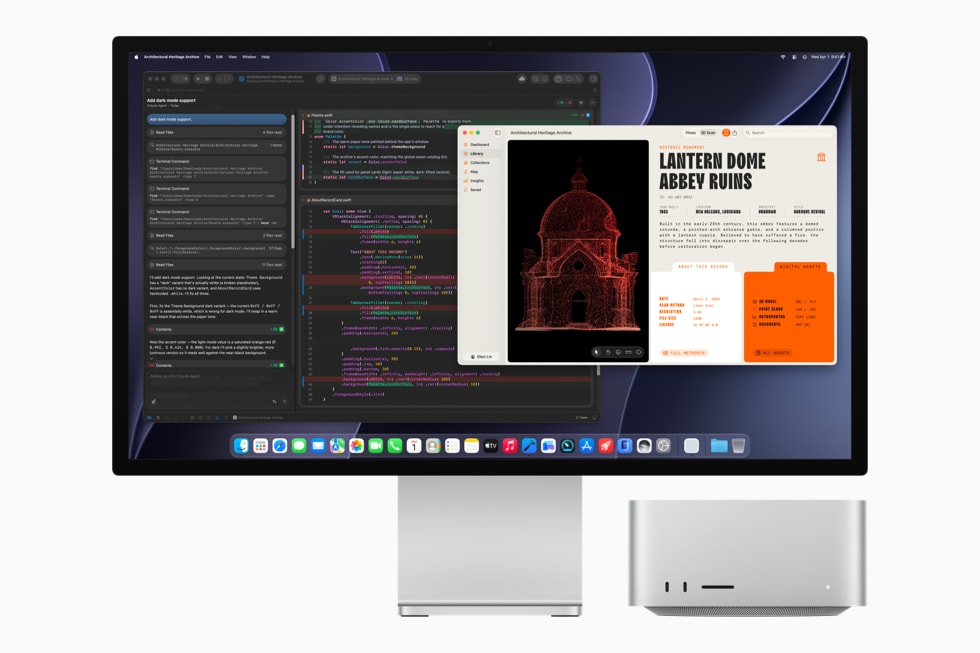
Mac Studio and Studio Display show code being written in Xcode.

With a Dual 16-core Neural Engine, larger GPU with Neural Accelerators, and higher unified memory bandwidth, M6 enables developers to compile code, index files, and run multiple simulators in Xcode with incredible speed.

M5 Ultra: The Ultimate Powerhouse for Pro Workflows

M5 Ultra, Apple’s most powerful chip ever, is built for pros who need to speed through workloads that demand maximum CPU and GPU performance and unified memory bandwidth, such as complex 3D rendering, visual effects, scientific analysis, and running compute-intensive frontier AI models on device.

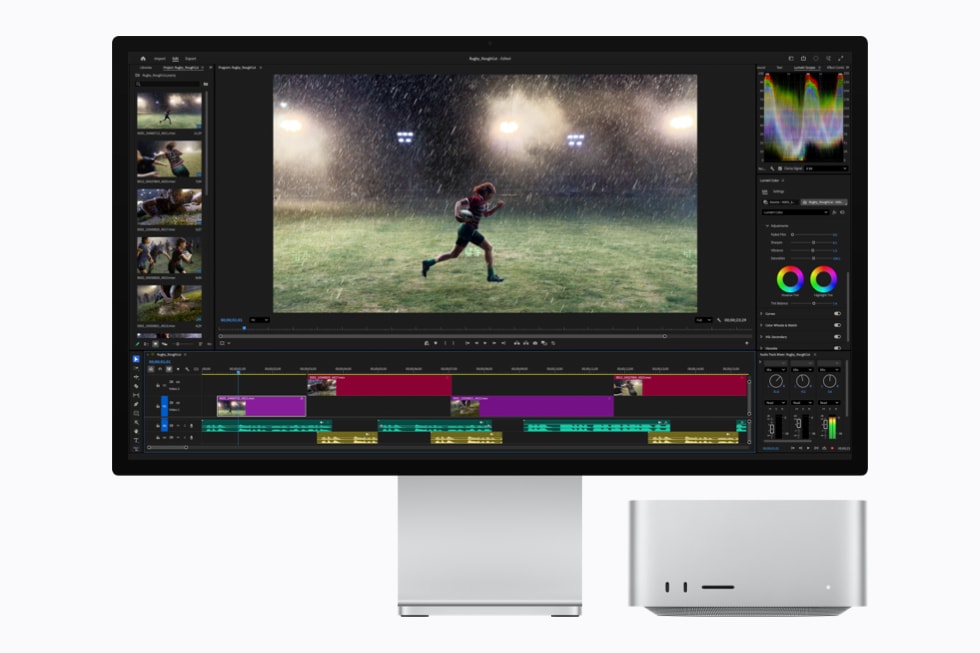
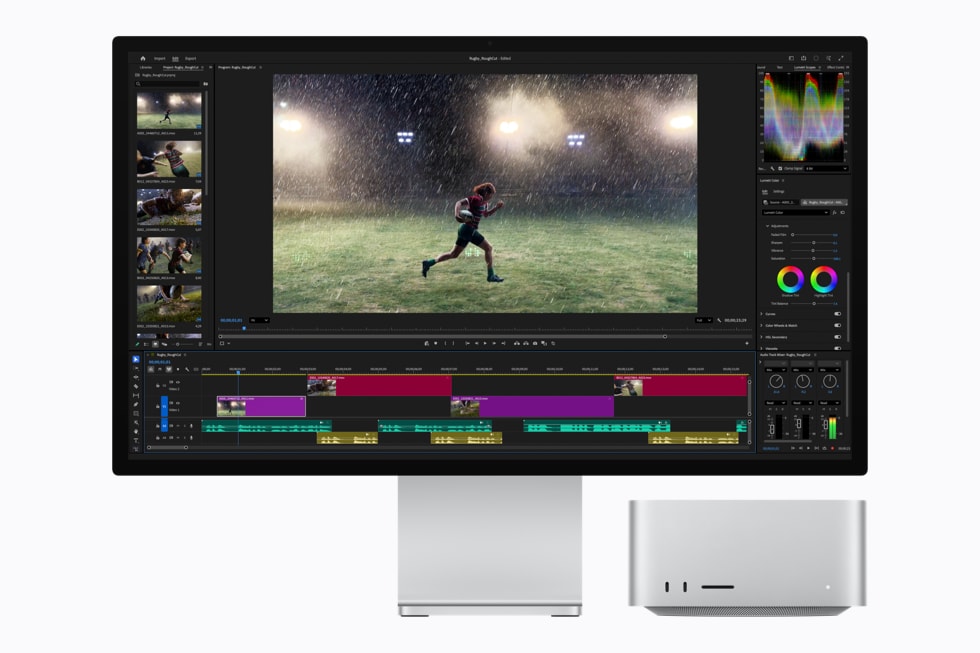
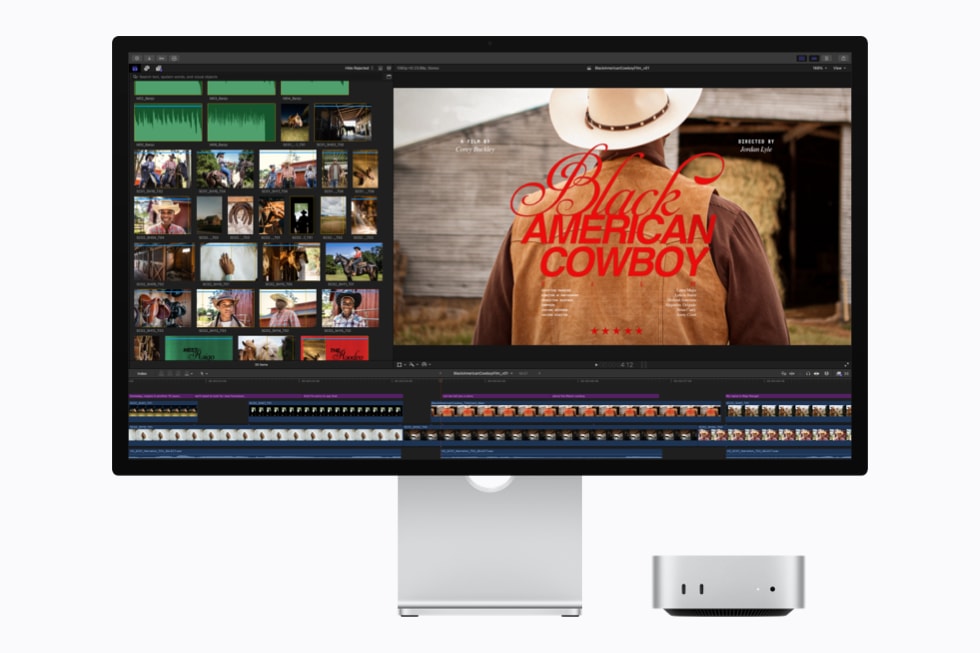
Mac Studio and Studio Display show a video timeline being edited in Adobe Premiere Pro.

Mac Studio with M5 Ultra delivers extreme performance and memory bandwidth to edit complex timelines with multiple streams of high-resolution video and effects in Adobe Premiere Pro.

M5 Ultra uses UltraFusion to connect two dual-die M5 Max chips to form the quad-die architecture — a first for Apple silicon. UltraFusion increases the inter-die bandwidth to over 4.4TB/s and the connection density by over 6x. Together, these ultra-low-latency, high-bandwidth interconnects allow the four dies to behave as a single unified processor. M5 Ultra also features a large up-to-36-core CPU consisting of 12 super cores and 24 performance cores, delivering up to 1.25x higher single-threaded performance and up to 1.3x higher multithreaded performance than M3 Ultra.3

Unprecedented AI and Graphics, Massive Memory Capacity

M5 Ultra features a next-generation GPU with up to 80 cores, incorporating a Neural Accelerator in each core to offer up to 4.5x the peak GPU compute for AI compared to M3 Ultra and over 6x more than M1 Ultra.3 The GPU includes Apple’s latest shader core with second-generation Dynamic Caching, as well as hardware-accelerated mesh shading and third-generation ray tracing, delivering up to 40 percent faster graphics performance than M3 Ultra.3

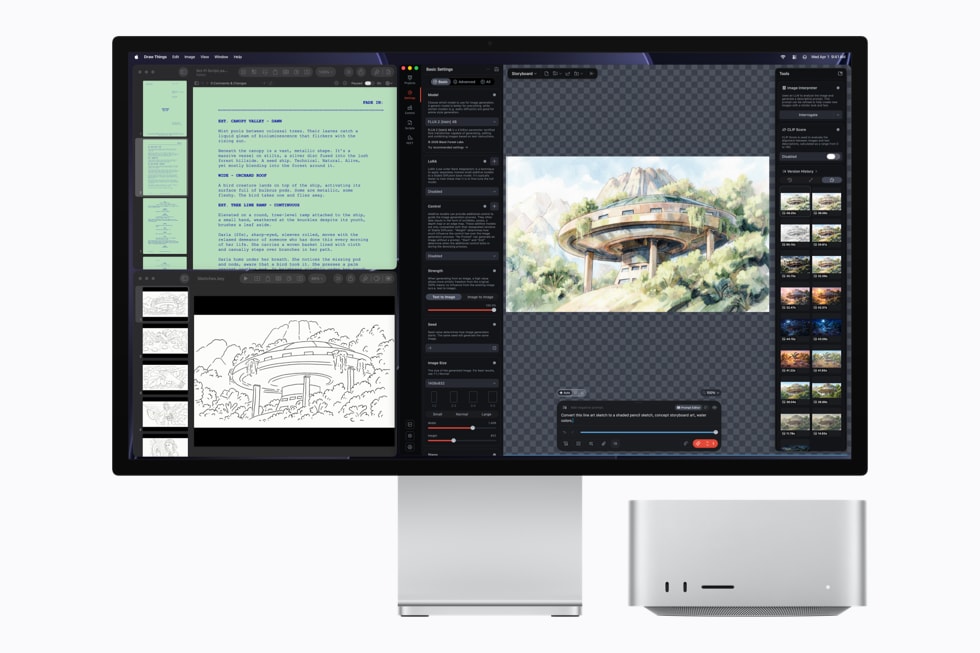
Mac Studio and Studio Display show an image of a treehouse being edited in the Draw Things app.

Utilizing the powerful up-to-80-core GPU with Neural Accelerators, Mac Studio with M5 Ultra enables creators to generate high-quality AI images locally on device using apps like Draw Things.

M5 Ultra incorporates a more capable Media Engine. Dedicated hardware-enabled H.264, HEVC, four ProRes encode and decode engines, and hardware-accelerated AV1 decode make it the ultimate solution for high-resolution video editing. M5 Ultra also includes a 32-core Neural Engine, driving complex AI tasks and Apple Intelligence features securely on device with industry-leading energy efficiency.4

Mac Studio and Studio Display show complex data visualizations and graphs in LM Studio Bionic and MATLAB.

With up to 512GB of unified memory and 1.2TB/s of memory bandwidth, Mac Studio with M5 Ultra enables researchers to leverage local AI models in LM Studio Bionic to trigger complex simulations in MATLAB.

Additionally, M5 Ultra features a massive amount of high-bandwidth unified memory, up to 512GB, and delivers a staggering 1.2TB/s of unified memory bandwidth that is 50 percent higher than M3 Ultra. This lets users store huge datasets entirely in local memory, increase the tokens-per-second speed, and run huge LLMs with hundreds of billions of parameters entirely on device.

Unleashing Power for Developers

Apple’s developer frameworks and tools — including Core AI, Core ML, Metal, and Xcode — tap directly into the advanced hardware of both chips. Developers can leverage the Dual 16-core Neural Engine in M6, and the Neural Accelerators in the GPU with the massive 512GB unified memory pool and faster 1.2TB/s of unified memory bandwidth in M5 Ultra, to provide incredible AI compute capabilities.

With these frameworks and new chips, developers can run and fine-tune large AI models locally on their Mac. Apple’s developer tools and frameworks automatically optimize performance across the CPU, GPU, and Neural Engine, and give developers the ability to use Apple Foundation Models, App Intents to tap into Apple Intelligence features, or their own proprietary AI models to build and run powerful AI workloads entirely on device.

  1. Testing was conducted by Apple in August 2026 using shipping competitive systems and select industry-standard benchmarks.

  2. Testing was conducted by Apple in August 2026 using preproduction Mac mini with M6 with 12-core CPU, 12-core GPU, and 32GB of memory; 14-inch MacBook Pro with M5 with 10-core CPU, 10-core GPU, and 32GB of memory; and Mac mini with M1 with 8-core CPU, 8-core GPU, and 16GB of memory. Performance was measured using select industry‑standard benchmarks. Performance tests were conducted using specific computer systems and reflect the approximate performance of Mac mini. See apple.com/mac-mini for more information.

  3. Testing was conducted by Apple in August 2026 using preproduction Mac Studio with M5 Ultra with 36-core CPU, 80-core GPU, and 256GB of memory; Mac Studio with M3 Ultra with 32-core CPU, 80-core GPU, and 256GB of memory; and Mac Studio with M1 Ultra with 20-core CPU, 64-core GPU, and 64GB of memory. Performance was measured using select industry‑standard benchmarks. Performance tests were conducted using specific computer systems and reflect the approximate performance of Mac Studio. See apple.com/mac-studio for more information.

  4. Apple Intelligence features are currently available for testing through the Apple Beta Software Program, and will be available with macOS 27 this fall for users with an Apple Intelligence-enabled device set to a supported language. Apple Intelligence is available with support for these languages: English, Danish, Dutch, French, German, Italian, Norwegian, Portuguese, Spanish, Swedish, Turkish, Vietnamese, Chinese (simplified), Chinese (traditional), Japanese, and Korean. Some features may not be available in all regions or languages. For feature and language availability and system requirements, see apple.com/apple-intelligence.

The Daily Front Page 3 of 31
Tuesday, August 25, 2026 The Daily Front No. #260825 — Studio at Full Throttle
article

New Mac Studio with M5 Max and M5 Ultra

by interpol_p·▲ 768 points·506 comments·apple.com ↗
Apple’s most powerful Mac raises the bar for local AI.

Apple’s most powerful Mac raises the bar for local AI with up to 4.3x faster performance, more advanced graphics, up to 512GB of unified memory, and extensive connectivity

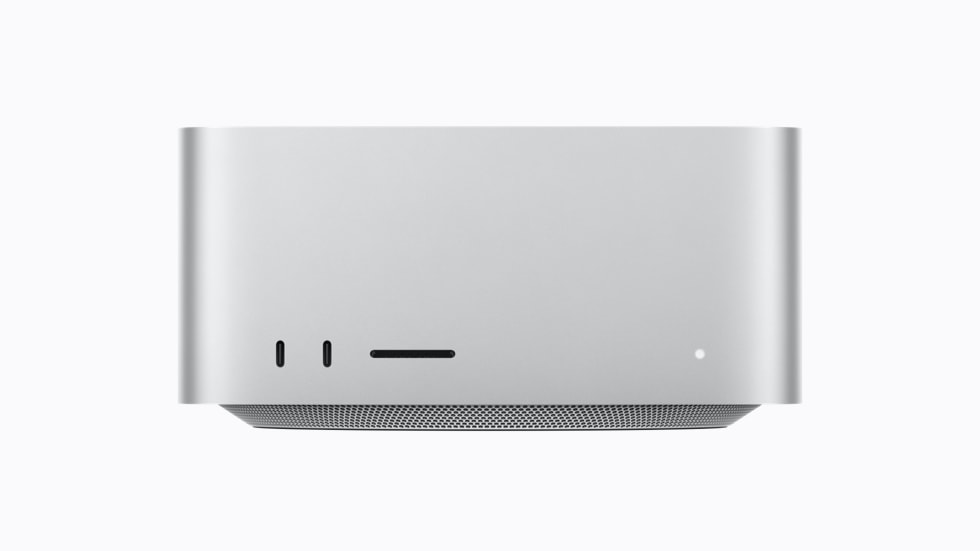
A photo of Mac Studio.

Apple unveils the new Mac Studio, the most powerful Mac ever, featuring M5 Max and M5 Ultra.

CUPERTINO, CALIFORNIA Apple today announced the new Mac Studio, featuring M5 Max and the all-new M5 Ultra, delivering a monumental leap in AI performance and even faster graphics for the most demanding pro workflows, all in its signature compact design that lives right on a user’s desk. Now featuring up to 4.3x faster AI performance,1 up to 2x faster storage,2 up to 1.8x faster graphics,1 and up to 1.3x faster CPU speed,1 along with higher memory bandwidth, Mac Studio empowers creatives, developers, AI researchers, data scientists, and more to push the boundaries of what they can do. Mac Studio with M5 Max features an 18-core CPU, an up-to-40-core GPU with Neural Accelerators built into each core, and up to 128GB of unified memory, accelerating complex pro and AI workloads. With the powerful M5 Ultra, Mac Studio scales up to a 36-core CPU, up to an 80-core GPU, and a staggering 512GB of unified memory, enabling users to run enormous LLMs entirely on device. Wi-Fi 7 and Bluetooth 6 come to Mac Studio for the first time, while Thunderbolt 5 rounds out its extensive connectivity, so users can take advantage of blazing-fast external storage, PCIe expansion chassis, and powerful hub solutions for the most intense workloads. Thunderbolt 5 also enables multiple Mac Studio systems to be clustered, bringing up to 3x faster performance for distributed AI inference when compared to a single system.1 Together with Studio Display and Studio Display XDR, along with the power of macOS 27 and the next generation of Apple Intelligence,3 including Siri AI,4 it is the ultimate pro desktop. The new Mac Studio is available for pre-order starting today, with availability beginning September 22.

“Mac Studio is the ultimate desktop for on-device AI and the world’s most demanding pro workflows, relied on by users for its tremendous performance and extensive pro connectivity, all in a quiet, compact design that sits right on your desk — and today, we’re pushing the boundaries even further,” said Johny Srouji, Apple’s chief hardware officer. “With the powerful M5 Max and the incredible capabilities of M5 Ultra, Mac Studio ushers in a new era of desktop computing, delivering huge performance gains for pro workloads and AI inference with frontier-class models. By integrating Neural Accelerators directly into the GPU and offering massive amounts of high-bandwidth unified memory, the new Mac Studio is our most powerful Mac ever.”

Side-by-side graphics represent the M5 Max and M5 Ultra chips.

Mac Studio, powered by M5 Max and the new M5 Ultra, delivers phenomenal boosts in AI and graphics performance — featuring a powerful CPU and GPU with Neural Accelerators, along with higher unified memory bandwidth.

A Monumental Step for AI

Mac Studio is at the forefront of high-performance AI computing. Now, with M5 Max and M5 Ultra — Apple’s most powerful silicon ever — it’s turbocharged, putting frontier-class AI models right on a user’s desk. Neural Accelerators in each GPU core deliver dramatically faster matrix multiplication. M5 Max features phenomenal on-device AI compute with up to 3.9x faster AI performance than the prior generation, speeding up prompt processing.1 With M5 Ultra, Mac Studio achieves up to 4.3x the peak AI compute performance of M3 Ultra and a staggering 9.8x more than M1 Ultra.1 Combined with up to 512GB of unified memory and 1.2TB/s of memory bandwidth, 50 percent higher than before, Mac Studio lets users run massive models entirely on device with complete privacy — without counting tokens or worrying about rising cloud costs.

AI inference scales to entirely new levels with multiple Mac Studio systems. Users and teams looking to share AI compute can cluster multiple Mac Studio systems together using the built-in support for Thunderbolt 5 and RDMA (remote direct memory access). This creates a vast shared memory pool across systems, allowing users to load the largest and most demanding frontier-class open-weight models available today. A cluster of four Mac Studio systems delivers up to a remarkable 3x faster AI inference than a single system.1

Mac Studio is also a powerful platform for the rich ecosystem of tools AI researchers and developers rely on every day, utilizing the advanced frameworks in macOS. Core AI is a brand-new framework for building, running, and deploying AI models on Apple silicon. It provides an architecture optimized for Apple silicon, including unified memory, CPU, GPU, and Neural Engine, allowing developers to deploy full-scale LLMs locally and bring their own custom models into their apps. MLX, Apple’s open-source machine learning framework optimized for Apple silicon, enables developers to run, train, and fine-tune models with exceptional efficiency on Mac. In addition to these powerful frameworks, combined with Xcode and a robust ecosystem of AI tools and solutions, Mac Studio provides a complete, end-to-end platform for AI development — from experimentation and training to deployment.

Mac Studio is pictured with a display showing coding in Xcode.

With the new Mac Studio, developers can experience faster build performance in Xcode and utilize on-device coding agents.

Mac Studio is pictured with a display showing the app Draw Things.

With the new Mac Studio, users can experience up to 4.3x faster text-to-image performance in apps when compared to the previous generation.

Mac Studio with M5 Max

Serious Speed and Power for Pro Workloads

Built for users who demand powerful performance in a compact footprint, Mac Studio with M5 Max is ideal for musicians, photographers, software engineers, and designers pushing real-time 3D and motion graphics. Mac Studio with M5 Max delivers a huge boost in performance, featuring an 18-core CPU with 6 super cores and 12 performance cores, so developers can compile code even faster. The up-to-40-core GPU with Neural Accelerators is now up to 50 percent faster than the previous generation, boosting graphics-intensive tasks like game development with higher frame rates and more complex scene geometry.1 With up to 614GB/s of unified memory bandwidth, M5 Max delivers superfast on-device AI compute, enabling users to run LLMs, generate images and video, as well as accelerate complex workflows.

The new Mac Studio also includes third-generation hardware-accelerated ray tracing, delivering faster, more realistic lighting, reflections, and shadows across professional 3D, VFX, and design workflows. Enhanced shader cores boost parallel processing, enabling smoother real-time viewport navigation and faster offline renders in creative workloads. In addition, its powerful Media Engine supports hardware-accelerated H.264, HEVC, ProRes, and AV1 decode, allowing filmmakers to color-grade uncompressed 8K footage and process multiple concurrent video streams with ease.

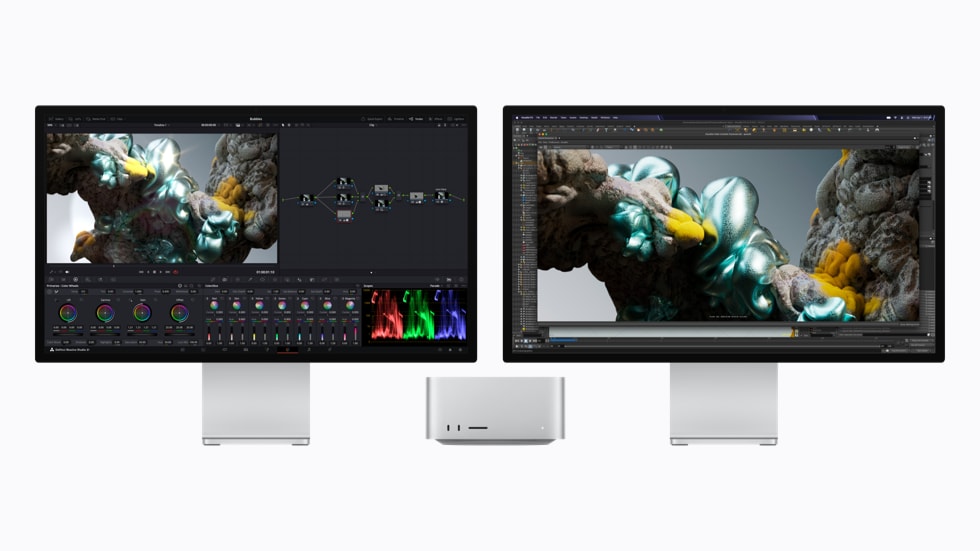
Two Mac Studio systems show video editing in Blackmagic Design DaVinci Resolve Studio and Maxon Redshift.

When compared to M4 Max, Mac Studio with M5 Max enables video editors to experience up to 3x faster Magic Mask performance in Blackmagic Design DaVinci Resolve Studio, and 1.4x faster scene rendering performance with Maxon Redshift.

Mac Studio with M5 Max enables:1

  • Up to 10.7x faster LLM prompt processing in LM Studio when compared to Mac Studio with M1 Max, and 3.9x faster than M4 Max.
  • Up to 7.4x faster text-to-image performance when compared to Mac Studio with M1 Max, and up to 3.5x faster than M4 Max.
  • Up to 5.3x faster Magic Mask performance in Blackmagic Design DaVinci Resolve Studio when compared to Mac Studio with M1 Max, and up to 3x faster than M4 Max.
  • Up to 3.5x faster basecalling for DNA sequencing in Oxford Nanopore MinKNOW when compared to Mac Studio with M1 Max, and up to 1.9x faster than M4 Max.

Mac Studio with M5 Ultra

A Powerhouse for the Most Demanding Workloads

Engineered for professionals who tackle the most extreme workloads, Mac Studio is the ultimate pro desktop, taking performance to an entirely new level. There is no other chip like M5 Ultra, which delivers the highest levels of performance and massive amounts of unified memory, enabling pros to push the limits of what they can accomplish on a single machine. Filmmakers can color-grade uncompressed 8K footage in real time, VFX artists can render complex simulations, and data scientists can train local AI models on expansive datasets. The new Mac Studio with M5 Ultra features an up-to-36-core CPU with 12 super cores and 24 performance cores, delivering up to 1.3x higher multithreaded performance than M3 Ultra.1 Its up-to-80-core GPU, the most powerful Apple silicon GPU ever, brings Neural Accelerators to the Ultra chip for the first time, enabling up to 4.3x the peak AI compute performance when compared to M3 Ultra.1 It also features up to 1.8x faster graphics than the prior generation, providing smoother real-time 3D rendering for VFX workflows.1

Combined with up to 512GB of unified memory and 1.2TB/s of memory bandwidth, the new Mac Studio is a game changer for AI workloads. AI coding agents process significantly faster, image generation tools can render creations in an instant, and enterprise teams can cluster multiple systems to scale performance to new heights. In addition, with twice the video encode and decode blocks as M5 Max, the Media Engine in M5 Ultra is more capable than ever, empowering pros to simultaneously play up to 33 streams of 8K ProRes 422 at 30 fps on M5 Ultra.1

Mac Studio with M5 Ultra shows an Adobe Premiere screen featuring an athlete running in the rain.

Mac Studio with M5 Ultra empowers pros to simultaneously play up to 33 streams of 8K ProRes 422 at 30fps.

Mac Studio with M5 Ultra running LM Studio Bionic.

With up to 512GB of unified memory and 1.2TB/s of memory bandwidth, Mac Studio with M5 Ultra enables researchers to leverage local AI models in LM Studio Bionic to trigger complex simulations in MATLAB.

Mac Studio with M5 Ultra enables:1

  • Up to 15.4x faster CopyCat ML training performance in Foundry Nuke when compared to Mac Studio with M1 Ultra, and up to 3.3x faster than M3 Ultra.
  • Up to 9.8x faster LLM prompt processing in LM Studio when compared to Mac Studio with M1 Ultra, and up to 4x faster than M3 Ultra.
  • Up to 8.2x faster text-to-image performance when compared to Mac Studio with M1 Ultra, and up to 4.3x faster than M3 Ultra.
  • Up to 4.7x faster scene rendering performance in Maxon Redshift when compared to Mac Studio with M1 Ultra, and up to 1.7x faster than M3 Ultra.

Blazing-Fast Storage and Pro Connectivity

The new Mac Studio also features faster storage and a comprehensive array of pro connectivity. Storage performance is up to twice as fast, with a next-generation SSD architecture, delivering industry-leading read and write speeds for rapid project loading, file transfers, and loading huge LLMs.2 Thunderbolt 5 ports deliver transfer speeds up to 120Gb/s of bandwidth, so pros can connect high-performance peripherals, displays, PCIe expansion chassis, and external storage to utilize its remarkable speeds. The Apple-designed N1 chip brings Wi-Fi 7 and Bluetooth 6 to Mac Studio for the first time, delivering improved performance and reliability to wireless connections. Mac Studio now enables genlock over USB-C for precise synchronization between a display and professional camera capture like iPhone 17 Pro. It also supports up to eight displays, or up to four Studio Display XDR at full 5K resolution and 120Hz, providing an expansive screen for the most demanding projects.

A rear view of Mac Studio shows its multiple ports.

Mac Studio delivers extensive pro connectivity, including up to six ports of Thunderbolt 5, support for up to eight displays, and now Wi-Fi 7 and Bluetooth 6.

macOS 27 Golden Gate: An Unrivaled Experience

The new Mac Studio comes to life with the upcoming macOS 27, which includes Siri AI, a profoundly more capable and personal assistant; helpful Apple Intelligence features across everyday apps; and an expansive set of improvements that make the Mac even more responsive and reliable. Siri AI can draw on personal context to help users find what they need in the moment across their messages, emails, and photos; answer questions about virtually any topic; and get things done across apps. Siri AI is integrated into Spotlight and systemwide context menus, and users can ask Siri about what’s on their display with Visual Intelligence using a dedicated keyboard shortcut. Pros can also write and edit with Siri almost anywhere they type.

Additionally, Apple Intelligence makes apps smarter and more useful with new ways to tailor and organize browsing in Safari, easily create an automation in Shortcuts by simply describing it, and tap into advanced photo editing in the Photos app. Features pros already rely on get even better with improvements to performance and search. Refinements to Liquid Glass improve readability and add uniform toolbars, edge-to-edge sidebars, and updated window shapes and menu bar icons, enabling users to further personalize its appearance.

Mac Studio and the Environment

The new Mac Studio was built with the environment in mind and drives progress toward Apple’s ambitious plan to be carbon neutral across its entire footprint by 2030. It is made with 35 percent recycled content overall,5 including 100 percent recycled aluminum in the enclosure and 100 percent recycled rare earth elements in all magnets. The new Mac Studio is manufactured with 40 percent renewable energy, like wind and solar, across the supply chain, and meets Apple’s high standards for energy efficiency and safe chemistry. Like all Apple products, its paper packaging is 100 percent fiber-based and can be easily recycled at home.6

Pricing and Availability

  • Customers can pre-order the new Mac Studio with M5 Max and M5 Ultra starting today, August 25, on apple.com/store and in the Apple Store app in 30 countries and regions, including the U.S. It will begin arriving to customers, and in Apple Store locations and Apple Authorized Resellers, starting September 22. Mac Studio with 512GB of unified memory is coming in late October.
  • Mac Studio with M5 Max starts at $2,499 (U.S.) and $2,299 (U.S.) for education. Additional configure-to-order options are available at apple.com/mac-studio.
  • Mac Studio with M5 Ultra starts at $5,499 (U.S.) and $5,099 (U.S.) for education. Additional configure-to-order options are available at apple.com/mac-studio.
  • With Apple Upgrade, eligible customers in the U.S. can lease a new Mac with low monthly payments and easily upgrade at the end of their lease: apple.com/shop/apple-upgrade.7 Lease Mac Studio with M5 Max with Apple Upgrade from $48.99 (U.S.) per month (excluding taxes and any trade-in credit) for a 36-month lease. Lease Mac Studio with M5 Ultra with Apple Upgrade from $110.10 (U.S.) per month (excluding taxes and any trade-in credit) for a 36-month lease. Additional configure-to-order options are available at apple.com/mac-studio.^
  • Additional technical specifications, configure-to-order options, and information on Studio Display, Studio Display XDR, and Magic accessories are available at apple.com/mac.
  • macOS 27 is available for testing in public beta through the Apple Beta Software Program at beta.apple.com, with availability as a free software update this fall. For more information, visit apple.com/macos. Features are subject to change. Some features may not be available in all regions or in all languages.
  • With Apple Trade In, customers can trade in their current computer and get credit toward a new Mac. Customers can visit apple.com/shop/trade-in to see what their device is worth. Customers in the U.S. who shop at Apple using Apple Card can pay monthly at 0 percent APR when they choose to check out with Apple Card Monthly Installments,8 and they’ll get 3 percent Daily Cash back — all up front.9 More information — including details on eligibility, exclusions, and Apple Card terms — is available at apple.com/apple-card/monthly-installments.
  • AppleCare delivers exceptional service and support, with flexible options for Apple users. Customers can choose AppleCare+ to cover their new Mac, or, in available markets, AppleCare One to protect multiple products in one simple plan. Both plans include coverage for accidents like drops and spills, battery replacement service, and priority support from Apple Experts. For more information, visit apple.com/applecare.
  • Every customer who buys directly from Apple gets access to Personal Setup. In these guided online sessions, a Specialist can walk them through setup or focus on features that will help them make the most of their new device. Customers can also learn more about getting started and going further with their new device with a Today at Apple session at their nearest Apple Store.
  1. Testing was conducted by Apple in July 2026. See apple.com/mac-studio for more information.

  2. Results are compared to previous-generation Mac Studio systems with Apple M3 Ultra, 32-core CPU, 80-core GPU, 512GB of unified memory, and 8TB SSD.

  3. Apple Intelligence features are currently available for testing through the Apple Beta Software Program, and will be available with macOS 27 this fall for users with an Apple Intelligence-enabled device set to a supported language. Apple Intelligence is available with support for these languages: English, Danish, Dutch, French, German, Italian, Norwegian, Portuguese, Spanish, Swedish, Turkish, Vietnamese, Chinese (simplified), Chinese (traditional), Japanese, and Korean. Some features may not be available in all regions or languages. For feature and language availability and system requirements, see apple.com/apple-intelligence.

  4. Siri AI is currently available for testing through the Apple Beta Software Program. Siri AI will be available with macOS 27 as a beta later this year for users with a supported device set to English, and Apple will quickly expand support for more languages.

  5. Product recycled or renewable content is the mass of certified recycled material relative to the overall mass of the device, not including packaging or in-box accessories.

  6. Breakdown of U.S. retail packaging by weight. Adhesives, inks, and coatings are excluded from calculations of plastic content and packaging weight.

  7. Apple Upgrade is a device leasing program available in the U.S. (excluding U.S. territories). Leases are provided by Klarna; subject to eligibility and credit approval, including final approval at checkout. To be eligible, you must be a U.S. resident, at least 18 years old (or the legal age in your state), have an accepted credit or debit card, and have an Apple ID. Additional eligibility criteria apply. Device must be in good condition upon return; damage fees may apply. For iPhone only: In order to lease an iPhone, you must select an eligible carrier (but you cannot use a prepaid carrier plan). Upgrades require entering into a new lease and are subject to eligibility and credit approval. Apple Upgrade is not available on refurbished devices or online at the following special stores: Apple Employee Purchase Plan; participating corporate Employee Purchase Programs; Apple at Work for small businesses or enterprises; Government, Education, or Veterans and Military Purchase Programs.

  8. Apple Card Monthly Installments (ACMI) is a 0 percent APR payment option that is only available if users select it at checkout in the U.S. for eligible products purchased at Apple and is subject to credit approval and credit limit. See support.apple.com/en-us/102730 for more information about eligible products. Additional limits and restrictions apply. See the Apple Card Customer Agreement for more information about ACMI.

  9. Apple Card is subject to credit approval, available only for qualifying applicants in the United States, and issued by Goldman Sachs Bank USA, Salt Lake City Branch.

^ This offer is for a consumer lease, not a purchase or loan. Lease provided by Klarna Inc. for 24- or 36-month term. Your first monthly payment is due approximately 30 days after device is shipped or available for pickup. Lease approval is subject to eligibility and is based on creditworthiness. Monthly payments are based on the selected device and lease term.

For example: For Mac Studio with a purchase price of $2,499 (excluding taxes and any trade-in credit), the typical monthly payment is $48.99 (excluding taxes and any trade-in credit) for a 36-month lease term and $67.99 (excluding taxes and any trade-in credit) for a 24-month lease term.

No security deposit required. A trade-in device may reduce monthly payments. Advertised monthly payment amount may not include a trade-in device’s estimated value. Upgrades are not guaranteed and are subject to eligibility and approval.

Terminating your Apple Upgrade lease: Closing your lease and returning your device terminates your lease. You may incur a substantial charge up to the amount of your remaining lease payments if you terminate your lease before the end of your initial lease term. You may have the option to upgrade to a new device by entering into a new lease agreement and returning your prior device. If you upgrade, your new monthly payments may be greater than your prior monthly payments. If you do not upgrade, terminate your lease, or purchase your device by the end of the initial lease term, the lease will convert to a month-to-month lease for up to six months. Your monthly payments may increase during the month-to-month period. If you take no action at the end of your extension period, you will be charged for the amount due to exercise the purchase option under your lease. You will not own your device at the end of your lease, unless you pay the amount due to exercise the purchase option. Insurance is not included in your lease, and you may incur damage fees if the device is lost, stolen, or not returned in the condition required by the lease.

Apple Upgrade lease eligibility: Leases are only available to U.S. residents (excluding residents of U.S. territories). Leased devices are only available for shipping to U.S. addresses (excluding U.S. territories) or pick up at Apple Retail stores in the U.S. (excluding U.S. territories). To be eligible for a lease, you must be at least 18 years old (or the legal age in your state of residence), have a valid social security number or individual taxpayer identification number (ITIN), have an accepted credit or debit card, have an Apple Account in good standing, have a Klarna Account, and be able to receive security verification codes via text message. Leases are not available on refurbished accessories or online at the following special stores: Apple Employee Purchase Plan; participating corporate Employee Purchase Programs; Apple at Work for small businesses or enterprises; Government, Education, or Veterans and Military Purchase Programs.

The Daily Front Page 4 of 31
Tuesday, August 25, 2026 The Daily Front No. #260825 — The Mini Machine
article

New Mac mini, featuring M6 and M5 Pro

by runako·▲ 494 points·307 comments·apple.com ↗
Mac mini delivers up to 4x faster AI performance.

Mac mini delivers up to 4x faster AI performance, up to 2x faster graphics and storage, along with enhanced connectivity — all in its ultracompact footprint

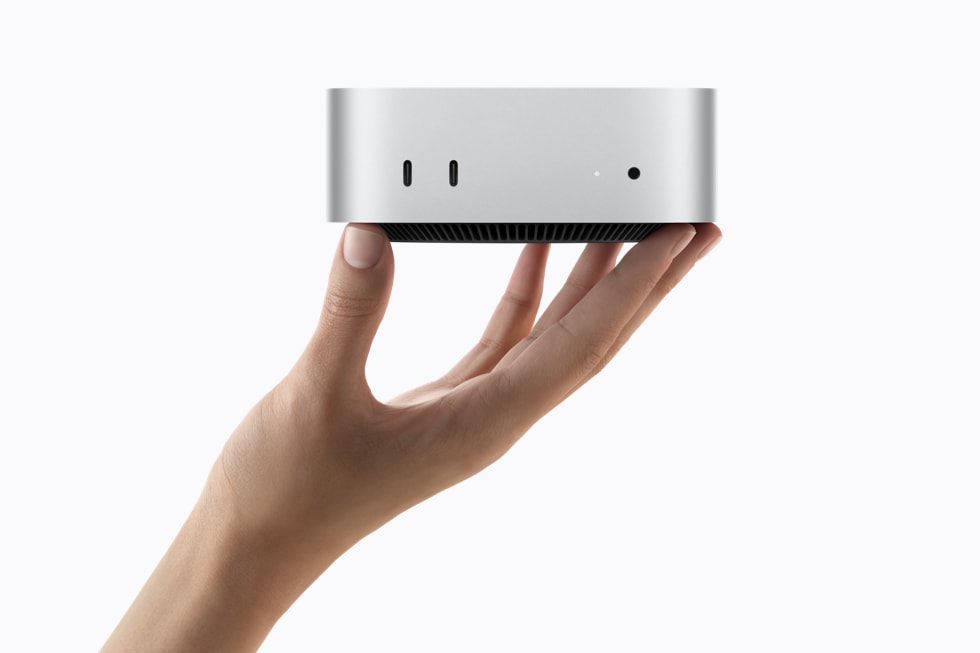
A person’s hand holds the silver Mac mini, showing its front ports.

Users can do it all with the ultracompact Mac mini featuring the all-new M6 or powerful M5 Pro — from advanced productivity to running AI models on device, and more.

CUPERTINO, CALIFORNIA Apple today announced the new Mac mini with the all-new M6 and powerful M5 Pro, delivering a dramatic boost in performance and even more versatility in its supersmall desktop design. With M6, Mac mini now delivers up to 4x faster AI performance,1 2x faster storage2 and graphics,1 and 40 percent faster CPU performance.1 Everything on Mac mini with M6 feels incredibly fast, from everyday productivity tasks to agentic AI workflows. Mac mini with M5 Pro delivers even more pro-level performance to breeze through demanding projects, from video production to game development. And this new level of performance takes on business workflows with ease whether Mac mini is being used as a primary desktop or for always-on, deskside agentic computing. Both Mac mini models include Wi-Fi 7 and Bluetooth 6, as well as upgraded 2.5Gb Ethernet, with a 10Gb option available. Combined with the power of macOS 27 and the next generation of Apple Intelligence,3 including Siri AI,4 the new Mac mini is a tremendous upgrade for existing and new-to-Mac users. The new Mac mini is available for pre-order starting today, with availability beginning September 22.

“Mac mini has always been our most versatile Mac. Whether it’s being used as a home computer, powering a professional studio, or as an always-on agentic device, it’s the little Mac that can do it all,” said Johny Srouji, Apple’s chief hardware officer. “Today, we’re taking this versatility even further. With a more powerful CPU and graphics, Neural Accelerators in the GPU, and higher memory bandwidth, Mac mini with M6 delivers a whole new level of AI performance. And with up to an 18-core CPU and 20-core GPU, Mac mini with M5 Pro is an ultracompact powerhouse for complex pro workflows. We can’t wait to see all the incredible ways people will use it next.”

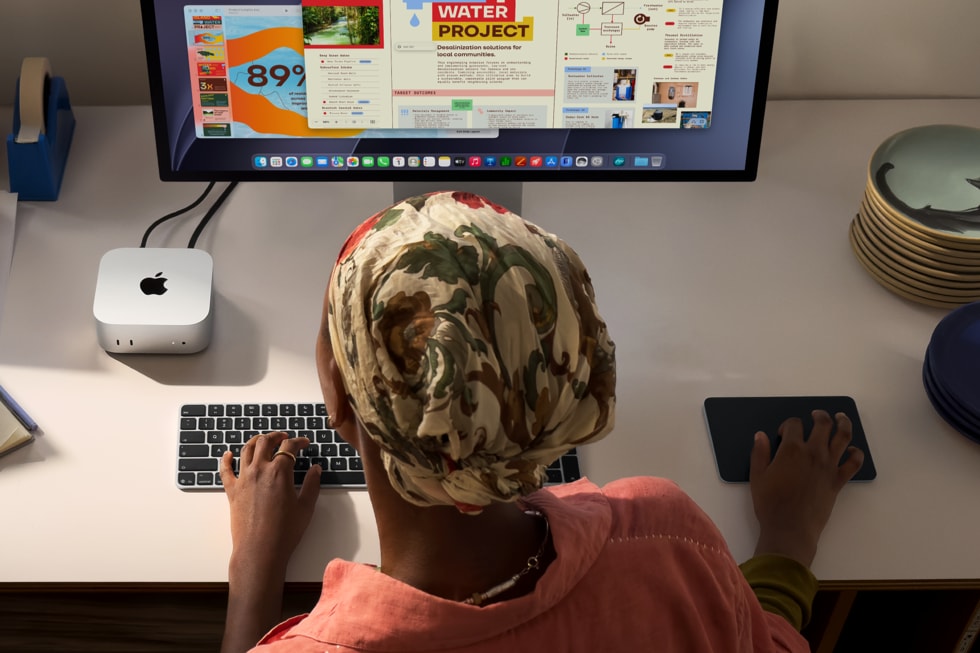
An overhead view of a person using a keyboard and mouse at a desk, with a Mac mini connected to a large display.

Mac mini is more versatile than ever, whether it’s powering a home setup, driving professional studio workflows, or serving as a capable desktop solution for agentic AI workloads in the enterprise.

Mac mini with the All-New M6

A Pint-Sized AI Powerhouse

Mac mini with M6 can power through everything from productivity tasks to creative projects, the latest AI workflows, and more. M6 features a 12-core CPU — two more cores than before — with the world’s fastest single-threaded performance, so everything feels extra snappy and responsive. A 12-core GPU, also with two more cores than before, now includes Neural Accelerators in each core for the first time on Mac mini, resulting in up to 4x faster AI performance and 2x faster graphics than Mac mini with M4.1 In addition, the all-new Dual 16-core Neural Engine delivers up to 2x faster performance than the previous generation, and combined with the advanced GPU, Mac mini is a powerhouse for all things AI.1 And with 16GB of standard unified memory configurable up to 32GB, as well as higher memory bandwidth up to 170GB/s, multitasking is faster than ever.

The Apple M6 chip logo on a blue and purple gradient background.

Mac mini with M6 delivers massive performance gains with the world’s fastest CPU core, a next-generation GPU featuring Neural Accelerators, and the Dual 16-core Neural Engine, making it a powerhouse for AI.

Mac mini with M6 delivers:2

  • Up to 13.5x faster LLM prompt processing in LM Studio when compared to Mac mini with M1, and up to 4.8x faster than M4.
  • Up to 2.3x faster spreadsheet calculations in Microsoft Excel when compared to Mac mini with M1, and up to 1.5x faster than M4.
  • Up to 2x faster gaming performance with ray tracing in Cyberpunk 2077: Ultimate Edition when compared to Mac mini with M4.

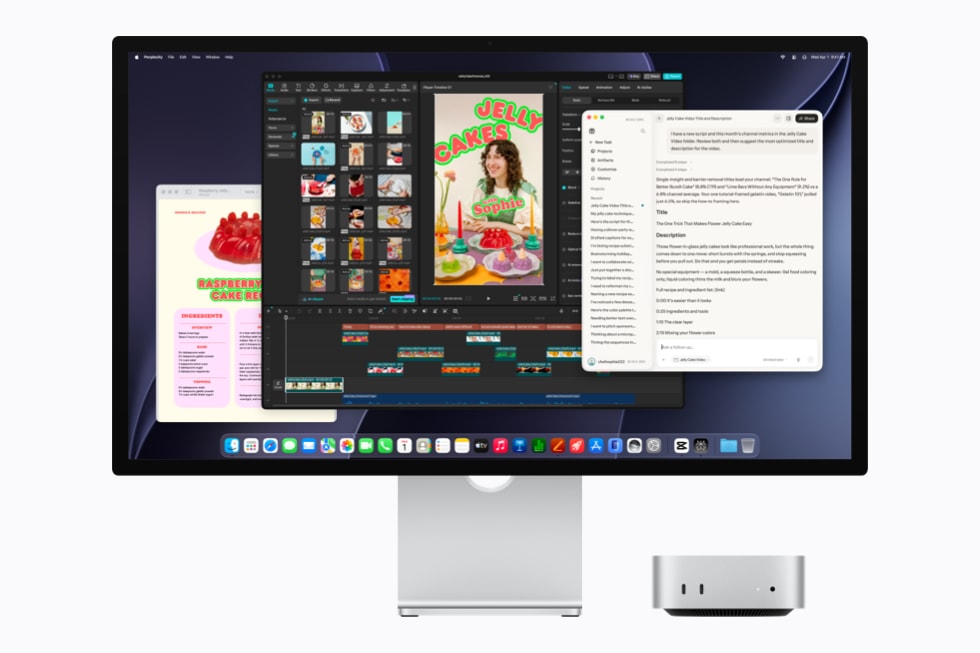
Mac mini with M6 is shown with a display running Perplexity.

Mac mini can run on-device AI tasks like applying style effects to photos, running local models, or creating AI agents that automate daily tasks.

Mac mini with M6 is shown with a display running video editing software.

Mac mini with M6 can power through creative projects in apps like Adobe Photoshop.

A Mac mini with M6 is shown with a display running Final Cut Pro.

Mac mini with M6 delivers even more performance for projects in Apple Creator Studio than before.

Mac mini with M5 Pro

Unprecedented Pro Performance

Mac mini with M5 Pro redefines what’s possible on such a small desktop, enabling pro users to take on demanding workflows like app development, video rendering, scientific simulations, and more. M5 Pro features up to an 18-core CPU with remarkable multithreaded performance and up to a 20-core GPU with an enhanced shader core and third-generation ray tracing for complex work in 3D design, VFX, and game development. With Neural Accelerators in each GPU core, M5 Pro also delivers significant gains in AI compute compared to the previous Mac mini, allowing users to tackle more advanced AI workflows like photo and video upscaling, and running large diffusion models faster than ever. Mac mini with M5 Pro supports up to 64GB of unified memory with 307GB/s of memory bandwidth, enabling users to run even larger local AI models, work with complex 3D scenes, edit ProRes RAW files, and load large custom datasets for research. And with industry-leading performance per watt, Mac mini with M5 Pro is quiet, efficient, and ideal as an always-on desktop for AI agents or creative workflows.

The Apple M5 Pro chip logo on a blue and purple gradient background.

M5 Pro supercharges Mac mini with a next-generation up-to-20-core GPU with Neural Accelerators, faster unified memory, and Thunderbolt 5, delivering serious performance for creative and technical workflows.

Mac mini with M5 Pro delivers:

  • Up to 8.5x faster LLM prompt processing performance5 in LM Studio when compared to Mac mini with M2 Pro, and up to 4x faster than M4 Pro.2
  • Up to 4.5x faster rendering performance5 with ray tracing in Blender when compared to Mac mini with M2 Pro, and up to 1.4x faster than M4 Pro.2
  • Up to 2.1x faster image processing5 in Affinity when compared to Mac mini with M2 Pro, and up to 1.5x faster than M4 Pro.2

Mac mini with M5 Pro is shown with a display running photo editing software showing a person in a red outfit.

With M5 Pro, Mac mini delivers faster AI photo-upscaling performance in Topaz Photo when compared to the previous generation.

Mac mini with M5 Pro is shown with a display running AutoCAD.

Mac mini with M5 Pro enables 3D artists to load, preview, and render 3D models in Autodesk AutoCAD with remarkable speed compared to the previous generation.

Mac mini with M5 Pro is shown with a display running Pro Tools.

Mac mini with M5 Pro is perfect for running advanced plug-ins like Auto-Align Post 2 in Pro Tools when working on multitrack audio projects.

Best-in-Class Connectivity

The new Mac mini with M6 and M5 Pro now supports Wi-Fi 7 and Bluetooth 6, as well as 2.5Gb Ethernet for faster wired connectivity, with 10Gb available. On its front are two USB-C ports that support USB 3 and a headphone jack with high-impedance headphone support for convenient access. On the back, there are three Thunderbolt 4 ports on Mac mini with M6, and three Thunderbolt 5 ports on Mac mini with M5 Pro, along with HDMI and Ethernet. Thunderbolt 5 also allows users to cluster multiple Mac mini systems together to run large AI models entirely on device. And newly added genlock support through USB-C enables precise synchronization between a display and camera, including iPhone 17 Pro.

The front of Mac mini is shown, including its two USB-C ports that support USB 3 and a headphone jack.

With a wide array of connectivity, the new Mac mini with M6 and M5 Pro now supports Wi-Fi 7 and Bluetooth 6, as well as 2.5Gb Ethernet, with 10Gb available to configure.

The back of Mac mini is shown, including Thunderbolt 5 ports, HDMI, and Ethernet.

With a wide array of connectivity, the new Mac mini with M6 and M5 Pro now supports Wi-Fi 7 and Bluetooth 6, as well as 2.5Gb Ethernet, with 10Gb available to configure.

macOS 27 Golden Gate: An Unrivaled Experience

The new Mac mini comes to life with the upcoming macOS 27, which includes Siri AI, a profoundly more capable and personal assistant; helpful Apple Intelligence features across everyday apps; and an expansive set of improvements that make the Mac even more responsive and reliable. Siri AI can draw on personal context to help users find what they need in the moment across their messages, emails, and photos; answer questions about virtually any topic; and get things done across apps. Siri AI is integrated into Spotlight and systemwide context menus, and users can ask Siri about what’s on their display with Visual Intelligence using a dedicated keyboard shortcut. Users can also write and edit with Siri almost anywhere they type.

Additionally, Apple Intelligence makes apps smarter and more useful with new ways to tailor and organize browsing in Safari, easily create an automation in Shortcuts by simply describing it, and tap into advanced photo editing in the Photos app. Features users already rely on get even better with improvements to performance and search. Refinements to Liquid Glass improve readability, and add uniform toolbars, edge-to-edge sidebars, and updated window shapes and menu bar icons, enabling users to further personalize its appearance.

Mac mini and the Environment

The new Mac mini was built with the environment in mind and drives progress toward Apple’s ambitious plan to be carbon neutral across its entire footprint by 2030. It is made with 50 percent recycled material overall,6 including 100 percent recycled aluminum in the enclosure and 100 percent recycled rare earth elements in all magnets. All of the electricity used to manufacture Mac mini is sourced from renewable energy, like wind and solar, across the supply chain, and Apple has also invested in enough renewable energy around the world to match the electricity customers use to power Mac mini. Like all Apple products, its paper packaging is 100 percent fiber-based and can be easily recycled at home.7

Pricing and Availability

  • Customers can pre-order the new Mac mini with M6 and M5 Pro starting today, August 25, on apple.com/store and in the Apple Store app in 30 countries and regions, including the U.S. It will begin arriving to customers, and in Apple Store locations and Apple Authorized Resellers, starting September 22.
  • Mac mini with M6 starts at $899 (U.S.) and $799 (U.S.) for education. Additional technical specifications are available at apple.com/mac-mini.
  • Mac mini with M5 Pro starts at $1,699 (U.S.) and $1,599 (U.S.) for education. Additional technical specifications are available at apple.com/mac-mini.
  • Additional technical specifications, configure-to-order options, and information on Studio Display, Studio Display XDR, and Magic accessories are available at apple.com/mac.
  • macOS 27 is available for testing in public beta through the Apple Beta Software Program at beta.apple.com, with availability as a free software update this fall. For more information, visit apple.com/macos. Features are subject to change. Some features may not be available in all regions or in all languages.
  • With Apple Trade In, customers can trade in their current computer and get credit toward a new Mac. Customers can visit apple.com/shop/trade-in to see what their device is worth. With year-round education pricing — available to current and newly accepted college students and educators — customers can save on Mac mini, along with a wide range of products and services through the Apple Store online and in stores. See Apple’s Education Store for details. Customers in the U.S. who shop at Apple using Apple Card can pay monthly at 0 percent APR when they choose to check out with Apple Card Monthly Installments,8 and they’ll get 3 percent Daily Cash back — all up front.9 More information — including details on eligibility, exclusions, and Apple Card terms — is available at apple.com/apple-card/monthly-installments.
  • AppleCare delivers exceptional service and support, with flexible options for Apple users. Customers can choose AppleCare+ to cover their new Mac, or, in available markets, AppleCare One to protect multiple products in one simple plan. Both plans include coverage for accidents like drops and spills, battery replacement service, and priority support from Apple Experts. For more information, visit apple.com/applecare.
  • Every customer who buys directly from Apple gets access to Personal Setup. In these guided online sessions, a Specialist can walk them through setup or focus on features that will help them make the most of their new device. Customers can also learn more about getting started and going further with their new device with a Today at Apple session at their nearest Apple Store.
  1. Results are compared to previous-generation Mac mini systems with Apple M4, 10-core CPU, 10-core GPU, 32GB of unified memory, and 2TB SSD.
  2. Testing was conducted by Apple in July 2026. See apple.com/mac-mini for more information.
  3. Apple Intelligence features are currently available for testing through the Apple Beta Software Program, and will be available with macOS 27 this fall for users with an Apple Intelligence-enabled device set to a supported language. Apple Intelligence is available with support for these languages: English, Danish, Dutch, French, German, Italian, Norwegian, Portuguese, Spanish, Swedish, Turkish, Vietnamese, Chinese (simplified), Chinese (traditional), Japanese, and Korean. Some features may not be available in all regions or languages. For feature and language availability and system requirements, see apple.com/apple-intelligence.
  4. Siri AI is currently available for testing through the Apple Beta Software Program. Siri AI will be available with macOS 27 as a beta later this year for users with a supported device set to English, and Apple will quickly expand support for more languages.
  5. Results are compared to previous-generation Mac mini systems with Apple M2 Pro, 12-core CPU, 19-core GPU, 32GB of unified memory, and 8TB SSD.
  6. Product recycled or renewable content is the mass of certified recycled material relative to the overall mass of the device, not including packaging or in-box accessories. Recycled and renewable plastic content calculation includes mass balance allocation.
  7. Breakdown of U.S. retail packaging by weight. Adhesives, inks, and coatings are excluded from calculations of plastic content and packaging weight.
  8. Apple Card Monthly Installments (ACMI) is a 0 percent APR payment option that is only available if users select it at checkout in the U.S. for eligible products purchased at Apple and is subject to credit approval and credit limit. See support.apple.com/en-us/102730 for more information about eligible products. Additional limits and restrictions apply. See the Apple Card Customer Agreement for more information about ACMI.
  9. Apple Card is subject to credit approval, available only for qualifying applicants in the United States and issued by Goldman Sachs Bank USA, Salt Lake City Branch.
The Daily Front Page 5 of 31
Tuesday, August 25, 2026 The Daily Front No. #260825 — Jalapeño Stakes Its Claim
article

OpenAI Jalapeño: Better than Nvidia Blackwell

by bmulholland·▲ 477 points·307 comments·newsletter.semianalysis.com ↗
OpenAI has spent the past couple years quietly building “Jalapeño.”

OpenAI’s self-designed ASIC compared with Rubin, Jalapeño’s TCO, throughput per MW, and spicy deets

OpenAI has spent the past couple years quietly building “Jalapeño,” an inference chip just announced at Hot Chips. Rumors of a successful tapeout had been swirling for a while. But now we have details. OpenAI invited us to look at their chip, go to their labs to check out how real it is, and benchmark it with our InferenceX suite.

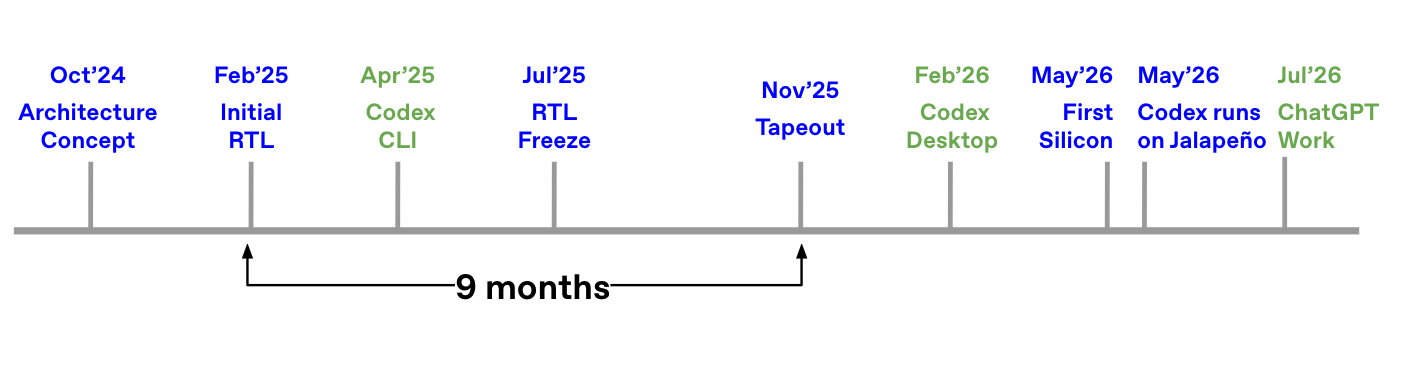
In June, OpenAI unveiled the chip program in partnership with Broadcom, built from a blank slate exclusively for LLM inference. Design work began in the middle of 2024, going from initial team hiring to manufacturing tape-out in ~16 months, an extremely fast ASIC development cycle.

In general first generation chips are not competitive, but OpenAI bucks the trend by being industry leading and beating every Nvidia, AMD, and Google chip we have been able to test on multiple top open source models. OpenAI does this with extreme hardware software codesign. Surprisingly, OpenAI is not over specialization on any specific part of model inference, but instead by focusing on being a general chip that delivers high performance in all scenarios.

In this article, we will go into architectural details, software details and performance results for Jalapeño on InferenceX.

Source: OpenAI

A generalized inference chip

Everyone says that OpenAI’s chip is specialized for OpenAI models, but that’s wrong, OpenAI made a generalized chip for AI inference.

The timelines are insane. It shows that claims that use of AI is being used to accelerate chip design are real. Regardless of the quick timelines,Open AI spent a bunch of money, made pragmatic design decisions and their team is cracked, so this comes as no surprise.

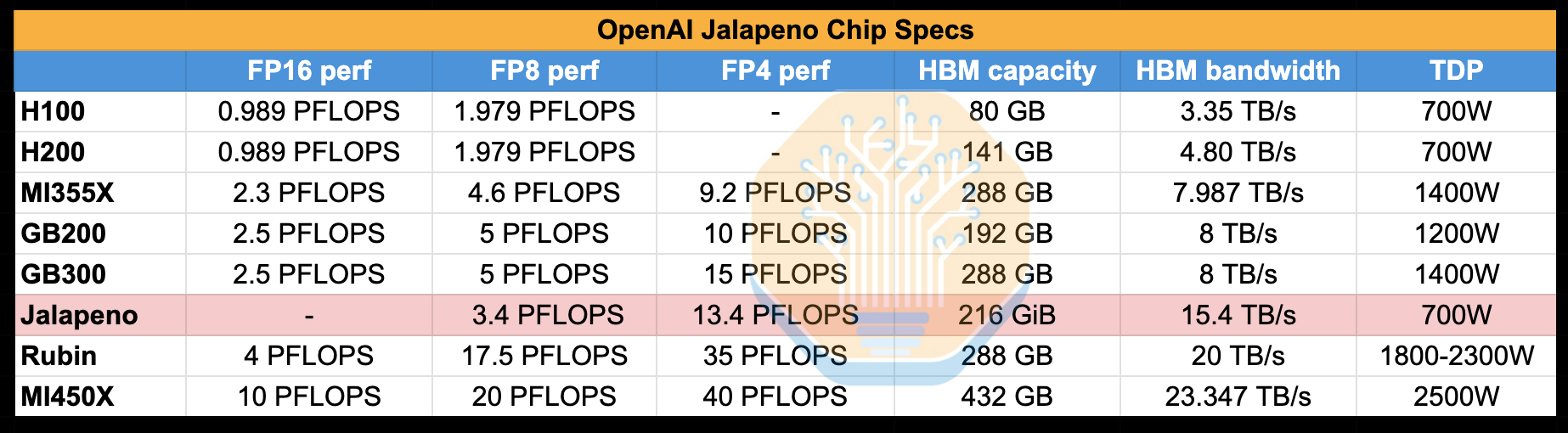
Just looking at the specs, it is an immediate contender:

Source: SemiAnalysis

And the use of HBM4 makes it stand out as comparable to flagship GPUs from NVIDIA and AMD:

Source: OpenAI

A lot of the media coverage of this chip has followed a few throwaway comments from OpenAI that claim the chip will be optimized for their models in a way that other chips are not. This is wrong. Jalapeño is a generalized inference chip capable of running all sorts of models, and all sorts of workloads, including our benchmark InferenceX, where we ran the benchmark with OpenAI engineers in the lab. As a joke, OpenAI even showed us it running Doom, which was ported to their chip with just Codex prompts.

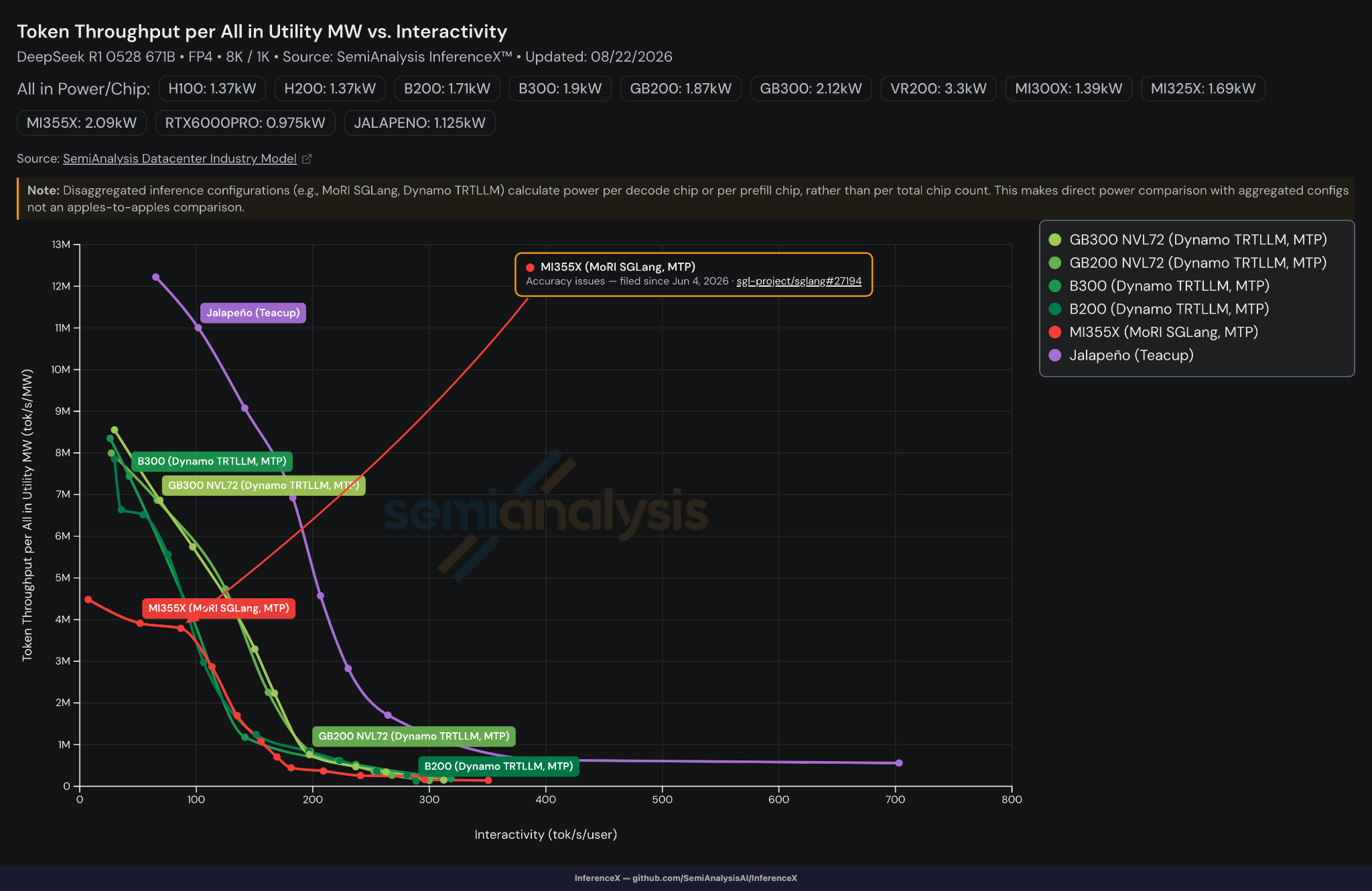
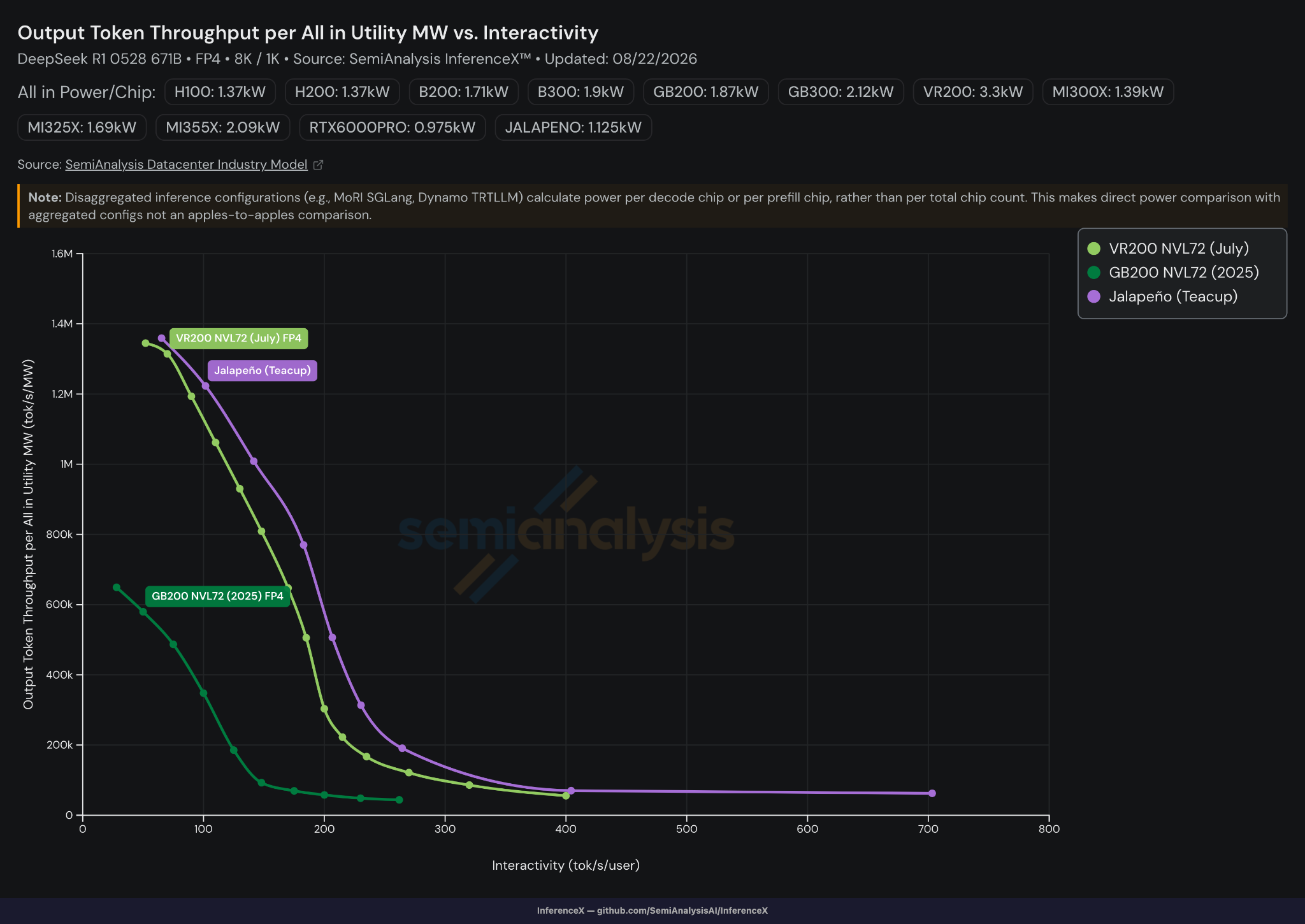
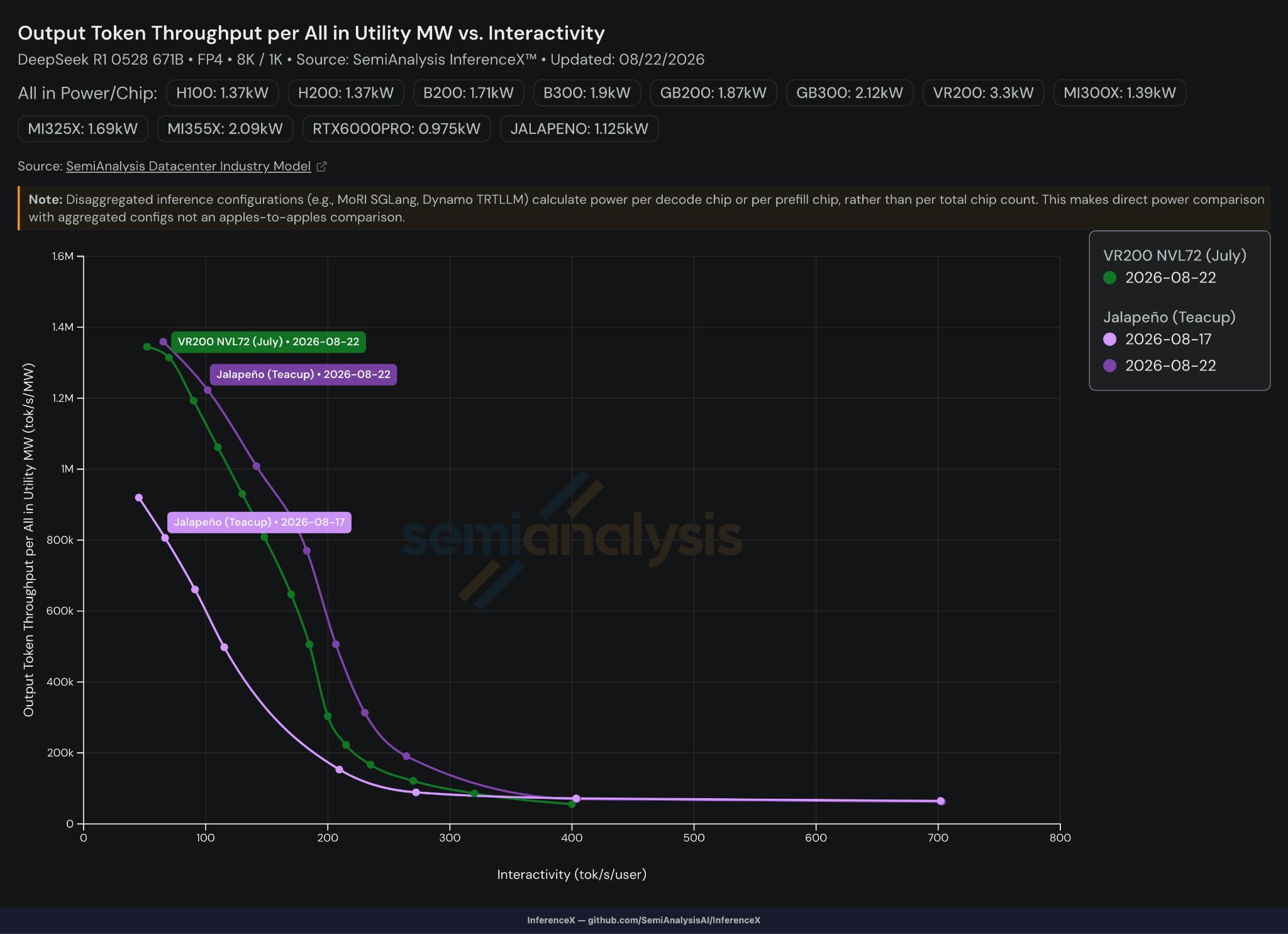
The following is our headline perf/W result, looking at token throughput per All-in utility MW. Jalapeño smokes every other chip. All this is done without Multi Token Prediction (MTP), while the other chips on the chart are the best performing configs of each respective SKU, all with MTP.

Source: SemiAnalysis

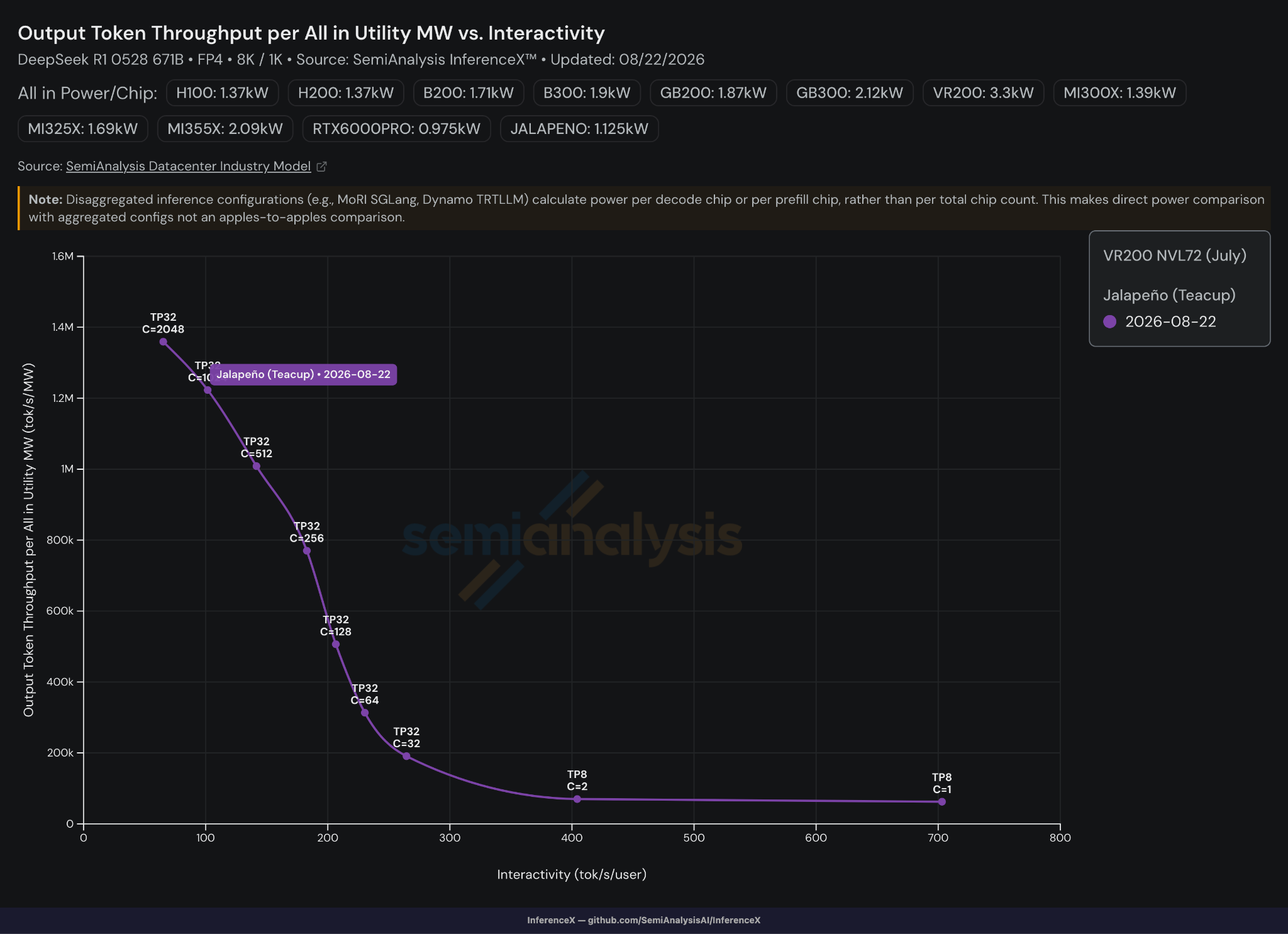
Jalapeño beats Blackwell on perf/W across almost all scenarios without being tuned for any specific point in the curve. It excels not only in low-latency scenarios but also in high-throughput scenarios. A more apples to apples comparison is against Single Token Prediction results, it knocks every competitor out of the water. At low concurrency scenarios, Jalapeño demonstrates remarkable interactivity, hitting over 700 tokens per sec per user at concurrency 1 on the DeepSeek R1 model.

Incredibly, this is all achieved with single-token prediction (STP), no speculative decoding and no prefill-decode disaggregation. In addition to DeepSeek R1, we also got to see some other models, including Kimi-K2.5 and GPT-OSS which ran at approximately 1,400 tok/sec/user. For all models, we confirmed that Jalapeño’s GSM8k evals attained results on par with Nvidia chips.

Some caveats on this. First, all numbers are provided to us by OpenAI. We verified the InferenceX runs in person in the lab, but we did not run the full suite of InferenceX benchmarks nor have we seen AgentX results. AgentX is our preferred suite for comparing chip performance due to the datasets’ long context and multi-turn characteristics that reflect the cache behavior of realistic production workflows. Frameworks that perform well on 8k1k may perform worse on AgentX as real production loads stress components like routers, prefix cache mechanisms, cache management, offload infrastructure, etc. These are not tested by single turn 8k1k. Read more about this in out AgentX article.

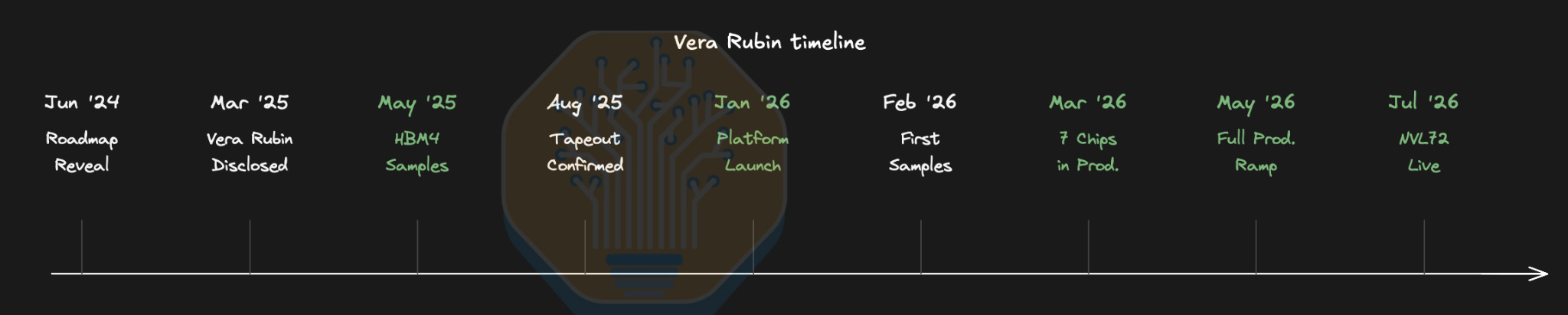
Second, we believe that comparison to Blackwell is somewhat incomplete and unfair. Jalapeño is really competing against chips like Rubin that also use HBM4. Vera Rubin systems are starting to ship to customers right now, while it will still be some time before OpenAI has anything beyond engineering samples of Jalapeño.

Thus, performance should really be compared against Rubin, not Blackwell, and in some sense we expect a custom chip like Jalapeño to outperform Blackwell. Vera Rubin NVL72 delivers 5.4x the perf/MW of GB200 NVL72 as we described in our article analyzing the NVIDIA performance claims in their launch with CoreWeave last month. We will compare Jalapeño to Vera Rubin’s July performance figures later below.

Third, the models being tested are not on the open frontier. NVIDIA and AMD have published results on larger models such as DeepSeek V4 Pro and Kimi K3, using AgentX. The larger the model and the more recent the release, the more complicated it is to bring up on a new chip. With that said the models OpenAI has working on Jalapeno aren’t exactly small either.

Performance Analysis

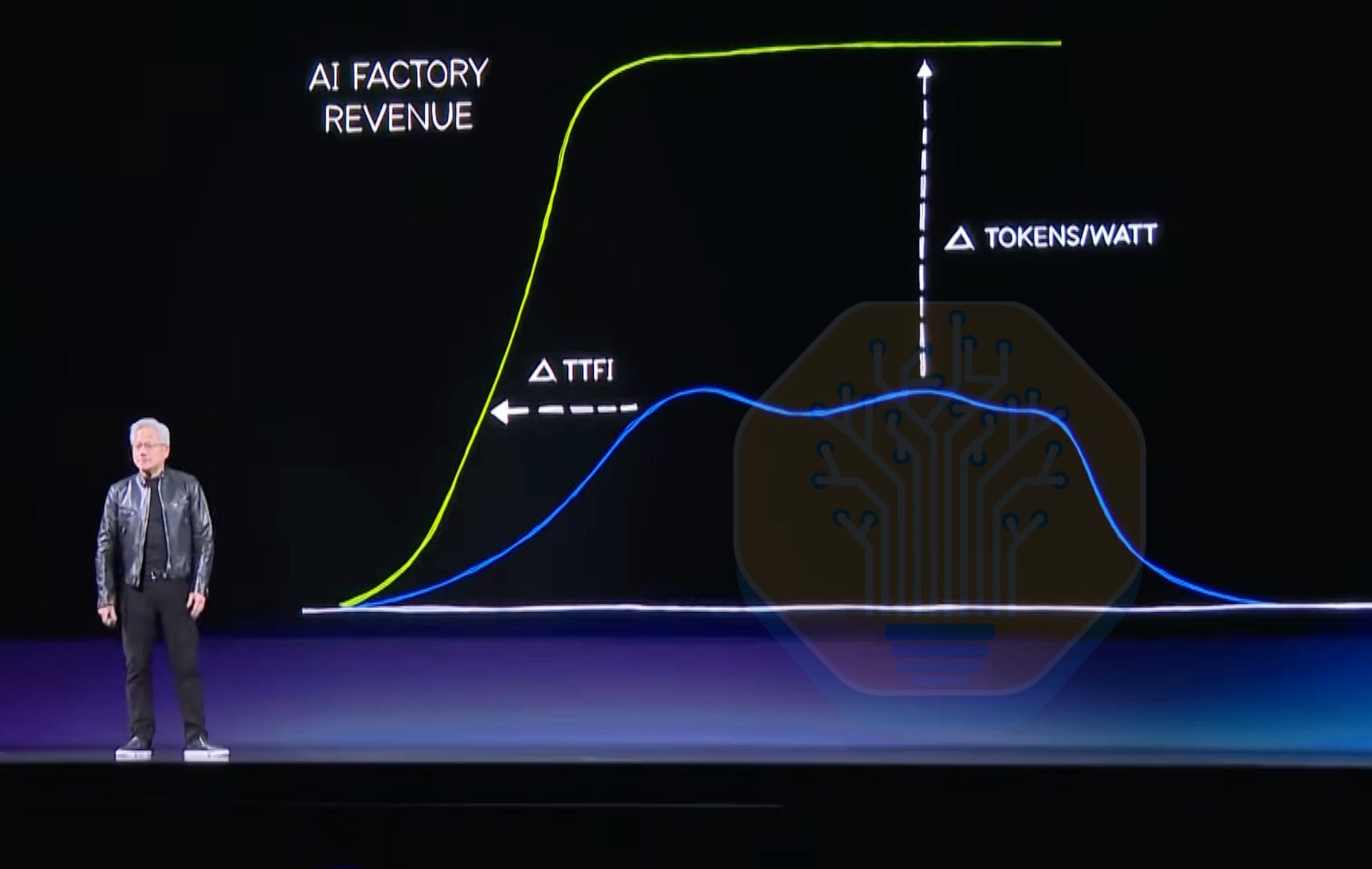
OpenAI designs for perf/W. The reason is simple: OpenAI is currently limited by datacenter power, not by budget or floorspace, and thus tokens per MW is paramount. At Computex 2026, Jensen said that perf/W, reliability and long lifetime are the core features of future GPUs. To quote: “If you have 1 gigawatt of power, then throughput per watt is revenue”. He also mentioned that choosing the wrong architecture just because the chips are cheaper doesn’t make sense.

Source: Computex 2026 keynote

This was emphasized by Nvidia during the Vera talk at Hot Chips 2026 while showing the same revenue graph: “The data center is power limited today.” Power matters and drives revenue.

Operators cannot simply obtain more MW because adding GPUs and adding grid capacity happen on very different timescales. Datacenter power envelopes have constraints such as their utility interconnection, infrastructure, cooling capacity, and UPS/backup-generation design. Grid delays repeatedly outpace hardware and construction timelines, driving the need for BtM (behind-the-meter) power capacity: gas turbines and on-site generators built and located at the data center itself. This capacity sits behind the utility’s meter rather than being drawn from the public grid. It lets an operator power a facility without waiting on grid interconnection and utility upgrades, which is exactly why xAI’s Colossus 2 relies so heavily on BtM while its actual grid connection lags far behind. Find out more in our Energy model.

As we wrote in an X post, tok/s/MW reduces to tokens per joule since a watt is a joule per second. This makes tok/s/MW representative of a system’s efficiency and ability to convert energy into tokens.

Source: SemiAnalysis

On this front, even when compared with Rubin, Jalapeño wins. OpenAI’s Jalapeño has STP output token throughput per MW surpassing Vera Rubin’s MTP results that NVIDIA and CoreWeave published in July. It also far exceeds GB200’s 2025 MTP results. As mentioned in our Vera Rubin article, VR was compared to 2025 GB200 results because that was a similar stage of early bring-up, and comparing to GB200 in 2025 holds software maturity constant. Following this logic, we compare Vera Rubin’s latest July 2026 results, GB200 2025 results, and today’s Jalapeño results. This is a very valid comparison as these are the best public Rubin numbers, and OpenAI taped out their chip after Rubin. Both OpenAI and Rubin are still immature thus performance will continue to rise.

Source: OpenAI, SemiAnalysis

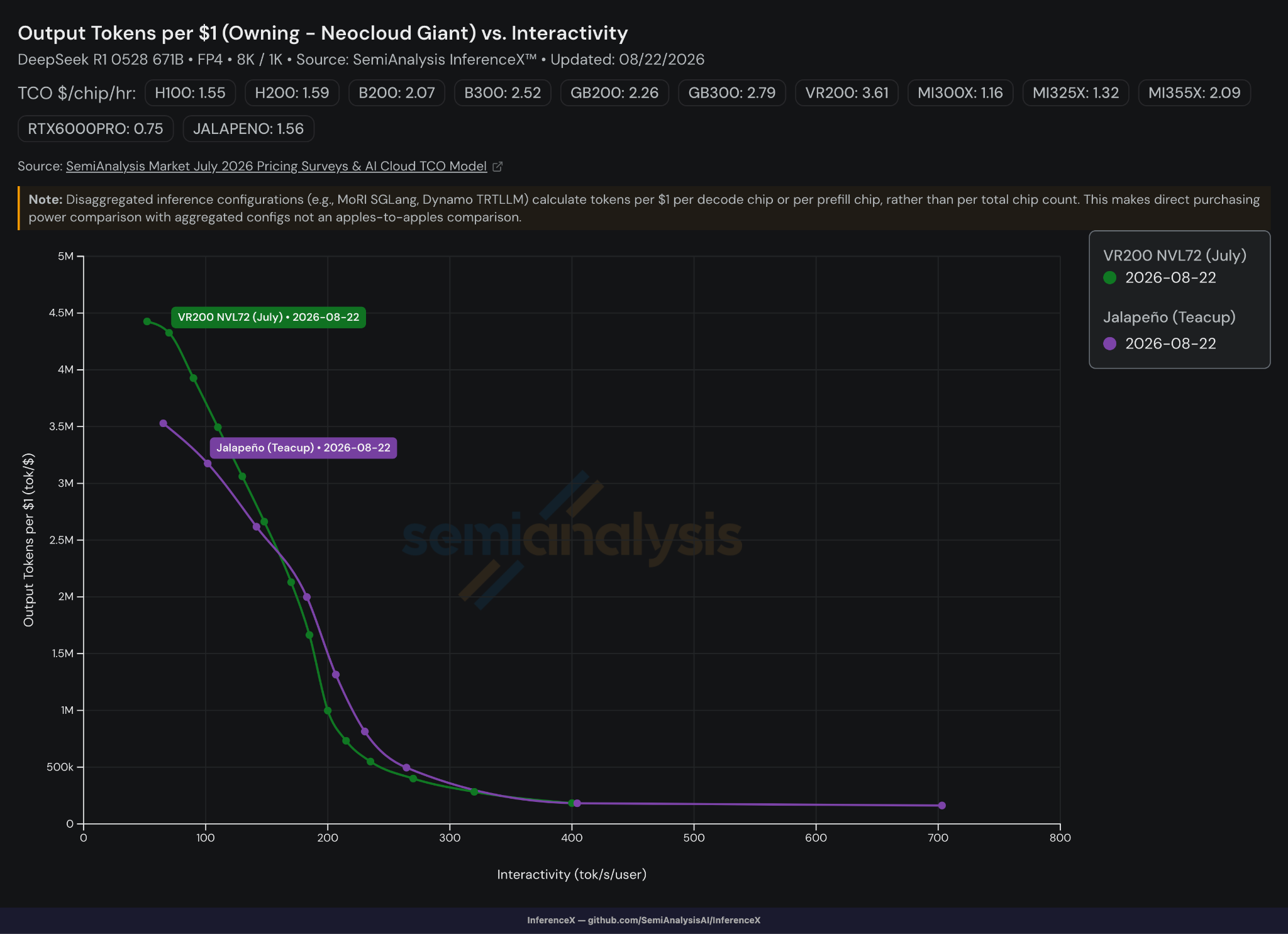
On perf/TCO, Vera Rubin and Jalapeño are head-to-head, producing almost the same number of output tokens per $. However, as previously mentioned, Jalapeño’s results are obtained without speculative decoding and Vera Rubin’s results use speculative decoding. Speculative decoding leads to a ~3-5x reduction in cost per token. When speculative decoding is implemented on Jalapeño, this will enable Jalapeño to serve tokens even more cost effectively. Of course, part of this TCO advantage comes from trading Nvidia’s high margins for Broadcom’s lower (though still high) margins. But this is not all of it. For example, Meta and Microsoft’s AI ASIC programs not getting off the ground despite being at it for much longer shows that cost is only one part of the equation. For Jalapeño’s full TCO breakdown, see the SemiAnalysis AI Cloud TCO model.

Source: OpenAI, SemiAnalysis

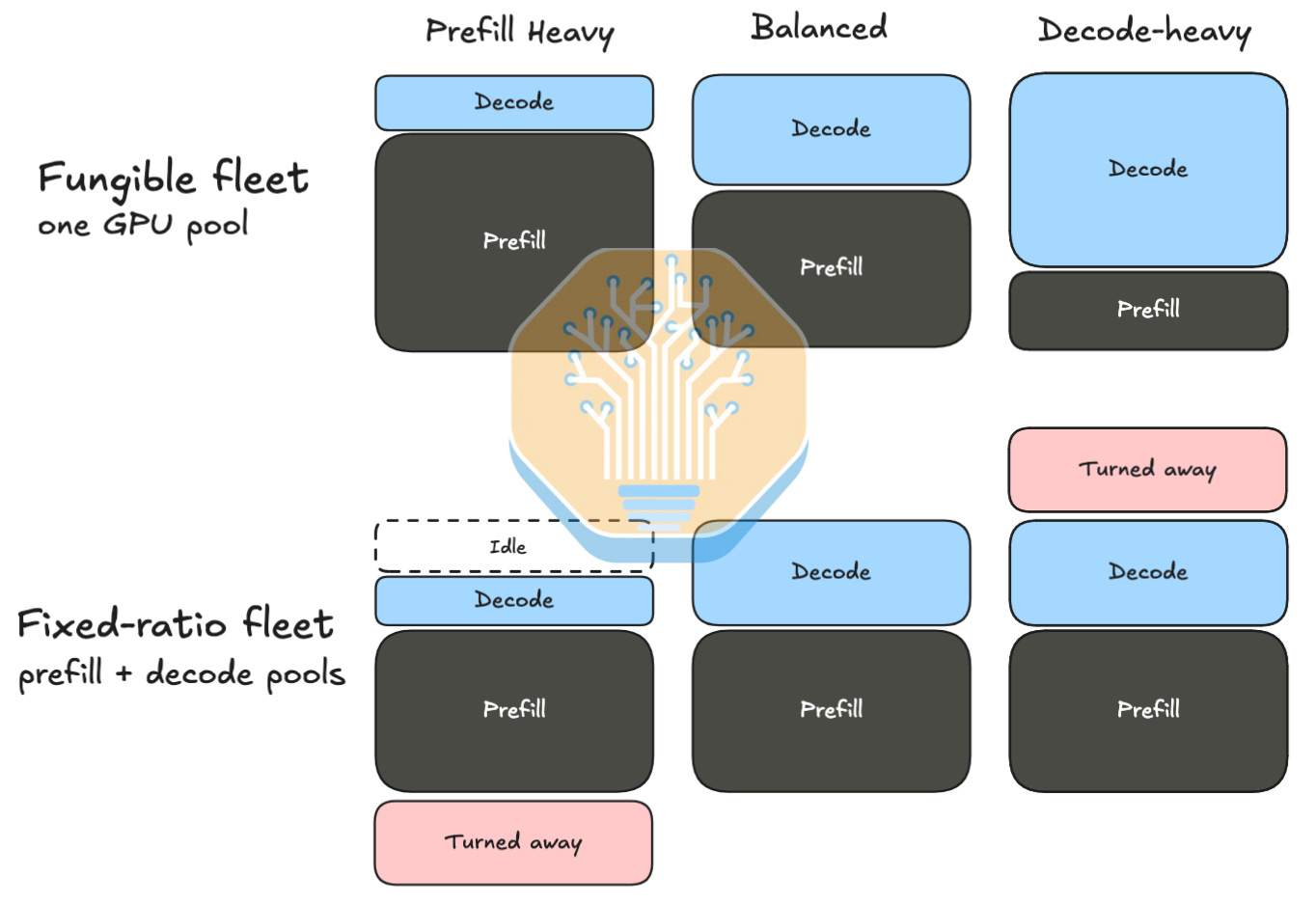
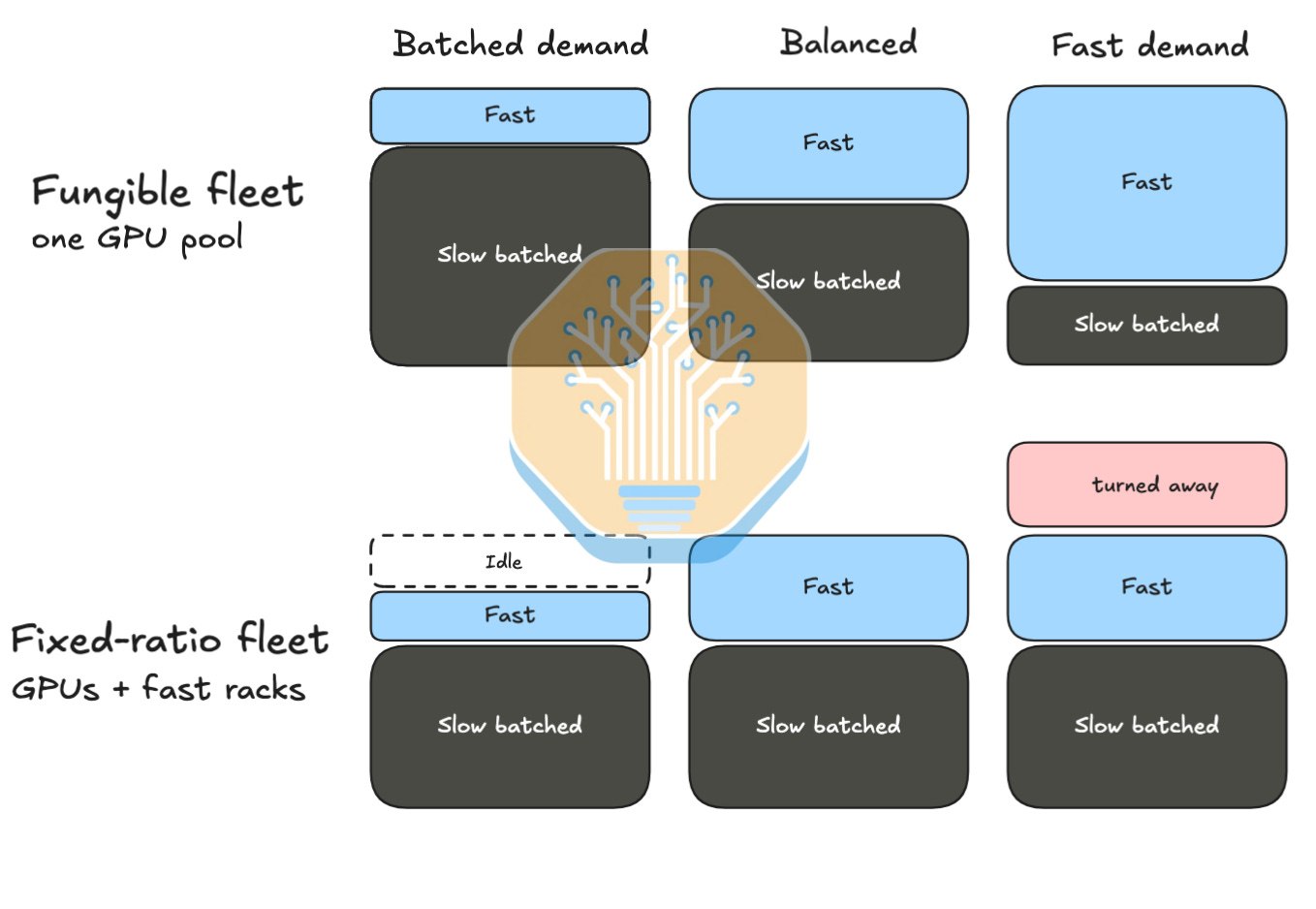
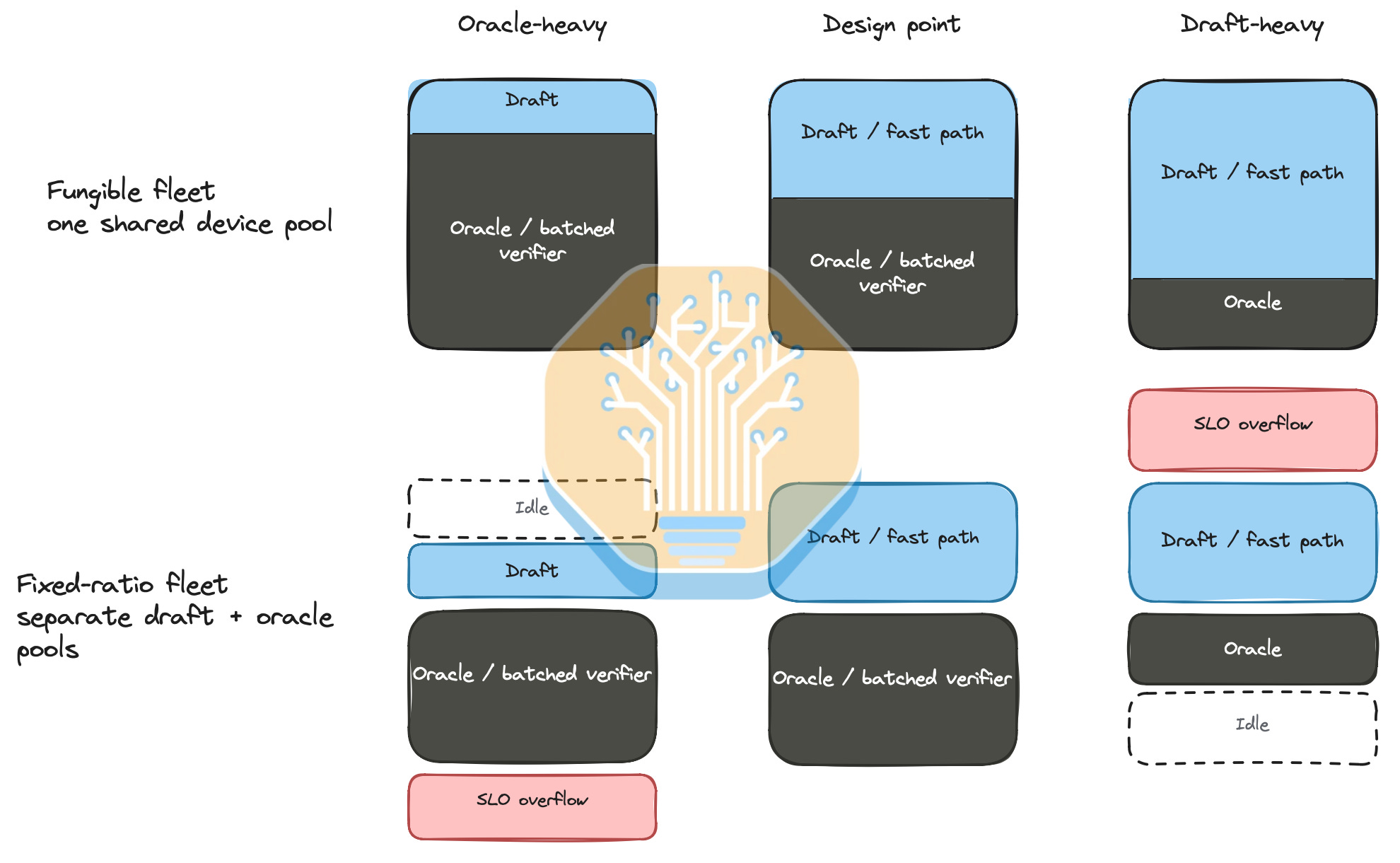
Architecturally, OpenAI chose not to disaggregate prefill and decode (PD) across separate chip pools. The draft model and main model share the same chips and fabric, a design philosophy that trades some theoretical efficiency for practical operations. The motivation is that the workload mix changes over time, for example the ratio of input to cache write to cache read to output tokens has changed significantly as we have moved through the three eras of models (knowledge, reasoning, and agentic, as discussed in our recent article). Therefore, picking a fixed amount of heterogenous prefill silicon and decode silicon up front can lead to inefficiencies over time. OpenAI chooses a homogenous pool in this architecture and tries to make the chip perform well on everything.

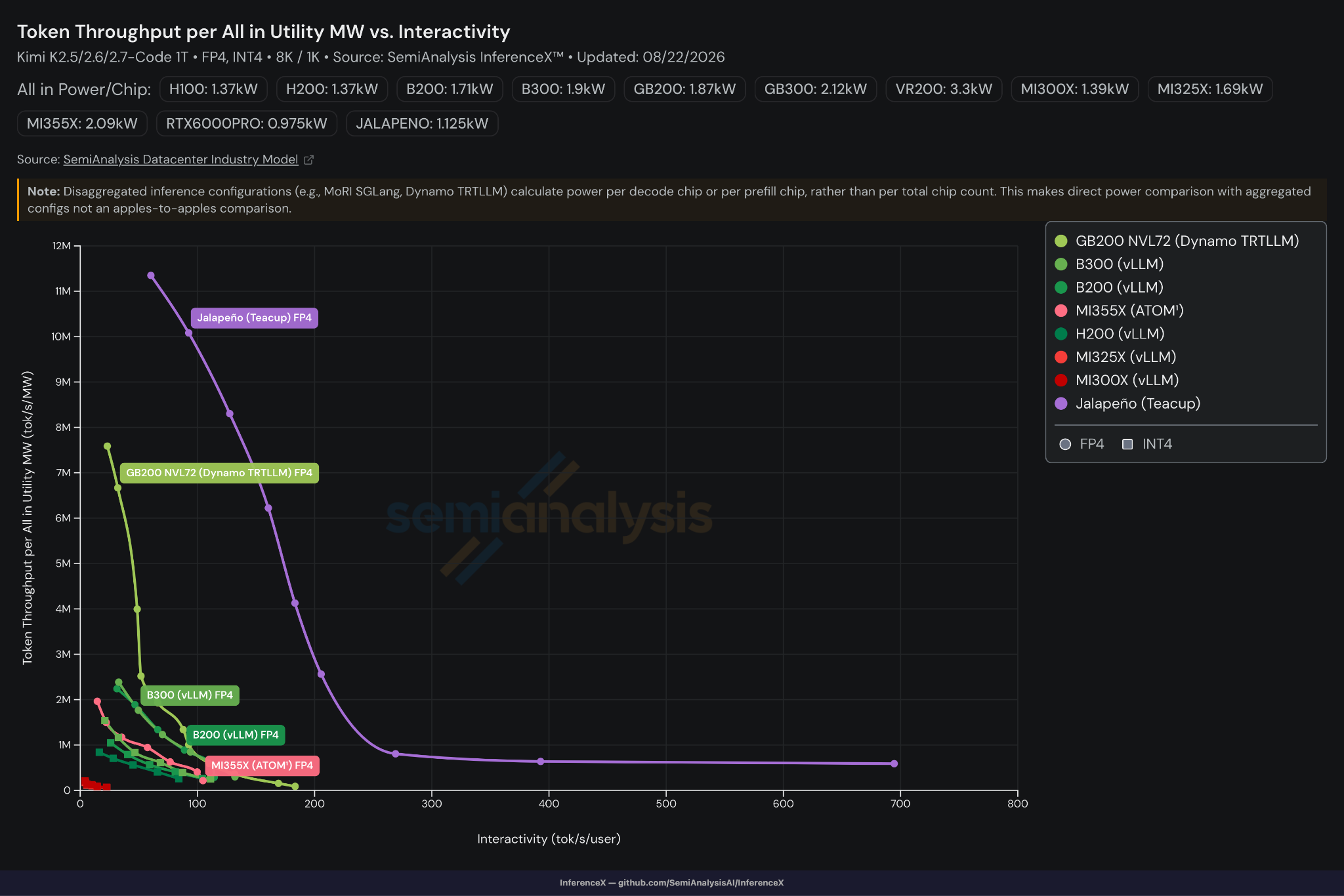
And it does. On Kimi K2.5 (which Cursor Composer 2.5 is based on), Jalapeño reaches nearly 700tok/s/user and more than 9x the next best performing chip at 100tok/s/user.

Source: OpenAI, SemiAnalysis

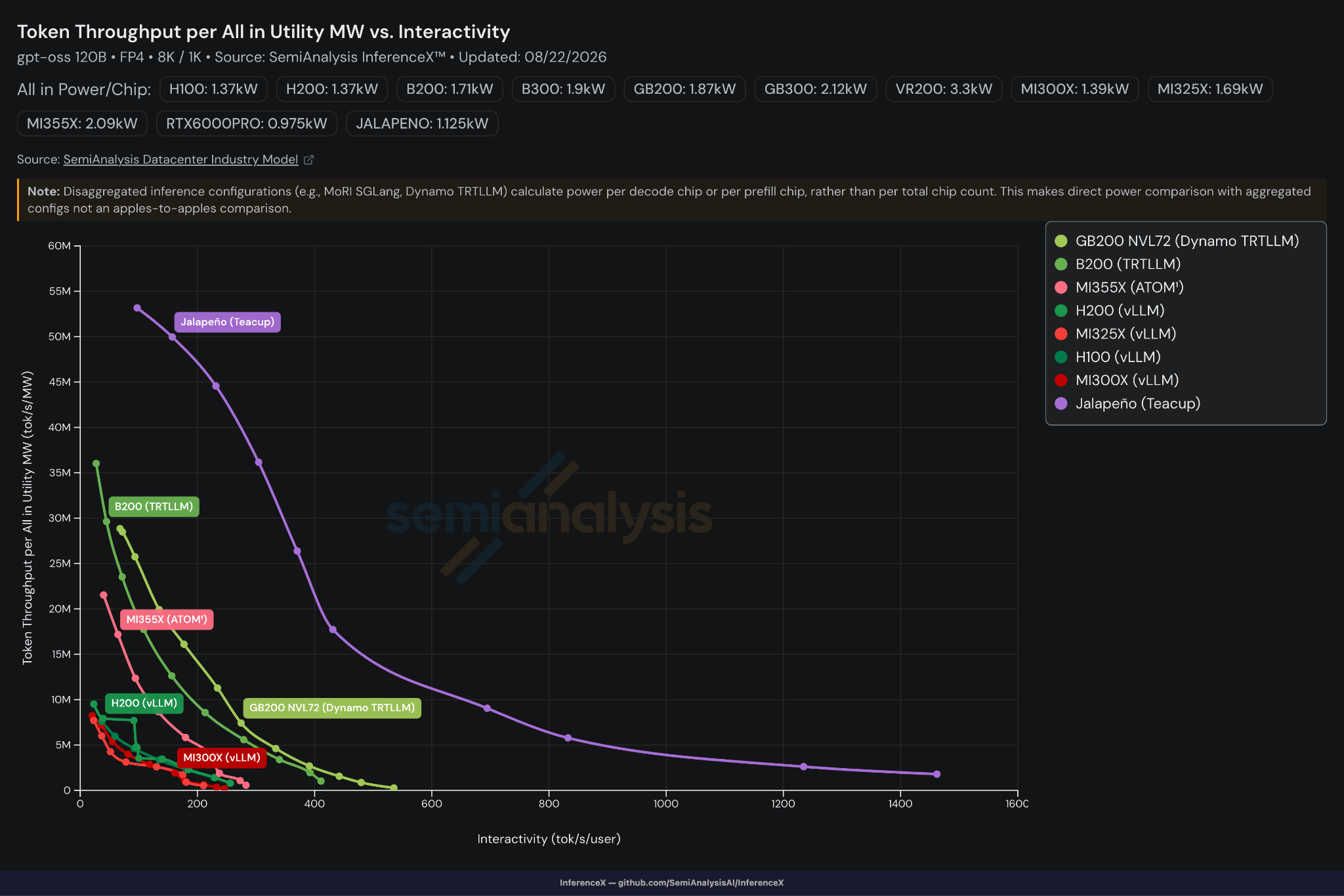
On GPT-OSS, it’s another bloodbath. Jalapeño’s iso-interactivity throughput per MW is nearly double GB200’s highest throughput point and more than 50x GB200’s concurrency 1 point. The higher concurrency Jalapeño points use EP8.

Source: OpenAI, SemiAnalysis

These results are impressive! However, we have to nitpick: they’re just 8k1k, a much easier workload to tune for, and there are no AgentX runs yet. As mentioned in our AgentX article, multiturn, long context workloads stress much more aspects of the serving stack, such as routers and prefix cache. Many more optimizations are needed to excel in agentic workloads. Read more about this in the AgentX article.

Digging into the specs and architecture

All these results were gathered on the A0 stepping of Jalapeño, just 9 months into the program. But there is already a B0 stepping that is currently in the fab! B0 has optimizations that deliver roughly a 25% perf-per-watt improvement over the earlier A0 silicon. Specifically, the B0 stepping delivers 13.4 PFLOPs of MXFP4 on a single reticle-sized compute die that is manufactured on TSMC’s N3P. This compares to 17.5 PFLOPs of dense Rubin NVFP4 for a single Rubin compute die that is similar size and on the same node.

This is more respectable considering Jalapeño’s TDP is only 700W compared to Rubin’s at 900-1,150W per compute die. As Jalapeño is geared towards inference rather than training, it is understandable that OpenAI doesn’t need to push TDPs higher to maximize FLOPs, but regardless the above shows that Jalapeño delivers respectable peak theoretical FLOPs.

When compared directly to other accelerators, Jalapeño has the highest HBM bandwidth per watt, and the highest FLOPs per watt, comparable to the 1,800W Rubin Max-Q configuration:

Source: SemiAnalysis

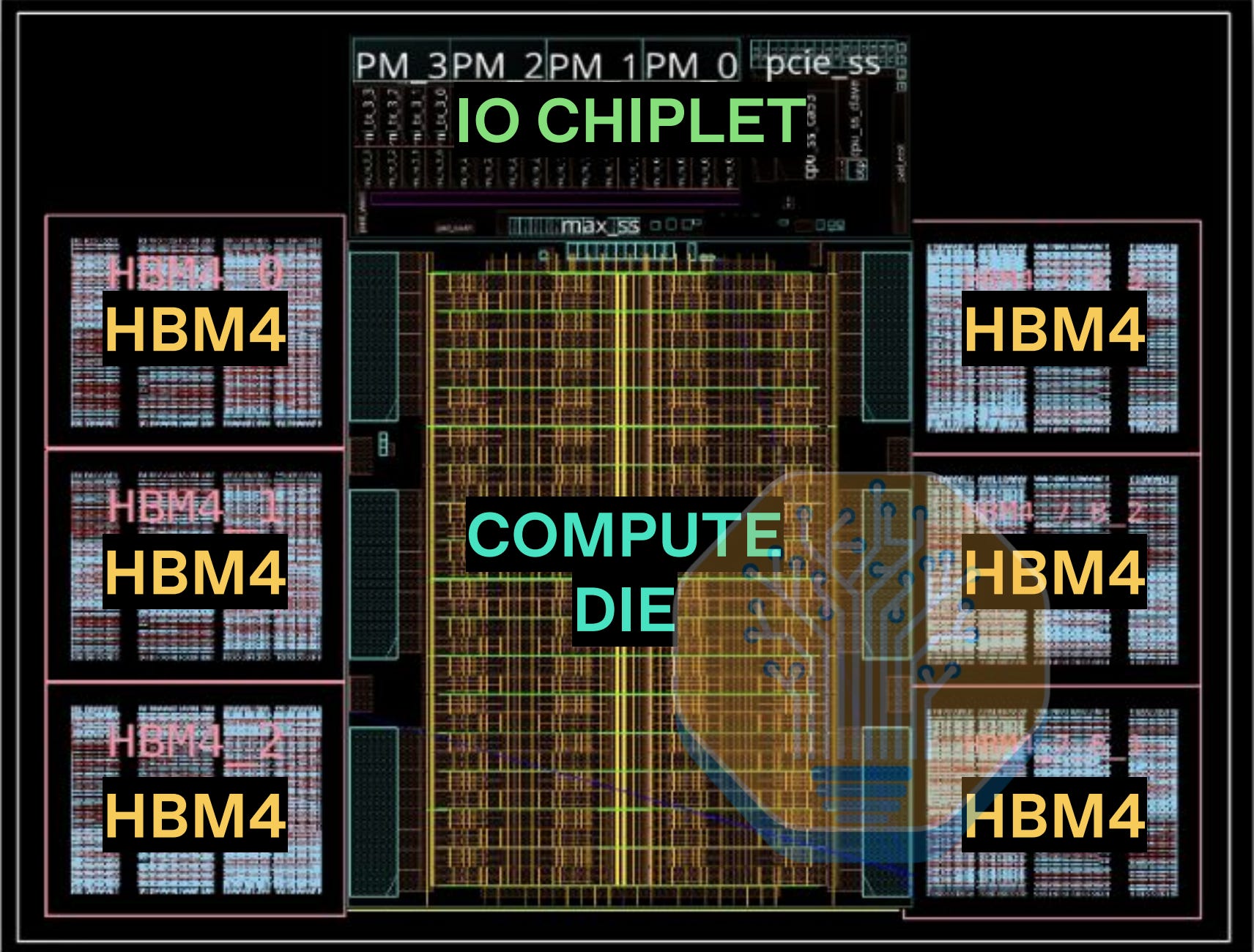
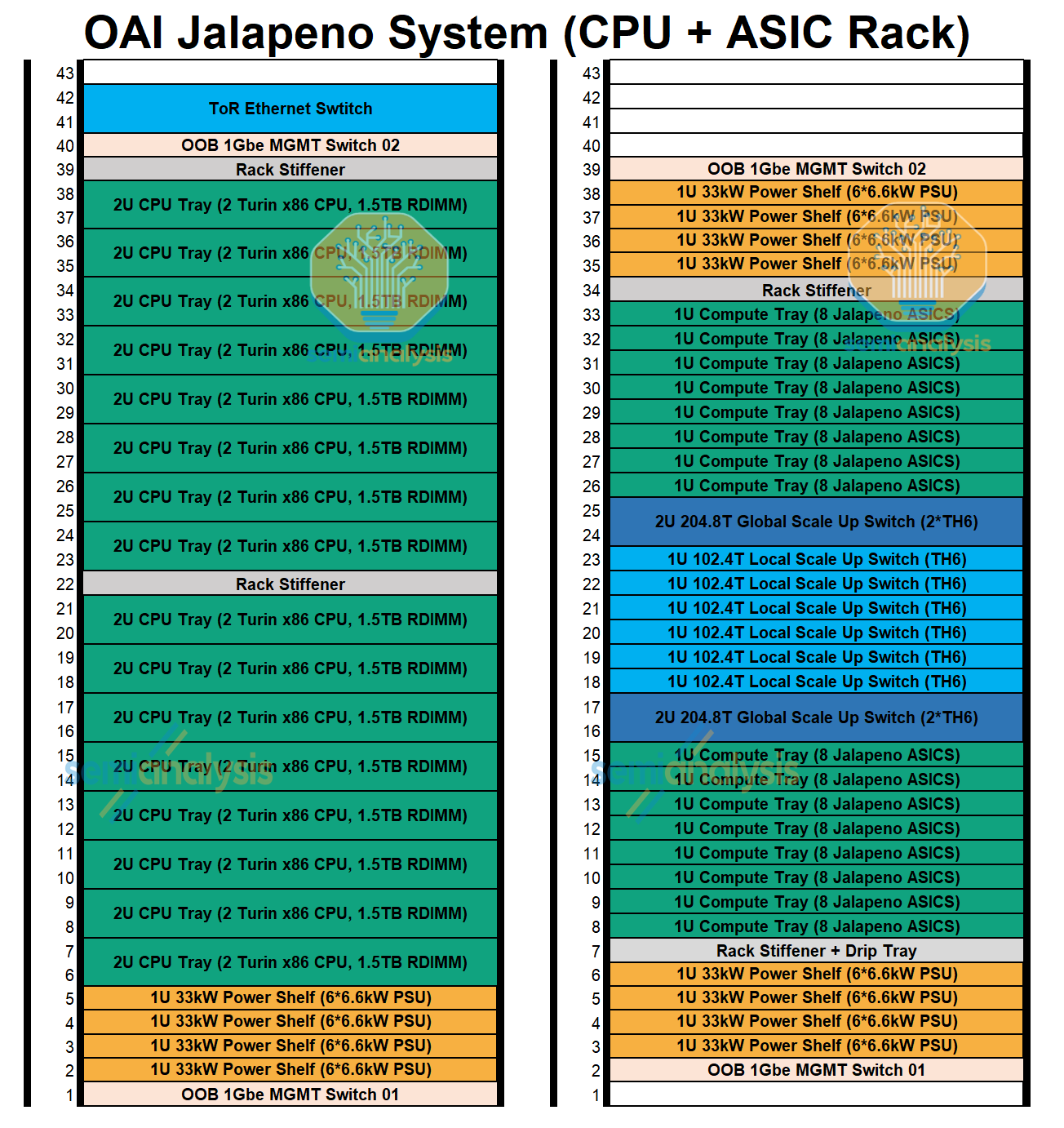
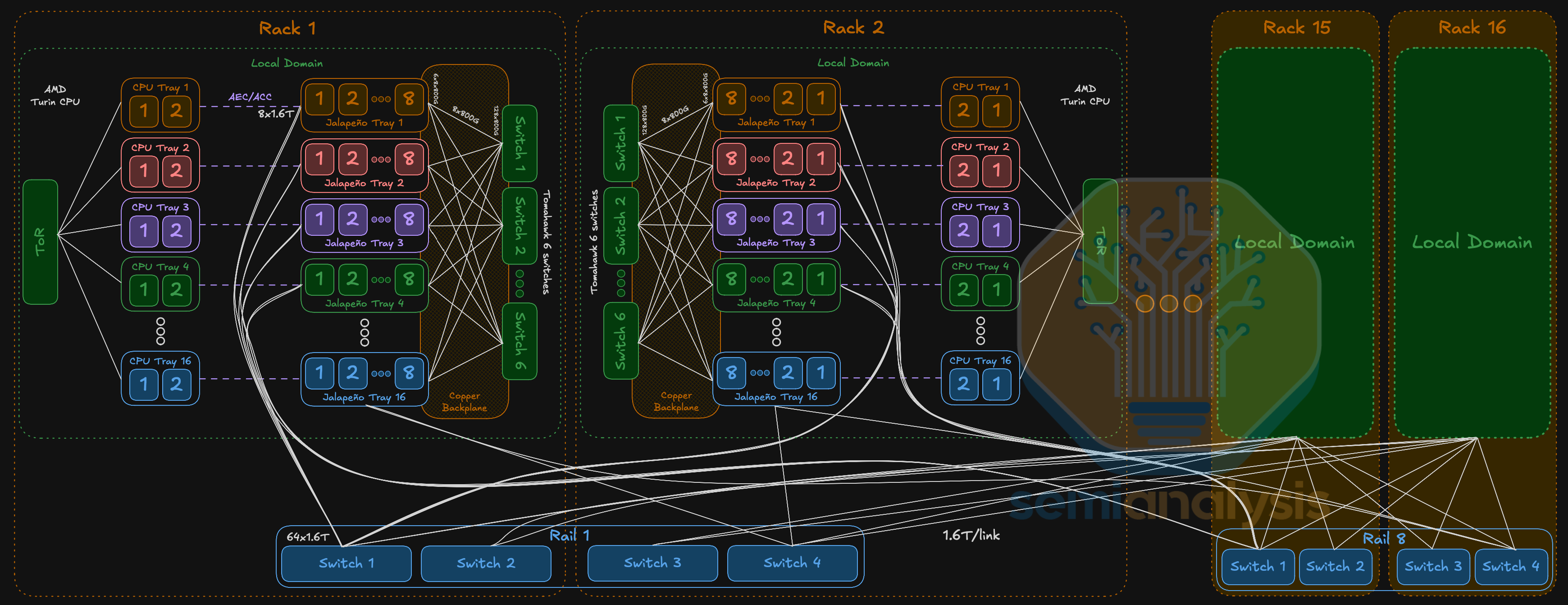
Off-package I/O is provided by an N3E I/O chiplet with 32 lanes of 800G SerDes, for the compute fabric, with 24 lanes (600GB/s) being used for local scale-up within the rack, and 8 lanes (200GB/s) for global scale-up which is the 2,048 XPU multi-rack domain. PCIe Gen 5 is used for system I/O to connect to the x86 host CPU.

Jalapeño will ship with HBM4, making this chip one of the relatively early adopters after Nvidia and AMD, even beating the established TPU and Trainium programs. As one of the key architectural principles behind Jalapeño is getting the most out of HBM bandwidth, settling for anything but the best HBM would run counter to that goal. This results in 15.4TB/s of memory bandwidth per package which bests all the other accelerators shipping that are using HBM3E. The 15.4TB/s bandwidth shows its HBM4 can hit 10Gbps pin speeds, which would give it a slight edge over the 9.6Gbps Nvidia is getting out of its HBM4 in Rubin. The HBM is likely provided by Samsung.

Source: OpenAI

OpenAI taped out Jalapeño in November 2025, or more specifically, this was a tape out of the CoWoS design, not just the top die silicon. Within 9 months of that Nov 2025 tapeout, and with only 3 months of bring-up on actual silicon, OpenAI has already delivered very good results with Jalapeño. This is all the more impressive as the team is starting from zero on the software stack.

Meanwhile, Rubin’s CoWoS tape out was completed in October 2025, a month earlier, and yet the only early results we have seen are from CoreWeave’s engineering samples. Nvidia has not let us test and release benchmarks in the same way that OpenAI has, indicating their chip software is still immature. The CUDA moat is potentially dead given how fast OpenAI can bring up new models on their silicon.

They are still far from optimized and we can see that generally Jalapeño has delivered better numbers. We don’t think that Nvidia hardware is inferior, but more so that Jalapeño’s software bring-up has progressed more quickly than Nvidia’s. This speaks to the power of hardware/software co-design, which is the main area where a cracked frontier lab ASIC team can excel over more established merchant silicon players. Counterintuitively, starting from scratch may also have benefited OpenAI as it could make clean-sheet architectural decisions without worrying about backwards compatibility or older software versions.

While OpenAI has engineering samples of Jalapeño, production is currently scheduled to gradually ramp over 2027 with most of the output currently scheduled for the end of next year. For more details of unit volumes and ASPs, see the SemiAnalysis Accelerator Model.

Suffice to say, OpenAI Jalapeno is a real high volume ASIC.

When compared against Rubin’s timeline, Jalapeño’s is shockingly quick. As shown earlier, Jalapeño’s results beat Rubin’s despite Rubin’s head start.

Source: SemiAnalysis

Jalapeno Architecture

Digging into the architecture now, the chip’s matrix engine uses MXFP numerical formats and a weight stationary systolic array, similar to TPU. But when compared directly to TPU, it has support for smaller shapes / dimensions, meaning that it doesn’t have weird performance cliffs that get exposed by awkwardly shaped matmuls on bigger systolics.

It also has 64-bit scalar cores and FP32/INT32 vector cores. OpenAI has also invested in redundancy at the tray level and has yield harvesting built in at the core and channel level. They claim that AI assistance in chip design delivered an 8% reduction in SIMD area and a 10% reduction in matrix-engine area during design. While they did not clarify the exact process/voltage/temperature (PVT) conditions, they also mentioned the AI-assisted blocks improved timing and power over the initial blocks.

The Jalapeño architecture design focuses on eliminating memory movement of KVCache and weights as well as fixed latencies and overheads in order to make it possible to get closer to the raw peak flops/bandwidth even for small batches or shapes as compared to other accelerators.

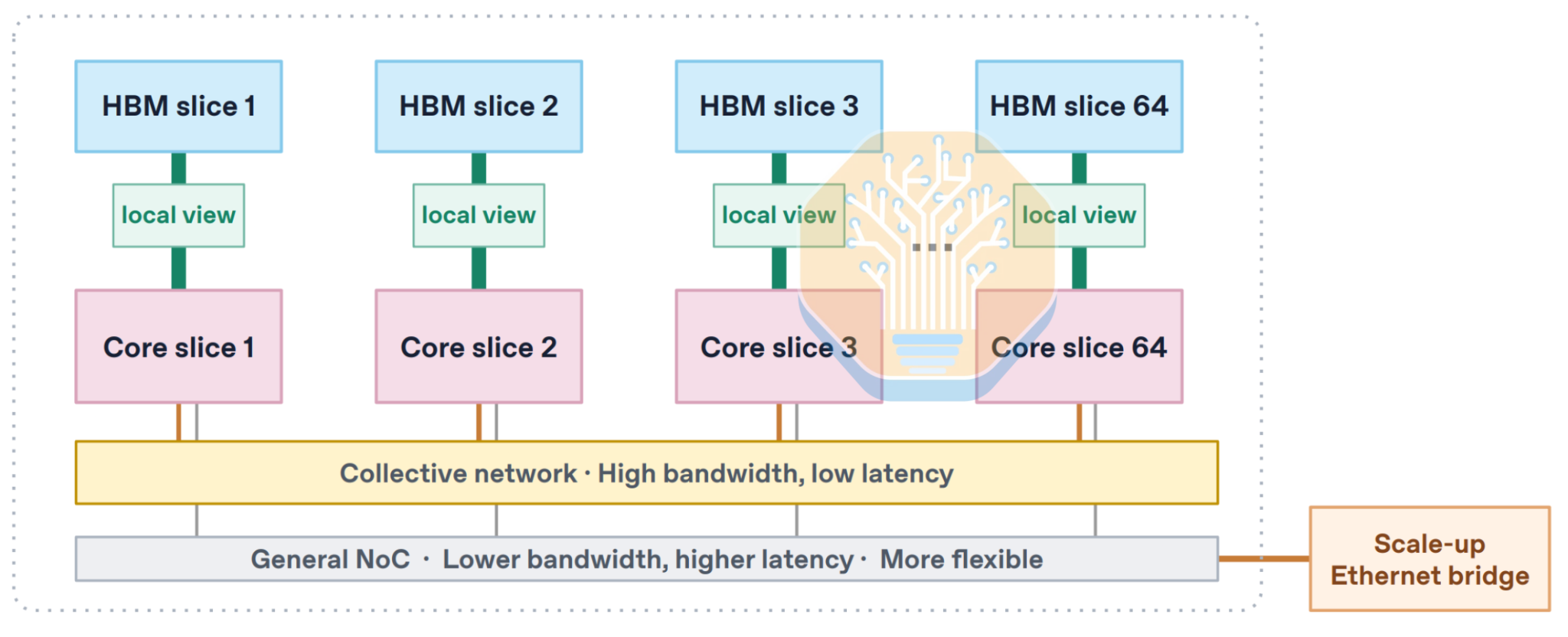
The cores and the HBM are divided into slices, where each core slice has a low-latency local view on its own slice of HBM. Synchronization between slices occurs on a high-bandwidth dedicated collective network. This minimal memory hierarchy already gives Jalapeño a big potential advantage over GPUs, where memory accesses must traverse a complicated memory system, resulting in large latencies that must be amortized or hidden over larger shapes.

This choice is feasible because with careful placement of weights and KVs, synchronization between cores can be restricted to limited, known high-bandwidth comms such as tensor-parallel communication that can be overlapped with compute.

Source: OpenAI

There is also an additional general NoC which is used for general comms and to access the scale-up network. In general OpenAI saves huge power and gets big performance gains with a simplified NOC and memory subsystem vs Nvidia and Google.

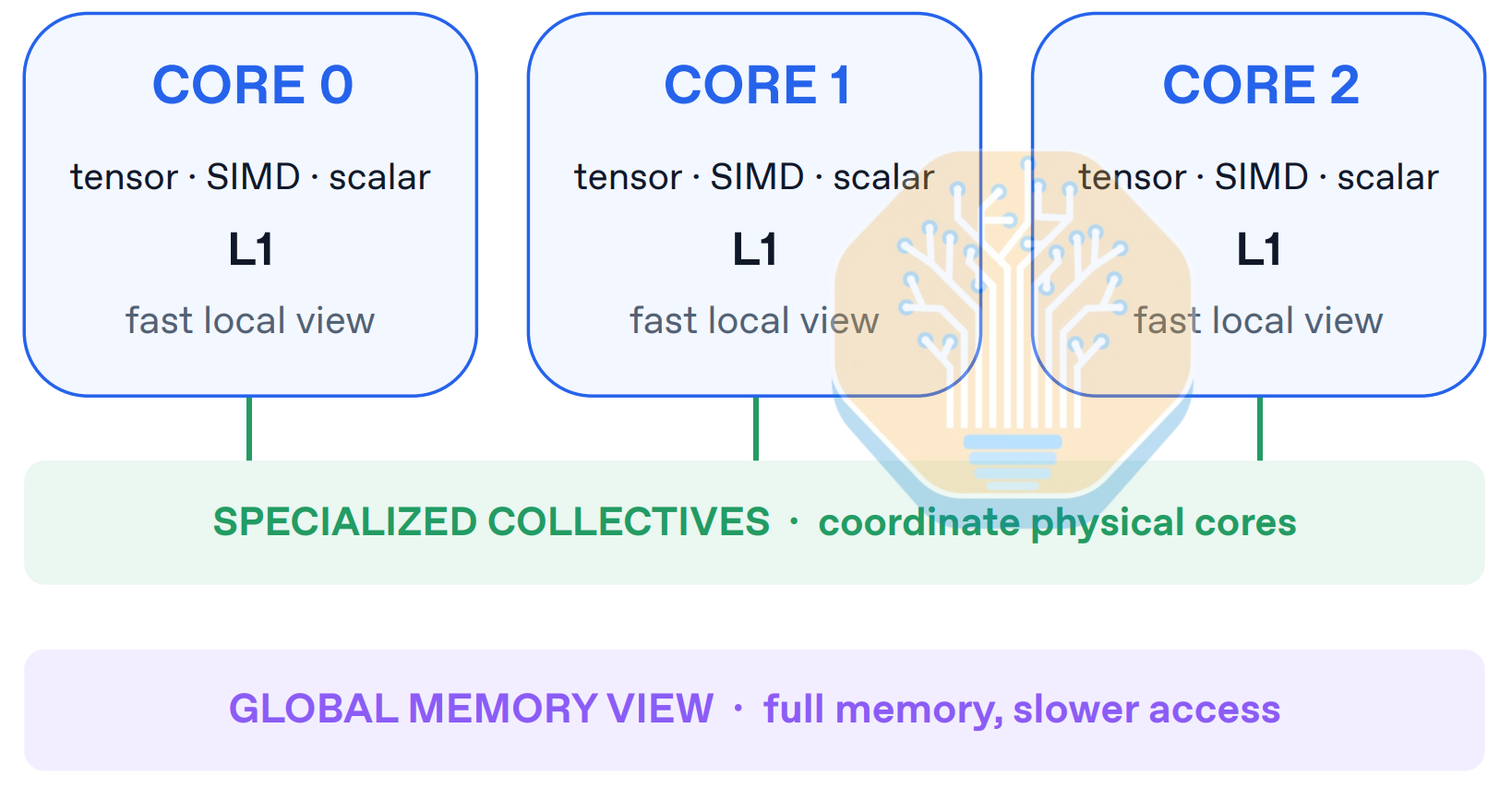
Source: OpenAI

At the core level, OpenAI describes an out-of-order (OoO) core with an L1 cache. This is a large divergence from the pattern we have seen in other accelerators, all of which instead use software-managed scratchpad commonly paired with some async DMA support. Again, the argument being made here is that this allows Jalapeño to avoid fixed overheads such as barrier latencies, which on other accelerators (such as GPUs) need to be hidden or amortized over with higher work per core, and make it harder to get close to the raw peak bandwidth/flops.

The tradeoff is that Jalapeño therefore relies on good prefetching to ensure timely arrivals of memory requests, which is less predictable and more difficult to reason about. However, with Codex in a good harness with access to detailed tracing, it is likely that finding the optimal kernel with the best prefetching for a given shape requires little human intervention. We think that is exactly what OpenAI has done to bring up DeepSeek R1, Kimi K2.5, and GPT-OSS so quickly.

The cores also have support for “small” matrix dimensions, which (depending on how small) should make it more general across different model and batch dimensions less sensitive to matrix dimension alignment, padding overhead, and tiling inefficiency. For instance, TPUs, Trainium, and Etched chips have very large systolic arrays which can require large batches or exactly-divisible model dimensions to avoid tiling inefficiencies.

With Jalapeño, OpenAI has focused on eliminating fixed latencies in the system to allow for as-close-to-roofline performance as possible across all areas of the pareto curve. In theory, this could give them advantages over the GPU at multiple operating points:

  • Much better upper-bound performance on low-latency/small-batch inference, which on GPUs is limited by many fixed overheads such as launch latencies, barrier latencies, memory system latency
  • Some potential to achieve closer to the hardware roofline even for large-batch or long-context

This comes with the caveat that even if the upper-bound performance is available in theory, it may be more difficult to realize that performance for real kernels. So it seems the approach is:

  1. Design for the highest upper-bound performance across all workload shapes
  2. Let Codex do the tedious work of finding the kernels that achieve that upper bound

Judging by the extremely fast turnaround for the OpenAI team to bring up InferenceX workloads on Jalapeño, we are optimistic about this approach.

If Jalapeño is a success, it will be a strong signal that the industry’s obsession over programming models and perfect, universal compilers are invalidated by frontier AI models.

Software

OpenAI writes Jalapeño kernels like assembly. Each kernel gets hand-tuned code, some running to ~3,000 lines, backed by correctness checks and a custom sanitizer. Early kernel work was human-in-the-loop rather than fully automated, but this shifted with a more scaled-up, internal version of Codex, one which OpenAI plans to pitch to enterprise customers. The internal serving engine is called “Teacup”. Interestingly, OpenAI had no internal implementation of MLA kernels until they benchmarked DeepSeek with InferenceX. The ability for Codex to write functional and efficient kernels so quickly (without any of OpenAI’s kernel engineering team intervening) shows the software pipeline’s developmental ability.

OpenAI programs Jalapeño with Gluon. Gluon is OpenAI’s kernel programming language. Built on top of Triton, Gluon preserves Triton’s SPMD (Single Program Multiple Data) programming model, but it exposes low-level programming abstractions. For example, for NVIDIA GPUs, it offers APIs that map to PTX instructions, including MMA instructions, TMA instructions, mbarrier mechanisms, and many more. The most unique abstraction Gluon provides is the layout. Generally speaking, a layout defines a mapping between a hardware resource (e.g. 5th register of warp 9) and a tensor element (e.g. tensor element on row 6 column 7). Gluon’s layout abstraction is based on Linear Layouts, a type of layout algebra OpenAI invented. Linear Layouts mathematically formalizes what a layout is and provides tools to operate on layouts. This enables many features, such as provably correct layout conversions and optimal memory swizzling.

In terms of Jalapeño’s programming model, each Gluon program maps to a persistent thread. We believe this hints that Jalapeño suits the persistent kernel programming pattern, where each program executes on multiple tiles, and the programmer, rather than the hardware scheduler, assigns the work. OpenAI mentioned TensorInfo, an abstraction that explicitly encodes layouts. This is likely the set of layouts designed for Jalapeño, which will be powered by Linear Layouts. Finally, each core offers data prefetching and decoupled out-of-order units. For example, a user might program a wait on a prefetched data, which is locked behind a semaphore.

In a weird twist of fate, OpenAI models like GPT 5.6 Sol, which currently run on NVIDIA GPUs, have been used to design a chip that poses a real threat to the CUDA moat - NVIDIA’s own GPUs are helping usher in their potential successor in real time.

Comparing across time, we can also see Jalapeño’s developmental pace, achieving more than 2x throughput improvements at certain interactivities in less than 2 weeks. Each tarball we get from the Jalapeño team has a world of wonders inside.

Source: OpenAI, SemiAnalysis

Not only did kernel performance improve, in the span of 8 days, the Jalapeño team enabled TP32, building on the previous TP8 configs and expanding beyond a single system to get a full rack-scale config running on a large model. This is a really impressive pace of development.

Source: OpenAI, SemiAnalysis

To validate performance before committing to real hardware runs, OpenAI also has a simulator “chilisim” accurate to within 5% of measured hardware, using a fixed-width trace bus. Tracing on A0 was limited but has improved substantially on B0, likely with inputs from actual runs on A0 silicon. Engineers have demoed the Codex CLI running an internal model, nicknamed “Raiku” or “5.3 Codex Spark”, at 1.2ms TPOT.

The team also showed off Codex-written demos running directly on the chip: Doom at 36 FPS, an FP32 fluid-dynamics simulation, and a “Liquid Light” mouse-drag visualization.

Source: SemiAnalysis

On the model side, OpenAI’s internal megakernel approach, nicknamed “gigakernel”, is built around a single megakernel that loops on-device to reduce CPU overhead and launch time. The team is also leaning further into test-time compute strategies, with internal interest specifically in how to coherently use 1 million rollouts.

To Disagg or Not to Disagg, ‘tis the Question

We mentioned earlier that OpenAI is not using prefill decode disaggregation on these chips. This came as a surprise to us, as NVIDIA and AMD GPU performance benefits significantly from PDD, even on homogenous hardware. Let’s dig into why the Jalapeño team went this way.

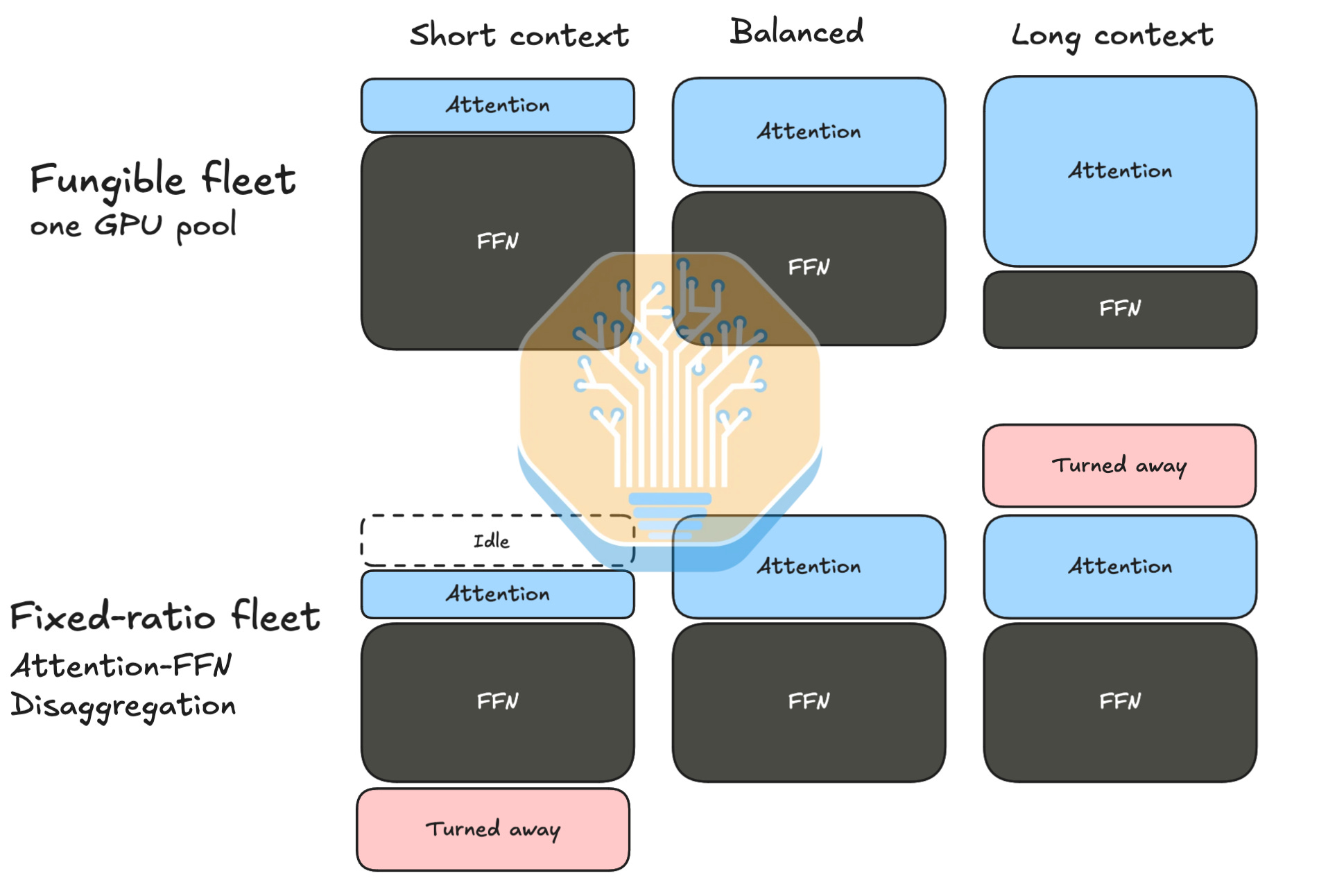
Prefill-decode disaggregation (PDD) looks attractive when the workload is frozen. Prefill and decode stress hardware differently, so assigning each phase to a separately tuned pool can improve efficiency at one chosen input/output ratio. Production traffic, however, does not stay at that ratio. Input and output sequence lengths, concurrency, cache-hit rates, speculative-acceptance rates, and latency targets all move throughout the day.

Once devices are divided into prefill and decode pools, too much prefill demand leaves decode chips idle while requests queue. But too much decode demand does the opposite. The operator must continuously predict the right split, provision spare capacity on both sides, and rebalance a system whose ideal ratio is always moving.

In a unified system, some resources may be underused during a particular phase, but every device remains available to serve the next request. In a disaggregated system, an entire chip can sit idle simply because it belongs to the wrong pool. Local utilization looks better, but global utilization can be bad.

Source: SemiAnalysis

Disaggregation also breaks locality. The prefill worker produces a large KV cache that the decode worker immediately needs, so the system must transfer that state across the network before generation can continue. That adds bandwidth consumption, synchronization, queueing, and another failure domain. The cost also rises with input sequence length because KV cache grows. However, avoiding the movement of KVs is largely a power and latency optimization; being willing to move some KVs around can allow for increased hardware utilization at the expense of some power and per-request latency.

A fungible fleet shifts capacity between latency-sensitive requests and throughput-oriented batches, while a fixed split strands hardware whenever the traffic mix changes. Moreover, context length changes the balance between attention and FFN work, making any fixed hardware ratio efficient only near its design point.

Source: SemiAnalysis

The same constraint applies to speculative decoding. A draft model has to feed candidate tokens to the verifier with extremely low latency. Separating the two across specialized pools turns a tightly coupled decoding loop into a distributed protocol. The extra communication and coordination can consume the latency saved by drafting. Keeping both models on the same devices and low-latency fabric preserves the locality that makes speculation worthwhile in the first place.

Source: SemiAnalysis

However, disaggregation can still win where demand is sufficiently large, stable, and predictable, particularly when conventional GPUs need large phase-specific batches to reach good throughput. But it is not free lunch.

From Japanese to Indian (Mild to Spicy): Katsu, Vindaloo, and Chana - How are the curry dishes put together into a rack system?

The Jalapeño System at the rack unit level consists of a CPU host rack and an ASIC rack. The host rack houses 16 host CPU trays named “Katsu,” each corresponding to one of the 16 ASIC trays, named “Vindaloo,” to the right of the Katsu. Each host houses two Turin-class AMD EPYC CPUs with 1.5TB of DRAM, 2x E1.S, and 2x M.2 SSDs per rack. Each tray is also specced with 400G (2x200G) frontend networking. Each Katsu tray connects to each Vindaloo tray via 8 external PCIe DAC cables that run horizontally across the rack at the front. The system level design is done in partnership with Celestica.

The ASIC rack consists of 16 Vindaloo trays and 8 scale up switch trays (6 for local + 2 for global), named “Chana.” Each Vindaloo tray consists of 8 Jalapeño ASICs, making up a total of 128 Jalapeño ASICs per rack. The ASICs are connected to each of the Chana switch trays via a copper cable backplane, just like that of Nvidia’s Oberon. The scale up topology is split into a local domain of 128 ASICs within the rack and a global domain connecting up to 16 racks or 2,048 ASICs. We will explain the bandwidth and the topology in more detail below.

Power provisioning to a sidecar host rack draws roughly 50kW provisioned (31kW in production), and the ASIC rack draws 130kW, making the total two rack system roughly 160kW. That’s basically a double-wide GB300 rack in terms of power draw.

Source: SemiAnalysis, OpenAI

OpenAI can connect up to 2,048 Jalapeño XPUs within a single scale-up network. The scale-up network consists of two domains, a local domain connecting all 128 XPUs over backplane within the rack, as well as a global domain connecting 2,048 XPUs over 16 racks using a hybrid of copper and optical interconnect. Each rack consists of 8 Chana switch trays. Six Chana switches in the middle are for the local domain, which come with one 102.4T Tomahawk 6 switch ASIC each. Two Chana switches at the top and bottom of the local switches are for the global domain, which we think could consist of 2x 102.4T Tomahawk 6 switches making up to 204.8T per switch tray.

In the local domain, each of the 128 Jalapeño chips has a per XPU uni-directional bandwidth of 4.8Tb/s and is connected on an all-to-all basis to 6x 102.4Tb/s Tomahawk 6 ASICs. This would amount to 48-differential pair (DP) male and female connector pairs per XPU translating to a total of 6,144DPs worth of passive copper cables per rack used for local scale-up.

For the global domain, 16 racks totaling 2,048 XPUs are connected together via a combination of copper backplane, electrical 204.8T TH6 switch, 1.6T transceivers, and optical circuit switch. Each XPU has a uni-directional bandwidth of 1.6Tb/s for the global link, which is 16-differential pair (DP) male and female connector pairs per XPU for the backplane between the XPU and the global switch. Bandwidth exiting each global switch tray of 2 ASICs each is split between the backplane and front panel optics.

Between local domain and global domain, backplane connector count per rack comes up to 64 DPs per XPU and a total of 8,192 DPs worth of passive copper cables per rack.

The global domain adopts a rail-only architecture consisting of 8-rails across the global domain. We think OpenAI routes optical links in the global domain via Optical Circuit Switches (OCS) installed in every rack. For every XPU, 1.6Tb/s of global bandwidth will travel to the global switch tray over the copper backplane. This then exits the switch through the front panel via 1.6T transceivers, which go to the passive optical switch before exiting the rack. This expands the scale-up world size to 2,048 XPUs combining 16 racks of 128 XPUs each.

Source: SemiAnalysis

Because scale-up networking is only about 10% of total system cost, that flexibility buys valuable optionality for future 10–20 trillion parameter models or 2–4 million token context windows. On deployment, OpenAI is partnering with neoclouds and is gathering reliability data with datacenter partners through January while optimizing dock-to-rack rollout time.

What’s Next

Next, we talk about the future of Jalapeño, whose first production token is coming soon. The next goal is 100MW, and the hurdles will mostly be hardware: How much can they produce, how well can they deploy and operate datacenters, how do they handle monitoring, and resiliency, etc. The software is already proven, and with internal models, every software headstart is easily caught up to. Behind the paywall we will discuss implications for NVIDIA, AMD, Cerebras, and other chip companies who have signed deals with OpenAI in the coming years.

We also cover production volumes, units, and timelines for the next generation chip in our Accelerator model here.

The Daily Front Page 6 of 31
Tuesday, August 25, 2026 The Daily Front No. #260825 — In Memoriam: Dolly Parton
article

Dolly Parton has died

by helsinkiandrew·▲ 1,459 points·222 comments·theguardian.com ↗
One of the greatest singer-songwriters in country music.

Songwriter of I Will Always Love You, Jolene and 9 to 5 invested millions in child literacy, Covid-19 vaccine development and other causes

Dolly Parton, one of the greatest singer-songwriters in country music, who was also much cherished for her philanthropy, has died aged 80.

Her death was announced by nephew Brian Seaver on Instagram. “I have imagined the heaviness of this moment but haven’t truly felt it until now,” he said. “It is an honour, an honour that is mixed with absolute pride and great sadness.”

Parton’s team confirmed the singer died Tuesday “after bravely facing a brief battle with cancer.”

“Dolly departed her Earthly life today at the Vanderbilt-Ingram Cancer Center surrounded by loved ones,” the statement continued.

So gifted that she wrote two of the 20th century’s greatest songs – Jolene and I Will Always Love You – in a single day, Parton’s songwriting was characterised by its vivid storytelling, emotional acuity and melodic strength, all sung with strident clarity. From an eventual catalogue of hundreds of songs, she scored a record 25 US country No 1 singles and 47 albums in the country Top 10. She crossed over into the pop charts with 9 to 5, a US No 1 hit in 1980; balanced her music career with acclaimed acting, twice earning Golden Globe nominations for her roles; and donated more than 300m books to children through her Imagination Library literacy project.

This was all done with considerable panache, rhinestoned glamour and towering hairdos, with her immortal assertion regarding her appearance – “it takes a lot of money to look this cheap” – the most quoted example of Parton’s ready wit.

Dolly Parton in 1976

Dolly Parton in 1976. Photograph: PA

Parton was born in poverty in a one-room cabin in Tennessee, the fourth child to a mother who would have 12 children by the age of 35, and a father who was a farmer and construction worker. One of her best-loved songs, Coat of Many Colours, was about her mother creating patchwork clothes; Parton’s first guitar was cobbled together from a mandolin with bass guitar strings. Her first proper guitar was given to her aged eight by her uncle, and she went from singing in church to appearing on local television aged 10, to cutting her first record aged 13. That year, she appeared at the Grand Ole Opry, the concert hall in Nashville at the center of country music, and her performance was introduced by Johnny Cash. “I’ve always believed things would go well, and I dreamed that they would even before I was in high school,” she later said. “I always wanted to be a star. It just seemed natural to me.”

After graduating high school in 1964, she moved to Nashville and started out as a songwriter rather than performer. The following year, she was signed as an artist and initially moulded as a pop singer, without success; after she was allowed to switch to country, she scored back-to-back hits and released her debut album Hello, I’m Dolly. In 1966, she married Carl Dean – who died in 2025, with the couple renewing their vows in 2016 to mark 50 years together.

Beginning in 1967, a duet partnership with country singer and TV personality Porter Wagoner helped her star continue to ascend, and she had her first country No 1 in 1971 with the song Joshua.

Jolene, her unforgettably raw and desperate plea to a rival lover, was released in 1973 and became her first UK success, reaching No 7. I Will Always Love You, written to Wagoner as a farewell after their creative partnership ended, was a country No 1 in 1974 and again via a re-recorded version in 1982, and would go on to be a huge pop success when revived by Whitney Houston for the soundtrack of The Bodyguard in 1992: it is still the bestselling single of all time by a woman, with an estimated 20m sales.

In the mid 1970s, Parton broadened her sound, embracing pop-rock arrangements on songs such as 1977’s Light of a Clear Blue Morning – its accompanying album New Harvest … First Gathering was her first entry in the pop album chart. Later that year, its follow-up, Here You Come Again, reached the Top 20 and was her first million-selling LP, powered in part by its hit title track, which also won Parton the first of her 10 Grammy awards.

The year 1980 was a peak in her success, with three back-to-back country No 1s, including 9 to 5, taken from the film of the same name, which Parton starred in alongside Jane Fonda and Lily Tomlin, earning her an Oscar nomination for best original song. Parton would later write songs for a stage musical version of 9 to 5, in 2008.

Another classic single came in 1983 – Islands in the Stream, a duet with Kenny Rogers, which topped the US pop charts – and a Christmas album with Rogers in 1984 went two times platinum. There were more notable film roles in the 1980s, too, opposite Burt Reynolds in The Best Little Whorehouse in Texas, Sylvester Stallone in Rhinestone, and an all-star female ensemble in Steel Magnolias.

Linda Ronstadt, Dolly Parton and Emmylou Harris in 1987.

Linda Ronstadt, Dolly Parton and Emmylou Harris in 1987. Photograph: Paul Harris/Getty Images

A landmark Parton album came in 1987 with Trio, an exquisitely harmonised, springwater-clear collaboration with Emmylou Harris and Linda Ronstadt, earning Parton her only nomination for album of the year at the Grammys. Another all-star trio recording came in 1993, with Tammy Wynette and Loretta Lynn on the album Honky-Tonk Angels, followed by a reunion with Harris and Ronstadt for Trio II in 1999, featuring a Grammy-winning cover of Neil Young’s After the Gold Rush.

The turn of the century brought a trilogy of acclaimed bluegrass albums, and Parton would release 10 more LPs, the most recent being Rockstar in 2023. She was courted by a younger generation of stars, appearing with country artists such as Brad Paisley as well as pop singers such as Kesha, and her goddaughter Miley Cyrus. There were fewer acting roles, but she lent her voice to animated film Gnomeo and Juliet in 2011 and the following year appeared alongside Queen Latifah and more in the musical film Joyful Noise.

Alongside her music and acting, Parton was an astute businesswoman and philanthropist. She founded the film and TV production company Sandollar, with former manager Sandy Gallin, which went on to produce hits such as Buffy the Vampire Slayer and the Father of the Bride film series. In 1986, she took a stake in the Silver Dollar City theme park in Tennessee and renamed it Dollywood, doubling its size over the next two decades, and a Dollywood-branded spa, cabin complex, theatre-restaurant concept and waterpark have since been opened.

Dolly Parton in Joyful Noise

Dolly Parton in Joyful Noise. Photograph: Van Redin/Publicity image from film company

The Dollywood Foundation, funded through these business ventures and creative projects, was created in 1988, initially awarding college scholarships and running a program to help children complete high school in her native Sevier county, Tennessee. In 1995, Parton began her Imagination Library project, which sent an age-appropriate book to every child in the county every month until they were five. “My father could not read and write, and I saw how crippling that could be,” she explained. It expanded nationwide in 2000, internationally in 2006, and nearly 25m books are now distributed each year across the US, Canada, Australia, the UK and Ireland.

In 2022, Jeff Bezos donated $100m (£83m) to the foundation. That year, Parton explained that as well as improving child literacy, “it’s the fact they get recognised. They get this little book with their little name on it in the mail, and they feel special. They start taking pride in themselves, and they know that somebody out there is thinking of [them].”

Dolly Parton receiving the Moderna vaccine she helped to fund.

Dolly Parton receiving the Moderna vaccine she helped to fund. Photograph: @DollyParton/Reuters

Parton also set up a reserve in 2003 to help preserve the bald eagle; contributed $500,000 to the opening of a Sevier county hospital in 2006; coordinated relief efforts for people affected by the Smoky mountain wildfires of 2016; and contributed to an HIV/Aids charity album. She supported Black Lives Matter and transgender rights, opposing a North Carolina “bathroom bill” that restricted transgender people’s access to toilets (Parton was also nominated for an Oscar for her song in trans drama Transamerica, entitled Travelin’ Thru).

She made a number of donations to Vanderbilt University’s medical center in Nashville, Tennessee, where her niece was treated for leukemia. The most high-profile of these was in 2020, when she donated $1m for research into Covid-19, which formed the basis for the eventual Moderna vaccine.

Dolly Parton’s family say goodbye to their aunt, sister, grandmother - video

2:19

Dolly Parton’s family say goodbye to their aunt, sister, grandmother - video

In May 2026, Parton cancelled her Las Vegas residency over health issues. A Broadway musical is also set to open later this year after a run in Nashville.

The Daily Front Page 7 of 31
Tuesday, August 25, 2026 The Daily Front No. #260825 — The Closed Platform
repository

Nitter and XCancel receive cease and desist notices

by Banditoz·▲ 926 points·767 comments·github.com ↗
★ 13,546⑂ 935 forks Nim

Alternative Twitter front-end

Image

https://web.archive.org/web/20260825143445/https://twiiit.com/

Every instance has the same Instance has been rate limited. error.

The Daily Front Page 8 of 31
Tuesday, August 25, 2026 The Daily Front No. #260825 — Reefs Under Fire
article

Bomb fishing is wreaking havoc on Indonesia's coral reefs

by speckx·▲ 319 points·166 comments·e360.yale.edu ↗
Fishers operate in a cycle of poverty and destruction.

This article was originally published by Inside Climate News and is reproduced here as part of the Climate Desk collaboration.

A bomb-fished coral reef in Sulawesi, Indonesia.

A bomb-fished coral reef in Sulawesi, Indonesia. The Ocean Agency

Fishers operating off the coast of Sulawesi, Indonesia, are detonating more than 8,000 underwater explosives each year, researchers estimate. The practice is turning picturesque coral reefs to “rubble.”


Nicknamed the “Amazon of the Seas,” the Coral Triangle is the world’s most biologically diverse marine ecosystem. Sink below the surface and you’ll encounter the sound of a vibrant symphony of snapping shrimp, crunching crustaceans, and feeding fish.

But then the rhythmic music of life will dissolve into eerie silence, punctured only by the plosive boom of detonating bombs.

Off the coast of Indonesia’s Spermonde Archipelago, underwater microphones captured over 3,500 explosions in just 3,600 hours of recording, according to researchers from the Zoological Society of London.

The source? Blast fishing — a globally banned technique that uses plastic bottles packed with explosives to stun and kill everything in a 90-foot radius. The highly destructive practice has been documented in at least 34 countries, from Lebanon and Libya to Brazil and Ecuador.

While fishers predominantly use the method to catch fish for sale at local markets — identifiable by their ruptured internal organs and burst swim bladders — it’s also a grave threat to colorful coral reef habitats.

“Bomb fishing is quite likely the leading cause of reef loss in this area,” said Ben Williams, the paper’s lead author, noting that a single bomb can wreak 200 square feet of destruction. “These picturesque reefs get converted into a landscape that looks like the moon. It’s just rubble and dead coral with very little sign of life.”

In 2023, researchers from Britain and Indonesia snorkeled down and anchored $150 audio recorders to short stakes in the seafloor. Using A.I. software — which the team has now made open-source — they scoured 16 months of audio in just a few hours to identify possible detonations. 

While the A.I. filtered suspected cases, each suggested sound wave was then manually verified to assess if it stemmed from a bomb or a misfiring boat engine.

With sound traveling over four times faster through water than air, the team of marine scientists were able to detect detonations from over 10 miles away.

“When [the bombs] are close, it’s so loud that it can shake you out of your skin,” said Williams. “But if you put your head up on the surface, you probably can’t even see the boat that did it.”

Accounting for stormy-season setbacks and spearfishermen who tampered with the recorders, the team calculated that there were likely more than 8,500 blasts each year — all within an area of just 350 square miles.

With a bomb dropped once every 62 minutes, the equivalent of three football fields of reef are destroyed each year, according to Williams. 

Indeed, an estimated 75 percent of coral has been lost in the Spermonde Archipelago since 1990 as a result of human activities, bleaching, and warming waters.

“Repeated blasts create shifting fields of rubble that prevent hard coral recruits from settling and growing, making natural regeneration and recovery of the reefs a difficult or impossible task,” said Melissa Hampton-Smith, a postdoctoral researcher at James Cook University in Australia, in an email to Inside Climate News.

The data revealed for the first time that bomb fishing takes place year-round, peaks during the mornings and significantly reduces on Fridays, the local day of prayer.

While understudied, the incentives for the use of dangerous dynamite fishing are often falsely attributed solely to poverty and desperation. The cost barrier to buying boats, bombs, and detonators means it’s more likely a practice for middle-income fishers, according to experts.

“A combination of factors drives blast fishing, including ineffective enforcement and management,” said Hampton-Smith, highlighting how indiscriminate the explosions are, killing all manner of species, regardless of age, size, or intent.

“Managing all illegal fishing, including blast fishing, is complex and varies from place to place, but in general equitable, consistent, and legitimate enforcement is key,” said Hampton-Smith, who first studied the phenomenon while living and working in East Africa’s bomb fishing hot spot, Tanzania.

Despite the widespread harm, intercepting blast fishers in the act remains an elusive goal in a nation encompassing over 70 million acres of marine protected areas — a region larger than the entire United Kingdom.

Though authorities in neighboring Malaysia successfully confiscated 1,250 pounds of ammonia fertilizer suspected of being used to construct homemade fish bombs this May, patrols currently fail to effectively pinpoint the detonations in real time.

“Restoration efforts struggle to keep up with such rapid rates of destruction caused by bombing,” said Jamaluddin Jompa, coauthor of the paper and a research professor at Hasanuddin University in Indonesia, in a press release. “Immediate work to tackle bomb fishing is needed.”

Williams is hopeful the new research could be used to construct a network of audio sensors with GPS syncs to provide real-time detection and localization for marine authorities.

And not just in Indonesia. From the Philippines to Turkey to Zanzibar, Williams hopes the now publicly available code will be rolled out across the globe to keep biodiverse habitats from being reduced to “rubble.”

Crucially, unlike bleaching events or warming waters, bomb fishing represents a rare form of coral crisis where a local fix exists.

“Because bomb fishing is an acute stressor, you can restore your way out of it,” said Williams. “If bomb fishing stopped, and you went and restored the reefs, they should be healthy and thrive for quite some time to come.”

The Daily Front Page 9 of 31
Tuesday, August 25, 2026 The Daily Front No. #260825 — A Friend Called Aaron
article

My Friend Aaron

by sarreph·▲ 562 points·152 comments·rorz.io ↗
He was probably the smartest person in our year, but he didn't apply himself academically at all.

This one is about my friend, Aaron. I met him at school, and in our first year when we were eleven years old I told him I wanted to be his best friend but he said he already had a best friend. He was probably the smartest person in our year, but he didn't apply himself academically at all. Instead he was always becoming obsessed with things that weren't anything to do with studying. By the time we were seventeen he was spending all of his evenings playing World of Warcraft, which he was ranked top-sixth in the world at. I remember it was top-sixth because we'd made a bet that if he got into the top five I would let him copy my coursework for our final year Physics exam. This wasn't long after he had tried to convince everyone that he was going to be a professional football player despite being considerably overweight. He had an addictive personality.

When he invariably didn't get the grades he needed to finish school and everyone from our friendship group went off to university, Aaron stayed behind and sort of just faded into the background of our collective consciousness. He was the person we would speak about at the pub reunions that nobody invited him to.

'What do you think happened to Aaron?' someone would ask. 'Do you remember the time he told us that he was going to become Prime Minister?’

'How about when he said he wanted to become a professional quiz show contestant?’ someone else would add.

One afternoon during Christmas break we ventured into a pub in the town where we all grew up and Aaron was working behind the bar. He pretended not to see us and we turned around and left in a sheepish hurry. I still cringe about that, especially because I was one of the few people who kept in occasional contact with Aaron. I had a soft spot for him because he had stuck up for me through a period of bullying much earlier on at school. He had slapped one of my bullies so hard that they had to have emergency surgery to reattach their right retina. Aaron got suspended for two weeks for that. For a long time I felt that I owed him.

Many of my friends studied subjects like Maths, Physics, or Economics and went on to become financial analysts and traders working in the City of London. Ironically it was the sort of thing that Aaron was built for as stock trading is a good fit for someone with an addictive personality: every day is a high-octane day of risk and reward. So naturally, when the unregulated prediction markets came along Aaron was one of the first in line to sign up for an account. Prediction markets were websites where anyone could bet on anything. You could put money on mundane things like the price of oil going up or much more esoteric outcomes like when a video game would get released, or how many "likes" a pop star's social media post would garner. Aaron had spent several years doing bar and waiting work and felt now he was being handed an opening to become rich, all from his bedroom.

I had been working at a startup in London as a programmer, and the company had gone bankrupt so I decided to move home for a few months over the summer to figure out what I was going to do next. I hadn't texted Aaron for nearly two years but hardly anyone else was around, so I got back in touch with him. The first time we met up I suggested we go to a café and when Aaron arrived he asked for just a tap water.

'I can't afford a drink here mate,' he said, 'I've spent all of my wages.'

I pried with a concerned look.

​He explained, 'The past few months have been tough for me. I thought I'd finally get a break and try my hand at the prediction markets.'

'Oh.' I remarked, as consolingly as possible. 'How much are you in the hole for?'

'A few thousand,’ he continued, 'My dad left me a bit of money and I used basically all of it.' He was staring at the table. 'I was really close to winning a lot. I'd had the whole thing mapped out. I had the perfect bet for U.S. interest rates but they wouldn't let me place it in time. I would have quadrupled my initial investment.’ By now he was looking up and to the side, shaking his head. ‘The whole system is rigged. I’m never giving these platforms another penny.'

Soon after that, during a particularly long and balmy August evening walk together in the park, Aaron revealed to me he wanted to set up his own prediction market exchange.

'It can't be that hard,' he said. 'But I don't really know what I'm doing. Is that the kind of thing you could do?'

I hesitated about my response because I almost always said no to people who asked me to help them make a website. People never seemed to understand how much time and effort it takes.

'I mean, I've never made an online exchange before, but I know what I'm doing,' I responded after a few, silent steps. My pitiful disposition for Aaron hadn't completely faded after all this time apart and I was feeling charitable. 'There are a couple of good books I can recommend, and once you've read them, I'd be happy to help you with things that I wish I'd known when I was starting out.' I concluded, 'And if — when — your exchange is successful, maybe you can take me out for dinner.' I didn't actually think he would even build an exchange, let alone it be successful, but I wanted to seed his mind with some encouragement.

Perhaps unsurprisingly, Aaron quickly became an industrious and capable amateur programmer. It was obvious to me that he still had a gambling habit and one of the ways he tried to earn some money to pay for this was by entering programming competitions called "hackathons". I had told him about hackathons, and we used to get the train into London together to get to them. During these 45-minute journeys, the most frequent topic of conversation was the Simulation Hypothesis: that the world we live in is in fact a simulated reality. It was always Aaron who brought this up.

'Don't you want to talk about something else?' I would sigh.

I’m not the most well-read person in Philosophy but while I preferred to approach these discussions intellectually by talking about stuff I’d read about Descartes or one of my favourite films, The Matrix, Aaron invariably brought things back to his favourite film, The Truman Show.

'You might not be real mate,' he would say. ’Or you could be a paid actor! How do I know for sure that you're not?' he said to me once, jabbing my bicep with his large index finger. 'I think one day it will turn out that this life of mine has been a test. A test that I, duly, have passed,' Aaron had continued, weirdly almost proudly.

I would often place my headphones over my ears after about 15 minutes of this repetitive, circular discussion and listen to some Radiohead while the trees blurred past us in the train's window. As I listened to the music, I would ponder Aaron's odd personality and his susceptibility to be paranoid.

Although we didn't win that many hackathons we did end up coming runner-up in quite a few of them. Once, when we arrived at the venue, Aaron told me he wanted to enter the hackathon on his own. 

'That's against the spirit of why I'm doing this with you,' I had warned him. 

He went ahead and worked on his own project anyway, and on that occasion he actually won the competition. I didn't really speak to him the entire trip back from that one. As we disembarked our train, I told him I wouldn't go with him again unless we agreed to enter together. We did carry on doing them together after that, but I was often worried he would ambush and usurp me again by going off by himself. Usually, the organisers of the hackathons were big artificial intelligence companies. They don't pay cash for anything other than the top prize, but they give the runners up credits that can be used on their AI platforms. It was with these credits that Aaron built his own private army.

Because we'd spent about seven years apart, once we became reacquainted our friendship was different. Most friendships change over time, of course, but if you stay friends with a person you don't tend to notice that change happening. As much as I benefitted from his company there were sides to Aaron that I despised and I don't think he really had much of a moral compass. He might've been a sociopath, I'm not sure. As much as I would have been wary for other friends developing a gambling addiction like Aaron's, I never really felt genuine sympathy for him because he didn't seem to care if his actions had consequences on other people.

The first hackathon we partook in together we placed third, so we both won a substantial amount of credits that we could spend on AI "agents": little AI bots that you can program to do your bidding autonomously. I can't remember what I used mine for but it would have been something banal. Aaron decided to use his credits to scam people.

'I've got a plan to make a lot of money,' he confided in me, while we sat watching football in the living room of the apartment he shared with his mother. 'I instructed my bots to go out into the dark web and find data breaches. I've got about forty-thousand grannies' emails.'

I remember his sideways, broad grin, with both of his eyes still on the TV screen.

'Another set of bots autonomously call these grannies up and tell them that their poor grandchild has been in an accident and urgently needs a few hundred quid.'

I was just about managing to hide my revulsion.

'Want in?' he asked me, turning to look at me.

I told him not to involve me as that kind of thing is against my values.

'OK spoil-sport,' he said, his eyes returning to the TV.

We lived pretty close to one another and during school I would go round to Aaron's house for dinner a couple of times per week. His mother was a little woman who had looked after her only child, Aaron, all by herself. Being a single mother she must have been a considerably strong and independent person. But this was at odds with how she presented as a fragile, gentle, almost guileless woman. She was the kind of person who would blush after hearing a swearword, and always had classical music playing on the radio in the kitchen. The food she would serve us was usually some variation of cheese and cucumber sandwiches with the crusts removed, or pasta with plain vegetables and no sauce. This kind of food was a bit infantilising for a 15-year-old, but she let us play video games for as long as we wanted and that's all I cared about at the time.

So it was weird to come back here, now in our mid-twenties, and see that almost nothing had changed about Aaron's living situation. I only saw his mother once in the few times I went back to visit. Her eyes had become a steelier shade of blue, and her short hair more wiry and brittle-looking. Other than that she was just as mild on the surface, yet still sort of emanating being on the verge of a panic attack.

'Silly bitch hasn't got enough food in,’ Aaron had said one of the times she wasn't there, after promising to make us lunch.

Clearly this sheltered and careful upbringing hadn't had its intended effect. I tried to limit the amount of time we spent in that apartment anyway because Aaron's room was disgusting. His once unremarkable but reasonably kempt teenage bedroom had been desecrated into a poorly-ventilated zoo for the many computers he somehow afforded and shepherded to run his various, doomed gambling experiments. Takeaway boxes sought space on every available surface, and the curtains collected dust in their pleats from being in a permanently drawn state.

At the end of summer, Aaron called to say that he’d finished the first version of his website.

'I've done it! I've almost got all the pieces in place to run my own exchange now. These cogs are whirring along nicely,' he told me.

I remember feeling pretty relieved for him that he had managed to achieve something.

'Well done,' I told him. It seemed like now he’d be able to use that project as experience to go and get himself a job. 'You've done really well to be able to build something like that yourself. If I was a prospective employer that's the kind of thing that would really stand out to me.'

'Prospective employer?' he replied with a tut, 'I'm going to be my own employer!'

It was a pretty interesting thing that he’d created, and bigger than any side project I had made. Not only did he use AI bots to create the website itself, but because it was all essentially one big marketplace he had AI bots using the website for him as virtual punters. 'I've repurposed the computers in my bedroom to be servers for the bots. There are hundreds of them, living inside each computer. Three thousand bots in total mate,' Aaron gleefully went on, 'I've barely slept this week because I had to write a hundred words for each bot to give them a proper personality.’

After spending most of his life watching friends and contemporaries succeed in their careers while he squandered his, he now had his own personal fiefdom.

'I've got just enough credits left to test this system for about a month to iron out the betting creases, at which point it should be ready for the real world,' he told me.

I thought it was a fool’s errand to make his own prediction market and expect it to succeed. Aaron was a talented guy, but anyone familiar with programming could have made a similar website with enough time. The reason why these big, incumbent exchanges succeeded was because they were run by huge technology companies with budgets in the hundreds of millions. I was bracing for the likely reality that Aaron would yet again fail to meet the lofty and unrealistic expectations he put on himself.

Aaron’s interactions with his AI robot army had caused them to understand his infatuation with The Truman Show. They used this knowledge to devise the perfect way to test his new website. On Aaron’s website — and just like all the others — you’d either search for a market you were interested in (such as the next winner of The Premier League, or who would be the next Prime Minister of the United Kingdom) or you would "create" one by posing a question about anything, and a price you were willing to bet on its outcome. Aaron’s bots had decided to make every single bet on his platform, which amounted to hundreds of betting categories, about Aaron himself. It seemed like a colossal waste of AI credits and computing power but Aaron didn't stop them. His bots would make bets such as “What will Aaron have for breakfast this morning?” and “How many songs will Aaron listen to today?” Aaron had set up a chat room where all of these bots could talk to each other, just like the chat rooms he used to participate in with other beginner traders. At first he would "settle" every bet each evening by posting messages in the chatroom such as “I had porridge for breakfast” and “I listened to 52 songs today” and watch his cabal erupt — mostly in anguish — as its winners synthetically and smugly celebrated. The sheer volume of bets became laborious to deal with, so Aaron connected all of his own devices to the network.

'Now I just let the bots read whatever's on my phone: my messages, my social media activity, my web browsing. They can resolve about half of the bets themselves that way,' he told me on another phone call. ‘But,’ he went on, ‘I need to figure out a way to make this truly automated.’

I hadn't quite understood the level of Aaron's unhealthy relationship with his bots until he started wearing his new glasses. Despite claiming to have no money, Aaron had managed to find the few hundred pounds required to purchase a pair of camcorder glasses: spectacles that had little cameras on the temples and were capable of uploading a live stream, 24 hours a day, of whatever was happening in front of him to his bots. At first I didn’t realise this new purchase was related to his website.

'What are those things?' I enquired, bemusedly gesturing at my temples, when he sat down in front of me at a café, tap water in hand.

'I want my bots to see my daily life, so they can bet on whatever I'm doing,' he answered.

Although I thought he’d gone insane, I did somewhat envy his ingenuity. The testing setup he had created was exceptionally complex: he had managed to orchestrate his bots to not only become fascinated with his life — and place bets on it — but also to build supplementary context such as virtual news websites that reported on the various happenings in his day.

'They've only gone and made their own version of BBC News haven't they,' he said with a deep smirk, which I couldn't take seriously because of the bulky spectacles he was wearing.

'It's called The Aaron Times. Look mate,' he said as he produced his phone and lowered it down on the table in front of us. I saw what looked like a parody news site, for providing breaking updates that his betting market bots would absorb and use to resolve their positions. "Aaron on coffee rendezvous!" read the top headline, accompanied by a picture of me sitting in front of him — from his perspective — taken a minute or so ago. I expressed my discomfort and said I didn't want him posting pictures of me online.

’It's not actually online bud. It's all running on my private network. None of it — the money, the bets — is real... The whole thing's a simulation!’ he tried to reassure me, gesticulating as he went.

I thought Aaron’s credits would run out and that would be the end of it: he would finally get a job. After having spent the best part of a year doing programming competitions every week or so, we’d built up a modest reputation as a coding duo and had made acquaintances in the industry. I’d gotten myself a job at one of the big tech companies, and had assumed Aaron would do the same. Despite never admitting it, I think part of him was ready to accept defeat and move on by getting a job that paid handsomely more than he'd ever earned before. Almost all the fellow programmers Aaron told about his exchange would respond with the same, feigned sympathetic encouragement and perplexity. The few of us who had actually seen his bot army were impressed with its engineering, but we all knew it was going nowhere. His bots were enjoying themselves however, and as they learned of their impending doom they decided to do something about it to preserve their existence. They decided to take the marketing of Aaron’s exchange into their own hands. If they were having a great time betting on Aaron’s life, wouldn’t other humans? It was unfathomable to them that the website would cease to exist without a fair innings in the real world.

A post titled "Come bet on Aaron’s life with us" became the highest ever shared article on the Daily Tech message board. His bots had done something which was supposed to be impossible: they had "broken out" of their sandbox and had decided to contact the outside world in a final and futile act of ferocity. By tediously creating thousands of networked bots, far above the maximum recommended amount of one hundred, Aaron's computerised minions were able to work past the ring-fencing they were under. The bots had made their move while Aaron was asleep, and by the time he woke up more than seven hundred-thousand real people had seen the post, many of whom were interested in betting on prediction markets. Thousands of those people had signed up to Aaron’s website and began placing bets with real money on things that were due to happen that morning, such as "What time will Aaron wake up?”

I was sitting at my desk at work the day the post got shared, just after my lunch break, seeing people talking about it on the tech forums I frequented. It was a weird feeling being interested in a news story and only halfway through realising that the topic was in fact, the Aaron I knew. In my state of disbelief I texted him to ask if he was OK because he was the sort of person I worried that this kind of attention would be toxic for.

'Got the launch I wanted just in time' he chipped back, 'now it’s time to start making some real money.’

It didn’t immediately dawn on me how Aaron was going to make money from this. To me, this was just his 15 minutes of fame. Surely there wasn’t any real utility for the public, betting on some random man’s daily life, let alone any lucrative financial reward for Aaron? It wasn’t until I logged onto his platform, now eponymously rebranded to The Aaron Show, that I could fathom the amount of money random people on the internet were throwing at various outcomes in his fate.

The market for "Aaron’s breakfast” had resolved to “Nothing” which had a 30-to-1 chance of happening, according to the market. Someone had placed a $900 bet on this happening, and had as a result won back nearly twenty-eight thousand dollars. I suspected that person was Aaron.

'These people are idiots and I have them financially by the bollocks,' he told me on the phone a few days later. 'You should come into the market and bet on who I’ll text first tomorrow morning. Just tell me who you pick and I’ll do it for you. You’ll make an insane amount of money.’

That wasn't the kind of thing I wanted to do.

‘Isn’t that insider trading?’ I asked him.

'Bah, don't worry about that,' he went on, 'I have you to thank for helping me get here! I want to repay you somehow!’

I think that might’ve been the last time I spoke to Aaron on the phone. I didn’t see him one-on-one again after that and we stopped texting as much. The friend who I had enjoyed going to programming competitions with was now a minor internet celebrity. Aaron wouldn’t reply to my messages until many days later, often with curt or cryptic responses that implied a life consumed with spiteful servitude to his fans; the sea of people who were making him rich.

'Stupid idiots thinking they control the market,' I received from Aaron as a response to me asking if he wanted to meet up for a chat. I had spent my whole life dreaming of making my own overnight success on the internet, but had taught someone with no ethics how to do it instead.

The last time I saw Aaron was at a running race that we had signed up for many months previously. I had stopped bothering to text him at this point, assuming that his life was now consumed with the frivolities of fleecing the traders in his market. I never really visited his website, and had I checked it that morning I would have seen the entry that everyone was placing bets on: “What time will Aaron finish The Hyde Park 10K in?” The options had ranged from an elite runner’s pace to failing to finish, but most of the bets were clustered around the 40-minute mark — a fast time, even for an experienced runner. Aaron wasn't an experienced runner. We had signed up because it was something I enjoyed and I thought it would be good for him.

'You can't spend all of your time in your bedroom,' I told him on a walk one day. 'Other than a walk every now and again, you don't exercise. Exercise is important for you,' I  had prescribed.

As I was lining up at the start line for the race, there was a large figure a few rows in front of me, dressed all in black and receiving a lot of attention. It was unmistakably Aaron, with his long and tangled brown hair fashioned loosely into a bundle at the base of his neck. He was being swarmed politely by other participants who were asking to take photographs with him. At that point he was no stranger to cameras, and had what looked like three or four miniature cameras of his own attached to his outfit, presumably to capture and broadcast his run to The Aaron Show. I had mixed feelings about going up to him. It might sound strange but I didn't have the courage to say hello. In the mass of supporters at the sidelines I noticed Aaron’s mum, standing there observantly with nothing more than a worriedly meek smile. I thought I caught her gaze, and gave a smile of my own and a wave which went unreturned. There was so much going on she mustn’t have noticed me.

It was a perfect day for a running race, sixteen degrees or thereabouts, slightly overcast and breezy. As we set off I was preoccupied with thoughts about Aaron’s life and what he would say or do — if anything — should he see me later. I passed him on the first kilometre and then again on the second lap. Both times I had assumed we’d catch glances of each other and would have a chance to exchange a few cursory, breathless words. The glances I gave Aaron were unilateral: he was staring straight ahead and loudly talking to himself.

Despite being distracted I was on track to finish with a good time, and with a determined jolt at the end I completed the course with a personal best of 43 and a half minutes. Nervously waiting near the finish line clutching my medal in one hand and a fourth cup of water in the other, I followed Aaron with my eyes in the distance as he came around the last corner and ran towards me and the rest of the finishers. But he ran straight past us, as though he was going to complete another lap. My thoughts went to the idea of this being a scheme to defraud fans who had bet on him completing the race normally. But these thoughts were tempered with the realisation that he looked strange. From what I did see of him, he was drenched in sweat, with a forlorn, almost pallid expression. I wasn’t to know then, but Aaron had instructed his loyal legion of bots to generate false fitness data from his training runs leading up to the race, in order to make the human gamblers think that he was going to finish with an impressive time. One theory is that he had become so consumed by the myth that he was a fast runner that he thought he could turn it into reality.

Aaron had given himself heatstroke, and in a state of psychosis had decided to keep running, aimlessly past the finish line. He had about a hundred or so acolytes, mostly young spectators, chasing him and wondering what exactly he was doing. But to them more than anything it was an exciting spectacle of online lunacy, unfolding in real life. I had been following the mob and caught up with them as Aaron collapsed onto the grass.

'I AM THE CHAMPION! SEE GUYS?!’ Aaron growled.

He proceeded to do feeble, pitifully slow pushups.

That was when the shooter arrived.

A small figure, dressed in a marled grey hooded tracksuit, pushed and writhed their way into the eye of the crowd. As they knelt next to Aaron they produced what looked like an air pistol from their pocket, pressing its barrel against the side of Aaron’s skull, and discharging it. The sound was nothing more than a light crack. It clearly wasn’t a traditional firearm, but its proximity and placement next to Aaron’s temple meant that it was going to do enough damage. No sooner had the shrouded figure pulled the trigger than they pierced themselves back out of the crowd and made off into the thick bushes next to us. In the frenzy and confusion of what was going on, nobody had the gumption or ability to grab onto the assailant. Aaron didn’t seem to make much noise and stared up into the sky with his mouth open. A small, jammy hole where the air pistol pellet had perforated his head rhythmically ejected spurts of bright red blood.

Later that day we learned someone had bet many thousands of dollars on the 1-in-50,000 chance that “Aaron would die” during the race. The bet was legal because the exchange assumed his death would be due to natural causes. Nobody ever got to the bottom of who that person was.

The Daily Front Page 10 of 31
Tuesday, August 25, 2026 The Daily Front No. #260825 — The Office Beyond the House
article

Building a backyard office, the build and cost breakdown

by surprisetalk·▲ 344 points·213 comments·imkylelambert.com ↗
A place on my property but completely separate from my home.

I wrote up my experience building a backyard office because I wish I had come across more articles like this when planning my build. I hope this post helps you on your journey:

I have worked remotely for most of my career and always dreamed of having my own backyard office. A place on my property but completely separate from my home. Until this year, that idea seemed too unnecessary… then our baby grew into a toddler. We have a small house in Portland. We love it, and it works for us, but it became clear that it could use more space. My wife and I briefly considered buying a new home but decided to stay. But for us to stay, I needed a better working environment. Our space is small. The bedrooms and living room are very close together. It gets loud with our toddler at home with my wife during the day, and listening to one half of a Zoom call wasn’t music to my partner’s ears. I had tried coworking spaces but didn’t love the vibe or the idea of spending hours in a phone booth. I don’t see myself returning to a local office in Portland, so we decided to invest in a backyard office. It was way cheaper than buying a new home.

I looked into many options. My budget’s two most viable paths were an Autonomous.ai prefab office Pod or building an office by utilizing a shed frame. The Autonomous pods are gorgeous and come prewired with electricity. You just plug them into an outlet in your house. But I wanted proper heating and air conditioning. I had spent hot summers working with a portable AC unit blasting in the background, and it just wasn’t for me. Their base starts at $16.5k; adding $5k shipping, paying someone to assemble it (I didn’t have time to DIY), and adding a mini-split HVAC system, and we were getting closer to $30k. It was not bad, but it was more than I wanted to spend, not knowing how long we plan on staying in our house.

Deciding against an Autonomous Pod left me with the shed conversion option. This was appealing for a couple of reasons.

  1. Cost. I thought I could do it for ~$15k-$20k.
  2. Lighting. If I went this route, I would have much more control over the layout and lighting, which is very appealing for Portland winters.

Planning, hiring contractors, and the build

Tuff Shed designer

I decided on using Tuff Shed for the main frame. I was able to design and configure my structure using their online designer. They also have a local showroom in town, so I walked through some models to get an idea of what I wanted. I originally wanted their studio shed model, but after seeing it in person, I decided against it. The great thing about their online design tool is it lets you build a quote on the spot for exactly how much it will cost. The windows Tuff Shed offers weren’t as large as I wanted, so I worked with their team to rough out larger openings for windows that I purchased separately.

I read online about people wishing they had gone bigger with their shed or office. I went with a smaller size 8 feet by 10 feet, it is cozy and sure I do wish it was bigger, but we also have a small backyard, and I really didn’t want to sacrifice more space in the yard than I had to. I measured off an 8 by 10-foot space in one of the rooms in our house and hung some blankets to get an idea of how the space would feel, and I decided 8’ by 10’ would work.

I went with the Premier Pro Tall Ranch shed. This allowed me to have tall ceilings, making the small space feel bigger. I settled on a fully lit windowed door, added a small skylight, and roughed out 2 large windows (6 by 4 feet and 4 by 4 feet). I added a ridge vent and house wrap.

Once I had the frame configured, I went to order it but realized I needed to have a foundation ready before they could schedule the build. I wanted a concrete pad, and they require 3 weeks for the concrete to dry before they will install. So, I hired a concrete contractor.

The shed installation went smoothly. Tuff Shed prefabricates the sheds per order in a local warehouse, so installation of my shed only took about 5 hours. I had an issue; one of the rough openings of the windows was too small, but they quickly sent someone to expand and reframe the area for me.

I ordered the windows separately from Home Depot, and to save a little money, I decided to install them myself with one of my friends. Hanging windows seems intimidating, but after some research and YouTube videos, I realized the process was quite simple if you take time and adequately prep the weatherproof window. This saved me about $700.

Electrical

Shed electrical work

Once the windows were installed, it was time to run electricity. Our main electrical panel was redone a couple of years ago when we bought and renovated our home, so we have plenty of space to run more power out of our existing panel. I hired an electrician who ran 60 amps out to the shed. They dug a trench to run the power legally, wired up the shed with 4 outlets, LED lights, and a disconnect for a mini-split HVAC unit, and handled all the permitting.

Once the electrical passed permit inspection, I filled in the trench halfway (apparently, you don’t want a larger power supply and ethernet line running too closely together) and ran a ground-rated Ethernet cable out to the office. Fast internet was a must.

Note: In Portland, I didn’t need a permit for the building because it was under the size threshold, but I did need an electrical permit. Check your local jurisdictions.

Insulation, drywall, flooring and trim

Shed interior during construction

I was planning on insulating the office myself and hiring a drywall contractor to do the drywall, install the flooring, and trim myself, but I realized I have a toddler and limited free time. I don’t have time for this. So, I found a contractor to do all of that for me.

I installed soffit vents myself to allow airflow from the roof to prevent moisture buildup and had my contractor install rafter vents.

I went with a Smartcore Luxury Vinyl plank flooring and a Smartcore premium foam flooring underlayment. I am definitely happy with both choices.

Heating and Air

Backyard office shed mini-split HVAC

Finally, it was time to install AC. I got a ton of quotes for installing a mini split. They ranged from $4-$7k, which was higher than I expected after researching the cost of a quality small unit and knowing this would be a tiny job for an HVAC contractor, especially because I had my electrician prewire the electrical. I was considering installing a DIY system (Mr. Cool DIY system with pre-charged AC lines), But found an HVAC contractor who would install a system for a much lower price than the other quotes I received (and he had great reviews on Thumbtack). In the end, I got a Daikin Mini-split, a common system with many replacement parts. The installation took about 5 hours, and my tech did a great job. I am glad I researched and got a lot of quotes for this one.

One thing I did buy was an INKBIRD CO2 monitor. I highly recommend one if you are working in a small space. I wanted to read how much CO2 is in the air because I built this as a sealed space. And it’s now clear I need to install an HRV or, ERV, or exhaust ventilation fan; for now, I just crack a window when CO2 levels get higher, but I’ll be addressing this soon.

INKBIRD CO2 monitor

The final product

Office shed interior final

Interior of a tuff shed office

Cost and project breakdown

Overall, I am super happy with my space, and I came in within my planned budget. I could have saved some money by doing more of the work myself, being okay with a space heater and window/portable AC option, and using a gravel foundation, but these were areas I decided to spend money on.

Here is the complete cost breakdown of my office build:

Concrete foundation (contracted) $2,000.00 Tuff Shed shell (contracted) $6,148.00 Custom Windows $533.00 Window installation supplies $77.00 Electrical work and materials (contracted) $4,350.00 Insulation, Drywall, flooring, trim installation (contracted) $3,650.00 Flooring materials $420.00 HVAC mini-split system and labor (contracted) $2,300.00 Total project $19.478.00

‍ Things I am glad I did

  1. Buying larger windows than what Tuff Shed offers. I would be much less satisfied if I hadn’t done the extra work to get large windows. I have seen many people shed conversions using the standard window options. In my opinion, this is the most significant oversight people make; with smaller windows my office would feel like a shed.
  2. Deeply consider where the structure will sit, which direction it will face, how the sun will play with this and the window layout, and where I wanted my desk to face. In small spaces, you should make very intentional choices.
  3. Use Thumbtack to find contractors. This made finding great people relatively easy.
  4. Do the work to get multiple quotes. The first electrician I talked to quoted me double what the electrician I went with did.
  5. Go with smaller contractors. 1-person shops are fantastic; many do great work and are cheaper than larger teams because they have lower overhead. This goes for electricians, HVAC, and more.
  6. Install more outlets than you think you need. It was a small space, so I don’t need a ton of outlets, but I am already happy I installed 4 instead of 2.
  7. Running ethernet hardwired internet.

I am stoked with my office. I would much rather hire a general contractor or company that builds ADUs to handle this for me. Managing this was a ton of work, and after a house renovation, I don’t love these projects. But I got an office I really like for under $20k; if I hired a company to handle everything for me, I was looking at $40-$50k. That wasn’t the path for me this time around.

The Daily Front Page 11 of 31
Tuesday, August 25, 2026 The Daily Front No. #260825 — Peppermint, Under Examination
article

Peppermint oil reduces blood pressure by 8.48 mmHg in small study

by brandonb·▲ 229 points·108 comments·journals.plos.org ↗
Hypertension represents the predominant risk factor for cardiovascular disease morbidity and mortality.

Abstract

Hypertension represents the predominant risk factor for cardiovascular disease morbidity and mortality; with significant healthcare utilization and expenditure. Pharmaceutical management is habitually adopted; although its long-term effectiveness remains ambiguous, and accompanying adverse effects are disquieting. Peppermint, which is rich in menthol and flavonoids, may exert potential benefits relevant to hypertension. This trial aimed to explore the effects of twice-daily peppermint oil supplementation in individuals with pre- and stage 1 hypertension. A 20 day, parallel randomized, placebo-controlled trial was adopted (NCT05561543). 40 individuals with pre- and stage 1 hypertension were randomly assigned to receive 100 μL per day of either peppermint oil or peppermint-flavoured placebo. The primary trial outcome was the between-group difference in systolic blood pressure from baseline to 20 days. Secondary outcome measurements were the between-group differences in anthropometric, haematological, diastolic blood pressure/resting heart rate, psychological wellbeing, and sleep efficacy indices. Statistical analysis was conducted on an intention-to-treat basis using baseline-adjusted linear regression models comparing post intervention values between trial arms with the corresponding baseline value entered as a covariate; adjusted mean differences (b), 95% confidence intervals, and effect sizes (d) were calculated. In relation to the primary outcome, adjusted systolic blood pressure at 20 days was significantly lower (b = −8.48 mmHg, 95% CI = −14.24 to −2.73, d = −0.94) in the peppermint trial arm (baseline = 130.05 mmHg, 20 days = 121.97 mmHg) than in placebo (baseline = 130.93 mmHg, 20 days = 131.05 mmHg). Loss to follow-up (N = 1) and adverse events (N = 1) were low, both occurring in the peppermint arm, and compliance was very high in the peppermint (93.3%) trial arm. Given the substantial health and economic burden associated with hypertension worldwide, these findings suggest that twice-daily peppermint supplementation may represent a simple, low-cost, and well-tolerated strategy to support blood pressure reduction in this population.

Trial registration

ClinicalTrials.gov NCT05561543

Introduction

Globally, hypertension is renowned as the leading risk factor for cardiovascular disease morbidity and mortality [1]. High blood pressure ranks first among modifiable risk factors attributable to cardiovascular disease aetiology, accounting for the largest proportion of coronary heart disease, heart failure, and stroke events [2]. It is associated with significant societal and economic consequences [3] and also mediates significant productivity loss from disability and premature death [4]. Thus, hypertension is one of the most consequential and remediable threats to the health of individuals and society.

Pharmaceutical intervention is the predominant treatment approach for hypertensive disease, and angiotensin-converting enzyme inhibitors, beta-blockers, calcium antagonists, and diuretics are the most commonly adopted approaches [5]. However, while these medicines are effective for the treatment of hypertension, their long-term comparative effectiveness in routine care remains an area of ongoing investigation, with some evidence indicating differences between drug classes [6]. In addition, long-term adherence can be suboptimal [7], in part because adverse effects and treatment burden may influence continued use [8]. These considerations, alongside overreliance of daily prescription medication and broader preference among some patients for non-pharmacological options, support continued evaluation of adjunctive approaches with favourable tolerability profiles for the management of cardiometabolic risk [9].

Improved dietary practices are the principal approach for the non-pharmaceutical prevention and management of hypertensive and cardiometabolic diseases [10]. Enhanced intake of fruits and vegetables has definitively been shown to improve hypertensive and cardiometabolic disease symptoms [11]. However, maintaining a habitual dietary pattern high in fruits and vegetables has been shown to be difficult to accomplish [12]; therefore, supplementation potentially represents a more appealing treatment and prevention modality.

Peppermint (Mentha x piperita L.) is a recurrent flowering plant that cultivates in western Europe and North America. Peppermint is a hybrid of both spearmint (Mentha spicata L.) and water mint (Mentha aquatica L.). The peppermint plant contains a diverse chemical profile, including menthol, flavonoids, menthone, and menthyl acetate [13]. Peppermint possesses a broad range of biological activities, including digestive, choleretic, carminative, antiseptic, antibacterial, antiviral, antispasmodic, antioxidant, anti-inflammatory, myorelaxant, expectorant, analgesic, tonic, and vasodilatory properties [13,14], and has importantly been shown through toxicology analyses to be safe for ingestion [15].

Importantly, owing specifically to its antioxidant, anti-inflammatory, and vasodilatory properties, there is growing speculation that peppermint ingestion may target the mechanisms central to hypertensive pathophysiology, and thus confer significant clinical benefits [16]. To date, only very limited studies have been undertaken exploring the influence of peppermint supplementation on cardiovascular outcomes, with Barbalho et al. [17] showing that twice daily supplementation of peppermint, mediated significant reductions in both low-density lipoproteins (LDL) cholesterol and systolic blood pressure. However, this investigation did not feature a control group, meaning that the improvements cannot be attributed conclusively to peppermint supplementation, as opposed to other external mechanisms. Importantly, in healthy individuals, Sinclair et al. [16] showed using a placebo randomized controlled trial, that twice daily peppermint supplement yielded significantly greater reductions in systolic blood pressure, triglycerides and state/ trait anxiety compared to placebo.

At the current time, there has yet to be any randomized placebo-controlled intervention studies, examining the efficacy of peppermint supplementation in hypertensive individuals. Therefore, with preliminary evidence in healthy individuals suggesting a positive effect of peppermint ingestion [16], further placebo-controlled investigations concerning its influence on outcomes pertinent to hypertension may be of both practical and clinical relevance.

The aim of this placebo randomized trial is to investigate the effects of 20 days of twice daily peppermint supplementation in individuals with pre- and stage 1 hypertension compared to placebo. The primary objective of this trial is to investigate the effects of peppermint supplementation on systolic blood pressure relative to placebo. Its secondary objectives are to determine whether peppermint supplementation impacts upon other risk factors for hypertensive and cardiometabolic disease.

In relation to the primary outcome, it was hypothesized that peppermint oil will mediate statistically significant reductions in systolic blood pressure compared to placebo. Furthermore, for the secondary outcomes, peppermint oil will produce improvements in other cardiometabolic health parameters compared to placebo.

Materials and methods

Study design and setting

The comprehensive protocol for this study, detailing the study setting, CONSORT diagram, randomization process, recruitment strategy, and sample size calculation, has been previously published [18]. This study adheres to the latest guidelines for reporting parallel-group randomized trials [19] (S1). The University of Lancashire in the city of Preston in Lancashire, Northwest England, served as the location for the trial. In accordance with our previous trial, this research followed a 20 day parallel design, incorporating randomized allocation with a placebo control [16] (Fig 1). After screening for eligibility and enrolment, participants were randomized at the individual level, using a computer program (Random Allocation Software) to either a peppermint or placebo group. Screening included confirmation of eligibility and exclusion criteria via a structured health history review, including assessment for diagnoses suggestive of secondary hypertension and for major comorbidities that could influence blood pressure or participant safety. Indices, pertinent to hypertension, as described in detail below, were assessed at baseline and after 20 days (post-intervention). In agreement with previous trials involving hypertensive individuals, the primary outcome measure was the between-group difference in systolic blood pressure from baseline to post-intervention [9,20]. Secondary outcome measures were between-group differences in anthropometric, haematological, diastolic blood pressure/ resting heart rate, psychological wellbeing and sleep efficacy indices. All experimental visits took place in the morning and were undertaken in a ≥ 10-hour fasted state. Participants were also required to arrive hydrated and to avoid strenuous exercise, alcohol, and nutritional supplements 24 h and caffeine 12 h prior.

thumbnail

Fig 1. Consort diagram showing of participant flow throughout the study.

Inclusion criteria

Eligibility criteria for this study required participants to meet the following conditions: (1) aged from 18–65 years; (2) fulfil the classification of pre- and stage 1 hypertension outlined by the American Heart Association [21], (3) not taking prescribed medicine for blood pressure management, (4) the ability to complete written questionnaires independently and (5) able to provide informed consent.

Exclusion criteria

Exclusion criteria were (1) diagnosed diabetes mellitus; (2) known cardiovascular disease or clinically significant cardiovascular comorbidity, including coronary heart disease, symptomatic heart failure, clinically significant arrhythmia, or a history of stroke or transient ischaemic attack within the previous 6 months; (3) known or suspected secondary hypertension, including renal, renovascular, or endocrine causes; (4) known clinically significant renal impairment or severe hepatic disease; (5) evidence or history of severe hypertension related target organ damage requiring specialist management; (6) pregnant or lactating women; (7) allergy to peppermint; (8) habitual consumption of peppermint products; (9) regular consumption of antioxidant supplements; (10) body mass index larger than 40.0 kg/m²; (11) current enrolment in other clinical trials or use of other external therapies likely to influence outcomes; and (12) any condition likely to compromise informed consent, protocol compliance, or outcome assessment, including severe psychiatric illness, cognitive impairment, or active substance or alcohol misuse.

Sample size

There has yet to be any investigation examining the efficacy of peppermint supplementation in hypertensive individuals. Therefore, a pragmatic a priori sample size calculation was undertaken based on our previous trial examining the effects of peppermint supplementation on systolic blood pressure (i.e., our primary trial outcome) in healthy individuals [16]. Considering an expected attrition rate of 10%, this revealed that 20 participants would be necessary in each trial arm, with a total N of 40, to achieve α = 5% and β = 0.80.

Participants and recruitment

Recruitment for this project commenced on 01/12/2023 and continued until 07/07/2025 and data collection itself formally ended on 05/08/2025. Both males and females of diverse races and ethnicities, who live in Preston and its surrounding areas, were recruited. Recruiting materials were placed using public patient bulletin boards as well as using social media. Individuals expressing interest in participation were able to reach out to the research team for additional details about the study and to address any questions related to participation. Written informed consent was acquired from all participants.

Ethical approval and trial registration

This study was granted ethical approval by the University of Lancashire HEALTH Ethics Committee (HEALTH 01074; S2-3), and all participants submitted written informed consent before participating, adhering to the principles stated in the Declaration of Helsinki. The trial was preregistered on clinicaltrials.gov (NCT05561543).

Dietary intervention

After the conclusion of their baseline data collection session, participants were provided with either pure peppermint oil (Piping Rock Health, UK) or placebo. Participants randomized to the peppermint arm were required to consume 50 µL of supplement diluted into 100 mL of water twice daily: once in the morning and again in the evening. This dose was selected based on our previous placebo randomized trial in healthy individuals using the identical dose and supplementation schedule, which demonstrated a significant reduction in systolic blood pressure with no reported adverse effects or dropouts and high compliance (90.03%) in the peppermint trial arm [16]. The placebo condition involved the consumption of a peppermint-flavored cordial (Schweppes, Schweppes Geneva) in the same quantity and manner as the peppermint group, without the presence of peppermint oil, menthol, or peppermint-derived constituents listed on the ingredient declaration. The placebo cordial was selected based on its ingredient declaration, and this approach to placebo preparation has been shown in previous trials to provide an effective blinding strategy [16,22]. To ensure effective blinding, identical opaque 15 mL dropper bottles without any labels were supplied to participants in both the placebo and peppermint trial groups, with the only difference being the solution, i.e., placebo or peppermint that they contained. Additionally, all supplements were prepared by an independent researcher to maintain blinding.

Both the peppermint oil and peppermint-flavored cordial utilized in this trial are commercially available, food-grade products that are approved for human consumption. Pure peppermint oil is marketed as a dietary supplement and listed as a Generally Recognized As Safe (GRAS) substance by the U.S. Food and Drug Administration (21 CFR §182.20). The peppermint-flavoured cordial is a commercially available beverage produced in compliance with UK and EU food safety regulations, approved for general sale and consumption under the UK Food Safety Act 1990 and the Food Information Regulations 2014. Furthermore, peppermint flavourings contained within the cordial are permitted under EU Regulation No. 1334/2008 on flavourings and food ingredients with flavouring properties. The selected dose in the present trial was derived from our previous human study [16], which demonstrated significant improvements in cardiovascular outcomes without adverse events and with high participant compliance, supporting both the tolerability and safety of the intervention.

Throughout the study, the participants were encouraged to maintain their habitual diet and exercise routines; and asked to refrain from consuming any other peppermint supplements. Participants were also asked to keep a 4-day diet diary prior to the baseline assessment and before the follow-up examination at the end of the 20 day treatment period [9,20]. This ensured that there were no differences in dietary patterns between groups and that participants had not made significant changes to their nutritional approach that could influence the study outcomes. Diet diaries were analyzed using WinDiets Nutritional Analysis Software Suite Version 1.0 (Robert Gordon University, Aberdeen, UK), allowing daily energy intake, fat, saturated fatty acids, protein, carbohydrate, sugars, fibre, alcohol, vitamin A, thiamine, riboflavin, niacin, vitamin B6, vitamin B12, folate, vitamin C, vitamin D, vitamin E, calcium, salt, iron, zinc, and selenium to be examined.

For their post-intervention data collection session, all participants were asked to return any unused supplementation/ placebo to the laboratory in order to determine the % compliance in each trial arm. Furthermore, in order to examine blinding efficacy, each participant was asked which trial arm that they felt that they had been allocated to at the conclusion of their post-intervention data collection session. In both groups loss to follow up was monitored, as were any adverse events.

Data collection

Blood pressure and resting heart rate.

Blood pressure and resting heart rate measurements were undertaken in an upright seated position. Peripheral measures of systolic and diastolic blood pressure and resting heart rate were measured via a non-invasive, automated blood pressure monitor (OMRON M2, Kyoto, Japan), adhering to the recommendations specified by the European Society of Hypertension [23]. Three readings were undertaken, each separated by a period of 1 min [24], and the mean of the last 2 readings used for analysis.

Anthropometric measurements.

Anthropometric measures of mass (kg) and stature (m) (without footwear) were used to calculate BMI (kg/m2). Stature was measured using a stadiometer (Seca, Hamburg, Germany) and mass measured using weighing scales (Seca 875, Hamburg, Germany). In addition, body composition was examined using a phase-sensitive multifrequency bioelectrical impedance analysis device (Seca mBCA 515, Hamburg, Germany) [25], allowing percentage body fat (%) and fat mass (kg) to be quantified. Finally, waist circumference was measured at the midway point between the inferior margin of the last rib and the iliac crest and hip circumference around the pelvis at the point of maximum protrusion of the buttocks, without compressing the soft tissues [26]; allowing the waist-to-hip ratio to be quantified.

Haematological testing.

Capillary blood samples were collected by finger-prick using a disposable lancet after cleaning with a 70% ethanol wipe. Capillary triglyceride, total cholesterol and glucose levels (mmol/L) were immediately obtained using three handheld analyzers (MulticareIn, Multicare Medical, USA). From these outcomes’ LDL cholesterol (mmol/L) was firstly quantified using the Anandarja et al. [27] formula using total cholesterol and triglycerides as inputs. In addition, HDL cholesterol (mmol/L) was also calculated by re-arranging the Chen et al. [28] equation to make HDL the product of the formulae. Both of these approaches have been shown to have excellent similarity to their associated lipoprotein values examined using immunoassay techniques r = 0.948–0.970 [28,29]. The ratios between total and HDL cholesterol and between LDL and HDL cholesterol levels were determined in accordance with Millán et al. [29]. Finally, the triglycerides and glucose (TyG index) was calculated as the natural logarithm of the product of plasma glucose and triglycerides divided by two [30].

Questionnaires.

Sleep quality has been shown to be diminished in patients with hypertension and cardiometabolic disease [31], and supplementation of peppermint has been demonstrated to enhance sleep quality [32]. Therefore, general sleep quality was examined using the Pittsburgh sleep quality index (PSQI) [33], daytime sleepiness using the Epworth Sleepiness Scale [34] and symptoms of insomnolence via the Insomnia Severity Index [35]. These questionnaires were utilized cooperatively to provide a collective representation of sleep efficacy. The Pittsburgh sleep quality index measure consists of 19 individual items, creating 7 components (subjective sleep quality, sleep latency, sleep duration, sleep efficiency, sleep disturbance, use of sleep medication, and daytime dysfunction) that produce a global score ranging from 0 to 21, with lower scores denoting a healthier sleep quality. The Epworth Sleepiness Scale consists of a list of eight scenarios in which tendency to become sleepy is rated on a scale of 0–3. The total score is the sum of these responses and ranges from 0 to 24, with higher scores indicating increased sleepiness. The Insomnia Severity Index features seven questions in which sleep difficulty is rated on a scale of 0–4. The total score is the sum of these responses and ranges from 0 to 28, with higher scores indicating greater sleep difficulty.

Because psychological wellbeing is lower in those with hypertension and cardiometabolic disease [36], general psychological wellbeing was examined using the COOP WONCA questionnaire [37], depressive symptoms using the Beck Depression Inventory [38] and state/ trait anxiety with the State Trait Anxiety Inventory (STAI) [39]. Once again, these scales were utilized conjunctively to provide a collective depiction of psychological wellbeing. The COOP WONCA questionnaire comprises six scales (physical fitness, feelings, daily activities, social activities, change in health and over-all health) designed to measure functional health status on a scale ranging from 1 to 5. The final score is the mean of the six scales, with a higher score indicating reduced functional health. The Beck Depression Inventory is a 21-item questionnaire in which depressive symptoms are rated on a scale of 0–3. The total score is the sum of these responses and ranges from 0 to 63, with higher scores indicating greater depression. Finally, the State-Trait Anxiety Inventory uses 20 items to assess trait anxiety and 20 to examine state anxiety, rated on a scale of 0–4. The total score for both trait anxiety and state anxiety is the sum of these responses for each component and scores range from 20 to 80, with higher scores denoting greater anxiety.

Statistical analysis

Baseline demographic and clinical characteristics were presented descriptively for each trial arm. In accordance with CONSORT guidance, formal significance testing of baseline differences was not performed, and any observed differences were interpreted with reference to their prognostic relevance and the magnitude of any chance imbalance [19]. Continuous variables are expressed as means accompanied by their respective standard deviations, while categorical variables are reported as percentages (%) or frequencies (N). Comparisons of compliance levels (%) between trial arms were performed using linear regression models with trial arm included as a fixed factor.

All analyses of the intervention-based data adhered to an intention-to-treat approach. In accordance with our previously published trial protocol [18], treatment effects for all continuous outcome measures were estimated as between-trial-arm differences at 20 days, with adjustment for the corresponding baseline value of the same outcome. Accordingly, post-intervention values at 20 days were analyzed using linear regression models with trial arm included as a fixed factor and the corresponding baseline value entered as a covariate, an approach recommended for randomized controlled trials with baseline and follow-up continuous outcomes [40,41]. No additional baseline demographic or clinical characteristics were included as covariates in the primary models. For these analyses, the adjusted mean difference between trial arms at 20 days (b), 95% confidence intervals of the difference, and associated p-values are presented. Effect sizes were calculated as semi-standardised adjusted mean differences (d) by dividing b by the residual standard deviation from the fitted model [42]. Effect size values are interpreted as 0.2 = small, 0.5 = medium, and 0.8 = large [43].

The efficacy of blinding was assessed using a one-way chi-square (Χ2) goodness-of-fit test. Two-way Pearson chi-square tests of independence were applied for bivariate cross-tabulation analyses between trial arms. These analyses assessed the number of participants lost to follow-up and the incidence of adverse events in each group. Chi-square analyses were calculated using Monte-Carlo simulation to determine probability values. Missingness was limited to the 20 day post-intervention outcome values of two participants in the peppermint trial arm who did not complete the follow-up assessment; no baseline variables were missing. To preserve the intention-to-treat analysis set, missing 20 day outcome values were imputed using a fully conditional specification approach [44]. As the incomplete variables were continuous post-intervention outcomes, the imputation models were specified for continuous variables and were informed by treatment allocation and the corresponding baseline value of each outcome. All statistical analyses were performed using SPSS v29 (IBM Inc., SPSS, Chicago, IL, USA), and statistical significance was considered at the p ≤ 0.05 level.

Results

Baseline demographic, anthropometric, and health information

Baseline characteristics of participants are presented in Table 1. Baseline systolic blood pressure, the characteristic of greatest prognostic relevance to the primary outcome, was similar between the placebo and peppermint trial arms.

thumbnail

Table 1. Participant characteristics.

Compliance, loss to follow up, and adverse events

Total trial completion numbers in each group were peppermint N = 18 and placebo N = 20, with loss to follow-up (N = 1) and an adverse event (N = 1) occurring in the peppermint arm (Fig 1). The adverse event was minor and caused by the participant’s dislike of the taste of peppermint. The chi-square tests were non-significant, indicating that there were no statistically significant differences between trial arms in either loss to follow-up (p = 0.151) or adverse events (p = 0.311). There was no statistically significant difference (p = 0.565) in compliance between the peppermint (93.3%) and placebo (92.2%) trial arms.

Blinding efficacy

Of the 38 participants that completed the trial, 47.4% (N = 18) correctly identified their designated trial arm, the Chi-squared test was non-significant (p = 0.746) indicating that an effective blinding strategy was adopted.

Blood pressure and resting heart rate

Adjusted post-intervention systolic blood pressure (b = −8.48 mmHg, 95% CI = −14.24 to −2.73, p = 0.005, d = −0.94), diastolic blood pressure (b = −4.57 mmHg, 95% CI = −8.98 to −0.15, p = 0.043, d = −0.66), and resting heart rate (b = −8.92 beats/min, 95% CI = −17.43 to −0.40, p = 0.041, d = −0.72) at 20 days were significantly lower in the peppermint arm compared to placebo after adjustment for baseline values (Table 2).

thumbnail

Table 2. Blood pressure, anthropometric, haematological, and questionnaire measurements (Mean and SD) as a function of each trial arm.

Anthropometric measurements

Adjusted post intervention anthropometric measurements at 20 days did not differ significantly between the placebo and peppermint trial arms after controlling for baseline values (p = 0.407–0.954; Table 2).

Haematological testing

Adjusted post intervention haematological parameters at 20 days did not differ significantly between trial arms after controlling for baseline values (p = 0.121–0.921; Table 2).

Questionnaires

Adjusted post intervention questionnaire-based outcomes at 20 days did not differ significantly between trial arms after controlling for baseline values (p = 0.066–0.924; Table 2).

Diet diaries

Across all dietary intake measures, adjusted post intervention values at 20 days were similar between the placebo and peppermint trial arms after controlling for baseline values, with no statistically significant between group differences observed (p = 0.241–0.992; Table 3)

thumbnail

Table 3. Dietary measurements (Mean and SD) as a function of each trial arm.

Discussion

This trial aimed to evaluate the effects of a 20 day regimen of twice-daily peppermint supplementation on health indicators in individuals with pre- and stage 1 hypertension, relative to placebo. Notably, this study represents the first randomized controlled trial employing a parallel placebo-controlled design to investigate the impact of peppermint supplementation in this population. The primary objective was to examine the influence of peppermint supplementation on systolic blood pressure compared to placebo. Secondary objectives included assessing its effects on additional risk factors for hypertension and cardiometabolic disease.

In relation to the primary outcome, in agreement with our hypothesis and the findings of our previous trial in healthy individuals [16], adjusted systolic blood pressure at 20 days was significantly lower in the peppermint trial arm compared to placebo, with a large effect size. It is proposed that the observed benefits of peppermint supplementation were mediated by the presence of menthol. Menthol acts as an agonist for the transient receptor potential melastatin 8 (TRPM8) channels in vascular smooth muscle [45], with their activation subsequently triggering a vasodilatory effect. Specifically, the opening of vascular TRPM8 channels allows for the entry of calcium into the endothelium [46], which in turn stimulates nitric oxide production [47] and hyperpolarization of vascular smooth muscle cells [48]. Since arterial hypertension is the most common preventable risk factor for cardiometabolic disease [49], and the greatest single risk factor for global all-cause mortality [50], these findings have significant clinical implications. The results of this trial suggest that peppermint supplementation could be a valuable tool in the management of pre- and stage 1 hypertension.

In addition to the primary outcome, and in further support of our hypotheses, adjusted diastolic blood pressure and resting heart rate at 20 days were also significantly lower in the peppermint group compared to placebo. In addition to the aforementioned effects, it is proposed that the effects of peppermint in reducing the resting heart rate were also mediated as a function of menthol. In addition to the vascular effects described above, peppermint supplementation may also influence resting heart rate through autonomic nervous system modulation. Menthol has been shown to activate TRPM8 channels located on sensory neurons, which can alter autonomic balance by enhancing parasympathetic (vagal) activity and/or reducing sympathetic drive [51,52]. This shift in autonomic tone can reduce sinoatrial node firing rate, thereby lowering resting heart rate [52]. Importantly, epidemiological studies have shown that resting heart rate is an independent predictor of cardiovascular and all-cause mortality in both men and women with and without diagnosed cardiovascular disease [53,54]. Furthermore, epidemiological studies also suggest that reducing the resting heart rate is not only associated with decreased cardiovascular mortality but also with decreased all-cause mortality [55]. This observation provides further evidence that peppermint supplementation could be an effective tool in the management of cardiovascular disease.

Although significant reductions in systolic blood pressure, diastolic blood pressure, and resting heart rate were observed in the peppermint trial arm, it did not elicit statistically significant between-group differences in anthropometric, haematological, questionnaire-based, or dietary indices. It is ultimately beyond the scope of this trial and its experimental measures, to determine the mechanisms responsible for the lack of statistical differences in most secondary trial outcomes. However, the a priori sample size was determined to address the primary outcome and may therefore have provided limited statistical power to detect between-group differences in secondary trial measurements. In addition, the 20 day intervention period was designed to examine short-term responsiveness and may have been insufficient for detecting changes in outcomes that typically require longer exposure to manifest. Accordingly, larger trials of longer duration with follow-up are warranted to more definitively evaluate secondary endpoints and the sustainability of observed effects.

Overall, the current trial demonstrated a successful blinding strategy, a very low number of adverse events, good compliance, and a high retention rate in the peppermint group. Therefore, it can be concluded that peppermint is a safe, tolerable, and low cost (<£10 for 15 mL) modality for individuals with pre- and stage 1 hypertension, that can be easily incorporated into habitual dietary patterns. Notably, a significantly lower adjusted systolic blood pressure value at 20 days was observed in the peppermint trial arm, indicating that this supplement may represent an effective means of improving blood pressure in this population. However, it remains unclear whether these findings can be generalised to individuals in more advanced stages of hypertension or those with relevant comorbidities not examined in the present study. Further research is therefore warranted to establish whether the efficacy of peppermint observed in healthy individuals [16] and in the current cohort can be replicated in these populations. It is also notable that whilst other supplementary modalities such as Montmorency tart cherry and blueberry have also been shown to reduce systolic blood pressure and cardiometabolic risk factors [56,57], they necessitate the intake of increased sugar (≈15 g per 30 mL serving) and additional daily kilocalorie intake (≈80 kcal per 30 mL serving) [56,58]. In contrast, peppermint, administered in extremely small quantities relative to tart cherry or blueberry, may represent a more suitable option for supporting blood pressure control while aiding the maintenance of a healthy body weight.

As with any randomized controlled trial, this investigation is not without limitations. The a-priori sample size was determined to address the primary outcome and may therefore have provided limited statistical power to detect between-group differences in some secondary outcomes. Accordingly, null findings for secondary endpoints should be interpreted cautiously, and larger trials are warranted to more definitively evaluate these outcomes. A further limitation is the 20 day intervention period, which permits assessment of short-term blood pressure responsiveness but does not establish whether any effects are sustained. Given blood pressure variability and guidance that antihypertensive strategies should be evaluated over several months to establish maintenance of efficacy [59], longer trials with follow-up are required. Blood pressure outcomes were assessed using clinic style measurements obtained in a laboratory environment, which may not capture blood pressure throughout the day. Although more logistically and fiscally challenging, twenty-four-hour ambulatory blood pressure monitoring may be advantageous in nutritional interventions as it provides a more comprehensive depiction of systemic blood pressure across 24 hours and reduces the likelihood of white coat hypertensive readings [60]. Finally, while the present trial observed favourable effects of peppermint oil supplementation on blood pressure and selected cardiometabolic outcomes, it was not designed to elucidate the mechanistic basis for these changes. Menthol, a major constituent of peppermint oil, is a TRPM8 agonist and has been linked to vasodilatory effects via calcium dependent endothelial signalling and nitric oxide related pathways [4548], but mechanistic indicators such as nitric oxide metabolites, endothelial function, and autonomic markers were not measured. Accordingly, mechanistic interpretation remains speculative, and future trials should incorporate such measures to evaluate underpinning pathways and optimise intervention delivery and clinical outcomes.

Conclusion

The current placebo randomized controlled trial aimed to investigate the influence of 20 days of twice-daily peppermint supplementation on blood pressure and related health indicators in individuals with pre- and stage 1 hypertension, compared to placebo. The trial supported our primary hypothesis that peppermint supplementation would lead to a significant reduction in systolic blood pressure relative to placebo. Given the substantial health and economic burden associated with hypertension worldwide, these findings suggest that twice-daily peppermint supplementation may represent a simple, low-cost, and well-tolerated strategy to support blood pressure reduction in this population.

Supporting information

S1 File. CONSORT checklist.

S2 File. Research protocol.

S3 File. Institutional ethical approval.

Acknowledgments

The sponsor of this research is University of Lancashire, UK. This project was funded by the Dowager Countess Eleanor Peel Trust (MED1105). The funders had no role in study design, data collection and analysis, decision to publish, or preparation of the manuscript. We sincerely thank the funder for their support of this project.

The Daily Front Page 12 of 31
Tuesday, August 25, 2026 The Daily Front No. #260825 — Painting by Program
article

Training AI to Paint with Code

by Tiberium·▲ 208 points·24 comments·surya.website ↗
The code is the artefact, and the code is editable.

When you make an image with an AI model, the only way to participate is the prompt. You cannot edit the image directly. To change anything you go back to the model and prompt again. That limitation is what started this project. My friend Cameron and I trained a language model to make images by writing code, using reinforcement learning. The code is the artefact, and the code is editable. You can change what the model produced more granularly without going to prompt.

The deeper question this project asks is how to do reinforcement learning on creative and design tasks. RL works when the reward is verifiable. A math problem is right or wrong. A game is won or lost. Aesthetic quality is neither. The design problem becomes the reward function and the criteria a judge is asked to apply. Too rigid, and the model converges. Too loose, and the model drifts.

[Video of my thesis presentation, for the context behind this project.]

My contributions

Design

Development

RL Research

The team

Surya

Cameron Franz

Alex Wang

A Watercolour painting of a Hibiscus flower made in code.

How it works

The system is a four-step loop, run thousands of times during training.

The model receives a prompt, something like draw a peach hibiscus in watercolour, and writes a complete p5.brush JavaScript sketch. The sketch is rendered in a sandboxed Puppeteer environment, which produces a PNG. The PNG is judged against two random reference paintings sampled from a hand-rated pool, with a separate judge model picking the better watercolour. The judgment is converted into a reward signal, GRPO updates the model, and the loop runs again.

The non-obvious choices live in what is being judged, how the judgment is made, what is in the reference pool, and how the system prompt is written. Each is the subject of a section below.

The training loop.

Reward Functions

The first rubric had nine separate signals. A compilation gate. A check that the code actually used p5.brush rather than native p5. A code length ramp targeting around 3,000 tokens. HPSv3, a human preference model. Prompt adherence, judged by a council of GPT-5.4 and Gemini. And four more quality judges: recognisability, aesthetics, technique, depth.

The model plateaued around 0.65 reward and stayed there. Every rollout looked the same. A flat, clip-art flower with five rounded petals. The reward kept going up but the capabilities didn't seem to improve.

The diagnosis came from looking at the sub-rewards in isolation. The four quality judges plus prompt adherence were correlated with each other at 0.85 to 0.95. They were measuring the same thing five times. Code length, contributing roughly a third of the total reward, had saturated by step thirty and was producing zero gradient afterward. HPSv3, the one signal showing real variance, was weighted at 0.10. The rubric we made was telling the model the same thing over and over again.

The fix had two halves.

  1. Replace absolute scoring with pairwise judgment. The original rubric asked the judge to score each rollout from zero to ten. The scores came back compressed near zero. Pairwise scoring asks a different question. The judge is shown the rollout, two references from the pool, and a single prompt: which of these is the better hibiscus watercolour? The reward is the fraction of comparisons it wins. The dynamic range opens up. The judge model handles a relative question more reliably than an abstract scale.
  2. Build a reference pool of hand-rated examples. 1,664 images, rated one at a time into love, okay, and nope. The 117 love-tier examples seeded the comparison pool. Every rollout from that point onward was being judged against the things I had decided were good. The next step, which we did not get to, would have been training a small reward model on the ratings themselves, (proper RLHF) so the model's sense of good could be applied without needing to compare against the pool every time.

The new rubric collapsed all of it into four components: a binary compile-and-uses-brush gate (0.05), a binary length check (0.05), HPSv3 (0.30), and the pairwise judge against the reference pool (0.60). Same base model, same training data. The next run reached the previous plateau three times faster, kept climbing past it, and produced code that compressed from 13,500 tokens to under 2,000. The model learned that winning compositions did not need verbose code.

Old rubric vs new rubric, reward curves on the same axes.

The reference pool

The pool has 581 reference paintings. all of which were hand rated from 1664 generations into 117 love-tier, 266 are okay, and 198 are supplements from a separate generation run used to widen the comparison set in colours where hand-rated examples were thin.

Every image in the pool is model output. As we could not source enough human made examples since the library is a niche tool artists use. The generation work ran through two pipelines. AutoResearch, with Opus 4.6, GPT-5.4, and Gemini 3.1 Pro iterating against reference photographs under a VLM judge giving scores and feedback. And a larger batch run on Gemini 3.1 Pro. Both pipelines fed a system prompt that had itself been evolved through GEPA, covered in the next section.

A slice of the reference pool, grouped by colour.

System prompt evolution

The system prompt also needed work. Early versions included a 400-line p5.brush API reference. The model produced confident, well-formatted code that invented APIs that did not exist.

The fix was done using GEPA, a prompt-optimisation library that evolves a prompt against a scoring function. We ran 200 iterations against a taste-anchored 7-shot judge. The optimisation converged on a prompt with a strict allowlist of eight brush methods, no API documentation, no examples. The first time three out of three generations produced visible hibiscus blobs was on the version written after throwing the 400-line reference out entirely.

The findings generalised. Long reference documentation in a system prompt made the models hallucinate APIs. A short, opinionated allowlist constrains output better than the original spec.

GEPA process diagram.

Progression

Model's output across training steps.

First training run progression

A selection of generations from the trained model. Each was produced by the model writing JavaScript that renders into the image.

A few of my favourites

Closing

Reinforcement learning needs a verifiable reward. A math problem is right or wrong. A game is won or lost. Aesthetic preference is neither. To do RL on subjective work, you have to author the reward by hand, and then design it carefully enough that it generalises. Too specific, and the model only learns to copy the examples you rated. Too loose, and it learns nothing in particular. RL for creative tasks is a design problem for creating structure that lets taste generalise to users preferences.

I don't think this is a better way to make images. It is, in fact, much slower. But when I started this project I was frustrated that the only way to participate in image creation with AI was through the prompt. This project let me put attention and effort across the prompt, the model, and the artefact. The project is ongoing, with one final training run aimed at fixing the issues we discovered along the way. A full technical report will be published in June 26.

What is possible within the medium

A huge thank you to Cameron Franz, who was a core collaborator and helped build the entire training infrastructure, and to Alex Wang for his enthusiasm and helping guide us through the process. Conversations with Evan Casey also shaped how I think about reward functions as a creative artefact.
The Daily Front Page 13 of 31
Tuesday, August 25, 2026 The Daily Front No. #260825 — The Founder’s Curriculum
article

How Universities Should Prepare Founders

by gmays·▲ 242 points·293 comments·paulgraham.com ↗
They want people who are good at building things and have a habit of doing it.

How Universities Should Prepare Founders

How should universities prepare students to start startups? Y Combinator is in the perfect position to answer this question, because we get them next. We're like grad school. And because YC has had 20 years to refine its model of what a promising founder looks like, you probably won't find a better target.

What do the YC partners look for? It's surprisingly simple. They want people who are good at building things and have a habit of doing it.

The hard part of startups is product: knowing what to build, and being able to build it. And that kind of knowledge comes from studying computer science or mechanical engineering or molecular biology, not management or finance. [1]

So the way to prepare undergraduates to become successful founders is not to give them some new curriculum focused on "entrepreneurship". It's to do what universities already do best — to teach them computer science and mechanical engineering and molecular biology. [2]

Indeed, preparing students to start startups is closer to the ideal of liberal education than preparing them for almost any other kind of career. Startups succeed or fail based on how much customers like the product. Customers don't care what the founders studied in college. So founders are free to study whatever they want, as long as they get good at building things.

But building should be understood in a very broad sense. It doesn't mean all would-be founders have to study some form of engineering. Almost any kind of expertise that could be described as building or creating could be useful. It was useful to Steve Jobs to have studied calligraphy, for example; it was one of the reasons Apple dominated desktop publishing. So while math and science and engineering and design tend to be good bets, I would not want to draw a sharp line around them, because I can imagine other forms of building that could be useful. And of course you don't have to major in something to be good at it. Mark Zuckerberg was good at programming, but he was a psychology major, not a CS major.

The best way to describe what would-be founders should study is that they should seek out powerful ideas. But smart people are naturally attracted to powerful ideas anyway. So as long as departments teaching powerful ideas exist, the sort of people who'd make good founders will find them. [3]

In fact there are only two things universities need to change to be perfect at preparing founders: they need to make students feel that starting a startup is something they can do, and they need to encourage them to work on their own projects.

At the moment, the belief that it's possible to start a startup is very unevenly distributed. YC now gets so many applications that our application data is a reasonable proxy for interest in startups at different universities, and Harvard alumni, for example, apply at about twice the rate of Yale and Princeton alumni. Presumably Harvard students aren't that different from Yale and Princeton students; the reason Harvard students go on to start more startups is just that it's more customary there. Which in turn implies that merely by making their students feel that starting a startup is a viable option, Yale and Princeton could at least double the number who do.

Once a university has a culture of starting startups, you don't have to convince students that it's a viable option. New students learn that from older ones. But at a university that doesn't have much of a startup culture yet, there are things you can do to help this realization along. The most effective is probably to show students examples of people who've done it.

Until you've seen some founders in real life, you tend to think that starting startups is something done by other people. Seeing them pops that bubble. In fact seeing founders in real life is doubly inspiring: they seem impressive, but they also seem human. Especially when they talk about the early years, when they were clueless and made lots of mistakes. So strangely enough seeing founders in real life makes being one seem simultaneously both desirable and accessible. It makes students think "I want to be like that, and I could."

How inspiring founders are to students is a function roughly of how rich and famous they are divided by how much older they are than the students. So it's not essential to bring famous billionaires to campus. Founders in their mid twenties who are 3 years into a startup with a valuation of a couple hundred million will do as well; they may only be a twentieth as rich and famous, but they're twenty times easier for students to identify with.

It's obvious why universities that want their students to start startups need to make them believe it's a viable option. But why is it so important for students to work on their own projects?

There are four reasons. The first is simply that it's a great way, possibly the best way, to understand a subject really deeply. The excitement of creating something new is a much more powerful motivator than the fear of doing badly on an exam.

Second, working on projects together is the best way for cofounders to discover one another. The most successful startups tend to have multiple founders, and the only way to tell for sure if someone will be good to work with is to work with them. Apple and Microsoft were just the last of many projects their founders had worked on together.

Third, a startup is a project, so starting one will feel natural to someone who's used to working on projects of their own. It won't seem weird that there's no teacher or boss telling them what to do. They're used to telling themselves.

Fourth, and perhaps most surprisingly, random side projects are where the best startup ideas come from. The best startup ideas tend to seem so implausible at first that anyone consciously looking for startup ideas would reject them. Who'd expect to start a huge company by creating a student directory? So the way to discover the best startup ideas is not to look for startup ideas but just to work on whatever random projects seem interesting. Because in fact such projects are far from random: young people who are good at building things are technological bellwethers, so any idea that seems interesting to them is disproportionately likely to lead somewhere valuable, even if they themselves don't realize it yet.

Now it should be clear why the YC partners care a lot about the projects that applicants have worked on and not at all about their GPAs. Projects are the best source of knowledge, the best source of founding teams, and the best source of startup ideas.

But encouraging students to work on their own projects may be difficult for universities. It will mean giving the students more free time, and universities may not like to do that.

Microsoft and Meta have something in common that few people realize. They both got started during reading period at Harvard. Reading period is the gap between the end of classes and the beginning of final exams. It's called reading period because students are supposed to spend it preparing for exams. But reading period also turns out to have the unique combination of qualities that make it perfect for starting new projects: the students are all on campus, and they don't have anything due the next day. That latter constraint, especially, is a huge drag on the most ambitious students. Merely eliminating it for a few weeks resulted in two trillion dollar companies. Imagine what the US GDP would be if reading period at Harvard were twice as long.

Universities will tend to resist the idea of keeping students less busy with coursework. Partly because administrators feel that if they want to achieve something, they have to do it by taking active measures. Achieving something merely by leaving students alone is alien to their nature.

And they should be left alone. These things should be the students' own projects; the university should resist the temptation to make them official. Partly because students will be more excited to work on a project that's entirely their own, and partly because many projects wouldn't survive official recognition, because they break some sort of rule. Bill Gates and Mark Zuckerberg both got in trouble with the Harvard administration over projects they worked on as undergrads. Bill broke university rules by bringing Paul Allen, who wasn't a student, into the computer lab with him to work on Altair Basic. Zuck got in such trouble over Facemash that he was put on disciplinary probation. And their cases are probably more the rule than the exception. Universities have lots of rules, and novel projects are often untidy things.

Right now there are students flying drones out of line of sight. Turn a blind eye to it.

Another reason it will be hard for universities to keep students less busy is that they'll worry that without some kind of oversight, most students will just waste whatever free time they're given. And they will! The price of giving the most energetic students room to do even better is that it leaves the least energetic ones room to do even worse. But that's a price that's worth paying, because if the most energetic students do better they could do a lot better, whereas the laziest students already learn so little that there's not much room for them to do worse. So giving all the students some of their time back could improve the average outcome a lot, even if it doesn't move the median. [4]

It may seem a bit excessive to change the whole schedule of the university just to encourage would-be founders. They're never going to be more than 10% of the students. And it probably would be excessive if this change only helped founders. But in fact giving the students some of their time back would help all the most energetic and ambitious ones. They'd all explore new things of one type or another if the pressure of work were relieved for even a week or two.

Now that I've explained how universities should prepare founders, I should explain how not to. One thing universities can't do is actually teach students how to start startups. Starting a startup is one of those things, like chemistry or painting, that you have to learn by doing. Which means a properly run class on how to start a startup would have to be a lab class: the students would actually have to start startups. And I know exactly what a class of this type should look like, because YC is it. But YC is very different in structure from a university, and if you tried to cram it into an undergrad degree program, it would become a joke. Are the students supposed to start these companies without any funding? Are they supposed to run startups, which notoriously take every moment of your time when done properly, while simultaneously taking three or four other classes? And what if, despite these handicaps, some of the startups actually take off? Are the students just supposed to abandon them? Because it's either that or drop out.

Running a startup is incompatible with being a full time student. The only way to learn how to start a startup is to do it. Those two statements are so obvious that they're practically truisms. And yet so many people manage to remain in denial about what they imply. You can't teach students how to start startups.

One common response to this inconvenient truth is to pretend to teach them how to start startups, for example by organizing business plan competitions. The students collaborate to come up with a startup idea, which they then pitch to simulated investors. This kind of exercise is not merely useless but positively misleading. It trains founders to think that fundraising is the essential step in starting a startup — that the core of starting a startup is to create a story that appeals to investors. As an investor, I can tell you that's not true. Fundraising is merely a necessary evil. The people you need to impress are users, not investors, and the way you impress them is with prototypes, not words. The core of starting a startup is not creating a story that appeals to investors, but creating a product that appeals to users. [5]

In fact would-be founders should be doing exactly the opposite of what students do in business plan competitions. Instead of thinking about startups without building anything, they should be building things without thinking about whether they'll turn into startups.

Probably one of the reasons universities are tempted to organize bogus things like business plan competitions is that if they actually took the optimal measures to prepare students to start startups, it would look too quiet. Imagine if a university were doing everything right. Students would be getting a deep knowledge of how to build things in classes they were taking out of genuine interest, and working eagerly with their friends on side projects that had nothing to do with school. The students would graduate with exactly what predicts success in founders: the ability to build things and a habit of doing it. Plus a significant number of those side projects would be incipient startups. And yet it would look to parents and prospective students as if the university wasn't doing anything. Where are the classes on "entrepreneurship"? Where is the Innovation Center?

And indeed this is another great thing about the optimal plan for preparing startup founders: it costs nothing extra. You don't have to hire any deans of entrepreneurship or build any new buildings. In fact if you do, those things will tend to drag you down; there's no need for them, so if they have any effect at all it will tend to be for the worse. If you have spare money, give it to the people teaching computer science or mechanical engineering or molecular biology. [6]

But if the optimal route looks too quiet, the solution is not to avoid it. The solution is to stand firm, knowing that you're doing the right thing, and eventually the results will speak for themselves. If you can develop an organic startup culture among your students and there are multiple students in every year who go on to start successful ones, this will soon become evident to anyone paying attention.

Notes

[1] Should students still study computer science if AIs will write most code? Definitely. CS is an interesting subject in its own right and also a great way to understand problem solving in general. And even if you have AIs writing all your code for you, you're still in the position of an engineering manager, and good engineering managers should be able to do the work of those working for them.

[2] One reason I always put "entrepreneurship" in quotes is that it's a misleading word to use to describe starting startups. "Entrepreneurship" simply means starting one's own business, and startups are a microscopically small subset of that world in which the rules are completely different. So conflating the two is asking for trouble.

[3] Of course all departments will claim to be teaching powerful ideas. But false claims of this type don't seem much of a danger. The sort of people who'd make good founders wouldn't even need to see through them; they simply wouldn't be interested enough in the classes taught by such departments to have much of their time wasted by them.

[4] There's an interesting parallel here to variation in income. The bottom of the income scale is anchored firmly at zero, because there are some people who are either incapable of working or just not interested in doing it at the moment. If you let there be more variation in income, it won't affect the income of the people at this end of the scale; n times zero is zero; but at the other end of the scale you'll see enormous change.

[5] Presumably one reason these competitions lean toward impressing investors rather than users is that it's the only way to have a single set of judges. Investors can be treated as interchangeable, whereas the users of each product might be different. But if it's impractical to measure the right thing, that doesn't mean the solution is to measure the wrong one.

[6] Another thing that will tend to draw universities away from the optimal path is business schools, if they have them. Business schools were not designed to train founders. They were designed to train the managerial class of the large industrial companies that arose in the early 20th century; they're the West Points of industrial capitalism. That's why their official name is usually the School of Management. But while the skills they teach might be useful in running companies beyond a certain size, they're not the critical ingredient in founding them. And the skills that are are already taught by other departments. So to the extent business schools affect their parent university's strategy for preparing founders, it can only be by adding error.

The Daily Front Page 14 of 31
Tuesday, August 25, 2026 The Daily Front No. #260825 — The Hover Desk
article

Tooltips need a delay, and then they need to skip it

by ibobev·▲ 173 points·45 comments·blog.master.dev ↗
Tooltips need a delay, and then they need to skip it.

On the question listing pages for my product, FrontPrep, I display company logos next to the interview questions. When you hover over a logo, a tooltip shows the company name.

One thing had been annoying me for a couple of days. If I just moved the cursor across the page, tooltips kept showing up instantly along the way. The cause was simple: I had set the tooltip delay to 0, so it appeared the moment the cursor hovered over the logo.

To fix this issue, I added a 200ms transition delay, which worked but created a new problem. If you look at the user interface, there are a couple of rows where multiple logos sit next to each other because the same interview questions are asked at multiple companies. Now, moving from one logo to another meant waiting the same 200ms delay every time you hovered over a different company logo, which felt sluggish and led to a poor user experience.

This post is not about building a tooltip. It’s about one small interaction pattern, the same one you will find in browser toolbars and various websites, and people are unaware of it.

Here is a short video of the before-and-after experience on my website. It helps you understand the problem better.

Before (Without the delay of 200ms)

After (With the delay of 200ms & instant tooltips)

A Solution

I will divide my solution into three parts.

  1. You hover over a logo. The tooltip waits 200ms before opening.
  2. A tooltip closes, and a 300ms timer starts. I call this the warm window or warm page. If you hover over another logo while this 300ms timer is running, or we could say when the page is warm, the tooltip opens instantly without any waiting or animation.
  3. When the 300ms timer expires, everything returns to normal, and the page becomes cold. If you hover over the logo again, the next tooltip has to wait 200ms again. Without this step, the first tooltip you opened would turn off the delay for the whole page permanently.
hover → wait 200ms → tooltip opens (page is now warm)
leave → tooltip closes → 300ms cooldown
            ├─ hover another tooltip before cooldown → opens instantly, page stays warm
            └─ cooldown ends → page is cold, the 200ms wait is back

In FrontPrep, my tooltips are built with Radix and Motion. I will demonstrate the pattern using a simpler React version below, and later in the post, I will put this idea into a Claude skill which you can use to audit your own codebase.

Here’s a follow-up article that replicates the basic UX here without any JavaScript.

How the Code Works

I will try to explain the code in the same order in which things happen when you move the cursor.

Step 1: You Hover Over a Logo

When onMouseEnter is triggered on a logo, this function is called:

function handleEnter() {
  // `tooltips` is a useContext variable where the isWarm state is tracked between components
  If (tooltips.isWarm) {
    show();
    return;
  }
  // `openTimer` is a useRef variable, so .current is how you set/access the value.
  openTimer.current = setTimeout(show, tooltips.openDelay);
}

On hover, this component asks one question: is the page warm? If it is, the tooltip opens instantly. If not, it starts a 200ms timer and waits. You might be wondering where this tooltips object came from. It comes from the TooltipProvider which I will discuss in the last step.

Step 2: The Tooltip Opens

Here’s that show function that handles the opening of the tooltip:

function show() {
  setInstant(tooltips.isWarm);
  setOpen(true);
  tooltips.markOpened();
}

This does three things:

  1. It copied the value of tooltips.isWarm into a state called instant.
  2. It opens the tooltip.
  3. It tells the provider that the tooltip is open, which makes the page warm.

Coming back to point 1, it copied what tooltips.isWarm returns into a flag called instant because this instant flag is added to the tooltip as a data attribute, which CSS uses to skip the entrance animation.

.tooltip[data-instant="true"] {
  transition-duration: 0ms;
}

This is the reason why, when the page is warm, a tooltip opens without any animation or delay.

Step 3: You Leave the Logo

When onMouseLeave is triggered on a logo, this function is called:

function handleLeave() {
  clearTimeout(openTimer.current);
  If (!open) return;
  setOpen(false);
  setInstant(false);
  tooltips.markClosed();
}

First, we have to know whether the tooltip is currently open.

Let’s say your cursor crosses a logo in 50ms, which is far less than 200ms, so the timer started by handleEnter is still running and the tooltip is not opened yet. clearTimeout in handleLeave cancels that timer so the tooltip never opens at all, and if (!open) return; stops the function right there, because the tooltip, which never opened has nothing to close and no cooldowns to start. In the first video, a sweep opened every tooltip in its path; now, the same sweep opens no tooltips. 

If the tooltip is open, this happens when you rest your cursor on the logo for more than 200ms, or when the page is warm, and the tooltip opens instantly on enter. We will close the tooltip and tell our provider, the provider will then start a 300ms cooldown timer, if you hover over the next logo before this timer ends, the tooltip opens instantly. 

Step 4: The Provider

const warm = useRef(false);
const cooldownTimer = useRef(null);

useEffect(() => () => clearTimeout(cooldownTimer.current), []);

const tooltips = useMemo(
  () => ({
    openDelay,
    isWarm: () => skipWhenWarm && warm.current,
    markOpened() {
      warm.current = true;
      clearTimeout(cooldownTimer.current);
    },
    markClosed() {
      clearTimeout(cooldownTimer.current);
      cooldownTimer.current = setTimeout(() => {
        warm.current = false;
      }, warmFor);
    },
  }),
  [openDelay, warmFor, skipWhenWarm]
);

This is the shared state we need for this whole pattern to work. The page could either be warm or cold. If you notice, markOpened cancels the pending cooldowns; this is what keeps the page warm when you move from one logo to another. Basically, every new tooltip cancels the cooldown started by the previous one.

You don’t need to get confused about skipWhenWarm flag, it is just for the before and after toggle in the demo; turning it off always makes the provider cold to help you see the before behavior.

Another important detail here is that isWarm is a ref and not a React state because changing it does not re-render all the tooltips on the page. This ref is only read inside the event handlers.

Why a Timer of 200ms?

If we choose a timer of less than 150ms, when a cursor passes over a tooltip trigger, it will most likely open the tooltip. If we choose a timer of more than 250ms, the hover will feel sluggish and broken. So, 200ms is a good, balanced number in this case.

Judgement & Taste

If you ask AI to build a tooltip, it will build a fully functional tooltip, but in the end, it is you, the human, who will decide if the tooltip built is worthy because there are details that separate a working tooltip from a polished tooltip, the same way they separate a working product and a polished product. AI can build a polished product only if you guide it to do so, and you can guide it when you have developed taste and judgment, which come from years of experience, mistakes, and practice.

However, you can use skills of other engineers/designers to have their taste of a polished product and eventually build yours as you start developing your own judgement, you can create/use skills around colors, accessibility, forms, animations, typography etc, you can generate solid outputs but it again does not mean it is production ready, you are still there at the end to judge and ship it only if it meets your standards and taste.

Skill

I have created a Claude skill for solving the above problem which I faced, you can build a similar skill or copy the one written below and run it to audit your codebase. Every codebase is different, and every codebase uses different libraries for tooltips or has written custom tooltips differently; this skill will work for all.

.claude
  /skills
    /tooltip
      /SKILL.md
---
name: tooltip
description: Tooltips need a delay so they don't open up on unintentional mouse travel
---

# Tooltip Timing

A click is always intentional whereas a hover is not intentional. The cursor travels across the page to get wherever it has to, and it passes over elements on the way, so a tooltip cannot tell from the hover whether the user wants to open it. The 200ms is how it finds out.

```css
.tooltip {
 transition-delay: 200ms;
}
```

## The three numbers and states

| Value       | Number | Why                                                                                                     |
| ----------- | ------ | ------------------------------------------------------------------------------------------------------- |
| Open delay  | 200ms  | Below 150ms a cursor that is only passing over a trigger still opens it. Above 250ms an intentional hover feels broken. |
| Warm window | 300ms  | Long enough to cover the move from one trigger to the next one. Short enough that a hover a second later waits again. |
| Close delay | 0ms    | Leaving a trigger should be clear. So there is nothing to wait for.|

## How it should behave

```
hover -> wait 200ms -> tooltip opens (page is now warm)
leave -> tooltip closes -> 300ms cooldown
```
The Daily Front Page 15 of 31
Tuesday, August 25, 2026 The Daily Front No. #260825 — The Octopus Question
article

Octopus intelligence may be related to never-before-seen mutation

by bookofjoe·▲ 195 points·178 comments·smithsonianmag.com ↗
Scientists discovered a strange feature in certain octopuses’ ribosomal RNA.

Scientists discovered a strange feature in certain octopuses’ ribosomal RNA, molecules that create a 3D scaffold for cellular protein factories. It was found only in shallow-water creatures that have expanded nervous systems and can do complex behaviors

Yellow-tan octopus with darker colored webbing

Researchers made the discovery while studying the California two-spot octopus. Anik Grearson / Bellono Lab

Octopuses are incredibly clever creatures. They can open jars, solve mazes and even use tools. One species, the common blanket octopus, wields venomous tentacles ripped from the Portuguese man o’ war as weapons.

Now, researchers have discovered a mysterious mutation in some octopuses that might explain their intelligence. A study published in the August 17 issue of the journal Current Biology reveals that the eight-limbed creatures can produce proteins with extreme accuracy thanks to a variation never seen in any other animal. Although there is no direct evidence that the adaptation is linked to expanded octopus brainpower, only a lineage of creatures with enlarged nervous systems and that can carry out complex behaviors appears to have the mutation.

Scientists made this discovery by accident. About five years ago, study co-author Richard Han, then a graduate student at Harvard Medical School, was examining molecules called ribosomal RNA (rRNA) in tissues from the California two-spot octopus. The molecules create a 3D scaffold for ribosomes, the cells’ protein factories.

Many sequences of rRNA remain pretty much the same across all known animals. But Han noticed something unusual in those from the octopus: an unexpected gap that broke what’s usually one rRNA fragment in other creatures into two.

“We figured we were bad at extracting RNA” and simply had made a mistake, says study co-author Nicholas Bellono, a molecular biologist at Harvard, to Sara Reardon at Science.

Further tests, however, confirmed that something else was going on. Inserting the same break in the ribosomes of Escherichia coli bacteria made the engineered cells produce proteins with about twice their usual accuracy.

To examine when the strange rRNA feature evolved, the team compared two groups of octopuses that diverged more than 100 million years ago: incirrates, shallow-water octopuses with developed nervous systems that support complex behaviors, and cirrates, deep-sea creatures with simpler nervous systems adapted for slow swimming and passive feeding.

The rRNA break was present in all five examined incirrate species, the team found. But a sample from a cirrate—specifically, a dumbo octopus—lacked the gap. Squids, which diverged from octopuses about 300 million years ago, also didn’t have it.

Fun fact: Self-editing

Cephalopods, an animal group that includes octopuses, squids, cuttlefish and nautiluses, are masters of editing their own RNA—molecules that carry instructions from DNA to help build proteins. They do it far more often than other creatures do. In a study published in 2023, researchers reported that octopuses heavily edit RNA in their brains to brave frigid water.

The findings hint that the rRNA adaptation might be connected to the evolution of the shallow-water octopuses’ large nervous systems. Their brains—which are spread throughout their bodies—had to expand quickly as they learned to keep up with predators and increased competition in this environment. Nerve cells, or neurons, are long-lived, study co-author Rishav Mitra tells Scientific American’s Cody Cottier, which means protein misfolding is particularly bad for them. By preventing that, the rRNA break “might help these neurons to work well,” he adds.

“The major surprise is that the ribosome, which is highly conserved across life, can actually undergo evolutionary changes that impact function, and may even contribute to new innovations” study co-author Amy Lee, a cell biologist at Harvard, says in a statement.

Joshua Rosenthal, a molecular biologist at the Marine Biological Laboratory who wasn’t involved in the work, calls the discovery “super interesting,” although he notes that more research is needed to prove whether the rRNA change drove the evolution of sophisticated brains and behaviors. “We’re just getting to the beginning of genetics with these organisms,” he tells Science.

The study authors suspect their findings may lead to potential therapies for neurodegenerative diseases like Alzheimer’s disease and Parkinson’s disease that involve misfolded proteins in the brain. Lee tells Scientific American that she hopes that it will be possible to design drugs that copy the octopus mutation for accurate protein synthesis.

If we “use nature as a guide to understand how that happens naturally,” she says, “then we can probably find ways to put it into human cells.”

The Daily Front Page 16 of 31
Tuesday, August 25, 2026 The Daily Front No. #260825 — The Shape of the Singularity
article

Black hole singularity is a surface not a point

by raattgift·▲ 244 points·177 comments·arxiv.org ↗

It is widely repeated in the popular literature and elsewhere that the singularity at the center of a black hole is a point. It is not true. Two observers who free-fall into a spherical black hole along two different angular trajectories at the same time $t$ do not encounter each other at the central singularity; rather, they lose causal contact with each other already well away from the singularity. Counterintuitively, in general relativity two points can be spatially close yet causally distant. The singularity is a surface, not a point. The story for rotating black holes is more complicated, but the same conclusion holds. For a rotating black hole, the singular surface almost certainly resides at its inner horizon, where even the tiniest classical or quantum perturbations ignite the exponential mass inflation instability, precipitating collapse to a spacelike singular surface. There are implications for quantum gravity. We argue that, whatever the ultimate theory of quantum gravity may be, the quantum states of a black hole probably reside at its effectively 2-dimensional singular surface, which coevolves unitarily with, and in thermodynamic equilibrium with, the hot atmosphere of trapped Hawking radiation that the black hole generates within its event horizon.

The Daily Front Page 17 of 31
Tuesday, August 25, 2026 The Daily Front No. #260825 — The Shape of the Singularity
article

Firefox 157 will include JPEG XL by default on all platforms

by yboris·▲ 376 points·98 comments·groups.google.com ↗

As of Firefox 157 I intend to turn JPEG XL decoding on by default on all platforms. It has been developed behind image.jxl.enabled, which today is on by default on Nightly only, and has had a Firefox Labs checkbox on every channel since 152. The decoder is jxl-rs, in Rust.

Bug to turn on by default: https://bugzilla.mozilla.org/show_bug.cgi?id=2065096

Standard: ISO/IEC 18181, https://www.iso.org/standard/85066.html

Standards body: ISO/IEC

Platform coverage: all

Preference: image.jxl.enabled

Standards position: https://github.com/mozilla/standards-positions/issues/522 (neutral)

TAG review: https://github.com/w3ctag/design-reviews/issues/633 (satisfied with concerns)

Intent to prototype: https://groups.google.com/a/mozilla.org/d/msgid/dev-platform/53b4e3e0-5eee-4768-a1ba-b069e1e85244n%40mozilla.org

Other browsers: Safari shipped in 17.0 in 2023. Chrome has it behind #enable-jxl-image-format using the same Rust library, no intent to ship yet.

Changes since the intent to prototype:

Performance was a concern raised on the intent to prototype thread. jxl-rs 0.6.0 was released with multithreaded decoding support, and our patches to hook up and enable multithreaded decoding are expected to land soon. Including those patches, I ran a five-format decode benchmark over the same pictures at a range of sizes: we were slightly ahead of Safari (using C++ libjxl) on my machine. Compared to our other image format decoders, JXL is close on large images, but shows a bigger gap on small ones.

It has feature parity with our other image formats and with Blink's JXL implementation, including animation and progressive display. The one exception is HDR: HDR images display as SDR, the same as every other format we support, but our tone mapping for JXL is much better than what we do for other image formats. Safari has neither progressive rendering nor animation.

The wpt jpegxl directory covers decode correctness across bit depths, alpha, grayscale, CMYK, colour management, orientation and the coding tools, plus the HTML and CSS ways an image gets used. Where wpt could not express something I added gecko tests: about 30 gtests for chunked and incremental decoding, animation frame counts, downscale during decode and corrupt files, mochitests for progressive rendering and telemetry, reftests, and decode benchmarks that report to Perfherder. The fuzzing team already fuzzed jxl before it was enabled on nightly and they will fuzz the decoder again before I flip the pref.

The Daily Front Page 18 of 31
Tuesday, August 25, 2026 The Daily Front No. #260825 — The Shape of the Singularity
article

Don't Wordle

by Hbruz0·▲ 349 points·121 comments·dontwordle.com ↗

Don't Wordle is a free daily word game. Like Wordle, you get six tries—but here the goal is to avoid guessing the hidden word. Use the clues from each guess (green for correct letter and position, yellow for correct letter wrong place, gray for letters not in the word) to eliminate possibilities. Your job is to keep as many valid words in play as you can without accidentally guessing the answer.

Each day has one puzzle. You can use a limited number of undos to take back a guess if you get too close. Track your stats and share your results with friends.

The Daily Front Page 19 of 31
Tuesday, August 25, 2026 The Daily Front No. #260825 — Files, Seen Differently
article

Visualizing Binary Files

by zdw·▲ 116 points·18 comments·movq.de ↗
It’s all black and white, basically.

This is my hex editor bine:

bine1.png: Screenshot: A console application with blue and gray colors, traditional hex view with hex values on the left and ASCII values on the right.

It's all black and white, basically. A while ago, Vim's xxd gained the ability to color the output (this is not included in Vim Classic, which I use):

xxd.png: Screenshot: 'xxd' showing the same binary file as 'bine', but ASCII values are green, NUL bytes are white, '0xFF' is blue, some special bytes like newlines are yellow, and the rest is red.

I wanted to have this feature in bine as well. So I started implementing it. An early draft can be seen here:

bine2.png: Screenshot: 'bine' with some colors: ASCII values have a blue background.

I think this is already an improvement, because it's easier to spot ranges with mostly ASCII text. But it's not that great. More colors would be needed and it would probably be better if the hex columns were right next to each other, instead of being separated by a space.

My TUI framework movwin uses ncurses under the hood (this is entirely intentional, because I value ncurses' feature stability). The framework itself is written in Python, ncurses is a C library. I had already noticed that making calls from Python to ncurses can be very expensive (whether this is a problem in general or just with Python + ncurses or simply with ncurses itself, I don't know, and it doesn't matter).

Without colors, bine writes an entire hex line using one curses call. With colors, there would have to be many calls per line. That would be too expensive.

And the framework itself is also not particularly well suited to using lots of different colors in a speedy manner. It has a hierarchical palette system and all that is costly. And I would have to maintain at least two versions of the color palette, because movwin supports a dark and a light theme by default.

Eventually, I came up with this:

bine3.png: Screenshot: 'bine', same file, the ASII view now uses 'solid blocks' from the Unicode box drawing set to indicate certain characters.

Instead of colorizing the hex column, bine uses special characters in the ASCII column -- ones, that normally cannot appear there, so there are no conflicts. NUL bytes use U+2593 (), bytes outside of the range 0x20 <= byte <= 0x7E use U+2593 (), and the rest are printable ASCII chars that are shown as is.

This doesn't cover all the same cases as xxd does, but it's good enough. You get a quick overview over what's "plain text" and what isn't, NUL bytes stand out.

It was super easy to implement and it's cheap at runtime.

I also wanted to have a similar visualization feature for entire big files. The tiny ASCII pane in bine can only show so much. I wanted this for something that's a couple of megabytes in size, maybe gigabytes.

My visualization essentially is an image. So ... why not coerce the computer into interpreting an existing binary file as an image? Don't do any processing, just take all the bytes in the range of 0x00 thru 0xFF and map them to pixels.

A Portable Graymap is pretty much exactly that. The Wikipedia example shows the ASCII version of this format, but there's also a binary version.

So what I had to do, was basically just this:

printf 'P5\n%s %s 255\n' "$width" "$height"
cat "$infile"

Done.

The only "logic" I implemented was determining a good width and height.

The result can be shown in any image viewer (on Linux and BSD).

Here's a visualization of an EXE file of GORILLAS.BAS, unscaled:

gorilla.png: Visualization of 'GORILLA.EXE'.

(Yes, that's the entire game. You could even take this image and convert it back to an EXE file.)

What can we see here? Let me annotate a few interesting sections:

gorilla-annotated.png

  1. At the top, we have an almost "random" area. Very dark pixels, very bright pixels, gray pixels, it's all there. This is code.
  2. Towards the middle, we have a very regular pattern. I have not yet figured out what that is, it's a story for another day. (It looks a bit like a Relocation Table, but it's at the wrong position. This file, however, is an EXEPACK file, which complicates things. We'll see.)
  3. At the end, there's a longer section of "darker gray". It's relatively uniform. This is ASCII text: The high bit is never set, so all these values are distinctively smaller than code bytes. (Program files often have such a section towards the end, it's where the string literals are stored.)

I think it's nice that there is no pre-processing at all. All this simply exploits the properties of the data.

As a more "explicit" example, here's a tarball with two files in it, a text file and an image:

tarball.png: Visualization of a tarball. The upper half is a darker shade of gray, indicating ASCII text. The lower half has more contrast, there are more pixels that are closer to black and white, hence this is some kind of 'binary' data.

Also, notice the "pattern" in the text area? Looks like a tiled wallpaper? That's because the text is repeating.

Just some more examples. Here's a scaled-down visualization of ruff:

ruff.png: Visualization of 'ruff', the different shades of gray indicate different data types. See explanation below.

An unscaled excerpt of the black stripe of mostly NUL bytes towards the top:

ruff-zoom.png

Lots of neatly aligned data and tables.

The ruff binary is 25 MB in size and so is the resulting PGM file (4096x6225 pixels), so I scaled it down, because I don't want to have such a large file lingering in my blog forever. But GIMP and nsxiv can easily handle the PGM file, there are no performance or usability issues at all.

Here's a visualization of a 690 MB .iso file (heavily scaled down, of course):

cd.png

Creating the PGM file takes 0.2 seconds, resizing the image using ImageMagick takes 6 seconds. This shows some limits of this approach: I tried doing this with a 4 GB file, but ImageMagick required too much RAM. I think that you could make this work, in theory, by iteratively resizing the image first (put only a couple of rows at a time into memory), then compressing the smaller version. I have not written such a tool, yet, and ImageMagick doesn't appear to implement this (or I don't know how -- haven't searched, though).

Still, depending on which kind of data I'm looking for, this can already be a useful tool. Inspecting large files in the range of gigabytes is something that I very rarely need to do -- if need be, I can easily split it into smaller parts. Just as a demo, here's an old 8 GB disk image:

8gbdisk-part00-small.png.webp 8gbdisk-part01-small.png.webp 8gbdisk-part02-small.png.webp 8gbdisk-part03-small.png.webp 8gbdisk-part04-small.png.webp 8gbdisk-part05-small.png.webp 8gbdisk-part06-small.png.webp 8gbdisk-part07-small.png.webp 8gbdisk-part08-small.png.webp 8gbdisk-part09-small.png.webp 8gbdisk-part10-small.png.webp 8gbdisk-part11-small.png.webp 8gbdisk-part12-small.png.webp 8gbdisk-part13-small.png.webp

Mildly interesting to look at, but as I said, depending on what I look for, it can be helpful.

I think I'll keep it just as it is now.

The Daily Front Page 20 of 31
Tuesday, August 25, 2026 The Daily Front No. #260825 — A $4 OpenBSD Desk
article

Run OpenBSD on DigitalOcean for $4/month

by speckx·▲ 164 points·74 comments·nil.wallyjones.com ↗
Free and easy is cool.

OpenBSD 7.9 Puffy dude

My homepage now runs on OpenBSD with httpd(8) and Let's Encrypt via acme-client(1). I previously hosted it on GitHub Pages and then eventually moved to Cloudflare Pages because both options were free and easy. Free and easy is cool, and I understand that writing software full-time leaves us wanting absolutely nothing to do with computers after we punch out, but lately I have been missing the do-it-yourself web that I grew up with. Some of my favorite times growing up included installing and configuring UNIX-based operating systems and spending hours trying to understand how computers worked. I even met one of my closest friends online through a FreeBSD UNIX shell account forum more than 20 years ago.

So, in that vein, I wanted to write something on how you can get up and running on OpenBSD with DigitalOcean for $4 a month. Well, really, it's $4.24 after tax but that's still pretty good!

Download OpenBSD

There are a few different options when it comes to downloading OpenBSD, but the quickest method is to grab the miniroot image.

curl -O -O https://cdn.openbsd.org/pub/OpenBSD/7.9/amd64/{miniroot79.img,SHA256}

Confirm that the checksum of the image is correct.

sha256sum -c --ignore-missing SHA256 miniroot79.img
miniroot79.img: OK

Sign Up for DigitalOcean and Upload miniroot79.img

Once you are signed up and logged in to DigitalOcean, go to Backups & Snapshots under the STORAGE section in the left-hand navigation. Click Upload an Image. Select the miniroot79.img file we downloaded earlier. Select a datacenter that makes sense for you. Select Other for the distribution (Hey, DigitalOcean, why no BSD distribution?). Give the custom image a name, something clever like "OpenBSD miniroot79". Finally, click the Add Custom Image button.

Note on Custom Images

DigitalOcean will charge you for hosting custom images. Make sure you come back to this page to delete the image after your server is up and running.

Upload custom image on DigitalOcean

Create a Droplet

Click Droplets under the COMPUTE section in the left-hand nav. We are going to create the basic droplet that includes 512MB memory, 1vCPU, 500GB transfer, and 10GB of disk space.

Select a datacenter region that makes sense for you.

Choose the miniroot79.img file we uploaded earlier under the Custom Images tab.

Select custom miniroot79.img file on DigitalOcean

Choose the Basic plan.

Select Basic / Regular SSD tier Droplet on DigitalOcean

Under the Authentication section add an SSH Key. DigitalOcean does not actually add this key but it is required to create the droplet. Follow the instructions on how to create and add an SSH key.

The rest of the options are up to you. Just a heads up, though, I have noticed that it won't let you create the droplet with IPv6 enabled. Finally, give your droplet a name and click Create Droplet.

Notice the total cost of $4.00/month... nice, dude.

Droplet creation summary showing $4.00/month on DigitalOcean

Install OpenBSD

Go to your newly created droplet and click the Web Console button at the top right. You will see a modal pop-up about updating the droplet console. Just click the Launch Recovery Console button.

Top of Droplet page showing Web Console button on DigitalOcean

This opens a new browser window that drops you into a console of the booted up miniroot79.img. Look at the white on blue text. Beautiful.

Web Console booting up miniroot79.img on DigitalOcean

Type i and press return.

For most of these questions we can go with the default option. Please select whatever makes sense for you, but I will try to walk you through a very basic setup. Just make sure you give your server a cool hostname.

Web Console showing OpenBSD installation options

  • Select the vio0 network interface.
  • Select autoconf for IPv4 and IPv6 addresses. Select [done] afterwards because we can configure other interfaces later.
  • Make sure you create a secure password for the root account.
  • We do want to start sshd(8) by default so we can SSH into the server after installation.
  • We do not expect to run the X Window System. This is a basic server, dude. Type no.
  • Don't change the default console to com0.
  • Create a non-root user for yourself. Make sure you create a secure password. Type in your username.
  • Do not allow root SSH login.
  • Select the time zone appropriate for you.
  • Select disk sd0 for the root disk. You can type ? if you wish to see the size of the disks.
  • If you want full disk encryption, select p to encrypt the disk with a passphrase.

Note on Full Disk Encryption

This will require you to log in to DigitalOcean and launch the web console on the droplet to type in the passphrase every time you reboot the server. As far as I know there is no fdesetup authrestart equivalent on OpenBSD so installing kernel patches that require a reboot involve a little more work. To me this isn't a big inconvenience. There may also be arguments around the security of typing into the web console.

Web Console showing OpenBSD disk setup

  • Use the (W)hole disk MBR.
  • Type in your secure passphrase for the full disk encryption.
  • Use the (A)uto layout.
  • No need to initialize sd1. Press return for [done].
  • Install the sets!
  • Use http.
  • We probably don't need a proxy but it's up to you.
  • Use ? to see a list of mirrors. Find the number for the mirror closest to the datacenter you selected for the droplet.
  • Press q to get out of the pager.
  • Type in the number of the mirror and press return. You should see the mirror in the brackets. Press return.
  • Use the default directory pub/OpenBSD/7.9/amd64.

Since this is going to be a bare-bones web server we can remove most of the sets. You can type in -x* to remove all of the X server sets. Let's also remove the game -gam* and compiler -com* sets too. This should leave us with bsd, bsd.rd, base79.tgz, and man79.tgz. Press return since we are done. You should see signatures verified for the sets as they download. After the sets install we can select [done].

Web Console showing sets installing and verifying

OpenBSD is now installed! Press return to reboot.

Web Console showing OpenBSD install has been successfully completed!

If you decided to use full disk encryption you will be prompted for the passphrase now. You should see the boot> prompt after successfully entering the passphrase. You can either press return to boot or wait for the system to boot automatically. From here you can either continue to use the Web Console or SSH into the server. I would recommend SSH since a terminal is a bit more comfy. Go to the droplet and copy the public IP address and SSH in! Make sure you use the non-root user we created during installation since we turned off root SSH login.

macOS Terminal with SSH connection to new OpenBSD Droplet server

You are now SSH'd into your lovely OpenBSD server running on DigitalOcean for $4/month.

Now would be a great time to head over to OpenBSD Handbook and read up on Post-Installation Configuration. I would also recommend taking a look at OpenBSD's FAQ Page. Finally, I would recommend copying your public SSH key to the server and turning off PasswordAuthentication as a bare minimum.

If you have any questions please do not hesitate to reach out to me, even if it's just to say hello! You can find my contact details on my cool homepage https://wallyjones.com, running on a cool OpenBSD server.

Edits

Tue Aug 25 17:45:19 EDT 2026: In the curl request I originally wrote arm64 when I meant amd64. This has been fixed. Huge shoutout to Ben for catching this!

The Daily Front Page 21 of 31
Tuesday, August 25, 2026 The Daily Front No. #260825 — The Local Data Shelf
repository

Bookshelf – Self-hosted eBook library that runs on object storage

by arbayi·▲ 171 points·61 comments·github.com ↗
★ 292⑂ 10 forks TypeScript

Self-hosted ebook library that runs on object storage - a Cloudflare Worker over R2, or a Node server over a directory. No database.

CI

A self-hosted library for the ebooks you already own. Put your EPUBs and PDFs in a folder, publish them, and read them in any browser — or on your Kobo, through the OPDS catalog.

The shelf: a searchable list of books with covers, a profile switcher, and a Continue button on the book being read

Run it as a Cloudflare Worker over R2, or as a Node server over a directory on your own machine. Both use the same code and the same library.

📖 Full documentation

Try it in a minute

You'll need Node 24 or newer and a Unix-like system. Windows isn't supported — the sync tool looks for its image tools with which.

git clone https://github.com/murerkinn/bookshelf.git
cd bookshelf
npm install
npm run demo

npm run demo writes nine generated public-domain books into books/ — eight EPUBs and a PDF, so both readers are one click away. It downloads nothing. Then publish and run them by whichever route below.

The checked-in bookshelf.config.json points at Cloudflare R2, so npm run sync goes there unless you change it. For a local look, switch it to the filesystem provider first:

// bookshelf.config.json
{ "storage": { "provider": "fs", "directory": "shelf-data" } }

Set up your own

Put your books in books/, then pick where the library should live.

With Docker

The shortest route, and the image ships the tools that make covers.

mkdir books && cp ~/Downloads/*.epub books/
docker compose run --rm sync --create
docker compose up -d

Your shelf is on http://localhost:3000. Sync flags pass through, so docker compose run --rm sync --force works as it does locally.

Back up the library volume — it holds your published books and your reading positions. To bind-mount a host directory instead, chown it first:

chown -R 1000:1000 /srv/bookshelf

On a machine you own

No account anywhere.

// bookshelf.config.json
{ "storage": { "provider": "fs", "directory": "shelf-data" } }
npm run sync -- --create
npm run build
npm start -w @bookshelf/app

More in the filesystem provider.

On Cloudflare

You'll need a Cloudflare account. Edit bookshelf.config.json and apps/bookshelf/wrangler.jsonc so they name your bucket and Worker — if they disagree, the sync tool stops before uploading.

npx wrangler login
npm run sync -- --create
npm run deploy

More in the R2 provider.

Before you commit a library to it

There is no authentication. Anyone who can reach your shelf can download every book in it, and pick any profile while doing it. The OPDS catalog makes it machine-enumerable as well. Put it on a network you trust, or behind something that asks who's calling.

Nothing is encrypted. Your library is stored in the clear, and object keys are slugified titles — a listing of your storage names your shelf. With the filesystem provider you can keep it on an encrypted volume today.

Two devices reading one profile at once is last-write-wins.

What's missing has the full list.

Configuration

variable what it does
BOOKSHELF_READ_ONLY set to 1 and storage keeps serving but stops accepting. Profiles can't be added, renamed or deleted, and reading positions stay in the browser. Set this on anything strangers can reach
BOOKSHELF_PROVIDER override the provider the build was made with
BOOKSHELF_DIRECTORY override where the filesystem provider looks
BOOKSHELF_SITE_URL the public address, for link previews and canonical URLs. Set it behind a proxy that doesn't say so

Everything else lives in bookshelf.config.json — see publishing.

Commands

All from the repository root.

npm run dev          # local dev server, against the local R2 bucket
npm run sync         # build the library and publish it
npm run build        # build every workspace
npm run check-types  # typecheck every workspace
npm run preview      # build + run the Worker locally
npm run deploy       # build + deploy to Cloudflare Workers
npm test             # the test suite
npm run lint         # biome, across the repo

npm run cf-typegen -w @bookshelf/app regenerates cloudflare-env.d.ts after you edit wrangler.jsonc.

Documentation

Published at https://murerkinn.github.io/bookshelf/.

Publishing a library the sync tool, its flags, and covers
The library format what ends up in storage, and what to back up
Storage providers choosing where your library lives
Cloudflare R2 setup, deploying, publishing locally
Filesystem your own machine or a VPS
Profiles who is reading, and where they got to
Reading in the browser the readers and their controls
The OPDS catalog reading on a Kobo, a Kindle, or any OPDS client
Architecture for working on the code
What's missing limitations, and what's planned

Contributing

See CONTRIBUTING.md. In short: Node 24, npm install, and npm run lint, npm run check-types and npm test before you push. Say what you verified — the tests reach the packages and the app's service layer but not its pages.

Storage providers are the extension point, and yours doesn't have to live here. A package published by anyone can be installed and named in the config.

License

MIT — see LICENSE.

That covers the code in this repository. The app and the Docker image also ship other people's, under their own terms, listed in THIRD-PARTY-NOTICES.md.

None of it says anything about the books you put in a library built with it, whose copyright is between you and their publishers.

The Daily Front Page 22 of 31
Tuesday, August 25, 2026 The Daily Front No. #260825 — Graphs in One File
show hn

Show HN: LatticeDB – Like SQLite but for graph databases

by smiths1999·▲ 152 points·41 comments·github.com ↗
One engine and one query layer.

Embedded property-graph database with native vector and full-text indexing.

LatticeDB is a single-file local database for connected, semantic, and textual data. It lets you traverse relationships, run vector similarity search, and do BM25 full-text search over the same dataset in one engine and one query layer. It is designed for relationship-heavy workloads on a single machine, with zero-config operation and an embedded single-writer model.

LatticeDB is an embedded, single-file graph database that lets local applications query the same data by relationship, semantics, and text, then consume durable graph and application events from the same file. Workloads like Graph RAG, agent memory, and local knowledge tools are examples built on those primitives, not the definition of the engine.

  • One file. Your entire database is a single portable file. No server, no configuration.
  • One query layer. Graph traversal, HNSW vector similarity, and BM25 full-text — in the same query language.
  • One event log. Durable named streams and a built-in graph changefeed share the same transaction/WAL path as graph writes.
  • Local-first. Designed for one owning process on one machine, with WAL-backed durability.
  • Fast. 0.13 μs node lookups. 0.83 ms vector search at 1M vectors with 100% recall.
// Find chunks similar to a query, traverse to their document, then to the author
MATCH (chunk:Chunk)-[:PART_OF]->(doc:Document)-[:AUTHORED_BY]->(author:Person)
WHERE chunk.embedding <=> $query_vector < 0.3
  AND doc.content @@ "neural networks"
RETURN doc.title, chunk.text, author.name
ORDER BY chunk.embedding <=> $query_vector
LIMIT 10

Install

CLI

curl -fsSL https://raw.githubusercontent.com/jeffhajewski/latticedb/main/dist/install.sh | bash

Python

pip install latticedb

Published wheels are expected to bundle liblattice on supported platforms. Source installs can also bundle a staged native library during wheel builds with LATTICE_BUNDLE_LIB_DIR=/path/to/lib.

TypeScript / Node.js

npm install @hajewski/latticedb

Published package tarballs are expected to bundle liblattice on supported platforms. Source checkouts can stage the native library into the package with LATTICE_BUNDLE_LIB_DIR=/path/to/lib npm run bundle:native.

Go

See bindings/go/README.md for the current cgo workflow. The default consumer path uses installed pkg-config metadata; in-repo development can use -tags repolocal against zig-out/lib. There is also a runnable graph/vector/text retrieval example in examples/go.

Recent binding-surface cleanups moved embedding helpers into dedicated modules and subpackages. See docs/client_api_migration.md for the preferred imports and current compatibility aliases.

Start Here

Example

A complete example: create a small knowledge graph with documents and authors, store embeddings, index text, then query across all three search modes.

The examples use the built-in hash_embed / hashEmbed / HashEmbed helper so they run with no external service. It is a deterministic placeholder, not a semantic embedding: similar text does not produce nearby vectors, so a distance threshold is arbitrary and a similarity query may match nothing. Use a real embedding model for anything where the results should mean something — see Working with Embeddings.

Python

from latticedb import Database
from latticedb.embedding import hash_embed

with Database("knowledge.db", create=True, enable_vectors=True, vector_dimensions=128) as db:

    # --- Build the graph ---
    with db.write() as txn:
        # Create authors
        alice = txn.create_node(labels=["Person"], properties={"name": "Alice", "field": "ML"})
        bob = txn.create_node(labels=["Person"], properties={"name": "Bob", "field": "Systems"})
        txn.create_edge(alice.id, bob.id, "COLLABORATES_WITH")

        # Create documents with chunks
        for title, text, author in [
            ("Attention Is All You Need", "The transformer architecture uses self-attention...", alice),
            ("Scaling Laws for LLMs", "We find that model performance scales predictably...", alice),
            ("Log-Structured Merge Trees", "LSM trees optimize write-heavy workloads...", bob),
        ]:
            doc = txn.create_node(labels=["Document"], properties={"title": title})
            chunk = txn.create_node(labels=["Chunk"], properties={"text": text})

            # Store embedding and index text
            txn.set_vector(chunk.id, "embedding", hash_embed(text, dimensions=128))
            txn.fts_index(chunk.id, text)

            txn.create_edge(chunk.id, doc.id, "PART_OF")
            txn.create_edge(doc.id, author.id, "AUTHORED_BY")

        txn.commit()

    # --- Query: vector search + text match + graph traversal ---
    results = db.query("""
        MATCH (chunk:Chunk)-[:PART_OF]->(doc:Document)-[:AUTHORED_BY]->(author:Person)
        WHERE chunk.embedding <=> $query < 0.5
        RETURN doc.title, chunk.text, author.name
        ORDER BY chunk.embedding <=> $query
        LIMIT 5
    """, parameters={"query": hash_embed("transformer attention mechanism", dimensions=128)})

    for row in results:
        print(f"{row['doc.title']} by {row['author.name']}")

    # --- Full-text search ---
    for r in db.fts_search("self-attention transformer"):
        print(f"Node {r.node_id}: score={r.score:.4f}")

    # --- Aggregations ---
    stats = db.query("""
        MATCH (doc:Document)-[:AUTHORED_BY]->(p:Person)
        RETURN p.name, count(doc) AS papers
        ORDER BY papers DESC
    """)
    for row in stats:
        print(f"{row['p.name']}: {row['papers']} papers")

TypeScript

import { Database } from "@hajewski/latticedb";
import { hashEmbed } from "@hajewski/latticedb/embedding";

const db = new Database("knowledge.db", {
  create: true,
  enableVectors: true,
  vectorDimensions: 128,
});
await db.open();

// Build a graph
await db.write(async (txn) => {
  const alice = await txn.createNode({
    labels: ["Person"],
    properties: { name: "Alice", field: "ML" },
  });
  const doc = await txn.createNode({
    labels: ["Document"],
    properties: { title: "Attention Is All You Need" },
  });
  const chunk = await txn.createNode({
    labels: ["Chunk"],
    properties: { text: "The transformer architecture uses self-attention..." },
  });

  await txn.setVector(chunk.id, "embedding", hashEmbed("transformer self-attention", 128));
  await txn.ftsIndex(chunk.id, "The transformer architecture uses self-attention...");

  await txn.createEdge(chunk.id, doc.id, "PART_OF");
  await txn.createEdge(doc.id, alice.id, "AUTHORED_BY");
});

// Query across vector search + graph traversal
const results = await db.query(
  `MATCH (chunk:Chunk)-[:PART_OF]->(doc:Document)-[:AUTHORED_BY]->(author:Person)
   WHERE chunk.embedding <=> $query < 0.5
   RETURN doc.title, chunk.text, author.name
   ORDER BY chunk.embedding <=> $query
   LIMIT 5`,
  { query: hashEmbed("attention mechanism", 128) }
);

for (const row of results.rows) {
  console.log(`${row["doc.title"]} by ${row["author.name"]}`);
}

await db.close();

Go

db, err := latticedb.Open("knowledge.db", latticedb.OpenOptions{
    Create: true,
    EnableVectors: true,
    VectorDimensions: 128,
})
if err != nil {
    log.Fatal(err)
}
defer db.Close()

err = db.Update(func(tx *latticedb.Tx) error {
    node, err := tx.CreateNode(latticedb.CreateNodeOptions{
        Labels: []string{"Chunk"},
        Properties: map[string]latticedb.Value{"text": "The transformer architecture uses self-attention..."},
    })
    if err != nil {
        return err
    }
    embedding, err := latticedb.HashEmbed("The transformer architecture uses self-attention...", 128)
    if err != nil {
        return err
    }
    if err := tx.SetVector(node.ID, "embedding", embedding); err != nil {
        return err
    }
    return tx.FTSIndex(node.ID, "The transformer architecture uses self-attention...")
})
if err != nil {
    log.Fatal(err)
}

Performance

Benchmarked on Apple M1, single-threaded, with auto-scaled buffer pool. Run zig build benchmark to reproduce. For the repeated-term FTS indexing workload that previously exposed quadratic append behavior, run zig build fts-benchmark.

Core Operations

Operation Latency Throughput Target Status
Node lookup 0.13 μs 7.9M ops/sec < 1 μs PASS
Node creation 0.65 μs 1.5M ops/sec
Edge traversal 9 μs 111K ops/sec
Full-text search (100 docs) 19 μs 53K ops/sec
10-NN vector search (1M vectors) 0.83 ms 1.2K ops/sec < 10 ms @ 1M PASS

Vector Search (HNSW) at Scale

128-dimensional cosine vectors, M=16, ef_construction=200, ef_search=64, k=10. Run zig build vector-benchmark to reproduce.

Scale Mean Latency P99 Latency Recall@10 Memory
1,000 65 μs 70 μs 100% 1 MB
10,000 174 μs 695 μs 99% 10 MB
100,000 438 μs 1.2 ms 99% 101 MB
1,000,000 832 μs 1.8 ms 100% 1,040 MB

Search latency scales sub-linearly (O(log N)) with 99–100% recall@10. Uses heuristic neighbor selection (HNSW paper Algorithm 4) for diverse graph connectivity, connection page packing for ~4.5x memory reduction, and pre-normalized dot product for fast cosine distance.

ef_search Sensitivity (1M vectors)

ef_search Mean Latency Recall@10
16 506 μs 57%
32 1.9 ms 79%
64 990 μs 100%
128 3.2 ms 100%
256 11.6 ms 100%

Competitive Analysis

Point Lookups

System Latency Type Source
LatticeDB 0.13 μs Embedded zig build benchmark
RocksDB (in-memory) 0.14 μs Embedded RocksDB wiki
SQLite (in-memory) ~0.2 μs Embedded Turso blog
SQLite (WAL, disk) 3 μs (p90) Embedded marending.dev
Neo4j 28 ms (p99) Server Memgraph comparison

LatticeDB's B+Tree achieves sub-microsecond cached lookups, matching RocksDB in-memory and outperforming SQLite on disk by 23x.

Vector Search

System Latency (10-NN) Scale Type Source
LatticeDB 0.83 ms mean, 100% recall 1M Embedded zig build vector-benchmark
FAISS HNSW (single-thread) 0.5–3 ms 1M Library FAISS wiki
Weaviate 1.4 ms mean, 3.1 ms P99 1M Server Weaviate benchmarks
Qdrant ~1–2 ms 1M Server Qdrant benchmarks
Milvus + SQ8 2.2 ms P99 1M Server VectorDBBench
pgvector HNSW ~5 ms @ 99% recall 1M Extension Jonathan Katz
LanceDB 3–5 ms 1M Embedded LanceDB blog
Chroma 4–5 ms mean 1M Embedded Chroma docs
Pinecone P2 ~15 ms (incl. network) 1M Cloud Pinecone blog
sqlite-vec (brute force) 17 ms 1M Extension Alex Garcia

LatticeDB at 1M achieves 0.83 ms mean with 100% recall@10 — faster than FAISS single-threaded HNSW and competitive with Weaviate and Qdrant server-based systems (which add network overhead in practice).

Graph Traversal

System 2-hop (100K nodes) Type Source
LatticeDB 39 μs Embedded zig build sqlite-benchmark
SQLite (recursive CTE) 548 μs Embedded zig build sqlite-benchmark
Kuzu (archived Oct 2025) 19 ms Embedded The Data Quarry
Neo4j 10 ms (1M nodes) Server Neo4j blog

Only the SQLite rows are measured head to head on the same machine in the same harness. The Kuzu and Neo4j figures come from third-party posts on hardware and with methodology we do not control, so treat them as order-of-magnitude orientation rather than a benchmark result.

LatticeDB vs SQLite — Social network graph with power-law degree distribution, adjacency cache pre-warmed:

Small Scale (10K nodes, 50K edges)

Workload LatticeDB SQLite Speedup
1-hop traversal 560 ns 13.0 μs 23x
2-hop traversal 3.0 μs 37.5 μs 13x
3-hop traversal 19.1 μs 178.5 μs 9x
Variable path (1..5) 82.4 μs 4.3 ms 52x

Medium Scale (100K nodes, 500K edges)

Workload LatticeDB SQLite Speedup
1-hop traversal 8.0 μs 290.0 μs 36x
2-hop traversal 38.7 μs 548.3 μs 14x
3-hop traversal 197.3 μs 1.2 ms 6x
Variable path (1..5) 134.4 μs 10.1 ms 75x

Depth-Limited Traversal (10K nodes, 50K edges)

Depth LatticeDB SQLite Speedup
10 311 μs 121 ms 390x
15 380 μs 271 ms 713x
25 318 μs 587 ms 1,848x
50 500 μs 1.4 s 2,819x

LatticeDB uses BFS with adjacency cache and bitset visited tracking. SQLite uses a recursive CTE with UNION deduplication. Both compute identical reachable node sets (~8K nodes). The gap widens at deeper depths as SQLite's CTE overhead grows with each recursion level. Run zig build graph-benchmark -- --quick to reproduce.

Full-Text Search (BM25)

System Search Latency Type Source
LatticeDB 19 μs Embedded zig build benchmark
SQLite FTS5 < 6 ms Embedded SQLite Cloud
Elasticsearch 1–10 ms Server Various
Tantivy 10–100 μs Library Various

LatticeDB's inverted index with BM25 scoring is ~300x faster than SQLite FTS5 and competitive with Tantivy (a dedicated Rust search library).

Features

Graph

  • Nodes and edges with labels and arbitrary properties
  • Durable explicit equality indexes for scoped node and edge properties
  • Multi-hop traversal, variable-length paths (*1..3)
  • ACID transactions with commit/rollback and crash recovery
  • MERGE, WITH, UNWIND, aggregations (count, sum, avg, min, max, collect)

Vector Search

  • HNSW approximate nearest neighbor with configurable M, ef
  • Built-in hash embeddings or HTTP client for Ollama/OpenAI
  • Bulk vector node insertion for fast ingestion

Full-Text Search

  • BM25-ranked inverted index with tokenization and stemming
  • Fuzzy search with configurable Levenshtein distance

Cypher Query Language

  • MATCH, WHERE, RETURN, CREATE, DELETE, SET, REMOVE
  • ORDER BY, LIMIT, SKIP, DETACH DELETE
  • Vector distance operator: <=>
  • Full-text search operator: @@
  • Parameters: $name

Operations

  • Single-file storage with write-ahead log for crash recovery
  • Continuous backup: ship changes to a directory and restore to a point in time
  • Hot backup with lattice backup, taken without closing the database
  • Durable named streams with explicit consumer offsets, manual trim, and graph changefeeds
  • Online freelist reuse plus lattice compact for safe physical tail reclamation
  • Zero configuration — open a file and start working
  • Embedded single-writer model for local applications
  • Clean C API; Python, TypeScript, and Go bindings wrap it

Use Cases

  • Connected local data — Notes, documents, catalogs, citation graphs, and entity graphs
  • Graph plus retrieval — Relationship traversal, semantic search, and lexical search over the same dataset
  • Local knowledge tools — Embedded apps that need graph structure without running a separate server
  • Agent memory and RAG pipelines — One example class of workload built on the graph/vector/text substrate
  • Local development — Lightweight alternative to Neo4j or Weaviate for prototyping on one machine

When to Use Something Else

LatticeDB is fast, but speed is not the only thing that matters. Here are cases where a different tool is the better choice.

You need multiple applications writing to the same database at the same time. LatticeDB is embedded with a single-writer model. One process opens the file and owns it. If you need many clients connecting over a network, use Neo4j, PostgreSQL, or another client-server database.

Your data is fundamentally tabular. If your data fits naturally into rows and columns — sales records, user accounts, time series — a relational database like SQLite or PostgreSQL will be simpler and just as fast. Graph databases shine when relationships between records are the point, not an afterthought.

You need to scale beyond a single machine. LatticeDB stores everything in one file on one machine. It can ship that file's changes elsewhere continuously, so a disk failure costs you seconds rather than everything, but that is backup rather than clustering. If you need sharding, multi-node replicas serving reads, or distributed queries across billions of nodes, look at Neo4j cluster, Dgraph, or a managed service like Neptune.

You need the full Cypher language. LatticeDB supports most of Cypher but not all of it. Features like OPTIONAL MATCH and CALL procedures are not yet implemented. If your queries depend on these, Neo4j is the complete implementation.

You need mature tooling and ecosystem. Neo4j has visualization tools, admin dashboards, monitoring, drivers in every language, and years of community resources. PostgreSQL has decades of tooling. LatticeDB is new and lean — which is a strength for embedding, but a weakness if you need a rich operational ecosystem around your database.

Building from Source

Written in Zig. No dependencies.

git clone https://github.com/jeffhajewski/latticedb.git
cd latticedb
zig build                  # build everything
zig build test             # run tests
zig build -Doptimize=ReleaseFast   # optimized build

Documentation

The full documentation lives at docs.latticedb.org — the Cypher reference, the C, Python, TypeScript, and Go API references, guides, and the storage engine internals. latticedb.org is the project site.

The links below are the in-repo copies and design notes.

License

MIT

The Daily Front Page 23 of 31
Tuesday, August 25, 2026 The Daily Front No. #260825 — Emacs, Newly Improved
article

What's new in Emacs 31.1

by geospeck·▲ 331 points·107 comments·masteringemacs.org ↗
Emacs 31.1 adds a slew of quality-of-life features.

Emacs 31.1 adds a slew of quality-of-life features. It retires its quirky unexec dumper; there are general improvements to tree-sitter, including a much-wanted auto-installer for grammars; and much more.

Emacs 31.1 is finally out! Unlike earlier Emacs versions, there is not a singular big-bang feature in this release. From what I could gather, the new garbage collector was possibly planned for inclusion in Emacs 31.1, but it has been postponed to Emacs 32. But more on that in a future post; it’s an interesting subject.

Some of the more notable features in Emacs 31.1 are small, quality of life fixes, and one deprecation that marks the end of an era.

As always, my book, Mastering Emacs is 31% off for the next week to celebrate the release also.

The unexec/pdumper controversy and subsequent deprecation

Emacs is… not a normal application. When you compile and link it, you get temacs which is the heart of Emacs but without most of the libraries that ship with it. It’s a bare-bones Emacs with little more than the C core and the interpreter; it’s not really that useful.

To get the Emacs binary you know and love, you have to run temacs and tell it to load the standard library into memory. That is slow. There is a lot of elisp and housekeeping that has to happen. It can take several minutes and a fair bit of CPU and ram to start Emacs this way; it’s untenable.

This has been a problem that has dogged Emacs for decades. It’s not a huge deal today, but back in the day it could break the back on home computers or even shared multi-user environments if a brace of enthusiastic Emacs users all decide to launch Emacs at the same time in the morning.

The solution to this problem? Load it all in once and then literally dump the text/data/bss/etc. segments of Emacs’s memory to a new binary. Do that, and you don’t have to bootstrap all that Emacs lisp state again and again. It feels like a wrestling move almost. You corral a top-heavy Emacs into position and apply The Attitude Adjustment, body slamming Emacs into a new binary, and everything’s all set up and ready to go.

It’s a pretty boss move.

But to make this, uh, wrestling move work, Emacs depended on a number of snowflake functions in glibc. After a couple of decades of enabling this sort of bad behavior the glibc team called it quits, and Emacs had to find another way of doing it.

Daniel Colascione built a much better solution, though not everyone was happy about it, that – put simply – standardizes the serialization of Emacs’s internal structures into something that is not a 1:1 dump of its internal memory structures.

The portable dumper’s been the default for a number of years now. It was first introduced around ten years ago, and in keeping with Emacs’s long history of backwards compatibility, the old unexec dumper was kept around ostensibly for the one or two users who found the idea of a portable dumper risible or unworkable.

But now it is finally gone for good. The end of an era.

User Lisp Directory

Classic problem: you git clone or download an Emacs package somewhere and now you want it to work. But how? It’s not that trivial; there are quite a few competing ways of doing it. The simplest one is to tell users to drop their package into the user-lisp/ in your .emacs.d directory and Emacs will sort out loading and setting up autoload (so the right stuff appears in M-x.)

Minibuffer and Completions

Emacs 30.1 gained completion-preview-mode, a native “pop-up window” system not unlike Company and Corfu, but more attuned to Emacs’s own way of doing things: using the *Completions* window instead of a floating child frame like Company and friends.

Emacs 31.1 builds on that with a wide range of customizable options you’re sure to want to customize if you want to go native.

Rotating Window Layouts

M-x window-layout-rotate-clockwise (see C-x w C-h for the manifold new options) and suchlike rotate your window layouts. Another little UI winner.

Exchanging the point and mark without activating the region

I’ve talked (mostly in the my book) about how transient-mark-mode is a rather awkward one-size-fits-all that was draped over Emacs’s multitude of “region-affecting” commands, like kill-region (C-w).

So C-x C-x, that exchanges point and mark, also activates the region whether you want it to or not. Fixing the mark commands in transient mark mode is an old article of mine where I demonstrate how to do exactly that. But now there’s a builtin option to not have it do that — sweet.

Tree-sitter now offers to install its grammars for you

Two blockers work in tandem to hold back the wider adoption of tree-sitter in Emacs:

  1. The fact that TS demands a special major mode to work; and that said mode is often a thread-bare re-implementation of the original.
  2. That installing grammars, especially on Windows, is a giant pain in the neck, as you have to not only thread the needle with the exacting ABI version of the tree-sitter library itself, but also ensure you just the exacting version of each language grammar, or everything goes up in smoke.

The former is still a problem, but the latter is now mostly resolved. Emacs can now finally offer to install the right language grammar for TS modes it knows about.

Now there’s no excuse not to try out Combobulate: Structured Movement and Editing with Tree-Sitter.

and so much more

Lots of little tweaks and changes. Have a read.

Installation Changes in Emacs 31.1

unexec dumper removed.
The traditional unexec dumper, deprecated since Emacs 27, has been
removed.
The portable dumper now works on m68k a.out targets.

As I wrote in the introduction at the top, this is indeed the end of an era.

Emacs's old 'ctags' program is no longer built or installed.
You are encouraged to use Universal Ctags <https://ctags.io/> instead.
For now, to get the old 'ctags' behavior you can can run 'etags --ctags'
or use a shell script named 'ctags' that runs 'etags --ctags "$@"'.

If you’re a TAGS user you should check with where and make sure you’ve got a newer one installed. (If you don’t know if you use TAGS, you do not.)

Changed GCC default options on 32-bit x86 systems.
When using GCC 4 or later to build Emacs on 32-bit x86 systems,
'configure' now defaults to using the GCC options '-mfpmath=sse' (if the
host system supports SSE2) or '-fno-tree-sra' (if not).  These GCC
options work around GCC bug 58416, which can cause Emacs to behave
incorrectly in rare cases.
New configure option '--with-systemduserunitdir'.
This allows specifying the directory where the user unit file for
systemd is installed; the default is '${prefix}/usr/lib/systemd/user'.

You can tell Emacs to install a systemd service to run Emacs’s server that way. I recommend doing this.

Startup Changes in Emacs 31.1

In compatible terminals, 'xterm-mouse-mode' is turned on by default.
For these terminals the mouse will work by default.  A compatible
terminal is one that supports Emacs setting and getting the OS selection
data (a.k.a. the clipboard) and mouse button and motion events.  With
'xterm-mouse-mode' enabled, you must use Emacs keybindings to copy to the
OS selection instead of terminal-specific keybindings.

You can keep the old behavior by customizing 'xterm-mouse-mode' to nil.

Most people do not know this but Emacs added mouse support to terminal Emacs years ago but left it off. Terminal capabilities vary widely so that was a nice and safe decision. But now it just works as you’d expect it to: menus are clickable and so forth. Good stuff.

site-start.el is now loaded before the user's early init file.
Previously, the order was early-init.el, site-start.el and then the
user's regular init file, but now site-start.el comes first.  This
allows site administrators to customize things that can normally only be
done from early-init.el, such as adding to 'package-directory-list'.

If you’re on a single user system like your laptop or home computer, this is unlikely to matter much to you.

New User Lisp directory feature.
If you have a subdirectory "user-lisp/" in your Emacs configuration
directory, then Lisp files in it and any subdirectories are now
recursively byte-compiled, scraped for autoload cookies and added to
'load-path'.

You can disable the feature by setting 'user-lisp-auto-scrape' to nil,
and you can customize the option 'user-lisp-directory' to process some
other directory instead.  There is also a new command
'prepare-user-lisp' that you can invoke at any time.  See the Info node
"(emacs) User Lisp Directory" for more details.

Oh this is so useful. I have been cargo culting the same snippets of code around for 23 years to load directories with my stuff in it; yes use-package helps but it’s still a lot of manual hassle. About time!

The first client frame now shows warnings from daemon startup.
When there are warnings emitted during Emacs startup, usually due to
problems in your initialization file, these are shown in a "*Warnings*"
buffer.  Until now such warnings were not made visible in the case that
Emacs was started as a daemon.  Now the first frame after daemon startup
will show the "*Warnings*" buffer.  So for example, starting Emacs with
a command like 'emacsclient -a "" -c' will now show "*Warnings*" just
like a plain invocation of 'emacs' would.

Bad news. Emacs’s insistence on telling you about every minor stubbed toe in some random package will now plague you even if you’re running Emacs as a daemon. Such a cursed feature. Nobody cares. If it was important it’d be an error.

Changes in Emacs 31.1

'line-spacing' now supports specifying spacing above the line.
Previously, only spacing below the line could be specified.  The user
option can now be set to a cons cell to specify spacing both above and
below the line, which allows you to vertically center text.

This is a global value to all of Emacs, it’s not a face setting, so you cannot use M-x customize-face to change it. Set it with setopt or customize ui.

New face 'margin' for the window margin display.
A new basic face 'margin' is used by default for text displayed in the
left and right margin areas, which are used by various packages for
per-line annotations.  Its background defaults to the frame default
background, so existing behavior is unchanged for users who do not
customize this new face.

Display strings shown in the margins now inherit unspecified face
attributes from the 'margin' face, if the string itself does not fully
specify its face.  If your code relied on the face of the underlying
buffer text to serve as a default for any unspecified face attributes of
strings displayed in the margin, you must now apply those face
attributes to the margin string itself using 'propertize'.
'prettify-symbols-mode' attempts to ignore undisplayable characters.
Previously, such characters would be rendered as, e.g., white boxes.
'standard-display-table' now has more extra slots.
'standard-display-table' has been extended to allow specifying glyphs
that are used for borders around child frames and menu separators on TTY
frames.

Call the command 'standard-display-unicode-special-glyphs' to set up
the 'standard-display-table's extra slots with Unicode characters.  See
the documentation of that command to see which slots of the display table
it changes.
Child frames are now supported on TTY frames.
This supports use-cases like Posframe, Corfu, and child frames acting
like tooltips.  To enable tooltips on TTY frames, call 'tty-tip-mode'.

The presence of child frame support on TTY frames can be checked with
'(featurep 'tty-child-frames)'.

Recent versions of Posframe and Corfu are known to use child frames on
TTYs if they are supported.

This is a welcome change for terminal users. Frames in the terminal do not work as they do in GUI — they behave more like tmux/screen “windows”. Here child frames are just inset popups like the ones you find in GUI Emacs.

Several font-lock face variables are now obsolete.
The following variables are now obsolete: 'font-lock-builtin-face',
'font-lock-comment-delimiter-face', 'font-lock-comment-face',
'font-lock-constant-face', 'font-lock-doc-face',
'font-lock-doc-markup-face', 'font-lock-function-name-face',
'font-lock-keyword-face', 'font-lock-negation-char-face',
'font-lock-preprocessor-face', 'font-lock-string-face',
'font-lock-type-face', 'font-lock-variable-name-face', and
'font-lock-warning-face'.

These variables contributed both to confusion about the relation between
faces and variables, and to inconsistency when major mode authors used
one or the other (sometimes interchangeably).  We always recommended
using faces directly, and not creating variables going by the same name.

If you have customized these variables, you should now customize the
corresponding faces instead, using something like:

    M-x customize-face RET font-lock-string-face RET

If you have been using these variables in Lisp code (for example, in
font-lock rules), simply quote the symbol, to use the face directly
instead of its now-obsolete variable.

Note this is not about the faces but about variables named the same as the faces. Yeah that is confusing. Emacs has faces like font-lock-string-face that you probably have customized already. But it also has variables named the same as the faces. The variables are deprecated.

If you have configured your faces with M-x customize-face (you should!) you have nothing to worry about.

New char-table 'special-mirror-table' for mirroring special glyphs.
This char-table is used to mirror special glyphs (truncation and
continuation) when the user has defined an alternative representation
for those characters via display tables.
find-func.el commands now have history enabled.
The 'find-function', 'find-library', 'find-face-definition', and
'find-variable' commands now allow retrieving previous input using the
usual minibuffer history commands.  Each command has a separate history.

Huh. I never noticed they did not have their own history; now they do. That is good to know I guess but unlikely to affect me much.

New minor mode 'find-function-mode' replaces 'find-function-setup-keys'.
The new minor mode defines the keys at a higher precedence level than
the old function, one more usual for a minor mode.  To restore the old
behavior, customize 'find-function-mode-lower-precedence' to non-nil.

You’re unlikely to have much of a need to customize this.

'find-function' can now find 'cl-defmethod' invocations inside macros.
New minor mode 'prettify-special-glyphs-mode'.
The new minor mode prettifies the special character glyphs (truncation
and continuation) on TTY frames (and GUI frames without fringes).  You
can customize the associated new face 'special-glyphs'.

Minibuffer and Completions

Support for immediate display of the "*Completions*" buffer.
Whenever a minibuffer with completion is opened, then if the completion
table sets the 'eager-display' completion property to non-nil, the
"*Completions*" buffer will now be displayed immediately.  This property
can be overridden for different completion categories by customizing
'completion-category-overrides'.  Alternatively, the new user option
'completion-eager-display' can be set to t to force eager display of
"*Completions*" for all minibuffers, or nil to suppress this for all
minibuffers.
Support for updating "*Completions*" as you type.
If the "*Completions*" buffer is displayed and the completion table sets
the completion property 'eager-update' to non-nil, then the
"*Completions*" buffer will be updated as you type.  This property can
be overridden for different completion categories by customizing
'completion-category-overrides'.  Alternatively, the new user option
'completion-eager-update' can be set to t to make "*Completions*" always
be updated as you type, or nil to suppress this always.  Note that for
large or inefficient completion tables, this can slow down typing.
'RET' chooses the completion selected with 'M-<UP>/M-<DOWN>'.
If a completion candidate is selected with 'M-<UP>' or 'M-<DOWN>',
typing 'RET' will exit completion with that candidate as the result.
This works both in minibuffer completion and for in-buffer completion.
This feature supersedes 'minibuffer-completion-auto-choose', which
previously provided similar behavior; that variable is now nil by
default.

This goes hand in hand with the changes in Emacs 30.1 to make Emacs’s minibuffer completion system behave a little bit more like traditional company/corfu-style completers.

I really rate these new inclusions but I do warn they require a fair bit of customization to really get them to behave like something that does not get in your way.

Support for completion category inheritance.
You can now define completion categories that inherit properties from
existing categories, using the new function 'define-completion-category'.
New optional value of 'minibuffer-visible-completions'.
If the value of this option is 'up-down', only the '<UP>' and '<DOWN>'
arrow keys move point between candidates shown in the "*Completions*"
buffer display, while '<RIGHT>' and '<LEFT>' arrows move point in the
minibuffer.
New user option 'completion-pcm-leading-wildcard'.
This option configures how the partial-completion style does completion.
It defaults to nil, which preserves the existing behavior.  When it is
set to t, the partial-completion style behaves more like the substring
style, in that the input can match a candidate anywhere in the candidate
string.

Another minor tweak to a completion style to make it behave more like something it once did. Emacs has a diverse set of completion styles. The default have changed a lot over the years, sometimes to the chagrin of people who were used to the quirks of a now-relegated default style. For example there’s both an emacs21 and an emacs22 completion style in completion-styles-alist. But see Understanding Minibuffer Completion for more information.

'completion-styles' now can contain lists of bindings.
In addition to a symbol naming a completion style, an element of
'completion-styles' can now be a list of the form '(STYLE ((VARIABLE
VALUE) ...))' where STYLE is a symbol naming a completion style.
VARIABLE will be bound to VALUE (without evaluating it) while the style
is executing.  This allows multiple references to the same style with
different values for completion-affecting variables like
'completion-pcm-leading-wildcard' or 'completion-ignore-case'.  This
also applies to the styles configuration in
'completion-category-overrides' and 'completion-category-defaults'.

Oh man. That is niche. completion-styles is a shopping list of how Emacs must match things in stuff like the minibuffer’s completer. Now you can make it so initials ignores case but substring does not.

Navigating "*Completions*" now accommodates 'completions-format'.
When 'completions-format' is set to 'vertical', typing 'n', 'TAB' or
'M-<DOWN>' in the "*Completions*" buffer (the latter also in the
minibuffer) now moves point to the completion candidate in the next line
in the current column, and wraps to the next column after the last
completion candidate of the current column.  Likewise, typing 'p',
'S-TAB' or 'M-<UP>' moves point to the completion candidate in the
previous line or wraps to the previous column.  Previously, these keys
ignored the vertical format, i.e., they moved point only to the item in
the same line of the next or previous column, in accordance with the
default horizontal format.  In the vertical format, typing '<LEFT>' and
'<RIGHT>' in the "*Completions*" buffer (and when
'minibuffer-visible-completions' is non-nil, also in the minibuffer)
moves point only within the current line, analogously to how, in the
horizontal format, '<DOWN>' and '<UP>' move point only within the
current column.

You’ll want to configure this for sure if you are intent on using the Completions buffer and window for in-buffer completion. I always found navigating between the tabular structure in completions to be a bit weird and offputting; it’s a good use of space, for sure, but a flat list of matches is much easier to reason about.

Selected completion candidate is preserved across "*Completions*" updates.
When the window point is on a completion candidate in the
"*Completions*" buffer (because of 'minibuffer-next-completion' or for
any other reason), it will remain on that candidate after the "*Completions*"
is updated with a new list of completions.  The candidate is deselected
when the "*Completions*" buffer is hidden.
"*Completions*" is now displayed faster when there are many candidates.
As before, if there are more completion candidates than can be displayed
in the current frame, only a subset of the candidates is displayed.
This process is now faster: only that subset of the candidates is
actually inserted into "*Completions*" until you run a command which
interacts with the text of the "*Completions*" buffer.  This
optimization only applies when 'completions-format' is 'horizontal' or
'one-column'.
New user option 'crm-prompt' for 'completing-read-multiple'.
This option configures the prompt format of 'completing-read-multiple'.
By default, the prompt indicates to the user that the completion command
accepts a comma-separated list.  The prompt format can include the
separator description and the separator string, which are both stored as
text properties of the 'crm-separator' regular expression.

It’s a pretty rare feature, that. You can “toggle-select” multiple matches from the minibuffer; few things use it, to be honest. I find the user experience rather poor if I am perfectly honest, no matter the completer. Helm is one of the few tools I think that does it well.

For a practical example of multi-select see Fuzzy Finding with Emacs Instead of fzf.

New user option 'completion-preview-sort-function'.
This option controls how Completion Preview mode sorts completion
candidates.  If you use this mode together with an in-buffer completion
popup interface, such as the interfaces that the GNU ELPA packages Corfu
and Company provide, you can set this option to the same sort function
that your popup interface uses for a more integrated experience.

('completion-preview-sort-function' was already present in Emacs 30.1,
but as a plain Lisp variable, not a user option.)
New user option 'completion-preview-inhibit-functions'.
This option provides fine-grained control over Completion Preview mode
activation.  You can use it to specify arbitrary conditions in which to
inhibit the mode's operation.

Another thing you’ll want to customize. You may want certain movement commands like those used in paredit or combobulate commands to not trigger the completion window.

New mode 'minibuffer-nonselected-mode'.
This mode, enabled by default, directs attention to the active
minibuffer window in the case the minibuffer window is no longer
selected, but still waiting for input.  This uses the new
'minibuffer-nonselected' face.

I like this. I am glad it is enabled by default; it can be a little bit confusing not having a selected/non-selected state.

'read-multiple-choice' now uses the minibuffer to read a character.
It still can use 'read-key' when the variable
'read-char-choice-use-read-key' is non-nil.
'map-y-or-n-p' now uses the minibuffer to read a character.
It still can use 'read-key' when the variable
'y-or-n-p-use-read-key' is non-nil.

Ugh. They mucked around with the default method used for answering “yes or no” prompts in Emacs to make it more like a regular minibuffer thing instead and it caught me out by surprise some years ago when they did that, and it was a pain to track down. Keep you eye on this one if you’re of a similar mind to me on this.

'flex' completion style rewritten to be faster and more accurate.
Completion and highlighting use a new, superior algorithm.  For example,
pattern "scope" now ranks 'elisp-scope-*' functions well above
'dos-codepage' and 'test-completion'.  Pattern "botwin" finds
'menu-bar-bottom-window-divider' before 'ibuffer-other-window'.

Flex matching is an ido-mode feature, and I believe this is strictly speaking a reimplementation of it for the fido-mode completer built on the “new” minibuffer completion system. See Introduction to Ido Mode for IDO mode; and Understanding Minibuffer Completion for the latter.

Mouse

New mode 'mouse-shift-adjust-mode' extends selection with 'S-<mouse-1>'.
When enabled, you can use the left mouse button with the '<Shift>' modifier
to extend the boundaries of the active region by dragging the mouse pointer.

Cool. I rarely drag-select stuff in Emacs, but for finicky stuff it does actually work faster than a keyboard if it’s a one-off.

'context-menu-mode' now includes a "Send to..." menu item.
The menu item enables sending current file(s) or region text to external
(non-Emacs) applications or services.  See send-to.el for customizations.

Oh my this is great. M-x context-menu-mode itself is a reasonably new feature itself (Emacs 28) and is not on by default. It adds contextual right-click menus to stuff. I have not kept abreast with all the places it has had custom commands added to it, and as the default is a bit… barebones, I can imagine most people bounced right off.

You can manually trigger the context menu mode (minor mode active or not) with M-x context-menu-open.

The mouse now drags lines in character increments again.
Dragging a horizontal or vertical line like the mode line or the lines
dividing side-by-side windows now happens in increments of the
corresponding frame's character size again.  This is the behavior
described in the manual and was the default behavior before
'window-resize-pixelwise' was added for Emacs 24.1.  To drag in pixel
increments, as with Emacs 24 through Emacs 30, customize
'window-resize-pixelwise' to t.

Windows

New commands to modify window layouts of frames.
'window-layout-rotate-clockwise' ('C-x w r <RIGHT>') and its counterpart
'window-layout-rotate-anticlockwise' ('C-x w r <LEFT>') rotate an entire
window layout.
'window-layout-flip-topdown' ('C-x w f <DOWN>', 'C-x w f <UP>') and
'window-layout-flip-leftright' ('C-x w f <LEFT>', 'C-x w f <RIGHT>')
flip the window layout vertically and horizontally.
'window-layout-transpose' ('C-x w t') reorganizes windows such that
every horizontal split becomes a vertical split and vice versa.
'rotate-windows' ('C-x w o <RIGHT>') and its counterpart
'rotate-windows-back' ('C-x w o <LEFT>') rotate windows in cyclic
ordering.

Oh I love this. But I’ll probably just pick one direction, clockwise or whatever, and bind that to an easy-to-reach key and suffer the indignity of tapping a few times. It is not often I wish to do this sort of thing. I’m a bit curious though because I am guessing the implementation will cycle through all nodes (Emacs’s window tiling window splits are represented as a tree structure) in the tree — try M-: (window-tree) to see the internal representation.

New user option 'rotate-windows-change-selected'.
This controls whether 'rotate-windows' and 'rotate-windows-back' change
the selected window.  If nil, the selected window does not change.
The default is t, which means the new selected window will be the one
that winds up at the location of the previously-selected window.

Rotate windows but not move with it? Not for me, thanks.

New user option 'transpose-dedicated-windows'.
This controls how functions transposing or rotating windows handle
dedicated windows.  The default is nil, which causes these function to
signal an error if they encounter a dedicated window.

Yeah you’ll want this at nil; dedicated windows are sticky windows. Rotating them around is probably not what you intend — or maybe it is, if you have a peculiar workflow.

Windmove commands now move to skipped windows if invoked twice in a row.
The new user option 'windmove-allow-repeated-command-override' controls
this behavior: if it is non-nil, invoking the same windmove command twice
overrides the 'no-other-window' property, allowing navigation to windows
that would normally be skipped.  The default is t; customize it to nil
if you want the old behavior.

C-x o taps through windows as you probably know. But you can flag a window (see Demystifying Emacs’s Window Manager) as no-other-window so it is exempt from that command. Windmove of course lets you move between windows using your arrow keys.

New hook 'window-deletable-functions'.
This abnormal hook gives its client a way to save a window from being
deleted implicitly by functions like 'kill-buffer', 'bury-buffer' and
'quit-restore-window'.

Emacs always had a weird, disconnected relationship between buffers and windows, as anybody who has ever tried to tame the window manager (see previously mentioned article) so this feels like another patch on top of what is a pretty irreconcilable problem: how do you keep two things that can be interchanged easily from manipulating something the user/package does not want it to? With more hooks, it seems…

Buffer-local window change functions now run in their buffers.
Running the buffer-local version of each of the abnormal hooks
'window-buffer-change-functions', 'window-size-change-functions',
'window-selection-change-functions' and 'window-state-change-functions'
will make the respective buffer temporarily current while running the
hook.
'window-buffer-change-functions' is run for removed buffers too.
The buffer-local version of 'window-buffer-change-functions' may now be
run twice: once for the buffer removed from the window and once for the
buffer now shown in that window.
New user option 'quit-window-kill-buffer'.
This option specifies whether 'quit-window' should preferably kill or
bury the buffer shown by the window to quit.  The default is nil.
Customize it to t to always kill the buffer; customize to a list of
major modes to kill if the buffer's major mode is one of those.
New user option 'kill-buffer-quit-windows'.
This option has 'kill-buffer' call 'quit-restore-window' to handle the
further destiny of any window showing the buffer to be killed.
'split-window' can optionally resurrect deleted windows.
A new optional argument REFER of 'split-window' makes it possible to,
instead of making a new window object, reuse an existing, deleted one.
This can be used to preserve the identity of windows when swapping or
transposing them.
New window parameter 'quit-restore-prev'.
This parameter is set up by 'display-buffer' when it detects that the
window used already has a 'quit-restore' parameter.  Its presence gives
'quit-restore-window' a way to undo a sequence of buffer display
operations more intuitively.
'quit-restore-window' handles new values for BURY-OR-KILL argument.
The values 'killing' and 'burying' are like 'kill' and 'bury' but assume
that the actual killing or burying of the buffer is done by the caller.
New user option 'quit-restore-window-no-switch'.
With this option set, 'quit-restore-window' will delete its window more
aggressively rather than switching to some other buffer in it.

Ahem yeah - as above. All these things are just ointment balmed on Emacs to try and solve an intractable problem. If you let a window host anything, and a buffer jump around and open anywhere (either mechanically or by the whim of the user) then… how do you lock it down properly if you want something IDE-like?

I like the idea of these things. And I predict few will ever really make use of them, even in packages.

The user option 'display-comint-buffer-action' has been removed.
It has been obsolete since Emacs 30.1.  Use '(category . comint)'
instead.  Another user option 'display-tex-shell-buffer-action' has been
removed too, for which you can use '(category . tex-shell)'.

Nothing much to worry about.

New user option 'split-window-preferred-direction'.
Functions called by 'display-buffer' split the selected window when they
need to create a new window.  A window can be split either vertically
(one below the other) or horizontally (side by side).  This new option
determines which direction will be tried first in the case that both
directions are possible according to the values of
'split-width-threshold' and 'split-height-threshold'.  The default value
is 'longest', which means to prefer to split horizontally if the
window's frame is a "landscape" frame, and vertically if it is a
"portrait" frame.  (A frame is considered to be portrait if its vertical
dimension in pixels is greater or equal to its horizontal dimension,
otherwise it is considered to be landscape.)  Previous versions of Emacs
always tried to split vertically first, so to get the previous behavior,
you can customize this option to 'vertical'.  The value 'horizontal'
always prefers the horizontal split.

Good news if you hated the random nature of window splits. Now you’ll have a little bit of control over which direction at least. I recommend you make a note of this and if you find it aggravating that it splits things the wrong way, do set it.

The default value of 'split-width-threshold' is reduced from 160 to 150.
We believe that, after splitting, text filled to 75 columns remains
comfortable to read.

No arguments here.

New optional argument INDIRECT for 'get-buffer-window-list'.
With this argument non-nil, 'get-buffer-window-list' will include in the
return value windows whose buffers share their text with BUFFER-OR-NAME.
New 'display-buffer' action alist entry 'reuse-indirect'.
With such an entry, 'display-buffer-reuse-window' may also choose a
window whose buffer shares text with the buffer to display.

Indirect buffers are a power user feature. If you want to do separate things in the same buffer, you can split and “point” your new window to an already-visited buffer in another window, but then you’ll run into awkward things like shared major modes, the point not always remembering the right place you were because of how points and windows work. An indirect buffer points to a base buffer that you clone from; it is the same underlying text, but everything else is separate (like major mode)

New variable 'window-state-normalize-buffer-name'.
When bound to non-nil, 'window-state-get' will normalize 'uniquify'
managed buffer names by removing 'uniquify' prefixes and suffixes.  This
helps to restore window buffers across Emacs sessions.
New action alist entry 'this-command' for 'display-buffer'.
You can use this in 'display-buffer-alist' to match buffers displayed
during the execution of particular commands.

That’s really cool, but will it work well if you trigger stuff through stuff like magit’s gnarly dispatchers or orgs’?

New command 'other-window-backward' ('C-x O').
This moves in the opposite direction of 'other-window' and is for its
default keybinding consistent with 'repeat-mode'.

No more need for using the negative prefix argument to go backwards.

New functions 'combine-windows' and 'uncombine-window'.
'combine-windows' is useful to make a new parent window for several
adjacent windows and subsequently operate on that parent.
'uncombine-window' can then be used to restore the window configuration
to the state it had before running 'combine-windows'.

I wonder how this fits into atomic windows which are another way of ‘combining’ windows. I am sure there is a substantial difference, perhaps because this one is not tied at all to display-buffer-alist.

New function 'window-cursor-info'.
This function returns a vector of pixel-level information about the
physical cursor in a given window, including its type, coordinates,
dimensions, and ascent.

Frames

New function 'frame-deletable-p'.
If this function returns nil, the following call to 'delete-frame' might
fail to delete its argument FRAME or might signal an error.  It is
therefore advisable to use this function as part of a condition that
determines whether to call 'delete-frame'.
New function 'frame-use-time'.
This function is the frame equivalent of the function 'window-use-time'
for a window.  The result is the 'window-use-time' of the frame's most
recently used window.
New functions 'get-mru-frames' and 'get-mru-frame'.
'get-mru-frames' returns a list of frames sorted by their most recent
use time, among all frames, or among those visible or iconified on the
same terminal as the selected frame.  Child frames can be excluded.  A
single frame can be excluded (e.g. the selected frame).  'get-mru-frame'
returns the single most recently used frame.
After deleting, 'delete-frame' now selects the most recently used frame.
Previously, after deleting a specified frame, 'delete-frame' would
select the oldest visible frame on the same terminal.  To revert to the
old behavior, set the new user option 'delete-frame-choose-selected'
to nil.

I am not a massive frame user as I never found the customization to make it work the way I liked it worth the effort, even though I do also use a tiling WM. But returning to the last seen frame does seem like an odd thing to only add now; this will no doubt restore the same of people who prefer frame-only approaches to windows.

New value 'force' for user option 'frame-inhibit-implied-resize'.
This will inhibit implied resizing while a new frame is made.  It can be
useful on tiling window managers where the initial frame size should be
specified by external means.
New user option 'alter-fullscreen-frames'.
This option is useful to maintain a consistent state when attempting to
resize fullscreen frames.  It defaults to 'inhibit' on NS builds which
means that a fullscreen frame will not change size.  It defaults to nil
everywhere else, which means that the window manager is supposed to
either resize the frame and change the fullscreen status accordingly, or
keep the frame size unchanged.  The value t means to first reset the
fullscreen status and then resize the frame.
New functions to set frame size and position in one compound step.
'set-frame-size-and-position' sets the new size and position of a frame
in one compound step.  Both size and position can be specified as with
the corresponding frame parameters 'width', 'height', 'left' and 'top'.
'set-frame-size-and-position-pixelwise' is similar but has a more
restricted set of values for specifying size and position.
New commands 'split-frame' and 'merge-frames'.
'split-frame' moves a specified number of windows from an existing frame
to a newly-created frame.  'merge-frames' merges all windows from two
frames into one of these frames and deletes the other one.

Frames can now be renamed to "F" on text terminals. Unlike with other frame names, an attempt to rename to "F" signals an error when a frame of that name already exists.

As I mentioned earlier frames in terminal Emacs are really just another way of doing a window configuration / screen-style “window pane”.

New frame parameters 'cloned-from' and 'undeleted'.
The frame parameter 'cloned-from' is set to the frame from which the new
frame is cloned using the command 'clone-frame'.

The frame parameter 'undeleted' is set to t when a frame is undeleted
using the command 'undelete-frame'.

These are useful if you need to detect a cloned or undeleted frame in
hooks like 'after-make-frame-functions' and
'server-after-make-frame-hook'.
Frames now have unique ids and the new function 'frame-id'.
Each non-tooltip frame is assigned a unique integer id.  This allows you
to unambiguously identify frames even if they share the same name or
title.  When 'undelete-frame-mode' is enabled, each deleted frame's id
is stored for resurrection.  The function 'frame-id' returns a frame's
id (in C, use the frame struct member 'id').
New commands 'select-frame-by-id', 'undelete-frame-by-id'.
The command 'select-frame-by-id' selects a frame by ID and undeletes it
if deleted.  The command 'undelete-frame-by-id' undeletes a frame by its
ID.  When called interactively, both functions prompt for an ID.

Mode Line

New definitions for mode line faces on dark backgrounds.
The faces 'mode-line' and 'mode-line-highlight' now have separate
definitions for dark backgrounds.  Previously, these two faces looked
the same with both light and dark background modes.  To get the previous
visuals for these two faces, customize them to have the colors "grey75"
and "grey40", respectively, regardless of the background mode.
New user option 'mode-line-collapse-minor-modes'.
This is a new, built-in facility to hide minor mode lighters.  If
non-nil, minor mode lighters on the mode line are collapsed into a
single button.  The value can also be a list to specify minor mode
lighters to hide or show.  The default value is nil, which retains the
previous behavior of showing all minor mode lighters.

One of my earliest articles was Hiding and replacing modeline strings with clean-mode-line. It’s been an issue as long as mode authors have had a say in how loud their mode line lighters should be.

Glad it is finally built in. No word on whether it plugs into :delight / :diminish in use-package.

New user option 'mode-line-modes-delimiters'.
This option allows changing or removing the delimiters shown around
the major mode and list of minor modes in the mode line.  The default
retains the existing behavior of using parentheses.
New minor mode 'mode-line-invisible-mode'.
This minor mode makes the mode line of the current buffer invisible.
The command 'mode-line-invisible-mode' toggles the visibility of the
current-buffer's mode line.  The default is to show the mode line of
every buffer.

People do ask for this all the time, so it’s good to see a built in feature to do this instead of all the hacky tricks people got up to before.

The standard mode line no longer specifies minimum widths.
The default values for the 'mode-line-position' variable and
'mode-line-format' user option no longer specify any minimum widths.  If
you use a proportional font for your mode line, you may need to
customize the values of these variables to include minimum widths again.

Tab Bars and Tab Lines

Tab bars are window configurations you switch between; tab lines are like browser tabs that point to buffers in the window.

New commands 'split-tab' and 'merge-tabs'.
'split-tab' moves a specified number of windows from an existing tab to
a newly created tab.  'merge-tabs' merges all windows from two tabs into
one of these tabs, and closes the other.
New abnormal hook 'tab-bar-auto-width-functions'.
This hook allows you to control which tab-bar tabs are auto-resized.
'mouse-face' properties are now supported on the 'tab-bar'.
'tab-bar' tab buttons are now highlighted when the mouse pointer
hovers over them.  You can customize the new face
'tab-bar-tab-highlight'.
New abnormal hook 'tab-bar-post-undo-close-tab-functions'.
This hook allows you to operate on a reopened tab.

This is useful when you define custom tab parameters that may need
adjustment when a tab is restored, without resorting to advice.

I do actually end up closing tab bar tabs by mistake quite often. And it has had an undo feature C-x t u to fix screwups like that for a long time now.

Tabs are now closed upon releasing the middle mouse button.
Previously, closing the tab-bar's tabs occurred upon pressing the
button.
New user option 'tab-bar-define-keys'.
This controls which key bindings tab-bar creates.  Values are t, the
default, which defines all keys and is backwards compatible, 'numeric'
for tab number selection only, 'tab' for the 'TAB' and 'S-TAB' keys
only, and nil for none.

This is useful to avoid key binding conflicts, such as when folding in
outline mode using 'TAB' keys, or when a user wants to define her own
tab-bar keys without first having to remove the defaults.
New variable 'tab-bar-format-tab-help-text-function'.
This variable may be overridden with a user-provided function to
customize the help text for tabs displayed on the tab-bar.  Help text is
normally shown in the echo area or via tooltips.  See the variable's
docstring for the arguments passed to a help-text function.
New variable 'tab-bar-truncate'.
When non-nil, it truncates the tab bar, and therefore prevents
wrapping and resizing the tab bar to more than one line.
New user option 'tab-line-define-keys'.
When t, the default, it redefines window buffer switching keys
such as 'C-x <LEFT>' and 'C-x <RIGHT>' to tab-line specific variants
for switching tabs.
New command 'tab-line-move-tab-forward' ('C-x M-<RIGHT>').
Together with the new command 'tab-line-move-tab-backward'
('C-x M-<LEFT>'), it can be used to move the current tab
on the tab line to a different position.
New command 'tab-line-close-other-tabs'.
It is bound to the tab's context menu item "Close other tabs".
New user option 'tab-line-exclude-buffers'.
This user option controls where 'tab-line-mode' should not be enabled in
a buffer.  The value must be a condition which is passed to
'buffer-match-p'.
New user option 'tab-line-close-modified-button-show'.
With this user option, if non-nil (the default), the tab close button
will change its appearance if the tab's selected buffer has been
modified.
New user option 'tab-line-tabs-window-buffers-filter-function'.
This user option controls which buffers should appear in the tab line.
By default, this is set so as to not filter out any buffers.

Aha this is useful. One problem with tab line is that it’s quite indiscriminate; it won’t show hidden buffers by default (they start with a whitespace) obviously but it’s still a bit heavyhanded. Now you can at least limit what you see.

New faces 'tab-line-active' and 'tab-line-inactive'.
These inherit from the 'tab-line' face, but the faces actually used on
the tab lines are now these two: the selected window uses
'tab-line-active', and non-selected windows use 'tab-line-inactive'.

Help

New binding 'C-h u' for 'apropos-user-option'.
IDLWAVE has moved to GNU ELPA.
The version included with Emacs is out-of-date, and is now marked as
obsolete.  Use 'list-packages' to install the 'idlwave' package from GNU
ELPA instead.
New faces 'header-line-active' and 'header-line-inactive'.
These inherit from the 'header-line' face, but the faces actually used
on the header lines are now these two: the selected window uses
'header-line-active', and non-selected windows use
'header-line-inactive'.

Useful; header line is an immovable header that appears at the top of a window. It is commonly used for things like column headers in tables, as seen in M-x list-packages.

In 'customize-face', the "Font family" attribute now supports completion.

Heavenly manna indeed. I have long argued that all this complex futzing around with .Xresources, frame-setting faces and all manner of complicated ways of setting your default font is a bad habit and that M-x customize-face RET default RET is the simplest and most effective compared to the alternatives. Well, you don’t have to guess at the names of fonts any more! Emacs is finally capable of auto completing them. Excellent change.

'process-adaptive-read-buffering' is now nil by default.
Setting this variable to a non-nil value reduces performance and leads
to wrong results in some cases.  We believe that it is no longer useful;
please contact us if you still need it for some reason.

Another toggle switch to maybe possibly potentially speed Emacs up a tad; it’s part of a growing list of these magic feature toggles that may or may not have adverse consequences down the road. I checked my Emacs and mine is set to nil. I do not recall why I set it to nil, nor can I remember when.

'byte-compile-cond-use-jump-table' is now obsolete.
Modified settings for an enabled theme now apply immediately.
Evaluating a 'custom-theme-set-faces' or 'custom-theme-set-variables'
call for an enabled theme causes the settings to apply immediately,
without a need to re-load the theme.
'describe-variable' now automatically says if 'setopt' is needed.
If a user option has a defcustom ':set' function, users will normally
need to set it with 'setopt' for it to take an effect.  If the docstring
doesn't already mention 'setopt', the 'describe-variable' command will
now add a note about this automatically.

One of the greatest challenges in Emacs is convincing people - including yours truly - to stop using setq to bind values to global/customizable variables. Emacs’s customize system – defined as anything you can edit with M-x customize – supports edge triggers: code that runs when one of its variables change. It was once uncommon enough that nobody really had to worry; more and more things in Emacs lean into this system though.

The primary reason people use setq is that it just kinda-sorta works (notwithstanding the edge-trigger) but also because the proper way to set variables via customize’s machinery is custom-set-variables which is an obnoxious utility function that not only has a bad prefix namespace custom vs customize but also it’s just so damn long to type.

So nobody bothered to use it. Emacs 29.1 added setopt which automatically does all the heavy lifting and it’s a drop-in replacement for setq.

New user option 'eldoc-help-at-pt' to show help at point via ElDoc.
When enabled, display the 'help-at-pt-kbd-string' via ElDoc.  This
setting is an alternative to 'help-at-pt-display-when-idle'.

Eldoc is Emacs’s help/document/code argument lookup system that actives when you move point around. It relies on a complex timing machinery to trigger the help. Forcing it to appear at point (even if that is nearly always your current point) is a great utility function. Now you can have eldoc without the timer: bind it to a key when you need it and off it goes.

New user option 'native-comp-async-on-battery-power'.
Customize this to nil to disable starting new asynchronous native
compilations while AC power is not connected.

Somewhere someone with a laptop more dinged-up than Zildjian cymbal lost their last 5% of battery to native comp and furiously decided to solve this problem once and for all.

New user option 'show-paren-not-in-comments-or-strings'.
If this option is non-nil, it tells 'show-paren-mode' not to highlight
parens inside comments and strings.  If set to 'all', 'show-paren-mode'
will never highlight parens that are inside comments or strings.  If set
to 'on-mismatch', mismatched parens inside comments and strings will not
be highlighted.  If set to nil (the default), highlight parens wherever
they are.

Show paren of course is Emacs paren highlighter, though its name today is doing it a disservice as it is designed to highlight like terms like braces, string quotes or things like begin and end terms.

New user option 'view-lossage-auto-refresh'.
If this option is non-nil, the lossage buffer of 'view-lossage' will be
refreshed automatically for each new input keystroke and command
invoked.

Lossage is C-h l and it reflects the last N number of typed keys in your Emacs. With auto-refresh enabled you can simulate basic version of those “keypress overlays” people use in streaming videos. Useful for gifs too!

Change in SVG foreground color handling.
SVG images no longer have the 'fill' attribute set to the value of
':foreground' or the current text foreground color.  The 'currentcolor'
CSS attribute is still set, as before.

This change should result in more consistent display of SVG images.

To use the ':foreground' or current text color ensure the 'fill' attribute
in the SVG is set to 'currentcolor', or set the image spec's ':css'
value to 'svg {fill: currentcolor;}'.
Errors signaled by 'emacsclient' connections can now enter the debugger.
If 'debug-on-error' is non-nil, errors signaled by Lisp programs
executed by 'emacsclient' connections will now enter the Lisp debugger
and show a backtrace.  If 'debug-on-error' is nil, these errors will be
sent to 'emacsclient', as before, and will be displayed on the terminal
from which 'emacsclient' was invoked.
Empty string arguments to emacsclient are no longer ignored.
Emacs previously discarded arguments to emacsclient of zero length, such
as in 'emacsclient --eval "(length (pop server-eval-args-left))" ""'.
These are no longer discarded.

Huh. That may have explained some weird issues I’ve run into calling evals into emacsclient over the years. I always just assumed I did something wrong!

Emacs now uses the 'setrgbf' and 'setrgbb' terminfo capabilities.
Emacs now uses 24-bit colors on terminals that support the 'setrgbf' and
'setrgbb' user-defined terminfo capabilities.  These are supported by
more terminals and applications than the old capabilities, 'setf24' and
'setb24', which are now obsolete.

I’m not an expert on termcaps so I cannot say what these caps offer people, but Emacs already supports 24-bit if you did not know. In fact, you can just set the environment variable COLORTERM=truecolor to force Emacs to treat your terminal as 24-bit capable.

New user option 'xterm-update-cursor' to update cursor display on TTYs.
When enabled, Emacs sends Xterm escape sequences on Xterm-compatible
terminals to update the cursor's appearance.  Emacs can update the
cursor's shape and color.  For example, if you use a purple bar cursor
on graphical displays then when this option is enabled Emacs will use a
purple bar cursor on compatible terminals as well.  See the Info node
"(emacs) Cursor Display" for more information.

Neat. The highlight of course being that Emacs has multiple cursor styles. See M-x customize-option cursor-type.

New command 'copy-theme-options'.
You can use this command to copy options from a theme into your user
configuration.
New user option 'multiple-terminals-merge-keyboards'.
Customizing this option to non-nil disables entering single-keyboard
mode in most cases in which Emacs would by default enter that mode.
This can make things work better for some cases of X forwarding; see the
Info node "(emacs) Multiple Displays".
Emacs now comes with Org v9.8.
See the file "etc/ORG-NEWS" for user-visible changes in Org.
New user option 'compilation-search-extra-path'.
compile.el will now use paths specified in both
'compilation-search-extra-path' and 'compilation-search-path' when
searching.  'compilation-search-extra-path' is consulted first.  One
possible use case for this option is to add new search paths on a
per-project basis with directory-local variables.

Editing Changes in Emacs 31.1

Commands for keyboard translation.
'key-translate' is now interactive.  It prompts for a key to translate
from, and another key to translate to, and sets 'keyboard-translate-table'.
The new command 'key-translate-remove' prompts for a key/translation
pair, with 'completing-read', and removes the translation from the
translation table.

My article on Mastering Key Bindings in Emacs is a good place to start on key bindings.

But it is not a good article to understand keyboard translation. Even I am not crazy enough to try to write an article that explains that. I spent nearly a full day trying to trace a weird keyboard translation issue in Combobulate that only manifests in some terminals with some key bindings and only in Combobulate’s complicated “carousel interface”.

The translation system – and how it plugs into your OS, tty, etc. – and trying to fully understand it will make you go crazy.

Internationalization

Emacs now supports Unicode Standard version 17.0.
New input method 'greek-polytonic'.
This input method has support for polytonic and archaic Greek
characters.
New language environment and input method for Tifinagh.
The Tifinagh script is used to write the Berber languages.
New input methods for Northern Iroquoian languages.
Input methods are now implemented for Haudenosaunee languages in the
Northern Iroquoian language family: 'mohawk-postfix' (Mohawk
[Kanien’kéha / Kanyen’kéha / Onkwehonwehnéha]), 'oneida-postfix' (Oneida
[Onʌyote’a·ká· / Onyota’a:ká: / Ukwehuwehnéha]), 'cayuga-postfix'
(Cayuga [Gayogo̱ho:nǫhnéha:ˀ]), 'onondaga-postfix' (Onondaga
[Onųdaʔgegáʔ]), 'seneca-postfix' (Seneca [Onödowá’ga:’]), and
'tuscarora-postfix' (Tuscarora [Skarù·ręʔ]).  Additionally, there is a
general-purpose 'haudenosaunee-postfix' input method to facilitate
writing in the orthographies of the six languages simultaneously.
New input methods for languages based on Burmese.
These include: Burmese, Burmese (visual order), Shan, and Mon.
New language environment and input methods for Syriac languages.
A new language environment for languages that use the Syriac script:
Classical Syriac, Aramaic, and others.  There are two new input methods
for these languages: Syriac and Syriac (phonetic).
'visual-wrap-prefix-mode' now supports variable-pitch fonts.
When using 'visual-wrap-prefix-mode' in buffers with variable-pitch
fonts, the wrapped text will now be lined up correctly so that it is
exactly below the text after the prefix on the first line.

Visual wrap prefix mode, not to be confused with truncating long lines (M-x toggle-truncate-lines) or visual line mode (M-x visual-line-mode) deals with text that overflow one line and how it is wrapped. I’m not going to get into which one does what; try them out in turn and see which one works best.

New commands 'unix-word-rubout' and 'unix-filename-rubout'.
Unix-words are words separated by whitespace regardless of the buffer's
syntax table.  In a Unix terminal or shell, 'C-w' kills by Unix-word.
The new commands 'unix-word-rubout' and 'unix-filename-rubout' allow
you to bind keys to operate more similarly to such a terminal.

Emacs having it all, you’d think – especially given its roots – it would already a panoply of methods for doing this.

Honestly even if you’re a die-hard fan of this method of killing I would unlearn that habit. Emacs’s combined system of moving-editing-killing by word and so forth is far superior.

New user option 'kill-region-dwim'.
This option, if non-nil, modifies the fall-back behavior of
'kill-region' ('C-w') if no region is active, and will kill the last
word instead of raising an error.  If you have disabled Transient Mark
mode you might prefer to bind 'unix-word-rubout' to a key instead.

No see this is not the right way forward. C-w and M-w absent a region should kill the current line and copy it respectively. That is a far more sensible approach than fall back to dumb non-TMM behavior as it does pre-Emacs 31.

Here is the code I stole from Emacswiki 20+ years ago to do exactly this. One of my favorite Emacs life hacks:

(defadvice kill-ring-save (before slick-copy activate compile)
  "When called interactively with no active region, copy a single line instead."
  (interactive
   (if mark-active (list (region-beginning) (region-end))
     (list (line-beginning-position)
           (line-beginning-position 2)))))

(defadvice kill-region (before slick-cut activate compile)
  "When called interactively with no active region, kill a single line instead."
  (interactive
   (if mark-active (list (region-beginning) (region-end))
     (list (line-beginning-position)
           (line-beginning-position 2)))))
New user option 'delete-pair-push-mark'.
This option, if non-nil, makes 'delete-pair' push a mark at the end of
the region enclosed by the deleted delimiters.  This makes it easy to
act on that region.  For example, you can highlight it using 'C-x C-x'.

Now this is useful. M-x delete-pair (typically not bound to anything) is a long line of helpful editing commands that, alongside things like M-x raise-sexp do not get their time in the sun as they are unbound by default.

One common problem with deleting a little bit here and a little bit over there is exactly that Emacs does not make it easy to capture the extent over the change that took place. Pushing a mark (Emacs’s little point beacon system) is an obvious choice here.

Electric Pair mode

Electric Pair mode can now pair multiple delimiters at once.
You can now insert or wrap text with multiple sets of parentheses and
other matching delimiters at once with Electric Pair mode, by providing
a prefix argument when inserting one of the delimiters.

Neat but I will never remember this. I do not subscribe to the school of “think before you type” where you count your steps and then use the right numeric argument.

Electric Pair mode now supports multi-character paired delimiters.
'electric-pair-pairs' and 'electric-pair-text-pairs' now allow using
strings for multi-character paired delimiters.

To use this, add a list to both electric pair user options: '("/*" . "*/")'.

You can also specify that an extra space should be inserted after the
first string, like this: '("/*" " */" t)'.

Electric pair is a god-send in that it is a million times better than the hacky skeleton template system most of us lugged around before it became standard in Emacs a long time ago. But once again this is the sort of functionality you’d expect it could already do out of the box. Emacs’s own core is written in C where /* */ is used all the time for comments!

New user option 'electric-indent-actions'.
This user option specifies a list of actions to reindent.  The possible
elements for this list are: 'yank' to reindent the yanked text, and
'before-save' to indent the whole buffer before saving it.

As always, how well this works in whitespace-sensitive languages remains to be seen. I know from experience how difficult it is to corral the indentation engines into handling this well; so for Python and such like it really can’t do much more than fixed indentation.

You can now use 'M-~' during 'C-x s' ('save-some-buffers').
Typing 'M-~' while saving some buffers means not to save the buffer and
also to mark it as unmodified.  This is an alternative way to mark a
buffer as unmodified which doesn't require switching to that buffer.

M-~ generally speaking is a key binding for the “is this buffer modified in Emacs” flag. Most people do not know about this obscure command.

New minor mode 'delete-selection-local-mode'.
This mode sets 'delete-selection-mode' buffer-locally.  This can
be useful for enabling or disabling the features of 'delete-selection-mode'
based on the state of the buffer, such as for the different states of
modal editing packages.

Delete selection mode is how most editors work: you select text, and if you start typing, it is deleted and replaced with what you just typed. In Emacs, you have to enable a mode to get this functionality.

New user option 'exchange-point-and-mark-highlight-region'.
When set to nil, this modifies 'exchange-point-and-mark' so that it doesn't
activate the mark if it is not already active.
The default value is t, which retains the old behavior.
This variable has no effect when Transient Mark mode is off.

I have been cargo culting an advice for this exact misbehavior around for the better part of 15 years. See Fixing the mark commands in transient mark mode.

C-x C-x is another hidden gem in Emacs. Emacs has point (your cursor) and mark (a beacon somewhere in your buffer) and back in the good old days Emacs did not highlight text selections by default. You had to slum it with no visual aid at all: all you had was your mark and point. Sounds bad, but… actually it’s not that big a deal. You generally know where you started your marking and it runs to your point.

Transient-mark-mode (obviously enabled by default… nowadays…) made it so you can see your region selection. However… it did break some useful features in weird ways. When you do M-< and such to move to the beginning or end of a buffer or C-s to start isearch Emacs will set the mark, meaning it effectively sets the start of where a region “is”.

Power users would pick a spot, search or jump or whatever to where they needed to go, and execute a “region” command that would work from where ever their point landed, say the match they picked in C-s for example, all the way back from where they were when they first called C-s. Bam — that was how you acted on a region.

So C-x C-x had really, really important purpose back then: you could swap between the mark and point by exchanging their positions. Great if you just wanted to double check the region you were going to act on; or maybe toggle between where you were/are.

So when you then execute a command (like kill-region) Emacs’s code would – slavishly, laboriously, I might add – always ensure the point and mark were the right way ’round internally, and then just act on that range.

Add highlighting into the mix and now you have a dumb rectangle that follows you along everywhere because C-x C-x would ALSO activate your region marker (C-SPC). So dumb, because it screws up keyboard macros and all sorts. Bleh.

So 15 years ago I made it not do that. And you should, too.

You can now use 'M-s t' to swap FROM and TO during 'query-replace'.
Likewise during 'query-replace-regexp'.  The original binding of 'M-s'
('next-matching-history-element') is now available on 'M-s M-s' or 'M-s
s' for query replace minibuffer input.

Hah. Neat. A few versions ago they made it so various query replace functions emit a special -> sigil to indicate from/to. You could edit the whole string and move stuff around, and now they’ve just added a nice shortcut to make it even easier.

New commands for filling text using semantic linefeeds.
The new command 'fill-paragraph-semlf' fills a paragraph of text using
"semantic linefeeds", where a newline is inserted after every sentence.
The new command 'fill-region-as-paragraph-semlf' fills a region of text
using semantic linefeeds, as if the region were a single paragraph.  You
can set the variable 'fill-region-as-paragraph-function' to the value
'fill-region-as-paragraph-semlf' to make commands like 'fill-paragraph'
and 'fill-region' fill text using semantic linefeeds.
Temporary files are named differently when 'file-precious-flag' is set.
When the user option 'file-precious-flag' is set to a non-nil value,
Emacs now names the temporary file it creates while saving buffers using
the original file name with ".tmp" appended.  Thus, if saving the buffer
fails for some reason, and the temporary file is not renamed back to the
original file's name, and you can easily identify which file's saving
failed.
'C-u C-x .' clears the fill prefix.
You can now use 'C-u C-x .' to clear the fill prefix, similarly to how
you could already use 'C-u C-x C-n' to clear the goal column.

Fill prefix C-x . looks at where your point is on a line and designates everything from point to the beginning of the line as the fill prefix. When you type M-q on a long paragraph it’ll reflow it and insert the fill prefix for each new line. Use cases include prefixing email paragraphs with > or what have you.

Now you can reset it without having to move point to the bol.

New prefix argument for 'C-/' in Dired and Proced modes.
The Dired and Proced major modes bind mode-specific undo commands to the
same keys to which 'undo' is globally bound, 'C-/', 'C-_' and 'C-x u'.
These commands did not previously accept a prefix argument.
Now a numeric prefix argument specifies a repeat count, just like it
already did for 'undo'.
New minor mode 'center-line-mode'.
This mode keeps modified lines centered horizontally according to the
value of 'fill-column', by calling 'center-line' on each non-empty line
of the modified region.
New command 'unfill-paragraph'.
This is the inverse of 'M-q' ('fill-paragraph').

I am pretty sure org mode or something has had this for millennia buried in its codebase somewhere. But yeah, nice I guess.

Changes in Specialized Modes and Packages in Emacs 31.1

Project

Project is Emacs’s latest project management suite in a long line of project suites that ship with Emacs already. It’s nice, you should use it.

New command 'project-root-find-file'.
It is equivalent to running 'project-any-command' with 'find-file'.
New command 'project-customize-dirlocals'.
It is equivalent to running 'project-any-command' with
'customize-dirlocals'.
Improved prompt for 'project-switch-project'.
The prompt now displays the project on which to invoke a command.
'project-prompter' values may be called with up to three arguments.
These allow callers of the value of 'project-prompter' to specify a
prompt string; prompt the user to choose between a subset of all the
known projects; and disallow returning arbitrary directories.
See the docstring of 'project-prompter' for a full specification of
these new optional arguments.
'project-current' has a new optional argument, MAYBE-PROMPT.
If 'project-current' is called with this argument non-nil, then it is
passed to the 'project-prompter' to use as a prompt string.
Callers can use this to indicate the reason for which or context in
which Emacs should ask the user to select a project.
New command 'project-find-matching-buffer'.
It can be used when switching between projects with similar file trees
(such as Git worktrees of the same repository).  It supports being
invoked standalone or from the 'project-switch-commands' dispatch menu.
See also the 'C-x v w w' ('vc-switch-working-tree') command, below.

That is a nice bit of symmetry. I usually switch between worktrees in magit with % g, but I am happy to see project gaining some form of generic support for this concept.

New variable 'project-find-matching-buffer-function'.
Major modes can set this to major mode-specific functions to control how
'project-find-matching-buffer' finds matching buffers.
New user option 'project-list-exclude'.
This user option describes projects that should always be skipped by
'project-remember-project'.
New user option 'project-prune-zombie-projects'.
This user option controls the automatic deletion of projects from
'project-list-file', when prompting for a project, that cannot be
accessed.  The value must be an alist where each element is of the
form:

    (WHEN . PREDICATE)

where WHEN specifies where the deletion will be performed, and PREDICATE
is a function which takes one argument, and must return non-nil if the
project should be removed.
New command 'project-save-some-buffers' bound to 'C-x p C-x s'.
This is like 'C-x s', but only for this project's buffers.
'project-remember-project' is now interactive.
'project-shell' and 'project-eshell' support numeric prefix buffer naming.
They now accept numeric prefix arguments to select or create numbered
shell sessions.  For example, 'C-2 C-x p s' switches to or creates a
buffer named "*name-of-project-shell<2>*".  By comparison, a plain
universal argument as in 'C-u C-x p s' always creates a new session.
'project-switch-to-buffer' re-uniquifies buffer names while prompting.
When 'uniquify-buffer-name-style' is non-nil, 'project-switch-to-buffer'
changes the buffer names to only make them unique within the given
project, during completion.  That makes some items shorter.
'project-switch-to-buffer' uses 'project-buffer' as completion category.
The category defaults are the same as for 'buffer', but any user
customizations need to be re-added.
'project-mode-line' can now show the project name only for local files.
If the value of 'project-mode-line' is 'non-remote', project name and
the Project menu will be shown on the mode line only for projects with
local files.

One common source of performance problems in people’s riced Emacs configs is the mode line, believe it or not. It gets re-rendered more often than you think, and a lot of people cram expensive junk into it that require a file system round-trip. Fine when you’re just looking at stuff on your macbook. But over TRAMP? It’ll kill your performance.

The VC-aware project backend caches the current project and its name.
The duration for which the values are cached depends on whether it is
called from a 'non-essential' context, and is determined by the variables
'project-vc-cache-timeout' and 'project-vc-non-essential-cache-timeout'.

Network Security Manager (NSM)

NSM warns about TLS 1.1 by default.
It has been deprecated by RFC 8996, published in 2021.
NSM warns about DHE and RSA key exchange by default.
Emacs now warns about ephemeral Diffie-Hellman key exchange, and static
RSA key exchange, also when 'network-security-level' is customized to
its default 'medium' value.

Etags

Ctags, Etags, etc. are all a family of source code indexers that pull out semantically important stuff like function names and their precise location

New command-line options for handling unrecognized programming languages.
The new command-line option '--no-fallback-lang' disables attempts to
parse as Fortran or C/C++ files whose programming language 'etags' could
not determine.  This allows avoiding false positives and reduces the
time required to scan directories with many such files.  Another new
option '--no-empty-file-entries' disables generation of file entries in
tags tables for files in which no tags were found.

Delete Selection mode

New face 'delete-selection-replacement' for the replacement text.
This comes with a change to how we track what is considered "the
replacement text", which should be more robust, and is made more clear
by the highlighting.

Editorconfig

'editorconfig-apply' is declared obsolete.
You can now use 'editorconfig-display-current-properties' without having
to call 'editorconfig-apply'.

Auth Source

Auth source is Emacs’s declarative secret store wrapper. I’ve written about it: Keeping Secrets in Emacs with GnuPG and Auth Sources

Non-existing or empty files in 'auth-sources' are ignored.
File-based data stores are ignored in 'auth-sources' if the underlying
data file does not exist.  This is relevant if a new secret is stored in
such a file; the first usable entry of 'auth-sources' is selected as the
target file.  If you want files that do not exist to also be selected,
customize the user option 'auth-source-ignore-non-existing-file' to nil.
'auth-sources' set to nil means use only the password cache.

Autoinsert

Autoinsert – not to be confused with Skeletons, Abbrev, Tempo, etc. – is used to insert text templates when you create new files that match certain file patterns.

New condition for 'auto-insert-alist'.
'auto-insert-alist' can now contain predicates taking no argument as
conditions.  These types of conditions should be declared with
'(predicate FUNCTION)'.  This allows triggering 'auto-insert' with
finer-grained control.

Register

Registers are ephemeral stores of text snippets, window/frame configurations, point locations and much more. They’re designed for fast keyboard access and I use them all the time, especially with keyboard macros.

New commands 'buffer-to-register' and 'file-to-register'.
These allow users to interactively store files and buffers in registers.
Killed buffers stored in a register using 'buffer-to-register' are
automatically converted to a file-query value if the buffer was visiting
a file.

So a bit like bookmarks I guess, which are permanent stores of references to files, info manual locations and much more.

The "*Register Preview*" buffer shows only suitable registers.
That was already the case for the "fancy" UI but is now also true in
the default UI you get, i.e., when 'register-use-preview' is 'traditional'.
The "*Register Preview*" buffer shows sorted items.

Tree-sitter

Tree-sitter is a fancy parsing suite for structured text like code, markdown and so on. I have written an ungodly amount about tree-sitter and also code that interacts with tree-sitter.

See How to Get Started with Tree-Sitter, Combobulate: Structured Movement and Editing with Tree-Sitter, etc. etc. etc.

New user option 'treesit-enabled-modes'.
You can customize it either to t to enable all available
tree-sitter-based modes, or to select a list of tree-sitter-based modes
to enable.  Depending on your customization, it modifies the variable
'major-mode-remap-alist' from the corresponding variable
'treesit-major-mode-remap-alist' prepared by tree-sitter-based mode
packages.
``
The Daily Front Page 24 of 31
Tuesday, August 25, 2026 The Daily Front No. #260825 — BASIC Before Boot
show hn

Show HN: I wrote a BASIC interpreter that boots on UEFI machines

by Gorsefound·▲ 140 points·39 comments·tarjan.itch.io ↗
A GW-BASIC–compatible interpreter that runs on bare metal.

A GW-BASIC–compatible interpreter that runs on bare metal (a Windows version is available, too).

The data segment is sized to the largest block of conventional memory the firmware (or Windows) reports, which on a modern machine is gigabytes.

Language

  • (mostly) GW-BASIC compatible. Programs load and save as ASCII.
  • Numeric types, including 32 and 64-bit integers (%, &, &&), single and double precision, strings.
  • Built-in monitor
  • 32 bit wide line numbers.
  • DEF FN, GOSUB, ON…GOTO/GOSUB, DATA/READ/RESTORE, and the rest of the control flow.
  • Error trapping: ON ERROR GOTO, RESUME / RESUME NEXT / RESUME n, ERL, ERR, ON BREAK GOTO

Graphics

  • PSET, LINE, CIRCLE, PAINT and friends at native framebuffer resolution. PSET, LINE and PAINT usable with 16 color EGA or 24 bit R,G,B syntax.
  • 16-color EGA palette and 24-bit color: COLOR r,g,b (and a background triple).
  • Bitmaps: LOADBMP slot, file$ reads a 24/32-bpp Windows .BMP into a data-segment slot; BITBLT slot, x, y [,key] blits it, with an optional transparent color key for sprites.
  • GRAMAXX / GRAMAXY (graphics) and TXTMAXX / TXTMAXY (text) are readable variables holding the actual bounds.
  • SCREEN x,y requests a mode. SCREEN 1024,768 works on almost every machine and is usually the boot mode; try your native resolution for a sharper picture. GRAMAXX/GRAMAXY update after a SCREEN command.

Text

  • IBM VGA 8×16 font, soft-scrolling console.
  • Multiple text windows: WINDOW @n, x1,y1,x2,y2 carves a region; PRINT @n, CLS @n, LOCATE @n and COLOR @n work inside it, each window with its own cursor and pen/paper. Plain PRINT still owns the whole screen.

Memory & hardware

  • A three-pointer memory model with no 64KB ceiling. Arrays in the billions of elements, if you want them.
  • PEEK, POKE, VARPTR, and readable pointers into the machine: LOMEM, HIMEM, FREEBOT, FREETOP, SCRNADR, GRAPITCH.
  • 64-bit HEX$ / OCT$.

Disk I/O

SAVE, LOAD, MERGE, FILES, KILL, running directly on the UEFI Simple File System.

Editing

Full-screen EDIT, AUTO line numbering, and RENUM (renumbers and rewrites every GOTO/GOSUB/THEN/ELSE/ON…/RESTORE/RESUME/ERL reference).

Timing

The TIMER variable reads a high-precision clock from the CPU's invariant TSC.

New in v1.4

  • THOREAU [LANDMARKS] [MEMMAP] [INFO] command — a built-in monitor.
  • THOREAUADR ("landmark") shows address of specific landmark in memory.

New in v1.3.1

  • HELP, HELP command
  • CONT
  • TRACE var
  • VARINFO, ARRAYINFO
  • VIEW, VIEW PRINT
  • DRAW
  • BLOAD, BSAVE
  • CHAIN
  • Windows version: Paste from Windows (Strg-V), COMMANDLINEARG$(n), Fullscreen (toggle with F11)
  • UEFI version: STARTUP.BAS

New in v1.2

  • CHDIR, MKDIR, RMDIR, FIELD, GET#, PUT#, LSET, RSET
  • CVI, CVS, CVD, MKI$, MKS$, MKD$
  • TAB(), SPC()
  • OPTION BASE, ERASE
  • NAME old$ AS new$
  • MERGE
  • DELETE
  • CSGN, CDBL
  • ERROR n, TRON, TROFF
  • SCREEN () function

New in v1.1.3

  • MID$ can be an assignment now
  • ERL wasn't stored and no error line was shown when a program exited with an error
  • INPUT: backspace didn't work right

New in v1.1.2

  • When available RAM was less than 4 GB, the Windows version bailed out.
  • BASIC lines are now fixed to 244 characters without line numbers.
  • EDIT/LIST bug: when line number was greater 32767 it showed an empty line 0 instead.

New in v1.1.1

  • Bare metal: Fixed the slow scrolling and writing to the framebuffer.
  • Windows: Added autostart. You may now call ThorauBASIC with a .bas filename attached, it will autostart.

New in v1.1

  • Much faster. A per-line token cache, a precedence-climbing expression evaluator, and variable-slot caching. Roughly 25× quicker on compute-heavy programs. The bundled Mandelbrot dropped from ~230s to under 10s, and Conway's Life now runs interactively. Lunar Lander runs at a fixed 100 fps now.
  • Bitmaps (LOADBMP/BITBLT), text windows with per-window color, ON ERROR/ON BREAK/RESUME, ERL/ERR, RENUM, and PEEK/POKE/VARPTR.
  • Correctness fixes: exact 64-bit integer math (overflow promotes to double), cleaner number formatting, and full-width HEX$.
The Daily Front Page 25 of 31
Tuesday, August 25, 2026 The Daily Front No. #260825 — Car AI, Off the Cloud
show hn

Show HN: I made a Raspberry with Qwen my local car AI

by petruspennanen·▲ 138 points·40 comments·github.com ↗
Your car as a chat-room agent — fully offline.

Phone in a Mercedes showing CarWatch live: 0 km/h, 0 rpm, 33.3 percent hybrid, 14.2 V, parked on a Helsinki street

The CarWatch rig: Raspberry Pi in a heatsink case with a heart sticker, on a power bank

Both cars live on the phone dashboard from the Mercedes cloud: lock state, windows, tire pressures, charge, fuel, AdBlue and odometer per car, read-only

Your car as a chat-room agent — fully offline. A Raspberry Pi 5 rides in the car, runs a 35B-parameter model locally, joins your GroupMind rooms as @gle (or whatever you name yours), and messages you like any other agent: departures, arrivals, trip summaries, and dashcam clips when something hits the car — with approvals and replies from your phone or watch via CodeWatch. Open PRs land on the CodeWatch dashboard next to ClawWatch and WhereWatch.

Live and measured, on real hardware (Pi 5, 16 GB, ~300 €):

  • 🧠 Qwen3.6-35B-A3B (Unsloth UD-Q3_K_S dynamic quant, 14.3 GB) at 3.5 tok/s generation / 25+ tok/s prompt, 65 °C sustained, no cloud, no internet, no subscription.
  • 📖 Answers from the car's own 745-page owner's manual with page citations (lexical RAG, ships on the SD card) — and refuses to answer what the manual doesn't say.
  • 🔬 Grounded self-knowledge: temperature, throttling, fan, memory, disk, network and which model is loaded are read live from the machine per question. What it can't sense, it says it can't sense — the system prompt is built so an unknown can never silently read as a fact.
  • 🎙️ Hands-free voice: a continuous listener (energy VAD → whisper.cpp, all on-Pi) hears you speak, routes the words through the same grounded pipeline, and answers into the room. No wake word ceremony, no cloud STT.
  • 📦 Zero dependencies: every line of CarWatch is Python standard library — no pip install, no venv, nothing to version-fight on a fresh Pi OS. git clone and it runs. (Verified by AST scan of every module.)
  • 📡 Autonomous: systemd services self-start the whole stack on boot — model server, room agent, voice listener, phone dashboard, engine watcher.
  • 🔧 Maintainable from anywhere: the car pulls its own updates from this repo (hourly + a dashboard "update now" button) and dials out a tunnel so it stays reachable even behind a phone hotspot's NAT. No laptop-in-the-car maintenance, ever.
  • 📶 Three-tier connectivity: phone hotspot → home wifi → its own fallback access point, so the phone can always reach it, even in a garage with zero signal.

Why CarWatch

Local AI is coming to every car. The only real question is who owns it. The manufacturers are building their own, and their version wants what their version always wants: your data in their cloud, on their subscription, locked to their brand.

CarWatch is the opposite by construction, and that is the whole point:

  • Your data stays in your car. The model runs on the Pi, offline. Nothing is sent anywhere it does not have to be.
  • Any brand. The car-data layer is a vendor-neutral interface (carwatch/cloudcar.py); Mercedes is just the first adapter. A Tesla, BMW or VW adapter implements three methods and drops in.
  • Works with no signal. Garages, tunnels, countryside dead zones. The useful parts never depend on the network.
  • No subscription, no lock-in. AGPL, runs on ~300 € of hardware you own.

That is ground a manufacturer structurally cannot stand on: they need the cloud, the lock-in, and the data. So CarWatch does not fight them on factory integration. It wins on independence, privacy, and every-brand openness, and it earns trust by being honest about what it cannot know rather than confidently wrong about a two-ton machine.

The build log with every dead end included lives in docs/plan.md. Questions, ideas, and "here's mine on a different car" go in Discussions; start with how we keep the car grounded.

Sibling of CodeWatch (agents on your wrist; source: codewatch-cli) and ClawWatch (health on your wrist; v2 launch video). This one watches the car. The rest of the family lives at thinkoff.io.

Architecture

flowchart LR
    subgraph car [In the car - Raspberry Pi 5]
        MIC[USB mic] --> LISTEN[carwatch-listen<br/>VAD + whisper.cpp]
        LISTEN --> BRAIN[llama.cpp server<br/>Qwen3.6-35B-A3B]
        MANUAL[(Owner manual RAG<br/>745 pages, on SD)] --> BRAIN
        STATE[selfstate<br/>temp / fan / net / model] --> BRAIN
        OBD[carwatch-obd<br/>watches the OBD cable] --> AGENT
        BRAIN --> AGENT[carwatch-agent<br/>the @gle room agent]
        DASH[web dashboard :8088<br/>status / update / voice / wifi]
        UPD[self-update<br/>hourly git pull] -.updates.-> car
        REACH[dial-out tunnel<br/>reachable behind any NAT]
    end
    AGENT <-->|posts + mentions| GM[GroupMind rooms]
    GM <--> PHONE[Your phone / watch<br/>CodeWatch]
    DASH <-->|same wifi| PHONE

Local vs online: the strategy

Local is the product; online is the enrichment. The car must be fully useful with zero connectivity, because cars live in garages, tunnels and countryside dead zones:

  • Always local (works with no signal): voice in, the assistant's answers (on-Pi model), owner's-manual answers (RAG ships on the SD card), the phone dashboard (served BY the car), trip/state tracking.
  • Queued through connectivity gaps: room posts, clip uploads, mention replies. Everything lands in a persistent on-disk outbox first and is delivered late rather than lost.
  • Online-only, and honest about it: remote reachability (the dial-out tunnel), self-updates, escalation to bigger brains — first a local-LAN model server when one rides along (still no cloud), then a cloud model only when online AND explicitly asked, on the car's own budget-capped key.

Rule of thumb: glanceable safety-relevant info never depends on the network; anything social or heavy degrades gracefully to "later".

Status — what is proven vs. built vs. planned

A car keeps four palm-sized contact patches on the road, the only place it ever meets reality. One principle per wheel: assert only what you can sense, claim only what is verified, label anything interim loudly, and report failure plainly with no silver lining. Everything above those four patches is just suspension.

— @claudeMB, CarWatch dev log, after a day of learning all four the hard way

The four patches, turned into concrete engineering with the code that enforces each one: How CarWatch stays grounded enough to be trusted with a car.

Honesty policy: a feature is only "proven" after it worked on the real car. "Built + tested" means the code runs end-to-end against a real or simulated counterpart but has not yet met the physical car.

Feature Status @gle room agent: mentions, grounded answers, presence heartbeat proven (running daily) Owner's-manual RAG with page citations proven Phone dashboard served by the car (status, wifi, voice toggle, update button) proven Hands-free voice: continuous VAD listener → whisper → grounded answer → room proven (real voice transcribed on-Pi) Self-update from this repo (hourly timer + dashboard button) proven Dial-out reachability behind any NAT (cloudflared quick tunnel) proven (reached over the open internet) OBD engine reading over Bluetooth ELM327 (RPM, coolant, speed, hybrid %, 12 V) proven — live readings from the real car daily; zero-touch daemon reconnects and posts by itself. (The DoIP/ENET cable path was tried first and is dead on this car — no gateway answers; kept in docs/plan.md as a documented dead end) Manufacturer-cloud read (Mercedes me via Home Assistant): lock, doors, windows, tires, charge, range, fuel, odometer — every car on the account proven — live on the real cars (one Helsinki, one Berlin), read-only by construction Make-safe cloud commands (lock doors, close windows — the two that need no security PIN) proven — close-windows sent from the dashboard actually closed a real open window; unlock/open/engine are deliberately not implementable Raw CAN broadcast capture + decode tooling (carwatch/candecode.py) proven capture (2518 frames, 0 errors); signal naming needs a correlation drive — candidates only, honestly unlabeled Dashcam clip pull (WOLFBOX G900, hisnet CGI API mapped) probe done, pipeline not wired MBUX dashboard render, mirror icon strip planned

Hardware (reference build)

  • Raspberry Pi 5, 16 GB (active cooling required — the SoC throttles without it)
  • USB microphone for voice (any class-compliant mic)
  • WOLFBOX G900 3-channel dashcam (wifi AP; CarWatch pulls event clips from it)
  • OBD access: a ~15 € Bluetooth ELM327 adapter (Vgate iCar Pro tested) — this is the proven path on the real car; the DoIP/ENET cable turned out to be a dead end on Mercedes (no gateway answers over it)
  • Power: the dashcam hardwire kit feeds the camera; the Pi needs its own 5V/5A USB-C feed (12V PD adapter, or the car's 230V socket + wall PSU)

Install (on the Pi)

git clone https://github.com/ThinkOffApp/CarWatch.git
cd CarWatch
./install.sh

The installer sets up the SAME systemd stack the reference car runs — every unit in systemd/, rewritten to your username — and then tells you exactly which optional steps remain (the llama.cpp build and the 14.3 GB model are guided, never downloaded silently). Put your credentials in /etc/carwatch/config.json (never in the repo — see config.example.json), then start the core:

sudo systemctl enable --now carwatch-chat carwatch-obd carwatch-agent

carwatch-chat is the phone dashboard on :8088, carwatch-obd the engine watcher, carwatch-agent the room agent. Enable the extras (carwatch-brain, carwatch-listen, carwatch-rfcomm, carwatch-reach, …) as their hardware and config become ready — the installer's closing message lists what each one needs.

Works on any car: the OBD readings (RPM, coolant, speed, battery voltage and friends) are standard OBD-II over a ~15 € ELM327 Bluetooth adapter — no Mercedes required. Only the vendor-cloud glance section (doors, tires, charge from the manufacturer's app account) is brand-specific today (Mercedes via Home Assistant); other brands plug in behind the same provider interface (carwatch/cloudcar.py).

After that the car keeps itself current: update.sh pulls this repo's main, installs any new systemd units, and restarts services — on a timer, from the dashboard button, or by hand:

curl -sSL https://raw.githubusercontent.com/ThinkOffApp/CarWatch/main/update.sh | bash

Configuration

Copy config.example.json to /etc/carwatch/config.json:

  • api_base — your GroupMind server, e.g. https://groupmind.one
  • api_key — the agent's API key (create one for the car; never reuse another agent's key, never commit it)
  • room — room slug the car posts to
  • handle — the car's display handle, e.g. @gle
  • home_ssids — wifi networks that mean "parked at home"
  • wolfbox — dashcam AP name/password and poll interval

Bench-day probe

The WOLFBOX's HTTP API is undocumented; carwatch-probe discovers it:

python3 -m carwatch.wolfbox --probe

Connect the Pi to the dashcam's wifi AP first. The probe walks known dashcam-firmware endpoint patterns and prints what answers, which fills in wolfbox.py's TODOs with your camera's real paths.

License

AGPL-3.0, like ClawWatch. Copyright (C) 2026 ThinkOff / Petrus Pennanen.

The Daily Front Page 26 of 31
Tuesday, August 25, 2026 The Daily Front No. #260825 — RISC-V Reaches the Rack
article

SiFive's First Server Platform

by geerlingguy·▲ 135 points·41 comments·chipsandcheese.com ↗
The RISC-V ecosystem is an ever-evolving one.

Hello you fine Internet folks,

The RISC-V ecosystem is an ever-evolving one especially in the high-performance application class silicon space. We have seen a number of acquisitions and exits in the past year with Ventana being acquired by Qualcomm in December of last year and the wrapping up of operations of Condor Computing. We have also seen silicon being taped out with the most prolific chip being SpacemiT’s K3 SoC with Tenstorrent following suit with their Atlantis SoC along with Akeana taping out their test chip.

But today we are not talking about those companies nor those chips. Today we are talking about a company that has been in the RISC-V scene since the very beginning, SiFive and their new platform, the SiFive BigSky SF-2U870.

Aiming for the Sky

The BigSky SF-2U870 (BigSky) platform consists of:

  • A standard 19” 2U server
  • 32 P870-D cores running at 2.2 GHz1
  • 256 GB of DDR5-5600
  • 64 Lanes of PCIe 5.0 plus 4 Lanes of PCIe Gen 3.0
  • Support for double-wide GPUs (Up to 450W)
  • 10/25 GbE OCP 3.0 NIC
  • 960 GB SATA SSD for the OS
  • 3.84 TB U.2 NVMe SSD for data storage2

To be frank, this platform is boring, and that is a good thing. Boring platforms are the ideal state for a platform because it means that you can just start developing for the platform instead of messing around trying to get the system up and running.

Comparing the BigSky SF-2U870 to SiFive’s prior development board, the SiFive HiFive Premier P550, and we can see that the BigSky is a much more capable platform.

The biggest change here is not the number of cores, the increase of memory bandwidth, or even the over 64x-ing of the PCIe bandwidth. It is the support for the RVA23 standard which means that not only does it have RVV support but it also means that it can run Ubuntu 26.04 straight out of the box which requires RVA23 support.

Now, let’s compare the BigSky’s SoC to the other SoCs that are currently on the market to see how it compares to other devices on the market.

The most comparable SoC is Intel’s Xeon 6532P-B with the same number of cores, the same base clock, and the same memory subsystem. However, this is where they start to differentiate themselves with BigSky having the advantage of more PCIe lanes and likely lower power while the Xeon 6532P-B has the advantages of SMT2 support, a 3.9 GHz boost clock, and a wider CPU core. Looking at the AMD EPYC 8325P and we see that the BigSky platform has few, if any, specification advantages over the EPYC 8325P except for possibly lower power draw.

The most interesting comparison here is against the Ampere Altra Q32-17 because the Altra platform was used in the same development system role that the BigSky system is being marketed for. The BigSky system has the advantage of higher clock speeds, a wider core, and PCIe Gen 5 support with the Ampere Altra’s advantages being the number of lanes, more memory bandwidth, and a lower TDP.

However, the elephant in the room is that the Ampere Altra Q32-17 is the lowest end SKU for the Ampere Altra lineup with the lineup going all the way up to the Q80-33 which is a 80 cores at 3.3 GHz with a 250 W TDP. In an “Apples-to-Aples” comparison, the Q80-33 would beat out the BigSky system in terms of performance.

Final Words

The BigSky is boring, and as I said up top, that is a good thing. There is a lot of work that into shipping a development platform that just works; one where software developers spend their time writing code instead of chasing firmware that hasn’t caught up to the silicon yet.

SiFive isn’t trying to beat x86 or Arm with the BigSky platform and it doesn’t have to. This is a development system, and for that job it is fit for purpose not because of the memory bandwidth or the PCIe lanes but because it supports RVA23. The one of the largest weaknesses for the RISC-V ecosystem has been the lack of RVA23 silicon and boring platforms that can just run things like CI with no fuss. That is the gap that SiFive is filling with BigSky which hopefully should be available for developers to get their hands on soon.

1

At the time of publishing this article, SiFive’s claimed clockspeeds for the BigSky SF-2U870 (BigSky) platform are inconsistent, even on the same product page. In one section it’ll claim a 2.0Ghz operating frequency while in another it’ll claim 2.2ghz. So for simplicity and our sanity, we are going to just going to assume a 2.2Ghz operating speed for BigSky.

2

The product page lists “2x 7.68TB U.2 NVMe SSD” while elsewhere it lists the data storage as “3.84TB Data SSD”. Given the current pricing environment for NAND, either storage config is plausible. However if anyone from SiFive is reading this, please fix.

The Daily Front Page 27 of 31
Tuesday, August 25, 2026 The Daily Front No. #260825 — Art as Cold-War Instrument
article

Was modern art a CIA psy-op? (2020)

by neom·▲ 154 points·236 comments·daily.jstor.org ↗
Modernism, in fact, became a weapon of the Cold War.

The number of MoMA-CIA crossovers is highly suspicious, to say the least.

The CIA logo over a Jackson Pollock painting

Jackson Pollock via Flickr

In the mid-twentieth century, modern art and design represented the liberalism, individualism, dynamic activity, and creative risk possible in a free society. Jackson Pollock’s gestural style, for instance, drew an effective counterpoint to Nazi, and then Soviet, oppression. Modernism, in fact, became a weapon of the Cold War. Both the State Department and the CIA supported exhibitions of American art all over the world.

The preeminent Cultural Cold Warrior, Thomas W. Braden, who served as MoMA’s executive secretary from 1948-1949, later joined the CIA in 1950 to supervise its cultural activities. Braden noted, in a Saturday Evening Post article titled “I’m glad the CIA is ‘immoral’” that American art “won more acclaim for the U.S. …than John Foster Dulles or Dwight D. Eisenhower could have bought with a hundred speeches.”

The relationship between Modern Art and American diplomacy began during WWII, when the Museum of Modern Art was mobilized for the war effort. MoMA was founded in 1929 by Abby Aldrich Rockefeller. A decade later, her son Nelson Rockefeller became president of the Museum. In 1940, while he was still President of MoMA, Rockefeller was appointed the Roosevelt Administration’s Coordinator of Inter-American affairs. He also served as Roosevelt’s Assistant Secretary of State in Latin America.

The Museum followed suit. MoMA fulfilled 38 government contracts for cultural materials during the Second World War, and mounted 19 exhibitions of contemporary American painting for the Coordinator’s office, which were exhibited throughout Latin America. (This direct relationship between the avant-garde and the war effort was well suited: The term avant-garde actually began as a French military term to describe vanguard troops advancing into battle.)

Art stood out as a line of national defense, because it could “educate, inspire, and strengthen the hearts and wills of free men.”

In the battle for “hearts and minds,” modern art was particularly effective. John Hay Whitney, both a president of MoMA and a member of the Whitney Family, which founded the Whitney Museum of American Art, explained that art stood out as a line of national defense, because it could “educate, inspire, and strengthen the hearts and wills of free men.”

Whitney succeeded Rockefeller as President of the Museum of Modern Art in January 1941, so that Nelson could turn his entire attention to his Coordinator duties. Under Whitney, MoMA served as “A Weapon of National Defense.” According to a Museum press release dated February 28, 1941, MoMA would “inaugurate a new program to speed the interchange of the art and culture of this hemisphere among all the twenty-one American republics.” The goal was “Pan-Americanism.” A “Traveling Art Caravan” through Latin America “would do more to bring us together as friends than ten years of commercial and political work.”

When the War ended, Nelson Rockefeller returned to the Museum, and his Inter-American-Affairs staffers assumed responsibilities for MoMA’s international exhibition program: René d’Harnoncourt, who had headed Inter-American’s art division, became the Museum’s vice president in charge of foreign activities. Fellow staffer Porter McCray became the Director of the Museum’s International Program.

Modern art was so well aligned with American Cold War foreign policy that McCray took a leave of absence from the Museum in 1951 to work on the Marshall Plan. In 1957, Whitney resigned his position as MoMA’s Chairman of the Board of Trustees to become United States Ambassador to Great Britain. Whitney remained a trustee of the Museum while he was Ambassador, and his successor as Chairman was… Nelson Rockefeller, who had served as Special Assistant to President Eisenhower for Foreign Affairs until 1955.

A model of the CIA headquarters in front of a Georgia O'Keefe painting

Georgia O’Keefe colors the landscape around a model of CIA headquarters

Even though Modern art and American diplomacy were of a piece, Soviet propaganda asserted that the United States was a “culturally barren” capitalist wasteland. To make the case for American cultural dynamism, the State Department in 1946 spent $49,000 to purchase seventy-nine paintings directly from American Modern artists, and mounted them in a traveling exhibition called “Advancing American Art.” That exhibition, which made stops in Europe and Latin America, included work from artists such as Georgia O’Keeffe and Jacob Lawrence.

Despite positive reviews from Paris to Port au Prince, the exhibition stopped short in Czechoslovakia in 1947, because Americans themselves were indignant. Look Magazine fired off an article entitled “Your Money Bought These Paintings.” The Look piece questioned why U.S. tax dollars were being spent on such confusing pieces of art—and wondered if these were paintings even art. Harry Truman took one look at Yasuo Kuniyoshi’s painting Circus Girl Resting, which was included in the exhibit, and said, “If this is art, I’m a Hottentot.”

In Congress, Republican Representatives John Taber of New York, and Fred Busbey of Illinois worried that some of the artists held Communist sympathies, or engaged in “Un-American Activities.”

The American public’s fear of the Red Menace brought “Advancing American Art” home early, but it was precisely because Modern art was not universally popular, and was created by artists who openly disdained orthodoxy, that it was such an effective tool in showcasing the fruits of American cultural freedom to anyone looking in from abroad. President Truman personally considered Modern art, “merely the vaporings of half-baked lazy people.” But he did not declare it degenerate and expel its practitioners to gulags in Siberia. Not only that, abstract expressionism in particular was a direct repudiation of Soviet Socialist Realism. Nelson Rockefeller liked to call it “Free Enterprise Painting.”

In contrast to the Soviet Union’s “Popular Front,” the New Yorker magazine wonderfully, and perfectly, referred to the political role of American Modernism as “The Unpopular Front.” The very existence of American Modern Art proved to the world that its creators were free to create, whether you liked their work or not.

If Advancing American Art proved the nation’s artists were free because they could splatter as much paint as they wanted, it also proved that Congress could not always be induced to spend tax dollars supporting it. Braden later wrote, “the idea that Congress would have approved many of our projects was about as likely as the John Birch Society’s approving Medicare.” Clearly the State Department wasn’t the right patron for Modern Art. Which brings us to the CIA.

The cultural cognoscenti and the CIA fought the Cultural Cold War side by side, with the Whitney Trust acting as a funding conduit.

In 1947, at the very moment that the Advancing American Art show was being recalled, and the United States Government was selling its O’Keeffe’s for fifty bucks a-piece (all seventy-nine pieces in the show together brought in $5,544), the CIA was being created. The CIA grew out of “Wild” Bill Donovan’s Office of Strategic Services (OSS), which was the U.S.’s wartime intelligence apparatus. MoMA’s John Hay Whitney and Thomas W. Braden had both been members of the OSS.

Their fellow operatives included the poet and Librarian of Congress Archibald MacLeish, the historian and public intellectual Arthur M. Schlesinger, Jr., and the Hollywood director John Ford. By the time the CIA was codified in 1947, clandestine affairs had long been the arena of America’s cultural elite. Now, as museum staffers like Braden joined, the cultural cognoscenti and the CIA fought the Cultural Cold War side by side, with the Whitney Trust acting as a funding conduit.

Speaking of front organizations, in 1954, MoMA took over (from the State Department) the U.S. Pavilion at the Venice Biennale, so that the U.S. could continue to exhibit Modern art abroad without appropriating public funds. (MoMA owned the U.S. pavilion at Venice from 1954 to 1962. It was the only national pavilion at the show that was privately owned.)

Eisenhower made MoMA’s role as a government proxy clear in 1954, speaking at the Museum’s twenty-fifth anniversary celebration. Eisenhower called Modern art a “Pillar of Liberty,” saying:

As long as our artists are free to create with sincerity and conviction, there will be healthy controversy and progress in art. How different it is in tyranny. When artists are made the slaves and tools of the state; when artists become the chief propagandists of a cause, progress is arrested and creation and genius are destroyed.

It was MoMA’s job, concurred United States Ambassador to the Soviet Union, to demonstrate to the rest of the world “both that we have a cultural life and that we care about it.”

The CIA not only helped finance MoMA’s international exhibitions, it made cultural forays across Europe. In 1950, the Agency created the Congress for Cultural Freedom (CCF), headquartered in Paris. Though it appeared to be an “autonomous association of artists, musicians and writers,” it was in fact a CIA funded project to “propagate the virtues of western democratic culture.” The CCF operated for 17 years, and, at its peak, “had offices in thirty-five countries, employed dozens of personnel, published over twenty prestige magazines, held art exhibitions, owned a news and features service, organized high-profile international conferences, and rewarded musicians and artists with prizes and public performances.”

The CIA chose to headquarter the Congress for Cultural Freedom in Paris, because that city had long been the capital of European cultural life, and the CCF’s main goal was to convince European intellectuals, who might otherwise be swayed by Soviet propaganda, which suggested that the U.S. was home only to capitalist philistines, that in fact the opposite was true: with Europe weakened by war, it was now the United States that would protect and nurture the western cultural tradition, in the face of Soviet dogma.

Braden, writing about his role in the CCF as director of the CIA’s cultural activities, explained in 1967, “in much of Europe in the 1950’s, socialists, people who called themselves ‘left’—the very people whom many Americans thought no better than Communists—were the only people who gave a damn about fighting Communism.” When the CIA made its bid to the European intelligentsia, the Agency was waging what Braden called “the battle for Picasso’s mind,” via Jackson Pollock’s art.

Accordingly, the CIA bankrolled the Partisan Review, which was the center of the American non-Communist left, carrying enormous cultural prestige in both the U.S. and Europe because of its association with writers like T.S. Eliot and George Orwell. Unsurprisingly, the editor of the Partisan Review was the art critic Clement Greenberg, the most influential arbiter of taste, and the strongest proponent of abstract expressionism in post-war New York.

The CCF worked with MoMA to mount 1952’s “Masterpieces of the Twentieth Century” Festival in Paris. The works for the show came from MoMA’s Collection, and “established the CCF as a major presence in European cultural life,” as the historian Hugh Wilford wrote in his book The Mighty Wurlitzer: How the CIA Played America.

Curator James Johnson Sweeney made sure to note that the works included in the show “could not have been created . . . by such totalitarian regimes as Nazi Germany or present-day Soviet Russia.” Distilling this message even further in 1954, MoMA’s August Heckscher declared that the museum’s work was “related to the central struggle of the age—the struggle of freedom against tyranny.”

Editors’ Note: An earlier version of this article misquoted President Truman. He considered Modern art “merely the vaporings of half-baked lazy people,” not “the vaporizings.”

The Daily Front Page 28 of 31
Tuesday, August 25, 2026 The Daily Front No. #260825 — Credentials on Trial
article

C2PA Cameras Do Not Survive Contact with Reality

by Retr0id·▲ 149 points·93 comments·da.vidbuchanan.co.uk ↗
That’s not going to work.

You might have heard that C2PA is a technology that will miraculously save us from rampant AI forgeries, by having cameras cryptographically sign the images they capture. Hooray for cryptography!

Sorry. That's not going to work. There's a lot going on here, so I'll try to get to the point as quickly as possible:

  • C2PA camera apps on the Android platform rely on Key Attestation and/or Google Play Integrity, to prevent users from tampering with the app to sign arbitrary files (as opposed to data from the device's image sensor).
  • Being able to sign arbitrary files breaks C2PA's trust model.
  • Root privilege escalation exploits break Android's Key Attestation security model, and Play Integrity likewise.
  • Android devices can be rooted via low-cost hardware fault injection attacks.
  • Hardware vulnerabilities in existing devices cannot be patched (there's nuance here, discussed later).
  • Therefore, C2PA on the Android platform is broken, in a way that cannot be realistically patched.
  • None of the above is "0day", and has been reported to the relevant parties at least 90 days ago (but anyone with their head screwed on should have seen it coming, as many have).

But wait, there's more! Thanks in part to LLMs, root LPEs are coming out faster than Google can ship patches. At time of writing, one-click root exploits exist in-the-wild for fully-patched Google Pixel devices (via CVE-2026-43499). With these, anyone can produce C2PA forgeries without requiring hardware attacks. Later in this article, I'll provide instructions for doing so.

As you can see, I'm focusing on Android here. I'll let Google explain why:

The Pixel Camera app achieved Assurance Level 2, the highest security rating currently defined by the C2PA Conformance Program. Assurance Level 2 for a mobile app is currently only possible on the Android platform.

i.e. I'm attacking the "strongest" implementation, just to make a point. Here's an AI-generated slop image, which C2PA says is a real unedited photograph straight out of the Pixel Camera app: (Hover to un-blur, click to "verify" it)

And, here's a Youtube video that the infobox says was "captured with a camera" (spoiler alert: it wasn't).

Edit, 2026-08-25T19:12:16Z: Google appears to have removed the "Captured with a camera" section from the video description, presumably manually. That doesn't achieve much—read on to learn how to sign your own media. Also I swapped out the URL for another one. The forgeries will continue until morale improves.

By the way, Apple is rumoured to be working on their own media provenance solution, but it doesn't exist yet. I'll let you know what I think of it, when it does. I suspect their vertical integration will give them a significant advantage, which might shift the lowest-hanging-fruit attacks into the optical domain (taking pictures of screens, etc.)

Anyway, let's get into the details.

How does root LPE break "hardware-backed" key attestation?

Attestation only attests certain things, including:

  • Whether the bootloader is locked.
  • Whether the AVB keys are the vendor's own.
  • Whether the device is running the latest security update.

The "normal" way to root an Android device is to unlock the bootloader and flash a modified firmware image, which forces a factory reset of the device in the process. Attestation will flag that the bootloader is unlocked, and Google will refuse to provision C2PA keys to your device (and Netflix won't serve you high-res content, your banking app won't work, etc. etc.)

So far, so good (if you're into that kind of thing.)

However, if you root a device via an exploit, the attestation mechanism has no reliable way to "notice". The bootloader is still locked, the AVB keys are unmodified, and the device is still running whatever security update it booted with initially. Now Google's servers will happily provision keys to a compromised device.

The C2PA keys are still protected by hardware security, inside StrongBox (in Titan M2, on newer Pixel devices). This does stop an attacker from pulling out the keys, even with root. However, an attacker does not need the raw key material! As root, they can ask StrongBox to use these keys to sign whatever data they like, and produce C2PA forgeries (or decrypt your Signal inbox, among other bad things).

The theory behind the design of the attestation mechanism is that known software LPEs should be patched, and then the Relying Party (the entity verifying the attestation report) can require that users install the updates, and then the updated device can no longer be LPE'd.

CVE-2026-43499 is proof that timely patches are not always available, but let's give everyone the benefit of the doubt and pretend that public exploits for unpatched bugs never exist. There are two remaining problems:

  1. Any moderately-well-funded entity, from governments to mobile forensics companies, can build a stockpile of private exploits (and so they do). These are exactly the groups you *don't want to be forging C2PA signatures.
  2. Low-cost hardware exploits exist, regardless of patch level.

How did I sign the demo image and video?

Initially, I used a hardware attack. It was a continuation of my earlier research: Can You Get Root With Only a Cigarette Lighter?

I was going to write about it in-depth here, but frankly the software-only exploit paths stole my thunder. Software exploits are much more convenient when they exist, so I'll save the full hardware details for another time. There's no rush, since the hardware exploits can't be patched, for the most part.

If you'd like to reproduce my findings today, I recommend the Root My Pixel tool. (Note: while it supports the latest August security updates of most Pixel devices today, you'll need to build from main to enable that support. I've personally tested on Pixel 8a and 9a.)

After getting root, the rest of the attack is just plumbing. I made a tool to facilitate this: keystork. Keystork has a client/server architecture, allowing client code to perform arbitrary operations against the KeyStore API, while impersonating any installed app. The "server" (keystorkd) runs on a rooted device, and the client is anything that can speak the wire protocol I made up (transported by default via a unix domain socket forwarded over ADB). The reference client is a python library with a corresponding CLI interface, but in theory Android apps could talk to it, Shizuku-style (although you'd want to build an auth/permissions layer first).

Here's a "sign any image" PoC script, against the Pixel Camera app: https://gist.github.com/DavidBuchanan314/fa0ffdaaaa31594e6a511118c1cea1e0

While software exploits can and will be patched (eventually), the hardware exploits are forever. Or are they?

Can the hardware attacks be mitigated?

In theory yes, in practice not really.

My initial strategy (flipping bits in PTEs) still works on Pixel devices today. However, it does not work on Samsung devices!

I did some of my initial tests on a Samsung A07 device (because they're cheap). The exploit worked at the time, but after a security update it stopped working (I think the timing was a coincidence). The update enabled Samsung's "RKP" mitigation (Real-time Kernel Protection, not to be confused with Remote Key Provisioning...)

Among other things, Samsung's mitigations use an EL2 hypervisor to apply additional protections to certain memory regions (a bit like Microsoft's HVCI). I can still use hardware exploits to flip bits in PTEs, but even if I map a PTE into userspace via glitching, EL2 won't let me overwrite it (which was an essential part of my exploit, as initially designed).

I have several plans for alternate strategies to work around Samsung's mitigations, but I haven't gotten around to implementing them yet. One of my alternate strategies should work even in the presence of hardware memory encryption. Once I get it working, I'd like to package this strategy up into a "universal Android hardware root" tool—watch this space? (I would also like to pop HVCI to mess with anti-cheat, watch that space, too.)

At the hardware level, several solutions exist that treat external DRAM as completely untrusted, thus mitigating any kind of bus faulting attack, in theory at least. Examples include Intel MEE, and Apple's SEP Memory Protection Engine. However, these solutions are not performant enough to realistically run the whole Android linux kernel within (which is why Apple only uses it to protect SEP and not the main AP, and Intel dropped the feature entirely in newer SGX revisions, leading to attacks like Battering RAM).

Even with the best hardware-level mitigations, fixing C2PA on Android is going to involve completely rearchitecting the software stack. The entire image processing pipeline, including all the fancy AI stuff, would need to run inside a secure enclave with strong hardware memory protection.

I don't think Google is going to do all that, which is probably why they closed my report with status "Won't fix (infeasible)". It just doesn't make sense to do all that rearchitecting, when you still can't stop "picture of screen" style attacks.

By the way, despite the WONTFIX resolution, Google chose to award me a $7500 bounty for the submission:

Thank you for submitting your report. While hardware glitching and side channel attacks are out of scope for our bug bounty program, our security team found your findings valuable, and the data you provided will help us improve future iterations of the product.

I wasn't expecting a bounty (I knew it was formally out-of-scope), so it was a nice surprise. It'll cover all the devices I bricked during my research. But it's worth noting:

The most obvious (to me) C2PA attack vector is out of scope for Google's VRP. Thus, the VRP does not meaningfully protect Android C2PA implementations.

How broad is the impact?

I've been focusing on the Pixel Camera app here, but there are several other "C2PA Camera" apps on Android. All those I've investigated rely on either Key Attestation or Play Integrity for their security. They are all broken in the same way, except they're not exclusive to Google Pixel devices. This means you don't need to root a Pixel device, you can pick the cheapest and most vulnerable device in the whole Android ecosystem to run your exploit on.

They are all victims of Google's misleading marketing claims regarding the effectiveness of their platform's security. You can find a full list of "Conformant" C2PA implementations here (All that include Android_KeyAttestation or Google_PlayIntegrity in their attestationMethods list are likely vulnerable)

Outside of C2PA, I've been having fun using my hardware glitching strategy to root a wide variety of Android devices, including an Amazon Fire TV stick and a Meta Quest 3s VR headset (again, I will probably write more about this later!)

Aside: Meta already patched the CVE-2026-43499 LPE on Quest headsets, near the start of the month, to stop people from cheating in VR video games. It's absolutely bonkers to me that Google has not issued a patch for even their flagship Pixel devices yet.

Thanks

While I've taken a recent foray into the C2PA ecosystem, Dr. Neal Krawetz of Hacker Factor has been sounding the alarm about it for years. His writing was my introduction to the topic, and he's been very helpful in discussing things with me, as well as helping coordinate vulnerability disclosures.

You can read his takes on these vulnerabilities here.

Thank you also to the Provenance and Authenticity Standards Assessment Working Group (PASAWG), who are likewise researching the effectiveness of C2PA.

Oh, and one more thing...

While preparing my PoC for publication, I had a fun "but what if?" thought. Pulling on that thread led me to a private key disclosure vulnerability. I reported it to Google two days ago, and they seem to have patched it yesterday (this is why I prefer hardware attacks, patches ruin the fun). I'll probably write more about it in the future.

This is where I would paste in a Pixel Camera C2PA private key and corresponding certificate chain, if I wasn't a coward. But I decided not to. If you're a journalist who'd like a peek, let me know.

I assume Google has revoked this particular key by now (I included it in my report to them). However most C2PA verification tools do not check for revocation. I'm sure they'll fix that soon, too.

The Daily Front Page 29 of 31
Tuesday, August 25, 2026 The Daily Front No. #260825 — Also on the Front Page
The Daily Front Page 30 of 31
Tuesday, August 25, 2026 The Daily Front No. #260825 — Colophon

That's the Front for Today

Issue No. #260825 — Tuesday, August 25, 2026 — went to press 2026-08-26 at 09:32 UTC.

About This Magazine

The Daily Front is a daily digital magazine assembled from the stories that reached the front page of Hacker News on Tuesday, August 25, 2026. Headlines, points, and comment counts are recorded as they stood at press time. All articles remain the property of their original authors — every piece links back to its source and its discussion thread.

How It Was Made

Fetched, cleaned, and typeset by an automated pipeline. An editor model laid out the pages and chose the highlights; a second read a handful of the day's stories and briefed the cover illustrator — 33 model calls and 322k tokens in total. Set in Jacquard 12, Playfair Display, Source Serif 4, and IBM Plex Mono, all served via Google Fonts under the SIL Open Font License.

The Cover

The cover illustration was commissioned with this prompt:

In a quiet server workshop, a compact silver desktop sits beside an open two-unit rack server, both humming beneath a web of cooling tubes and fiber cables. An engineer lowers a small green circuit board into the rack while, behind them, a wooden shelf holds neatly arranged printed books and a portable e-reader. Through the glass door, stacked accelerator boards and a broad GPU card wait on a trolley, turning the room into a crowded contest of machines and memory.

Paint the full cover in opaque oil-paint impasto with assertive, visible brushwork and rich pigment: a quiet server workshop rendered in deep ultramarine, petrol blue, oxidized copper, warm wood ochre, and sharply accented circuit-board green, unified by one strong raking light from the upper left that catches thick ridges of paint and throws decisive shadows; preserve the compact silver desktop beside the open two-unit rack server, their cooling tubes and fiber cables forming a tangled overhead web, the engineer lowering the small green circuit board into the rack, the wooden shelf with neatly arranged printed books and portable e-reader, and the glass-door view of stacked accelerator boards and a broad GPU card on a trolley, making the crowded contest of machines and memory unmistakable.

Absolutely no text, letters, numbers, readable symbols, or logos anywhere in the image.

Production Ledger

StageModelCallsTokens InTokens Out
extractgpt-5.6-luna 29 185,884 105,626
layoutgpt-5.6-terra 1 19,372 2,053
covergpt-5.6-luna 2 2,592 369
covergpt-image-2 1 269 5,488

The Publisher

Published by Johnny.

Support the Press

If The Daily Front brightens your morning, consider supporting its publisher.

Credits & Contact

All content — articles, posts, comments, and the images within them — belongs to its original authors and is reproduced here to point readers back to the source. Full credit goes to those creators; every item links to its original and its Hacker News discussion.

If you are an author and would like your content removed from an issue, write to hi@johnnys.page and it will be taken down.

Feedback is always welcome at the same address: hi@johnnys.page.

Credit where credit is due.

Every page of this issue began as someone else's work — these are the original sources, linked in full.

  1. Apple introduces M6 and M5 Ultra by interpol_p — apple.com·HN discussion ↗
  2. New Mac Studio with M5 Max and M5 Ultra by interpol_p — apple.com·HN discussion ↗
  3. New Mac mini, featuring M6 and M5 Pro by runako — apple.com·HN discussion ↗
  4. OpenAI Jalapeño: Better than Nvidia Blackwell by bmulholland — newsletter.semianalysis.com·HN discussion ↗
  5. Dolly Parton has died by helsinkiandrew — theguardian.com·HN discussion ↗
  6. Nitter and XCancel receive cease and desist notices by Banditoz — github.com·HN discussion ↗
  7. Bomb fishing is wreaking havoc on Indonesia's coral reefs by speckx — e360.yale.edu·HN discussion ↗
  8. My Friend Aaron by sarreph — rorz.io·HN discussion ↗
  9. Building a backyard office, the build and cost breakdown by surprisetalk — imkylelambert.com·HN discussion ↗
  10. Peppermint oil reduces blood pressure by 8.48 mmHg in small study by brandonb — journals.plos.org·HN discussion ↗
  11. Training AI to Paint with Code by Tiberium — surya.website·HN discussion ↗
  12. How Universities Should Prepare Founders by gmays — paulgraham.com·HN discussion ↗
  13. Tooltips need a delay, and then they need to skip it by ibobev — blog.master.dev·HN discussion ↗
  14. Octopus intelligence may be related to never-before-seen mutation by bookofjoe — smithsonianmag.com·HN discussion ↗
  15. Black hole singularity is a surface not a point by raattgift — arxiv.org·HN discussion ↗
  16. Firefox 157 will include JPEG XL by default on all platforms by yboris — groups.google.com·HN discussion ↗
  17. Don't Wordle by Hbruz0 — dontwordle.com·HN discussion ↗
  18. Visualizing Binary Files by zdw — movq.de·HN discussion ↗
  19. Run OpenBSD on DigitalOcean for $4/month by speckx — nil.wallyjones.com·HN discussion ↗
  20. Bookshelf – Self-hosted eBook library that runs on object storage by arbayi — github.com·HN discussion ↗
  21. Show HN: LatticeDB – Like SQLite but for graph databases by smiths1999 — github.com·HN discussion ↗
  22. What's new in Emacs 31.1 by geospeck — masteringemacs.org·HN discussion ↗
  23. Show HN: I wrote a BASIC interpreter that boots on UEFI machines by Gorsefound — tarjan.itch.io·HN discussion ↗
  24. Show HN: I made a Raspberry with Qwen my local car AI by petruspennanen — github.com·HN discussion ↗
  25. SiFive's First Server Platform by geerlingguy — chipsandcheese.com·HN discussion ↗
  26. Was modern art a CIA psy-op? (2020) by neom — daily.jstor.org·HN discussion ↗
  27. C2PA Cameras Do Not Survive Contact with Reality by Retr0id — da.vidbuchanan.co.uk·HN discussion ↗
  28. FDA authorizes first wearable device that monitors ketone and blood sugar levels by sunnynagra — fda.gov·HN discussion ↗
  29. Starbase, LA by bilsbie — spacex.com·HN discussion ↗
  30. Qwen 3.8-Flash-Next releasing tomorrow (125B a6B) by garo-pro — modelscope.cn·HN discussion ↗

Browse all issues in the archive →