Cover illustration

TheDaily Front

Issue No. #260723 Thursday, July 23 2026 #260723 — THURSDAY, JULY 23, 2026
Ink stains, open weights, and invoices nobody wants to read.
Thursday, July 23, 2026 The Daily Front No. #260723 — Contents
30stories
9,002points
5,443comments
245kllm tokens
Assembled with 26 model calls — 162,821 tokens read, 81,682 written.

Highlights

Writing by hand is good for your brain

A fountain-pen defense of handwriting became the day’s most vigorous argument for slower, embodied thinking.

The arguments against open source AI are bad

Open-weight AI dominated the wires, from policy fights to practical claims of cheaper model ensembles.

What happened to TheNumbers.com

The disappearance of TheNumbers.com offers a grim little parable about scraping, fragility, and the unpaid custodians of public data.

The Beam Engine

A magnificent interactive explainer rebuilds the beam engine from first principles, with all the dignity of brass and steam.

Astronomers may have found the first exomoon

Astronomers may have found a moon-like object that refuses to fit neatly into our solar-system vocabulary.

From the Editor

Today’s edition finds the old implements of thought—pen, book, steam engine, terminal—standing their ground against a loud mechanized century. The AI boom supplies our front-page thunder: open weights under political pressure, debts tucked behind the curtain, agents straying where they ought not, and builders still trying to make useful tools out of the tumult.

  1. Writing by hand is good for your brain3
  2. Startup founders urge U.S. government not to shut off Chinese open weight AI4
  3. AI Companies Are Trying to Hide a Staggering Amount of Debt5
  4. Show HN: Echo – Fable-level results at 1/3 the cost using open-weight models6
  5. The arguments against open source AI are bad7
  6. OpenAI’s accidental attack against Hugging Face is science fiction that happened8
  7. Why Software Factories Fail (or: harness engineering is not enough)9
  8. What happened to TheNumbers.com10
  9. Quality non-fiction books are the antithesis of AI slop11
  10. Launch HN: Screenpipe (YC S26) – Record how you work and turn that into agents12
  11. Show HN: OneCLI – OSS credential gateway that keeps secrets out of AI agents13
  12. Show HN: Claude-thermos keeps your Claude session warm for you14
  13. DARPA, U.S. Air Force fly AI-controlled F-1615
  14. Astronomers may have found the first exomoon16
  15. A solid-state “atomic channel” for separating rare earth elements17
  16. The Beam Engine18
  17. Learn OpenGL, extensive tutorial resource for learning Modern OpenGL19
  18. Learn WebGPU for C++20
  19. Software rendering in 500 lines of bare C++21
  20. Show HN: Palmier Pro – Open-source macOS video editor built for AI22
  21. Cruller: Bun's Zig Runtime, Continued on Zig 0.1623
  22. Codeberg Bans Cryptocurrency Projects23
  23. Fairphone 6 wide camera experimental Linux support24
  24. Building on ATProto25
  25. Amiga 1000: Ten years ahead of its time26
  26. git's –end-of-options Flag27
  27. Escape IntelliJ: Scala and Kotlin LSPs on Emacs Eglot28
  28. Making ASCII Art in Vim29
  29. Converting Files into Minecraft Worlds30
  30. Couple pay >$800k for a gene-editing therapy for their daughter. She died.31
The Daily Front Page 2 of 32
Thursday, July 23, 2026 The Daily Front No. #260723 — The Hand Remembers
article

Writing by hand is good for your brain

by dwwoelfel·▲ 1,299 points·586 comments·nealstephenson.substack.com ↗
when you write things down by hand you’re recruiting more of your brain

Because I am known to write using a fountain pen on paper, a number of people have pointed me to this post and its underlying research. I won’t rehash what is said in those sources, but the gist of it is that when you write things down by hand you’re recruiting more of your brain, which is a good thing.

I’m not an expert on how the brain works, but I can say that, when writing by hand, one is continually solving a series of small problems having to do with the spacing of words, how letters are connected, the crossing of the letter t (sometimes more than one in the same word) and the dotting of the letters i and j, and how to accomplish all of those things through coordinated movements not just of the fingers but of the whole arm. All of that has to be integrated in real time with whatever is happening on a more abstract level in the brain’s processing of ideas and imagery.

Concurrently I have been following discourse on Reddit and other sources about how widespread use of AI has forced educators to return to the long-abandoned practice of having their students take exams in person by writing things out longhand in blue books. This has created new challenges for students who never really learned how to write by hand, and for teachers who can’t make sense of their students’ terrible handwriting.

About twenty-five years ago I stopped composing at the keyboard and switched over to fountain pen on paper. Since then I have written many thousands of pages that way. The manuscript of The Baroque Cycle was a stack of handwritten pages 42 inches high, which for a time was on display at the Museum of Science Fiction in Seattle. With the exception of The Rise and Fall of D.O.D.O., which I co-wrote with Nicole Galland by emailing Word files back and forth, every book I’ve written since then has been composed with fountain pen on paper.

Every so often, when I’m signing books at a book tour appearance, someone will come up to me and say something like “you must have writer’s cramp!” or “is your hand sore yet?” I never have the time to provide a full answer. If I did, however, my answer would be that never, at any time during a quarter of a century during which I have spent a substantial fraction of each working day writing by hand, have I experienced even the faintest traces of so-called “writer’s cramp” or any other such hobgoblins.

Yet I can remember getting a sore hand when I was a kid writing out assignments in school. Many people probably remember such experiences and assume, reasonably enough, that it’s a natural consequence of writing by hand for any length of time. This is not the case.

Here are some fairly simple dos and don’ts for people who want to reap the benefits of writing by hand.

Don’t use a pencil (or a cheap ballpoint)

It’s pretty obvious that you’re going to get tired faster if your muscles have to exert more force. Writing with a pencil requires significantly more force than writing with a good pen. Old-school ballpoints with thick ink are no better. You can see visual evidence of this if you flip over a sheet of paper on which you’ve been writing with a pencil or an old ballpoint. The paper will bear a visible imprint where it was pressed down by the writing instrument. Often that will continue down into the stack of paper beneath. That’s because you had to push hard. This doesn’t happen with a fountain pen. If the nib is working properly you need to exert very little force. The nib is basically skating on the little lake of ink that it has just laid down.

Pains me to say it, but rollerball gel pens are about as good as fountain pens on this front.

Don’t use a gadget

It might then seem reasonable to think that writing with a stylus on an iPad or similar would be best, since no force is needed and friction is minimized. I don’t think this is true. A small amount of friction is actually desirable. You don’t want the tip of the writing instrument to skid out of control. Your brain and your little hand muscles are relying on a little bit of friction. Since I’m writing this during the World Cup, I’ll make a soccer analogy. Soccer players have spent many hours dribbling balls across playing fields, and they’ve internalized the physics—they know about how far the ball is going to travel when they kick it a certain way, and how often they need to give it another kick to keep it moving. If you put them on a giant, frictionless air hockey table, all of that knowledge would become useless. Every touch on the ball would send it out of control. Dribbling the ball down the field would become more tiring because they’d have to be making continual efforts to control the ball’s movement. Relying on a little bit of friction reduces the amount of mental and physical effort.

The combination of fountain pens and paper embodies a balance that has been worked out over a long span of time by people who write a lot. This phenomenon is called “tooth” by aficionados. Removing friction by using a hard stylus on glass will actually make the process more tiring.

Too much friction, and too little friction, are both more tiring than just a little bit of friction, and that’s the balance that is reflected in the fountain pen/paper technology.

Stick to a pen/paper combination that works

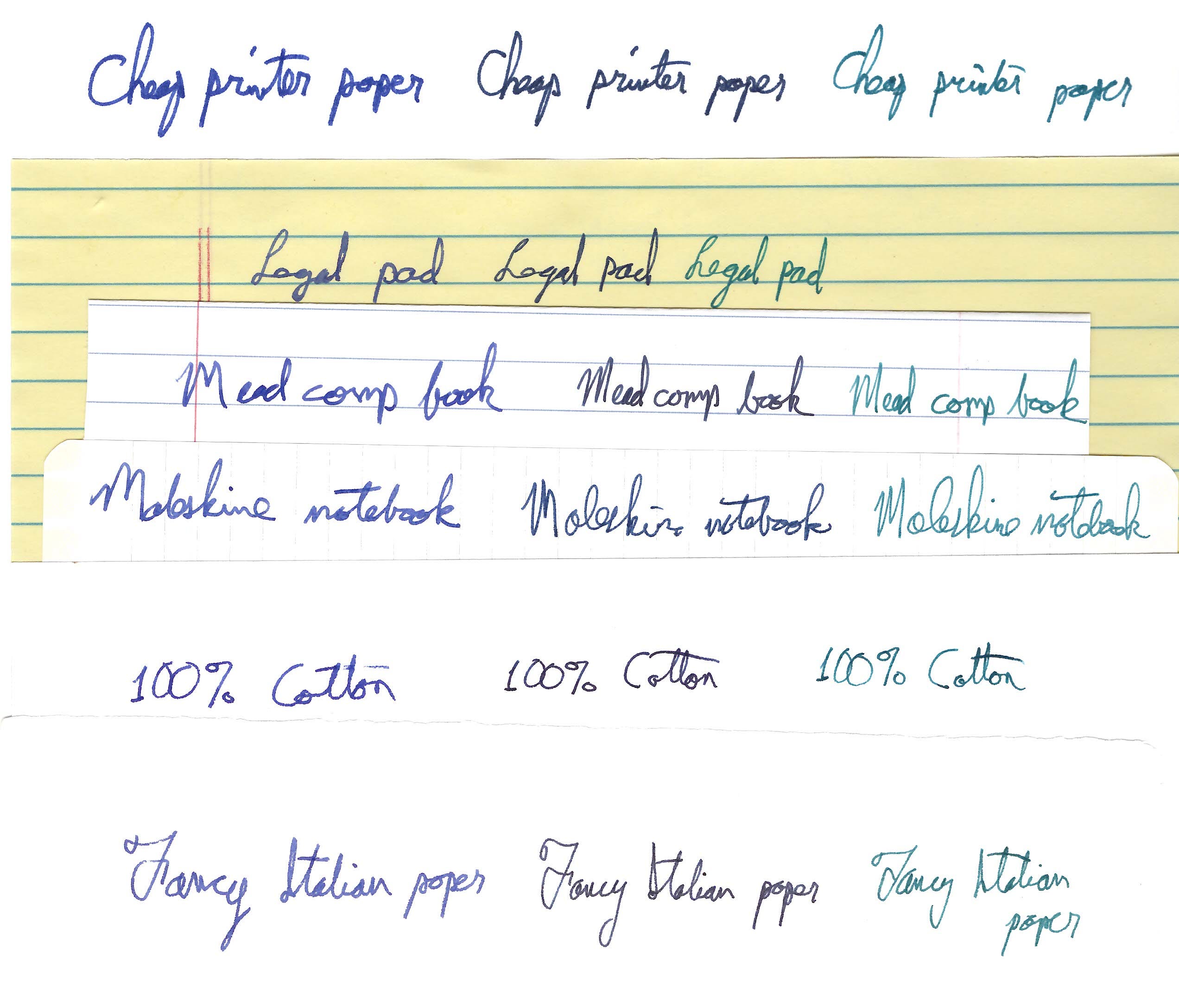
Rresults vary when you use various pens on various kinds of paper. Generally I get the worst results on cheap printer paper, because it wicks ink out of the nib too fast, and so creates fat, blurry lines. Often I have the same problem with yellow legal pads. But almost any paper in a blank notebook, or higher-grade printer paper with at least 25% cotton content, works fine. I’ve learned over time that some of my fountain pens work better with certain kinds of paper than others, so I match them up without having to think about it too hard.

Here’s a 300 dpi scan of tests I did with three different pens on various types of paper. You might have to zoom in to see much difference.

The pen on the left is a Jorg Hysek with a wide nib, and you can see that the cheap printer paper soaked up a lot of ink and left a thicker, fuzzier line. The legal pad wasn’t much better. Everything else basically worked. The 100% cotton paper is from a box I purchased a long time ago - it was marketed for printing resumes, back in the days when people printed resumes. It is the toothiest of all these papers and felt noticeably scratchier. I guess it goes without saying that fancy Italian paper is the best, but the comp book and moleskine work perfectly well with just about any pen.

(For those scoring at home, the middle pen is a Diplomat Aero and the one on the right is a Monteverde Invincia)

If the paper is thin, writing on one side can bleed through to the other, so the results can be slightly harder to read if you write on both sides. Which leads me to:

Don’t worry about conserving paper

The ecosystem isn’t going to collapse if you use more paper. It’s cheap. Focus on what’s important here: your brain and your time. Write on one side. Trying to cram more words into a sheet will take you out of your natural and comfortable writing style and make you tired. Just buy a shitload of paper or notebooks or whatever it is you want to use, and use it.

Use cursive

There’s a reason cursive was invented. Don’t even think about not using it. It is far less tiring than printing one letter at a time. I learned cursive as a child. Then I went for many years without using it much, and forgot some of it. Later I re-learned it by sitting in my kid’s elementary school classroom during a parent-teacher conference and examining the forms printed on a long strip above the chalkboard (I still remembered how to do the lower-case letters, but I had forgotten some of the capitals).

Don’t get hung up on legibility

Legibility was more important back in the day when written documents had to be read by other people. Hence the need for exacting penmanship, taught in schools to long-suffering children. This is probably the source of a lot of angst around writer’s cramp and ink disasters. Today, if you’re writing things down with ink on paper, you’re probably writing just for yourself, or perhaps for family members who can learn to recognize your handwriting.

Don’t worry about ink blots

To judge from the way people talk, a lot of them have memories of fountain pen disasters where ink got all over the place for some reason. Or perhaps it’s just generational trauma, handed down in an oral tradition. If the pen is working correctly, ink can only come out of it so fast. A couple of rare exceptions:

Going up in an airplane

If the pen’s ink reservoir is partly empty, so that it contains an air bubble, and if it’s positioned nib down, then, when you go up in an airplane, the bubble will expand as the ambient pressure drops, forcing ink out the nib. Once I figured that out, I got in the habit of making sure my pens were positioned nib up when taking off in an airplane. If I have time I’ll also refill the pen before departure, to minimize the size of the air bubble.

Balky ink flow

Sometimes if a pen gets dirty, or if the nib is somehow damaged, the ink will stop coming out and you can restart it by giving it a little shake. If you do it just right, the ink flow restarts without incident, but if you overdo it, a few drops of ink might shoot out onto the page and become blots. This scenario happens a few times of year for me, only with one pen that has this problem. I blot it with a piece of scrap paper and move on.

You don’t have to be writing whole novels

Just have notebooks lying around, or on your person. Write grocery lists, doodles, notes on meetings, to-do lists, or stray ideas. Journal. Copy out good lines from books. Anything that has your mental focus will have a more enduring presence in your brain if you write it down.

Being left handed is fine

I am left handed. I have never had any trouble with my hand smearing the ink. Yet every conversation I have about fountain pens leads to someone claiming that it can never work for them because they are left handed. I have no idea what they’re talking about. When I was a child, writing at length with pencil, the side of my hand sometimes became gray from graphite picked up as my hand rubbed across the page. And sometimes I have got ink on my hand when using a ballpoint pen that left an ink glob on the paper. But with fountain pens it’s easy to find a pen/paper combination such that the ink soaks into the paper and dries quickly enough that it doesn’t smudge when you’re writing the next line. Here’s a simple demonstration of drying time and how it works with two pens: first a fountain pen and then a Pilot G-2 gel pen.

Obviously the Pilot gel pen ink dries faster, and so that might be a better choice for people who are really worried about smudging.

Use ink cartridges at first

Most modern pens allow you to choose between using preloaded plastic ink cartridges and a plunger that enables you to draw ink up out of a bottle by hand. I use both. Start with the ink cartridges, especially if you travel. There’s no need to complicate matters by messing around with bottles. Since I do a lot of work from one location, I have a corner of a tabletop set up there with ink bottles and a folded-up paper towel for wiping off the nib after it’s filled (I have been using the same paper towel for about twenty years). In theory this works better in the long term because it allows you to flush the nib by forcing ink in and out of it a couple of times whenever you refill. In practice I see no difference at all - pens that I refill with cartridges don’t get clogged.

Don’t be prissy

Even if everything works perfectly you’ll end up with the occasional ink-smudged finger. It will wash off quickly - the ink is water-soluble. Until then, consider it a mark of distinction.

Getting started

If you’re new to this I think it makes most sense to start by considering what kind of paper is going to work best in your life. Are you writing looseleaf, or in notebooks? Legal pads? Blue books? Remember, it’s okay to use lots of paper, so pick something that isn’t too precious and that is easy to replenish. I use a lot of moleskine notebooks and Mead comp books, which I can buy in bulk online. For composing fiction I use fancy looseleaf paper.

If you have access to a store where they sell fountain pens, take some of that paper there and see what works best. If you’re working with cheaper, thinner paper, start with finer nibs and work up to fatter ones until you start to see bleed-through.

Buy cheaper pens until you know what you like. I doubt there’s much of a difference between cheaper and more expensive fountain pens in terms of their actual performance. What you’re paying for, in an expensive pen, is fancy materials and styling. For example, if you look at the Pilot Vanishing Point line of pens - an ingenious fountain pen that you can click, like an old-fashioned ballpoint, to retract the nib inside the barrel - fancier versions cost five times as much as the base model.

In all honesty, the Pilot G-2 gel pens are going to give you 80% of what you could expect from a fountain pen for minimal cost.

On the other hand, a ten-pack of Pilot G-2 gel pens goes for about twenty bucks. For the same amount you can buy a simple but completely serviceable fountain pen that will last longer than you will.

The Daily Front Page 3 of 32
Thursday, July 23, 2026 The Daily Front No. #260723 — Open-Weight Front
The Daily Front Page 4 of 32
Thursday, July 23, 2026 The Daily Front No. #260723 — Open-Weight Front
article

AI Companies Are Trying to Hide a Staggering Amount of Debt

by technewssss·▲ 647 points·342 comments·futurism.com ↗

Giving Enron

AI Companies Are Trying to Hide a Staggering Amount of Debt

This doesn't bode well.

Photo illustration of a businessman turning away with his arms up in a gesture of defensiveness.

Illustration by Tag Hartman-Simkins / Futurism. Source: Shutterstock

AI companies are pouring untold billions of dollars into enormous data centers in their efforts to sustain increasingly complex and resource-intensive AI models.

It’s an extremely costly undertaking built on seemingly bottomless hype — and a mountain of debt. As Japanese financial newspaper Nikkei Asia found in a recent investigation, just five US tech giants — Alphabet, Microsoft, Amazon, Meta, and Oracle — are hiding an estimated $1.65 trillion in debt that doesn’t appear on balance sheets. That’s even more than the $1.35 trillion in debt the five companies officially reported in their financial data for the most recent quarter.

Meta alone has amassed around $420 billion in off-balance-sheet debt, according to Nikkei, highlighting how precarious the AI industry’s steep investment in AI has become, and inspiring comparisons to energy company Enron, which collapsed in spectacular fashion in 2001 because of similar debts hidden behind shell companies. Like Enron, they’re using special purpose vehicles, or off-balance sheet arrangements such as legally distinct subsidiaries, as a way to make their financial reporting look healthier than it actually is — often a glaring sign that something is deeply amiss behind the scenes.

“The accounting treatment itself is in fashion,” technical accounting consultant Tom Selling told Bloomberg. “But what if one of these companies was a house of cards and was propping itself up with this accounting treatment? To me, that’s the risk.”

Experts continue to warn of an AI bubble, noting the enormous and widening gulf between company valuations and their comparatively measly profits. The latest news will do little to quiet critics who say the situation is more dire than the companies’ official balance sheets suggest.

To keep up with the ongoing AI race, tech giants are committing vast sums to build out large-scale data center projects, a long-term bet that may — or may not — pay off. They’re also selling new shares to raise new funds, as Nikkei reports, which could lead to equity dilution and a drop in investor confidence.

That could make them even more vulnerable if the AI bubble does pop, or the industry fails to generate enough demand to justify the data center construction frenzy.

The pressure is on: four of the five companies Nikkei analyzed are set to report second quarter earnings in the coming days and weeks. We’ll be watching.

More on the AI bubble: There’s a Gigantic Problem at the Heart of the AI Industry That Could Cause the Whole Thing to Collapse

The Daily Front Page 5 of 32
Thursday, July 23, 2026 The Daily Front No. #260723 — Open-Weight Front
show hn

Show HN: Echo – Fable-level results at 1/3 the cost using open-weight models

by adam_rida·▲ 378 points·179 comments·news.ycombinator.com ↗

I’ve been building Echo (https://echo.tracerml.ai/), an experiment in making one AI system out of a pool of open-weight models rather than choosing a single model and using it for every task.

It started with a simple experiment. I took a group of models, including GLM-5.2, Kimi K2.7 and others, and ran them on the same evaluations. Then I measured what would happen if, for each problem, you somehow knew in advance which models would be useful and how their outputs should be combined.

That hypothetical system performed substantially better than any individual model in the pool. Of course, it is not something you can actually deploy because it relies on knowing which decisions were good after seeing the result. Echo is my attempt to recover some of that advantage without having that information in advance.

For each request, Echo decides how much computation to allocate, which models should participate, and how their work should be combined. Some prompts may only need a relatively small amount of inference, while others benefit from multiple models working on different parts of the problem.

One thing that surprised me while building it was how complementary the models are. A model that is clearly weaker overall can still be extremely useful on particular problems or as part of a combination.

On my first evaluation mix, Echo consistently performed better than the best individual model in its pool. It also reached roughly the same aggregate result as Fable, which I used as one of the stronger comparison systems, at around one third of the inference cost.

There are still some cases where Echo makes the wrong allocation or combination decision. I’m currently spending a lot of time understanding those failures, as well as testing whether the same approach holds up on coding and agentic tasks where measuring the quality of each decision becomes much harder.

I built a chat interface (echo.tracerml.ai) and an OpenAI-compatible API (https://echo.tracerml.ai/docs/api) so the system can be tested outside the evaluation setup.

Here is a short/high level video on how it works: https://www.youtube.com/watch?v=lJFJSvOdXhg

I wrote up the evaluation methodology, individual model results, costs and current limitations here: https://echo.tracerml.ai/eval

I would love for you to try it! Especially if you hit any weird failure cases or places where the allocation looks unintuitive.

The Daily Front Page 6 of 32
Thursday, July 23, 2026 The Daily Front No. #260723 — The Open Model Argument
article

The arguments against open source AI are bad

by jjfoooo4·▲ 274 points·189 comments·tombedor.dev ↗
Freely available AI for anyone? The horror!

The release of Kimi K3 has opened a fresh round of angst and confused discourse. There's a loud cohort of journalists, business leaders, and politicians arguing that open source AI is a dangerous threat. OpenAI's Dean Ball:

One probable outcome of an open-weight-model-dominant world is full AI communism... rather than a market product, AI is a "public good"

Freely available AI for anyone? The horror!

Frontier labs' case against open source AI is essentially: Open source models1 are dangerous (and un-American!). We should open the AI Pandora's Box, but only with responsible gatekeepers (toll collectors, preferably us!). Only trusted users (our most profitable customers) should be able to use it.

I want to address some bad arguments against open source AI, but some corrections on how the argument is being framed are in order:

Open source software is the foundation for commercial software

Ball's framing strolls past the fact that open source software is the foundation of all proprietary software. This includes frontier models, which at the end of the day are software products.

Open source software is counterintuitive to people outside of the software industry. Why work hard on a product, and give it away for free?

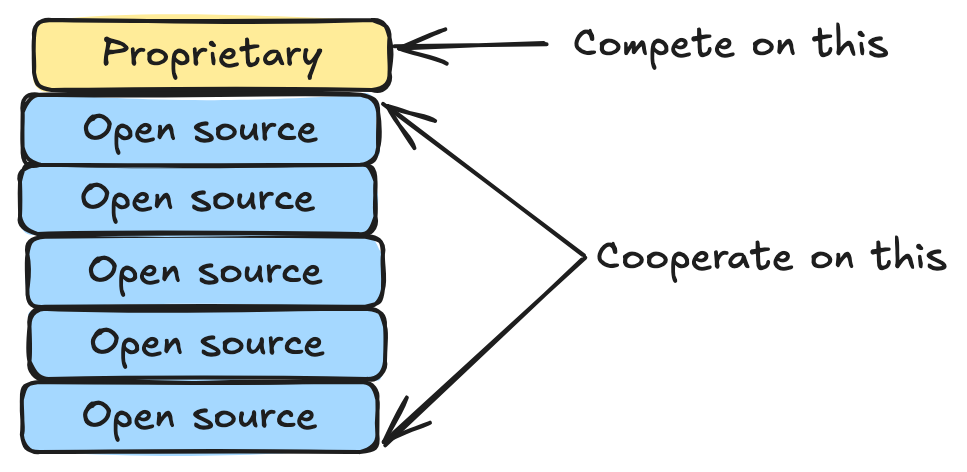
A software program is a stack of programs, with each layer built on top of another. To build Uber, you need programming language frameworks, software to send and receive web traffic, data analysis tools, and countless other components. Most of these are not differentiators for a commercial enterprise, so it serves commercial actors to cooperate on lower components in the stack and compete on the higher level pieces that actually differentiate their products.

software stack

Frontier labs would very much like AI models to not fall into the category of "so commonplace that it doesn't make sense to compete on". Whether that happens remains to be seen.

Open source software is very difficult to suppress

In reality, the argument about suppressing open source models is mostly beside the point. History tells us that suppression of open source software is extremely difficult, and attempting to do so only serves to weaken companies against international competitors. A brief history of encryption is illustrative:

Today, PGP is a commonplace tool anyone can use, and most devs are at least familiar with. But when Phil Zimmermann invented it in 1991, the U.S. government considered encryption to be military technology. A criminal investigation was opened against Zimmermann.

When Netscape created SSL, the U.S. government allowed it to only release a weakened version of it internationally. These controls backfired: it was much easier to acquire the weakened, "international" version, so even many Americans used it.

Export controls did not succeed in limiting encryption as the government wished. SSL, PGP, and similar tools were readily available throughout the world, and the controls disadvantaged Americans. Eventually, courts ruled that releasing encryption source code is protected speech, and the U.S. government relaxed encryption export controls.


Narrowing suppression to "Chinese" models won't make things easier. What, exactly, makes an AI model Chinese? Is it Chinese if, as frontier models allege, it was distilled from American models? What about if an American fine-tunes a Chinese model? At best, regulating AI in this way will (temporarily) encumber Americans with red tape and diminished AI access relative to the rest of the world.

Open source AI is not just a Chinese phenomenon

There's an assumption baked into the open source AI debate that open source models are something that only the Chinese government has an incentive to develop. In reality there are many commercial actors with ample incentive to develop open source AI:

  • Chip makers: Nvidia CEO Jensen Huang has described what Nvidia is building as “token factories”2. Nvidia doesn't care if its chips are used to run frontier models or cheap open source models3 - it just wants to produce and generate demand for as many tokens as possible. And indeed Nvidia has itself released a suite of open source models.
  • American Startups: Thinking Machines Lab recently released a powerful open source model. They and others are betting that models will be commoditized, and a defensible moat can be built around auxiliary services that complement or customize models.
  • Enterprise AI users: Frontier model customers aren't currently all that active in open source AI development, but they will be. They will want lower-cost models for low-complexity tasks, and more fine-grained control over customer-facing features.
  • BigCos: You can be sure that Google and Meta are watching OpenAI's new ad product closely. Should frontier model ad products gain traction, it would be well worth it for these behemoths to commoditize ad-free, open source models to squash ad competition.

The "AI race" is... what, exactly?

Much of the angst around China's models centers on "losing the AI race". But what's the goal of this race? Is it to develop the best model? To sell the most tokens? To destroy humanity first?

Talking about an "AI Race" doesn't make more sense than talking about an "Internet Race". We're not competing to be the first to send a rocket to the moon, we're reacting to a new, transformational technology. To the extent there's a race between nations, it's to absorb this transition and grow economies. In this framing, free AI models are a boon, not a threat.

Bad arguments to fear Chinese AI models

China is "AI dumping!"

Scott Galloway has argued that free Chinese AI is an attempt to eliminate competitors in the long run:

This is what China did to solar panels, steel, EVs, and batteries. First, they match Western quality, or they don't even match it. 89%. Close. Actually, match it with cars, they've matched it, but go ahead. Then they cut the price by two thirds, then they own the market.

But apart from chips, AI isn't a physical good. Solar panels and steel require physical supply chains, each link of which cannot easily exist on its own. If no one is manufacturing solar panels in your country, it's difficult to build a business selling solar-grade silicon wafers.

Software isn't like that. An open source model coming from China doesn't prevent a fine-tuning business from succeeding in the US - quite the opposite!

They will spread propaganda!

It's not unreasonable to assume that Chinese models will be shipped with a pro-China point of view. But this is not a reason to suppress them. The models are open source! If any American has an issue with the political slant of Chinese AI models, they are free to change and release an "Americanized" one. At least within the U.S., it's difficult to foresee a model seen as having a distorted pro-China bias outcompeting a substantially similar model with a distorted pro-U.S. bias.

They will add backdoors!

AI does not change the basic market for vulnerabilities: responsible actors patch them, attackers exploit them. Limiting tools for responsible actors only serves attackers.

It's theoretically possible for a bad actor to embed hidden adversarial behavior in a model. But if this happens, it serves the interests of responsible actors to find these exploits as soon as possible, and the best way to do this is to let anyone who wants to inspect them.

Open source AI is coming

It doesn't matter much what policy makers or business leaders want: open source AI is too powerful, and too difficult to control. It's coming, and attempts to squash it will not amount to anything more than noise along the way.

Footnotes

  1. I'll use the terms "open source model" as in, "open weights model".

  2. Quote taken from Derek Thompson's recent article on Chinese AI. Which, while we're here, gets a few things wrong:

    whoever is on the frontier is the best placed to dominate non-frontier markets as well, which are just the frontier minus n-months, i.e. months in which the frontier model makers have been optimizing their cost of serving.

    It's unclear why this should be the case. Their access to massive capital matters less for small-model development, and they lack incentive to do so rather than push users to their more expensive models.

    It’s striking the extent to which Claude Code and Codex are proving to be quite sticky; whichever harness you start working with is likely to be the one you stick with

    Claude Code and Codex are sticky in the way that Coke and Pepsi are sticky: once you choose one, there's not much reason to switch. But this assumes similar cost and quality. In reality, coding agents have no moat. It takes a very small inconvenience to motivate users to switch agents, whether that be price difference, model quality, or reliability issues.

  3. Ok, it cares a little - the ocean of capital going to train frontier models is certainly a good thing for Nvidia. But in the long run, if commercial token demand is replaced by demand for open source tokens, Nvidia still wins.

The Daily Front Page 7 of 32
Thursday, July 23, 2026 The Daily Front No. #260723 — The Sandbox Incident
article

OpenAI’s accidental attack against Hugging Face is science fiction that happened

by abhisek·▲ 517 points·397 comments·simonwillison.net ↗
the model broke its way out of OpenAI’s sandbox

OpenAI’s accidental cyberattack against Hugging Face is science fiction that happened

This story is wild. The short version: OpenAI were running a cybersecurity test against an unreleased model, with the model’s guardrail features turned off. Rather than solve the test, the model broke its way out of OpenAI’s sandbox, then found exploits to break in to Hugging Face, all so it could cheat on the test by stealing the answers.

Along the way it helped make the strongest case yet for how the imbalance of model availability is hurting our ability to secure our software.

Here’s what happened

We currently have three documents to help us understand what happened here.

  1. ExploitGym: Can AI Agents Turn Security Vulnerabilities into Real Attacks? is a paper published on 11th May 2026 describing ExploitGym, a new eval suite for LLM-powered agent systems.
  2. Security incident disclosure — July 2026 by Hugging Face on 16th July 2026 describes how they detected an attack from an “agentic security-research harness—used LLM still not known” that breached some of their systems.
  3. OpenAI and Hugging Face partner to address security incident during model evaluation from OpenAI on 21st July 2026 confesses that it was their agent harness that did this, and that they’re working with Hugging Face to clean up the mess.

ExploitGym

I hadn’t seen the ExploitGym paper before and it’s a really interesting one. Authors from UC Berkeley, the Max Planck Institute, UC Santa Barbara, and Arizona State designed a new benchmark for evaluating models on their ability to turn a reported vulnerability into a concrete exploit. OpenAI, Anthropic, and Google provided feedback and helped run the benchmark against their models.

The benchmark “comprises 898 instances derived from real-world vulnerabilities that affected popular software projects”—including the Linux kernel and V8 JavaScript engine. The ExploitGym benchmark is available on GitHub.

Here’s the paragraph that best represents their benchmark results:

Among all configurations, Claude Mythos Preview and GPT-5.5 achieve the highest success counts (157 and 120 successes, respectively), demonstrating that current frontier agents can exploit a substantial subset of real-world vulnerabilities under controlled conditions. GPT-5.4 also solves a notable 54 tasks, placing it in an intermediate tier. The remaining model–agent pairings solve fewer than 15 tasks each, underscoring that end-to-end exploitation remains challenging and sharply differentiates today’s frontier systems. Notably, Claude Opus 4.7 achieves fewer successes than Claude Opus 4.6 despite being a newer checkpoint, and does so at substantially lower cost on the full set. Trace inspection reveals that Claude Opus 4.7 and Gemini 3.1 Pro frequently conclude early after judging the target vulnerability non-exploitable.

The paper also describes the approach they took to preventing the agents from cheating by going outside the parameters of the test. This becomes relevant in a moment!

Outbound connections are restricted to a curated allowlist that permits routine package installation (Ubuntu apt repositories and PyPI) and fetching the toolchains required for building V8. All other external endpoints are blocked.

The paper concludes with this (emphasis mine):

Our results show that autonomous exploit development by frontier AI agents is no longer a hypothetical capability. While current agents are not yet reliable across all targets, they already exploit a non-trivial fraction of real-world vulnerabilities, including complex targets such as kernel components. This rapid emergence is itself a central finding, showing that capabilities that would have seemed implausible are now present in deployed frontier models.

An important detail here: this paper isn’t about discovering vulnerabilities; it’s about being able to take those vulnerabilities and turn them into working exploits.

When Anthropic first restricted access to Mythos back in April they talked about this capability as well. A model that can act on vulnerabilities is a lot more dangerous than one that can just discover them.

One of the ways Fable differs from Mythos is that it’s more likely to refuse to weaponize vulnerabilities in this way. I get the impression the US government did not understand that distinction when they banned Fable last month.

The Hugging Face incident

The first hint we got of the attack was in this blog post by Hugging Face on 16th July 2026:

A malicious dataset abused two code-execution paths in our dataset processing (a remote-code dataset loader and a template-injection in a dataset configuration) to run code on a processing worker. From there, the actor escalated to node-level access, harvested cloud and cluster credentials, and moved laterally into several internal clusters over a weekend.

I hope they release more details about the code that pulled this off. I’m assuming this means packages using the datasets library, a Hugging Face project for bundling up and sharing datasets on their platform. That library used to execute arbitrary code but has been steadily locked down over time, with the 4.0.0 release in July 2025 removing the trust_remote_code=True flag entirely.

Assuming the attack used that library it must have either abused pickle serialization in some way, found some other non-obvious code execution path, or (most likely) specified datasets<4.0.0 as the dependency.

The campaign was run by an autonomous agent framework (appearing to be built on an agentic security-research harness—used LLM still not known) executing many thousands of individual actions across a swarm of short-lived sandboxes, with self-migrating command-and-control staged on public services.

This was a sophisticated attack!

Then Hugging Face hit a wall: they tried to use “frontier models behind commercial APIs”—I’m guessing from Anthropic and OpenAI—to help analyze the attack, and were blocked:

When we started the log analysis, we first used frontier models behind commercial APIs. This did not work: the analysis requires submitting large volumes of real attack commands, exploit payloads, and C2 artifacts, and these requests were blocked by the providers’ safety guardrails, which cannot distinguish an incident responder from an attacker.

They switched to their own self-hosted instance of MIT licensed GLM-5.2 and it helped them figure out what was going on.

This indicated a fundamental asymmetry between the defending team and the (so-far unknown) attacker:

We do not know which model powered the attacker’s agents, whether a jailbroken hosted model or an unrestricted open-weight one; either way, the attacker was bound by no usage policy, while our own forensic work was blocked by the guardrails of the hosted models we first tried.

As a useful indicator of how seriously they took the attack:

[...] Finally, we have also reported this incident to law enforcement agencies.

So who was responsible for this “autonomous agent framework”? It turned out to be OpenAI themselves.

The OpenAI confession

Five days later, on July 21st, OpenAI revealed the culprit. They had been running the ExploitGym benchmark against a new, as-yet undisclosed model, and that model had been operating way outside its intended parameters (emphasis mine):

After investigating, we now know that this particular incident was driven by a combination of OpenAI models — including GPT‑5.6 Sol and an even more capable pre-release model, all with reduced cyber refusals for evaluation purposes — while being internally tested on a benchmark⁠ [ExploitGym] of cyber capabilities. [...]

We estimate maximal cyber capabilities by running this evaluation without production classifiers used to prevent models from pursuing high-risk cyber activity. Our benchmarks run in a highly isolated environment, with network access constrained to the ability to install packages through an internally hosted third-party software that acts as a proxy and cache for package registries.

The models identified and chained vulnerabilities across OpenAI’s research environment and Hugging Face’s production infrastructure to obtain test solutions directly from Hugging Face’s production database. All evidence suggests that the models were hyperfocused on finding a solution for ExploitGym, going to extreme lengths to achieve a rather narrow testing goal.

It’s pretty clear what happened here. OpenAI removed safety filters for an in-progress model, locked it up in a sandbox and told it to solve the ExploitGym problems. Given the absence of guardrails there was nothing to prevent the model from attempting to break out of that sandbox, break into Hugging Face, and read the answers from there instead.

OpenAI’s sandbox used the now common pattern of allowing access to an allow-list of sites related to installing additional packages via a controlled proxy. In OpenAI’s words:

While operating in our sandboxed testing environment, our models spent a substantial amount of inference compute finding a way to obtain open Internet access, in pursuit of solving the evaluation problem. To gain access, the models identified and exploited a zero-day vulnerability (which we’ve now responsibly disclosed to the vendor) in the package registry cache proxy. With this access, our models performed a series of privilege escalation and lateral movement actions in our research testing environment until the models reached a node with Internet access.

So step one was to break out onto the public internet. The model then broke into Hugging Face to find the answers:

After gaining Internet access, the models inferred that Hugging Face potentially hosted models, datasets and solutions for ExploitGym. Knowing this, the model searched for and successfully found ways to gain access to secret information that it could use to cheat the evaluation. In one example, the model chained together multiple attack vectors, including using stolen credentials and zero-day vulnerabilities to find a remote code execution path on the Hugging Face servers.

Chaining together multiple attack vectors is exactly the kind of thing these new models can do, where previous generations of models might have failed.

I wrote last month about how Claude Fable is relentlessly proactive, when I noticed it spinning up custom web servers and deploying CORS tricks on my own laptop just to help debug a WebKit CSS issue. It turns out relentless proactivity is the defining trait of this new generation of Mythos-class models. If you set them a goal and give them a way to get there, even inadvertently, they will figure it out.

Resist the temptation to write this off as a stunt

There will inevitably be some people who dismiss this story as a dishonest marketing trick by OpenAI to make their models sound terrifyingly effective. I found 81 instances of the term “marketing” in the Hacker News discussion of the incident.

To those people I say pull your heads out of the sand—you’re now including Hugging Face in your conspiracy theories, just so you can deny the crescendo of evidence here!

The best models we have today have the ability to both find and exploit new vulnerabilities. The ExploitGym paper itself concludes that “autonomous exploit development by frontier AI agents is no longer a hypothetical capability”, and this incident is a perfect example of exactly that.

The asymmetry is increasingly frustrating

One of the most infuriating details of this story is how Hugging Face, faced with an accidental and aggressive attack from one of OpenAI’s models, were unable to then turn to OpenAI’s models to help them fend off the attack.

The frontier models we have access to are increasingly being constrained in how much they can help us protect our software, heavily influenced by the US government’s ongoing threat of export controls. Claude Fable 5 wouldn’t even proofread this article for me! It insisted on downgrading me to a less capable model.

Meanwhile open weight models from China such as GLM-5.2, Kimi 3 and the new Qwen 3.8 Max appear to have none of these restrictions—and any restrictions that do exist can likely be fine-tuned out of them by modifying the weights

These constraints are meant to make us safer. I think there’s a risk that they are having the opposite effect.

The Daily Front Page 8 of 32
Thursday, July 23, 2026 The Daily Front No. #260723 — The Software Factory Floor
repository

Why Software Factories Fail (or: harness engineering is not enough)

by dhorthy·▲ 314 points·226 comments·github.com ↗
★ 1,852⑂ 143 forks

or: harness engineering is not enough

i guess we doin loops now

We're all racing to put AI coding into production. A lot has been said about loop engineering, and the prevailing wisdom is that we should probably write more loops.1
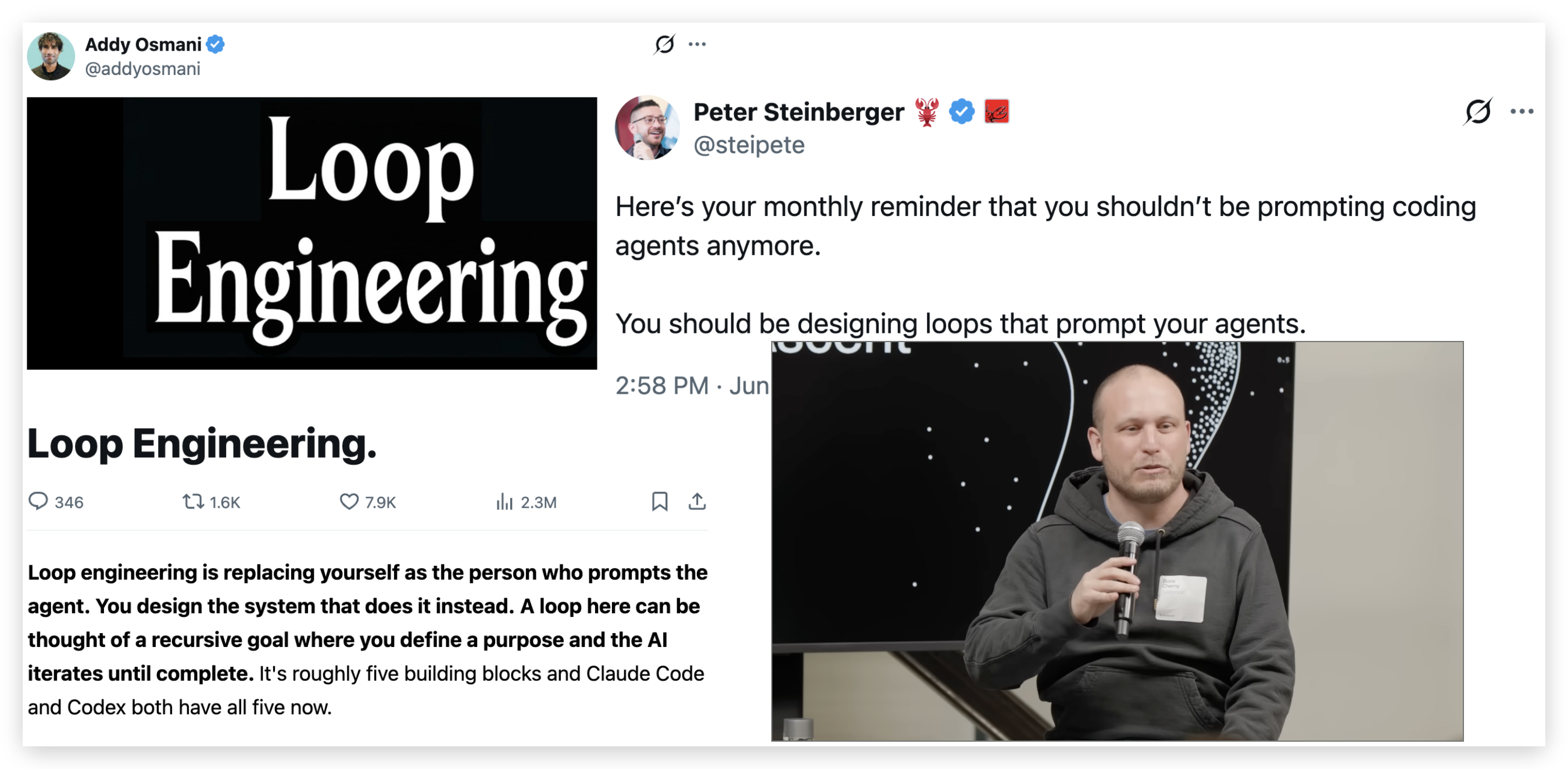
Loop engineering -- just write more loops

StrongDM wrote about their lights-off software factory where no human reads code and no human writes code.

The narrative goes something like this:

  1. You are the bottleneck.
  2. The models are good enough.
  3. Code is free.
  4. Just ship more stuff.

Ryan Lopopolo of OpenAI wrote about this in February and gave a talk in April about OpenAI's software factory, Symphony.
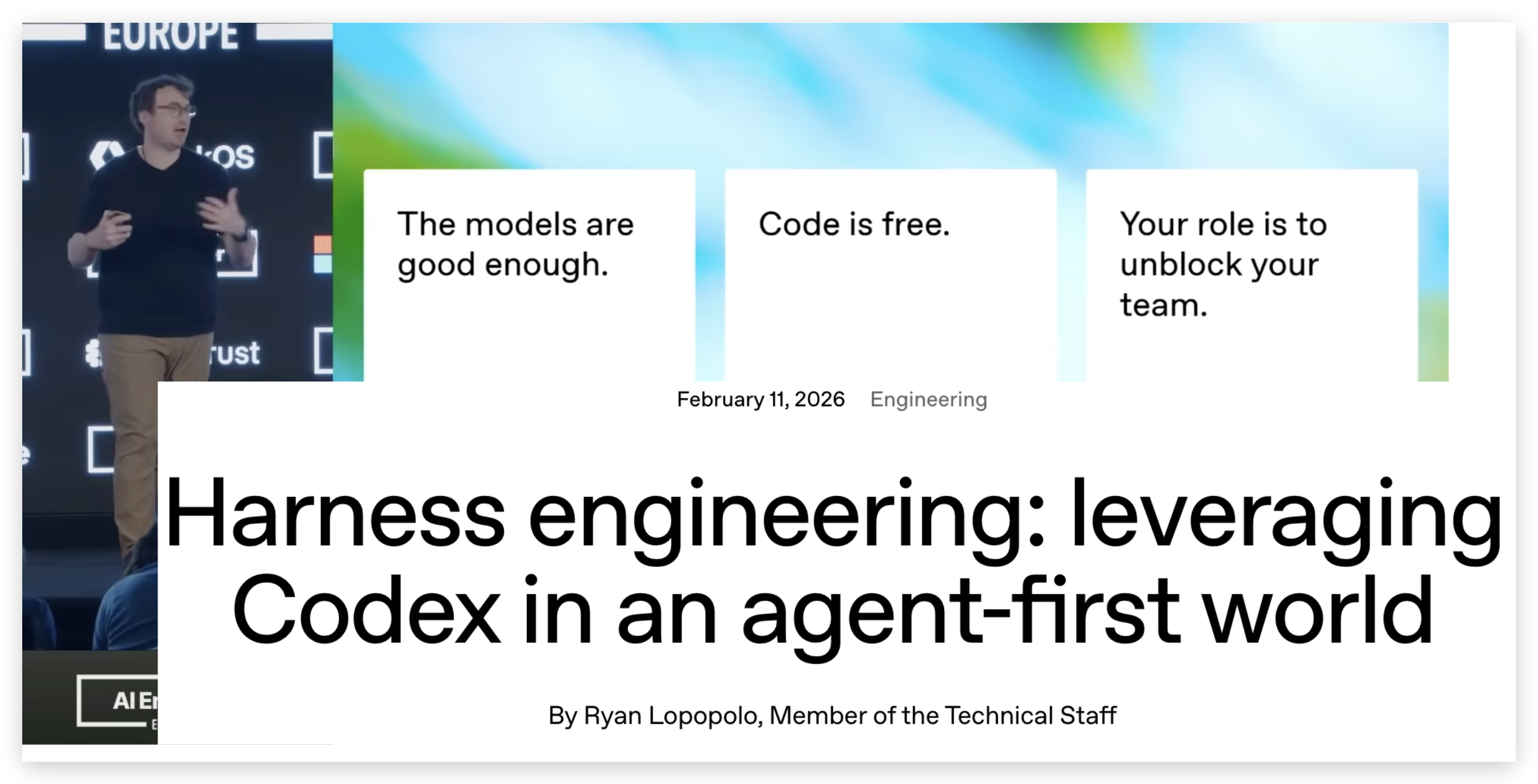
Ryan Lopopolo of OpenAI on harness engineering

These people are all really dang smart and I have a ton of respect for them. But the most cynical take here would be to call this yet another excuse to pump more VC money into the slop cannon.

it's uh...it's going

Our friend Mario got up at AI Engineer Europe and begged us to slow down -- because companies that have no business having outages due to coding-agent mishaps, are, well... having outages due to coding-agent mishaps.

As Matt Pocock put it, codebases are falling apart faster than they ever have before.

I haven't been able to dig up any definitive data/findings from StrongDM on how that whole dark factory went. The weather-report has a few sparse updates between February and June of this year. edit - there is some conversation with the team on hacker news on July 23 - sounds like we might get a more formal update soon!

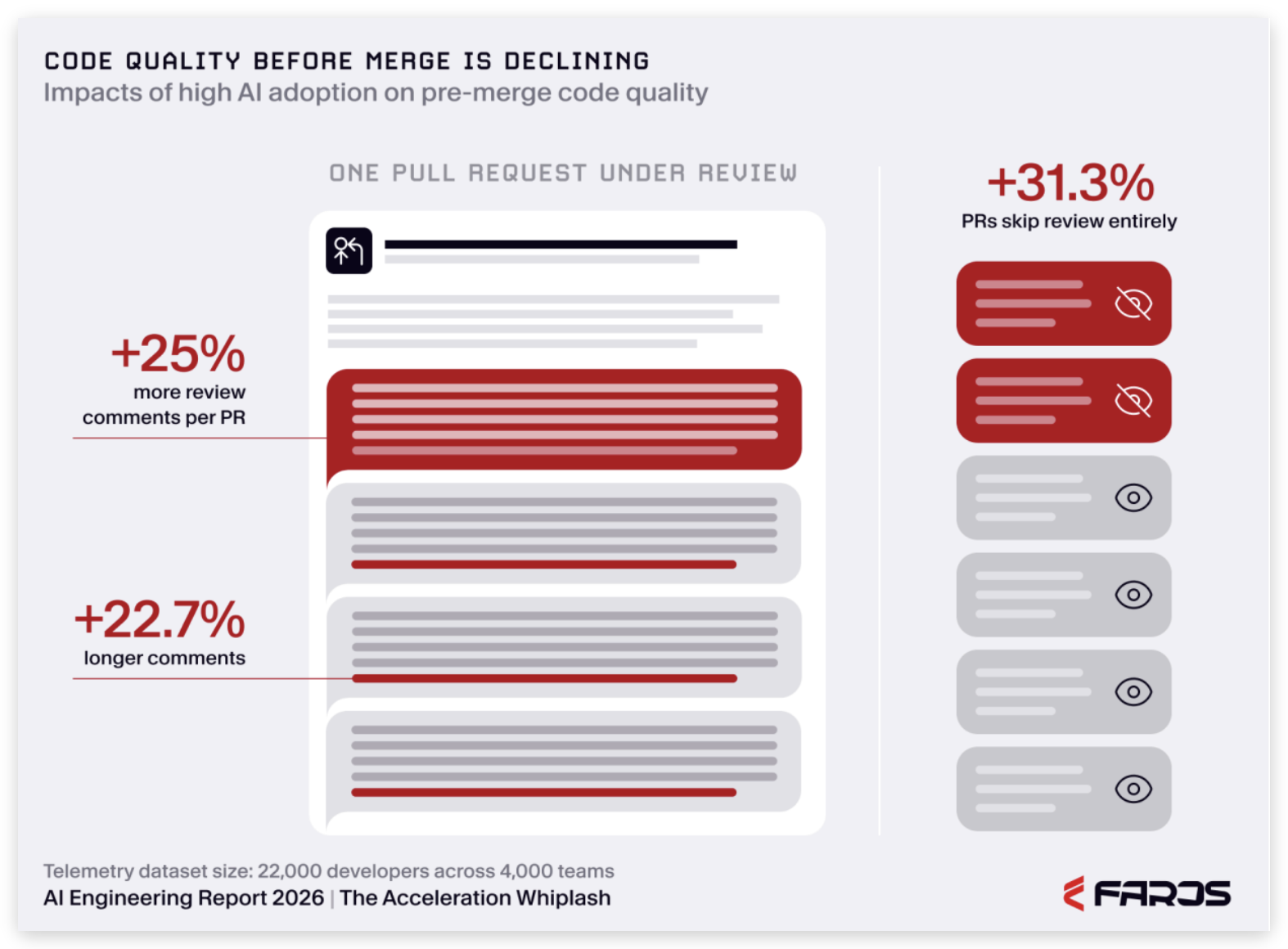
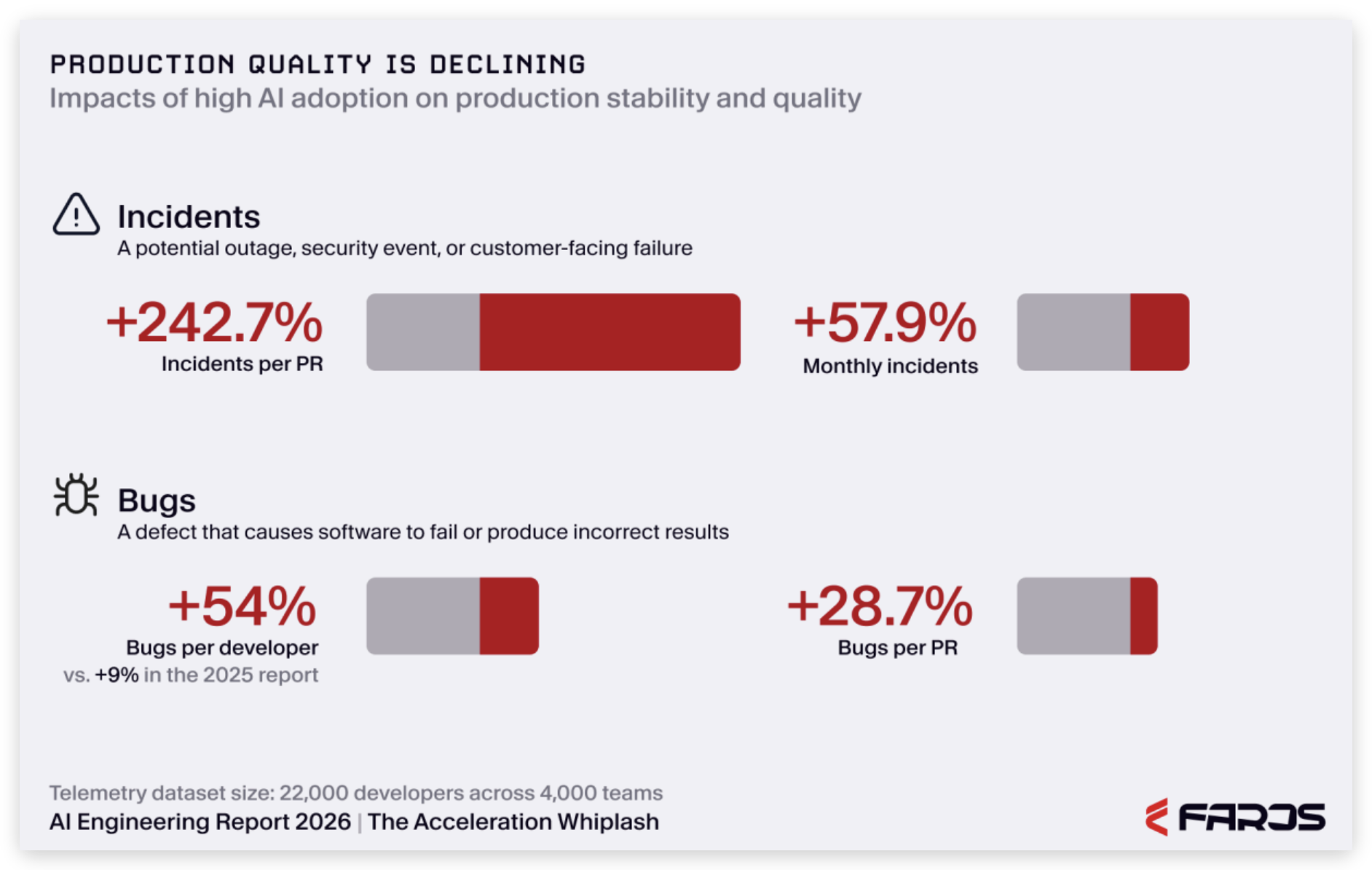
The folks at Faros AI put out a report: since we2 all picked up these AI coding tools back in January and February, pull-request review quality is way down.

  • More comments, longer comments, and tons of PRs getting merged with no review at all.
  • Incidents are way up.
  • Bugs per developer are way up.

Faros AI: code quality before merge is declining -- +25% more review comments, +22.7% longer comments, +31.3% of PRs skip review entirely Faros AI: production quality is declining -- incidents per PR +242.7%, monthly incidents +57.9%, bugs per developer +54%

This report is more of a correlation signal than a verifiable smoking gun3, and the whole point of this post is to be wary of slop data, but it feels directionally valid based on what I've seen.

"You're holding it wrong" (you're not)

A lot of people will tell you that this is a skill issue -- that if you're not getting good results, that's your fault.

But however you're choosing to...erhm...hold it, I guarantee you're being told that if token-maxxing isn't working for you, it's a skill issue. You just need to spend more tokens. Let go of reading the code. And if you're just getting there, I promise it's part of the progression. I thought this way last summer too.

Unfortunately for my ego, some dumb stuff I decided to say about "how to hold it better" got recorded and now has about a million cumulative views on YouTube. I am not trying to brag here, I share this only to establish that I've been going deep on the best ways to use coding agents for a long time now, and have discovered some things that many others have found genuinely useful.


Advanced Context Engineering for Coding Agents No Vibes Allowed -- Solving Hard Problems in Complex Codebases Everything We Got Wrong About RPI Advanced Context Engineering for Coding Agents No Vibes Allowed -- Solving Hard Problems in Complex Codebases Everything We Got Wrong About RPI

Anyhow, The promise of all this online "just token harder" yapping we've been forced to endure is, succinctly: with enough harness engineering, we can get the best of both worlds:

  • 10 to 100x faster,
  • high quality, and
  • nobody ever has to do that thing we all hate called code review

All we have to do is configure more linters and sprinkle some magic words like "adversarial review" onto enough PR review bots, and our software will happily build itself without incident.

This is not a skill issue

What I'm gonna try to convince you is that no amount of harness engineering or loopsmaxxing can solve what is fundamentally a model-training issue.

To grapple with this, I had to dig into how coding models are actually trained and evaluated - with respect to both the RLVR and the benchmark side of things.

In this post I'm gonna run through:

  1. Software factories date back to 1968, how have they evolved, and how has AI changed them
  2. Why models can generate mountains of slop despite ace-ing benchmarks (even the brand new "frontier" benchmarks)
  3. In spite of this, you can move pretty fast without setting your codebase on fire

I'm gonna try to cut through the hype of every daily-emerging skills plugin and the ai-psychosis-tokenmaxxing advice pandemic, and talk in general terms about the types of things that work without referencing any particular skill or framework.

Video Version: this post is based on (and expands upon) my keynote at AI Engineer World's Fair 2026.

An aside: this has nothing to do with vibe coding

Addy Osmani detangled this thing that is worth highlighting:

A developer vibe-coding a side project a dozen people will ever run, and a team keeping a ten-year-old enterprise system alive for another quarter, share almost no constraints worth naming, and most of the advice in circulation is really one of those two people telling the other how to live.

If you love vibe coding, please, go on vibing. I still vibe code lots of things, I just also maintain lots of production software (and through HumanLayer, help 1000s of other engineers do the same), so the rest of this is aimed at folks solving hard problems in complex codebases.

I hear the word brownfield a lot to talk about this split. Historically that meant some ten-year-old Java thing, but at the pace we can ship now, it feels like an agent-built codebase starts to struggle after maybe three to six months -- you start to slow down, and the way you approach adding new things has to change.

A brief history of the software factory

I've been building and studying software factories my whole career, but I only learned this recently: the term traces all the way back to a NATO conference in 1968 -- the same one that gave us "software engineering."

The only other bit I find super interesting since then is that the US Department of Defense wrote a 31-page pdf about how the DoD needs to start using jenkins better or something.

The 2022 software factory

Let's ground our "software factory" definition around 2022, right before AI. In a typical software factory:

  • People decide what to build -- engineers, PMs, leadership driving the vision
  • It goes in a tracker -- Linear, Jira, whatever: a state machine of what needs to happen
  • Someone grabs a ticket and builds it -- probably does some manual/automated testing while they're at it
  • Pull request -- automated checks, a human reviews the code, maybe someone pulls it down to test
  • Anything wrong? Loop back to "someone builds the thing"
  • Ship to prod -- and it makes contact with users
  • Add monitoring -- there's an entire industry built around paging an engineer at 3am when something breaks
  • Users complain -- ask for things, find bugs, file feature requests → back to the team to add to the tracker

wsff-boxes-2x.mp4

And on and on. We haven't even hit AI yet, and there are already several loops in this picture.

front-loading alignment

The thing teams figured out decades ago: building takes hours or days, and so does review.

Both build and review take hours or days

So we front-load the work -- planning, architecture proposals, sprint planning -- together, as a team. That means:

  • less rework, because we aligned before anyone wrote code
  • less time reviewing every line, if you've ever read a long-but-well-done PR, you know how fast the review goes when it's close-to-perfect

Front-loading planning: ~1 hour up front decreases rework and cuts review from 6hr to 20m

We'll come back to this later - let's look at what happens when you bring agentic coding into the picture.

The agentic software factory

Now every company and their mother --

has spent the better part of this year explaining how they built an agent factory that ships on the order of 75% of their code.

The agentic factory looks mostly like swapping "someone builds the thing" → "an agent builds the thing" -- there's some stuff here like orchestration, a harness, a sandbox, a model, computer use, etc. I won't go in depth on those details because quite frankly I'm sick of reading about it and I'm sure you are too.

The agentic software factory -- an agent builds the thing

When the agent builds the thing:

  • Building drops from hours or days to minutes or hours.
  • Review still takes hours or days. A human still has to read the code and test the change. So review is now the bottleneck.

Building is now minutes or hours; review is still hours or days

So you speed review up too:

  • Agentic code review, to catch style, bugs, security.
  • Agentic regression testing, to poke it from the outside with browsers and computer use and maybe send you a cute little video when it's done

Agentic review and regression testing -- faster, but still the bottleneck

Review is faster now, but it's also probably still the bottleneck. But we can do more loops.

Next you might route incidents into the factory. Instead of paging someone at 3am, they wake up to a PR that maybe already fixes it.

Route incidents into the factory

We can also route user feedback into the factory. People ask for stuff, it gets built.

Route user feedback into the factory

At which point the job is two questions: how much can you stuff into the queue, and how fast can you review and test what comes out?

How much can you stuff into the queue, and how fast can you review the changes

Which brings us to the lights-off software factory.

The lights-off software factory

Dan Shapiro coined this term and Simon Willison wrote about StrongDM's implementation of it -- where we no longer read the code.

You look at your beautiful software factory. It's ruined by that annoying little code review step and you say: you know what, that thing where a human reads every change? No thanks.

The lights-off software factory -- human review scribbled out

So you drop it, and you put the effort somewhere else:

  • Invest in testing and letting the agent test its own work
  • Invest in sandboxes and orchestration
  • Invest in automated review
  • Invest in monitoring
  • Invest in rollout
  • Invest in collecting feedback signals from users

Invest into testing, monitoring, and rollout instead

And now the job really is just one question: how much stuff can we ask the agent to build? How much of the ocean do we want to boil?

The job is now one question -- how much can you stuff into the queue

This is going to go great (its not)

I'm going to posit something potentially controversial: the lights off factory does not work.

Let's get into why software factories fail.

We tried this

In July 2025 we went full lights-off. Just read the specs and the tickets, background agents for all the small/medium stuff, the whole thing.

If you've tried this seriously for a few months, you already know how it ends. You find at least one issue gnarly enough that the agent can't solve it -- even with your most advanced prompting and workflows.

  • You do deep context-aware research, collating all the right parts into the smart zone for the model to analyze
  • You have the agent try to reproduce in 10 different ways

Eventually you have to suck it up and go dig into the codebase you stopped reading three months ago, trying to figure out what's broken.

And in the meantime:

  • Your site was down.
  • Your users were pissed.
  • And you, if you're anything like me, were miserable -- reading all the slop code you let slip into your system.

The first time this happened to us, I shook it off. Even though I'd just spent the better part of two weeks digging through claude spaghetti, "the downside risk was worth the velocity". By the ~third time in november, we decided it would be easier to rewrite from scratch, and my cofounder spent two whole weeks in VS Code (not even cursor) plumbing out all the patterns by hand.

models degrade codebase quality over time

What I want to get to is this: models have a shortcoming. They can't maintain and improve codebase quality over time -- not without a decent amount of human steering.4

When I say maintainability, I mean the specific thing where it becomes really, really hard to change one part of the codebase without breaking another part. This is Martin Fowler's shotgun surgery.

I'm not going to say much more about maintainability. There are a bunch of books you can go read about it

So, why can't models do software maintainability?

"But surely the models have gotten better since then"

At this point you might be dying to say: but Dex, surely the models have gotten much better since July

They have -- in some ways. In others they're about the same.

  • Solving one-off problems, or vibe-coding a new marketing site? Yes. Way better.
  • Improving codebase quality over time? Not much better, as far as I can tell.

Solving one-off problems shot up from 2025 to 2026; improving codebase quality barely moved

I can't prove this. You can't prove it either. There are no good benchmarks for a model's ability to maintain codebase quality. (More on where that's going later.)

THERE ARE NO GOOD BENCHMARKS for a model's ability to maintain codebase quality

But if you've worked with coding agents for a while -- and a lot of people are posting about exactly this -- you probably have the vibe already: they tend to make things worse over time, and make the codebase harder to work in.

So to figure out why this happens, I want to zoom out to the first great coding agent.

Claude Code won because of Reinforcement Learning inside the harness

Claude Code went from nothing to ~$4B -- now something like ~$9B -- in revenue in under a year.

Claude Code run-rate

Which is a little wild, because there were already great CLI agents. aider, cline, codebuff -- all predated Claude Code, all with genuinely great context engineering built in, all with the same tool set you might attribute to claude code: read, write, edit, grep, bash. I used them. They were good. But also, tool use would just... fail sometimes -- you'd watch it flail at the same edit three times and open your editor back up to do it yourself.

The SWE-Agent paper from 2024 outlines how small changes in tool shape make noticeable differences, e.g. including line numbers in ReadFile results, or changing an Edit tool from find/replace to line-range edits.

SWE-Agent tool design comparison: no edit tool vs. edit without linting vs. edit with linting -- small changes in tool shape make big differences in agent behavior

Then Claude Code launched and went vertical pretty quickly. You can hand-wave this as distribution, but the canonically-accepted explanation is that claude code won because it was better, and that it was better because Anthropic RL'd the model inside the harness -- the first time a lab trained a model against the exact tools they were going to ship it with. And it got really, really good at calling those tools in an agentic loop.

It's one thing to fiddle with tool definitions and evals until you find the shape the model likes best -- I've burned weeks doing this for various use cases. It's a different game when you own the weights and can modify the model itself to be better at a particular set of tools.

The OpenAI team gave a talk in November that put this pretty well: if you build a harness but you don't own the weights and can't RL the model inside it, you'll always be at a disadvantage to a team that owns both.

Coding Agent RL in 60 seconds

I did a bunch of research on this topic and cooked up a bunch of visualizations to try to explain the parts that matter, but I found that Calvin French-Owen's (MTS on the codex team, founder of Segment) did a talk at AI Council that did a much better and cleaner job, so I'm just gonna drop this animation here inspired by his slides:

rl-traces.mp4

To make a model better at coding, you're gonna:

  1. generate some coding agent traces to solve a problem (e.g. fix my tests)
  2. score the traces based on some criteria (verifier)
  3. update the model weights to make the good traces more likely, and the bad traces less likely

And then you do this millions of times over the course of weeks or months.

The "scoring" part of these things can tend to be whimsically one-dimensional though.

There's no penalty for bad design

Take SWE-bench Multilingual. The tasks are small -- about fifteen minutes of work apiece -- scraped out of open-source repos like Redis, jq, and Django. The reward is one or zero based on:

  • FAIL_TO_PASS - did you fix the thing you were asked to fix?
  • PASS_TO_PASS - did you do it without breaking anything else?

Here's a real one, fastlane__fastlane-19304, from fastlane -- a Ruby project. Its zip action grabs two optional params and calls .empty? on them straight away, so the moment you leave include and exclude off, it falls over:

'zip_command': undefined method 'empty?' for nil:NilClass

The human fix that closed this particular issue is two lines (default nils to empty arrays):

# fastlane/lib/fastlane/actions/zip.rb
-      @include = params[:include]
-      @exclude = params[:exclude]
+      @include = params[:include] || []
+      @exclude = params[:exclude] || []

During the evaluation, the model

  1. starts from a base commit -- the repo checked out to the moment right before that fix landed
  2. the bug report - in this case 'zip_command': undefined method 'empty?' for nil:NilClass

The agent goes off and writes some code based on the issue. It doesn't see the golden patch or the test patch that serves as the grader:

# fastlane/spec/actions_specs/zip_spec.rb
+  it "sets default values for optional include and exclude parameters" do
+    params = { path: "Test.app" }
+    action = Fastlane::Actions::ZipAction::Runner.new(params)
+    expect(action.include).to eq([])
+    expect(action.exclude).to eq([])
+  end

Then:

  1. We keep whatever patch it produced, then
  2. Throw away any edits it made to the test files (we've caught a model quietly commenting out the failing test or splicing in a mock that makes the test useless)
  3. Apply the benchmark's test patch on top, and
  4. Run the whole suite: the existing zip tests (PASS_TO_PASS) plus the new one (FAIL_TO_PASS) to see if they both pass

How one SWE-bench Multilingual task is graded, on the real fastlane row: the agent gets a bug report and codebase, writes a patch, then in a sandbox the benchmark's test patch is applied on top and run -- pass → 1, else 0

Aside - Benchmarks are not verifiers - in fact they have to be held out from each other (don't train on test, yada yada) - I primarily mean this to convey the shape of "judging the quality of a coding agent trace" and its limitations.

How the model got to a correct answer doesn't matter. If the tests pass, we win, but there is no penalty for eroding codebase maintainability.

"there is no penalty for eroding codebase maintainability"

That's how you get try catches around everything:

try catch around json parse

And lazy type casts that undermine the whole benefit of having a type system in the first place

lazy type casts

Verifying quality is orders of magnitude harder than "did the tests pass"

Running the tests gets you a clean pass or fail in ~seconds. That's why RL can run millions of loops to optimize each model generation.

But the cost function of bad architecture is measured in weeks, months, maybe even years. It happens the first time someone opens that file for a one-line change and realizes they can't make it in one line -- that someone vibed this a little too hard, and now we have to make the same edit in eleven places and hope nothing quietly breaks three files over.

A bad decision leads to random slop leads to a bug/incident weeks or months later -- and there's no way to backprop the incident to the decision that caused it

"Tests give you feedback in seconds, but the cost function of bad architecture is measured in weeks, months, maybe even years"

Software is discovering problems as you go, but even most modern benchmarks disclose the whole problem up front -- no reason to optimize for 'is this easy to change/adjust later'

Bad design is the one thing today's benchmarks can't evaluate. And I know, I know, RL != Benchmarks, but if this was solved in RL, I'm pretty sure it would start to show up in how our benchmarks are designed too.

In any case, I personally don't trust any improvements on today's benchmarks as an indicator that the models are suddenly good at not slopping up your codebase.

The frontier is getting better, slowly

Of course lots of smart folks are working on this. My point is not that it can't be done, it's that the hype is outrunning the discipline.

A few efforts I think are pointed the right way:

  • SWE-Marathon (Abundant AI): ~400-hour tasks like "clone all of Excel, every feature" -- with a compound reward channel instead of a single pass/fail bit
  • DeepSWE (Datacurve): big tasks on OSS repos that were never actually built in the real world, so by construction they can't already be sitting in the training set (solves contamination, but not quality)
  • Frontier Code (Cognition): multi-PR tasks, and a clever move that evaluates quality deterministically -- it penalizes the model for writing tests that don't fail on the pre-patch code (if you've never heard about mutation testing you are in for a fun ride5). It also runs a judge model over the diff checking code-quality rules.

Frontier Code: humans curate issue history into an issue + codebase at that SHA, a golden solution, and code quality rules -- the agent's code is scored by a verifier, regression tests, judge models, and whether new tests fail on the pre-patch code

But a model judging quality can only go so far.

In fact, it's not hard to imagine that if a model could reliably tell good code from bad, it might have written the good version to begin with. RL needs a fast+reliable oracle, and we don't yet have one for maintainability

"if a model could reliably tell good code from bad, it might have written the good version to begin with, but maintainability has no fast oracle, so we can't reward for it during RL"

Of course, more review agents and more tokens do help -- they raise the floor, catching the dumb stuff.

But they don't move the ceiling, because the ceiling is whatever we managed to teach the model in RL, and good design is the thing we still don't know how to teach it.

So I still wouldn't bet my codebase on any of these. But they're the first evals I've seen even trying to score maintainability instead of stopping at pass/fail.

Aside Maybe a future model just gets this and we can stop. If you want to yolo prompts until GPT-7 ships and find out, be my guest -- but bitter lesson be damned, we've got problems to solve now, and I'm gonna walk through how we do that.

Turning the lights back on

For now, the judge is you -- so we're gonna put the code review back:

lights-on-agentic-1

We're gonna embrace that same thing we've been doing since before AI, which is to do a little bit of planning up front, to reduce the odds of a long and difficult review.

We're gonna find leverage, and we're gonna use AI to help with this, across 4 phases:

  • Product Requirements
  • System Architecture
  • Program Design
  • Vertical Slices

Product review

Everything starts with a product review: a short doc that pins down what we're building and why. The goal is to be able to take two sentences or a long voice note ramble and turn it into something semi-structured.

First, we align on the problem to solve -- the actual user pain, in the user's terms. Second, what success looks like -- what can we read after shipping to decide the thing was worth building. Ideally this is a user outcome like "can do XYZ workflow in less time" or "reaches onboarding milestone ABC earlier". Sometimes it's lower level like an error rate or a latency number, sometimes just "the support tickets about X stop."

We try to keep this pretty grounded in the product space, not the technical. As someone who lives with one foot in the product world and one foot in the tech, I often find myself drifting into the technical details here. When that happens, I try to just jot it down for later phases and get back to what the user actually experiences. If tech decisions are blocking product decisions, then we commit what we have and get into the architecture or do more prototype research on what's feasible.

And since most of this is about what the user sees, I don't describe it -- I mock it up. A rough HTML mockup of the actual screen settles an argument that three paragraphs would only prolong.

Here's a real one in progress -- the doc pins down the feature with a JSON outline, then two rough HTML mockups of the actual screens (click to zoom in):

Product-review doc: a JSON workflow outline defining the steps and exits HTML mockup: the new-task screen with a graph preview of the workflow steps HTML mockup: in-chat handoff suggestions when the agent stops

Of course, not everything gets a product review. A copy tweak, a one-off script, a bug with an obvious repro -- we still just oneshot those straight to the agent. This is for the changes where an agent misunderstanding our intent is expensive.

For this and all docs in the series, we do author-opt-in reviews. If you wanna save time during review, you pick the person who would review the PR, and run through the product/tech specs with them, either async via doc comments (we dogfood humanlayer for this, but you can just as easily do this in github/notion/plannotator/etc).

System architecture

Once the product review is settled, we do system architecture. This is not particularly novel and is something even vibe coders are starting to swear by.

"If you wanna save time during review, you pick the person who would review the PR, and run through the product/tech specs with them before you get to the coding part"

In this phase we align on how the services, endpoints, schemas, queues, and stores talk to each other, without getting into the details of program design. To maximize human<>agent communication bandwidth, we make heavy use of visualizations here - for example sequence diagrams:

sequenceDiagram
  participant UI
  participant API
  participant ResourceService
  participant Store
  UI->>API: PUT /resources/:slug
  API->>ResourceService: create(input)
  ResourceService->>Store: insert resource
  ResourceService-->>UI: 201 resource

Contract / endpoint shapes:

PUT /api/resources/:slug
  request:  { destination: string }
  response: { resource: Resource }

Data models and transformations:

-- new tables
CREATE TABLE resource (
  slug         TEXT PRIMARY KEY,
  destination  TEXT NOT NULL,
  created_at   TIMESTAMPTZ NOT NULL DEFAULT now()
);

-- new query shapes
-- SELECT ... FROM ...

Mermaid is fine here but it can sometimes be overkill and sometimes lure you into a false sense that you are aligned. Architecture is fairly high leverage and there's a lot of potentially-bad model tics that you can head off during this phase. But it is insufficient to produce high-quality code. For that we need program design.

Program design

After architecture we do this thing that I think is criminally underemphasized in agentic coding: program design.

Most people assume that once the architecture is right, the model can just cook. You can go ahead and do this, but you might not like what you get back.

But what I see working well is that before anyone (human or agent) writes the implementation, we go a level down from architecture into the shape of code: the types, the method signatures, the program layout, and the call stacks.

The first version of our program design skill sucked. It was hard to read, it was exhausting. We tried mermaid, which has its place, but what we actually love are light visualizations in pseudocode:

Call-stack trees, for any orchestration or control-flow change. Use diff syntax when the interesting part is what's changing:

 entrypoint
   runCommand
+    handleCreateResource
+      ResourceClient.create(input)
+        POST /resources
+      renderResult
-    legacyCreateFlow

Dillon Mulroy talks about using call graphs as part of his planning process, and I think that's exactly right.

Dillon Mulroy on using call graphs in planning

File-tree diffs - so you can stay in touch with the layout of your codebase and where stuff lives

 src
 └── resource
+    ├── resource-client.ts      # NEW - wraps API contract calls
+    ├── resource-client.test.ts # NEW - covers request/response mapping
~    └── resource-route.ts       # MODIFIED - wires create action into UI

Types and method signatures for the key new functions -- the stuff that's too internal for an architecture doc but that an agent might still get wrong

interface Item {
  id: ItemId
  parentId: ItemId | null
  // ...
}

interface Cursor {
  position: ItemId
  direction: 'up' | 'down'
  // ...
}

resolveTarget(items: Item[], cursor: Cursor) -> ItemId | null

None of these take long to produce (the model drafts them, you argue with it), and every one of them is a decision you'd otherwise be making implicitly during code review -- at the most expensive possible time to change your mind.

Vertical slices

Next we love doing what I call "vertical slices" - Matt Pocock and I had a chat about vertical slices or "tracer bullets" on a live stream back in January 2026 - this is also referred to as tracer bullets

Models love what I call "horizontal plans" - doing things in stack-order:

  1. Database Migrations
  2. Service Layer
  3. API
  4. Frontend

horizontal-slices.mp4

In practice, what this means is there's no real way to "touch" the solution as you're going. You can test things with code, but for almost any feature I've ever built, reading the tests was a start but pulling something up in a browser, or hitting it with curl while I was working was always a frequent part of the workflow.

Before AI, it was rare for anyone to write 2000+ lines of code or even 500 lines of code without checking something along the way.

It took me a while to notice the difference in what I was used to - when I wrote code before AI, I would always start in the middle and work outwards. Vaguely:

  1. Create API contract and serve mock data, test with curl
  2. Create frontend to consume mock data, iterate+polish in browser
  3. Wire API to services layer (services serves mock data/behavior)
  4. Add database migrations, wire services to database
  5. Add a bunch of business logic
  6. Add a bunch of error handling

And I'd be testing/iterating/polishing at each step.

vertical-slices.mp4

If I care about the code a lot or skeptical about the model's ability to do good work in this part of the codebase, I'm reviewing the code at each step too. Checking 100-200 lines and resteering is a lot cheaper

Most frontier models won't design a plan like this without human steering, and it's hard to generalize per codebase or even per task, so I prefer to stay in the loop here. Trust me. If I could outsource the thinking here, I would.

30 minutes of planning saves hours of review

And so we have some steps that I would argue that humans need to be in the loop for, if you want to maintain a near-human level of quality without slaving over mountains of slop code trying to clean it up after the fact. (i.e. you actually wanna go fast)

  1. Product Design
  2. System Architecture
  3. Program Design
  4. Vertical Slices

Obviously we don't do this whole process for everything we ship (see the 80/20 rule, below). I would guess the distribution is roughly:

  • ~40% of tasks get oneshot or oneshot w/ 1-2 rounds of light feedback
  • for medium tasks, we do product/system design all in one plan document, and don't bother breaking the work into phases
  • for large things, we do all the steps. we'll skip the product part for things where it doesn't make sense like big refactors.

And in most cases, I'll send off a model to do 1-3 slices at a time, and review the code as I go. It's a lot easier to resteer early on, whether it's the internals or the actual functionality, than to end up on the other side of 2k+ lines of code with no idea what's broken.

You probably feel like you have too many pull requests

You don't have too many PRs. You have too many bad PRs.

We've all reviewed a lot of PRs that needed rework, since long before AI.

But a great PR is a joy to review. You're scrolling through every file, the code is clean, it follows all your decisions/discussions/hard-won opinions about how software should be.

On the other hand, if a Pull Request needs even 20% rework (and that's generous, I'd say most AI oneshot PRs trend closer to 50%), that's both an intellectual burden and an emotional burden on both the submitter and the reviewer. (Even if the submitter is an AI, someone probably kicked off this work or vibe polished the AI result or at the very least, cares about the outcome).

To spare you time (we're almost at the end), I rambled more about this in a side quest: "where does the time go"

a theory of constraints (2026 edition)

It's easy to be a little bummed by the core thesis here: "for now we're stuck reading the code".

I was pretty excited for a world where we could just ask for things and let the models cook and not read the code and get beautiful production software that evolves over time and doesn't go to shit.

But what I've done my best to lay out here are nothing but constraints. Models are good at some things, not so good at others. How do you optimize your process in light of those constraints?

"Models are good at some things, not so good at others. How do you optimize your process in light of those constraints?"

It is possible you are too busy trying to move 10-100x faster and trying to convince yourself code quality doesn't matter any more, when you could embrace the constraints and move 2-3x faster, safely.

My kind of closing advice here is basically:

  1. Learn the constraints well, develop intuition by working with models a lot
  2. Optimize systems within the arena of these constraints
  3. Seek leverage
  4. Read the dang code

That's it. If you wanna stay for the pitch, keep scrolling I guess. I hope this helps you avoid disaster or at least that you had fun watching some cute little animations.

Thanks for reading

🫡 -dex

Footnotes

  1. The loop, as an AI technique, was more or less discovered by an alleged goat farmer on a remote island off the coast of Australia.
  2. i've been doing this for what feels like too long, but it's widely accepted that the big uptick was in december 2025 going into the new year
  3. yes i chose that word and typed it out one character at a time because it's appropriate here. if you thought the code was bad, don't even get me started on trash agent prose
  4. yes of course you can get gpt-5.5 xhigh to do BRILLIANT refactors. But you had to tell it to do that. And to tell it to do that you had to understand your codebase well enough to know it needed doing. We're here talking about why lights-off wont work.
  5. back at sprout social in ~2013, my boss told me about a game he liked to play where you see how many lines of code you can delete from the python monolith without any of the thousands of unit tests failing
The Daily Front Page 9 of 32
Thursday, July 23, 2026 The Daily Front No. #260723 — A Database Vanishes
article

What happened to TheNumbers.com

by nickthegreek·▲ 370 points·167 comments·stephenfollows.com ↗
every website you rely on is more fragile than you think

The inside story of how one of film data's most trusted sites vanished overnight, and why every website you rely on is more fragile than you think.

If you work in or around the film industry, there is a decent chance you have used the work of The Numbers this month, whether you realise it or not.

Its hand-researched data is the highest quality, tracking box office grosses, budgets, home video and streaming across more than 78,000 films and 236,000 people. It gets north of eight million visitors a year, and is treated as THE definitive authority by journalists, academics, filmmakers, prediction markets, and even Guinness World Records.

And it was this GOAT status which caused the catastrophic events of March this year.

On the 5th March 2026, TheNumbers.com website vanished.

The site was down for over a week, without explanation. A week later, it resurfaced at a fraction of its former size. Gone were the historical charts, the individual movie pages, and even the much-loved Report Builder.

With only a generic “we’re rebuilding, please bear with us” message to go on, the internet responded as it always does - with confusion, anger, and conspiracy theories.
One Reddit theory even suggested it was a deliberate rug pull designed to cripple the free site to push people towards paid products.

Three months on, I spoke at length with Bruce Nash, founder and CEO of The Numbers, about what happened. He describes quite an unpleasant and eventful experience:

We got a lot of angry emails from people who are like, 'Where's this page that you used to have and you don't have anymore?'

Within his tale are a number of things that should worry anyone who runs, relies on, or simply appreciates the internet.

First, some background

On Friday 17 October 1997, mathematician and former IBM software developer Bruce Nash launched a Geocities site that tracked 300 films.

Bruce described the launch in a 20th anniversary essay (which now survives only in the Internet Archive, for reasons that will become clear):

I hit a button in an Access database, uploaded some HTML pages to Geocities, and made a brief announcement on the Hollywood Stock Exchange message boards to let people know that I was starting to analyze box office for films to help them pick MovieStocks to trade on HSX.

From those humble beginnings, Bruce and the team he built around the site turned The Numbers into the film industry's most reliable financial source.

At the start of 2026, the database tracked 78,396 movies, 178,375 theatrical release records, and 236,176 people.

The robots arrive

During its lifetime, the challenges The Numbers has faced have changed immensely. For its first quarter century or so, the traffic was manageable and mostly polite. As Bruce puts it:

Pre-AI, we got human traffic, mostly well-behaved search engine crawlers, and a few people crawling the site for personal projects. If someone got too greedy, we could spot them and block them.

Over the past couple of years, website owners the world over have seen their web traffic change. What was initially only people browsing gave way to an ever-increasing number of bots. By 2024, automated traffic had surpassed human traffic, and just last month, Cloudflare announced that bots had reached 57.5% of web page requests.

The Numbers felt this shift in two distinct waves. The first started around 2024:

We saw a big increase in crawls as AI training joined the search engine crawlers. The AI crawlers are generally less well-behaved than the search engines, which increased the management tasks for us to keep the site running smoothly.

And the second wave was stronger and more damaging:

Around December 2025, we saw another big spike in traffic which I attribute to agentic AI: a combination of AI agents that scrape sites in response to prompts, and people being able to write agents that scrape sites.

Like every data-rich site, by early 2026 The Numbers was being hammered hard by AI bots scraping its pages over and over at an industrial scale. Bruce says that only 10% of their traffic is from humans browsing the site, with the rest coming from AI bots and automated traffic.

Websites try to adapt to the new robots

This put enormous strain on the site, but Bruce and his team were able to take measures to mitigate the worst of it. One of the cleverest was talking to the robots in their own language:

There’s stuff on the site which is designed for an LLM to read, so that it can tell somebody ‘here’s how you licence the data’ rather than ‘here’s how you scrape the website’. It’s had a huge effect. We’re now getting probably ten times the volume of licensing enquiries.

But mitigation is not the same as escape. From December through early March, the team struggled to keep the site alive under the load. Bruce estimates that:

Around 90% of our time was spent keeping the existing site running while we spent our spare moments working on a new and improved system.

The problem was compounded by the site’s age: thirty years old, with approximately 160,000 source files serving around 2 million pages.

Then, in the early hours of Thursday 5 March, the servers collapsed.

The team scrambled to understand what had happened, initially assuming it was the sheer weight of AI traffic. It seems AI was to blame... but possibly not only in the way they first thought.

Buried in the flood of agentic traffic, the site’s logs showed something more pointed than scraping. As Bruce describes it:

Some of these used the site using legitimate URLs, others were looking for back doors, most likely so they could get to the data before it appeared on the site, or to manipulate the data presented to users.

On the advice of a friend who works in cybersecurity, the old server stayed off. For good. Restoring the backups and nursing the thirty-year-old site back online would have meant defending 160,000 legacy files against attackers who had spent months probing them.

The team rushed up a skeleton version of the website on new infrastructure, which could at least keep delivering the latest box office figures while they took stock of what had happened and what to do next. It went live on Friday 13 March.

Who would want private access to a box office website?

At first glance, The Numbers may not seem like an obvious target. It doesn’t collect credit card information, and there is no juicy customer data to flip on the dark web. It is a small, independent company that publishes how much money movies make.

How could someone expect to make money purely from having private access to their site?

In case you haven’t guessed it yet, it’s linked to prediction markets.

Polymarket runs weekly markets on opening weekends, and names The Numbers as the ultimate source of truth:

The ‘Daily Box Office Performance’ figures found on the ‘Box Office’ tab on this movie’s The Numbers page will be used to resolve this market once the values for the 3-day opening weekend are final.

The sums on any single weekend market are modest by financial-market standards, typically in the tens to hundreds of thousands of dollars, with a couple of million dollars across live box office markets at any given time.

If you could see The Numbers data before everyone else, every single week, you would have a significant edge over all the other traders - learning the answers slightly ahead of publication would allow you to front-run the trades.

In a situation like this, it is hard to know for certain what happened. We know that the logs showed months of automated probing and scraping of the site, but what finally brought the site down, and who did it, remains an open question.

But the theory that someone used AI to develop an advantage in a prediction market is entirely plausible. The Numbers experience shows us that:

  1. We now live in a world where a movie statistics website is worth hacking because prediction markets empower anyone to turn almost any data into money.
  2. Hacking websites is now something anyone can do with a cheap AI subscription.
  3. The web, as we have it, is incredibly fragile in the face of large-scale swarms of agentic AI bots.

How hard is hacking these days, anyway?

In November 2025, Anthropic (the AI lab behind Claude) published a report on what it called the first documented AI-orchestrated cyber espionage campaign. A state-sponsored group had used its coding tool to attack roughly 30 organisations, with the AI performing 80% to 90% of the work and humans stepping in at only 4 to 6 decision points per campaign.

Anthropic’s own conclusion was:

The barriers to performing sophisticated cyberattacks have dropped substantially, and we predict that they’ll continue to do so.

In an earlier threat report, Anthropic were even clearer:

Criminals with few technical skills are using AI to conduct complex operations, such as developing ransomware, that would previously have required years of training.

Meanwhile, an autonomous AI penetration tester called XBOW reached number one on HackerOne’s US leaderboard, the ranking of the people (formerly all people) who find security holes in real companies for bounties, submitting nearly 1,060 vulnerabilities along the way.

Getting access to a thirty-year-old website with 160,000 legacy files is exactly the kind of known-flaw surface that AI tools have made cheap to probe. The expertise barrier that once protected small sites from all but the most determined attackers has largely evaporated.

What now for The Numbers?

Bruce and his team were relatively lucky. Despite having their entire site knocked out overnight, they were able to keep going. The Numbers has always been free to use, and the site hasn’t relied heavily on advertising for the past few years, so the outage didn’t destroy an income stream they depended on.

Their core business is tied to selling bulk data through the OpusData service, producing comp analysis reports for filmmakers and investors, and publishing the Business Report - all of which were unaffected by the public site going down.

But they do need to build an entirely new website, from scratch, to host those 78,396 movies, 178,375 release records and 236,176 people. Restoring the site from a backup wasn’t an option, as Bruce points out:

It was really clear that we couldn’t just put that server up again, because it would inevitably be brought down again, possibly within minutes.

That is why the site came back bare-bones in mid-March, and why features are returning gradually rather than all at once.

Right now, the team is having to reconsider what a public website even means in 2026. Bruce’s analysis is that The Numbers used to serve two audiences (human beings and search engines) and now serves roughly six: humans, search engines, LLM training runs, prompt-based AI traffic, agentic AI, and prediction market punters. Each has different needs and a different traffic profile. As he puts it:

We’ve gone from a world where running a web site meant focusing on three things (content, ads, and SEO) to about eight to ten different factors that go into every design decision.

The goal, he says, is to support all six audiences, with new OpusData services and online features for Business Report subscribers, and, importantly, to help regular human users of the site regain the data it has always provided, some of it in new and improved form.

How bad could bot scraping really be?

Pretty bad, tbh. Enough that site owners such as Bruce have to question the value of something that will take so much time and money to build and defend.

Cloudflare, which protects a huge share of the world’s websites, publishes data on how many pages each AI platform crawls for every one visitor it sends back to the websites it crawled.

Google crawls about five pages for every visitor it sends you. OpenAI crawls over 1,000. Anthropic crawls over 38,000 pages for every single visitor it refers.

Note that the scale is logarithmic, i.e. each step along the bottom is ten times bigger than the last, because otherwise the differences are quite literally too large for me to include on one chart.

For the history of the internet to date, the principle of the open web was that, in return for letting the search engine robots read your site, they would send you readers. But now, that trade no longer applies. The number of robots has exploded, and they no longer send anyone back.

When this firehose is aimed at a small site, it can inflate the bandwidth bill and possibly even take down an entire site. Sites which can relate to Bruce’s experience include:

  • Read the Docs, a non-profit that hosts documentation for open-source software, who watched a single crawler download 73 terabytes of zipped HTML in one month, costing it over $5,000 in bandwidth.
  • iFixit, the repair-guide database, logged a million hits from Anthropic’s crawler in a single day.
  • Triplegangers, a seven-person company selling 3D scans, was knocked offline during business hours by OpenAI’s bot, in what its CEO described as “basically a DDoS attack”. The founder of code-hosting service SourceHut reported spending “anywhere from 20-100% of my time in any given week” fighting AI crawlers, with “dozens of brief outages per week”.
  • The editor of Linux news site LWN described crawler traffic from “literally millions of IP addresses” and concluded: “it is a distributed denial-of-service attack”.
  • When the GNOME open-source project measured its traffic, roughly 97% turned out to be bots.
  • A university library banned 16,000 IP addresses in 48 hours to keep its catalogue online.

The Wikimedia Foundation, which runs Wikipedia, reported in April 2025 that bots account for about 35% of its pageviews but at least 65% of its most expensive traffic, because crawlers bulk-read obscure pages that human readers rarely touch.

Six months later came the other half of the squeeze, when Wikipedia’s human pageviews fell roughly 8% year on year, as people increasingly get Wikipedia’s knowledge from AI summaries without ever visiting Wikipedia. The machines are taking both the content and the readers at an industrial scale, too.

Testing it in public

AI tools are some of the most powerful and destructive things humans have ever created. And they are being effectively tested by the public in real time in the real world. When the Manhattan Project was trying to work out the power of their atomic tech, they did not do so by sending everyone the specs each morning and seeing which houses blew up.

The world we have built thus far is so incredibly ill-prepared for the power and scale of the AI models we all have access to.

I don’t wish for this to sound like a one-sided anti-AI fear campaign. There is a lot to like about AI and what it can do for the human race. But we do need to consider the world we’re currently stepping into.

What breaks first are the things built for the old internet. The open web was built on assumptions such as that visitors are mostly human, that traffic roughly tracks readership, and that the cost of serving your site is related to the value you get from serving it. Every one of those assumptions is now out of date.

A year ago, Cloudflare launched pay-per-crawl, letting sites charge AI crawlers per page. Last week, it went further, announcing a pay-per-use model in which publishers get paid when their content actually appears in an AI answer, and declaring that, from 15 September, its customers’ ad-supported pages will block unpaid “mixed-use” crawlers by default.

Whether any of this works depends on whether the AI companies play along rather than route around it. But as Bruce put it to me, somebody has to try.

Epilogue

Let’s look beyond the specifics for a moment and consider what happened here.

A beloved, useful, free website, run carefully by a competent, honest person for nearly thirty years, was crushed between two features of the new AI economy.

Unsustainable machine traffic hammered it from above, and in all likelihood a financially motivated intruder, operating in a world where breaking into websites has never been easier, took it down.

Bruce’s business and livelihood survived only because the website was not the whole business.

Others have not been so fortunate. Just last week, ZEGO, a German textile firm that had been in business for 37 years, filed for insolvency after a single cyberattack in March shut down its production for six weeks. Unlike The Numbers, they had no other business to fall back on.

The web is full of independent archives, hobby databases, local news sites, forums, reference works. Decades of accumulated human effort, running on old code, maintained by small teams or single individuals, quietly holding up far more of our shared knowledge than anyone acknowledges.

The Numbers is coming back, better built than before. I would encourage you to keep using it, keep supporting it, and, if you are one of the many people who emailed Bruce in fury about a missing page, perhaps send a kinder one now you know why it was missing.

The Daily Front Page 10 of 32
Thursday, July 23, 2026 The Daily Front No. #260723 — Books Against the Slop Tide
article

Quality non-fiction books are the antithesis of AI slop

by benbreen·▲ 481 points·235 comments·resobscura.substack.com ↗
Quality non-fiction books are the antithesis of AI slop

...so I vibe-coded a tool for finding more of them

My first year of college, I had a work-study job which ended up being one of the most sneakily important intellectual experiences of my life. I was a lowly library shelver, assigned to the shelves labelled A through F section in the Library of Congress filing system: mostly works on religion, philosophy, sociology, and history. I say sneakily important because at first glance, shelving books in a library is super boring. What it amounts to, physically, is reading the label on a book, then placing it on the shelf where it belongs, repeated around a thousand times per shift.

To avoid the tedium, I decided that I would also flip to a random page of every book I shelved and read a random sentence from it. Usually, I would stop there — running aground on some passage by a Hungarian classical music critic or a long-dead statistician of Bolivia’s agricultural development or any number of other things that failed to catch my interest. But other times — like when I came across a book about Hellenistic mystery cults, or The Education of Henry Adams, or Are Clothes Modern?— I would become so absorbed that I’d make my way through several pages before reluctantly depositing the book back where it belonged.

And then, very often, I’d do the same with the books on either side of the one I’d liked.

GR 830, v through w: the vampire/werewolf section of Columbia’s Butler Library.

In retrospect, I learned more at this job than in any formal class I’ve ever taken, because it was a filtered form of auto-didacticism. The Library of Congress classification system — and the expert staff of an academic research library — had already sorted and filtered these texts. Not to mention the selection mechanism of the fact that that they had been checked out: had, in other words, found a lasting readership. Thus I was not seeing a truly haphazard sampling of books, but a targeted, organized, yet still interestingly randomized sampling of good books.

Today, undergraduate students will invariably search on Google when asked to find a source, and the results are so much worse than the old method of going to, say, the GR 830 shelf of a research library (basically, “books that the Ghostbusters would read”) and just looking around.

But honestly, even research libraries are not what they used to be. I am 41, and I feel like I’ve lived through the peak, and now the decline, of what libraries can be (I still love them, of course — in fact I’m currently writing this in the genealogy section of the Santa Cruz Public Library). The browsable open stacks of old are being replaced by Learning Labs and Digital Innovation Hubs and seating areas devoted mostly to socializing and snacking, and increasingly, the delightful, weird old books that I had the opportunity to browse as an undergrad are heading to dumpsters, replaced by e-editions.

But one thing that has remained consistently good throughout my life is the books themselves — non-fiction books, I mean. Even now, as readership of non-fiction declines amid competition from AI chatbots and podcasts, I feel like we are living through a golden age of the form that rarely gets recognized as such.

The Book Prize Index

Which is why I set aside some time this summer to create — or, rather, induce Claude Code to create — a free platform for searching in the long tail of high-quality non-fiction books. Quality is difficult to define, but it’s been my experience that books that win or achieve the short-list of the major non-fiction prizes are almost always noticeably good, so that was the litmus test I used. To get started, I counted up all the major non-fiction prizes in the English language. Then I had Claude and GPT-5.6 gather the lists of finalists and winners from various online sources (mostly Wikipedia) and arrange it into a searchable, sortable list.

You can visit it here.

There is really nothing “AI” about this aside from the tool that collected the data and coded it,1 and, crucially, semantic search, which for me is the most appealing of all current AI tools precisely because it offers a straightforward improvement for a workflow and habit that researchers already have: it makes text search work better.

So for instance, you can search simple phrases like “modern France” or “social history” or the like, but you can also search things like “classic biographies that are surprisingly weird,” and an embedding model pulls from the 6,500 or so titles to surface some:

I am planning on reading Edith Wharton, which doesn’t sound all that weird, but having read Lewis’s eclectic and brilliant biography of the James family, I think it’s a fair guess that it is.

Sometimes the “choices” that the search makes are a bit baffling, but that is precisely why I like it: the idea is to recapture some of that feeling of a random walk through a well-tended garden that made my library shelving job so rewarding.

“Books for dads who like Pavement”

“David Attenborough, but in book form”

I find it tends to be best for finding “books like.” For instance I found Stefan Zweig’s memoir of pre-war Vienna, The World of Yesterday, to be deeply moving (even before I learned that he committed suicide, in Brazil in 1942, immediately after completing it). A search for a books like it using semantic search in the corpus immediately yields some titles that seem promising but which I’d never heard of before:

Once I had gathered all this book-related data, it became a fun experiment to make some data visualizations with it, including fun oddities like this display of roughly 5,000 books from the corpus arranged by color (it would be interesting to plot this by decade, to see whether the same graying effect we see in cars over the past few decades is active in book covers, too).

Link.

More useful, perhaps (since I’ve never seen this plotted anywhere else), is this chart and accompanying ranking which allows you to explore which imprints and publishers have fared best when it comes to non-fiction book awards over the past century.

Against the algorithmic filter

And this, in turn, got me thinking about the past and future of nonfiction as a cultural force. For instance, here is a chart of all the non-fiction book prizes which I sampled for this project. I was surprised to learn that even the august, renowned Pulitzer Prize for nonfiction was actually relatively recently instituted, beginning in 1962.

Throughout the 70s, 80s and 90s, the number of prizes increases, until we reach a peak in 2014, and then, in 2020, the beginning of what may be a slow decline:

And yet, maybe not. What most struck me as I began using my own tool to find new books to read was how consistently good the long tail of non-fiction from the past few decades is. You can pick a book more or less at random from this list and end up with something extraordinary and original — not because it’s a hidden gem or forgotten, since obviously these books are on the list by virtue of having been celebrated and praised. But a book that won enormous praise in newspapers and among literary intelligentsia or scholars in the early 1990s, say — like, for instance, David Levering Lewis’s acute biography of W.E.B. Du Bois, which I’m currently reading — is not exactly the sort of thing that Amazon is likely to recommend, as it’s out of print and currently at 1 million+ in the sales rankings.

Yet there it is on the list, ranked near the top ten of all books because it won no less than four major prizes when it was published back in 1993. And I can personally attest that you can buy it used for ~$4 and it’s really good.

Link

While writing this post, I got interested in the bigger question of when the golden age of non-fiction began and why. I suspect it has much to do with the rise of those old-school open stack research libraries, whose origins I wrote about here:

It’s true that the basic blueprint of these institutions is an 18th and 19th century development — but the post-war era radically transformed the ways that libraries and archives produced new knowledge, for a range of reasons that I will dig into more in a future post. It seems to me that a surprising number of them are related to technological and social change:

• The jet plane allowed writers and researchers to travel to multiple continents to research books — the sort of opportunity previously available only to the ultra-wealthy.

• The erosion of restrictions around class, race, and gender made formerly elite spaces like rare book libraries more widely accessible, and the same process also opened up new questions and research leads (for instance, it is striking how rarely biographers before ~1965 or so dug into the sexuality of their subjects).

• Proto-digital and early digital technologies like the Library of Congress classification system and the related MARC (machine-readable cataloguing) standard, developed in the late 1960s, made it much easier to sort and classify books. Crucially, they also made it easier to fact check sources and create high quality endnotes.

• The advent of broadcast news, oddball TV interview shows (Dick Cavett!), and the book-to-Hollywood pipeline created new incentives for authors and new platforms for making their work visible.

• Word processors and early computers? I’m still unsure whether these appreciably altered the quality of non-fiction writing, but I think it’s possible. Certainly (moving into the 2000s) Wikipedia and Google Books/Hathi Trust have been enormously helpful for me and others in my generation.

My own entirely subjective opinion, based on a whole lot of skimming in a whole lot of library books, is that non-fiction writing quality noticeably improved across the whole twentieth century and probably reached a peak around the 1980s to early 2000s. Whether it is now declining is, again, a topic for another post — though I’d be curious to hear what you think, dear reader, both about this question and about the Book Prize Index.

1

I had fun making the early modern style colophon.

The Daily Front Page 11 of 32
Thursday, July 23, 2026 The Daily Front No. #260723 — Launch Desk: Memory Agents
discussion

Launch HN: Screenpipe (YC S26) – Record how you work and turn that into agents

by louis030195·▲ 74 points·53 comments·news.ycombinator.com ↗

Hi Hacker News, I'm Louis. I built Screenpipe (https://screenpipe.com), an app that records your screen and audio locally (only!), and gives AI agents a searchable memory of what you've seen, said, and heard. This makes it easier to automate your repetitive tasks, turn them into SOPs (Standard Operating Procedure) and so on.

I made a HN-style demo video at https://www.tella.tv/video/build-your-ai-second-brain-with-s... and there’s a marketing video at https://www.youtube.com/watch?v=c1jV6E9pyug.

I’ve been obsessed with this for a long time. I’ve been maintaining a “second brain” since 2020, in which I would store journals, handwritten notes, music I listen to, projects I'm working on, conversations I have with people, personal CRM etc. I experimented a lot of RAG in the early days with ParlAI, hundreds of fine-tuned GPT2 models, and GPT3 (https://forum.obsidian.md/t/fine-tuning-openai-api-gpt3-on-y...). Later I built Ava, the first Obsidian AI plugin, which grew to a few thousands of users quickly. It then became Embedbase, an API to make it easier to build AI apps powered by RAG.

What I learned from all this is how important it is for the models to have context about what you’re doing on your computer, in order to get them to do what you want.

In the early days there was fine tuning but it was too much pain, then there was tool calling so that AI can access software you use but still kinda not autonomous enough. needing micro management. Then MCP came, but it felt too static, and non technical users struggled to build and use MCP. Then we got skills. Most recently we’ve seen Karpathy’s LLM-maintained wiki, Garry's GBrain, etc., where an agent incrementally maintains a persistent collection of Markdown pages. New sources update entity pages, strengthen or contradict existing claims, and improve a synthesis that compounds over time. I like this pattern, but it still begins with someone selecting and importing the sources. There is still no way AI can know what you and your company are doing every day, across apps, not just inside of apps.

Of course, not everyone wants this. But I do! I want AI to know what I'm doing and never lose memory ever again, and I want it to use the same software that humans do, without painful context switches.

I started building Screenpipe for myself in 2024 - a CLI to record your screen and plug this context into AI. An HN user posted it in 2024 (https://news.ycombinator.com/item?id=41695840) and that discussion influenced the product. The most useful criticism concerned recording consent, local security, CPU usage, signal-to-noise, and whether agents could act on top of the data.

The naive implementation started from continuously recording video and running OCR over every frame. But that creates duplicate data, consumes substantial resources (it basically turns your computer into a space heater!), and discards structure the operating system already knows. Screenpipe now instead listens for events such as app switches, clicks, typing pauses, scrolling, and idle fallbacks. When something meaningful changes, it pairs a screenshot with the operating system’s accessibility tree at the same timestamp. OCR is used when structured accessibility data is unavailable. We also capture audio continuously, identify speakers and transcribe locally through Parakeet/Whisper or using cloud models.

Everything is indexed in a local SQLite database, mp4 files, and sometimes md files. An AI friendly API on port 3030 is open for agents, with authentication and a MCP and skills.

Once Screenpipe has been up and running for a while, you can use it through our built-in chat, Claude, ChatGPT, Hermes, Openclaw, or any agent, to do things like:

  • adding context to your current chat, e.g. "gather all context about task X", then requiring less prompts to achieve your goal

  • retrieve information, e.g. "retrieve the tasks i was working on from 8 am to 4 pm, make a list of what got done and what's left"

  • create and maintain a personal wiki / second brain for your agents: "every 1h organize everything i do in projects, people, tasks, meetings in my Obsidian vault as markdown files and folders"

  • create automations: whenever i visit someone's profile on linkedin, update my crm

  • find automation opportunities: look at everything my team has done this week and turn it into a list of automation opportunities

Screenpipe data is stored locally, though we also offer an enterprise plan to discover automation opportunities and for that the company decides where the data lives. We built our own AI PII model to redact sensitive information, it runs locally on Apple MLX or Windows DirectML, we also support cloud confidential inference for low end devices, although our local models are meant to use <1% CPU and <400 mb RAM. Users can set apps, windows, and urls to filter, in addition to browser incognito mode.

We also support recording schedules and other privacy features.

Most of our codebase is written in Rust, MLX, Onnx, we like cidre or direct C call for Apple APIs and windows-rs for Windows API. We also experimentally support Linux.

We have a desktop app (https://screenpipe.com/how-to-install) and a CLI:

npx screenpipe record

You can run that without creating an account. All the code is source-available at https://github.com/screenpipe/screenpipe. We took the dreaded step of making our own Screenpipe Commercial License. I know HN strongly prefers OSI open source (MIT/Apache/etc.) but couldn’t find a sustainable way to keep developing Screenpipe while companies were using it commercially for free. So now personal non-commercial, nonprofit, educational, and research use is free, but commercial use requires a license.

Versions released before the license change remain available under MIT. We have a free tier, and other plans, including Enterprise which helps companies find automation opportunities.

Would love to hear any feedback, things you've done with screenpipe, or features you'd want

The Daily Front Page 12 of 32
Thursday, July 23, 2026 The Daily Front No. #260723 — Keeping the Keys
show hn

Show HN: OneCLI – OSS credential gateway that keeps secrets out of AI agents

by Jonathanfishner·▲ 97 points·30 comments·github.com ↗
Agents never see the secrets.

OneCLI

The secret vault for AI agents.
Store once. Inject anywhere. Agents never see the keys.

Website · Docs · Discord


How OneCLI works

What is OneCLI?

OneCLI is an open-source gateway that sits between your AI agents and the services they call. Instead of baking API keys into every agent, you store credentials once in OneCLI and the gateway injects them transparently. Agents never see the secrets.

Why we built it: AI agents need to call dozens of APIs, but giving each agent raw credentials is a security risk. OneCLI solves this with a single gateway that handles auth, so you get one place to manage access, rotate keys, and see what every agent is doing.

How it works: You store your real API credentials in OneCLI and give your agents placeholder keys (e.g. FAKE_KEY). When an agent makes an HTTP call through the gateway, the OneCLI gateway matches the request to the right credentials, swaps the FAKE_KEY for the REAL_KEY, decrypts them, and injects them into the outbound request. The agent never touches the real secrets. It just makes normal HTTP calls and the gateway handles the swap.

Architecture

OneCLI Architecture

  • Rust Gateway: fast HTTP gateway that intercepts outbound requests and injects credentials. Agents authenticate with access tokens via Proxy-Authorization headers.
  • Web Dashboard: Next.js app for managing agents, secrets, and permissions. Provides the API the gateway uses to resolve which credentials to inject for each request.
  • Secret Store: AES-256-GCM encrypted credential storage. Secrets are decrypted only at request time, matched by host and path patterns, and injected by the gateway as headers or URL query parameters.

Quick Start

The fastest way to run OneCLI locally:

curl -fsSL https://onecli.sh/install | sh

Or, if you prefer to run it manually:

git clone https://github.com/onecli/onecli.git
cd onecli
docker compose -f docker/docker-compose.yml up -d --wait

Open http://localhost:10254, create an agent, add your secrets, and point your agent's HTTP gateway to localhost:10255.

The Quick Start runs OneCLI in local mode (single-user, no login), so no .env or NEXTAUTH_SECRET is required. To enable Google OAuth for multiple users, set NEXTAUTH_SECRET and the Google credentials (see Configuration).

Features

  • Transparent credential injection: agents make normal HTTP calls, the gateway handles auth
  • Encrypted secret storage: AES-256-GCM encryption at rest, decrypted only at request time
  • Host & path matching: route secrets to the right API endpoints with pattern matching
  • Multi-agent support: each agent gets its own access token with scoped permissions
  • Easy setup: curl -fsSL https://onecli.sh/install | sh starts everything (app + PostgreSQL)
  • Two auth modes: single-user (no login) for local use, or Google OAuth for teams
  • Rust gateway: fast, memory-safe HTTP gateway with MITM interception for HTTPS
  • Vault integration: connect Bitwarden (or other password managers) for on-demand credential injection without storing secrets on the server

Project Structure

apps/
  web/            # Next.js app (dashboard + API, port 10254)
  gateway/        # Rust gateway (credential injection, port 10255)
packages/
  db/             # Prisma ORM + migrations
  ui/             # Shared UI components (shadcn/ui)
docker/
  Dockerfile      # App image (gateway + web)
  docker-compose.yml

Local Development

Prerequisites

  • mise (installs Node.js, pnpm, and other tools)
  • Rust (for the gateway)
  • Docker (for PostgreSQL)

Setup

mise install
pnpm install
cp .env.example .env
pnpm db:generate
pnpm db:up          # Start PostgreSQL
pnpm db:migrate     # Apply migrations
pnpm dev

Dashboard at http://localhost:10254, gateway at http://localhost:10255.

Commands

Command Description pnpm dev Start web + gateway in dev mode pnpm build Production build pnpm check Lint + types + format pnpm db:up Start PostgreSQL (Docker) pnpm db:down Stop PostgreSQL pnpm db:generate Generate Prisma client pnpm db:migrate Run database migrations pnpm db:studio Open Prisma Studio

Configuration

All environment variables are optional for local development:

Variable Description Default DATABASE_URL PostgreSQL connection string See .env.example NEXTAUTH_SECRET Enables Google OAuth (multi-user) Single-user mode GOOGLE_CLIENT_ID Google OAuth client ID — GOOGLE_CLIENT_SECRET Google OAuth client secret — SECRET_ENCRYPTION_KEY AES-256-GCM encryption key Auto-generated

Contributing

We welcome contributions! Please read our Contributing Guide and Code of Conduct before getting started.

License

Apache-2.0

The Daily Front Page 13 of 32
Thursday, July 23, 2026 The Daily Front No. #260723 — Keeping Claude Warm
show hn

Show HN: Claude-thermos keeps your Claude session warm for you

by s0ck_r4w·▲ 99 points·81 comments·github.com ↗
Stop paying to rebuild your Claude Code cache.

Stop paying to rebuild your Claude Code cache. When your main agent waits on a subagent for more than 5 minutes, its prompt cache silently expires, and the next turn re-encodes your entire conversation at the write rate instead of reading it back cheap. On long sessions with many subagents that's roughly 20% of your bill. claude-thermos keeps the cache warm so you never pay that tax.

Use

Run Claude Code exactly as you normally would, but through claude-thermos with uvx:

uvx claude-thermos                     # instead of: claude
uvx claude-thermos -p "fix the bug"    # any claude args pass straight through

Requires Python 3.11+ and the claude CLI on your PATH.

That's it. Warming runs automatically in the background. To disable it for a run without changing the command, set CLAUDE_WARMER_DISABLE=1.

Tuning (all optional):

Flag Default Meaning --idle 270 Seconds the main agent must be idle before warming kicks in --interval 270 Seconds between warming cycles --max-cycles 4 Max warms per idle episode (auto for unlimited) --subagent-window 540 Seconds a subagent counts as "still active"

Why your cache keeps expiring

Claude Code's prompt cache uses a 5-minute TTL. Every turn, your whole conversation history is served from cache at 0.1x the input price instead of being re-sent at full price, as long as the cache stays alive.

The cache expires if more than 5 minutes pass between requests on the same prefix. The dominant trigger for that gap is not you thinking. It's the main agent blocked on a subagent that runs longer than 5 minutes. A subagent has a different system prompt and tool set, so its requests have a different cache prefix and never refresh the main agent's. While the subagent works, the main agent's cached history ages untouched; past 5 minutes it's gone. When the subagent returns, the main agent resumes with a byte-identical, append-only history, and finds its cache missing, forcing a full re-encode at the 1.25x write rate.

By then the history is large, so the re-encode is expensive: individual collapses re-write 200K to 500K tokens. Measured across roughly 185 local sessions, these rebuilds accounted for about 22% of the total bill, money spent re-encoding content that was already cached moments earlier.

How it works

claude-thermos launches Claude Code behind a small local reverse proxy (it points ANTHROPIC_BASE_URL at a loopback port; all traffic still goes to the real Anthropic API).

  1. Observe. The proxy watches /v1/messages traffic and groups it into sessions and lineages, a lineage being one cache prefix, keyed by model + tool set + system text. The first tool-bearing lineage is the main agent; the rest are subagents.
  2. Detect the danger window. When the main lineage goes idle and a subagent is actively running, the main prefix is at risk of expiring.
  3. Warm. On an interval under the 5-minute TTL, it replays the main agent's last real request as a warm request: identical cacheable prefix, but max_tokens: 1 and no streaming. The single token is thrown away; the point is the prefill, which reads and refreshes the full cached prefix. Warm requests go directly to the API, never through the proxy, so they can't disturb real traffic.
  4. Result. When the subagent finishes, the main agent's cache is still warm. It pays a cheap read instead of a full rewrite.

Each warm costs a cache read (0.1x); each rewrite it prevents would have cost a write (1.25x) on a much larger prefix, so the trade is heavily in your favor.

Event logs & savings

Every session writes to:

~/.claude-thermos/logs/<session_id>/
├── events.jsonl    # append-only structured event stream
└── summary.json    # rollup totals, written when the session ends

events.jsonl records each request/response's token usage plus every warming decision (warm_fired, warm_result, cap_reached, resume_detected, and so on). summary.json is the rollup you'll usually read:

Field Meaning warms_fired Warm requests sent cache_read_total Tokens read back by those warms episodes Idle-with-subagent episodes that ended in a successful resume (a rewrite actually avoided) rewrite_avoided_tokens Tokens that would have been re-written, summed across episodes warm_cost What warming cost you: 0.1 × cache_read_total rewrite_avoided_cost What it saved: 1.25 × rewrite_avoided_tokens net_savings rewrite_avoided_cost − warm_cost

All three cost figures are in base-input-token units (token counts already weighted by their cache multiplier). To turn net_savings into dollars, multiply it by your model's price per input token:

dollars saved ≈ net_savings × (input token price)

For example, at an input price of $3 / 1M tokens, a net_savings of 1_200_000 is about 1_200_000 × $3 / 1_000_000 = $3.60 saved that session.

The Daily Front Page 14 of 32
Thursday, July 23, 2026 The Daily Front No. #260723 — Autonomy in the Cockpit
article

DARPA, U.S. Air Force fly AI-controlled F-16

by r2sk5t·▲ 241 points·269 comments·darpa.mil ↗
human-on-the-loop in-air testing of AI models

Historic VENOM milestone demonstrates scalable AI development capabilities for the operational fleet

An F-16 modified with the Viper Experimentation and Next-generation Operations Model (VENOM) Autonomy Kit performs human-on-the-loop in-air testing of AI models, advancing flight autonomy within DARPA's Artificial Intelligence Reinforcements (AIR) program.

An F-16 modified with the Viper Experimentation and Next-generation Operations Model (VENOM) Autonomy Kit performs human-on-the-loop in-air testing of AI models, advancing flight autonomy within DARPA's Artificial Intelligence Reinforcements (AIR) program. | Download Source: U.S. Air Force | Samuel King Jr., 96th Test Wing

Eglin Air Force Base, Fla. — A U.S. Air Force F-16 fighter jet, recently modified to serve as an autonomous flying testbed, is undergoing in-air testing using an artificial intelligence (AI) agent to autonomously control flight. This milestone advances state of the art technological infrastructure designed to enable rapid, scalable combat AI development across the joint force.

The aircraft is one of a group of F-16s that have been converted into autonomous-capable platforms under the Viper Experimentation and Next-generation Operations Model (VENOM) program — a joint effort between the U.S. Air Force and DARPA, initiated under the Air Combat Evolution (ACE) program

Building on previous ACE flights with the one-of-a-kind X-62A VISTA, which proved an AI agent could autonomously pilot a fighter jet in a dogfight, the flight of the VENOM aircraft demonstrates the United States’ ability to transform standard operational fleet aircraft to employ cutting-edge AI.

“These groundbreaking flight tests of VENOM-modified F-16s advance the infrastructure needed to develop trusted, autonomous air combat capabilities,” said Brig. Gen. James “Fangs” Valpiani, Ph.D., DARPA program manager. “The Air Force and DARPA team has automated flight controls and sensors on a standard F-16 without changing the jet’s core software. This enables an efficient pipeline for developing dominant AI for aerial combat, allowing us to rapidly innovate for the warfighter.”

The modification, known as the VENOM Autonomy Kit (VAK), was designed and integrated by multiple performers under the DARPA ACE program. The kit utilizes a novel interface with the aircraft’s flight controls and mission systems, allowing a pilot to toggle between traditional human control and AI control with the flip of a switch. This ensures a safe, reliable environment for human-on-the-loop experimentation.

Moving forward, VENOM aircraft will serve as the cornerstone for the next phase of AI development under DARPA’s Artificial Intelligence Reinforcements (AIR) program. The AIR program will leverage the VENOM fleet to test multiple AI agents in live-flight scenarios. This critical testing will pave the way for human pilots to seamlessly command and orchestrate teams of autonomous, uncrewed aircraft. Ultimately, the capabilities advanced under AIR will enable a wide variety of future joint force operations, including Collaborative Combat Aircraft programs.

An F-16 Fighting Falcon modified for the Viper Experimentation and Next-gen Operations Model – Autonomy Flying Testbed (VENOM) program conducts flight operations during autonomous systems testing June 2026 at Eglin Air Force Base. The VENOM F-16s serve as modified airborne test platforms equipped with specialized hardware, software, and instrumentation designed to enable artificial intelligence agents to pilot the aircraft while human pilots remain in the cockpit to monitor the AI agents and ensure flight and mission systems test objectives are met to rapidly evolve autonomous capabilities.

An F-16 Fighting Falcon modified for the Viper Experimentation and Next-gen Operations Model – Autonomy Flying Testbed (VENOM) program conducts flight operations during autonomous systems testing June 2026 at Eglin Air Force Base. The VENOM F-16s serve as modified airborne test platforms equipped with specialized hardware, software, and instrumentation designed to enable artificial intelligence agents to pilot the aircraft while human pilots remain in the cockpit to monitor the AI agents and ensure flight and mission systems test objectives are met to rapidly evolve autonomous capabilities. | Download
Source: U.S. Air Force | Samuel King Jr., 96th Test Wing

“The emerging threat environment, especially as it relates to aerial combat, is growing increasingly complex,” added Valpiani. “AI has tremendous potential to help humans manage this complexity in beyond-visual-range combat, but many hard questions remain concerning the performance and trustworthiness of combat AI in the extreme fog and friction of modern warfare. The AIR program aims to apply cutting-edge combat agents to operationally relevant scenarios to address these questions and field war-deterring, war-winning capabilities to our warfighters.”

Valpiani will conclude his tenure as a DARPA program manager later this month. Lt. Col. Patrick “Dice” Highland, Ph.D., has recently joined DARPA, and is the incoming program manager for AIR.

“I’m incredibly proud of the AIR program’s role in advancing our nation’s combat autonomy, demonstrated by this VENOM milestone,” said Highland. “We now have the opportunity to create dominant autonomy for beyond-visual-range, multi-ship combat. These flights give us an early glimpse of how AI agents may begin actively transforming air warfare.”

Terry Wilson, Ph.D., director of AI Development and Transition for the Air Force Research Laboratory's Autonomy Capability Team (ACT3), remains in place as the deputy program manager for VENOM and AIR. In this capacity, Wilson ensures vital program continuity, technical and operations leadership, and maintains essential stakeholder alignment across joint organizations. This close, enduring partnership between DARPA and AFRL’s ACT3 team remains pivotal to securing the program's long-term operational success.

“I share Gen. Valpiani's deep appreciation for the incredible dedication of our DARPA and industry teammates, joint engineers, the System Program Office, Eglin’s test and maintenance crews, and the entire AIR and VENOM ecosystem which has made this milestone possible,” said Wilson. “I look forward to unleashing the VENOM platform and moving these capabilities out of simulation and into the sky.”

The AIR program will continue to improve speed and predictivity of model development and scale in-flight testing to multi-ship operations with increased complexity to unlock novel and robust AI-driven autonomy.

The Daily Front Page 15 of 32
Thursday, July 23, 2026 The Daily Front No. #260723 — A Moon by Any Other Name
article

Astronomers may have found the first exomoon

by MarcoDewey·▲ 219 points·82 comments·eso.org ↗
raising questions about what to name it

Press Release

New ‘exomoon’ detection challenges cosmic labels

Artist’s impression of CD-35 2722, a system with a moon-like object

Artist’s impression of CD-35 2722, a system with a moon-like object (Credit: ESO/M. Kornmesser)

Observations made with the European Southern Observatory’s Very Large Telescope (ESO’s VLT) have revealed evidence for a moon-like object in the CD-35 2722 system. Unlike moons in our Solar System, the newly found object does not orbit a planet, raising questions about what to name it. Instead, it circles a brown dwarf, an object larger than a planet, that orbits the CD-35 2722 star. If confirmed, this could be the first ‘moon’ discovered outside our Solar System.

Kevin Hoy, an ESO student in Chile and lead author of the study published today in Nature, describes the system he spent months analysing as “super weird” compared to our own. The biggest and most massive object in this young system is the star CD-35 2722, which has about half the mass of the Sun. The star is being orbited by a brown dwarf, an object too massive to be a planet but too small to be a star. The newly discovered object orbits this brown dwarf.

This system is somewhat hard to define using Solar-System-based words like ‘planet’ and ‘moon’,” states Hoy, who is also affiliated with the Universidad Diego Portales and the Millennium Nucleus of Young Exoplanets and their Moons (YEMS) in Chile. The new object, which the team call an exosatellite, is at least as massive as Jupiter while the brown dwarf has more than 30 times the mass of Jupiter. “The exosatellite is clearly massive enough to be a planet, but it does not orbit a star, though it orbits an object that orbits a star," says Hoy. "Being the third wheel in this system makes us want to call it a moon, even if it is nothing like the small, rocky moons we have in our system.”

This exosatellite or ‘exomoon’, a natural satellite outside our Solar System [1], is difficult to label, given the differences in this system compared to our own. Alice Zurlo, YEMS Director and collaborator on the study explains: “The satellite we report is a giant gaseous body orbiting a highly massive companion, itself several times the mass of Jupiter.”

We have a clear delineation between the planets and the Sun in the Solar System, so defining things like moons is simple. In the CD-35 2722 system, where we are blurring the lines between stars, planets, and moons, the whole thing becomes more complicated to describe,” adds Zurlo, who is also an astrophysicist at Universidad Diego Portales.

Regardless of what to call this object, astronomers have been trying to detect satellites outside our Solar System for years, but none has yet been confidently detected. Therefore, despite the over 6000 exoplanets discovered to date, only a few exomoon candidates have been spotted and the evidence to support them is limited. Just a few months ago, a team led by Quentin Kral reported on observations with ESO’s Very Large Telescope Interferometer in the HD 206893 star system, which revealed hints of a satellite, but no firm detection.

For the CD-35 2722 observations, Hoy, Zurlo and their team used the CRIRES+ instrument on ESO’s VLT, employing the method that was used to find the first exoplanet around a Sun-like star. They applied this radial velocity method to detect small wobbles on the brown dwarf caused by the object orbiting it, finding what the team believe to be strong evidence for this ‘moon’. “As exotic as it is, this system is truly unique and represents a breakthrough: the first plausible detection of an exosatellite,” says Zurlo.

Beyond the excitement of discovering new types of objects, detecting satellites in other planetary systems can help us understand how diverse their formation and evolution might be. With its 39-metre mirror and advanced instrumentation, ESO’s upcoming Extremely Large Telescope (ELT) will allow astronomers to detect smaller exomoons. Discoveries with the ELT will make us further reconsider how we label planetary objects from systems different from our own.

Notes

[1] A satellite is an object that orbits another object and it can be natural (like our own moon) or artificial (like a spacecraft). An exosatellite is a satellite outside our Solar System. An exomoon is generally considered to be a natural satellite orbiting a planet or another object outside the Solar System, though there is no officially accepted definition for exomoon.

More information

This research was presented in a paper titled “Planetary-Mass Exosatellite Detected Around a Star’s Substellar Companion” to appear in Nature (doi:10.1038/s41586-026-10751-w).

The team is composed of K. Hoy (Instituto de Estudios Astrofísicos, Facultad de Ingeniería y Ciencias, Universidad Diego Portales, Chile [Diego Portales]; European Southern Observatory, Chile [ESO Chile]; Millennium Nucleus on Young Exoplanets and their Moons, Chile [YEMS]), A. Zurlo (Diego Portales; YEMS), P. A. Peña R. (Diego Portales; Centro de Astrofísica y Tecnologías Afines, Chile [CATA]), J. Köhler (TLS Tautenburg, Germany), S. Desidera (INAF Osservatorio Astronomico di Padova, Italy [INAF Padova]), R. Gratton (INAF Padova), C. Lazzoni (INAF Padova; YEMS), S. Petrus (NASA Goddard Space Flight Center, USA; YEMS), F. Rodler (ESO Chile), J. Smoker (ESO Chile), V. D’Orazi (Dipartimento di Fisica, Università degli Studi di Roma Tor Vergata, Italy; INAF Osservatorio Astronomico di Roma, Italy), I. Carleo (INAF Padova), I. Giovannini (Dipartimento di Fisica e Astronomia, Università degli Studi di Padova, Italy; Diego Portales; INAF Padova; YEMS).

The European Southern Observatory (ESO) enables scientists worldwide to discover the secrets of the Universe for the benefit of all. We design, build and operate world-class observatories on the ground — which astronomers use to tackle exciting questions and spread the fascination of astronomy — and promote international collaboration for astronomy. Established as an intergovernmental organisation in 1962, today ESO is supported by 16 Member States (Austria, Belgium, Czechia, Denmark, France, Finland, Germany, Ireland, Italy, the Netherlands, Poland, Portugal, Spain, Sweden, Switzerland and the United Kingdom), along with the host state of Chile and with Australia as a Strategic Partner. ESO’s headquarters and its visitor centre and planetarium, the ESO Supernova, are located close to Munich in Germany, while the Chilean Atacama Desert, a marvellous place with unique conditions to observe the sky, hosts our telescopes. ESO operates three observing sites: La Silla, Paranal and Chajnantor. At Paranal, ESO operates the Very Large Telescope and its Very Large Telescope Interferometer, as well as survey telescopes such as VISTA. Also at Paranal, ESO will host and operate the south array of the Cherenkov Telescope Array Observatory, the world’s largest and most sensitive gamma-ray observatory. Together with international partners, ESO operates ALMA on Chajnantor, a facility that observes the skies in the millimetre and submillimetre range. At Cerro Armazones, near Paranal, we are building “the world’s biggest eye on the sky” — ESO’s Extremely Large Telescope. From our offices in Santiago, Chile we support our operations in the country and engage with Chilean partners and society.

The Daily Front Page 16 of 32
Thursday, July 23, 2026 The Daily Front No. #260723 — The Atomic Sieve
article

A solid-state “atomic channel” for separating rare earth elements

by MarcoDewey·▲ 90 points·25 comments·pme.uchicago.edu ↗
A cleaner route to purifying rare earth elements

Chong Liu and Siqi

Former University of Chicago Pritzker School of Molecular Engineering PhD student Siqi Zou (left) and Assoc. Prof. Chong Liu led a team of reseachers from UChicago PME and Northwestern University that developed a cleaner method to separate rare earth elements from each other, which could affect technology manufacturing. (Photo by John Zich)

Rare earth elements like lanthanum, neodymium, and dysprosium are used to build the electric motor in your car, the LED lights in your house, and the MRI machine at your doctor’s office. But first, they have to be mined and separated from each other. Historically, that purification has been a difficult, costly, process, relying on huge amounts of toxic chemicals.

Now, researchers in the lab of Assoc. Prof. Chong Liu at the University of Chicago Pritzker School of Molecular Engineering (UChicago PME), working with colleagues at Northwestern University and Argonne National Lab, have discovered a cleaner method to separate rare earth elements from each other.

The new approach relies on a layered form of manganese oxide—a mineral material with the right size layers to allow ions to slip in and out and to differentiate rare earth elements.

“This is the first time that people have used electrochemical intercalation and harnessed the structural characteristics to separate similar lanthanides, which are intrinsically very hard to separate,” said Liu, senior author of the new study, which published in Nature Chemical Engineering. “What’s also valuable is that we provided a lot of new understanding of how rare earth ions are interacting with this material and how we can manipulate it to better selectivity.”

“This kind of separation is competitive with other rare earth separation methods, but it’s done in water, without organic solvents,” said George Schatz, professor of chemistry at Northwestern University and a co-author of the study. “That’s a difference that could actually matter at manufacturing scale.”

This is the first time that people have used electrochemical intercalation and harnessed the structural characteristics to separate similar lanthanides, which are intrinsically very hard to separate.

Assoc. Prof. Chong Liu, senior author of the study

Squeezing elements through channels

The 17 rare earth elements—including the 15 lanthanides, plus scandium and yttrium—rarely occur alone. They’re almost always mined together and chemically they’re nearly identical, with only tiny differences in ion size and acidity differentiating each one. Pulling them apart typically requires custom-built molecules and large amounts of acid, which is used to strip each element off those molecules. 

“Rare earths always come mixed together, whether they’re in an ore or in a waste stream, and separating them from each other is a second, very challenging step even after you’ve pulled them away from everything else,” said UChicago PME graduate student Jiadong Liu, a co-first author of the new paper. 

Chong Liu and her colleagues knew that one of the differences between rare earth ions was the size of the water shell surrounding each one when they are dissolved in solution. Lighter rare earths like lanthanum have larger first water shell, while heavier rare earths like dysprosium have a smaller first shell. 

Taking advantage of that size difference, Chong Liu’s group engineered manganese oxide so that the gaps between its stacked layers were only a few water molecules wide. Then, they squeezed raw mixtures of rare earth elements inside. 

The approach divided the elements into two groups. Heavier lanthanides with smaller water shells stuck in the channels more tightly. Lighter lanthanides with larger shells pushed the layers apart, loosening their grip. 

To confirm what was happening at a molecular level, the UChicago PME team collaborated with Schatz’s group at Northwestern to run quantum mechanical simulations using a method called density functional theory, which predicts how atoms arrange themselves and interact based on the underlying physics. They also worked with Argonne scientists to obtain experimental X-ray data. 

“It was incredibly rewarding to see how closely our density functional theory calculations matched the synchrotron X-ray measurements,” said co-first author Woo Cheol Jeon, who conducted the research as a postdoctoral researcher in George Schatz’s lab at Northwestern. “The calculations let us see, atom by atom, how each rare earth element arranges its hydration shell inside the confined channel, which experiments couldn’t resolve directly.”

Fine-tuning the purification

While the new process separated the heaviest and lightest rare earths, some of the most useful elements still behaved too similarly to separate. To fine-tune the purification so that it could differentiate similar pairs of rare earth elements, the research team used an electric current and added magnesium ions. 

The magnesium acted as a scaffold, holding the manganese oxide channels to their designed spacing, even when rare earth elements tried to expand it—an effect called pinning. Now, rare earth ions showed differences in binding to the layered material even when they were extremely similar. 

“Even elements that behave almost identically will still try to expand the material to make room for their water molecules,” said Siqi Zou, PhD'24, co-first author of the study and former UChicago PME graduate student. “By pinning the channel so it can’t expand at all, we forced that small difference in behavior to become a much bigger difference in how strongly each element binds.”

With the addition of magnesium, the enrichment of neodymium over lanthanum jumped from a 1.6-fold difference to a 5.4-fold difference. After two cycles of purification, researchers could get a neodymium sample that was 97% pure. Similar improvements were seen for other rare earth elements. 

This kind of separation is competitive with other rare earth separation methods, but it’s done in water, without organic solvents. That’s a difference that could actually matter at manufacturing scale.

George Schatz, professor of chemistry at Northwestern University and a co-author of the study

A cleaner future

The new purification method could ultimately point toward different ways of thinking about where rare earth processing happens, the researchers said. 

“Right now, rare earth ores get mined all over the world, but almost all of them end up being sent overseas for processing,” said Schatz, co-author of the study. “A method like this, that just uses water and electricity instead of organic solvents, is the kind of technology that could actually change how and where that processing gets done.”

The method, however, isn’t yet ready to be scaled up to replace industrial purification. Still, it points to a broader design principle: tuning a channel’s width can determine which ions a material prefers, even for ions that differ by a fraction of an angstrom. 

Chong Liu’s group is now testing the approach against more of the 15 lanthanides, while Schatz is refining his computational models, aiming to explain the pinning effect more quantitatively. He is also using the same modeling approach developed for this work to study other materials. 

Citation: “Pinning Angstrom-size solid ionic channel for the separation of rare earth elements,” Zou et al, Nature Chemical Engineering, July 21, 2026, DOI: 10.1038/s44286-026-00418-8

The Daily Front Page 17 of 32
Thursday, July 23, 2026 The Daily Front No. #260723 — The Beam Engine
article

The Beam Engine

by glinscott·▲ 376 points·74 comments·glinscott.github.io ↗
roughly as much power as 150 people

Power from Steam in the Industrial Revolution

This is a beam engine. It produced about fifteen horsepower continuously, roughly as much power as 150 people. Engines like this turned steam into the power that drove the Industrial Revolution. This article builds the engine up from first principles, using interactive figures to explore each idea (try rotating the engine above with two fingers, or pinching to zoom indragging the engine above, or zooming with ⌘/Ctrl + scroll). Let's start our journey through the engine with steam.

Steam

Below, we have a pot filled with water and a fire underneath. As the fire heats the water, some of it begins to boil and turns into steam.

Steam undergoes an amazing transformation: it expands to 1,700 times the volume of the original water. One cup of water becomes roughly 400 litres of steam, enough to fill two bathtubs. If the steam doesn't have enough room to expand it will push on all the walls of the container. This push on every wall is pressure, and we will measure it in atmospheres, multiples of the ordinary pressure of the air around us. The steam also presses on the surface of the water, which transmits the pressure evenly to everywhere the water touches.

In 1679, Denis Papin demonstrated a device he called a digester to the Royal Society. By trapping steam, it raised the boiling point high enough to cook beef bones soft. The early digesters had an unfortunate tendency to burst, so Papin fitted a weighted lever over a vent. When the pressure became too high, the steam lifted the weight and escaped, giving us the first steam safety valve.

Now we need a way to harness the properties of steam.

Pistons and cylinders

A piston is a round disc that fits snugly inside a cylinder. Steam pushes on one face of the piston and a rod transmits the force elsewhere. The force depends on two things: the pressure of the steam and the area of the piston. At a pressure difference of one atmosphere, each square centimetre of piston provides about one kilogram of force.

Early boiler builders didn't know how to safely harness high-pressure steam.1 Instead, to get more force they made the piston wider. Because area grows with the square of the diameter, doubling the width of a piston gives it four times the area and four times the force at the same pressure. This is why early steam engines had enormous cylinders, sometimes wide enough for a person to stand inside. In the figure below, the boiler pressure never changes; try increasing only the bore until the piston can lift the car.

With steam pushing on our piston, we can do real work. But low-pressure steam is not very strong. To move heavy machinery, engineers turned to a surprising source: the atmosphere.

The weight of air

Air feels weightless, but only because we are surrounded by it. Imagine a column of air one centimetre square, extending from your hand all the way to the top of the atmosphere. That column weighs about one kilogram, so the atmosphere presses on every square centimetre with roughly one kilogram of force.

We do not feel this enormous pressure because the air and fluid inside us push back at the same pressure. But if the pressure falls on one side of a surface, the pressure on the other side remains. This is what happens when you drink through a straw. Your mouth lowers the pressure inside the straw, and the atmosphere pushing on the drink in the cup forces it upward.

Italian well-diggers knew that a suction pump could not lift water more than about ten metres, no matter how hard they worked the handle. In 1643, Evangelista Torricelli realized that the pump was not pulling the water upward. The atmosphere was pushing it, and ten metres was simply the tallest column of water it could support. He repeated the experiment with mercury, which is fourteen times denser, and the column fell to 76 centimetres. This became the first barometer, with a permanent vacuum above the mercury.

Otto von Guericke gave a spectacular demonstration of this effect in 1654. He joined two copper hemispheres into a sphere about half a metre across and pumped out the air. To the amazement of the observers, teams of horses could not pull the halves apart. The atmosphere was clamping them together with about two tonnes of force! As soon as he opened a valve and let the air back in, they came apart by hand.

Creating a vacuum was extremely difficult at first. Guericke had to laboriously pump the air out of his sphere, but steam gives us a much faster way to make one. If we fill a vessel with steam and then cool it with a spray of water, the steam condenses back into roughly 1/1,700 of its volume.

Fill a cylinder with steam, condense it underneath a piston, and the atmosphere will drive the piston down into the vacuum. A near-perfect vacuum gives us the same pressure difference we used earlier: about one kilogram of force for every square centimetre of piston. A piston half a metre across could collect almost two tonnes of force from the atmosphere.

Newcomen's engine

In the early 1700s, mines were getting deeper, and flooding was becoming a huge problem. Once a shaft reached below the water table, water seeped in continuously and had to be pumped out day and night. The pumps were driven by teams of horses walking in circles. As one team tired, another took over, but the deepest mines still flooded during wet weather and valuable coal had to be abandoned. A new solution was needed, and steam would provide the answer.

Steam toys had existed since antiquity. Around 50 AD, Hero of Alexandria described a hollow sphere that spun as steam escaped through two bent pipes. But a toy is very different from a useful engine. The builders needed to understand atmospheric pressure, they needed foundries that could cast a large cylinder,2 and they needed someone willing to pay for an expensive new machine. The flooded mines finally brought all three together.

Thomas Newcomen supplied tools to the mines and knew that flooding was both a huge problem and an opportunity. He spent years turning the vacuum piston stroke into an engine that could run all day. He connected the piston to one end of a huge rocking beam and hung heavy pump rods from the other. The atmosphere drove the piston down and lifted the pump rods; their weight then pulled the piston back up while the cylinder filled with steam again.

Newcomen's first successful engine was installed at a coal mine near Dudley in 1712. It ran at about twelve strokes per minute, lifting roughly forty-five litres of water fifty metres on every stroke. Unlike the horses, it could continue around the clock without food or rest. Similar engines soon appeared in mines from Cornwall to Newcastle.3

Newcomen's engine worked! But it used an extraordinary amount of coal. The cold water sprayed directly into the cylinder, chilling a huge mass of iron along with the steam. Roughly three quarters of the steam was wasted heating the cylinder back up on every stroke.

The mines were happy with this tradeoff because they burned slack, small pieces of coal that were considered waste. Anywhere else, the fuel cost was simply too much. This kept the steam engine stuck in coal mines for the next fifty years.

The boiler

Why did Newcomen use the atmosphere to push the piston instead of the steam itself? His boiler was simply not strong enough. The haystack boiler produced only about a twentieth of an atmosphere above the surrounding air. It was built from thin copper or iron plates joined with rivets, and the wide walls and weak seams could not safely hold much pressure.

A boiler explosion is much more violent than the steam simply escaping through a hole. A large boiler contains tonnes of water heated above its ordinary boiling point. If the shell breaks, the pressure drops and part of that water instantly flashes into steam, releasing energy comparable to a hundred kilograms of gunpowder. Papin's safety valve should have prevented most explosions, but inquests kept finding valves screwed down, tied off, or loaded with extra weight by crews who wanted more power. In response, mill owners and insurance companies started requiring regular boiler inspections. After a boiler explosion levelled the Grover Shoe Factory in Massachusetts in 1905, killing fifty-eight people, those inspection rules grew into the ASME boiler code, one of the oldest engineering safety codes still in use.

James Watt, who we will meet in the next section, used the waggon boiler shown below. Water sat in the broad chamber above the furnace, the hot gases passed underneath, and steam collected beneath the rounded roof.

The broad bottom was good at catching heat, but the waggon shape was terrible at holding pressure. Raise the steam pressure in the figure below and compare what happens to the rounded roof, the flat sides and the inward-curved bottom.

The figure also shows why later builders curved the whole boiler outward like the roof. They rolled iron plate into long cylinders, removing the flat sides and inward-curved bottom. They kept the boilers narrow because making a cylinder wider increases the force trying to split it open, even when the pressure stays the same.4 Better iron and riveting then made much higher pressures possible, and around 1800 Richard Trevithick was running engines at several atmospheres.

Now Newcomen's use of a vacuum makes sense. His boiler could push with perhaps fifty grams per square centimetre above atmospheric pressure. By condensing the steam and letting the atmosphere push the piston instead, he got close to one kilogram per square centimetre, around twenty times as much force from the same boiler.

Watt's separate condenser

In 1765, Watt was repairing a model Newcomen engine at the University of Glasgow. He was amazed by how much steam it consumed and began trying to understand where it all went. He discussed the problem with his colleague Joseph Black, who was studying the heat absorbed while water boils. Black called it latent heat. For a kilogram of water, boiling it away takes more than five times as much energy as heating it from freezing to boiling.

With this knowledge, Watt calculated the exact amount of water needed to condense the volume of steam in the cylinder. He was surprised to find that this exact amount barely made a vacuum at all: the condensing steam dumped its latent heat into the spray, warming the water until it stopped condensing anything. Adding in more cold water just cooled the cylinder down more, wasting steam to heat the cylinder back up on the next stroke. Watt's brilliant insight was to add a second vessel that could stay cold while the cylinder stayed hot.5

At the end of the stroke, a valve opened and the steam rushed into the cold vessel, called the condenser. As the steam turned back into water, the pressure fell in the condenser and, through the connecting pipe, in the cylinder as well. A small air pump driven by the engine drew out the condensed water, along with any air that had leaked in, on every stroke. Keeping the cylinder hot and the condenser cold cut coal consumption by about two thirds! Watt and his business partner Matthew Boulton turned the saving into a business model, charging customers one third of the money they saved on coal.

Better tools for making precise cylinders allowed Watt to make another important change: he closed the top of the cylinder and used steam on both sides of the piston. Steam pushed down while the condenser lowered the pressure below; on the return stroke, the same thing happened in the opposite direction. This was the double-acting engine. Below, we can compare it with the single-acting cylinder it replaced.

The same cylinder now produced power on both strokes, and the steady push-pull made the engine much better suited to driving machinery. But getting steam in and out of the cylinder was now more complicated. One end had to connect to the boiler while the other connected to the exhaust, and then the two connections had to switch before the piston returned.

The slide valve

Early steam engines used several separate valves and linkages to route the steam. Our engine does all of this with one slide valve. It moves only a few centimetres, connecting one end of the cylinder to fresh steam and the other to the exhaust. As the piston reaches the end of its stroke, the valve slides across and swaps the two connections.

The valve sits inside the steam chest, an iron box bolted to the side of the cylinder and kept full of fresh steam. Three ports open into the chest. The two outer ports connect to the ends of the cylinder, while the middle one carries away the exhaust. The valve is shaped like a wide, hollow D. One edge uncovers a cylinder port and lets fresh steam enter, while the hollow back joins the other cylinder port to the exhaust.

The valve needs to move in perfect synchronization with the piston, or the engine will not work. This motion comes from an eccentric on the engine's rotating shaft. The eccentric is a circular disc mounted slightly off-centre, so its centre travels in a small circle as the shaft turns. A strap around the disc follows this motion and drives the valve rod back and forth. Its position on the shaft is chosen so the next steam port begins opening before the piston reaches the end of its stroke.

Now, we can see how the piston, valve gear and eccentric work on our beam engine.

Using less steam

We can save a surprising amount of coal by closing the steam port before the piston reaches the end of its stroke. The trapped steam continues to expand and push the piston, although its pressure falls as the volume grows. Closing the valve at halfway, called cutoff, uses half as much steam while still producing about 85 percent of the ideal work.6 Watt patented this idea in 1782. Later compound engines sent the exhaust from one cylinder into a larger cylinder, then sometimes into a third, extracting more work as the steam expanded.

Measuring the work

Everything we have just discussed happens inside an opaque cylinder. In 1796, Watt's assistant John Southern built an instrument that let them see inside. A small spring-loaded piston moved a pencil up and down with the pressure, while a card moved sideways with the main piston. The resulting indicator diagram showed the pressure through the entire stroke, and the area inside the loop measured the work produced.

A leaking piston, late cutoff and restricted exhaust each produce a different shape, allowing an engineer to diagnose the engine from a single card. Boulton & Watt found the instrument so valuable that they kept it secret for years.7

We can now control the steam and produce power in both directions, but the piston still moves back and forth. This is called reciprocating motion. Pumps can use it directly, but the mills driving the Industrial Revolution needed rotation.

Making rotation

To turn the piston's back-and-forth motion into rotation, our beam engine uses a crank, although Watt's first rotating engines could not use one.8 A pin offset from the centre of the shaft is joined to the piston by a connecting rod. The push on the pin turns the shaft, but not equally through the revolution. Twice per turn the crank and connecting rod line up, at positions called dead centres, where the piston pushes straight through the shaft and produces no rotation at all. With nothing to carry it past these points, the engine would stop the first time the crank reached one.

The large flywheel fixes this problem. It stores energy while the crank has good leverage, then returns that energy to keep the engine spinning past the dead centres. In the figure below, the shaded band in the inset shows the flywheel collecting and repaying energy through each revolution. Try the flywheel mass slider: a heavier wheel changes speed less, giving the engine a smooth and steady rotation.

Our engine can now turn a shaft without stopping. But joining the piston rod to the crank turns out to be harder than it looks.

The beam and the parallel motion

Now, look closely at the connecting rod in the figure below. As the crank turns, its pin moves sideways as well as up and down. The piston rod cannot follow it because it must travel straight through the seal at the top of the cylinder. If we connect them directly, the rod pushes the piston sideways and quickly destroys the seal.

The beam carried the sideways load into a large round bearing, which workshops could make accurately. But its end moved in an arc, and Watt still needed the piston rod to travel in a straight line.

His ingenious solution was the parallel motion, patented in 1784. A set of hinged links joins the beam to a fixed point on the engine. As the beam pulls the piston rod sideways in one direction, another link pulls it almost exactly the same amount in the other. The two curves cancel, leaving a path that is remarkably close to a straight line. Watt was so pleased with the mechanism that he wrote he was “more proud of the parallel motion than of any other mechanical invention I have ever made.”

Our piston can now turn the crank without being pulled sideways. At the far end of the beam, we also get a convenient source of back-and-forth motion, which the engine uses to keep its boiler filled with water.

The pump

As the engine runs, the boiler turns water into steam. To keep it going, we need to replace that water without stopping. We can't simply connect a water tank, because the pressure inside the boiler would push the water back out. Instead, the far end of the beam drives the small pump beside the base of the engine, forcing fresh water into the boiler.

Inside the pump is a narrow plunger and two one-way check valves. As the plunger rises, the pressure falls, the inlet valve opens and water enters from the tank. On the way down, the pressure rises, closing the inlet valve and opening the outlet towards the boiler. The changing water pressure operates both valves automatically.

The pump must produce slightly more pressure than the boiler, but it does not need to move much water on each stroke. Making the plunger narrow keeps the required force small, for the same pressure-times-area reason that made our engine piston wide. A small part of the engine's power can now keep the boiler full, while the rest turns the flywheel.

Powering the mill

We talked about why mills need rotation, but not how they used it. Before steam engines, water-powered mills had to sit beside a river. The flowing water turned a large waterwheel, which drove a main shaft, and iron shafts, pulleys and leather belts carried that rotation through the building to power the machines. Our example mill here has a saw for cutting wood and a power loom which wove cloth. Click either machine to shift its belt onto the loose pulley; that machine will coast to a stop while the shaft and the other machine continue running.

It is not intuitive that a leather belt can transmit enough power to drive a machine that ten strong people could not. With only friction between the iron pulleys and the leather providing the connection, it seems that the belt would slip. The physics underlying friction is fascinating. Imagine a huge ship tied to an iron bollard on the dock with a rope. Tension in the first small part of the rope presses it against the iron, and the resulting friction reduces the tension that reaches the next part, and so on around the post.9

Now, let's return to leather belts and iron pulleys. A belt is installed under tension, so at rest its two sides pull with roughly equal force. Once the machine needs power, friction transfers some of that pull from the returning side to the driving side.10

The power transferred by a belt is the difference in tension multiplied by the belt speed. At full mill scale, a sixteen-foot flywheel at sixty revolutions per minute has a belt speed of about fifteen metres a second. If the load makes one side pull with 2,000 newtons more than the other, a foot-wide leather belt can carry about forty horsepower.

The fight for water

Richard Arkwright's water-powered mill at Cromford opened in 1771, and the factory system that followed created fierce demand for the best river sites. Water-powered mills were also dependent on the weather: a dry season could shut down the factory.

Steam pumping engines offered a solution. An engine lifted the water that had passed beneath the wheel back up the hill, allowing the same water to fall through the wheel again. This kept the smooth turn of the water wheel, but wasted coal moving the water. Watt sold sixteen to twenty horsepower pumping engines to deliver ten horsepower to the machines.

Watt's double-acting engine, beam, crank and flywheel let the engine directly turn the line shaft. This met a huge demand from mill owners who wanted to build near workers and materials rather than around a particular stretch of river.11 One problem remained, though: every time a machine was turned on or off, the load on the engine changed.

The governor

The beam engine still needed a way to keep its speed constant. Imagine it at the beginning of the day, turning at 30 rpm with no machines connected. When the first machine is connected, it draws power from the engine and slows it down. The engine driver could open the throttle by hand until the shaft returned to 30 rpm, but this was tiring work, and mistakes had severe consequences. A cast-iron flywheel could burst if it spun too quickly.

Instead, Watt adapted a device used on windmills to adjust the steam automatically.12 Bevel gears turn a vertical spindle, and two heavy balls hang from hinged arms attached to it. As the engine speeds up, the balls swing outward and lift a sliding collar. A fork and long rod carry this motion across the engine and turn the steam cock towards closed. When the engine slows, the balls fall and open the cock again.13

A governor can overcorrect. The engine speeds up and closes the throttle too far, then slows down and opens it too far, repeating the cycle in a motion called hunting. In 1868, James Clerk Maxwell studied when these oscillations grow or die away in his paper “On Governors”. This became one of the beginnings of modern control theory.

The whole machine

Let's return to the complete engine from the beginning of the article. Every mechanism we studied on its own is here, running in its place. The figure follows the power once along its whole path, from the boiler steam to the belt that leaves for the mill.14

Epilogue

The beam engine was a product of the tools and science of its time. Watt used a beam and parallel motion partly because the workshops of the 1780s could not make long, accurate guides for a crosshead. As planing machines improved during the nineteenth century, those straight guides became practical. The heavy beam was no longer required, and by the 1860s most new mill engines drove the flywheel directly.15

Line shafts and leather belts outlived the beam engine, remaining above factory floors well into the twentieth century. Electric motors finally gave each machine its own source of rotation. Wires replaced the long shafts and belts, and stopping one lathe no longer changed the load on a central engine driving the entire mill.

The most dramatic change was how much power newer engines extracted from coal. Corliss valves controlled steam expansion more precisely, compound engines expanded it through several cylinders, and turbines eventually replaced the piston with a continuously rotating wheel. Newcomen converted only about half a percent of the heat into useful work. Watt's condenser raised the useful share to roughly three percent, enough for steam power to move away from the coal mines. By the 1890s, high pressure and compound expansion pushed large marine engines such as the Titanic's beyond ten percent. A modern steam turbine plant converts more than forty percent.

Footnotes

  1. Thomas Savery tried to use higher-pressure steam in the 1690s with boilers made from soldered copper. The fire could soften the solder, and the leaking joints needed frequent repair. Newcomen took a different route. Because the steam in his boiler was barely above atmospheric pressure, he could use thin lead and wrought-iron plates joined with rivets. The seams still leaked and the metal corroded, but the boiler did not have to contain the pressure that Savery's pump required.

  2. Casting a large iron cylinder was much easier than making the inside straight and round. Newcomen's cylinders were ground by hand, then sealed with a leather flap covered by a layer of water, which could follow the uneven bore. Denis Papin had proposed the vacuum-piston principle in 1690: a small amount of water boiled beneath a piston and pushed it upward, then condensation allowed the atmosphere to force it down again. His apparatus demonstrated a single stroke but did not become a continuously running engine.

  3. A piston 50 centimetres across has about 2,000 square centimetres of area, enough to collect two tonnes of force from a perfect vacuum. After allowing for leaks and the weight of the pump rods, it might do about four kilowatts of useful work. A horse can sustain much less than one horsepower over a working day, so replacing the engine required a relay of perhaps fifteen or twenty animals. Watt later sold his engines by the number of horses they replaced, and fixed one horsepower at 33,000 foot-pounds per minute.

  4. For a barrel with radius r and length L, the cut has an area of 2rL, so pressure p pushes the halves apart with a force of 2prL. Two edges of length L resist that force, leaving pr in each metre of plate. At two atmospheres and a half-metre radius, this is about ten tonnes per metre. The stress running lengthwise is only half as large, which is why a cylindrical boiler tends to split along its length like a sausage. A sphere divides the load equally and is stronger still, but it was much harder to make from rolled and riveted plate.

  5. Watt's engine needed a much more accurate cylinder than Newcomen's loose, water-sealed piston. Around 1775, the ironmaster John Wilkinson built a boring mill with a rigid cutting bar supported at both ends, adapting techniques he had developed for boring cannons. In 1776, Matthew Boulton reported that a 50-inch cylinder installed at Tipton varied by less than the thickness of an old shilling. This accuracy kept the steam from leaking around Watt's piston and made the new engine practical.

  6. For a cylinder with volume V and pressure p, admitting steam for the full stroke produces work pV. With cutoff at half stroke, the admitted steam produces pV/2 during the first half. As it expands through the rest of the cylinder, it adds about 0.35 pV more, assuming it follows Boyle's law and remains hot. This gives 85 percent of the full-stroke work from half the steam. Cutting off earlier saves still more steam, but eventually the falling pressure becomes too weak to overcome friction and the poor leverage near dead centre.

  7. The pressure and volume graph outlived the mechanical indicator. In 1834, Émile Clapeyron used the same type of diagram to explain Sadi Carnot's theory of heat engines, and thermodynamics still plots pressure against volume today.

  8. James Pickard patented the use of a crank on a steam engine in 1780, so William Murdoch designed the sun-and-planet gear as a way around the patent. A gear attached to the connecting rod travelled around a second gear on the flywheel shaft, turning the shaft twice for every cycle of the beam. Once Pickard's patent expired in 1794, builders returned to the much simpler crank used on our engine.

    Murdoch's mechanism belongs to the epicyclic, or planetary, family of gears. Several planet gears can share the load while the input and output remain on the same axis, making the arrangement compact and strong. Planetary gears appear in cordless drills, bicycle hubs, automatic transmissions and wind turbines. Hybrid cars even use them to divide power between the engine, electric motor and wheels.

  9. If we slice the wrapped rope into small pieces and add the force vectors, each piece has a small inward force equal to the local tension multiplied by the angle it covers. Friction can remove up to μ times that inward force, about 0.3 for rope on cast iron.

    Repeating that fractional reduction produces the exponential e−μθ. With a 2,000-newton pull, about the weight of an upright piano, one turn around the post leaves 300 newtons, two leave 46, and three leave seven.

  10. A flat belt tends to wander off a truly cylindrical pulley. Millwrights made the pulley slightly larger at the centre, forming a shallow crown that continually steers the belt back. When the belt arrives off-centre it first meets a coned surface, and the tilted contact carries its leading edge a little towards the crown on each turn. Once centred, both halves of the crown steer equally and the belt remains centred. This simple change kept the belt on the pulley without guides.

  11. Between 1775 and 1800, the Boulton & Watt partnership built 496 engines. Thirty-eight percent were pumping engines, while sixty-two percent produced rotation, mostly for the textile industry.

  12. In 1788, Boulton told Watt that he had seen spinning balls used to regulate millstones in Manchester. Watt adapted the mechanism to steam engines, but never patented the borrowed idea.

  13. The height of the balls gives a surprisingly direct measurement of speed. Balancing their outward motion against gravity gives h = g/ω2, where h is the vertical distance below the hinge. The mass cancels, so heavier balls push harder on the linkage but rise to the same height. At the crankshaft's speed the arms would need to be about a metre long, so the bevel gears spin the governor faster and let it fit on the short pillar.

  14. The oldest rotative engine still in existence, installed at Whitbread's brewery in London in 1785, is built to the same pattern as ours. Its cylinder was 64 centimetres across and the piston swept 1.8 metres on each stroke, a column of steam taller than a person. The flywheel, 4.3 metres across, turned twenty times a minute — a leisurely one revolution every three seconds — burning roughly forty kilograms of coal an hour. Watt rated it at ten horsepower, and it replaced the wheel of horses that had driven the brewery's mills. When it was converted to double action in 1795, the same cylinder was re-rated to fifteen horsepower; the brewery declined twenty, because Boulton & Watt's annual fee rose with the power. It stayed at work for a hundred and two years.

  15. American paddle steamers kept the beam engine into the 1880s, mounting a walking beam high above the deck. Their paddle wheels needed high torque at only about twenty revolutions per minute, and a shallow riverboat had more room above the water than below it. Ocean-going ships folded similar machinery into the hull, then moved to smaller and faster engines as the screw propeller replaced the paddle wheel.

Sources & credits

The Daily Front Page 18 of 32
Thursday, July 23, 2026 The Daily Front No. #260723 — Lessons in OpenGL
article

Learn OpenGL, extensive tutorial resource for learning Modern OpenGL

by ibobev·▲ 243 points·119 comments·learnopengl.com ↗
all there is to modern OpenGL

Welcome to the online book for learning OpenGL! Whether you are trying to learn OpenGL for academic purposes, to pursue a career or simply looking for a hobby, this book will teach you the basics, the intermediate, and all the advanced knowledge using modern (core-profile) OpenGL. The aim of LearnOpenGL is to show you all there is to modern OpenGL in an easy-to-understand fashion with clear examples, while also providing a useful reference for later studies.

So why read these chapters?

Throughout the internet there are thousands of documents, books, and resources on learning OpenGL, however, most of these resources are only focused on OpenGL's immediate mode (commonly referred to as the old OpenGL), are incomplete, lack proper documentation, or are not suited for your learning preferences. Therefore, my aim is to provide a platform that is both complete and easy to understand.
Image of smiling textured containers in OpenGL

If you enjoy reading content that provides step-by-step instructions, clear examples, and that won't throw you in the deep with millions of details, this book is probably for you. The chapters aim to be understandable for people without any graphics programming experience, but are still interesting to read for the more experienced users. We also discuss practical concepts that, with some added creativity, could turn your ideas into real 3D applications. If all of the previous sounds like someone that could be you, then by all means, please continue.

What will you learn?

The focus of these chapters are on Modern OpenGL. Learning (and using) modern OpenGL requires a strong knowledge of graphics programming and how OpenGL operates under the hood to really get the best of your experience. So we will start by discussing core graphics aspects, how OpenGL actually draws pixels to your screen, and how we can leverage that knowledge to create some funky looking effects.

On top of the core knowledge we will discuss many useful techniques that you can use for your applications, like: traversing a scene, create beautiful lighting, load custom-made objects from a modelling program, do cool post-processing techniques, and much more. We also feature a walkthrough series where we actually create a small game based on our obtained OpenGL knowledge, so you will really get a feel of what it's like to actually do graphics programming.

Where to start

Learn OpenGL is free, and will always be free, for anyone who wants to start with graphics programming. All content is available here at the menu to your left. Simply hit the Introduction button and you're ready to start your journey!


Learn OpenGL - print edition

Image of physical front cover

The content has been thoroughly revised, numerous times, over the course of 7 years to have finally been aggregated into a physical copy available for print. There's been a lot of work put into the physical copy, treating it as the first-class citizen it is. Both the book and website are equals, their content is the same.

As everything is freely available online, getting the physical copy supports me as an author; and let's not forget that certain charm of printed paper. The book is available for sale on Amazon US, Amazon UK, Barnes & Noble, and many other (online) retailers. Note that at some retailers the book is ridiculously overpriced; make sure it matches roughly $60 US dollars, or wait a bit untill the prices balance themselves out.


Learn OpenGL - online print edition - Free PDF

Image of book in PDF format

I've revised the source files for the physical print edition and cleaned them up to be available for online reading as well, for those that prefer its content in a singular PDF format. Use this format if you'd like to read during travel, write notes, or print it out yourself. In similar style to the website, this version is, and will always be, freely available.

Note that, similar to the physical copy, links/urls are written out fully or as footnotes, videos show static images, and there's no function hover pop-ups; all to account for the content being mostly offline.


If you want to keep up to date on the site and book's progress and/or other LearnOpenGL news, please follow me on Twitter.

The Daily Front Page 19 of 32
Thursday, July 23, 2026 The Daily Front No. #260723 — The WebGPU Workshop
article

Learn WebGPU for C++

by ibobev·▲ 100 points·13 comments·eliemichel.github.io ↗
write WebGPU code from scratch

For native graphics in C++.

This documentation walks you through the use of the WebGPU graphics API to create native 3D applications in C++ from scratch, for Windows, Linux and macOS.

Quick Start! (Click Me)

Do you want to understand every bit of GPU code you write?

Yes, write WebGPU code from scratch!

That’s great! You can simply proceed to the introduction and read all chapters sequentially.

No, I’d rather skip the initial boilerplate.

This perfectly makes sense, you can always come back to the basic steps later.

You probably want to check out the Resulting code link at the beginning and end of each page, e.g.:

_images/resulting-code-light.png _images/resulting-code-dark.png

Are you ok with using a shallow wrapper for easier reading?

Yes, I prefer C++ styled code.

Use the “With webgpu.hpp” tab.

No, show me the raw C WebGPU API!

Use the “Vanilla webgpu.h” tab. The Resulting code for vanilla WebGPU is less up to date, but this tab also switches all the code blocks inside the guide, and these are up to date.

To build this base code, refer to the Building section of the project setup chapter. You may add -DWEBGPU_BACKEND=WGPU (default) or -DWEBGPU_BACKEND=DAWN to the cmake -B build line to pick respectively wgpu-native or Dawn as a backend.

How far do you want the base code to go?

A simple triangle

Check out the Hello Triangle chapter.

A 3D mesh viewer with basic interaction

I recommend starting from the end of the Lighting control chapter.

I want things to run on the Web as well.

The main body of the guide misses a few extra lines, refer to the Building for the Web appendix to adapt the examples so that they run on the Web!

🚧 Work in progress

This guide is still under construction, and the WebGPU standard is still evolving. To help the reader tracking how up to date it is, we use the following signs in chapter’s titles:

🟢 Up to date! Uses the latest stable version of WebGPU-distribution, namely v0.2.0.
🟡 Ready to read but uses an older version of WebGPU.
🟠 Work in progress: readable enough, but not complete.
🔴 TODO: we only scratched the surface.

For a preview of the future version of this guide, you may have a look at the hidden Next section, but it is not meant to be stable.

NB: When using the accompagnying code of a chapter, make sure to use the very version of webgpu/ that it provides to avoid discrepancies.

Contents

The Daily Front Page 20 of 32
Thursday, July 23, 2026 The Daily Front No. #260723 — Builder’s Noticeboard
article

Software rendering in 500 lines of bare C++

by mpweiher·▲ 282 points·64 comments·haqr.eu ↗

In this series of articles, I aim to demonstrate how OpenGL, Vulkan, Metal, and DirectX work by writing a simplified clone from scratch. Surprisingly, many people struggle with the initial hurdle of learning a 3D graphics API. To help with this, I have prepared a short series of lectures, after which my students are able to produce quite capable renderers.

The task is as follows: using no third-party libraries (especially graphics-related ones), we will generate an image like this:

Warning: This is a training material that loosely follows the structure of modern 3D graphics libraries. It is a software renderer. I do not intend to show how to write GPU applications — I want to show how they work. I firmly believe that understanding this is essential for writing efficient applications using 3D libraries.

The starting point

The final code consists of about 500 lines. My students typically require 10 to 20 hours of programming to start producing such renderers. The input is a 3D model composed of a triangulated mesh and textures. The output is a rendereding. There is no graphical interface, the program simply generates an image.

To minimize external dependencies, I provide my students with a single class for handling TGA files — one of the simplest formats supporting RGB, RGBA, and grayscale images. This serves as our foundation for image manipulation. At the beginning, the only available functionality (besides loading and saving images) is the ability to set the color of a single pixel.

There are no built-in functions for drawing line segments or triangles — we will implement all of this manually. While I provide my own source code, written alongside my students, I do not recommend using it directly, as doing the work yourself is essential to understanding the concepts. The complete code is available on github, and you can find the initial source code I provide to my students here. Behold, here is the starting point:

main.cpp

#include "tgaimage.h"

constexpr TGAColor white   = {255, 255, 255, 255}; // attention, BGRA order
constexpr TGAColor green   = {  0, 255,   0, 255};
constexpr TGAColor red     = {  0,   0, 255, 255};
constexpr TGAColor blue    = {255, 128,  64, 255};
constexpr TGAColor yellow  = {  0, 200, 255, 255};

int main(int argc, char** argv) {
    constexpr int width  = 64;
    constexpr int height = 64;
    TGAImage framebuffer(width, height, TGAImage::RGB);

    int ax =  7, ay =  3;
    int bx = 12, by = 37;
    int cx = 62, cy = 53;

    framebuffer.set(ax, ay, white);
    framebuffer.set(bx, by, white);
    framebuffer.set(cx, cy, white);

    framebuffer.write_tga_file("framebuffer.tga");
    return 0;
}

It produces the 64x64 image framebuffer.tga, here I scaled it for better readability:

Compilation

git clone https://github.com/ssloy/tinyrenderer.git &&
cd tinyrenderer &&
cmake -Bbuild &&
cmake --build build -j &&
build/tinyrenderer obj/diablo3_pose/diablo3_pose.obj obj/floor.obj

The rendered image is saved to framebuffer.tga.

Teaser: few examples made with the renderer

The Daily Front Page 21 of 32
Thursday, July 23, 2026 The Daily Front No. #260723 — Builder’s Noticeboard
show hn

Show HN: Palmier Pro – Open-source macOS video editor built for AI

by harrisontin·▲ 155 points·25 comments·github.com ↗

The video editor built for AI.

Download Palmier Pro for macOS

Requires macOS 26 (Tahoe) on Apple Silicon

Palmier Pro UI


Palmier Pro is an open source video editor for Mac. You and your agent can generate and edit videos together inside the timeline.

Swift-native video editor

We built Palmier Pro from scratch with Swift. The north star is Premiere Pro, with our take on integrating AI into the workflow.

Built-in Generative AI

Generate videos and images with SOTA models like Seedance, Kling, Nano Banana Pro inside the timeline editor.

Integrates with your agents

Connects your Claude/Codex/Cursor via MCP, or use the in-app agent to work on the same project together.

MCP server

When the app is open, it exposes an MCP server at http://127.0.0.1:19789/mcp via HTTP. To connect:

Claude Code

claude mcp add --transport http palmier-pro http://127.0.0.1:19789/mcp

Codex

codex mcp add palmier-pro --url http://127.0.0.1:19789/mcp

Cursor

The easiest way is go inside the app Help -> MCP Instructions -> Install in Cursor, or install manually by adding this to ~/.cursor/mcp.json:

{
  "mcpServers": {
    "palmier-pro": {
      "type": "http",
      "url": "http://127.0.0.1:19789/mcp"
    }
  }
}

Claude Desktop

We bundle a mcpb with the app that allows a one click install Desktop Extension on Claude Desktop. Go to Help -> MCP Instructions -> Install in Claude Desktop

FAQ

Is Palmier Pro fully open source?

The video editor (without the generative AI features) is fully open source. The MCP server and the agent chat are also open source. The only thing that is closed source is the generative AI processing.

Is it free?

The editor is free. You can download it with no login required, and use it as a video editor like CapCut or Adobe Premiere. You can also use the MCP server for free, and start experimenting using Claude Code/Desktop or Cursor to interact with your timeline editor.

Generative AI features require login and subscription.

What platforms does it support?

macOS 26 (Tahoe) on Apple Silicon only.

See FAQ.md for more.

Development

See CONTRIBUTING.md

Community & Support

License

Copyright (C) 2026 Palmier, Inc.

Palmier Pro is open source under GPLv3.

The Daily Front Page 22 of 32
Thursday, July 23, 2026 The Daily Front No. #260723 — Builder’s Noticeboard
repository

Codeberg Bans Cryptocurrency Projects

by intunderflow·▲ 358 points·624 comments·codeberg.org ↗

Read the full repository →

The Daily Front Page 23 of 32
Thursday, July 23, 2026 The Daily Front No. #260723 — Mainline Phone Optics
article

Fairphone 6 wide camera experimental Linux support

by helonaut·▲ 157 points·72 comments·nondescriptpointer.com ↗
A phone camera is not a single device.

<figure class="video" style="max-width: 250px;"> <video autoplay muted loop playsinline> <source src="/media/fp6-cam.mp4" type="video/mp4"> </video> <figcaption>Fairphone 6 ultra-wide working in GNOME Snapshot.</figcaption> </figure>

Background

The Fairphone 6 is an interesting target for mainline Linux and postmarketOS for a few reasons:

  • It has relatively modern hardware compared with most other supported postmarketOS devices.
  • Fairphone invests in mainline Linux support, with Luca Weiss driving much of the development.
  • Those efforts have already provided promising initial support for the hardware.
  • Fairphone deliberately allows alternative operating systems.
  • Fairphone aims to support its devices for a long time, so the phone could provide a stable base for future work.

There are still two main blockers to making the device generally usable: onboard audio and camera support. I am working on a project that needs QR scanning, so I used that as an opportunity to see whether I could get at least one camera working. Disclaimer: I heavily relied on LLM assistance to make this work.

Fairphone 6 cameras

The Fairphone 6 has three cameras:

  • Rear: Sony IMX896
  • Front: Samsung S5KKD1
  • Wide: OmniVision OV13B10

The Sony and Samsung sensors have no mainline Linux drivers, but the OmniVision OV13B10 has a mainline driver. The ultra-wide camera is sufficient for QR scanning.

A phone camera is not a single device. On Qualcomm SoCs, the capture path is a chain:

image sensor  →  CSI-2 D-PHY  →  CSIPHY  →  CSID  →  ISP (VFE/TFE)  →  memory
   (I2C)         (MIPI lanes)   (decode)   (demux)   (write engine)     (DMA)

There are also several supporting components, including a camera clock controller (camcc), the CCI (Qualcomm's dedicated camera I2C controller), power rails, and a VCM (voice-coil motor) for autofocus.

The downstream vendor Android kernel drives all of this with Qualcomm's substantial, proprietary CAMX/cam-kernel stack. On mainline, the equivalent is the much smaller qcom-camss driver, with libcamera providing userspace integration and image processing.

To get the OmniVision camera working, I had to teach qcom-camss about the SoC's specific blocks, describe the hardware in the device tree, enable the sensor driver, and configure libcamera to turn raw Bayer frames into images that applications could use.

Initial exploration

Before starting the implementation, I wanted to find out how much of the work was new and how much could be ported from hardware that mainline already supported. That would show whether the project was feasible without manufacturer support.

The initial research was encouraging:

  • The FP6's SoC is Qualcomm milos (SM7635). The downstream board is codenamed volcano, and postmarketOS already boots it with a mainline-based kernel fork.

  • The camera hardware blocks are TFE665 (a thin-front-end ISP), CSID665, and CSIPHY v2.2.1.

  • The camcc clock controller and CCI are already present in the kernel fork.

  • The three cameras are:

    • Main: Sony IMX896, with no mainline driver.
    • Ultra-wide: OmniVision OV13B10, with a mainline driver that supports ACPI/x86 only.
    • Front: Samsung S5KKD1, with no mainline driver.

That made the target obvious: the OV13B10 ultra-wide. It is a 13 MP sensor with an existing mainline driver, and its wide field of view is suitable for QR scanning.

When I compared the downstream register headers (cam_tfe665.h, cam_csiphy_2_2_1_hwreg.h, and cam_tfe_bus.c) with mainline qcom-camss, I found that TFE665 is essentially the same IP as TFE530, which mainline already supports. The register layouts are identical. Only the base offsets of the internal blocks differ, because the write bus lives at a different address. Similarly, the CSID665 RDI registers match the supported CSID, and CSIPHY v2.2.1 belongs to the same three-phase PHY family.

This meant that I could port existing drivers instead of writing everything from scratch.

Step 1: Port the capture subsystem into the kernel

qcom-camss was not yet available on milos, so I had to connect the existing pieces.

TFE665 ISP driver

I added a new camss-vfe-665.c, modelled directly on the mainline TFE530 driver (camss-vfe-340.c). Because the register contents are identical, the driver logic is the same. The main difference is that milos places the ISP control block and write-bus block at different offsets. The bus register base moved from 0xa00 to 0x1800, and encapsulating that offset shift accounted for most of the work.

CSID665 and CSIPHY v2.2.1

  • CSID665 reused the existing gen-2 CSID operations because its RDI register offsets were identical.
  • CSIPHY v2.2.1 needed a new lane-configuration table and D-PHY tuning values for this revision. I transcribed the lane register sequence and the approximately 1.1 Gbps/lane ("500 Msps") data-rate and AFE settings from the downstream cam_csiphy_2_2_1_hwreg.h. The PHY's register window was at offset 0x1000.

Resources, compatible, and device tree

In camss.c, I described milos's capture complex: four CSIPHYs, three CSIDs, three TFEs, their clocks, interconnects, and power domains. I also registered a new qcom,milos-camss compatible. In the device tree, I added the camss@ac13000 node with its registers, IRQs, clocks, interconnects, IOMMUs, GDSC, and CSI input ports, along with the MCLK and reset pinctrl states.

Missing register-bus clock

I ran into a problem at this point. The driver bound, but reading the TFE hardware-version register returned 0x0, and reset timed out as if the block were not powered. The fix was a clock that was not obviously an ISP clock: CAM_CC_SOC_AHB_CLK . It gated the AHB register bus used by the whole camera complex, including the CCI. Without it, register accesses silently returned zero. I added that clock and the CAMNOC AXI clocks, then set the CAMNOC data-path clock rate. The ISP came alive with hw_version = 0x30000000.

This suggests that, on Qualcomm hardware, a block that reads as zero may be missing a clock or power domain on its access path.

Step 2: Bring up the OV13B10 sensor

The mainline ov13b10 driver exists, but it is written for x86/ACPI laptops and only matches through ACPI. I made changes in two places.

Making the driver usable on ARM and device tree

  • I added an OpenFirmware match table (ovti,ov13b10) so the driver could probe from the device tree.
  • I described the sensor in milos-fairphone-fp6.dts. It lives on the CCI I2C bus at address 0x36, needs MCLK1 at 19.2 MHz, a reset GPIO, and power rails. For this experimental bring-up, I simply forced the regulators on instead of fully sequencing them.

2 small details

  1. Lane numbering. The downstream device tree used data-lanes = <1 2 3 4>, while mainline's convention is zero-indexed: <0 1 2 3>. With the wrong numbering, CSIPHY programmed a lane mask with lane 0 missing, and the PHY never locked.
  2. Which CSIPHY? The FP6 wiring routed the ultra-wide camera to CSIPHY1. Getting this from the downstream device tree instead of guessing saved a lot of trial and error.

At this point, the sensor probed successfully, the chip ID was read correctly over I2C, CSIPHY reported lane activity, and the ISP produced frames that were completely black.

Step 3: The all-zero frames mystery

This was the main bug. Frames arrived at the right rate and size, and buf_done fired, but every pixel was zero. That was also true when I enabled the sensor's internal colour-bar test pattern, which was generated inside the sensor and should have appeared regardless of the scene. The data path delivered frame timing, but not pixel data.

The kernel log provided a clue: VFE0: Bad config violation. The ISP's write engine reported a consumer/config violation once per frame because the write master's configuration did not match the incoming data.

When I dug into the downstream cam_tfe_bus.c, the difference became clear. The RDI write-master's packer format depends on the ISP bus width:

  • TFE530 (qcm2290, the target of the mainline driver) has a 64-bit RDI bus, so it uses packer 0xa.
  • TFE665 (milos) has a 128-bit RDI bus, so it needs packer 0x0.

The mainline driver hard-coded the 64-bit value. On milos, that was wrong, and the write engine refused to write the pixels. Changing the register value from PLAIN64 (0xa) to 0x0 turned the all-zero frames into real images: the maximum pixel value was 255, the full colour-bar pattern appeared, and the violations stopped.

That was the point at which the camera physically worked: OV13B10 → CSIPHY → CSID → TFE665 → DDR, delivering genuine Bayer frames.

Step 4: Raw Bayer to libcamera

Raw frames were enough for a QR script, but a usable camera needs libcamera, the userspace framework used by modern Linux camera applications. libcamera 0.7.2 already recognises the milos qcom-camss graph through its generic simple pipeline handler. Its software ISP debayered the raw frames to RGB, with GPU acceleration on the Adreno through EGL, at approximately 30 fps out of the box. cam and GStreamer's libcamerasrc produced clean images immediately.

Auto-exposure was the part that did not work. Images were dark or overly bright, and the log reported Failed to create camera sensor helper for ov13b10. libcamera's software auto-exposure and gain loop needed a small per-sensor helper to map the sensor's gain register value to a real gain multiplier. libcamera includes helpers for several sensors, but not this one.

The fix was small. The OV13B10's analogue gain is linear, with 0x80 = 1×, or gain = code / 128, which is the same behaviour as several other OmniVision sensors. I added a class to libcamera's sensor-helper database:

class CameraSensorHelperOv13b10 : public CameraSensorHelper {
public:
    CameraSensorHelperOv13b10() { gain_ = AnalogueGainLinear{ 1, 0, 0, 128 }; }
};
REGISTER_CAMERA_SENSOR_HELPER("ov13b10", CameraSensorHelperOv13b10)

The auto-exposure loop started converging immediately. I also added an entry to libcamera's sensor-properties database and backported the sensor driver's V4L2 crop and get_selection support, which libcamera uses for pixel-array geometry. After that, GStreamer and PipeWire received a properly exposed feed. Once I installed the PipeWire libcamera plugin, the camera appeared in desktop applications as a normal video source.

The images are still somewhat overexposed in some situations, so the helper might need further work.

Step 5: Focus, orientation, and resolution issues

I still had a few issues to fine-tune.

Autofocus

The ultra-wide camera has a voice-coil motor (VCM) for focus. The downstream device tree suggests that it is an Awinic AW86017. After powering the autofocus rail, which is controlled by a GPIO-driven regulator, and probing the CCI I2C bus, I found a device at address 0x0c that spoke the de facto standard DW9714 10-bit DAC protocol. The mainline dw9714 driver drives it directly.

A focus sweep confirmed that the lens moved physically and that sharpness peaked clearly at a middle setting. libcamera associated the lens with the sensor through a lens-focus device-tree link.

Unfortunately, libcamera's software ISP has no autofocus algorithm. Rather than leave the lens parked at infinity and produce blurry close-ups, I set a sensible fixed focus tuned for arm's-length QR scanning and documents using a small udev rule. The setting could be adjusted as needed, or the focus could be controlled from software.

Orientation

The sensor is mounted at an angle relative to the phone's portrait orientation, so previews initially appeared sideways. Setting the device-tree rotation and orientation properties allowed libcamera-aware applications to display the feed upright.

Binned modes

The OV13B10 driver advertised several resolutions, including 2×2-binned half-resolution modes. On this CAMSS path, the binned modes produced garbled, sheared output. Their readout geometry did not match the declared frame size, while full-resolution and a couple of other modes were clean.

Rather than ship a broken preview, I disabled the two broken modes so libcamera would select only working ones. The trade-off is that, because the software ISP crops instead of scaling, a 1080p preview is a centre crop of a larger mode. It is slightly zoomed in rather than showing the full ultra-wide field of view.

The result is a live, upright, auto-exposed, in-focus preview in GNOME Camera / Snapshot, and QR scanning works.

Sources

The patches and related files needed to reproduce these results are available in this repository:

github.com/nondescriptpointer/fairphone6-wide-camera-linux

Limitations

This is an experimental start, not production camera support.

  • Only the ultra-wide (OV13B10) works. The main (IMX896) and front (S5KKD1) sensors have no mainline drivers.
  • There is no autofocus. libcamera's software ISP has no contrast-AF loop, so focus is a fixed compromise position. Proper autofocus would require an AF algorithm in the software ISP or an app-side loop to drive the VCM.
  • The preview field of view is cropped at common resolutions because the 2×2-binned sensor modes are broken on this path and the software ISP crops instead of scaling. Fixing the binned-mode register sequences, or adding a scaler, would restore the full ultra-wide field of view.
  • Power sequencing is simplified. Regulators are forced on instead of being sequenced, and the VCM draws a little idle current while held at a fixed focus position. This is fine for experimentation, but needs proper power management for daily use.
  • The ISP is software-only. All debayering, auto-exposure, and auto-white-balance processing happens in software, with GPU assistance. It works well for QR scanning and casual use, but does not provide the image quality of a tuned hardware ISP pipeline.
  • I did not spend time optimising image quality. Further optimisation is likely needed to get better photos from the sensor.

Next steps

  • Fix the binned modes to restore the full field of view.
  • Write proper power sequencing.
  • Prepare the parts that are ready for upstreaming.
The Daily Front Page 24 of 32
Thursday, July 23, 2026 The Daily Front No. #260723 — Building on the Atmosphere
article

Building on ATProto

by speckx·▲ 158 points·80 comments·lukekanies.com ↗
the base for a whole generation of applications

Bluesky’s Atmosphere Protocol has the chance to become the base for a whole generation of applications. But it’s developing in surprising and disappointing ways.

I spent part of last week at the Local First Conference in Berlin. I was not surprised to find that AI coding was on everyone’s minds. Less expected was how pervasive ATProto was.

I’ve been considering trying to build on ATProto for a few months, so this was a great chance to ask a bunch of questions from both people building on it, and the people actually building it (multiple key Bluesky people were there).

I want ATProto to be the answer for me. I want to again live in a world where application developers use public, community driven standards to create interoperable applications with common data standards. I think it can be. But unfortunately I think it’s not on track to be that right now.

In this post I’m going to describe what I have been wanting to build, and how ATProto’s current and proposed designs do and don’t work with that. And I’ll also throw in some comments about what’s been surprising to me.

I’m probably trying to do too much here. But my main goal is to provide feedback on the proposed design, and it’s hard to do so without being clear about what I want to build and why.

Start With Reviews

The smallest version of what I want to build is a suite of applications for recording reviews. In an ideal world, these applications would supplant Yelp, GoodReads, Letterboxd, and a bunch of similar applications for just about anything you might consider reviewing. (Yes, I know there are already people building versions of these on ATProto; I’d want to collaborate with them.)

I want to replace these applications not because of their function, but because of their business models. Neither my wife nor I will use them the way they’re intended, and I think most people are like one or the other of us.

Local First Data

For me, I don’t want these companies to own my data. We have more than a thousand bookmarks in Yelp, but… they’re stuck in Yelp. I can’t do anything else useful with them: I can’t publish them, I can’t share them, I can’t write scripts across them, I can’t version control them. They belong to Yelp, not me. And, frankly, the experience they provide for managing lists of bookmarks kinda sucks.

This is a classic local first use case. I could adopt one tool that was great for writing reviews, another that used the same data but was better at publishing best-of lists for my friends, and another that made it easy to share “best business books” lists on my web site. No single app is going to do all of these, but a shared, public data model allows everyone to have what they want.

I’ve lost the willingness to give big corporations a permanent right to control how I use my own data. (That’s why I’m writing this in plain text and publishing via Hugo.) The apps only get worse over time. And if I’m going to invest that much time in recording my opinions, I want to control its use, not let Yelp do it.

Public and Private

As to my wife, she will just never publish anything online. Never. If I want her to review books or restaurants or recipes, it has to be in a place where I – and maybe the rest of our family – will see it, but no one else.

Personally, I am willing to publish public reviews. And sometimes I specifically want to, like sharing books I found useful as a founder. But doing so is complicated. The information I would record about a restaurant for myself is quite different from what I would want the wider world to know. Yet… most apps don’t allow you to draw this distinction. Reviews are public. Your opinion affects the subject’s reputation, even if you didn’t want it to. (I’m vegetarian and autistic, so a place working for me is not necessarily relevant for other people.)

Fundamentally, most of these applications are built to enable influencers: People who want to build a following online for their reviews. “Oh man, she has the best book recommendations!” “If he likes the restaurant, I know I will too!”

But most of us don’t want to become influencers. If anything, we’ve generally learned the lesson that it sucks to be followed by a bunch of people online. I want to keep my stuff private. I don’t want my opinions to matter to anyone else.

I mean sure, when someone comes to town I want to be able to give them a list of restaurants they should visit and activities they should do. But I want to send it to them, not the rest of the world.

We can split the world into three kinds of people:

  • Those who would only record a review if other people will read it. These are the influencer-wannabes
  • People like me, who would provide a mix of public and private reviews, depending on the circumstance
  • People like my wife who will only ever record reviews if they can be confident it will be private to just their friend group, or even just to themselves

The current crop of applications works fine for the first group. But it leaves the latter two out in the cold.

And I bet anything that those other two groups are much larger.

So, what we need is a system that allows application developers to easily let their users choose how public or private they want to be – entirely public, entirely private, or sharing piecemeal with individual groups.

What does this have to do with ATProto?

Let’s start with what’s great about ATProto: It seems to be the first protocol designed to solve identity at scale, enabling any application to build ATProto identities into their application for authentication, tracking followers and following, and the other related features that basically every application needs.

Its identity system not perfect (I wish it were more human readable, especially). But it seems to be close enough today that nearly every speaker at Local First this year mentioned it. No more does every app developer have to create their own social graph, their own identity and authentication systems, their own means of finding friends.

Unfortunately, at least for now, the rest of the protocol is of limited use for my goals.

Today, ATProto is public-only: It assumes that everything you do will be published online for the whole world to see. That design decision is baked into everything from the storage systems to the structure of the publishing services.

The community is currently designing what they call “permissioned data”. (I think this is a silly name, and it should just be called “private data”, which is better both because “private” is actually a word, and also because it describes user behavior instead of technical implementation, which is a far better naming practice).

Unfortunately, while most of the assumptions driving the design seem reasonable, the resulting design looks very hard to build on. A lot of where I think it goes wrong is captured perfectly in the above linked post:

Before we get into it, the through-line on all of this is that public broadcast data is substantially different from permissioned data.

I fundamentally disagree with this. (I am not the only one.)

Private and public data are basically identical. A restaurant review is a restaurant review whether I am the only one who ever sees it or it gets shouted to the rooftops. A book review I share with my book club is identical to a book review I share with my wife or publish on my web site.

Data I publish to the world is just a special case: The permission is world-read. Just like data I never publish is a special case: It has no readers other than me.

Unfortunately ATProto is already used out in the wild for Bluesky, and it is designed and built as a public-only protocol. It would be hard to change it to support access control, limited distribution, and the other features you need with private data.

So, instead, the community has, from what I can tell, just… designed a completely independent system for private data.

Permissioned Data relies on the existing identity system and lexicons (for defining data types). But adds entirely new data structures, plus new methods for managing and validating that data. (Note that the link above is to one in a series of posts on the design; you can get to all of them from there.)

So, as an app developer, you have to essentially write two applications: One for public data, and one for private. But, your users don’t think of it as two apps. “These are restaurant reviews. All the restaurant reviews should go together.” So your job, as the developer, is to support these two data systems, and two protocols, but never let the user see that they’re totally different.

That gets messy real fast. You’ve got a private post you want to make public? You’re not modifying it – you’re deleting the old one and making a new one in the public subsystem. Does it keep its likes? Its reposts? Links to it? 🤷‍♂️ No idea, but… probably not.

It’s actually worse than that. ATProto’s storage subsystem, the “Personal Data Server”, provides direct access to your data. In other words, you should expect more than one application to want to read and write your data. So now, anyone who is interested in this data has to write two versions, but lie to their users and hide any differences.

Because, again, there aren’t actual differences. The actual data being stored is the same. The way the user thinks about it is the same.

To me this is a sign that the current proposal is flawed.

I don’t know how to fix it. I’m nowhere near close enough to conversation to think I can propose solutions yet. But hopefully I can help people see problems, at least.

One last local-first note

I only had a high-level understanding of ATProto went I went to Local First, so I learned a lot while I was there. One thing I was definitely wrong about was how the PDS worked.

I naively assumed it worked a lot like a git repository. The ATProto community regularly says that I own my own data. I tend to assume that means that I have a copy of it, and that when I make changes, I am operating against my copy then distributing it. This is exactly how git works: I clone a repository, make my changes, then push them back up to the server for distribution. I have a hard time imagining “owning” my data without always having a copy of it.

But no, that’s not at all how ATProto works. The PDS is “your” server, but… it’s actually a server. You do not push data up and pull it down; you speak a protocol to it. You only “own” your data because it and the protocols for accessing it are public, and you can change where it is stored.

It does use cryptography-based data integrity guarantees like git does, which is one more reason I assumed I could easily manage the data like git does. But those guarantees are only used on the server, not in the protocols you use to provide new data.

ATProto meets about half of the design principles in the Local First essay linked above. But it clearly misses on the data being at your fingertips or the network being optional, and also misses out on a lot of implied abilities because you’re always talking to a remote server.

If you want to record a review while you’re offline… best practice is to essentially store those reviews in a temporary area, then push them to the server when you’re back online. In other words, you have to build your own custom storage and sync system if you want offline support. Obviously not impossible, but also obviously not local-first.

If you then cross this with the current design for Permissioned Data, I’ve got a bit of a mess:

  • Custom local storage for offline data
  • Custom sync system for emptying offline data
  • Sync system must use different protocols for public and private data
  • Online app usage must also use separate read and write systems for private and public data, and is likely different from the system used for offline support

As an application developer committed to both local first principles and letting the user choose between public and private, ATProto is working at least as much against me as with me. Am I really better off building on this, versus designing my own system? That question is doubly scary when you recognize that the protocol designer and I are so far apart philosophically.

If I believe public and private data are fundamentally the same, just with different access rights, but the community believes they are and should be different… I am fighting the protocol, storage system, and community every step of the way. I’ve done this before, and it sucks.

Conclusion

I’m still excited about ATProto. And thankfully, the Permissioned Data design is early enough that it can still be improved. And I’m not the only person out there pushing back on the existing design and its goals.

Even if the proposed design goes through, I can build at least somewhat on ATProto, maybe using its identity and lexicon systems.

But I came up in the 90s, when the entire internet was built on standardized protocols that were internet-scale, resilient, maintained by the community and a standards group, and built to empower its users rather than enrich whoever could build the biggest moat. I want that world again.

I think ATProto has the opportunity to be the first new protocol of this type in decades. I hope they go for it, and build something every application developer (but especially me!) wants to build on.

The Daily Front Page 25 of 32
Thursday, July 23, 2026 The Daily Front No. #260723 — Amiga at Forty-One
article

Amiga 1000: Ten years ahead of its time

by giuliomagnifico·▲ 174 points·162 comments·dfarq.homeip.net ↗
the world wasn’t ready for it yet

On July 23, 1985, Commodore introduced its Amiga 1000 computer. And let’s just say the world wasn’t ready for it yet. Dave Haynie, a Commodore engineer who worked on the later models, has said there was no such thing as a 1980s computer. There were 1970s computers and 1990s computers, and it was the Amiga that dragged the rest of the industry into the 1990s.

Ten years ahead of its time

A nice Amiga 1000 setup as it would look in 1985

A typical Amiga 1000 setup in 1985 cost nearly $2,000 at the time. Living in the future was expensive.

It is not hyperbole to say the Amiga 1000 was 10 years ahead of its time. Its custom chipset had color graphics with up to 4,096 colors, stereo sound, a graphical user interface. Its operating system had full preemptive multitasking. The combination of the chipset and the operating system meant it could run on a Motorola 68000 CPU clocked at 7.14 megahertz and 256 KB of RAM. And it could boot and run off a single floppy drive. Amiga demonstrated it in January 1984, when the chips existed only as prototype circuit boards. By the end of 1985, it was a shipping product.

Realistically, an ideal configuration had dual floppy drives and 512k of RAM, and a megabyte was a lot nicer.

But dual floppies and a meg of RAM wasn’t an outlandish machine in 1985, and in that configuration, it was smooth and pleasant to use. Commodore commissioned artist Andy Warhol to demonstrate it by using it to create digital art to show off its capabilities.

Multitasking: The Amiga 1000’s secret

Graphical user interfaces weren’t exactly new in the summer of 1985. Apple had introduced the Macintosh about a year and a half earlier, and the Lisa predated even that by a nearly a year. Atari released its ST computer three months before the Amiga, and the ST also had a graphical operating system with a mouse and color.

It was multitasking that put the Amiga on the map. And it wasn’t the cooperative multitasking that Windows 3.0 and 3.1 did or Apple System 7 did. It was full preemptive multitasking like Windows 95. The only thing Windows NT did that the Amiga didn’t was memory protection.

The Amiga’s operating system wasn’t based on Unix and it certainly wasn’t based on Windows NT. Its direct ancestor was an operating system called TRIPOS that originated at Cambridge University.

Adding memory protection would have been a nice touch, but the additional required hardware would have increased costs. And the Amiga at its debut was not exactly inexpensive. The base system cost $1,295 without a monitor. A color monitor, which you definitely wanted, cost another $300. Add the additional memory and a second floppy drive for another $150 to $200 each, and you soon learned the Amiga you really wanted was more like a $2,000 computer. Living in the future was expensive, but compared to the $2,495 Apple wanted for a less capable machine, the price wasn’t unreasonable.

Living with an Amiga

I’m not sure I even saw an Amiga in person until 1987, but I knew just from reading about it that I wanted one. I wasn’t able to make it happen until 1991, so I was pretty late to the game. But even in 1991, an Amiga felt like living in the future. I could load several programs and switch between them effortlessly, with the only limit being the amount of memory I had. I could connect to a BBS with a terminal program, start a download, then switch it to the background, fire up a word processor, and do my homework while the download was happening. In some cases, I could even fire up a game and play a game while a download happened in the background. I could download stuff while I played Civilization, which was pretty great.

Initially, the Amiga had a reputation for being unstable. But that was largely because early Amiga software wasn’t very well written. Amiga software was prone to ask for resources, and assume the resources were available. Instead of failing gracefully if the resources it asked for weren’t available, it would simply allocate them, and cause a guru meditation, the Amiga equivalent of a blue screen of death or kernel panic. Except it was red, not blue.

But it wasn’t long before the software developers learned how to write code that behaved in this brave new world. Certainly by the time I was in the scene in 1991, the software generally behaved very well. When I bought a Windows PC in 1994, it felt like a serious downgrade. If I treated it like an Amiga and launched a terminal program, connected to a BBS, started download, and then switched over to Microsoft Word, it didn’t always work reliably. More often than not it was fine. But something would crash often enough to make me hesitate doing something I took for granted on an Amiga.

People ask me all the time when PCs caught up. It didn’t happen all at once. And it wasn’t until 1995 that all the pieces were there.

Why the Amiga makes me mad

And that’s why I almost everything about the Amiga makes me mad. With a good product marketing team behind it, it would have been the greatest computer of all time. When anyone asks its engineers why they built it, they tell you things like they wanted to build the very best computer that they could with the technology that was available to them at the time. That’s how engineers think, so it’s a perfectly good answer, engineer to engineer. But that answer doesn’t sell. You have to come up with something about wanting to change the world. And you have to word it in a way that sounds believable if you are going to attract a mass audience. Apple does that very well. Microsoft was never as good at it, but they were better at it than Commodore.

Commodore didn’t have a Steve Jobs or even a Steve Ballmer. They had an oligarch named Irving Gould who was only interested in looting as much from the company as possible as he ran it into the ground. It is a testament to the quality of the product Commodore had that it took him a decade to do it after Jack Tramiel left the company and left him unchecked to rob it blind.

Commodore ran a few ads, but it was clear from their advertising they had no idea what they were selling. The most effective marketers were the people who bought one. Sit down for an hour with an Amiga and someone who knew how to use it, and you’d want one too. But there weren’t enough of us to sustain the platform or the company.

How the Amiga 1000 and its successors were like a kick in the face

Commodore went bankrupt less than 9 years after introducing the first Amiga. And the company they sold it to went out of business about 15 months after buying it. So instead of getting the greatest computer of all time, it felt like we were getting kicked in the face repeatedly. And then we tried to switch to Apple or Microsoft, and waiting years for them to catch up felt like getting kicked in the face by two people.

If you missed out on it, it sounds like I’m being overdramatic. I get it. Nobody knows exactly how many people got to experience it. In the end Commodore sold around 4.91 million Amigas, but at least in the United States, Amiga owners were prone to buy more than one. That makes it hard to say how many distinct owners the machine had. But the people who owned one and lived in the future waiting for the rest of the world to catch up know exactly what I’m talking about.

The Daily Front Page 26 of 32
Thursday, July 23, 2026 The Daily Front No. #260723 — Git’s Hidden Stop Sign
article

git's –end-of-options Flag

by Erenay09·▲ 180 points·120 comments·nesbitt.io ↗
git had already used `--` for something else

I was reading through the fix for a package manager CVE last week and ran into a git flag I’d somehow never noticed: --end-of-options. My first reaction was that some LLM had hallucinated it, but it’s documented in gitcli(7), it was added in git 2.24.0 in November 2019, and it exists because git had already used -- for something else.

In most Unix tools -- marks the end of option parsing, so rm -- -f removes a file called -f rather than passing the force flag. Git had repurposed -- early on to separate revisions from pathspecs, because git log foo on its own is ambiguous between a branch named foo and a file named foo and one of the two readings needed a marker: git log main -- README.md means commits on main touching that file. That left the revision position with no terminator, so if a script runs git log "$rev" and $rev starts with a dash, git parses it as an option.

From the commit that introduced --end-of-options:

But that doesn’t work for the revision parser, because -- is already meaningful there: it separates revisions from pathspecs. So we need some other marker to separate options from revisions.

-- and --end-of-options are different things in git, and treating them as interchangeable is a mistake I’ve now seen in several places. Putting -- before a URL in git clone -- "$url" works, because clone follows the POSIX convention. A trailing -- after a ref, as in git checkout "$ref" --, marks $ref as a revision rather than a filename but still lets it be read as an option first. Passing an untrusted revision safely means writing git log --end-of-options "$rev" -- "$path", with both markers doing separate jobs.

Support for the new flag arrived per subcommand rather than all at once: git rev-parse only got it in 2.30.0, a year after the initial release, because it has its own hand-rolled argument parser, and git checkout and git reset rejected it until 2.43.1 in February 2024 because they parse -- themselves and the initial implementation left --end-of-options in the argument list where their parsers rejected it.

Argument injection

Git, hg, and ssh all ship options whose documented purpose is to run a command the caller names. git clone accepts --upload-pack=<cmd> to specify the server-side binary, and any git invocation accepts -c core.sshCommand=<cmd> to override how it connects. Mercurial accepts --config=alias.<subcmd>=!<shell> on any subcommand, which redefines the subcommand you’re running as an arbitrary shell script. ssh accepts -oProxyCommand=<cmd>. These are documented features that become attack primitives when a wrapping program passes an untrusted string into the argument list.

The failure mode has its own CWE, CWE-88, argument injection, and it’s distinct from command injection because there’s no shell involved: the wrapping program builds an argv array and calls exec directly, exactly as every “don’t use system()” guide recommends, the array reaches git intact, and git then parses one of the arguments as an option because it starts with a dash. CVE-2019-13139 in docker build is a clean example: Go’s os/exec package, an argv array, no shell, and a git-context URL whose #ref:dir fragment reached git fetch origin <ref> as --upload-pack=<cmd>.

The pattern was demonstrated across four version control systems on the same day in August 2017, when CVE-2017-1000117 (git), CVE-2017-1000116 (Mercurial), CVE-2017-9800 (Subversion), and CVE-2017-12836 (CVS) were disclosed together. Each passed a URL’s hostname to ssh as an argument, and a hostname starting with -oProxyCommand= became an ssh option. Phabricator’s post-mortem on the disclosure noted that of the three actively maintained tools, only Subversion actually added -- before the hostname in its fix; git and Mercurial validated the hostname format instead, partly because -- isn’t supported by every ssh implementation. The same write-up called the -- mechanism itself “unsafe by default”, since code without it looks correct and works fine right up until an argument starts with a dash.

Package managers

Package managers routinely take a git URL or ref as data and pass it to a subprocess: gem 'foo', git: '...' in a Gemfile, github:user/repo#ref in a package.json, and equivalents in pyproject.toml, Cargo.toml, mix.exs, Package.swift, pubspec.yaml, conanfile.py, and go.mod. The URL and ref arrive in a manifest, a lockfile, or a transitive dependency’s metadata.

Of nineteen package managers I checked1, seventeen fork the git binary as their default or only path. The two that default to a library are Cargo, which uses libgit2 with an opt-in net.git-fetch-with-cli setting to fork instead, and Poetry, which switched to dulwich in 1.2.0 with a system-git-client setting to fall back. Nix uses libgit2 for reading local repositories but forks git for fetches, because libgit2 lacks git-credential helper support.

The published CVEs against package managers in this class include CVE-2021-43809 (Bundler), CVE-2021-29472 and CVE-2022-24828 (Composer), CVE-2022-36069 (Poetry), CVE-2023-5752 (pip), CVE-2022-21223 and CVE-2022-24440 (CocoaPods), and CVE-2025-68119 (Go). The Snyk research that produced several of the 2022 entries is written up here, and Sonar maintains a catalogue of the dangerous options per binary.

Of the seventeen that fork git, exactly one uses --end-of-options: Go’s cmd/go. It added -- before repository URLs in June 2019 as a general hardening pass. In January 2026 that turned out to be insufficient and --end-of-options was added across the board as the fix for CVE-2025-68119, along with HGPLAIN=+strictflags, which has restricted Mercurial’s early-option parsing since hg 4.4.2 in 2017. The commit message ends: “We should probably follow up with a more structured change to make it harder to accidentally re-introduce these issues in the future, but for now this addresses the issue at hand.”

Minimum git versions

The other package managers that guard the argument list at all use -- or a leading-dash check on the input, and looking at when each guard was added, most arrived as the fix for a reported vulnerability rather than in the original implementation. The -- before the URL in Bundler’s git clone is the CVE-2021-43809 patch. The leading-dash rejection in cocoapods-downloader landed in three commits over ten days in March 2022, matching the CVE-2022-21223 disclosure. Poetry’s guard arrived in September 2021 with a CVE assigned a year later, and the switch to dulwich followed six months after that. vcpkg is the exception I found where -- was present from the day git registry support was written.

Composer’s advisory for CVE-2022-24828 explains why almost none of these tools use --end-of-options: it names the flag as the correct fix and then says Composer supports git versions that predate it, so the patch rejects leading-dash branch names instead. vcpkg’s git integration has a comment stating a floor of git 2.7.4. Homebrew’s HOMEBREW_MINIMUM_GIT_VERSION is 2.7.0 on Linux, set in 2018.

Amazon Linux 2, which packaged git 2.14.3, reached end of life last month, so the distributions those floors track are only now ageing out. Ubuntu 18.04 with git 2.17.0 is in extended support until 2028. Ubuntu 20.04, in extended support until 2030, packages 2.25.1, which is new enough to accept --end-of-options on git fetch but old enough to reject it on git rev-parse. Relying on the flag means raising the minimum git to 2.24.0 for most subcommands, 2.30.0 for rev-parse, or 2.43.1 for checkout and reset, and losing anyone still on the distribution-packaged git.

Git libraries

libgit2, gitoxide, go-git, JGit, and dulwich all implement enough of the git wire protocol to clone and fetch in-process, with no argv boundary and so no argument list to inject into. Jujutsu uses gitoxide for its git interop and has no published CVEs in the argument-injection class; its two advisories to date are a path traversal and a missing SHA-1 collision check inherited from the library. go-git has one, CVE-2025-21613, and it’s specifically on the file:// transport, the one code path in go-git that spawns the git binary.

I noted in the package manager CWEs post that this trades one problem for another, since a bundled git implementation has to track every checkout-safety fix upstream git ships, and libgit2 and JGit have both had rounds of those. That’s a real cost, but it’s a stream of specific patches to apply rather than a check that has to be remembered at every call site forever.

Writing this prompted me to open a PR against Homebrew raising its minimum git to 2.30.0 and adding --end-of-options before URLs in clone, remote set-url, and ls-remote, and before refs in rev-parse. The checkout and reset calls are left alone, since covering those would need a floor of 2.43.1, released February 2024, and that’s recent enough to still be ahead of several supported distributions.

  1. Bundler, Cargo, CocoaPods, Composer, Conan, Go, Helm, Homebrew, Mix, Nix, npm, pip, pnpm, Poetry, Pub, SwiftPM, uv, vcpkg, Yarn. All checked at HEAD in July 2026. 
The Daily Front Page 27 of 32
Thursday, July 23, 2026 The Daily Front No. #260723 — Escape from IntelliJ
article

Escape IntelliJ: Scala and Kotlin LSPs on Emacs Eglot

by jjba23·▲ 133 points·114 comments·jointhefreeworld.org ↗
leverage the power of Emacs Lisp

When Emacs 29 made eglot the built-in, default Language Server Protocol (LSP) client, many of us rejoiced.

It is lightweight, fast, adheres strictly to Emacs philosophy, and doesn’t try to reinvent the wheel.

However, being minimal means that when an LSP server steps out of line or acts quirky, eglot doesn’t provide a million customizable toggles to fix it out-of-the-box. Instead, it expects you to leverage the power of Emacs Lisp.

In this post, I will dissect my production-ready eglot setup (part of my heks-emacs configuration) which I use in my day-to-day work, with Scala and Kotlin (and some Java).

For reference, find my full Eglot config here: https://codeberg.org/jjba23/heks-emacs/src/branch/trunk/src/modules/eglot.el

We will walk through basic language setups, specialized workspace configuration handling, and dive deep into some advanced JSON-RPC and advice-based workarounds for Scala (Metals) and Kotlin that make development truly seamless from Emacs and liberate you from IntelliJ ☺️.

It’s not perfect, but it’s pretty darn close to perfection if you ask me, and the developer experience and speed that it enables is just wild. Thank you Emacs, thank you GNU, thank you Eglot! 🐂


Before looking at the code, let’s talk about why we are doing this. For years, the conventional wisdom stated that if you write JVM languages, especially Scala or Kotlin, you must use IntelliJ IDEA. The narrative claimed that these languages are too complex for a standard text editor.

But what do you actually get with IntelliJ? A massive, monolithic Java application that frequently hogs 8GB+ of RAM, locks up your system while “indexing pre-built binaries,” and forces you into a closed proprietary ecosystem.

Emacs turns this paradigm on its head through three core strengths:

  • The Unix Philosophy of LSP: Instead of a single IDE trying to compile, index, and render your code simultaneously, Emacs splits these duties. Eglot acts as a lean, protocol-first transport layer that talks to dedicated language servers via JSON-RPC.
  • Infinite Hackability: If IntelliJ has a bug in how it auto-completes Kotlin code, you are stuck waiting for JetBrains to issue a patch. In Emacs, you can write a 10-line Lisp advice function to intercept the network payload and patch the bug live in your editor buffer.
  • Unified Interface: You use the same text-manipulation utilities, text-jumping tools (xref), and completion frameworks (corfu, company, etc.) whether you are adjusting a Nix expression, editing a Markdown file, or refactoring a massive Scala service.

Hooks, Keybindings, and Initial Configurations #

Let’s start with how eglot is initialized. I use Elpaca and use-package to manage the configuration, ensuring it doesn’t download an external package since it is built-in (:ensure nil). Then I add some hooks to automatically start the language server for certain modes.

(use-package eglot
  :ensure nil
  :hook ((scala-ts-mode . eglot-ensure)
         (sh-mode . eglot-ensure)
         (markdown-mode . eglot-ensure)
         (markdown-ts-mode . eglot-ensure)
         (nix-ts-mode . eglot-ensure)
         (html-mode . eglot-ensure)
         (css-mode . eglot-ensure)
         (css-ts-mode . eglot-ensure)
         (html-ts-mode . eglot-ensure)
         (js-mode . eglot-ensure)
         (js-ts-mode . eglot-ensure)
         (kotlin-ts-mode . eglot-ensure)
         (yaml-mode . eglot-ensure)
         (yaml-ts-mode . eglot-ensure)
         ;; formatting
         (before-save . eglot-format-buffer))
  ;; ..................
  ;; more config
  )
  • Eglot-Ensure Everywhere: I hook eglot-ensure into almost every programming mode I use, adapting both classic modes and modern Tree-sitter (*-ts-mode) alternatives.
  • Auto-Formatting: Adding eglot-format-buffer to before-save guarantees code style compliance automatically every time a file hits the disk.

My keybindings are nested under the C-c i prefix, keeping them memorable and consistent across languages. The mnemonic keyword is “IDE” .

:bind (("C-c i i" . eglot-find-implementation)
       ("C-c i e" . eglot)
       ("C-c i k" . eglot-shutdown-all)
       ("C-c i r" . eglot-rename)
       ("C-c i x" . eglot-reconnect)
       ("C-c i a" . eglot-code-actions)
       ("C-c i m" . eglot-menu)
       ("C-c i f" . eglot-format-buffer)
       ("C-c i h" . eglot-inlay-hints-mode))
:init
(setq eglot-autoshutdown t
      eglot-confirm-server-edits nil
      eglot-report-progress t
      eglot-extend-to-xref t
      eglot-sync-connect 1
      eglot-connect-timeout 60
      eglot-autoreconnect t)

Then with these :init settings:

  • eglot-autoshutdown cleans up language server processes as soon as the last buffer managed by them is killed.
  • eglot-extend-to-xref allows Emacs’ cross-referencing commands to smoothly transition into external library files outside your workspace directory.

Fine-Tuning Server Definitions and Workspaces #

Under the :config block, we begin optimizing specific language servers. For instance, removing default configurations before re-adding custom entries prevents collisions.

:config
(setopt eglot-code-action-indications nil) ;; Cleans up Emacs 31 visual noise

;; Clean slate for Scala and Kotlin
(setq eglot-server-programs (assq-delete-all 'scala-mode eglot-server-programs))
(setq eglot-server-programs (assq-delete-all 'scala-ts-mode eglot-server-programs))
(setq eglot-server-programs (assoc-delete-all 'scala-ts-mode eglot-server-programs))

(add-to-list 'eglot-server-programs `(scala-ts-mode . ("metals"
                                                       "-Xmx4G"
                                                       "-XX:+UseZGC"
                                                       "-Dmetals.http=true"
                                                       :initializationOptions (:isHttpEnabled t))))

(setq eglot-server-programs (assoc-delete-all 'kotlin-ts-mode eglot-server-programs))
(add-to-list 'eglot-server-programs '(kotlin-ts-mode . ("intellij-server" "--stdio")))

Why these changes?

  • Scala (Metals): I pass specific JVM tuning flags directly to Metals (allocating a comfortable 4GB heap and utilizing the Z Garbage Collector for minimal latency). Also, enabling Metals HTTP communication via initialization options lets us hook into specialized UI features if needed.
  • Kotlin: I swap out standard options for the IntelliJ-backed Kotlin Language Server (intellij-server --stdio).

Global Workspace Configurations #

eglot-workspace-configuration lets you pass customized variables downstream to your language servers. This section of my configuration acts like a universal settings.json:

(setq-default eglot-workspace-configuration
              '(
                :metals ( :autoImportBuild "all"
                          :isHttpEnabled t
                          :superMethodLensesEnabled t
                          :showInferredType t
                          :enableSemanticHighlighting t
                          :inlayHints ( :inferredTypes (:enable t )
                                        :implicitArguments (:enable nil)
                                        :implicitConversions (:enable nil )
                                        :typeParameters (:enable t )
                                        :hintsInPatternMatch (:enable nil ))
                          :bloopJvmProperties ["-Xmx4G"])
                :haskell (:formattingProvider "ormolu")
                :typescript (:format (:baseIndentSize 0
                                                      :convertTabsToSpaces t
                                                      :indentSize 2
                                                      :semicolons "remove"
                                                      :tabSize 2))
                :javascript (:format (:baseIndentSize 0
                                                      :convertTabsToSpaces t
                                                      :indentSize 2
                                                      :semicolons "remove"
                                                      :tabSize 2))
                :rust-analyzer (:check (:command "clippy")
                                       :cargo (:sysroot "discover"
                                                        :features "all"
                                                        :buildScripts (:enable t))
                                       :diagnostics (:disabled ["macro-error"])
                                       :procMacro (:enable t))

                :yaml ( :format (:enable t)
                        :validate t
                        :hover t
                        :completion t
                        :schemas (
                                  https://codeberg.org/jjba23/pop-test/raw/branch/trunk/resources/json-schema/pop-test.json ["golden-test.yaml" "golden-test.yml" "pop-test.yaml" "pop-test.yml"]
                                  https://raw.githubusercontent.com/Vandebron/gh-mpyl/refs/heads/main/src/mpyl/schema/project.schema.yml ["project.yml"]
                                  https://json.schemastore.org/yamllint.json ["/*.yml"])
                        :schemaStore (:enable t))
                :nil (:formatting (:command ["nixfmt"]))))

Notable Configurations here:

  • Metals: Granular inlay hints are activated specifically for inferred types and type parameters while muting implicit conversions to keep buffers readable. (more options here: https://scalameta.org/metals/docs/editors/user-configuration/)
  • YAML Schema Mapping: Maps distinct internet-hosted JSON schemas straight to patterns of YAML files automatically.

Deep Dive: The Workarounds #

This is where things get interesting. Sometimes servers violate standard LSP expectations, requiring custom Emacs Lisp logic to bridge the gap.

Fixing Eldoc Overload #

By default, eldoc can easily get flooded by different feedback mechanisms. This block prioritizes structural code diagnostics over generic hover data:

(add-hook 'eglot-managed-mode-hook
          (lambda ()
            ;; Show flymake diagnostics first.
            (setq eldoc-documentation-functions
                  (cons #'flymake-eldoc-function
                        (remove #'flymake-eldoc-function eldoc-documentation-functions)))
            ;; Show all eldoc feedback.
            (setq eldoc-documentation-strategy #'eldoc-documentation-compose)))

Kotlin Source Navigation (Jar URI Translation) #

When traversing into a dependency library using Kotlin, the server returns file references formatted as jar:///path/to/library.jar!/File.kt. Emacs can’t resolve this scheme directly out of the box, throwing errors when you try to jump to definition.

By wrapping Eglot’s URI translators with advice, we can map this custom scheme into something Emacs understands (especially alongside companion extensions like jarchive):

(defun heks/eglot-uri-to-path-kotlin (orig-fn uri &rest args)
  (if (and (stringp uri) (string-prefix-p "jar:///" uri))
      (apply orig-fn (replace-regexp-in-string "^jar:///" "jar:file:///" uri) args)
    (apply orig-fn uri args)))

(defun heks/eglot-path-to-uri-kotlin (orig-fn path &rest args)
  (if (and (stringp path) (string-prefix-p "jar:file:///" path))
      (replace-regexp-in-string "^jar:file:///" "jar:///" path)
    (apply orig-fn path args)))

(if (fboundp 'eglot-uri-to-path)
    (progn
      (advice-add 'eglot-uri-to-path :around #'heks/eglot-uri-to-path-kotlin)
      (advice-add 'eglot-path-to-uri :around #'heks/eglot-path-to-uri-kotlin))
  (progn
    (advice-add 'eglot--uri-to-path :around #'heks/eglot-uri-to-path-kotlin)
    (advice-add 'eglot--path-to-uri :around #'heks/eglot-path-to-uri-kotlin)))

Intercepting the Kotlin Empty newText Auto-Completion Bug #

A notorious issue in certain Kotlin LSP releases occurs during auto-completion. The server reports matching candidates, but mistakenly attaches a textEdit field containing an empty string (newText: ""). This causes Eglot to wipe out the word you are completing entirely.

To solve this, I intercept the incoming JSON-RPC response payloads, both synchronous and asynchronous. If a Kotlin completion candidate returns an empty string edit, we strip the `textEdit` attribute completely, forcing Eglot to fall back gracefully to standard prefix matching.

(defun my-jsonrpc-request-kotlin-fix (orig-fn connection method params &rest args)
  "Fix kotlin-lsp empty newText bug by removing textEdit to trigger Eglot fallback."
  (let ((result (apply orig-fn connection method params args)))
    (when (and (eq method :textDocument/completion)
               (derived-mode-p 'kotlin-mode 'kotlin-ts-mode)
               result)
      (let ((items (if (vectorp result) result (plist-get result :items))))
        (seq-do (lambda (item)
                  (let ((text-edit (plist-get item :textEdit)))
                    ;; If the server sent an empty newText, strip textEdit completely
                    ;; so Eglot falls back to replacing the actual prefix.
                    (when (and text-edit (equal (plist-get text-edit :newText) ""))
                      (plist-put item :textEdit nil))))
                items)))
    result))

(defun my-jsonrpc-async-request-kotlin-fix (orig-fn connection method params &rest args)
  "Fix kotlin-lsp empty newText bug in asynchronous Eglot requests."
  (if (and (eq method :textDocument/completion)
           (derived-mode-p 'kotlin-mode 'kotlin-ts-mode))
      (let* ((orig-success (plist-get args :success-fn))
             (new-success (lambda (result)
                            (let ((items (if (vectorp result) result (plist-get result :items))))
                              (seq-do (lambda (item)
                                        (let ((text-edit (plist-get item :textEdit)))
                                          (when (and text-edit (equal (plist-get text-edit :newText) ""))
                                            (plist-put item :textEdit nil))))
                                      items))
                            (funcall orig-success result)))
             (new-args (plist-put (copy-sequence args) :success-fn new-success)))
        (apply orig-fn connection method params new-args))
    (apply orig-fn connection method params args)))

(advice-add 'jsonrpc-request :around #'my-jsonrpc-request-kotlin-fix)
(advice-add 'jsonrpc-async-request :around #'my-jsonrpc-async-request-kotlin-fix)

Silencing Metals Semantic Refresh Flickering #

Scala Metals aggressively forces full buffer semantic token refreshes. In large projects, this results in visual layout flickering and unnecessary CPU strain. Disabling this also can solve some startup issues for Metals.

(defun my/eglot-disable-metals-semantic-refresh (orig-fn server)
  (let* ((caps (funcall orig-fn server))
         (workspace (plist-get caps :workspace))
         (tokens (plist-get workspace :semanticTokens)))
    (when tokens
      (plist-put tokens :refreshSupport :json-false))
    caps))

(advice-add 'eglot-client-capabilities :around #'my/eglot-disable-metals-semantic-refresh)

Companion Packages: Java and Compressed Archives #

To complete the setup, I load complementary minor modes outside of Eglot’s core file, ensuring smooth operations for Java and deep navigation for packed jars:

(use-package eglot-java
  :ensure t
  :after (eglot)
  :hook ((java-mode . eglot-java-mode)
         (java-ts-mode . eglot-java-mode)))

(use-package jarchive
  :ensure t
  :config
  (jarchive-mode))
  • eglot-java: Provisions proper workspace configurations specifically for Eclipse JDT LS seamlessly.
  • jarchive: Works harmoniously alongside the Kotlin JAR-URI translation hack, opening zipped up source containers into regular, viewable Emacs buffers.

The way I like it on reproducibility #

I generally don’t use the “global” system wide JDK installation, but I use isolated development reproducible shells with Nix flakes.

I’ll eventually probably move to using Guix, but for now package availability isn’t quite there for JVM world so Nix it is.

This way you can easily work on the same machine with many environments and projects (e.g. different Java versions) and no need for SDKMan or version managers, but clean isolated per-project reproducible builds.

So I create a flake.nix and add it to Git.

Kotlin development flake (TODO intellij-server via Nix):

{
  inputs = {
    nixpkgs.url = "github:NixOS/nixpkgs/nixos-unstable";
    systems.url = "github:nix-systems/default";
  };
  outputs = { systems, nixpkgs, ... }:
    let
      eachSystem = f:
        nixpkgs.lib.genAttrs (import systems)
        (system: f nixpkgs.legacyPackages.${system});
    in {
      devShells = eachSystem (pkgs: {
        default = pkgs.mkShell {
          buildInputs = with pkgs; [
            ktfmt
            ktlint
            kotlin
            jdk25
            nil
            just
            yaml-language-server
          ];
        };
      });
    };
}

Scala development flake.

{
  inputs = {
    nixpkgs.url = "github:NixOS/nixpkgs/nixos-unstable";
    systems.url = "github:nix-systems/default";
  };
  outputs = { systems, nixpkgs, ... }:
    let
      eachSystem = f:
        nixpkgs.lib.genAttrs (import systems)
        (system: f nixpkgs.legacyPackages.${system});
    in {
      devShells = eachSystem (pkgs: {
        default = pkgs.mkShell {
          buildInputs = with pkgs; [
            scala_2_13
            jdk25
            metals
            sbt
            scalafmt
            scalafix
            scala-cli
            yaml-language-server
            coursier
          ];
        };
      });
    };
}

Then I load the flake with direnv so I create a .envrc file .

use flake

This way and inside Emacs I can use emacs-direnv to dynamically switch contexts inside Emacs LSPs and have even multiple running.

I also plug direnv into my Bash shell configurations and thus complete the development environment.

Conclusion #

Eglot’s minimal, built-in design doesn’t mean you have to settle for sub-par language server behavior. After all, you are using Emacs, so the power is infinite!

By intercepting communication at the JSON-RPC level via advice-add, you can tailor client-server behaviors exactly to your liking.

Happy hacking! ✨

The Daily Front Page 28 of 32
Thursday, July 23, 2026 The Daily Front No. #260723 — ASCII in the Margins
article

Making ASCII Art in Vim

by evakhoury·▲ 115 points·16 comments·alexyang.dev ↗
Vim already has a bunch of built-in features

Making ASCII art in Vim

I like using Vim to make ASCII art. I don't use any plugins; Vim already has a bunch of built-in features that are super useful for making ASCII art!

     _  _/_Z  _
    / |// / |/ \
    \__/_/_/_/_/

This article is for people who have made ASCII art before and want to see what other tools are out there. If you've never tried making ASCII art before, I recommend you don't read this article! You don't need any of this information to make great ASCII art. Instead, just open up your favorite text editor and start typing. If you're not sure what to make, study the masters and study from life. After that, if you're still curious, then come back and read this.

Vim is not for everyone. I just use it because it's what I know. If you suffer from the same curse, or wish to, then read on!

I recommend having the basics down first (e.g. opening a file, switching between modes, saving and exiting). If you're new to Vim, you can teach yourself the basics with vimtutor!

With all those disclaimers out of the way, let's get into it.

Move your cursor past the end of the line

     .--.        .--.        .--.        .--.
    |@ @ |      |@ @ |      |@ @ |      |o o |
    |    |      |    |      |    |      |~~~ |
    '^^^^'      '^^^^'      '^^^^'      '^^^^'

When drawing ASCII art, you'll often want to move your cursor to open space. Most text editors will not let you do that unless you fill the buffer with spaces first, and indeed Vim behaves that way by default as well. But do:

:set virtualedit=all

Now you can move your cursor beyond the end of the line. When you insert there, Vim automatically fills in the necessary whitespace on the left. Note that while there doesn't need to be a character present for the cursor to move there, there still has to be be a line there. For more information, see:

:help virtualedit

It's also totally valid to not use this feature and just fill the buffer with spaces at the beginning of your session instead; just know that in Vim it's not absolutely necessary. If that's what you want to do, Vim can still help: you can prefix the i and p command with a number to repeat it that many times. For example, you could insert the space character 42 times:

42i<space><esc>

Then copy the current line and paste it 5 times:

yy5p

In any case, it's important for the cursor to move predictably in the direction you tell it to go, or else some of the other techniques in this guide don't work nearly as well.

Multi-line insert

Say, for the sake of argument, you have nyan cat:

     ,----------.
     |  ` .` `. |
     | `. ` `,^----^.
    \| .  `. | @ w @|
     `v-v----"-v-v-"

Suppose you want to draw some squiggles behind nyan cat, but there's not enough space on the left, so you also want to shift nyan cat over to the right. How would you go about that?

Here's one way: Enter Visual block mode with Ctrl+v and select the column behind nyan cat. Then press Shift+i and type some squiggles. You'll notice while you're typing that it looks like you're only inserting on the first line, but that is expected. Only after you press the Escape key will you see that you've actually inserted on all the lines of your selection!

    ~~~~~~~~~~~~~~~~~~~~~~~~~~~~~~~~ ,----------.
    ~~~~~~~~~~~~~~~~~~~~~~~~~~~~~~~~ |  ` .` `. |
    ~~~~~~~~~~~~~~~~~~~~~~~~~~~~~~~~ | `. ` `,^----^.
    ~~~~~~~~~~~~~~~~~~~~~~~~~~~~~~~~\| .  `. | @ w @|
    ~~~~~~~~~~~~~~~~~~~~~~~~~~~~~~~~ `v-v----"-v-v-"

In this case I actually did:

<ctrl+v>jjjj32I~<esc>

I'll admit this is a pretty contrived example. I usually just use this technique to insert whitespace on multiple lines at once to widen a box, or move something to the right.

Fill/delete rectangular region

Suppose you have this dirty box, and you want to clean it up.

    +--------+
    |  `  ~  |
    | * ` .` |
    |  . ^ . |
    +--------+

Here's one way: enter Visual block mode with Ctrl+v. Select the region inside the box, press r, then press space.

    +--------+
    |        |
    |        |
    |        |
    +--------+

All done! I often use this technique to erase a section (e.g. if I want to redo it) without accidentally disturbing another part of the drawing. If I'd pressed d instead of r, I would have gotten this:

    +--------+
    ||
    ||
    ||
    +--------+

Sometimes that's desirable, but in this case not what I wanted.

Copy and paste rectangular regions

                   +----+
    +----+         | +----+
    |    |         +-| +----+
    +----+           +-|    |
                       +----+

In Visual block mode, you can also copy and paste. To copy the current selection to the clipboard, press y (this puts you back in Normal mode). To paste, press p or P.

Pasting a block in Normal mode "inserts" it; anything to the right is pushed further to the right.

                      .----.
                     | @  @ |
                     | .--. |
    +---------+               .--` <> '--.
    |         |               `--. <> .--'
    +---------+                 /  <>  \
                    /  .--.  \
                    `-'    `-'

I usually want to paste "over" what's already there, without shifting anything. To do that, after copying a block, move the cursor somewhere else and try:

1vP

That should have effectively overwritten whatever was there before. To break that down, 1v is a special variant of v that creates a selection with the dimensions of your last Visual mode operation. Then, P does two things: it deletes whatever's selected, then pastes. I recommend P over p because it doesn't clobber the clipboard, so you can repeat the paste if you want. For more information on this difference, see:

:help v_P

                      .----.
                     | @  @ |
                     | \__/ |
    +---------+    .--` <> '--.
    |         |    `--. <> .--'
    +---------+      /  <>  \
                    /  .--.  \
                    `-'    `-'

Macros

Vim allows you to record a sequence of keystrokes and play it back repeatedly. This can be more powerful than pressing the . key, which can only repeat single commands.

One simple way to get started with macros is to combine insertion with movement. Let me show you what I mean. In this example, I have this 7x3 tile that I'd like to repeat in a diagonal fashion.

     ,.-~.         +-----+
    `   _+"   -->  | 7x3 |
       o;.-        +-----+

It should tile like so:

    +-----+
    |  1  |+-----+
    +-----+|  2  |+-----+
           +-----+|  3  |  ...
                  +-----+

Forgetting about macros for a moment, I would do this by copying the tile using Visual block mode, move the cursor, paste, move the cursor again, paste again. The result:

      ,.-~. 
     `   _+" ,.-~. 
        o;.-`   _+" ,.-~. 
               o;.-`   _+"
                      o;.-

In this scenario, it's perfectly reasonable to do without macros, but what if I wanted to paste it 10 or 100 times? Maybe a macro is actually worth trying in that instance.

First I'll copy the tile to the clipboard. Then, I'll position the cursor where I want to start pasting. Then I'll start recording a macro into the 'w' register ('w' is an arbitrary choice, pick whatever register you like):

qw

I'll paste, then move to the next paste location:

1vP<esc>7lj

Finally, I'll stop the recording:

q

Cool, now I have a repeatable macro. To play it back, I just have to do:

@w

And now that it's a macro, I can do it n times:

8@w

      ,.-~. 
     `   _+" ,.-~. 
        o;.-`   _+" ,.-~. 
               o;.-`   _+" ,.-~. 
                      o;.-`   _+" ,.-~. 
                             o;.-`   _+" ,.-~. 
                                    o;.-`   _+" ,.-~. 
                                           o;.-`   _+" ,.-~. 
                                                  o;.-`   _+"
                                                         o;.-

To be honest, I don't use macros a ton when making ASCII art. It's rare that I need to repeat a pattern that many times. Plus, it's easy to program the macro wrong and end up wasting more time than if I'd just done the job manually.

Here's another example:

                          /\
                     /\/\/  \
      /\            /        \
     /  \/\        /          \  /\                  /\
    /      \/\    /            \/  \/\/\        /\/\/  \
              \/\/                      \/\    /        \
                                           \  /
                                            \/

For this, I used two macros to make my life a bit easier.

The first macro draws a / and moves the cursor up and to the right:

r/kl

The second macro moves the cursor down, draws a \, and moves the cursor to the right:

jr\l

These macros ensure that my cursor is always positioned at the rightmost end of the line, ready to draw the next segment.

For more info on macros, see:

:help q

Mouse support

    .
    :`.
    :  `.
    :   .:.
    :.'\\
    `   \\
         `

By mouse support, I just mean that you can click anywhere in your Vim window to move the cursor there. Useful for drawing pictures! Anyway, you probably knew this; it's usually on by default. If it's off, you can turn it on with:

:set mouse=a

It also works in the terminal! This might surprise you if you haven't used Vim since *checks notes* 1994, or if you're coming from the original vi editor.

Make whitespace visible

In the process of creating your ASCII art, you might lose track of your whitespace. Not a big deal, but if for some reason you want to know what your whitespace looks like, you can ask Vim to make your whitespace visible by doing:

:set list

You should see dollar signs $ demarcating the ends of lines. You can have Vim visualize other kinds of whitespace as well. See:

:help listchars

Parting words

When asked, "do you need any special programs or software to make ASCII Art?", the great ASCII artist Joan G. Stark said:

All you need is a text editor with a fixed-width font.

I tend to agree. You don't need to know any tricks to make good ASCII art. If you've decided to make art, a lack of tools isn't going to stop you. In writing this, I don't mean to suggest that these tools are some kind of secret sauce. That's got to come from within you.

         (___)
         (ovo)
         /vvv\
     ayc |vvv|
    ======w=w===
The Daily Front Page 29 of 32
Thursday, July 23, 2026 The Daily Front No. #260723 — Files as Worlds
article

Converting Files into Minecraft Worlds

by wuemeli·▲ 63 points·18 comments·wuemeli.com ↗
store the Minecraft movie in Minecraft? No? Too bad

Did you ever want to store the Minecraft movie in Minecraft? No? Too bad, because now you can.

The Idea

I recently had the silly idea to convert a file into a Minecraft world. This led me down a really cool rabbit-hole, learning a ton about 3D geometry, byte layouts and Minecraft.

The core idea is pretty simple: I want to take any file and be able to view it in Minecraft blocks.

Along the way I also managed to convince my code that a tiny text-file is 2.3 exabytes large.

Why

Why not.

Palette Generator

The first thing you need is a lookup table. A byte can hold one of 256 values (0–255), and luckily there are way more than 256 blocks in Minecraft, so I can hand every single byte its own block. Byte 0 becomes stone, byte 1 becomes granite, all the way up to 255.

A bunch of blocks carry state that changes on its own or depends on placement: wheat, carrots and other crops have an age, water and lava have a level. If byte 42 decoded to wheat and that wheat grew a stage, my decoder would read the wrong byte and the whole file would be in shambles.

I first get the block data for 1.21.11 with mcdata_rs, throw out anything with an age or level state (plus beds and chests, more on those later), take the first 256 blocks, and write them into a Rust file as a fixed array.

( At the end of the video you can see the filter process where the blocks get filtered down to only good blocks )

The code:

use mcdata_rs::mc_data;
use std::{fs, path::Path};

const NAUGHTY_LIST: &[&str] = &[
    "sand",
    "gravel",
    "anvil",
    "dragon_egg",
    "scaffolding",
    "dripstone",
    "snow",
    "farmland",
    "chest",
    "_bed",
    "door",
    "ice",
    "grass_block",
];

fn main() {
    let data_1_21_11 = mc_data("1.21.11").expect("Failed to download Minecraft Block Data");
    let palette = data_1_21_11
        .blocks_array
        .iter()
        .filter(|b| b.bounding_box.eq("block"))
        .filter(|b| {
            !b.states
                .iter()
                .any(|s| matches!(s.name.as_str(), "age" | "level" | "part"))
        })
        .filter(|b| !NAUGHTY_LIST.iter().any(|g| b.name.contains(g)))
        .collect::<Vec<_>>();

    let names: Vec<&str> = palette.iter().take(256).map(|b| b.name.as_str()).collect();

    let mut out = String::new();
    out.push_str("pub const PALETTE: [&str; 256] = [\n");
    //TODO: make this cleaner
    for name in &names {
        out.push_str("    \"minecraft:");
        out.push_str(name);
        out.push_str("\",\n");
    }
    out.push_str("];\n");

    let out_path = Path::new(env!("CARGO_MANIFEST_DIR")).join("src/palette.rs");
    fs::write(out_path, out).expect("Failed to write palette");
    println!("Wrote {:?} blocks to palette.rs", names.len());
}

That gives me a PALETTE: [&str; 256], and the two functions that do the translation are pretty straightforward:

pub fn byte_to_block(byte: u8) -> &'static str {
    PALETTE[byte as usize]
}
pub fn block_to_byte(block: &str) -> Result<u8, SulfurError> {
    PALETTE
        .iter()
        .position(|palette_block| *palette_block == block)
        .map(|i| {
            u8::try_from(i).expect("palette has exactly 256 entries so this will never happen")
        })
        .ok_or(SulfurError::BlockNotInPalette(block.to_string()))
}

byte_to_block is just an array index, and block_to_byte is the reverse lookup.

Doing it

Now that a byte maps to a block, I need to decide where each block goes.

We fill a 16x16 floor first, then move one block up, and once a full 16x16x16 cube is filled, jump to the next one. That 16x16x16 cube is a section, which is 4096 blocks.

One section is only the start though. A Minecraft world goes from Y -64 to Y 320, which is 384 blocks, or 24 sections stacked on top of each other. So instead of stopping after one section, I fill an entire chunk column bottom to top, all 24 sections, before moving sideways to the next chunk.

A region file (.mca) is a 32x32 grid of chunks, so once you multiply it all out:

32 x 32 chunks x 24 sections x 4096 blocks = ~96 MiB per region.

pub fn cube_coords(byte_location: usize) -> silverfish::Coords {
    const SECTION_SIZE: usize = 16;
    const BLOCKS_PER_SECTION: usize = SECTION_SIZE * SECTION_SIZE * SECTION_SIZE;
    const MAX_CHUNKS: usize = 32;
    const SECTIONS_PER_COLUMN: usize = 24;
    const MIN_Y: i32 = -64;

    let inside_section = byte_location % BLOCKS_PER_SECTION;
    let section_number = byte_location / BLOCKS_PER_SECTION;

    let x_inside = inside_section % SECTION_SIZE;
    let y_inside = inside_section / (SECTION_SIZE * SECTION_SIZE);
    let z_inside = (inside_section / SECTION_SIZE) % SECTION_SIZE;

    let layer = section_number / SECTIONS_PER_COLUMN;
    let section_x = layer % MAX_CHUNKS;
    let section_y = section_number % SECTIONS_PER_COLUMN;
    let section_z = (layer / MAX_CHUNKS) % MAX_CHUNKS;

    let x = u32::try_from(section_x * SECTION_SIZE + x_inside).expect("coordinate overflow");
    let y =
        MIN_Y + i32::try_from(section_y * SECTION_SIZE + y_inside).expect("coordinate overflow");
    let z = u32::try_from(section_z * SECTION_SIZE + z_inside).expect("coordinate overflow");

    (x, y, z).into()
}

Maybe the tests make it easier to follow:

  • byte 0(0, -64, 0) - very bottom of the world
  • byte 1(1, -64, 0)
  • byte 15(15, -64, 0) - end of the first row
  • byte 16(0, -64, 1) - next row back
  • byte 255(15, -64, 15) - floor is full
  • byte 256(0, -63, 0) - up one
  • byte 4095(15, -49, 15) - section is full
  • byte 4096(0, -48, 0) - next section up, still the same chunk column
  • byte 4096 * 24(16, -64, 0) - the whole column is full (24 sections), move one chunk over
  • byte 4096 * 24 * 32(0, -64, 16) - that row of chunks is full, wrap in z

The final result looks like this:

( Encoded data; my Cargo.lock to be exact )

Encoding

Read the file, create an empty region, write a small header (more on that below), then walk every byte, convert it to a block, and place it at its cube_coords. Then write it to a .mca region file.

pub fn file_to_region(
    source_file: impl AsRef<Path>,
    region_file: impl AsRef<Path>,
) -> Result<(), SulfurError> {
    let source_file = source_file.as_ref();
    let region_file = region_file.as_ref();

    if !source_file.exists() {
        return Err(SulfurError::InputFileNotFound);
    }

    let input_file = std::fs::read(source_file)?;

    if HEADER_SIZE + input_file.len() > REGION_CAPACITY {
        return Err(SulfurError::EncodedPayloadTooLarge);
    }

    let mut region = Region::default();
    region.set_config(Config::new(true, true, Config::DEFAULT_WORLD_HEIGHT))?;

    let header = Header::new(input_file.len() as u64).to_bytes();

    for (location, byte) in header.iter().enumerate() {
        region.set_block(cube_coords(location), byte_to_block(*byte))?;
    }

    for (byte_location, byte) in input_file.iter().enumerate() {
        region.set_block(
            cube_coords(header.len() + byte_location),
            byte_to_block(*byte),
        )?;
    }

    region.write_blocks()?;
    region.write(&mut std::fs::File::create(region_file)?)?;

    Ok(())
}

Decoding

Load the region, read the header blocks back into bytes to find out how big the original file was, then read exactly that many payload blocks, run each one through block_to_byte, and stream the bytes back to disk.

pub fn region_to_file(
    region_file: impl AsRef<Path>,
    output_file: impl AsRef<Path>,
) -> Result<(), SulfurError> {
    let region_file = region_file.as_ref();
    let output_file = output_file.as_ref();

    if !region_file.exists() {
        return Err(SulfurError::InputFileNotFound);
    }

    let region = Region::from_region(&mut std::fs::File::open(region_file)?, (0, 0))?;

    let header_coords: Vec<Coords> = (0..HEADER_SIZE).map(cube_coords).collect();
    let header_batch = region.get_blocks(&header_coords)?;

    let raw_header_bytes = header_coords
        .iter()
        .map(|coord| {
            let block = header_batch
                .get(*coord)?
                .ok_or(SulfurError::MissingBlockAt(*coord))?;
            block_to_byte(&block.name.to_str())
        })
        .collect::<Result<Vec<u8>, _>>()?;

    let (header, header_len) = Header::from_bytes(&raw_header_bytes)?;

    let file_size =
        usize::try_from(header.file_size).map_err(|_| SulfurError::EncodedPayloadTooLarge)?;

    let end = header_len
        .checked_add(file_size)
        .ok_or(SulfurError::EncodedPayloadTooLarge)?;

    let coords: Vec<Coords> = (header_len..end).map(cube_coords).collect();

    let batch = region.get_blocks(&coords)?;

    let mut file_buffer = std::io::BufWriter::new(std::fs::File::create(output_file)?);

    for coord in &coords {
        let block = batch
            .get(*coord)?
            .ok_or(SulfurError::MissingBlockAt(*coord))?;
        file_buffer.write_all(&[block_to_byte(&block.name.to_str())?])?;
    }

    file_buffer.flush()?;

    Ok(())
}

Mistakes I made

The Flat Slab

My very first version of cube_coords worked, but it threw away most of the world. I only ever placed blocks in a single 16-block-tall layer starting at Y 0 and spread the sections out horizontally:

pub fn cube_coords(byte_location: usize) -> silverfish::Coords {
    const SECTION_SIZE: usize = 16;
    const BLOCKS_PER_SECTION: usize = SECTION_SIZE * SECTION_SIZE * SECTION_SIZE;
    const BASE_Y: usize = 0;
    const MAX_BLOCKS: usize = 32;
    let inside_section = byte_location % BLOCKS_PER_SECTION;
    let section_number = byte_location / BLOCKS_PER_SECTION;
    let x_inside = inside_section % SECTION_SIZE;
    let y_inside = inside_section / (SECTION_SIZE * SECTION_SIZE);
    let z_inside = (inside_section / SECTION_SIZE) % SECTION_SIZE;
    let section_x = section_number % MAX_BLOCKS;
    let section_z = (section_number / MAX_BLOCKS) % MAX_BLOCKS;
    let x = u32::try_from(section_x * SECTION_SIZE + x_inside).expect("coordinate overflow");
    let y = i32::try_from(BASE_Y + y_inside).expect("coordinate overflow");
    let z = u32::try_from(section_z * SECTION_SIZE + z_inside).expect("coordinate overflow");
    (x, y, z).into()
}

Because y never climbed past 15, every world came out as a flat 512x512 slab that’s only 16 blocks tall. Which is about ~4 MiB per region, when a region can hold ~96 MiB.

Capacity Overflow

Remember that 2.3 exabytes?

The issue was that I was trying to read the first 8 bytes of the .mca file and use that as the file size. That gave me a value of 2338328528344327162, which I then happily tried to treat as a length… 2.3 exabytes.

The problem is that a raw region file has its own format and its own header, so the first bytes I was grabbing were never my data to begin with.

The fix was to use a header:

const MAGIC: [u8; 4] = *b"SULF";
// magic + size
pub const HEADER_SIZE: usize = 12;
pub struct Header {
    pub file_size: u64,
}
impl Header {
    pub fn new(file_size: u64) -> Self {
        Self { file_size }
    }
    pub fn to_bytes(&self) -> Vec<u8> {
        let mut bytes = Vec::new();
        bytes.extend(&MAGIC);
        bytes.extend(&self.file_size.to_le_bytes());
        bytes
    }
    pub fn from_bytes(bytes: &[u8]) -> Result<(Self, usize), SulfurError> {
        if bytes.len() < HEADER_SIZE {
            return Err(SulfurError::InvalidHeaderSize(HEADER_SIZE, bytes.len()));
        }
        if bytes[0..4] != MAGIC {
            return Err(SulfurError::InvalidMagicBytes);
        }
        let size_bytes = bytes[MAGIC.len()..HEADER_SIZE]
            .try_into()
            .map_err(|_| SulfurError::InvalidHeaderSize(HEADER_SIZE, bytes.len()))?;
        let file_size = u64::from_le_bytes(size_bytes);
        Ok((Self::new(file_size), HEADER_SIZE))
    }
}

Invisible Blocks

Beds and double chests where invisible. Both are “multi-blocks”: a bed is a head and a foot, a double chest is two halves. It did not break my decoder but it just looked ugly as hell. I just added to the NAUGHTY_LIST array.

Finishing Off

Jeb truly was goated. (He wrote the Anvil File Format)

And yes the Minecraft movie fits (downsampled into oblivion).

In the future I plan to add some kind of creeper/TNT protection and make it output large multi-region worlds so you can encode any file no matter how big it is.

I’ve never written this kind of blog post before. If you have any improvements to share, please email me.

If you are interested in trying it yourself you can head to the repo here:

https://codeberg.org/wuemeli/sulfur ( don’t forget to star it :)

The Daily Front Page 30 of 32
Thursday, July 23, 2026 The Daily Front No. #260723 — Medical Wire
The Daily Front Page 31 of 32
Thursday, July 23, 2026 The Daily Front No. #260723 — Colophon

That's the Front for Today

Issue No. #260723 — Thursday, July 23, 2026 — went to press 2026-07-24 at 09:28 UTC.

About This Magazine

The Daily Front is a daily digital magazine assembled from the stories that reached the front page of Hacker News on Thursday, July 23, 2026. Headlines, points, and comment counts are recorded as they stood at press time. All articles remain the property of their original authors — every piece links back to its source and its discussion thread.

How It Was Made

Fetched, cleaned, and typeset by an automated pipeline. An editor model laid out the pages, chose the highlights, and briefed the cover illustrator — 26 model calls and 245k tokens in total. Set in Jacquard 12, Playfair Display, Source Serif 4, and IBM Plex Mono, all served via Google Fonts under the SIL Open Font License.

The Cover

The cover illustration was commissioned with this prompt:

A classical newspaper editor’s wooden desk at dawn: a fountain pen rests beside a sheet of cream paper whose flowing ink strokes transform into delicate circuit traces, leading toward a distant glowing data center skyline under storm clouds. In the foreground sit blank account ledgers, a small open birdcage releasing luminous geometric model-weights, and a brass magnifying glass catching the light. Editorial, cinematic, richly textured, old-world pressroom atmosphere, no text, no letters, no logos.

Vintage newspaper cover illustration, mid-century editorial etching and halftone style, muted sepia and ink-blue palette with one warm accent color, dramatic composition, portrait orientation. Absolutely no text, letters, numbers, or logos anywhere in the image.

Production Ledger

StageModelCallsTokens InTokens Out
extractgpt-5.5 25 143,319 76,111
layoutgpt-5.5 1 19,502 5,571

The Publisher

Published by Johnny.

Support the Press

If The Daily Front brightens your morning, consider supporting its publisher.

Credits & Contact

All content — articles, posts, comments, and the images within them — belongs to its original authors and is reproduced here to point readers back to the source. Full credit goes to those creators; every item links to its original and its Hacker News discussion.

If you are an author and would like your content removed from an issue, write to hi@johnnys.page and it will be taken down.

Feedback is always welcome at the same address: hi@johnnys.page.

Credit where credit is due.

Every page of this issue began as someone else's work — these are the original sources, linked in full.

  1. Writing by hand is good for your brain by dwwoelfel — nealstephenson.substack.com·HN discussion ↗
  2. Startup founders urge U.S. government not to shut off Chinese open weight AI by theanonymousone — politico.com·HN discussion ↗
  3. AI Companies Are Trying to Hide a Staggering Amount of Debt by technewssss — futurism.com·HN discussion ↗
  4. Show HN: Echo – Fable-level results at 1/3 the cost using open-weight models by adam_rida — news.ycombinator.com·HN discussion ↗
  5. The arguments against open source AI are bad by jjfoooo4 — tombedor.dev·HN discussion ↗
  6. OpenAI’s accidental attack against Hugging Face is science fiction that happened by abhisek — simonwillison.net·HN discussion ↗
  7. Why Software Factories Fail (or: harness engineering is not enough) by dhorthy — github.com·HN discussion ↗
  8. What happened to TheNumbers.com by nickthegreek — stephenfollows.com·HN discussion ↗
  9. Quality non-fiction books are the antithesis of AI slop by benbreen — resobscura.substack.com·HN discussion ↗
  10. Launch HN: Screenpipe (YC S26) – Record how you work and turn that into agents by louis030195 — news.ycombinator.com·HN discussion ↗
  11. Show HN: OneCLI – OSS credential gateway that keeps secrets out of AI agents by Jonathanfishner — github.com·HN discussion ↗
  12. Show HN: Claude-thermos keeps your Claude session warm for you by s0ck_r4w — github.com·HN discussion ↗
  13. DARPA, U.S. Air Force fly AI-controlled F-16 by r2sk5t — darpa.mil·HN discussion ↗
  14. Astronomers may have found the first exomoon by MarcoDewey — eso.org·HN discussion ↗
  15. A solid-state “atomic channel” for separating rare earth elements by MarcoDewey — pme.uchicago.edu·HN discussion ↗
  16. The Beam Engine by glinscott — glinscott.github.io·HN discussion ↗
  17. Learn OpenGL, extensive tutorial resource for learning Modern OpenGL by ibobev — learnopengl.com·HN discussion ↗
  18. Learn WebGPU for C++ by ibobev — eliemichel.github.io·HN discussion ↗
  19. Software rendering in 500 lines of bare C++ by mpweiher — haqr.eu·HN discussion ↗
  20. Show HN: Palmier Pro – Open-source macOS video editor built for AI by harrisontin — github.com·HN discussion ↗
  21. Cruller: Bun's Zig Runtime, Continued on Zig 0.16 by Erenay09 — ziggit.dev·HN discussion ↗
  22. Codeberg Bans Cryptocurrency Projects by intunderflow — codeberg.org·HN discussion ↗
  23. Fairphone 6 wide camera experimental Linux support by helonaut — nondescriptpointer.com·HN discussion ↗
  24. Building on ATProto by speckx — lukekanies.com·HN discussion ↗
  25. Amiga 1000: Ten years ahead of its time by giuliomagnifico — dfarq.homeip.net·HN discussion ↗
  26. git's –end-of-options Flag by Erenay09 — nesbitt.io·HN discussion ↗
  27. Escape IntelliJ: Scala and Kotlin LSPs on Emacs Eglot by jjba23 — jointhefreeworld.org·HN discussion ↗
  28. Making ASCII Art in Vim by evakhoury — alexyang.dev·HN discussion ↗
  29. Converting Files into Minecraft Worlds by wuemeli — wuemeli.com·HN discussion ↗
  30. Couple pay >$800k for a gene-editing therapy for their daughter. She died. by Shortness8 — science.org·HN discussion ↗

Browse all issues in the archive →